Connect EHR Data to Power BI: Epic, Cerner & FHIR Guide
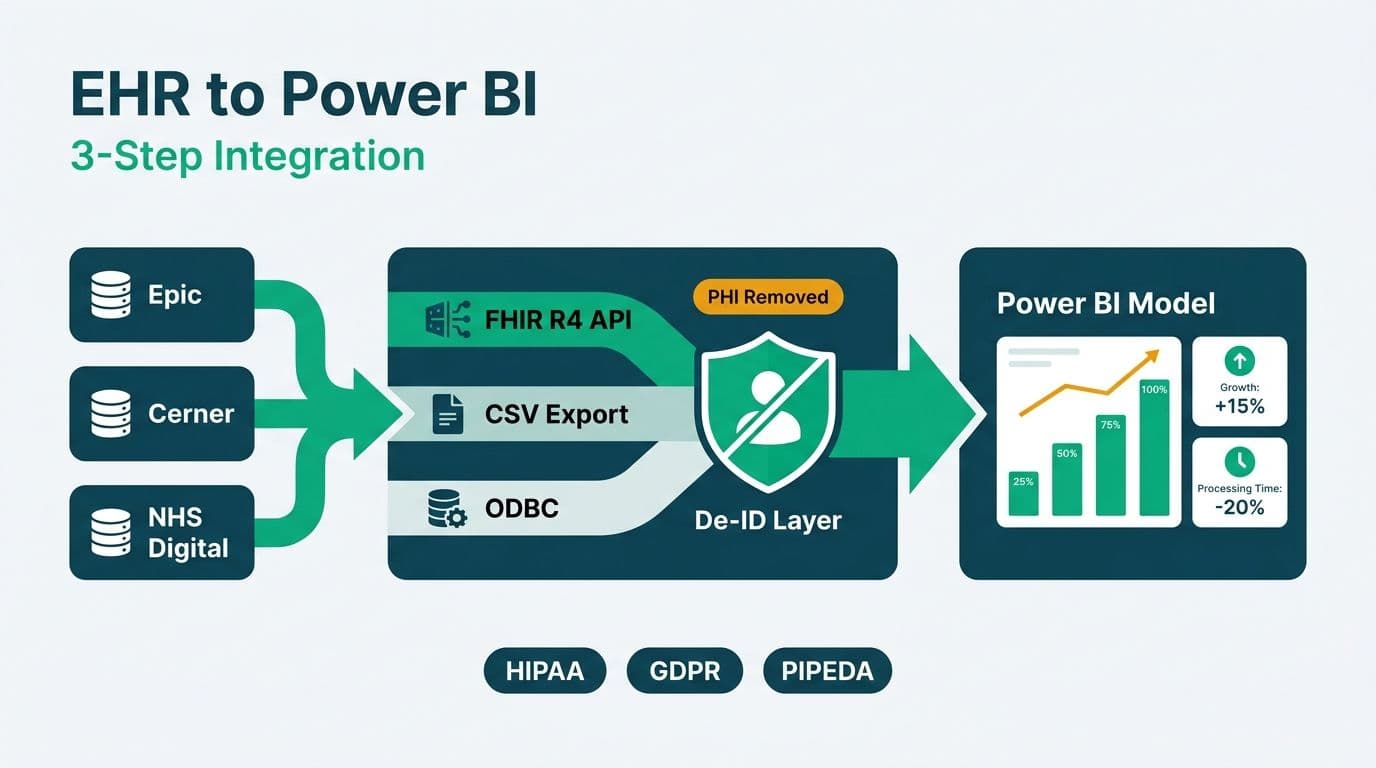
Connecting EHR data to Power BI is a three-step process: choose the right integration path (FHIR API, CSV export, or ODBC), apply de-identification to remove protected health information before it reaches the semantic model, and configure governance controls that satisfy the compliance framework applicable to your jurisdiction. This guide covers all three steps for Epic, Cerner, and NHS Digital environments operating under HIPAA, GDPR, and PIPEDA - including how to connect Power BI to Epic EHR FHIR API and other HL7-compliant endpoints for hospital reporting across US, UK, and Canadian sites from a single governed semantic model.
Key Takeaways
FHIR R4 APIs are the preferred method for connecting Epic, Oracle Health (Cerner), and NHS-connected systems to Power BI - structured, standards-based, and supported by Azure Health Data Services.
CSV bulk exports remain viable for legacy EHR builds or infrequent extract workflows, but de-identification must happen upstream of Power BI, not inside Power Query.
HIPAA, GDPR, and PIPEDA share a common baseline - access controls, audit trails, and data minimization - but differ on breach notification timelines and consent requirements.
Row-Level Security (RLS) and workspace-level sensitivity labels are the two non-negotiable Power BI controls for any production EHR dataset.
Power BI's natural language query (Q&A) feature, configured with healthcare synonym tables, gives non-technical executives self-service access to de-identified EHR summaries without writing DAX or SQL.
How Do You Connect EHR Data to Power BI? Three Integration Paths
Three methods cover virtually every EHR-to-Power BI integration scenario. The right choice depends on your EHR vendor, build version, IT security policy, and whether you need near-real-time or batch data.
1. FHIR R4 REST API - the modern, vendor-neutral standard supported by Epic (SMART on FHIR), Oracle Health (formerly Cerner), and NHS Digital's API Platform. Power BI's Web connector calls FHIR endpoints directly and returns JSON that Power Query transforms into a dimensional model through iterative record-expansion steps.
2. Bulk CSV or flat-file export - every major EHR generates structured exports: HL7 ADT feeds, CCD documents flattened to CSV, or custom SQL extracts from reporting schemas such as Epic Clarity or Cerner Millennium. This is the reliable fallback for legacy builds or air-gapped clinical networks where outbound API calls are restricted.
3. ODBC or direct database connection - available for on-premise Epic Clarity and Cerner Millennium databases. Requires network-level access and a read-only service account on a dedicated reporting schema. Most hospital IT policies restrict this path to the on-premise Power BI Gateway so data never crosses the network unencrypted.
For most new deployments in 2026 and beyond, FHIR R4 through Azure Health Data Services (AHDS) is the recommended architecture. AHDS acts as a managed FHIR broker between the EHR and Power BI, enforces resource-level RBAC, and provides a stable endpoint that survives EHR version upgrades without requiring changes to the Power BI connection.
Healthcare analytics teams that need a governed, compliance-ready path to production dashboards often engage Managed Power BI for healthcare teams rather than building the pipeline in-house, particularly when HIPAA sign-off is required before go-live.
What Is FHIR R4 and Why Is It the Preferred EHR-to-Power BI Bridge?
FHIR (Fast Healthcare Interoperability Resources) R4 is the HL7-ratified standard for exchanging clinical data over REST APIs. It is the interoperability standard mandated for certified EHR vendors under the US 21st Century Cures Act, enforced by the ONC's information-blocking rules - which means Epic, Oracle Health, and Meditech Expanse all expose FHIR R4 endpoints as of their 2021 and later releases (ONC, 2022).
FHIR represents clinical concepts as typed resources: Patient, Encounter, Observation, Condition, and MedicationRequest, each addressable via a predictable URL structure. Power BI's Web connector fetches these JSON payloads, and Power Query's `Table.ExpandRecordColumn` function flattens nested fields into table rows suitable for a star schema. Because every FHIR resource follows the same bundle structure, transformation steps written for Epic Encounter records will work with minimal modification against an Oracle Health endpoint.
Authentication uses OAuth 2.0 with SMART on FHIR. The access token, scoped to specific resource types such as `patient/Observation.read`, is obtained from the EHR's authorization server. Store this token in Azure Key Vault and retrieve it at refresh time via the Gateway's managed identity - never hardcode credentials in the `.pbix` file or expose them in Power Query parameters.
For NHS England, the NHS API Platform exposes FHIR R4 endpoints including the Personal Demographics Service (PDS) and GP Connect. Access requires NHS Login credentials, an approved use-case registration, and current Data Security and Protection Toolkit (DSPT) compliance - the UK equivalent of an annual security self-assessment.
Step-by-Step: Pulling Epic and Cerner Data via FHIR API into Power BI
The following sequence applies to US hospital analytics teams looking to connect Power BI to Epic EHR FHIR API endpoints or Oracle Health Millennium for the first time. Steps 4 through 6 apply equally to NHS Digital integrations with adjusted authentication flows.
Step 1 - Register an application in your EHR's developer portal.
For Epic, use open.epic.com and select the Backend Services application type for server-to-server pulls, noting the client ID assigned at registration. For Oracle Health (Cerner), register at the FHIR Developer Portal and request only the resource scopes your dashboard actually requires - excessive scope requests slow approval and create unnecessary data-access risk.
Step 2 - Store OAuth credentials in Azure Key Vault.
Create a Key Vault secret for the client secret or private key. Grant the Power BI Gateway's managed identity read access to that specific secret. Never paste credentials into Power Query parameters, query strings, or M code constants.
Step 3 - Deploy Azure Health Data Services as a FHIR broker.
AHDS decouples the EHR from Power BI. It ingests the FHIR stream, enforces RBAC at the resource level, and provides a stable endpoint that does not change when the EHR upgrades. Configuration and supported resource types are documented in Microsoft's Azure Health Data Services documentation (Microsoft, 2026).
Step 4 - Connect Power BI Desktop via the Web connector.
Use parameterized M queries so the FHIR base URL and resource type are defined in query parameters, not buried in hard-coded strings. Set the gateway credential type to OAuth2 and point the token endpoint at your Azure AD (Entra ID) tenant.
Step 5 - Flatten FHIR JSON in Power Query.
FHIR bundles are deeply nested. Iteratively expand record columns to surface fields such as `Patient.name.family`, `Observation.valueQuantity.value`, and `Encounter.period.start`. Document each expansion step in a query description - data lineage auditors and compliance reviewers will reference this during internal assessments.
Step 6 - Publish to a dedicated healthcare workspace.
Keep EHR datasets isolated in their own Power BI workspace, separate from operational or finance reporting. Apply sensitivity labels at the dataset level using Microsoft Purview Information Protection before any report connects. Enable workspace-level audit logging on day one, not after the first incident.
For visual design patterns that build on this data model, the companion guide on hospital patient flow and bed capacity dashboards in Power BI covers the KPI layer from admission date through discharge, using the same Encounter and Observation resources described above.
How Do You Connect HL7 FHIR API to Power BI Using Power Query M?
The most practical entry point for analytics engineers learning how to connect HL7 FHIR API to Power BI is a paginated Power Query M function that handles FHIR R4 bundle responses natively. FHIR REST endpoints return JSON bundles in a predictable structure: a `resourceType` of "Bundle", an `entry` array containing individual resources, and a `link` array that signals the next-page URL when results are paginated across multiple calls.
Authenticate before you query. Retrieve your OAuth 2.0 bearer token from Azure Key Vault via the Gateway's managed identity. During local development in Power BI Desktop, store the token temporarily in a query parameter marked "Do not include in report" - never in a saved M string constant. In production, the Gateway credential type handles token refresh automatically against your Entra ID tenant.
Fetch the first bundle page using structured options. Use `Web.Contents` with `RelativePath` and `Query` record options rather than string concatenation, which avoids injection risk and keeps the base URL in a single query parameter. For example, fetching paginated Encounter records filtered by date uses `Query = [_count="100", date="ge2025-01-01"]` appended to the FHIR base URL parameter.
Flatten the entry array iteratively. Call `Json.Document` on the binary response, extract the `entry` field as a list, convert to a table with `Table.FromList`, then call `Table.ExpandRecordColumn` on the `resource` column. Continue expanding nested records - `period`, `subject`, `serviceType` - naming each step descriptively in the query editor so compliance auditors tracing data lineage can follow the transformation chain without additional documentation.
Handle pagination with a recursive M function. Large FHIR result sets are paged. After each response, inspect the `link` array for an entry with `relation = "next"` and pass that URL to a recursive helper function. Accumulate pages as a list before converting to a table, and include an iteration ceiling to guard against infinite loops on misconfigured endpoints.
Apply de-identification within Power Query as a secondary control only. Primary de-identification must occur upstream - in the Azure Data Factory pipeline, Clarity SQL extract, or AHDS transformation layer - before data reaches Power Query. Within Power Query, add a secondary sweep: remove free-text columns (`text.div`, clinical `note` fields), replace any residual direct identifiers with surrogate keys, and generalize date columns to month-year using `Date.StartOfMonth`. For HIPAA Safe Harbor compliance under 45 CFR §164.514(b), confirm no date granularity below year is retained for patients over 89. For GDPR pseudonymisation under Article 4(5), verify that the token-to-identifier mapping table remains in a separately secured store with no Power BI connection - Power Query should receive only the pseudonymised token, never the original NHS number, SSN, or national ID.
Validate column profiles before publishing. Run Power Query's column-profiling view to confirm no string column contains patterns matching national ID formats before the dataset is promoted to the healthcare workspace.
What PHI-Safe Data Model Patterns Should You Apply After You Connect Power BI to Epic EHR FHIR API?
After you connect Power BI to Epic EHR FHIR API endpoints and flatten the JSON in Power Query, the semantic model layer introduces its own compliance exposure if left unstructured. These four patterns apply across US HIPAA, UK GDPR, and Canadian PIPEDA environments and bridge the gap between raw FHIR data in Power Query and a PHI-safe production semantic model.
Replace national identifiers with surrogate keys before data enters the model. Medical Record Numbers, NHS Numbers, and provincial health card numbers must be swapped for integer surrogate keys in the upstream ETL layer - ADF pipeline or Clarity SQL extract - not inside Power Query. The fact table holds only the surrogate key; the reverse-mapping table sits in a separately secured store with no Power BI connection. Any column that could serve as a quasi-identifier - date of birth, full postal code, rare diagnosis code in a small cohort - follows the same rule.
Separate PHI-bearing columns into a restricted dimension secured with Row-Level Security. Age bands, 3-digit ZIP prefixes (HIPAA Safe Harbor), and anonymized gender codes are safe in a shared Patient dimension. Full dates of birth, complete ZIP or postal codes, and high-cardinality ethnicity fields in small cohorts belong either in a restricted dimension visible only to roles with a signed clinical data access agreement, or excluded from the model entirely. Define RLS roles in DAX at the dataset level, map them to Entra ID security groups, and test role membership before promoting to the production healthcare workspace.
Control date granularity in the Date dimension. HIPAA Safe Harbor under 45 CFR §164.514(b) requires that any date beyond year be suppressed for patients over 89. Build this rule as a calculated column in your Date table - replacing qualifying encounter dates with a year-only proxy value - and apply the equivalent logic in the upstream ETL so that Power Query receives the already-truncated date. Validate compliance in Power BI Desktop's column distribution view before publishing. Canadian provincial privacy legislation (PIPEDA and provincial health privacy acts) imposes similar date-generalization expectations; apply the same year-floor pattern for Canadian datasets.
Hide raw FHIR expansion columns immediately after model build. Intermediate columns produced during FHIR JSON expansion - `entry.resource.subject.reference`, `entry.resource.text.div`, `entry.resource.identifier[0].value` - frequently retain source-identifier fragments. Mark every intermediate expansion column as hidden in the model view as soon as the final clean measures are confirmed. Hidden columns do not appear in end-user reports but remain accessible to anyone with dataset-edit rights, which is why upstream de-identification is always the primary control and model-layer hiding is a secondary safeguard only.
How Do You Connect FHIR Data to Power BI for Multi-Region Hospital Reporting?
Health systems operating across US, UK, and Canadian sites face a compound challenge: each region exposes FHIR endpoints under different identity providers, OAuth scopes, and regulatory frameworks, yet the board needs a single consolidated dashboard. The architecture answer is one Azure Health Data Services (AHDS) workspace per regulatory jurisdiction, with a Power BI composite model assembling cross-regional measures downstream.
Deploy one AHDS workspace per regulatory jurisdiction.
Provision AHDS in the Azure region designated in your HIPAA BAA (typically US East or US West) for Epic and Cerner endpoints serving US facilities. Provision a separate AHDS workspace in Azure UK South for NHS API Platform connections. For Canadian sites under PIPEDA, use Azure Canada Central. Each workspace ingests FHIR R4 bundles from its regional EHR, enforces resource-level RBAC independently, and applies de-identification before data leaves the clinical perimeter. Isolating workspaces ensures that a governance incident in one region - a misconfigured access policy or an unexpected data exposure - does not propagate across jurisdictions.
Use parameterized M queries to reuse the same connector template across regions.
Store the FHIR base URL and resource type as query parameters rather than hard-coded strings in Power BI Desktop. The same M template - fetching Encounter or Observation bundles, flattening nested JSON, and loading into a staging table - runs against all three regional AHDS endpoints by switching a single parameter value. The Power BI Gateway retrieves region-specific OAuth tokens from Azure Key Vault via managed identity, one Key Vault secret per region.
Build cross-region dashboards with a composite model, not cross-border data transfers.
PHI and personal data should not cross regional boundaries. Instead, de-identify at the AHDS layer and expose only aggregated, anonymized measures to a shared OneLake schema. The Power BI semantic model uses a composite model with DirectQuery connections to each regional dataset, pulling measures such as bed-occupancy rates, readmission rates, and average length of stay without moving patient-level records outside their originating jurisdiction.
Apply distinct Microsoft Purview sensitivity labels per regional dataset - for example, "HIPAA Protected" for the US dataset, "UK NHS Sensitive" for the UK dataset, and "PIPEDA Controlled" for the Canadian dataset. Row-Level Security at the consolidated report level restricts analyst access by Entra ID group membership, so a regional operations manager sees only their jurisdiction's data while a system-wide medical director sees the full picture.
Account for differing breach-notification clocks in your incident-response runbook.
A refresh failure that exposes personal data in the UK dataset triggers GDPR's 72-hour notification window to the ICO. The same class of failure in the US dataset triggers HIPAA's 60-day window to HHS OCR, and a Canadian dataset failure falls under PIPEDA's "as soon as feasible" standard to the OPC. Document which Power BI workspace maps to which regulatory regime so the on-call team knows which clock starts the moment an anomaly is detected.
How Do You De-identify Patient Data Before It Enters Power BI?
De-identification removes or transforms the 18 HIPAA Safe Harbor identifiers - names, geographic subdivisions smaller than state, dates beyond year, phone numbers, email addresses, Social Security numbers, and others enumerated in 45 CFR §164.514(b) - before protected health information (PHI) reaches any reporting layer. This step is required for any Power BI dataset accessed by staff who are not covered entities with an active patient care relationship to the individuals in the data.
Two HIPAA-recognized approaches exist:
Safe Harbor Method (45 CFR §164.514(b)): Remove all 18 listed identifiers. Generalize dates to year only, or express them as age bands for patients over 89. Truncate ZIP codes to three digits only where the population in that code exceeds 20,000.
Expert Determination Method: A qualified statistician certifies that re-identification risk is sufficiently low given the intended use. This method allows more granular dates and geographies but requires documented expert review and a signed attestation retained for audit purposes.
De-identification must happen upstream of Power BI - in the ETL layer via Azure Data Factory, Databricks, or a Clarity SQL extract script - before clean data lands in OneLake or the AHDS staging area. Applying de-identification inside Power Query means that a failed mid-refresh or a developer connecting directly to the staged dataset exposes raw PHI to anyone with dataset permissions.
A hypothetical mid-size US hospital pulling Encounter and Observation records for a readmission-risk dashboard would: (1) truncate admission dates to month-year in the Clarity SQL extract, (2) replace Medical Record Numbers with surrogate keys generated in the staging database, (3) drop all free-text clinical notes entirely, and (4) validate output against an internal de-identification checklist before promoting to the production Power BI dataset.
For UK organizations under GDPR, pseudonymisation under Article 4(5) is the functional equivalent - replacing direct identifiers with tokens while retaining a secure, separately stored mapping table. NHS Digital's DSPT requires documented pseudonymisation controls as part of the annual submission.
Canadian health authorities under PIPEDA must follow the Office of the Privacy Commissioner's guidance on anonymisation. Where Power BI workspaces are hosted in a US Azure region for cost or latency reasons, PIPEDA's cross-border transfer provisions apply: data subjects must be informed, and contractual safeguards equivalent to Canadian privacy protections must be documented and in place before the transfer occurs.
What Governance Controls Does HIPAA, GDPR, and PIPEDA Require for EHR Analytics?
The table below maps each regulation's core requirements to specific Power BI and Azure controls.
| Requirement | HIPAA (US) | GDPR (UK/EU) | PIPEDA (Canada) |
|---|---|---|---|
| Legal basis for processing | Covered entity or signed BAA | Legitimate interest or explicit consent | Knowledge and consent of the individual |
| De-identification standard | Safe Harbor or Expert Determination (45 CFR §164.514) | Pseudonymisation (Art. 4(5)) | Anonymisation per OPC guidance |
| Data residency | US-region Azure recommended | EEA or UK-adequate country | Canadian-region Azure preferred |
| Audit trail | HIPAA audit controls (45 CFR §164.312(b)) | Article 30 processing records | Accountability principle |
| Breach notification | 60 days to HHS OCR | 72 hours to supervisory authority | As soon as feasible to OPC |
| Access control principle | Minimum necessary | Data minimization (Art. 5(1)(c)) | Limiting collection |
| Power BI control layer | Sensitivity labels + RLS | Sensitivity labels + RLS | Sensitivity labels + RLS |
A Business Associate Agreement (BAA) must be signed with Microsoft before any PHI touches Power BI Service or Microsoft Fabric. Microsoft includes a HIPAA BAA addendum in its standard Online Services Terms for covered workloads, covering Power BI Premium and Fabric capacity SKUs in compliant Azure regions (Microsoft, 2026). For UK NHS trusts, a Data Processing Agreement under UK GDPR must be executed before NHS-sourced data connects to any cloud BI tool.
For a closer look at workspace-level sensitivity label configuration and audit log retention that satisfies both GDPR Article 30 requirements and Power BI governance standards, the guide on GDPR-compliant SaaS financial reporting covers the same control layer applied to a different regulated environment.
How Does NHS Digital Data Connect to Power BI? UK Considerations
NHS England (which absorbed NHS Digital in 2023) exposes clinical and administrative data through three primary channels:
NHS API Platform - FHIR R4 endpoints for the Personal Demographics Service (PDS), GP Connect, and the National Record Locator. Access requires NHS Login credentials, an approved use-case registration, and current DSPT compliance before any data flows.
Secondary Uses Service (SUS) - aggregate commissioning data supplied to Integrated Care Boards as CSV files via SFTP. These files are de-identified by NHS England before release, removing the de-identification burden from the receiving trust or ICB.
NHS Federated Data Platform (FDP) - the national analytics platform with trust onboarding completed through 2025 and now in wider deployment across NHS England in 2026. Trusts with FDP access can export approved aggregate datasets via the platform's sanctioned export mechanism, then load them into Power BI through standard Azure connectors.
For a typical NHS trust building an elective-recovery or patient-flow dashboard, the architecture is: SUS CSV extract (pre-de-identified by NHS England) ingested to Azure UK South region, Power Query transformation, and Power BI workspace configured with DSPT-compliant access controls and sensitivity labels. The entire workspace stays in Azure UK South to satisfy NHS data residency guidance.
A trust combining GP Connect Encounter data (FHIR) with SUS Hospital Episode Statistics (HES) CSV exports in a single patient-flow report illustrates how the two channels complement each other: FHIR delivers primary-care activity in near-real-time, while SUS provides the longitudinal secondary-care record. The guide on AI workflow automation for healthcare operations explores how similar NHS data pipelines can be extended with automated alerting and anomaly detection once the base Power BI integration is stable.
When Should You Use CSV Export Instead of FHIR API?
CSV export is the right integration path when:
The EHR instance predates FHIR support - Epic builds before 2018 community editions, Cerner Millennium versions prior to the 2020 FHIR enablement update, or on-premise Meditech C/S instances lack the reliable FHIR R4 endpoints that modern Power BI connectors expect.
The integration is one-time or low-frequency - quarterly regulatory extracts, one-off cohort analyses, or migration validation runs do not justify maintaining an OAuth application registration, managing client-secret rotation, or monitoring token expiry.
IT security policy prohibits outbound API calls - some hospital networks enforce strict egress controls. A scheduled SQL extract dropped to a secure SFTP server can be picked up by Azure Data Factory without opening a FHIR endpoint through the clinical firewall or requesting network-policy exceptions.
Apply de-identification at the source before the file leaves the clinical network. Do not use Power Query to strip PHI after the fact. If the file is intercepted in transit, lands in an unsecured storage account during an ETL failure, or is accessed by a developer working in staging, unmasked PHI is exposed - a reportable breach under all three regulatory frameworks.
A Canadian regional health authority operating under PIPEDA might schedule a nightly Cerner CSV extract to a sovereign-cloud Azure Canada Central blob container, apply a Python de-identification script via Azure Data Factory, and land the clean file in OneLake before the Power BI dataset refreshes. The PHI-containing source extract would be deleted from the staging container immediately after successful validation - never retained beyond the minimum necessary window.
Once EHR data is clean and loaded into the semantic model, non-technical stakeholders - operations managers, finance directors, and board members - can use Power BI's natural language query (Q&A) feature to ask plain-English questions without writing DAX or SQL. Configuring Q&A synonym tables with healthcare terminology - mapping ICD-10 codes to readable descriptions, or aliasing "readmission" to the underlying encounter-type field - makes natural language query for healthcare compliance reporting viable for executive self-service reporting in environments where clinical terminology would otherwise block adoption. The detailed setup guide for Power BI Q&A natural language queries covers synonym configuration and the Q&A linguistic schema required for a production healthcare deployment.
---
About Lets Viz: Lets Viz is a data analytics consulting firm working with US healthcare organizations, UK fintech companies, Canadian manufacturers, and global SaaS businesses since 2020. The team holds a 5.0 Clutch rating and specializes in governed Power BI deployments, HIPAA-compliant EHR data pipelines, and full-stack BI implementations ranging from single-workspace governance audits to long-term managed analytics programs.
When your organization is ready to move EHR data into a production-grade, HIPAA-compliant Power BI environment, Managed Power BI for healthcare teams outlines how the team structures the integration from data ingestion through dashboard delivery and ongoing governance.