AI Lead Qualification Agent: Build One With Claude or OpenAI
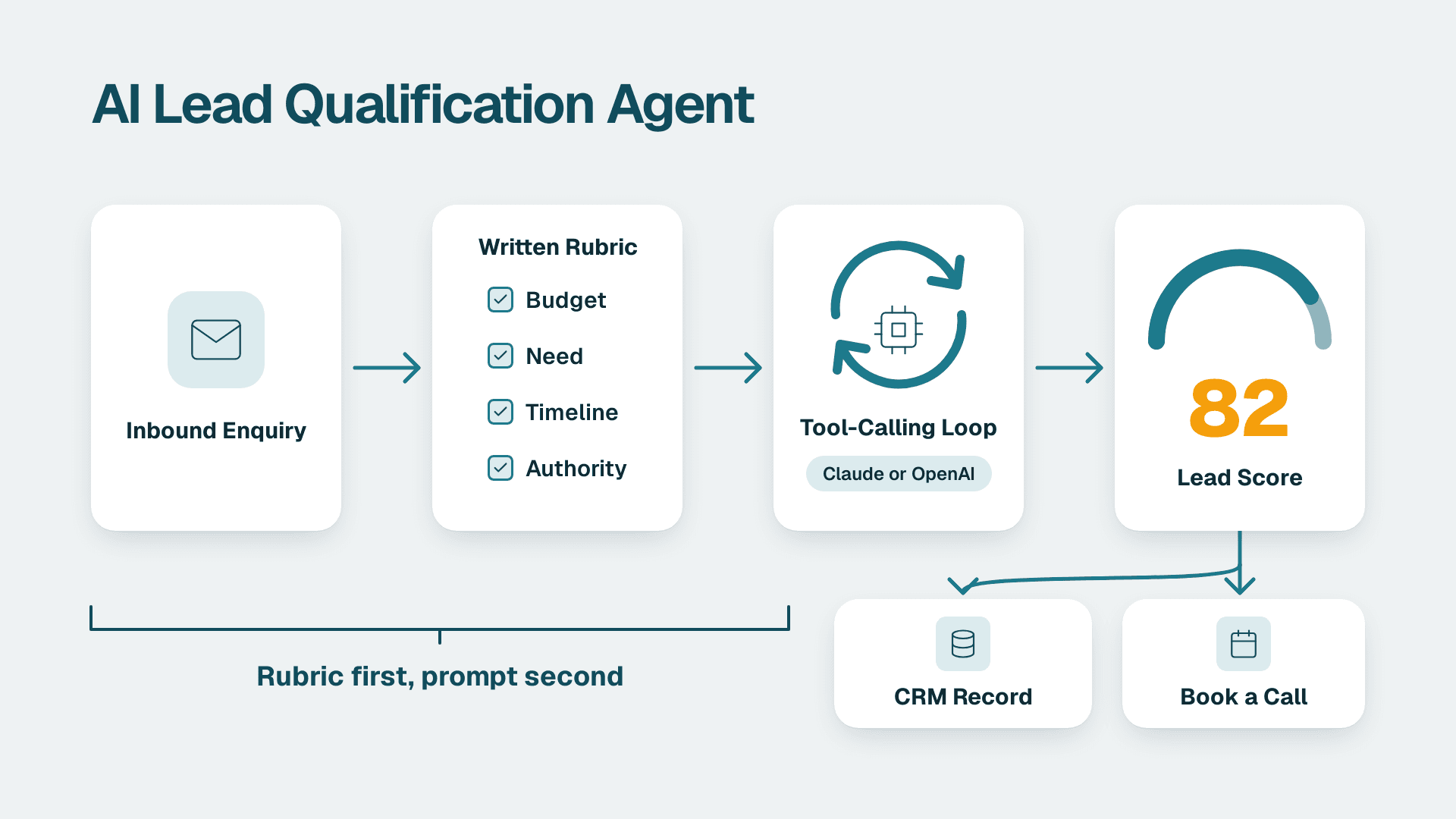
Clients keep posting the same job: an AI agent that answers questions, qualifies inbound leads and calls our systems. The answer is a Python service that runs a tool-calling loop on the Claude or OpenAI API, scores each enquiry against your written rubric, and writes the result to your CRM. A first working version takes roughly 40 to 70 hours.
Key Takeaways
- AI lead qualification is a rubric plus a tool-calling loop, not a clever prompt. Write the rubric first.
- The agent should collect a fixed set of fields, score them, then hand off to a human or a calendar. It should not improvise policy.
- Most failures come from missing handoffs, stale knowledge and unvalidated tool calls, not from the model.
- Budget 40 to 70 hours for a first build and plan for ongoing upkeep as your services and prices change.
- If you get a handful of enquiries a week, a form and a fast human reply usually beats an agent.
What Clients Ask For
Across the postings for this job, the same requirements recur. Clients who post it usually want:
- An agent that answers questions about services, areas covered, opening hours and typical process, drawn from their own documents rather than from general model knowledge.
- Lead qualification on inbound calls, web chat or forms: who is asking, what they need, how urgent it is and whether they are a fit.
- Tool calls into existing systems: a CRM, a calendar, a ticketing tool, sometimes a quoting or order system, through their APIs.
- Python with the OpenAI or Claude API, often with a request for context handling across a long conversation and multi-step workflows.
- Testing and ongoing updates, because the first version is never the last one.
- A constraint on budget and risk: no wrong promises about price, no medical or legal advice, and a clean way to reach a person.
If you are deciding between building and buying, our guide to AI agent and automation consulting explains how we scope this kind of work, and the best no-code AI agent builders are worth a look first if your needs are simple.
What They Actually Need From AI Lead Qualification
The request says agent, but the real problem is usually leakage. Enquiries arrive out of hours, on busy days or on a channel nobody watches, and the good ones go cold while the team is on a job or with a patient. The goal is a fast, consistent first response that sorts serious enquiries from noise and puts the serious ones in front of a person with the details already captured.
That is a narrower thing than a general assistant, and it is easier to build well. If you are still mapping where automation belongs in your operation, start with the AI automation for SMBs guide and the business automation process walkthrough.
Before writing code, ask these questions:
1. What makes a lead worth a human's time today? Get the answer as rules (job type, postcode, budget band, timeline). If the team cannot state it, the model cannot apply it, and the first task is writing the rubric.
2. Which channel carries most enquiries: phone, chat or forms? Voice adds speech-to-text, latency and interruption handling. Chat and forms are far simpler. Our piece on an AI voice agent that books calls covers the voice-specific work.
3. Where do the answers live? If pricing, policies and service areas sit in scattered documents that disagree, the agent will repeat the disagreement. This decides whether you need retrieval or just a short, maintained fact sheet.
4. What can the agent do, and what must a human do? Booking a slot is low risk. Quoting a price, confirming a diagnosis or promising a callback time is not. The list of allowed tool calls defines the whole build.
5. Who owns updates after launch? Services, prices and staff change. If nobody owns the knowledge, the agent goes stale in weeks.
The Build
The architecture is small. Each component has one job.
| Component | Tool | What it does |
|---|---|---|
| Channel intake | Web chat widget, form webhook or telephony provider | Passes each message or transcript to the service |
| Agent service | Python (FastAPI or similar) | Runs the conversation loop and enforces rules |
| Model | Claude API or OpenAI API | Reads the conversation, decides the next message or tool call |
| Knowledge | Fact sheet in the prompt, or a vector store for larger sets | Supplies approved answers on services, areas and process |
| Tools | Python functions behind JSON schemas | Create lead, check availability, book slot, hand off |
| CRM | Your existing CRM via its API | Stores the lead, score and transcript |
| Logging | Database table plus alerts | Records every turn and tool call for review |
Data moves in a straight line. A visitor writes a message or a call is transcribed. The service appends it to the stored conversation and sends it, with the system prompt and tool definitions, to the model. The model either replies or requests a tool call. Your code validates the call, runs it, and returns the result to the model. When the required fields are collected, the model calls a scoring tool, your code writes the lead to the CRM and either books a slot or alerts a person. Every step is logged.
How to Build It, Step by Step
1. Write the qualification rubric
In a plain document, list the fields you must collect (name, contact method, service needed, location, timeline, budget band) and the rules that turn them into a grade such as hot, warm or not a fit. Add the disqualifiers, like areas you do not serve. You know it works when two people on your team apply the rubric to ten past enquiries and get the same grade for nearly all of them. Disagreement means the rule is vague, so fix it before it becomes a prompt.
2. Define the lead schema and the tools
Create one JSON schema for the lead with required fields and enums for the grade. Then define the tools. With the Claude API, each tool goes in the tools array with a name, description and input_schema. With the OpenAI API, each goes in tools as a function, and you should set strict to true so arguments must match the schema. Keep the list short: save_lead, check_availability, book_slot and handoff_to_human cover most service businesses. You know it works when a test call with a deliberately incomplete payload is rejected by the schema.
3. Build the conversation loop in Python
Write a function that sends the message list, system prompt and tools to the model, then checks the response. On Claude, a stop_reason of tool_use means run the requested tool and send back a tool_result block with the matching ID. On OpenAI, a finish_reason of tool_calls means the same, and you reply with a message whose role is tool. Loop until the model returns plain text, with a hard cap of around eight iterations so a confused model cannot spin forever. Set temperature low for extraction work so the same input gives the same output. You know it works when a scripted conversation ends with a saved lead and the loop count is under the cap.
4. Write the system prompt as rules, not personality
The prompt should state the role, the fields to collect, the order to ask them, what the agent must never do (quote prices, give advice, promise times) and exactly when to call handoff_to_human. Put the approved fact sheet in the prompt for a small business. Use retrieval only when the knowledge is too large to fit comfortably. You know it works when asking an off-topic or out-of-scope question produces a polite redirect, not an invented answer.
5. Connect the CRM and calendar
In your CRM's developer settings, create an API credential limited to creating and updating leads, not deleting them. Map the schema fields to CRM fields, including a custom field for the grade and one for the transcript link. Add an idempotency check, such as a lookup on phone or email, so a retry does not create a duplicate. You know it works when a test lead appears in the CRM once, with every field filled and the right owner assigned.
6. Add validation and the handoff path
Between the model and every tool, add code that checks types, ranges and permissions. Never let the model supply a record ID or an amount you have not verified. Build the handoff so it sends the person the summary, the grade and the transcript through email or chat, and tells the visitor what happens next. You know it works when a visitor who types that they want a person is routed in a single turn.
7. Build a test set and run it on every change
Collect 40 to 60 real past enquiries, anonymised, covering good leads, bad leads, angry messages, vague messages and attempts to push the agent off script. Write the expected grade and expected tool calls for each. Run the whole set after every prompt or model change and compare. You know it works when the pass rate is stable between runs and you can see which cases moved after a change.
8. Deploy with logging and a review habit
Deploy the service behind HTTPS, store every turn and tool call, and alert on errors and on conversations that hit the loop cap. For the first two weeks, have a person read every transcript daily. Then move to weekly sampling. You know it works when a failed tool call produces an alert within minutes and you can replay the exact conversation.
Where These Builds Break
The agent answers confidently from stale or wrong knowledge. A price changes, a service is dropped, and the agent keeps stating the old version. Fix it by keeping one owned fact sheet with a review date, and by instructing the agent to hand off any question the sheet does not cover.
Tool calls with bad arguments. The model can produce a date in the wrong format or a field that does not exist. Fix it with strict schemas, server-side validation and a clear error message returned to the model so it can correct itself once before handing off.
No clean escape to a human. Leads get stuck in a loop with a bot, which is worse than a voicemail. Fix it by making handoff available at every turn, triggering it on repeated confusion or on strong emotion, and testing it in the suite. The deflection and handoff design is the same discipline applied to support.
Context drift in long conversations. After many turns the agent forgets a detail or contradicts itself. Fix it by keeping a structured lead record outside the conversation, updating it after each turn, and passing it in on every call instead of relying on the model to remember.
Silent model changes. A vendor model update can shift behaviour. Fix it by pinning the model version you tested, running the test set before switching, and keeping a rollback.
Time and Cost
For a single channel and one CRM, a realistic first build looks like this:
| Phase | Hours |
|---|---|
| Rubric, scoping and fact sheet | 6-10 |
| Schema, tools and agent loop | 12-20 |
| CRM and calendar integration | 8-14 |
| Validation, handoff and logging | 6-10 |
| Test set and tuning | 8-16 |
That totals roughly 40 to 70 hours. Voice adds transcription, latency tuning and interruption handling, and can add another 20 to 40 hours. Several channels, several CRMs or a large knowledge base to retrieve from also push the estimate up. Messy source documents are the most common hidden cost.
Running costs have three parts: model usage billed per token by your chosen vendor, hosting for the small Python service, and any telephony or transcription provider if you take calls. Token prices differ by model and plan and change often, so check the vendor's current pricing page rather than trusting a figure in an article. Conversations here are short, so usage is typically modest next to staff time, but measure it on your own volume during the first month. Plan for upkeep too: a few hours a month to review transcripts, update the fact sheet and re-run the test set.
If you want a figure for your own scope, the instant project cost calculator gives a starting range, and the open-source versus SaaS comparison shows how upkeep changes the picture.
When Not to Build This
Low enquiry volume. If you receive a handful of enquiries a week, a short form with required fields and a same-day human reply will do the job. The build and upkeep effort will not pay back.
High-stakes advice. Where the first conversation involves clinical judgement, legal advice or binding quotes, an agent should only collect details and book a person. If that is all you need, a form and a booking link are simpler and safer.
No agreed definition of a good lead. If the team cannot say what qualifies, automation will only scale the disagreement. Run the rubric exercise by hand for a few weeks first, then decide.
Get Help Scoping Yours
If you want a second opinion on whether this build suits your business, our team can review your channels, CRM and rubric and give you an honest estimate. Learn more about our AI agent and automation consulting and how we work.
Sources
Facts and prices checked November 2026.
---
About Lets Viz: Lets Viz has delivered AI, CRM, automation and BI projects since 2020 for service businesses, clinics, real estate teams, ecommerce brands and finance functions. We hold a 5.0 Clutch rating from client reviews, and we build agents that hand off to people cleanly and stay maintainable after launch.