Cloud Data Warehouse: Fabric vs BigQuery vs Redshift
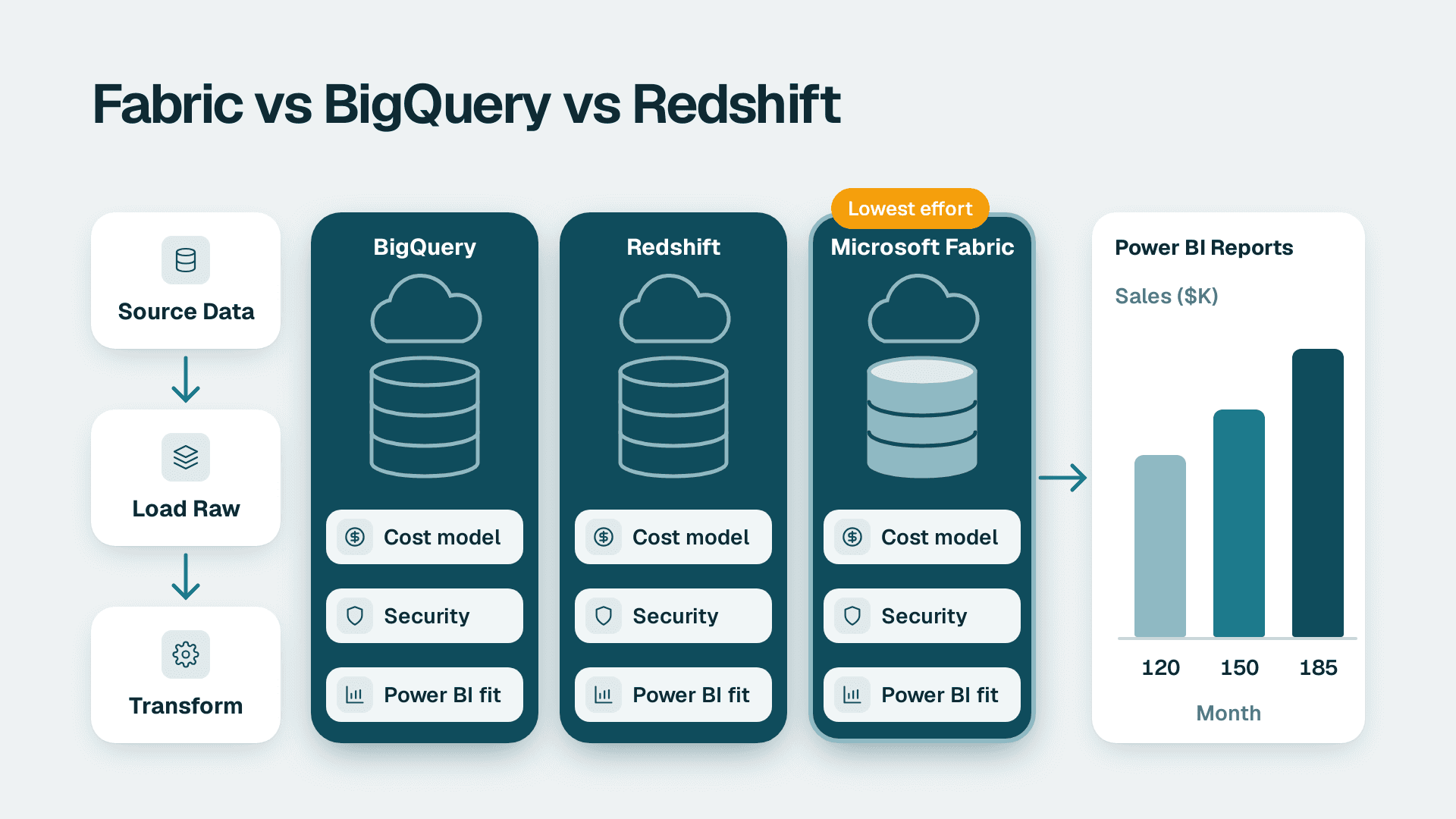
A cloud data warehouse is a centralized repository of structured and semi-structured data hosted on cloud infrastructure and managed by the provider, so your team pays for capacity instead of running hardware. For a mid-market team that reports in Power BI, Microsoft Fabric usually carries the lowest effort to run, while BigQuery and Redshift fit teams already committed to those clouds.
Key Takeaways
- A cloud data warehouse replaces hardware you maintain with a managed service, billed on a pay-as-you-go model.
- ELT is now the default pattern: load raw data first, transform inside the warehouse.
- For Power BI-centred teams, the deciding factors are effort to run, cost predictability and how directly the warehouse feeds your semantic models.
- Security and compliance (HIPAA, SOC 2, GDPR, PIPEDA) depend on configuration and governance, not on the platform alone.
- Pick on workload and existing cloud commitments, then prove the choice with a small pilot before migrating everything.
What is a cloud data warehouse?
A cloud data warehouse is an enterprise data platform for analysis and reporting, hosted and operated by a cloud provider rather than by your own IT team. It pulls data from sources such as point-of-sale systems, marketing automation and CRM into one governed store that BI tools query.
The Databricks overview of cloud data warehouses defines it as a centralized repository of structured and semi-structured data on cloud infrastructure. It contrasts this with on-premises warehouses, which need physical hardware maintained by an organisation's own IT team. The same page notes that cloud warehouses typically follow a pay-as-you-go model, while on-premises systems demand significant up-front capital for hardware and licences plus ongoing maintenance.
For data engineers and BI leads, the practical meaning is simple. You no longer size a server, patch a database engine or plan a hardware refresh. You choose a service, load data and tune workloads. If you are still weighing whether you need a warehouse at all, our guide on the signs you have outgrown spreadsheets covers the trigger points.
If your reporting layer is Power BI, the warehouse decision is really a platform decision. Our Power BI and Fabric consulting work usually starts by mapping which sources, models and refresh patterns the warehouse must support, because those answers narrow the shortlist quickly.
How does a cloud data warehouse work under the hood?
Cloud warehouses use distributed computing, columnar storage and massively parallel processing (MPP) to answer large analytical queries quickly. Columnar storage reads only the columns a query needs, and MPP splits the work across many nodes.
Most modern services also separate compute from storage. That lets you scale each independently: add compute for month-end reporting without paying to store more data, or keep years of history cheaply while running small compute at night.
Some services use a cluster-based architecture similar to a traditional warehouse. Others are serverless and shift more of the management work to the provider. Google Cloud describes both approaches in its explainer on what a data warehouse is.
What are the layers of a data warehouse?
Warehouse architecture is typically organised into three tiers. The bottom tier stores data, the middle tier processes it, and the top tier presents it through reporting tools. Microsoft lists four deployment types in its data warehouse overview: on-premises, cloud, hybrid and federated. AWS describes the same three tiers as a front-end client, an analytics engine and a database server.
In a Power BI estate, Power BI is the top tier. Everything beneath it is the warehouse decision this article helps you make.
What are the advantages of using a cloud data warehouse?
The main advantages are elastic scale, lower up-front cost, less infrastructure to manage and built-in integrations with BI and machine learning tools. Each matters differently depending on team size.
- Elasticity. Compute and storage scale independently, so a quarter-end spike does not force you to buy for peak all year.
- Cost model. Pay-as-you-go replaces capital spend on hardware and licences, which suits mid-market budgets that cannot front-load infrastructure.
- Lower operating burden. The provider handles hardware, patching and much of the availability work. Serverless options reduce management further.
- Built-in resilience. Google Cloud lists disaster recovery and automatic backups, compliance and governance tooling, and self-service ETL and ELT integration among the standard capabilities of cloud warehouses.
- Direct BI and AI integration. Warehouses ship with connectors for BI, AI and machine learning, which shortens the path from raw data to a dashboard.
There is a trade-off. Pay-as-you-go pricing rewards discipline and punishes unmonitored workloads. A poorly written query or an always-on development environment can quietly raise the bill, so cost monitoring belongs in the first sprint, not the last.
What is ETL in data warehousing, and where does ELT fit?
ETL (extract, transform, load) transforms data before loading it into the warehouse. ELT (extract, load, transform) sends data to a central repository first and converts it afterwards. Cloud warehouses favour ELT because their compute is elastic and cheap enough to do the transformation inside the platform.
The difference changes how a team works:
| Pattern | Where transformation happens | Best fit |
|---|---|---|
| ETL | In a separate engine before loading | Strict pre-load cleansing, legacy sources, data that must be masked before it lands |
| ELT | Inside the warehouse after loading | Cloud-first stacks, fast onboarding of new sources, analyst-owned SQL transformations |
ELT keeps raw data available, which makes it easier to rebuild a model when a definition changes. It also moves transformation logic into SQL that your analytics engineers already know. The cost is governance: raw data in the warehouse can include personal information, so access controls need to be in place before you load it.
For teams deciding how the warehouse relates to a data lake, our explainer on lakehouse vs data lake vs data warehouse lays out when each pattern applies.
What is the difference between a cloud data warehouse and a database?
A database is built to run transactions: recording an order, updating a customer. A cloud data warehouse is built to analyse history across many sources. The two usually coexist, with databases feeding the warehouse.
| Dimension | Operational database | Cloud data warehouse |
|---|---|---|
| Primary job | Run day-to-day transactions | Analysis and reporting across sources |
| Data shape | Current, normalised records | Historical, integrated, often modelled for analysis |
| Query pattern | Many small reads and writes | Fewer, larger scans and aggregations |
| Storage layout | Typically row-oriented | Columnar, with MPP processing |
| Typical users | Applications | Analysts, BI tools, data scientists |
A related term is the data mart. AWS describes it as a data warehouse serving a specific team or business unit, such as finance, marketing or sales. It is smaller and more focused, and it may be a portion of a larger warehouse. Mid-market teams often start with one finance or sales mart and expand once the model proves useful.
What is an Azure data warehouse, and where does Fabric fit?
An Azure data warehouse is a warehouse service running on Microsoft's cloud. For new builds, Microsoft Fabric is the unified analytics platform that brings warehousing, data engineering and Power BI together on a shared storage layer called OneLake.
The practical appeal for a Power BI team is proximity. The warehouse, the semantic model and the report sit in one governed environment, so there are fewer connections to secure, fewer credentials to rotate and fewer places for a refresh to fail. Copilot capabilities also sit on the same platform. Per Microsoft's licensing documentation, Copilot in Power BI and Fabric needs a paid Fabric capacity F2 or higher, or Power BI Premium P1 or higher. A Pro or PPU licence alone is not enough, and trial capacities are excluded.
Capacity is the cost lever to understand. Fabric is billed through capacity SKUs, and choosing between F and P SKUs changes both your bill and your flexibility. Our Fabric F-SKU vs P-SKU capacity cost guide walks through that decision. If you are migrating from an older Azure analytics service, the Fabric vs Synapse vs Databricks TCO breakdown compares the running cost of each route.
Fabric vs BigQuery vs Redshift: which cloud data warehouse service fits a Power BI team?
Fabric fits teams that want one Microsoft platform end to end. BigQuery fits teams whose data already lives in Google Cloud. Redshift fits teams standardised on AWS. All three can feed Power BI, but the effort to run each differs.
Google Cloud describes BigQuery as its cost-effective, serverless, multicloud enterprise data warehouse. AWS describes Amazon Redshift as a fully managed data warehouse service offering petabyte-scale data warehousing and exabyte-scale data lake analytics in one service.
| Factor | Microsoft Fabric | BigQuery | Amazon Redshift |
|---|---|---|---|
| Natural home | Microsoft and Power BI estates | Google Cloud estates | AWS estates |
| Operating model | Capacity-based, managed within Fabric | Serverless | Fully managed service |
| Power BI fit | Same platform as Power BI and OneLake | Connector-based | Connector-based |
| Effort for a Power BI team | Lowest: one admin plane, one security model | Moderate: cross-cloud identity and networking | Moderate: cross-cloud identity and networking |
| Cost behaviour | Predictable once capacity is sized | Driven by usage patterns | Driven by the service configuration you choose |
| Best when | Reporting is Power BI-first | Source systems and ML already on Google | Source systems and data lake already on AWS |
Treat that table as a starting frame, not a verdict. Exact prices vary by region, commitment and workload, so model your own query volume and refresh schedule before deciding.
When is Fabric the better choice?
Choose Fabric when most of your reporting is already in Power BI, your identity is Microsoft Entra ID, and your team prefers fewer moving parts to the last increment of tuning. The shared storage layer reduces data copies, and governance settings are applied once rather than in each tool.
When is BigQuery or Redshift the better choice?
Choose BigQuery or Redshift when your operational data, event streams and data science work already live in that cloud, and moving them would cost more than connecting Power BI to a remote warehouse. Moving large volumes of data between clouds adds both egress charges and engineering time, so keep the warehouse near the data when you can.
A hypothetical example: a Canadian manufacturing company with plant data already in AWS would likely keep its warehouse there and connect Power BI to it. A UK fintech whose finance team lives in Microsoft 365 and Power BI would more naturally build in Fabric. Neither choice is universal; both follow where the data and skills already sit.
How much does a data warehouse in the cloud cost to run?
Cost has three parts: compute, storage and people. Licences for the BI layer sit on top. Compute is usually the largest and most variable piece, so most cost control comes from managing when and how hard you query.
For the Power BI layer, list prices since 1 April 2025 are $14 per user per month for Power BI Pro and $24 per user per month for Premium Per User (PPU). Warehouse compute is billed separately, and the model differs by platform.
Use this checklist to compare options on a like-for-like basis:
1. Estimate daily and peak query load. Count scheduled refreshes, ad hoc analysts and any embedded or customer-facing reports.
2. Separate hot and cold data. AWS notes that frequently accessed data is kept in fast storage such as SSD drives, while infrequently accessed data goes in a cheaper object store such as Amazon S3. The same tiering logic applies on any platform.
3. Plan non-production environments. Development and test workloads left running are a common source of waste.
4. Price the people. A platform that needs less tuning and fewer integration hops can cost less overall even if its list compute price is not the lowest.
5. Set budgets and alerts on day one. Pay-as-you-go without monitoring is the main way teams overspend.
For a deeper look at Microsoft capacity economics, see the pricing guide linked above. For other vendors, request a quote based on your own workload rather than relying on a generic calculator.
How do you secure a data warehouse on the cloud?
Security is shared. The provider secures the infrastructure, and you configure identity, access, encryption choices, data classification and monitoring. Compliance outcomes depend on that configuration.
Start with the regulations that apply to your readers' markets:
- US healthcare and finance: HIPAA applies to protected health information, and SOC 2 reports are common expectations in vendor reviews. A US healthcare provider would need access controls and audit trails that can show who viewed which records.
- UK and EU: GDPR governs personal data, including rights of access and erasure. That makes it important to know where personal data sits in a raw ELT landing zone.
- Canada: PIPEDA applies to private-sector organisations handling personal information, so data residency and consent handling belong in the design.
Two practical controls matter in almost every case. First, apply row-level and object-level security so the warehouse enforces who sees what, rather than relying on report filters alone. Second, keep audit evidence. Microsoft Purview Audit (Standard) keeps audit logs for 180 days, which is useful to know if your compliance regime requires a longer retention period than that default.
Column masking or pseudonymisation of personal fields before they reach analyst-facing layers also reduces risk, and it is cheaper to design in at the start than to retrofit.
How should a mid-market team choose a cloud data warehouse service?
Choose by workload and existing cloud commitments, then validate with a time-boxed pilot. A data warehouse cloud service is easiest to adopt when it matches where your data, identity and skills already sit.
Follow this sequence:
1. List your sources and where they live. Note which are in Microsoft, Google, AWS or on-premises systems.
2. Define the first use case. Pick one finance or sales mart with clear owners, rather than modelling the whole business. Our ranking of which Power BI dashboard to build first helps with that choice.
3. Shortlist two platforms. One should be the platform closest to your current cloud, the other the closest to your BI layer.
4. Run a pilot on real data. Measure refresh time, query speed on your heaviest report and the admin effort each platform needed.
5. Model total cost. Include compute, storage, BI licences, monitoring and the engineering hours to operate it.
6. Decide governance before scale. Agree on naming, ownership, access reviews and a cost owner.
If you are unsure how ready your organisation is, the free BI readiness self-assessment gives a structured starting point.
A final point on architecture: a warehouse is only as useful as the model on top of it. Whichever platform you choose, define metrics once in a governed semantic layer so that every report uses the same definitions. Without it, a faster warehouse simply produces inconsistent numbers more quickly.
Ready to scope a build or migration? Our team can help you choose and implement the right platform through Power BI and Fabric consulting.
---
About Lets Viz: Lets Viz is a data analytics consultancy that has delivered Power BI and Microsoft Fabric projects since 2020 for clients including US healthcare providers, UK fintech firms, Canadian manufacturers and global SaaS companies. We hold a 5.0 rating on Clutch and focus on warehouse designs that finance and operations teams can trust and afford to run.
Sources
- Databricks: cloud data warehouse overview
- Google Cloud: what is a data warehouse
- Microsoft Azure: what is a data warehouse
- AWS: what is a data warehouse
Facts and prices checked November 2026.