Best AI Agent Frameworks and Platforms, Ranked (2026)
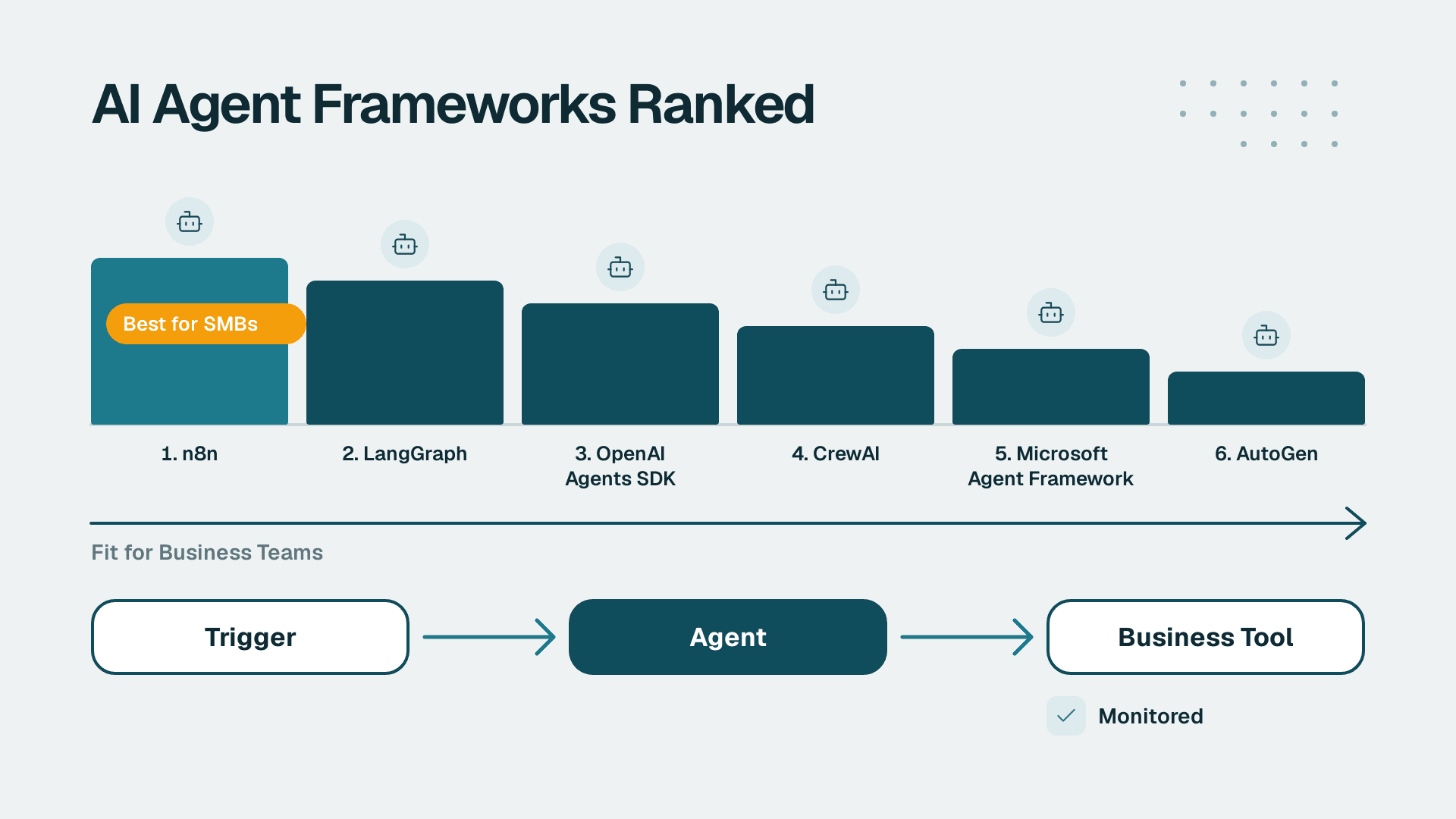
For most small and mid-sized businesses, n8n is the best starting point among AI agent frameworks and platforms. It lets an ops team wire agents into real systems visually, with no engineering team required. If you have developers and need strict control over agent behaviour, LangGraph is the strongest code-first choice for production.
Key Takeaways
- n8n ranks first for SMBs because it needs the fewest specialist skills and connects to the tools you already run.
- LangGraph ranks first for engineering teams that need durable, auditable, multi-step agents.
- CrewAI is quick to prototype with, but plan extra testing before you trust it with production work.
- AutoGen has been succeeded by Microsoft Agent Framework, so new projects should not start on it.
- Many tasks do not need an agent at all: a plain script or automation is cheaper and more reliable.
Our Ranking Criteria
We scored each option on the factors that decide whether an agent project survives past the pilot. This is a judgement-based ranking from an ops and automation perspective, not a benchmark. Some entries are code libraries and one is a visual platform, so we call them frameworks and platforms rather than treating them as identical products.
- Skills needed: good means a realistic fit for the people a mid-market company actually has, not a dedicated machine learning team.
- Production readiness: good means state is persisted, failures are visible, runs can be resumed and behaviour is controllable.
- Integration depth: good means connecting to your CRM, finance, email and ticketing tools without custom glue for every one.
- Control and observability: good means you can see what the agent did, why, and stop it when it goes wrong.
- Maintenance burden: good means the project stays stable when the underlying model or library changes.
If you want a broader view of where agents fit in your operation before choosing tooling, start with our guide to AI Automation for SMBs: What It Is and How to Start. If you would rather have an expert shortlist for your stack, our AI automation consulting team does exactly that.
1. n8n: The Best Starting Point for Ops Teams
n8n is a workflow automation platform with built-in AI agent nodes. You build flows visually: a trigger fires, an agent node reasons over the input, and tool nodes act in your other systems. Strictly speaking it is a platform rather than a code framework, but it solves the same problem for most SMB buyers.
Best for: ops leaders and founders with a technically curious analyst but no dedicated developers, automating things like inbox triage, lead routing and document handling.
Pros:
- Visual building keeps the skills barrier low, and the workflow is readable by non-engineers.
- A large library of connectors covers most common business apps.
- Deterministic steps and agent steps live in one flow, so you can keep the agent's job small.
Cons:
- Complex, long-running agent logic gets awkward on a canvas and is harder to test than code.
- Self-hosting means someone owns uptime, upgrades and credentials.
If you are weighing it against a hosted alternative, our comparison of OpenAI Agent Builder vs n8n walks through the trade-offs for business automation.
2. LangGraph: The Production Standard for Engineering Teams
LangGraph is a code-first library that models an agent as a graph of steps with explicit state. You decide which node runs next, where a human approves, and how the run resumes after a failure.
Best for: companies with Python developers building agents that touch money, customers or core records, where predictability matters more than speed to demo.
Pros:
- Explicit control flow makes behaviour easier to reason about, test and audit.
- Persistent state and human-in-the-loop checkpoints suit long, multi-step processes.
- Model-agnostic, so you are not locked to a single provider.
Cons:
- Steeper learning curve than any other option here; expect real engineering time.
- The graph model is more ceremony than a simple one-step task deserves.
3. OpenAI Agents SDK: The Cleanest Path If You Are Already on OpenAI
The OpenAI Agents SDK is a lightweight library for building agents that use tools, hand work to other agents and apply guardrails. It keeps the number of concepts small, which makes it approachable for a developer building a first agent.
Best for: small engineering teams that have standardised on OpenAI models and want a minimal, readable codebase.
Pros:
- Few abstractions, so a developer can be productive quickly.
- Built-in ideas for handoffs and guardrails map well to business processes such as triage and escalation.
- Tracing support helps you inspect what an agent did.
Cons:
- Designed around one vendor's ecosystem, so portability takes deliberate effort.
- You still own hosting, retries, scheduling and monitoring.
4. CrewAI: The Fastest Route to a Working Demo
CrewAI organises agents as a team of roles, such as a researcher and a writer, that collaborate on a goal. The role metaphor is easy for business stakeholders to grasp, which is why demos come together fast.
Best for: prototypes, research and content workflows, and teams that want to show stakeholders something tangible within days.
Pros:
- Intuitive role-based model, easy to explain to non-technical sponsors.
- Quick to get a multi-agent flow running with modest code.
Cons:
- Autonomous collaboration between agents can be harder to predict and debug than an explicit graph.
- Budget extra time for testing, logging and guardrails before production use.
5. Microsoft Agent Framework: The Enterprise-Minded Option
Microsoft Agent Framework builds agents and multi-agent workflows in .NET, Python and Go. According to the official Microsoft Learn overview (2026), it brings together four areas: Agents, Harness Agent, Workflows and Integrations. Its agents support Microsoft Foundry, Anthropic, Azure OpenAI, OpenAI, Ollama and more.
Best for: organisations with .NET developers or a heavy Microsoft estate that want one supported path from prototype to production.
Pros:
- Graph-based workflows combined with enterprise features such as the ones carried over from Semantic Kernel.
- Works with several model providers, not just one.
- Official first-party documentation and install paths for each language.
Cons:
- The Go version is in public preview and does not yet implement declarative agents, CodeAct or functional workflows.
- A newer project means fewer community examples than the older libraries.
6. AutoGen: Know Its Status Before You Start
AutoGen pioneered the idea of multiple conversational agents working together. Microsoft now describes Agent Framework as the direct successor to Semantic Kernel and AutoGen, created by the same teams. It combines AutoGen's agent abstractions with Semantic Kernel's enterprise features and adds graph-based workflows.
Best for: teams maintaining an existing AutoGen project, or researchers exploring multi-agent conversation patterns.
Pros:
- Strong multi-agent conversation concepts that influenced much of the field.
- Plenty of existing examples to learn from.
Cons:
- Not the right foundation for a new business project given its successor.
- Migrating later costs time you can avoid by starting elsewhere.
Quick Comparison Table
| Option | Skills needed | Best use case | Production readiness | Visual building |
|---|---|---|---|---|
| 1. n8n | Low to Medium | Ops workflows with a few agent steps | Medium to High | Yes |
| 2. LangGraph | High | Auditable multi-step agents | High | No |
| 3. OpenAI Agents SDK | Medium | Tool-using agents on OpenAI models | Medium | No |
| 4. CrewAI | Medium | Prototypes, research and content | Medium | No |
| 5. Microsoft Agent Framework | Medium to High | .NET and Microsoft-centric builds | Medium to High | No |
| 6. AutoGen | Medium to High | Existing projects only | Low (superseded) | No |
What Are AI Agent Frameworks and Do You Need One?
An AI agent framework is a library that runs the loop of model calls and tool calls for you, then adds orchestration, state and guardrails around it. A platform like n8n gives you the same loop with a visual interface.
Before picking any of them, take Microsoft's own advice: if you can write a function to handle the task, do that instead of using an AI agent. Fixed rules, known inputs and predictable outputs belong in ordinary automation. Reserve agents for work where the input is messy and the next step depends on judgement. Our piece on what autonomy really means in business explains where that line sits.
What Are the Types of AI Agents?
The textbook list has five types: simple reflex agents, model-based reflex agents, goal-based agents, utility-based agents and learning agents. Some lists add hierarchical or multi-agent systems as further types. In business, almost everything you will deploy is a goal-based agent: it is given an objective, a set of tools and rules about when to stop or ask a human.
What Are the Top AI Agent Frameworks for Business?
For business use, the shortlist is the six above. If you have no developers, choose n8n. If you have developers and a high-stakes process, choose LangGraph. If your team is on .NET or Microsoft tooling, evaluate Microsoft Agent Framework. Treat CrewAI as the prototyping tool and AutoGen as a legacy option.
How to Monitor Automated Reports and Agents for Silent Failures
The most expensive agent failure is the one nobody notices: a run that quietly stops, or returns a plausible but wrong answer. Whichever option you choose, build monitoring in from day one.
- Log every run with its input, output, duration and status, and keep the logs somewhere searchable.
- Alert on absence, not just errors. A job that should run daily and did not is a failure even if nothing threw an exception.
- Add a sanity check on outputs, such as a record count within an expected range or a required field that must not be empty.
- Sample outputs weekly. A human spot check of a handful of results catches quality drift that automated alerts miss.
- Name an owner. An alert with no owner is noise.
This applies equally to scheduled reports. If your reporting is also moving off spreadsheets, a common question is whether to build dashboards or automations first. Our advice: automate the data movement and cleaning first, because a dashboard on unreliable data only makes bad numbers look authoritative. Then see which dashboard to build first for the order that pays back fastest.
How to Choose
- No developers on staff: start with n8n and keep each agent step narrow, with a human approving anything that moves money or contacts a customer.
- Developers and a regulated-adjacent or high-value process: choose LangGraph for explicit control, even though it takes longer to learn.
- Already standardised on OpenAI models: the OpenAI Agents SDK gives you the shortest path to a maintainable first agent.
- Microsoft-centric stack or .NET developers: evaluate Microsoft Agent Framework rather than starting on AutoGen.
- Only need a stakeholder demo: use CrewAI to prove the idea, then decide whether to rebuild on something sturdier.
If you are still comparing visual options, our ranking of no-code AI agent builders for ops teams covers the platform side in more depth.
Ready to pick the right foundation and avoid a stalled pilot? Talk to our AI automation consulting team and we will map your processes to the right tool, build the first agent and set up the monitoring that keeps it honest.
---
About Lets Viz: Lets Viz is a data analytics and AI automation consultancy that has helped businesses turn data into decisions since 2020. We work across industries including SaaS, professional services, retail, logistics and manufacturing, with a 5.0 Clutch rating from clients.
Sources
Facts and prices checked November 2026.