Zoho One Consultant — Replace Your SaaS Stack With One Business OS
We implement Zoho One for companies replacing multiple disconnected SaaS tools with a unified business operating system. CRM, Books, People, Projects, Campaigns, Desk, and Analytics — all connected, all talking to each other, all live in 60 days. As a Zoho Authorized Partner, we design the data architecture first so your apps share information instead of siloing it.
Trusted by teams across 15+ countries
Zoho One implementation at a glance
Driving measurable success through data. We help our clients achieve improved KPIs, operational efficiency, and tangible business outcomes.
50+
Zoho apps in the bundle
60
days avg to full-suite go-live
3
phases: revenue, ops, intelligence
100%
fixed-price per phase
Three ways disconnected SaaS tools are costing you more than Zoho One
The average SMB runs 12+ SaaS tools. The cost isn't just the subscriptions.
The problem
You're paying for 8 separate tools that don't share data
$800–2,000/month in overlapping subscriptions, plus the hidden cost of manual re-entry at every team handoff
The typical SMB stack: CRM, email marketing, accounting, project management, support, analytics, social, and file storage — each from a different vendor, none talking to each other. Zoho One replaces all of them from $37–105/user/month with native data flow between every app.
The problem
Your team switches between 6 apps to complete one customer workflow
Context switching costs 20+ minutes of focused work per transition — 2 hours per team member per day in a 6-app environment
Lead captured in one tool, proposal sent from another, project kicked off in a third, invoice issued in a fourth. Each switch is a handoff where data is re-entered and errors are introduced. Zoho One collapses the full customer lifecycle — lead to invoice — into one automated flow.
The problem
You bought Zoho One but only 2 of the 45 apps are actually live
You're paying for a 45-app suite and extracting value from CRM and email — the tools that would cut your SaaS bill in half sit unconfigured
Most Zoho One self-implementations stall after CRM and Campaigns go live. The apps that unlock the biggest savings — Books replacing accounting software, Projects replacing project management, Desk replacing customer support — are left unconfigured because no one has time to design 45 integrations at once. We do.
The Zoho One implementation that does not overwhelm your team
Data architecture before app deployment
We design how entities (contacts, deals, employees, projects) are shared across apps before configuring a single one.
Phased delivery with ROI at each phase
CRM + Books live in 30 days. People + Projects in 60. Analytics + Campaigns in 90. Benefits before the full rollout is complete.
Cross-app workflow automation
Deal closes means invoice creates means project spins up means time tracking starts. One action, multiple apps updated.
Multi-tool migration sequencing
We manage cutover from HubSpot, QuickBooks, BambooHR, and Asana simultaneously, in the right order.
Change management built in
Role-based training for each app deployed. Users are ready before go-live, not scrambling after.

Zoho One implementation patterns for your industry
Different industries use different apps from the Zoho One suite. Here is which modules we implement for three common verticals across the US, Canada, and South Africa.
Which Zoho One apps do consulting, legal, and accounting firms actually use?
Professional services firms use 6 core Zoho One apps: CRM for client pipeline, Projects for matter and engagement management, Books for invoicing and WIP, Desk for client support, Campaigns for relationship nurturing, and Analytics for firm dashboards. In Canada, PIPEDA-compliant data handling is configured across all apps. In South Africa, POPIA consent fields are built into CRM and Books. In the US, 1099 contractor tracking and state-level tax are configured in Books.
Can Zoho One handle online, in-store, and marketplace retail in one suite?
Yes. Zoho One's Inventory, Commerce, Books, and Analytics apps cover the full retail stack: storefront, inventory, order management, invoicing, and business intelligence — all in one vendor. Shopify Connect syncs your existing Shopify store into the ecosystem. In South Africa, ZAR multi-currency with VAT 15%. In Canada, GST/HST/PST by province. In the US, state-level sales tax calculated automatically via Avalara.
How do agencies manage client work, billing, and reporting in one Zoho One environment?
Agencies are one of Zoho One's strongest fits. CRM handles the pipeline; won deals trigger a Projects project and a Books invoice simultaneously. Billable hours in Projects populate Books invoices automatically. Campaigns handles client nurture. Social manages client social accounts from one calendar. Analytics gives the director a single view of revenue by client, project status, and team utilisation.
What we implement in Zoho One
Our Offerings
Zoho CRM (revenue core)
Pipeline configuration, Blueprint automation, lead scoring, and integrations. The foundation every other Zoho app connects to.


How a Dallas marketing agency replaced 9 SaaS tools with Zoho One and cut $4,200/month in subscriptions
The challenge
A 22-person marketing agency was paying $4,200/month across 9 separate tools: Salesforce Essentials, Mailchimp, FreshBooks, Asana, Zendesk, Hootsuite, plus Google Analytics, Slack, and Dropbox. Nothing integrated — client data was re-entered at every handoff, project status in Asana was invisible in Salesforce, and invoices were manually created in FreshBooks from won deals. New client onboarding took 45 minutes across 3 systems.
What we built
We implemented Zoho One as the agency's full operating system: CRM replaced Salesforce, Campaigns replaced Mailchimp, Books replaced FreshBooks, Projects replaced Asana, Desk replaced Zendesk, Social replaced Hootsuite — all six wired together. A won deal in CRM now auto-creates a Books invoice and a Projects project simultaneously. Client onboarding takes 12 minutes in one system.
Outcomes
$4,200
monthly subscription savings — 9 SaaS tools replaced by one suite
9 → 1
disconnected tools replaced by one integrated operating system
45 → 12 min
new client onboarding — one system, zero manual re-entry
60 days
from kickoff to fully live on Zoho One across all teams
Why companies choose Lets Viz to implement Zoho One
Zoho One has 50+ apps. Most implementations fail because consultants try to deploy everything at once. We prioritize the data spine first — then add apps on top.
Zoho One Authorized Implementation Partner
Certified Zoho Partner with multi-app Zoho One implementations across professional services, SaaS, manufacturing, and field services. We have deployed the full suite, not just the CRM layer.
Data architecture before app deployment
The reason Zoho One implementations fail is wrong data architecture — contacts in CRM that do not match employees in People, deals that do not sync to Books invoices. We design the data spine before deploying a single app.
Phased deployment that keeps you operational
We implement in phases — CRM + Books first (the revenue spine), then People + Projects (the operational layer), then Campaigns + Desk + Analytics (the intelligence layer). You get ROI from each phase before moving to the next.
Cross-app workflow automation
The real value of Zoho One is when apps talk to each other automatically. We build the cross-app workflows: deal closes → invoice creates → project spins up → time tracking starts. One action, multiple apps updated.
Multi-tool migration management
Replacing HubSpot, QuickBooks, BambooHR, Asana, and Intercom simultaneously is complex. We manage the migration sequencing, data mapping, and cutover planning so you are not running parallel systems longer than necessary.
Change management and user adoption built in
Zoho One has 50+ apps. Users get overwhelmed without structured training. We deliver role-based training, build internal knowledge bases, and offer post-launch hypercare so adoption is not left to chance.
Zoho One implementation partner vs. a freelancer who 'knows Zoho'
Both can configure CRM. The difference is everything that connects to it.
Consulting partner (Lets Viz)
- All 50+ apps evaluated against your actual workflow — only the right ones implemented
- Cross-app automations designed first: a won deal triggers Projects AND Books simultaneously, not two separate manual steps
- Historical data migrated from each legacy tool and validated before Zoho One goes live
- POPIA / PIPEDA compliance configured across every app that touches customer data
- Role-based permissions set so each team sees only the apps and data relevant to their function
- 30-day post-go-live support — the integration edge cases surface in week 2, not week 8
Staffing agency / body shop
- Configures CRM; the other 44 apps are outside their scope
- No cross-app workflow design — apps work in isolation, same as your old stack
- No migration validation — data exists in Zoho One but may be incomplete or mis-mapped
- Compliance configuration not part of the engagement
- All users get admin access because permission design is complex and time-consuming
- Handover means handing you a login — no adoption plan, no training recorded
Zoho One vs Microsoft 365 vs Google Workspace vs individual SaaS tools
For SMBs replacing a stack of 6–10 disconnected tools, Zoho One typically wins on integration depth and 3-year TCO. Here is how the options compare.
| What matters | RecommendedZoho One | Microsoft 365 | Google Workspace | Individual SaaS stack |
|---|---|---|---|---|
| License cost per user / month | $37–105/user | $6–57/user | $6–18/user | $80–300+/user (all tools combined) |
| Native CRM included | yes — Zoho CRM | no — Dynamics 365 is separate ($65–135/user) | no — third-party CRM required | separate tool |
| Native accounting included | yes — Zoho Books | no — separate product | no — third-party accounting required | separate tool |
| Native project management | yes — Zoho Projects | partial — Planner / Project (separate) | no — third-party PM required | separate tool |
| Cross-app automation (no-code) | yes — Blueprint + Flow across all apps | Power Automate — steep learning curve | Apps Script — developer required | Zapier / Make — connector cost + maintenance |
| Native email marketing | yes — Zoho Campaigns | separate tool | ||
| Native BI & dashboards | yes — Zoho Analytics | partial — Power BI Pro ($10/user extra) | Looker Studio — basic only | separate tool |
| Number of apps in suite | 50+ apps | 12 core apps | 8 core apps | 8–12 vendors |
| CA / SA data residency | yes — CA + SA data centres | yes — global data centres | yes — global data centres | varies by vendor |
| Best fit | SMBs replacing 6+ disconnected SaaS tools who want one vendor and native integration | Enterprises already standardised on Microsoft with IT resources to manage Dynamics | Teams prioritising email, docs, and collaboration who are comfortable managing separate vertical tools | Teams that need best-of-breed in specific functions and have the IT resources to maintain integrations |
From disconnected SaaS tools to a unified business OS in 60 days
We deploy Zoho One in three layers — revenue, operations, and intelligence — so you get ROI from each phase before the next begins.
Week 1–2 — App selection & data architecture
We audit your current SaaS stack, map which apps Zoho One will replace, and design the data architecture: what lives where, how entities (contacts, companies, deals) are shared across apps, and which cross-app workflows to build. You get a deployment roadmap before we configure a single app.
Week 3–4 — Revenue spine: CRM + Books
Zoho CRM implemented and customized for your sales process. Zoho Books set up with chart of accounts, bank feeds, and tax configuration. CRM-Books sync configured — won deals create invoices automatically. This is the foundation every other app builds on.
Week 5–6 — Operational layer: People + Projects + Desk
Zoho People (HRMS) configured with your org structure, leave policies, and approval workflows. Zoho Projects set up with your project templates and time tracking. Zoho Desk configured if you have a support function. Cross-app automation connects projects to CRM deals and time to Books billing.
Week 7–8 — Intelligence layer: Campaigns + Analytics + training
Zoho Campaigns connected to CRM for lead nurture. Zoho Analytics dashboards built across CRM, Books, and People data. Role-based training sessions delivered. Full suite goes live. Optional: monthly retainer for new app deployments and ongoing automation.
The Zoho One suite we implement
50+ apps. We identify the right 6–10 for your business, wire them together, and migrate your existing tools — so data flows across every function without manual re-entry.
CRM & Sales
Zoho CRM · Bigin · SalesIQ · Zoho Sign · Zoho Survey
Finance & Ops
Zoho Books · Inventory · Expense · Payroll · Commerce
Marketing
Zoho Campaigns · Social · MarketingHub · Forms · Survey
Support & HR
Zoho Desk · Assist · People · Recruit · Cliq
Projects & Collab
Zoho Projects · Meeting · WorkDrive · ShowTime · Writer
Analytics & AI
Zoho Analytics · DataPrep · Zia · Creator · DataBridge
What does a Zoho One implementation cost?
Fixed-price scopes. Same rates for US, South Africa, and Canada — all remote. We quote after the first free call.
Core Suite (3–5 apps)
fixed project
Implement the 3–5 Zoho One apps that cover your most urgent workflows: CRM, Books, Campaigns, Projects, or Desk — wired together and migrated from your existing tools.
- 3–5 apps selected, configured, and integrated
- Legacy tool migration for each app in scope
- Cross-app automations (CRM → Books, CRM → Projects)
- POPIA / PIPEDA compliance across all apps
- Role-based user permissions configured
- Team training sessions + recorded handover
Full Suite Build
fixed project
Full Zoho One operating system — all 6–10 relevant apps wired together, all legacy tools migrated, full team trained. One vendor for your entire operation.
- Full suite audit: right apps selected for your workflow
- 6–10 apps implemented and integrated end-to-end
- All legacy SaaS tools migrated and decommissioned
- Cross-app automation designed and deployed
- Full compliance configuration across all apps
- 90-day post-launch support included
Zoho One Admin Retainer
per month
Named Zoho One admin for new app rollouts, automation additions, user onboarding, and cross-app workflow updates — month-to-month, no lock-in.
- $499/mo covers up to 10 hours of support
- Named Zoho One consultant
- 2-business-day SLA on all requests
- New app rollouts included in retainer
- Workflow automation updates and additions
- Monthly system health and adoption review
- Cancel anytime — month-to-month
All prices in USD. Implementation cost varies by number of apps, legacy migration complexity, and team size. Fixed-price quote after a free discovery call.
Wondering what this would cost you?
Answer a few questions and see an honest price range on screen — no email, no call needed.
See it in action
Real engagements. Documented outcomes.
Workforce Data Trapped in a Time-Tracking Tool
Eight Hubstaff entities. Automated daily sync. A failing 6-minute trigger fixed to run in 22 seconds. Project delivery, utilisation, and cost dashboards — rebuilt from scratch.
A CRM That Stored Data but Ran No Process
Lead scoring. Blueprint enforcement. Multi-region nurture. Full-funnel attribution. All wired inside one Zoho ecosystem — for a B2B SaaS security platform operating across 4 countries.
Two CRMs. One Master View. Zero Middleware.
A Google Apps Script pipeline that unified Housecall Pro and GoHighLevel into a single Looker Studio dashboard — 15,149 records synced on first run, 0 SaaS fees added.
Frequently asked questions about Zoho One consulting
Find answers to common questions about our services and process.
Further reading
Guides and insights to help you make an informed decision.
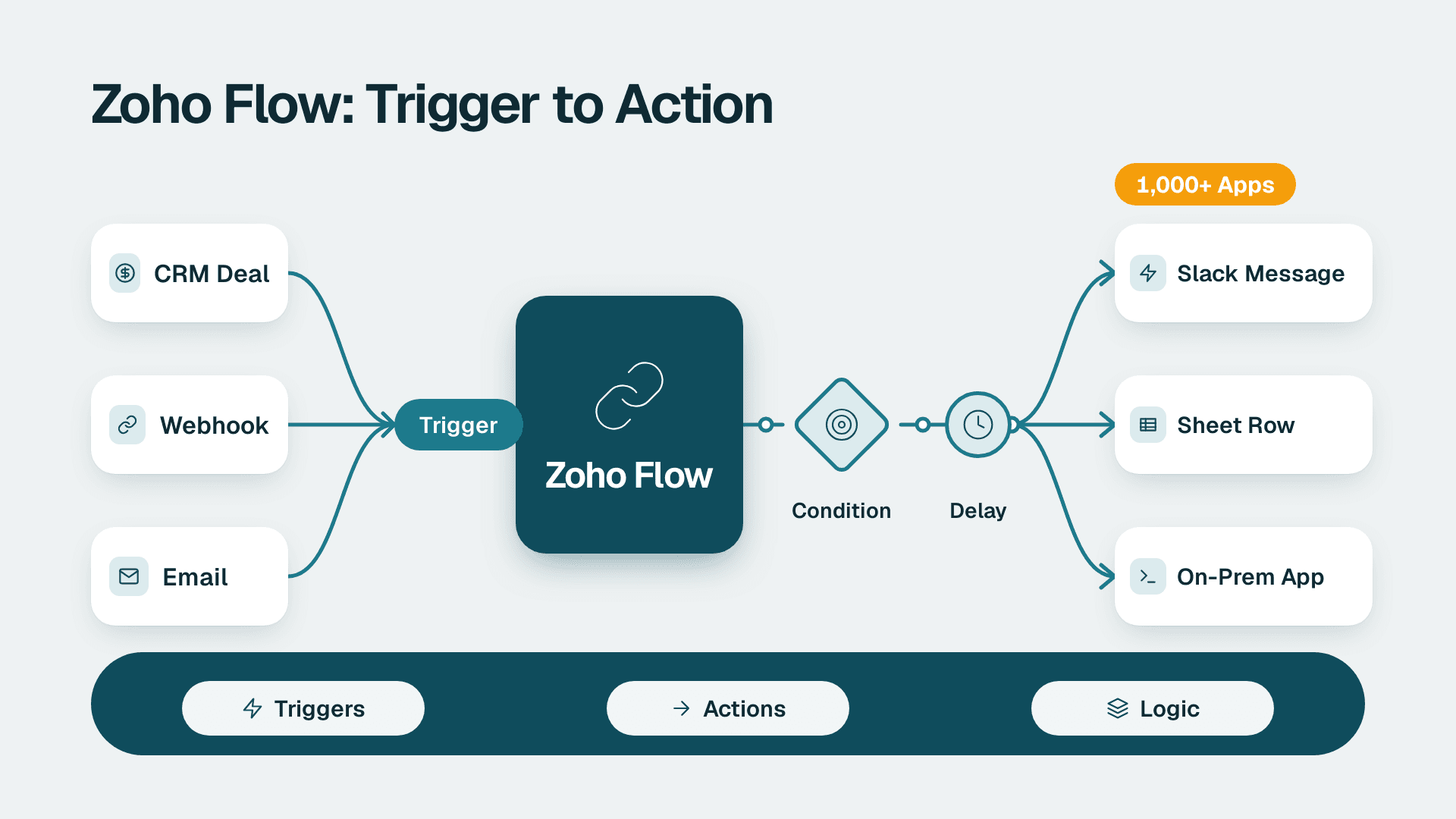
Zoho Flow: How to Automate Work Across Zoho and Other Apps
Zoho Flow connects 1,000+ apps with no-code workflows. Learn what it does, how to build a flow, when Deluge or n8n fits better, and what to check.
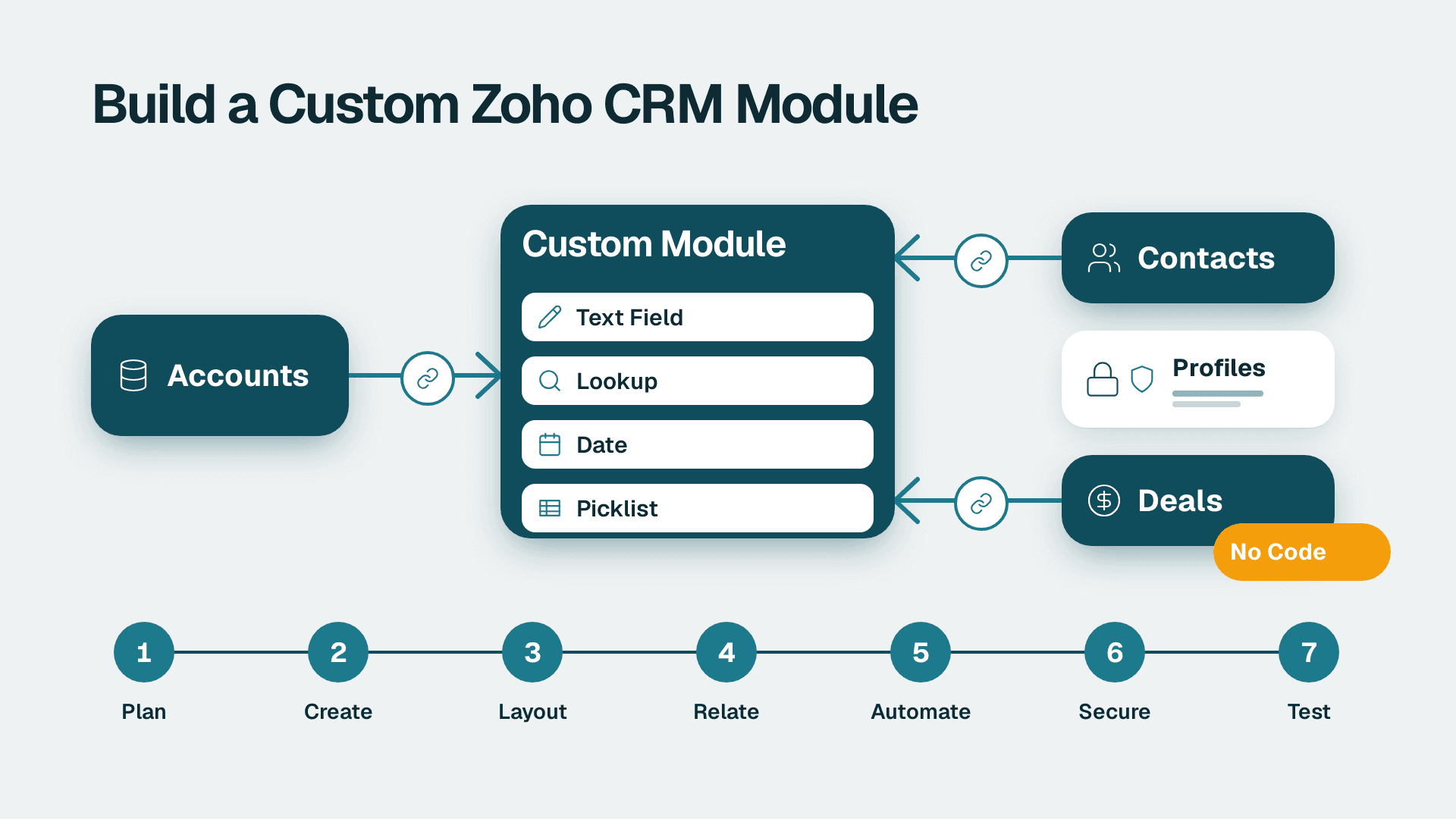
How to Create Custom Modules in Zoho CRM: 7 Steps
Learn how to create custom modules in Zoho CRM, relate them to Accounts and Deals, and lock down access. Allow 2-3 hours for a first module, plus testing time.
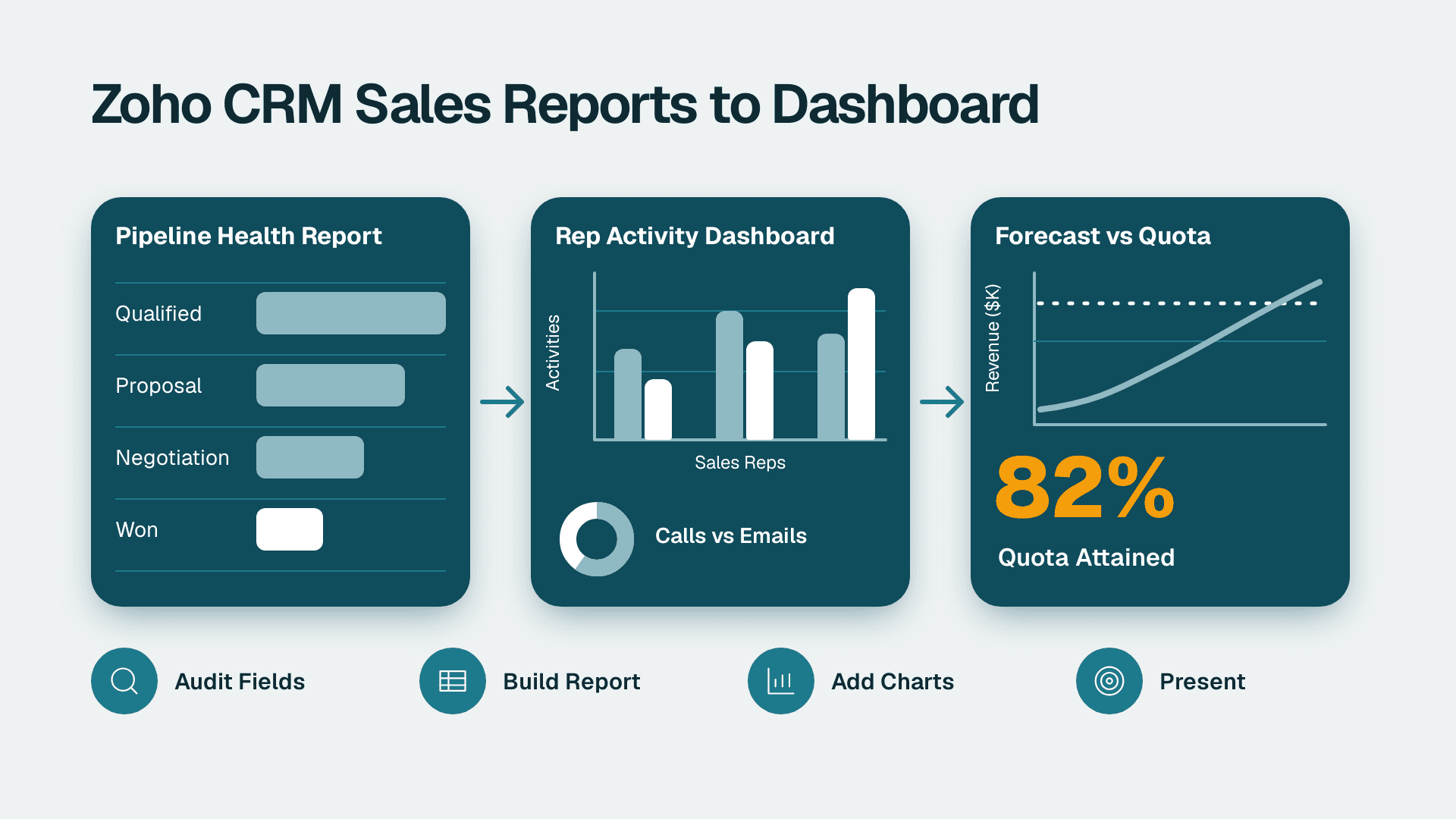
How to Build Zoho CRM Reports and Dashboards for Sales
Follow this Zoho CRM reports and dashboards tutorial to build pipeline, rep activity and forecast views for leadership. Plan on about half a day.