Dax Function: XIRR
 Reviewed by Neetu Singla — Founder, Lets Viz Technologies — AI & Data Consultant. Last reviewed June 5, 2026.
Category: Financial Functions
The XIRR function in Power BI calculates the internal rate of return (IRR) for a series of cash flows that occur at irregular intervals. It is used for financial modeling to determine the profitability of investments, accounting for non-periodic cash inflows and outflows.
Purpose
To evaluate the profitability of an investment or project with irregular cash flow schedules.
Assists in decision-making by calculating the rate of return required to break even on an investment.
Type of Calculations
Solves for the discount rate that equates the net present value (NPV) of cash flows to zero.
Handles irregular timing of cash flows, unlike the IRR function.
Practical Use Cases
Investment Analysis: Calculate returns for venture capital or private equity investments.
Project Evaluation: Assess profitability for projects with non-uniform cash flows.
Loan Assessment: Determine effective interest rates for loans with non-standard payment schedules.
XIRR(values, dates, [guess])
| Parameter | Type | Description |
|---|---|---|
values | Column | A column containing the cash flow amounts, where outflows (e.g., investments) are negative and inflows are positive. |
dates | Column | A column containing the dates corresponding to each cash flow in the values column. |
[guess] | Optional | A scalar value providing an initial guess for the IRR calculation (default is 0.1 or 10%). |
How Does XIRR Dax Works
Mathematical Principle
The XIRR function solves for rr in the following equation:
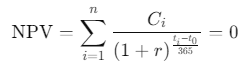
Where:
Ci: Cash flow at time ti
ti: Date of cash flow i
: Base date (first cash flow date)
r: Discount rate (internal rate of return)
The function uses iterative methods (e.g., Newton-Raphson) to approximate r.
Key Points
Cash flows must include at least one positive and one negative value.
Dates must correspond one-to-one with cash flow amounts.
Iterative calculations might fail if the guess is too far from the actual IRR.
What Does It Return?
- Decimal Value: The internal rate of return as a percentage, expressed as a decimal (e.g., 0.12 = 12%).
When Should We Use It?
Non-Periodic Cash Flows: Evaluate investments or loans with irregular payment schedules.
Financial Comparisons: Compare returns across different projects or portfolios.
Dynamic Analysis: Incorporate actual dates into financial models for precision.
Examples
Basic Usage :
Given a series of cash flows and their corresponding dates:
| Values | Dates |
|---|---|
| -1000 | 2023-01-01 |
| 200 | 2023-06-01 |
| 800 | 2024-01-01 |
XIRR(
VALUES(Table[Values]),
VALUES(Table[Dates])
)
Result: 0.153 (15.3% annualized return)
Column Usage
For a dataset with multiple projects:
| Project | Values | Dates |
|---|---|---|
| Project A | -5000 | 2023-01-01 |
| Project A | 2500 | 2023-12-31 |
| Project B | -7000 | 2023-03-15 |
| Project B | 4000 | 2024-03-15 |
ProjectIRR =
CALCULATE(
XIRR(Projects[Values], Projects[Dates]),
FILTER(Projects, Projects[Project] = EARLIER(Projects[Project]))
)
Result: Computes IRR for each project.
Advanced Usage
Combine XIRR with conditional logic for profitability checks:
ProfitabilityCheck =
IF(
XIRR(Investments[Values], Investments[Dates]) > 0.1,
"Profitable",
"Not Profitable"
)
Result: Flags investments with IRR greater than 10%.
Tips and Tricks
Include all cash flows and corresponding dates for accurate results.
Use an informed
guessvalue for quicker convergence in complex scenarios.Ensure cash flow values include at least one inflow and one outflow.
Dates must be unique and sorted in ascending order.
Performance Impact of XIRR DAX Function:
Works well with moderate datasets; however, large datasets may require optimization (e.g., pre-aggregating data).
Avoid using with highly volatile or sparse cash flow datasets.
Related Functions You Might Need
| Function | Description |
|---|---|
IRR | Calculates the internal rate of return for periodic cash flows. |
NPV | Computes the net present value for a series of cash flows. |
XNPV | Calculates NPV for irregular cash flows. |
Want to Learn More?
For more information, check out the official Microsoft documentation for XIRR You can also experiment with this function in your Power BI reports to explore its capabilities.
Unlock the full capabilities of Power BI and elevate your data insights with our specialized consulting services. Whether you need guidance on advanced DAX functions like those highlighted here, support in designing interactive dashboards, or expertise in optimizing data models for enhanced performance, our experienced Power BI consultants are equipped to deliver customized solutions for your business. Explore our Power BI Consulting Services page to discover how we can help your organization make smarter, data-driven decisions.
The XIRR function calculates the internal rate of return for cash flows occurring at irregular intervals.
While designed for irregular cash flows, XIRR can handle periodic ones, but IRR might be simpler in such cases.
The guess parameter provides an initial estimate for IRR, helping the function converge more quickly.
No, XIRR requires at least one positive and one negative cash flow. Otherwise, it cannot compute a return.
No, IRR is for periodic cash flows, while XIRR is for irregular cash flows.
Need Power BI help in a real engagement?
Our team writes DAX like this every day for SaaS finance and ops teams. Refresh monitoring, change requests with a 2-business-day SLA, and a named analyst on retainer — or scoped hourly help if you just need a fix.
Named analyst2-day SLAFrom $5K/mo
