Dax Function: PMT
 Reviewed by Neetu Singla — Founder, Lets Viz Technologies — AI & Data Consultant. Last reviewed June 5, 2026.
Category: Financial Functions
The PMT function in Power BI calculates the payment amount for a loan or investment based on constant payments and a fixed interest rate. It is widely used in financial analysis and budgeting to compute periodic payments.
Purpose
Loan Analysis: Determines the payment amount required to repay a loan over a specific time.
Investment Planning: Calculates payments for annuities or similar financial instruments.
Type of Calculations
Performs financial calculations based on the present value, future value, interest rate, and the number of periods.
Considers both positive and negative cash flows to represent payments and inflows.
Practical Use Cases
Loan Repayment: Calculate monthly payments for mortgages, car loans, or personal loans.
Savings Contributions: Estimate periodic contributions required to achieve a financial goal.
Budget Forecasting: Model future cash flows for businesses or individuals.
PMT(rate, nper, pv, [fv], [type])
| Parameter | Type | Description |
|---|---|---|
rate | Scalar | The constant interest rate per period (e.g., annual, monthly). |
nper | Scalar | Total number of payment periods (e.g., months, years). |
pv | Scalar | Present value, or the total amount of the loan or investment. |
[fv] | Scalar | Optional. The desired future value at the end of the periods. Defaults to 0 if omitted. |
[type] | Scalar | Optional. Payment timing: 0 for end of the period (default), 1 for start of the period. |
How Does PMT Dax Works
Mathematical Principle
The PMT function calculates periodic payments using the formula:
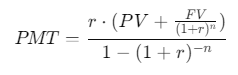
Where:
r: Interest rate per period
PV: Present value (loan or investment amount)
FV: Future value
n: Total number of periods
What Does It Return?
Scalar Value: The payment amount required per period.
Sign Convention: Returns a negative value to represent outgoing payments.
When Should We Use It?
Loan Planning: Determine monthly installments for loans of varying durations and rates.
Retirement Planning: Calculate contributions needed to reach retirement savings goals.
Debt Management: Understand payment schedules for outstanding liabilities.
Examples
Basic Usage :
Calculate the monthly payment for a loan of $10,000 at an annual interest rate of 5% over 5 years.
PMT(0.05 / 12, 5 * 12, -10000)
Result: $188.71 (Monthly payment).
Column Usage
Calculate periodic payments for multiple loans in a table:
| LoanID | Rate | Periods | PresentValue |
|---|---|---|---|
| 1 | 0.05 | 60 | 10000 |
| 2 | 0.03 | 36 | 15000 |
| 3 | 0.06 | 48 | 20000 |
Add a calculated column:
Payment = PMT(Loans[Rate] / 12, Loans[Periods], -Loans[PresentValue])
Advanced Usage
Incorporate future value (FV) and payment type (Type) into calculations:
AdvancedPayment = PMT(0.04 / 12, 10 * 12, -5000, 10000, 1)
Result: Calculates the payment when contributions grow to $10,000.
Tips and Tricks
Use consistent units for
rateandnper(e.g., monthly interest rate with monthly periods).Always use a negative
pvto signify outgoing payments.Forgetting to convert annual interest rates to monthly rates.
Misinterpreting the sign of
pvandfv.
Performance Impact of PMT DAX Function:
Efficient for single scalar calculations.
For large datasets, precompute static inputs to optimize performance.
Related Functions You Might Need
| Function | Description |
|---|---|
PV | Calculates the present value of an investment or loan. |
FV | Computes the future value of an investment based on constant payments and interest rates. |
RATE | Determines the interest rate per period for an investment or loan. |
NPER | Calculates the number of periods required for an investment or loan. |
Want to Learn More?
For more information, check out the official Microsoft documentation for PMT You can also experiment with this function in your Power BI reports to explore its capabilities.
Unlock the full capabilities of Power BI and elevate your data insights with our specialized consulting services. Whether you need guidance on advanced DAX functions like those highlighted here, support in designing interactive dashboards, or expertise in optimizing data models for enhanced performance, our experienced Power BI consultants are equipped to deliver customized solutions for your business. Explore our Power BI Consulting Services page to discover how we can help your organization make smarter, data-driven decisions.
The PMT function calculates the periodic payment amount required to repay a loan or achieve a financial target.
Yes, you must convert the annual interest rate to a monthly rate by dividing it by 12.
The function defaults to a future value (fv) of 0 and assumes payments occur at the end of each period (type = 0).
Yes, though negative rates are uncommon, the function will compute payments accordingly.
No, the function returns a precise decimal value. You can use the ROUND function to format it.
Need Power BI help in a real engagement?
Our team writes DAX like this every day for SaaS finance and ops teams. Refresh monitoring, change requests with a 2-business-day SLA, and a named analyst on retainer — or scoped hourly help if you just need a fix.
Named analyst2-day SLAFrom $5K/mo
