Dax Function: TBILLYIELD
 Reviewed by Neetu Singla — Founder, Lets Viz Technologies — AI & Data Consultant. Last reviewed June 5, 2026.
Category: Financial Functions
The TBILLYIELD function in Power BI calculates the yield of a Treasury bill (T-bill) for a given settlement date, maturity date, and price. This function is essential in evaluating the return on short-term government securities in financial models and investment analyses.
Purpose
Determines the annualized yield of a Treasury bill based on its purchase price and duration.
Assists in assessing the profitability of short-term investments.
Converts the price of a T-bill into a comparable annualized return for decision-making.
Type of Calculations
Calculates the annualized return (yield) of a T-bill as a percentage.
Uses a 360-day year convention for computation.
Practical Use Cases
Investment Evaluation: Compare T-bill yields with alternative investments.
Portfolio Management: Optimize portfolios containing short-term government securities.
Risk-Free Return Benchmarking: Use as a baseline for other financial instruments.
TBILLYIELD(settlement, maturity, pr)
| Parameter | Type | Description |
|---|---|---|
settlement | Scalar | The settlement date of the Treasury bill (the date it is purchased by the investor). |
maturity | Scalar | The maturity date of the Treasury bill (the date it expires, and the investor receives the face value). |
pr | Scalar | The price of the Treasury bill per $100 face value. |
How Does TBILLYIELD Dax Works
Mathematical Principle
The TBILLYIELD function computes the yield using the following formula:
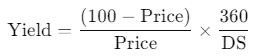
Where:
Price: The purchase price of the T-bill.
DS: The number of days between the settlement date and the maturity date.
360: The conventionally used number of days in a year for T-bill calculations.
Key Points
The yield represents the annualized return rate, making it comparable across different T-bills and other investments.
The 360-day year convention simplifies computations but may introduce minor discrepancies compared to actual calendar days.
What Does It Return?
- Scalar Value: The annualized yield of the Treasury bill as a percentage, based on the settlement date, maturity date, and price.
When Should We Use It?
Analyzing T-Bill Returns: Determine the profitability of Treasury bills in the context of fixed-income investments.
Comparative Investment Analysis: Compare T-bill yields against other short-term and risk-free securities.
Risk-Free Rate Estimation: Use as the benchmark return rate for risk-free investments in financial models.
Examples
Basic Usage :
A Treasury bill has a settlement date of January 1, 2025, a maturity date of April 1, 2025, and a price of $98.50. Calculate the yield:
TBILLYIELD(DATE(2025, 1, 1), DATE(2025, 4, 1), 98.50)
Result: 6.09% (annualized yield).
Column Usage
For a table of Treasury bills:
| T-Bill ID | Settlement | Maturity | Price |
|---|---|---|---|
| 1 | 01/01/2025 | 04/01/2025 | 98.50 |
| 2 | 02/15/2025 | 05/15/2025 | 99.00 |
Yield = TBILLYIELD(TBills[Settlement], TBills[Maturity], TBills[Price])
Result: Computes the annualized yield for each Treasury bill.
Advanced Usage
Combine TBILLYIELD with filtering to find T-bills with yields above a certain threshold:
HighYieldTBill =
CALCULATE(
MAX(TBILLYIELD(TBills[Settlement], TBills[Maturity], TBills[Price])),
FILTER(TBills, TBILLYIELD(TBills[Settlement], TBills[Maturity], TBills[Price]) > 5)
)
Result: Returns the highest yield among T-bills yielding more than 5%.
Tips and Tricks
Use precise date formats to ensure accurate settlement and maturity calculations.
Validate the price input as it directly impacts the yield calculation.
Settlement dates must always be earlier than maturity dates; otherwise, the function will return an error.
Avoid using prices not expressed per $100 face value.
Performance Impact of TBILLYIELD DAX Function:
Handles small datasets efficiently.
For large datasets, consider precomputing yields in calculated columns to reduce runtime during analysis.
Related Functions You Might Need
| Function | Description |
|---|---|
TBILLPRICE | Calculates the price of a Treasury bill given its discount rate and maturity. |
TBILLEQ | Computes the bond-equivalent yield of a Treasury bill. |
YIELD | Determines the yield of a security with periodic interest payments. |
PRICE | Calculates the price of a security based on its yield. |
Want to Learn More?
For more information, check out the official Microsoft documentation for TBILLYIELD You can also experiment with this function in your Power BI reports to explore its capabilities.
Unlock the full capabilities of Power BI and elevate your data insights with our specialized consulting services. Whether you need guidance on advanced DAX functions like those highlighted here, support in designing interactive dashboards, or expertise in optimizing data models for enhanced performance, our experienced Power BI consultants are equipped to deliver customized solutions for your business. Explore our Power BI Consulting Services page to discover how we can help your organization make smarter, data-driven decisions.
The TBILLYIELD function calculates the annualized yield of a Treasury bill based on its settlement date, maturity date, and price.
No, the function is specifically designed for Treasury bills.
The function returns an error since the settlement date must precede the maturity date.
The price should be expressed per $100 face value of the Treasury bill.
The function uses a 360-day year convention and does not account for actual calendar days.
Need Power BI help in a real engagement?
Our team writes DAX like this every day for SaaS finance and ops teams. Refresh monitoring, change requests with a 2-business-day SLA, and a named analyst on retainer — or scoped hourly help if you just need a fix.
Named analyst2-day SLAFrom $5K/mo
