Dax Function: TANH
 Reviewed by Neetu Singla — Founder, Lets Viz Technologies — AI & Data Consultant. Last reviewed June 5, 2026.
Category: Mathematical and Trigonometric Functions
The TANH function in Power BI is a mathematical DAX function that calculates the hyperbolic tangent of a given number. The hyperbolic tangent is a trigonometric-like function used in various mathematical, engineering, and data transformation contexts.
Purpose:
- The TANH function is used to compute values that model hyperbolic relationships. It is particularly useful in scenarios involving growth curves, signal processing, and certain machine learning algorithms.
Type of Calculations:
- The TANH function calculates the hyperbolic tangent of a number using the formula:
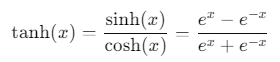
- The result is always within the range −1 to 1.
Practical Use Cases:
- Data Normalization: Scale values between and 1.
- Statistical Modeling: Represent sigmoid-like growth curves.
- Machine Learning: Activation functions in neural networks.
- Signal Processing: Analyze and process waveforms.
TANH(<number>)</number>
| Parameter | Type | Description |
|---|---|---|
number | Scalar | A numeric value for which the hyperbolic tangent is calculated. It can be positive, negative, or zero. |
How Does TANH Dax Function Works?
The TANH function computes the hyperbolic tangent, which behaves similarly to the regular tangent but for hyperbolic functions:
- If the input x approaches positive infinity, the output approaches 1.
- If the input x approaches negative infinity, the output approaches −1.
- At x = 0, the output is 0.
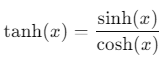
Mathematically:
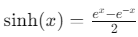
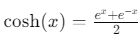
Where:
- (hyperbolic sine)
- (hyperbolic cosine)
What Does It Return?
The TANH function returns a numeric scalar value between −1 and 1, representing the hyperbolic tangent of the input number.
When Should We Use It?
- Normalizing Data: To scale data values smoothly between −1 and 1 for downstream calculations or visualizations.
- Growth Models: Analyze phenomena with sigmoid-like or s-shaped growth curves.
- Financial Analysis: Model exponential changes in stock prices or interest rates.
- Machine Learning: Use as part of activation functions for neural networks.
Examples
Basic Usage
Calculate the hyperbolic tangent of 1:
Result = TANH(1)
Output: 0.7616 (approx).
Column Usage
Apply the hyperbolic tangent calculation to a column of values:
HyperbolicTangent = TANH(Table[Values])
Computes the hyperbolic tangent for each value in the Table[Values] column.
Advanced Usage
Combine the TANH function with other DAX functions for a custom transformation:
ScaledTanh = TANH(Table[Values]) * 10 + 5
Result: Scales the result of the hyperbolic tangent by 10 and adds 5.
Tips and Tricks
- Range Awareness: Use the function to ensure output values are constrained between −1 and 1.
- Avoid Overflows: While the function handles large numbers, be mindful of inputs significantly far from 0, as results quickly asymptote to ±1.
- Combine with Other Hyperbolic Functions: Leverage SINH and COSH for complementary calculations.
Performance Impact of TANH DAX Function:
- The TANH function is computationally efficient for scalar inputs.
- For large datasets, ensure calculations are performed in bulk to minimize performance overhead.
Related Functions You Might Need
- SINH: Computes the hyperbolic sine of a number.
- COSH: Computes the hyperbolic cosine of a number.
- EXP: Calculates e, used in the TANH formula.
- TAN: Computes the tangent of a number (non-hyperbolic).
Want to Learn More?
For more information, check out the official Microsoft documentation for TANH. You can also experiment with this function in your Power BI reports to explore its capabilities.
If you’re looking to unlock the full potential of Power BI and take your data insights to the next level, our expert Power BI consulting services are here to help. Whether you need assistance with implementing advanced DAX functions like the ones discussed here, creating interactive dashboards, or optimizing your data models for better performance, our team of seasoned Power BI consultants is ready to provide tailored solutions for your business. Visit our Power BI Consulting page to learn more about how we can empower your organization with data-driven decisions.
The TANH function calculates the hyperbolic tangent of a given number, outputting a value between −1 and 1.
The output is always within the range −1 to 1.
TAN calculates the tangent of an angle (non-hyperbolic), while TANH computes the hyperbolic tangent.
Yes, the TANH function is useful for scaling values between −1 and 1.
Yes, but for optimal performance, batch-process data transformations where possible.
Need Power BI help in a real engagement?
Our team writes DAX like this every day for SaaS finance and ops teams. Refresh monitoring, change requests with a 2-business-day SLA, and a named analyst on retainer — or scoped hourly help if you just need a fix.
Named analyst2-day SLAFrom $5K/mo
