Dax Function: SINH
 Reviewed by Neetu Singla — Founder, Lets Viz Technologies — AI & Data Consultant. Last reviewed June 5, 2026.
Category: Mathematical and Trigonometric Functions
The SINH function in Power BI is a DAX function that calculates the hyperbolic sine of a given number. Hyperbolic functions are analogs of the standard trigonometric functions but are based on hyperbolas rather than circles.
Purpose:
- To compute the hyperbolic sine, which is used in advanced mathematical modeling and geometric computations.
- Particularly useful in physics, engineering, and mathematical applications where hyperbolic relationships are modeled.
Type of Calculations:
- Performs calculations to return the hyperbolic sine of an input value.
Practical Use Cases:
- Engineering Calculations: Useful in hyperbolic equations that describe catenary curves or heat conduction.
- Physics Applications: Solve problems involving exponential growth/decay or special relativity.
- Mathematical Modeling: Model systems that exhibit hyperbolic behavior.
SINH(<number>)</number>
| Parameter | Type | Description | |
|---|---|---|---|
number | Scalar |
|
How Does SINH Dax Function Works?
The SINH function calculates the hyperbolic sine based on the formula:
- e represents Euler’s number (≈2.718).
- For positive inputs, sinh(x) grows exponentially.
- For negative inputs, sinh(x) decreases exponentially but remains symmetric about the origin.
What Does It Return?
The SINH function returns a scalar value representing the hyperbolic sine of the input number. It is computed as: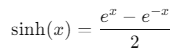
When Should We Use It?
- Hyperbolic Modeling:
In fields like architecture (catenary curves for bridges) or physics (hyperbolic motion).
- Exponential Growth/Decay:
Model scenarios where changes grow or shrink exponentially but symmetrically.
- Complex Functions:
Use in conjunction with other hyperbolic or exponential functions.
Examples
Basic Usage
Calculate the hyperbolic sine of 1:
HyperbolicSine = SINH(1)
Output: sinh(1)≈1.175.
Column Usage
Apply the SINH function to a column of data:
HyperbolicSineColumn = SINH(Values[Numbers])
Returns the hyperbolic sine for each value in the Values[Numbers] column.
Advanced Usage
Combine with exponential functions to calculate:
CustomHyperbolicSine = (EXP(Numbers[Value]) - EXP(-Numbers[Value])) / 2
Result: This replicates the output of the SINH function.
Tips and Tricks
- Input Scaling: Ensure that input values are appropriately scaled; large values can produce extremely large results due to the exponential nature.
- Symmetry: Remember that sinh(−x) = −sinh(x), which can simplify certain calculations.
- Combining Functions: Use with COSH (hyperbolic cosine) and TANH (hyperbolic tangent) for full hyperbolic calculations.
Performance Impact of SINH DAX Function:
- The SINH function is computationally efficient for most datasets.
- For very large datasets with high input values, consider testing performance due to the exponential nature of calculations.
Related Functions You Might Need
- COSH: Calculates the hyperbolic cosine of a number.
- TANH: Calculates the hyperbolic tangent of a number.
- EXP: Computes exe^x, used in deriving hyperbolic functions.
- SIN: Computes the sine of an angle (not hyperbolic).
Want to Learn More?
For more information, check out the official Microsoft documentation for SINH. You can also experiment with this function in your Power BI reports to explore its capabilities.
If you’re looking to unlock the full potential of Power BI and take your data insights to the next level, our expert Power BI consulting services are here to help. Whether you need assistance with implementing advanced DAX functions like the ones discussed here, creating interactive dashboards, or optimizing your data models for better performance, our team of seasoned Power BI consultants is ready to provide tailored solutions for your business. Visit our Power BI Consulting page to learn more about how we can empower your organization with data-driven decisions.
The SINH function calculates the hyperbolic sine of a given number using the formula
Yes, the SINH function computes the hyperbolic sine, while the SIN function computes the standard sine (trigonometric).
Yes, the SINH function can handle negative numbers. It returns a negative result for negative inputs.
Use the SINH function in a calculated column or measure:
HyperbolicSineColumn = SINH(Table[Column])The SINH function returns values between −∞ and +∞, depending on the input.
Need Power BI help in a real engagement?
Our team writes DAX like this every day for SaaS finance and ops teams. Refresh monitoring, change requests with a 2-business-day SLA, and a named analyst on retainer — or scoped hourly help if you just need a fix.
Named analyst2-day SLAFrom $5K/mo
