Dax Function: COSH
 Reviewed by Neetu Singla — Founder, Lets Viz Technologies — AI & Data Consultant. Last reviewed June 5, 2026.
Category: Mathematical and Trigonometric Functions
The COSH function in Power BI is a mathematical DAX function that calculates the hyperbolic cosine of a given number. This function is used in scenarios involving hyperbolic geometry, physics, and advanced mathematical modeling.
Purpose
The COSH function helps compute the hyperbolic cosine, which describes the shape of a hanging cable (catenary) or other phenomena related to hyperbolic geometry. It finds applications in scientific and engineering fields where hyperbolic relationships are essential.
Type of Calculations
The COSH function computes the hyperbolic cosine of a number using the formula:
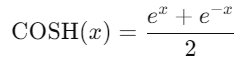
Where is Euler’s number (approximately 2.71828).
Practical Use Cases
- Engineering and Physics: Calculating properties of suspended cables, beams, or structures.
- Financial Modeling: Representing exponential growth or decay with hyperbolic functions.
- Signal Processing: Transforming signals that require hyperbolic relationships.
COSH(<number>)</number>
| Parameter | Type | Description |
|---|---|---|
<number> | Scalar | A numeric value for which the hyperbolic cosine is to be calculated. |
How Does COSH Dax Function Works?
The COSH function calculates the hyperbolic cosine using the formula:
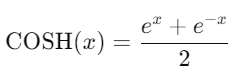
- Exponential Growth and Decay: The function combines the exponential growth ex and decay e-x to compute the result.
- Symmetry: COSH is an even function, meaning COSH(−x)=COSH(x).
What Does It Return?
The COSH function returns a scalar value of type decimal. The result is always greater than or equal to 1 for real input numbers.
When Should We Use It?
- When working with hyperbolic models in geometry or physics.
- In data transformations involving exponential relationships.
- For advanced calculations in financial and scientific datasets.
Examples
Basic Usage
Calculate the hyperbolic cosine of 0:
COSH(0)
Output: 1
Column Usage
If a column [Values] contains numeric data, calculate their hyperbolic cosine:
= COS([Values])
This creates a new calculated column with COSH values.
Advanced Usage
Combine COSH with other functions to model exponential growth or decay:
= COSH([GrowthFactor] * [Time])
This formula models exponential trends in a dataset over time.
Tips and Tricks
- Large Numbers: Be cautious when inputting large numbers, as the exponential calculation may result in overflow errors.
- Normalization: Use COSH to normalize exponential data for better interpretability.
- Combining Functions: Pair COSH with SINH or TANH for comprehensive hyperbolic modeling.
Potential Pitfalls
- Input Range: The COSH function can handle both positive and negative numbers but be aware of the exponential growth for large inputs.
- Precision: Calculations involving very small or very large numbers may encounter precision limitations.
Performance Impact of COSH DAX Function:
- The COSH function is computationally efficient but may encounter performance challenges with very large datasets or extreme input values.
- Precompute COSH values for static inputs to optimize performance in real-time dashboards.
Related Functions You Might Need
- SINH: Computes the hyperbolic sine of a number.
- TANH: Computes the hyperbolic tangent of a number.
- EXP: Calculates the exponential function.
- LOG: Computes the natural logarithm of a number.
Want to Learn More?
For more information, check out the official Microsoft documentation for COSH. You can also experiment with this function in your Power BI reports to explore its capabilities.
If you’re looking to unlock the full potential of Power BI and take your data insights to the next level, our expert Power BI consulting services are here to help. Whether you need assistance with implementing advanced DAX functions like the ones discussed here, creating interactive dashboards, or optimizing your data models for better performance, our team of seasoned Power BI consultants is ready to provide tailored solutions for your business. Visit our Power BI Consulting page to learn more about how we can empower your organization with data-driven decisions.
The COSH function calculates the hyperbolic cosine of a given number, which represents the average of exponential growth and decay.
Yes, the COSH function is symmetric, meaning COSH(−x)=COSH(x).
The COSH function returns values greater than or equal to 1 for real input numbers.
While COSH can handle large numbers, it may encounter overflow or precision issues for extremely large inputs.
COSH calculates the hyperbolic cosine, while SINH computes the hyperbolic sine, and TANH computes the hyperbolic tangent. Together, they model different aspects of hyperbolic geometry.
Need Power BI help in a real engagement?
Our team writes DAX like this every day for SaaS finance and ops teams. Refresh monitoring, change requests with a 2-business-day SLA, and a named analyst on retainer — or scoped hourly help if you just need a fix.
Named analyst2-day SLAFrom $5K/mo
