Dax Function: DEGREES
 Reviewed by Neetu Singla — Founder, Lets Viz Technologies — AI & Data Consultant. Last reviewed June 5, 2026.
Category: Mathematical and Trigonometric Functions
The DEGREES function in Power BI is a DAX (Data Analysis Expressions) function that converts an angle measured in radians to degrees. This is particularly useful when working with trigonometric calculations, as many mathematical functions return values in radians.
Purpose
The DEGREES function is designed to:
- Simplify conversions between radians and degrees.
- Enable compatibility with datasets and calculations that require angle measurements in degrees.
- Facilitate the use of trigonometric data in dashboards and visualizations.
Type of Calculations
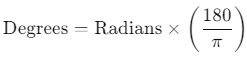
The DEGREES function performs a mathematical conversion based on the formula:
Practical Use Cases
- Geospatial Analysis: Convert angles in radians to degrees for mapping and geographic calculations.
- Engineering Metrics: Transform trigonometric results into degrees for design or simulation reports.
- Data Visualization: Standardize angle measurements to degrees for easier interpretation in charts.
DEGREES(<radians>)</radians>
| Parameter | Type | Description |
|---|---|---|
<number> | Scalar | A numeric value or column representing the angle in radians. |
How Does DEGREES Dax Function Works?
The DEGREES function multiplies the input value (in radians) by 180/π to compute the equivalent value in degrees. The constant π is internally defined within Power BI as approximately 3.14159265359.
Formula Illustration
For a value of 1 radian:

What Does It Return?
The function returns a numeric value representing the angle in degrees.
When Should We Use It?
- When importing data with angle measurements in radians but your analysis requires degrees.
- For trigonometric calculations that need to align with systems using degree-based angles.
- In visualizations that involve rotation or orientation in degrees.
Examples
Basic Usage
Convert a scalar value of radian to degrees:
DEGREES(1)
Output: 57.2958
Column Usage
Convert values in the [AnglesInRadians] column to degrees:
= DEGREES([AnglesInRadians])
Output: A new column with angles in degrees.
Advanced Usage
Combine the DEGREES function with trigonometric functions. For instance, calculate the cosine of a value in radians and convert the result to degrees:
DEGREES(COS([AnglesInRadians]))
Output: The cosine of the angle, converted to degrees.
Tips and Tricks
- Combine with RADIANS Function: Use alongside the RADIANS function when converting back and forth between degrees and radians.
- Validate Input: Ensure input values are in radians to avoid incorrect conversions.
- Integrate with Trigonometry: Use in tandem with other trigonometric functions like SIN, COS, and TAN.
Potential Pitfalls
- Unit Confusion: Misinterpreting the input units (degrees instead of radians) can lead to incorrect results.
- Large Datasets: Avoid excessive conversions in calculated columns for performance reasons.
Performance Impact of DEGREES DAX Function:
- The DEGREES function is computationally light, but for large datasets, consider pre-converting values at the data source.
- Avoid unnecessary conversions to maintain efficiency in calculated columns or measures.
Related Functions You Might Need
- RADIANS: Converts degrees to radians.
- SIN, COS, TAN: Trigonometric functions that often return values in radians.
- ACOS, ASIN, ATAN: Inverse trigonometric functions compatible with radians.
Want to Learn More?
For more information, check out the official Microsoft documentation for DEGREES. You can also experiment with this function in your Power BI reports to explore its capabilities.
The DEGREES function converts an angle measured in radians to degrees, making it useful for geospatial and trigonometric calculations.
Yes, it converts negative radians to the equivalent negative angle in degrees.
Yes, it works seamlessly with trigonometric functions like SIN, COS, TAN, and their inverses.
The DEGREES function converts radians to degrees, while the RADIANS function performs the reverse operation.
Yes, but consider optimizing its use in calculated columns or pre-converting values to enhance performance.
Need Power BI help in a real engagement?
Our team writes DAX like this every day for SaaS finance and ops teams. Refresh monitoring, change requests with a 2-business-day SLA, and a named analyst on retainer — or scoped hourly help if you just need a fix.
Named analyst2-day SLAFrom $5K/mo
