Dax Function: PI
 Reviewed by Neetu Singla — Founder, Lets Viz Technologies — AI & Data Consultant. Last reviewed June 5, 2026.
Category: Mathematical and Trigonometric Functions
The PI function in Power BI is a DAX function that returns the mathematical constant π (pi), which is approximately equal to 3.14159265358979. The constant π represents the ratio of a circle’s circumference to its diameter and is essential in various mathematical, geometrical, and engineering calculations.
Purpose:
The PI function is used to perform calculations involving circles, arcs, and periodic functions where π is a fundamental constant.
Type of Calculations:
- Calculating areas and circumferences of circles.
- Performing trigonometric calculations involving radians.
- Engineering and scientific calculations.
Practical Use Cases:
- Geometry Calculations: Compute the area of circles or lengths of arcs.
- Physics Applications: Calculate oscillations, waves, and circular motion.
- Trigonometry: Convert degrees to radians or work with sinusoidal functions.
PI()
How Does PI Dax Function Works?
The PI function is straightforward—it outputs the constant π to a high level of precision. This constant can be used directly in formulas or combined with other DAX functions for calculations.
Formula Example:
Circumference of a circle:
Circumference = 2 × PI() × Radius
Area of a circle:
Area = PI() × Radius2
What Does It Return?
The function returns a single scalar value, which is the nearest odd integer that is:
- Greater than or equal to the input for positive numbers.
- Less than or equal to the input for negative numbers.
When Should We Use It?
- eometric Calculations: Any scenario requiring calculations for circular shapes or arcs.
- Wave Functions: Use π in periodic functions like sine or cosine to model waves.
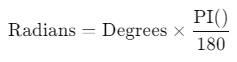
- Unit Conversions: Convert angles from degrees to radians using the formula:
Examples
Basic Usage
Calculate the value of π:
ConstantPi = PI()
Output: 3.14159265358979
Column Usage
Compute the area of circles with radii stored in a column:
CircleArea = PI() * ('Table'[Radius] ^ 2)
Advanced Usage
Convert degrees to radians for trigonometric calculations:
Radians = 'Table'[Degrees] * (PI() / 180)
Combine with trigonometric functions to calculate sine values:
SinValue = SIN('Table'[Degrees] * (PI() / 180))
Tips and Tricks
- Avoid Hardcoding π: Always use the PI function instead of manually typing the value of π to ensure precision and consistency.
- Use in Measures: Leverage PI in calculated measures to dynamically calculate circular values like areas and circumferences.
- Combine with Trigonometry: Use in conjunction with functions like SIN, COS, and TAN for modeling sinusoidal data.
Performance Impact of PI DAX Function:
The PI function is computationally efficient since it retrieves a constant value. It has no performance impact, even in large datasets.
Related Functions You Might Need
- SIN: Returns the sine of an angle.
- COS: Returns the cosine of an angle.
- TAN: Returns the tangent of an angle.
- RADIANS: Converts degrees to radians.
- DEGREES: Converts radians to degrees.
Want to Learn More?
For more information, check out the official Microsoft documentation for PI. You can also experiment with this function in your Power BI reports to explore its capabilities.
If you’re looking to unlock the full potential of Power BI and take your data insights to the next level, our expert Power BI consulting services are here to help. Whether you need assistance with implementing advanced DAX functions like the ones discussed here, creating interactive dashboards, or optimizing your data models for better performance, our team of seasoned Power BI consultants is ready to provide tailored solutions for your business. Visit our Power BI Consulting page to learn more about how we can empower your organization with data-driven decisions.
The PI function returns the mathematical constant π, approximately 3.14159265358979.
No, the PI function does not require any parameters.
The PI function is used to calculate areas, circumferences, and arc lengths for circular shapes.
Use the formula:
Yes, the PI function provides π to a high level of precision suitable for most calculations.
Need Power BI help in a real engagement?
Our team writes DAX like this every day for SaaS finance and ops teams. Refresh monitoring, change requests with a 2-business-day SLA, and a named analyst on retainer — or scoped hourly help if you just need a fix.
Named analyst2-day SLAFrom $5K/mo
