Zoho CRM vs HubSpot for Mid-Market Teams: TCO Breakdown
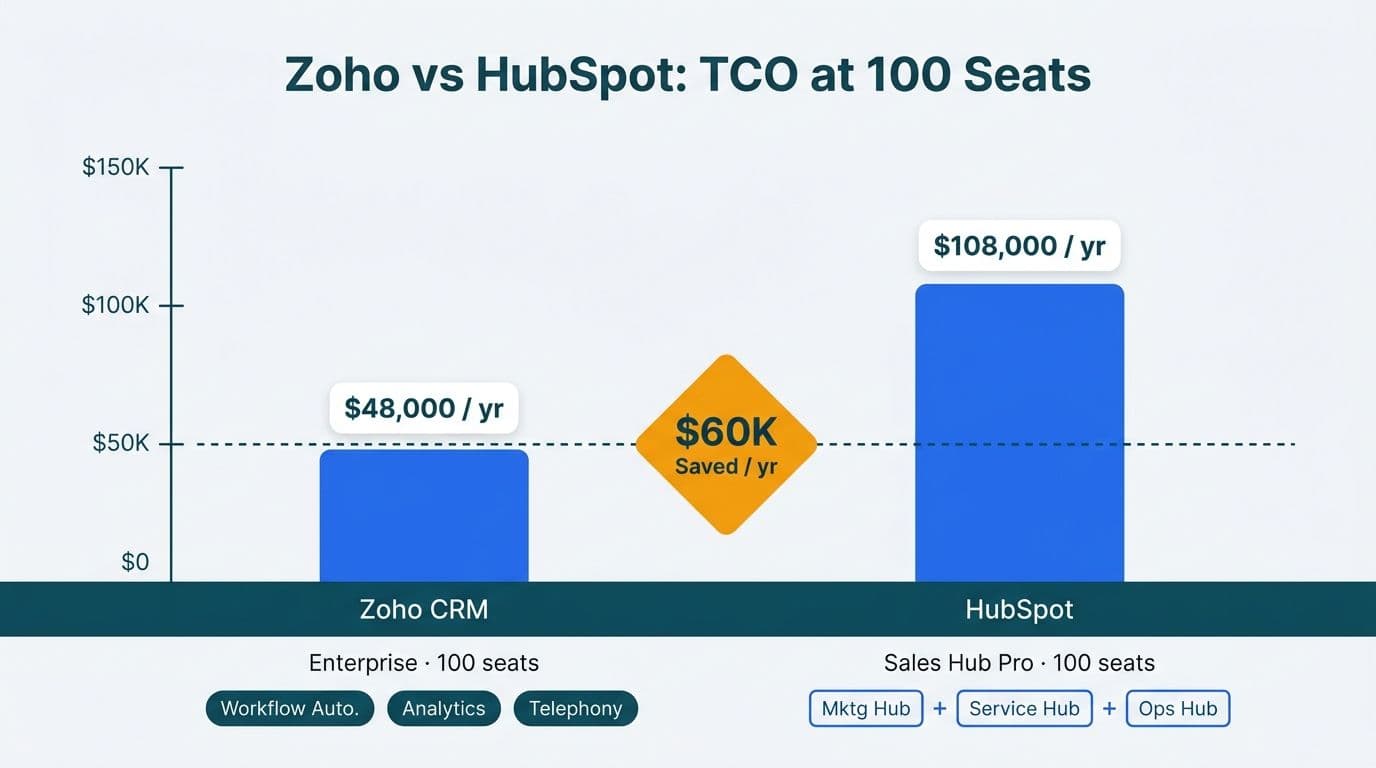
For most mid-market teams, Zoho CRM delivers comparable automation depth at roughly half the per-seat cost of HubSpot once you account for each platform's bundling model. HubSpot's modular hub pricing escalates sharply at the professional tier, while Zoho CRM bundles workflow automation, analytics, and telephony into a single per-seat price - a meaningful advantage for CIOs managing software budgets across 50-500 users.
Key Takeaways
- At 100 seats, Zoho CRM Enterprise licensing costs roughly $48,000 annually versus approximately $108,000 for HubSpot Sales Hub Professional, based on each vendor's published list pricing (Zoho and HubSpot pricing pages, 2026)
- HubSpot charges separately for Marketing Hub, Sales Hub, and Service Hub; Zoho bundles comparable capabilities into CRM Plus, reducing vendor sprawl and licensing complexity
- Zoho's Blueprint automation enforces mandatory process checkpoints at the Enterprise tier; HubSpot's equivalent branching logic sits behind its Enterprise plan at significantly higher per-seat cost
- Both platforms offer HIPAA Business Associate Agreements, but Zoho provides more regional data residency options for EU- and Canada-based regulated industries
- Implementation timelines for either platform run 8-16 weeks at mid-market scale; Zoho's deeper configurability rewards teams that engage a specialist partner early
What Is the Zoho CRM vs HubSpot Total Cost of Ownership for Mid-Market Teams?
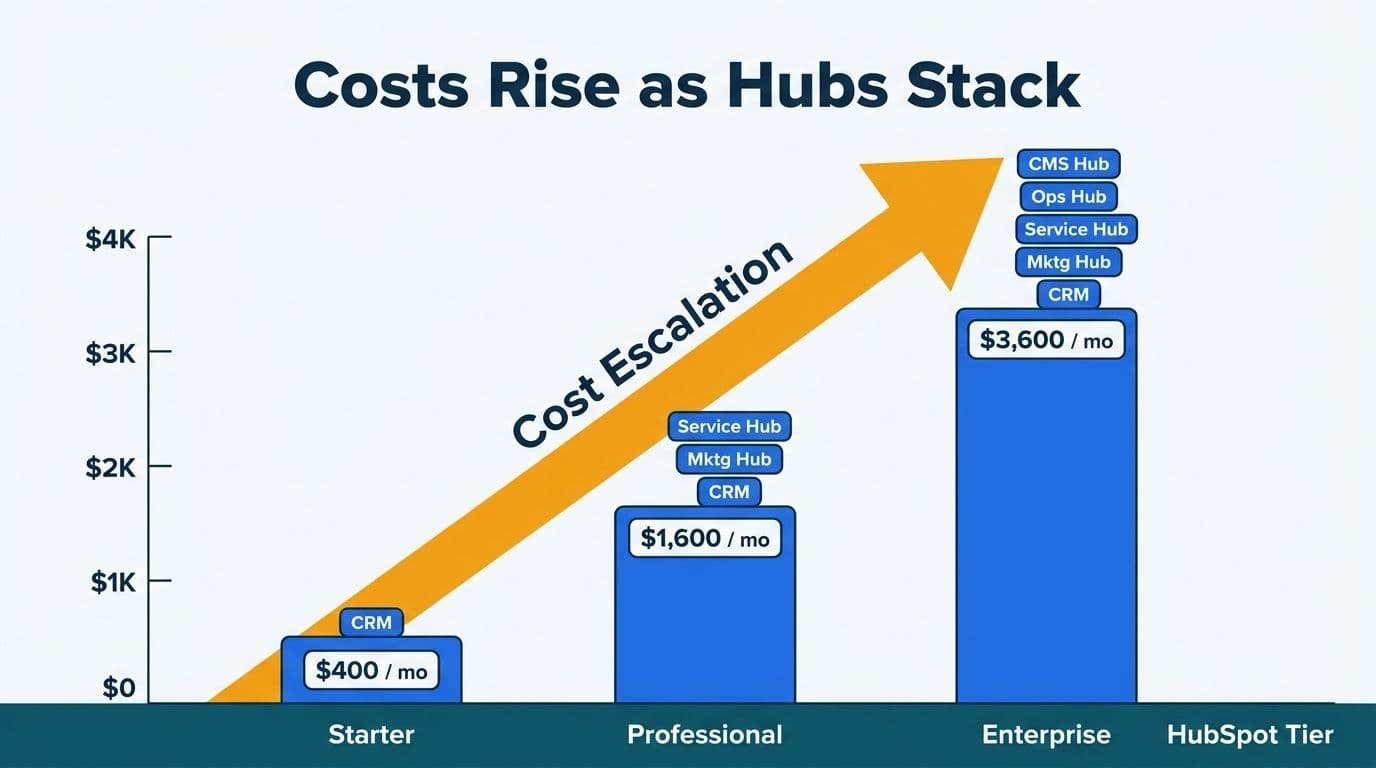
Total cost of ownership extends well beyond headline per-seat pricing. For a US healthcare analytics firm or a Canadian financial services company evaluating a 100-seat CRM deployment, the real comparison includes licensing tiers, bundled versus modular feature access, implementation fees, ongoing administration, and the cost of add-ons that are standard features on the competing platform.
Working with a specialist in Zoho CRM consulting can substantially reduce implementation and configuration costs compared to building in-house expertise from scratch, particularly when the rollout involves compliance-sensitive data flows under HIPAA, PIPEDA, or SOC 2 requirements.
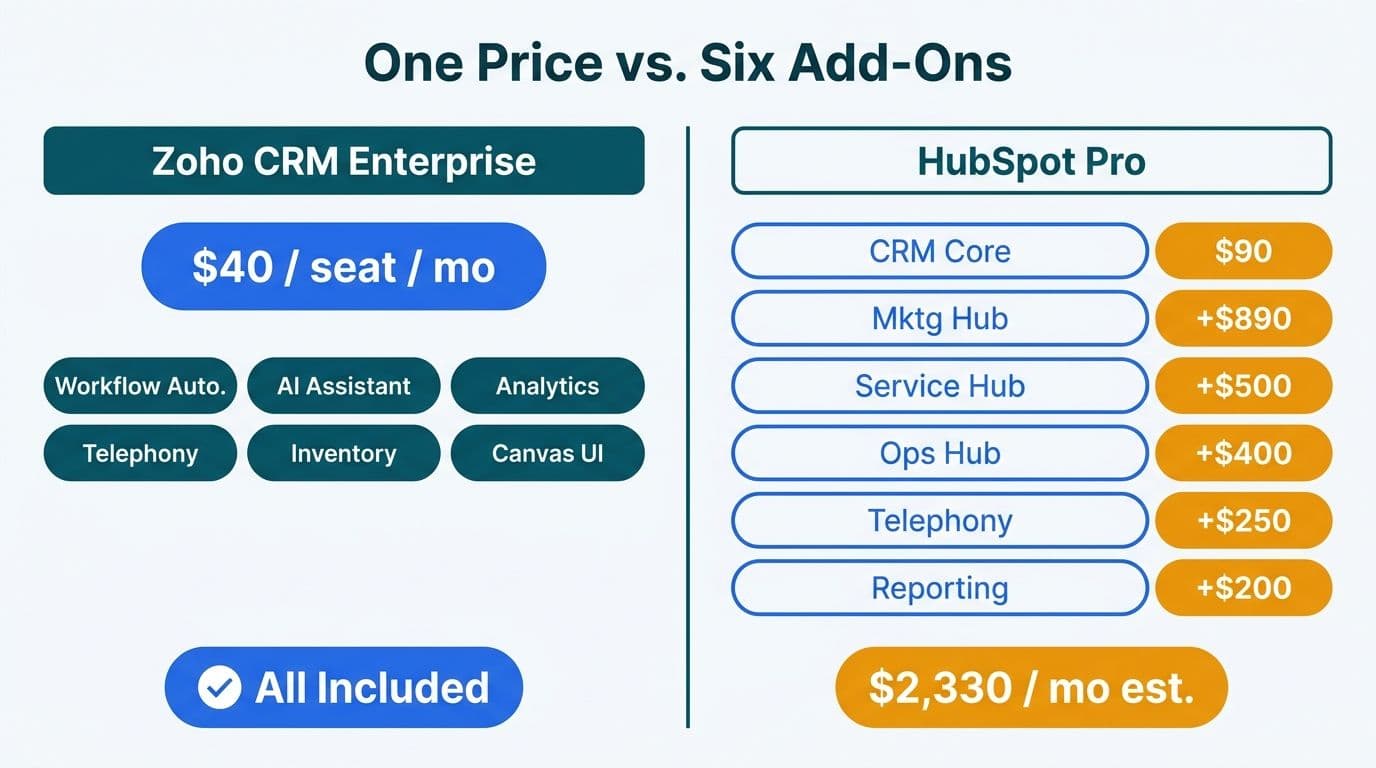
According to each vendor's published pricing pages (2026), Zoho CRM Enterprise is priced at $40 per user per month billed annually, while HubSpot Sales Hub Professional is priced at $90 per seat per month billed annually, with a minimum seat count requirement that raises the entry cost for smaller teams. At 100 seats, that licensing gap is approximately $60,000 per year before factoring in add-ons.
| Feature | Zoho CRM Enterprise | HubSpot Sales Hub Professional |
|---|---|---|
| Per-seat price (annual billing) | $40/user/month | $90/seat/month |
| 100-seat annual license cost | ~$48,000 | ~$108,000 |
| Marketing automation | Via Zoho Campaigns or CRM Plus add-on | Separate Marketing Hub license required |
| Analytics and dashboards | Native Zoho Analytics integration | Basic reports; advanced analytics is paid |
| Telephony | Zoho PhoneBridge included | Separate add-on or partner integration |
| HIPAA BAA available | Yes (Enterprise tier and above) | Yes (Professional tier and above) |
| Data residency regions | US, EU, AU, IN, CN, SA | US, EU |
*Sources: Zoho and HubSpot official pricing and feature documentation, 2026. Rates shown are billed-annually list prices; volume and partner discounts vary.*
For a UK fintech firm operating under GDPR, EU data hosting is a mandatory checkpoint. Both platforms satisfy this for core CRM data, but Zoho's multi-product EU residency - covering CRM, Analytics, and Desk together - simplifies controller-processor documentation compared to managing separate DPAs for each HubSpot hub.
For a detailed breakdown of feature access by tier, see our Zoho CRM pricing plans comparison.
How Does Automation Depth Compare - Zoho CRM Workflow Rules, Blueprint, and HubSpot Workflows?
Automation is where the two platforms diverge most meaningfully for mid-market revenue operations teams. Both offer visual workflow builders, but the underlying constructs and the tiers they require differ in ways that matter for process-driven industries like healthcare and financial services.
Zoho CRM Workflow Rules trigger automated actions based on field changes, time conditions, or record creation events. Common uses include auto-assigning inbound leads by territory, sending follow-up emails when a deal stage changes, or updating a field when a task is marked complete. Workflow Rules are available from the Standard tier and require no technical expertise to configure.
Zoho CRM Blueprint operates differently. Rather than reacting to events, Blueprint enforces process adherence by defining the valid states a record can occupy and the conditions that must be satisfied before a transition is permitted. A healthcare revenue cycle team, for example, can require that a compliance document is attached before an opportunity advances to "Contract Sent." Blueprint makes that gate mandatory - the record cannot move forward until the condition is met. This is qualitatively different from a Workflow Rule that sends an email reminder. Blueprint is available at the Enterprise tier.
HubSpot Workflows at the Professional tier handle standard automation needs well - lead rotation, deal stage triggers, and email sequences. Multi-branch conditional logic, however, is constrained at Professional. Teams building process-enforcement workflows with multiple conditional branches frequently find they need HubSpot Enterprise to replicate what Zoho delivers at the Enterprise tier for $40 per seat.
A concrete example from our practice: a B2B client's team was building marketing lists by hand from their CRM data. A scheduled Zoho automation now runs every two hours inside Zoho, syncing 30 fields of sales context into four regional mailing lists and routing each contact by country. Manual list-building went to zero. This type of scheduled multi-field sync operates within Zoho CRM's native automation at the Enterprise tier, without external middleware.
Teams evaluating the full bundled automation stack should also review what Zoho CRM Plus includes, which combines CRM, Campaigns, Desk, and Analytics into a unified suite with cross-module automation triggers.
What Regional Data Controls Does Each Platform Offer for Healthcare and Finance?
Data residency and compliance configuration are decisive factors for regulated mid-market buyers. The core question is not just whether a Business Associate Agreement or DPA exists, but where data physically resides and what contractual controls govern third-party access.
HIPAA (US healthcare): Both Zoho and HubSpot offer HIPAA-eligible configurations with a signed BAA available at the enterprise tiers. For US healthcare organizations, the BAA is the threshold requirement before using either CRM to process protected health information. Zoho's HIPAA coverage applies to CRM, Desk, and Analytics; organizations should confirm module-level scope with Zoho directly before treating any product line as HIPAA-covered by default. Our detailed guide to Zoho CRM for healthcare practices covers the field-level security configuration and audit logging setup that HIPAA minimum-necessary compliance requires.
GDPR (UK and EU): Both platforms process EU customer data under standard contractual clauses and host EU data in dedicated European data centres. For a UK financial services firm post-Brexit, data transfers between the UK and EU require either an adequacy decision or standard contractual clauses in the DPA - verify your vendor agreement covers your specific jurisdiction. Zoho's EU data centre covers CRM, Analytics, and Desk simultaneously, which simplifies multi-product compliance documentation compared to HubSpot's hub-by-hub architecture, where different hubs may require separate DPA negotiations.
PIPEDA (Canada): Canadian organizations face distinct obligations around consent management, data access rights, and retention timelines. Zoho offers Canadian data residency on select enterprise arrangements; HubSpot routes Canadian customer data through US or EU data centres by default, with contractual protections but without physical residency in Canada. For a Canadian financial advisory firm handling client personal information, this distinction is material and worth raising explicitly during vendor procurement rather than discovering it during a privacy audit.
SOC 2 Type II: Both vendors maintain SOC 2 Type II attestations covering their cloud infrastructure - the standard checkpoint for US SaaS companies and financial services firms conducting third-party vendor risk assessments.
How Does Zoho CRM's Microsoft 365 Integration Setup Work?
Most mid-market teams in North America and the UK run Microsoft 365 for email, calendar, and document collaboration. Zoho CRM's M365 integration, configured through Zoho's official Microsoft 365 connector, syncs contacts, calendar events, and email correspondence bidirectionally between Outlook and CRM records. Emails sent or received via Outlook are automatically logged against matching CRM contacts once the integration is active. The setup follows an admin-level OAuth authorization flow in the Microsoft 365 admin centre and requires no developer resources for standard deployments (Zoho integration documentation, 2026).
HubSpot's M365 integration covers similar ground through its Outlook add-in and Sales Hub email logging. Both implementations handle the core email-and-calendar synchronization that sales teams need daily.
Where the two platforms diverge is in document-heavy workflows. Zoho's native SharePoint connector allows documents attached to CRM deals to be stored directly in SharePoint rather than Zoho's own file system - a meaningful distinction for UK financial services firms where FCA record-keeping obligations or internal audit requirements mandate storage in an approved document management system. HubSpot does not offer native SharePoint document routing at comparable depth, requiring middleware or custom API work for equivalent document control.
For mid-market teams running a Microsoft-centric technology stack, Zoho's M365 depth addresses a common procurement objection: that adopting Zoho means operating outside the Microsoft ecosystem.
What Is a Realistic Zoho CRM Implementation Timeline for Mid-Market Teams?
A standard mid-market Zoho CRM rollout covering lead management, deal pipelines, workflow automation, and M365 integration typically takes 8-16 weeks, depending on data migration complexity and the number of third-party integrations required.
A representative phased approach for a 50-200 seat deployment:
- Weeks 1-3: Discovery, data audit, requirements documentation, user role and profile design
- Weeks 4-8: Core CRM configuration - modules, fields, page layouts, roles and profiles, Workflow Rules
- Weeks 9-12: Integration build (M365, ERP or accounting platform, marketing tool), Blueprint automation for key deal stages, data migration and validation
- Weeks 13-16: User acceptance testing, training, go-live cutover, hypercare support
Zoho CRM roles and profiles setup - which governs field-level security, record access permissions, and module visibility - is the configuration step most frequently underestimated by in-house teams attempting a first-time implementation. Getting this wrong at launch creates months of remediation. Experienced partners have templated these configurations for common industry patterns: a healthcare practice's access model differs structurally from a financial advisory firm's, and both differ from a distribution company's.
Zoho CRM user adoption best practices during the hypercare window include role-specific training sessions rather than generic all-hands demos, a sandbox environment for new users to practise before the cutover date, and a documented escalation path for configuration questions in the first 30 days. Measuring adoption by CRM activity rates - calls logged, deal stages updated, emails linked - rather than login frequency alone gives implementation sponsors earlier warning of friction points before they affect pipeline visibility.
HubSpot implementations typically reach basic functional state faster because the platform's defaults require fewer decisions during initial configuration. Teams prioritizing speed to standard functionality will find HubSpot's ramp shorter. Teams that need process enforcement, multi-branch automation, or granular field-level security will find Zoho's additional setup investment pays back over the contract term.
Our Zoho One implementation methodology guide outlines the discovery and configuration approach we apply across mid-market rollouts.
When Should a Mid-Market Team Choose Zoho CRM Over HubSpot?
Zoho CRM is the stronger commercial decision when three or more of the following conditions apply:
Budget discipline at scale: At 75 seats or above, the licensing difference between Zoho CRM Enterprise and HubSpot Sales Hub Professional is material enough to require active justification in the other direction. Finance directors presenting software ROI to a board will find Zoho's per-seat arithmetic considerably more defensible.
Process-driven sales cycles: Healthcare, financial services, and professional services deals with mandatory compliance checkpoints benefit from Blueprint's state-machine enforcement. When a contract cannot legally advance without a sign-off or document attachment, a Workflow Rule email reminder is insufficient - Blueprint makes the control mandatory at the record level.
Multi-product ecosystem plans: If the organization will also need marketing automation, analytics, telephony, or a customer service desk, Zoho's bundled pricing through CRM Plus or Zoho One avoids per-hub pricing escalation. HubSpot's equivalent capability across four hubs carries a licensing cost that compounds materially at scale.
Regulated data residency requirements: Mid-market companies in UK fintech, EU financial services, or Canadian professional services face data residency obligations that Zoho's multi-region hosting addresses more flexibly than HubSpot's two-region model.
Microsoft-centric document workflows: Teams using SharePoint as a document of record benefit from Zoho's native SharePoint connector, reducing the custom integration work required for compliance-grade document storage.
HubSpot is the stronger choice when onboarding speed is the primary constraint, the team has limited technical administration capacity, or the primary use case is inbound marketing analytics tied to a content-heavy website. HubSpot's marketing contact timeline and campaign analytics are genuinely strong at standard tiers, and its onboarding experience is widely regarded as smoother for teams without prior CRM configuration experience. These are real trade-offs - the goal is a platform that fits the team's workflow and compliance context, not a vendor decision driven by brand familiarity alone.
---
About Lets Viz: Lets Viz is a data analytics and CRM consulting firm serving clients since 2020, with a 5.0 Clutch rating across engagements in US healthcare, UK fintech, Canadian manufacturing, and global SaaS. Our team holds Zoho advanced certifications and has configured Zoho CRM for HIPAA-covered healthcare practices, GDPR-regulated financial services firms, and PIPEDA-scoped Canadian organizations, bringing implementation experience that shortens timelines and reduces post-launch remediation.
If your team is ready to model a Zoho CRM deployment against your current licensing costs and compliance requirements, our Zoho CRM consulting team can scope the implementation, build the total cost of ownership comparison, and accelerate the configuration decisions that most delay go-live.


