Zoho CRM GDPR Compliance Configuration: Step-by-Step
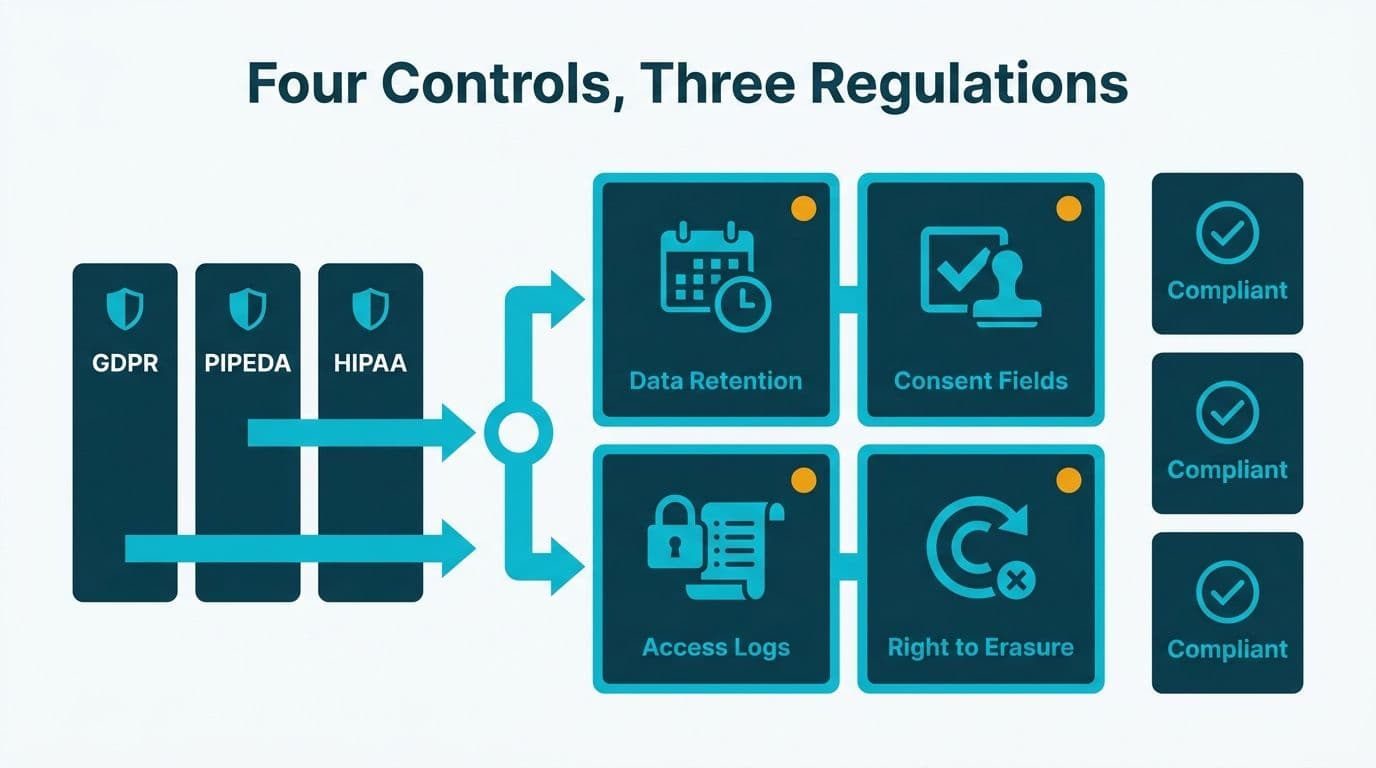
Configuring Zoho CRM for GDPR, PIPEDA, and HIPAA compliance requires four coordinated controls: data retention policies that flag expiring records, consent capture fields with timestamped audit trails, role-based access logs that satisfy supervisory authority requests, and documented right-to-erasure workflows. All three regulations share a common CRM configuration backbone - the differences lie mainly in retention windows, consent language, and breach notification timelines.
Key Takeaways
- Zoho CRM's retention workflows, audit logs, and consent fields can satisfy the technical requirements of GDPR (UK/EU), PIPEDA (Canada), and HIPAA (US) from a single configuration framework
- Consent capture requires a minimum of four custom fields per contact: status, source, timestamp, and the privacy notice version the contact agreed to
- The right-to-erasure workflow must include a human approval step - Zoho CRM does not auto-delete on data subject requests
- Role-based profiles and field-level security enforce HIPAA's Minimum Necessary standard and GDPR's data minimization principle
- Audit logs in Zoho CRM are stored for up to 60 days in-app; export them to long-term storage for regulatory audit windows
What Does Zoho CRM GDPR Compliance Configuration Require?
All three regulations impose overlapping obligations on organizations that store personal data in a CRM: a lawful basis for holding the data, controls limiting who can access it, an auditable trail of changes, and a defined process for deleting a contact's record on request. The differences lie in scope, enforcement mechanisms, and the specific thresholds that trigger action.
| Regulation | Jurisdiction | Core CRM Obligations | Breach Notification Window |
|---|---|---|---|
| GDPR | EU + UK | Consent records, retention limits, 30-day DSAR response, DPO for some orgs | 72 hours to supervisory authority |
| PIPEDA | Canada | Accountability, accuracy, limited retention, breach log | "As soon as feasible" |
| HIPAA | US healthcare | Minimum Necessary access, PHI audit log, BAA with vendors | 60 days to HHS + affected individuals |
A US healthcare finance team configuring Zoho CRM for billing workflows must treat every patient financial record as protected health information. HIPAA's Minimum Necessary standard means a billing clerk should never see clinical notes in the same CRM view as payment details. A UK fintech firm under GDPR must fulfill a right-to-erasure request within 30 days of a verified submission. A Canadian manufacturing company under PIPEDA must stop processing a contact's data the moment consent is withdrawn, regardless of where that data resides.
The configuration scope described in this guide aligns with the implementation checklist used by Zoho CRM consulting practitioners for regulated-industry deployments, where missing a single cross-module dependency - such as the link between Blueprint stages and campaign suppression lists - can undermine an otherwise complete compliance setup.
How Do You Configure Data Retention Policies in Zoho CRM?
Zoho CRM does not offer a native auto-delete scheduler for standard contact and account records, but fully compliant retention workflows can be built using custom date fields, Blueprint stage logic, and scheduled automation rules.
Step 1: Add a Retention_Expiry_Date field. Create a custom date field on the Contacts, Leads, and Accounts modules. A workflow rule auto-populates it at record creation by adding your policy window to the creation date.
Step 2: Set your retention window by regulation.
- GDPR (EU/UK): retention must be tied to the purpose of collection - typically 2 years for marketing consent records and 6 years for contract-related records under UK Limitation Act provisions
- PIPEDA (Canada): no statutory fixed term exists. The Office of the Privacy Commissioner of Canada recommends documenting the retention rationale in a data inventory alongside the CRM field configuration
- HIPAA (US): medical records must be retained for 6 years from creation or the date last in effect, whichever is later (45 CFR 164.530(j), as documented in Zoho's HIPAA compliance guide, 2025)
Step 3: Build a daily scheduled workflow. When today's date passes Retention_Expiry_Date, the workflow tags the record as "Expired - Pending Review," assigns it to the compliance owner, and suppresses it from active campaign lists via a Status field update. This prevents expired records from entering new sends while the compliance review is pending.
Step 4: Require human review before any deletion. Zoho CRM does not hard-delete records automatically - a compliance admin must initiate the erasure workflow. This design is intentional: it preserves the audit trail of related activities, notes, and deal histories that regulators may request during an investigation. It also creates the documented decision point that both GDPR and HIPAA require before data destruction.
Whether your team handles this configuration in-house or engages a Zoho partner depends largely on your existing CRM administration depth and how many data residency regions you need to cover simultaneously.
How Do You Capture and Manage Consent in Zoho CRM?
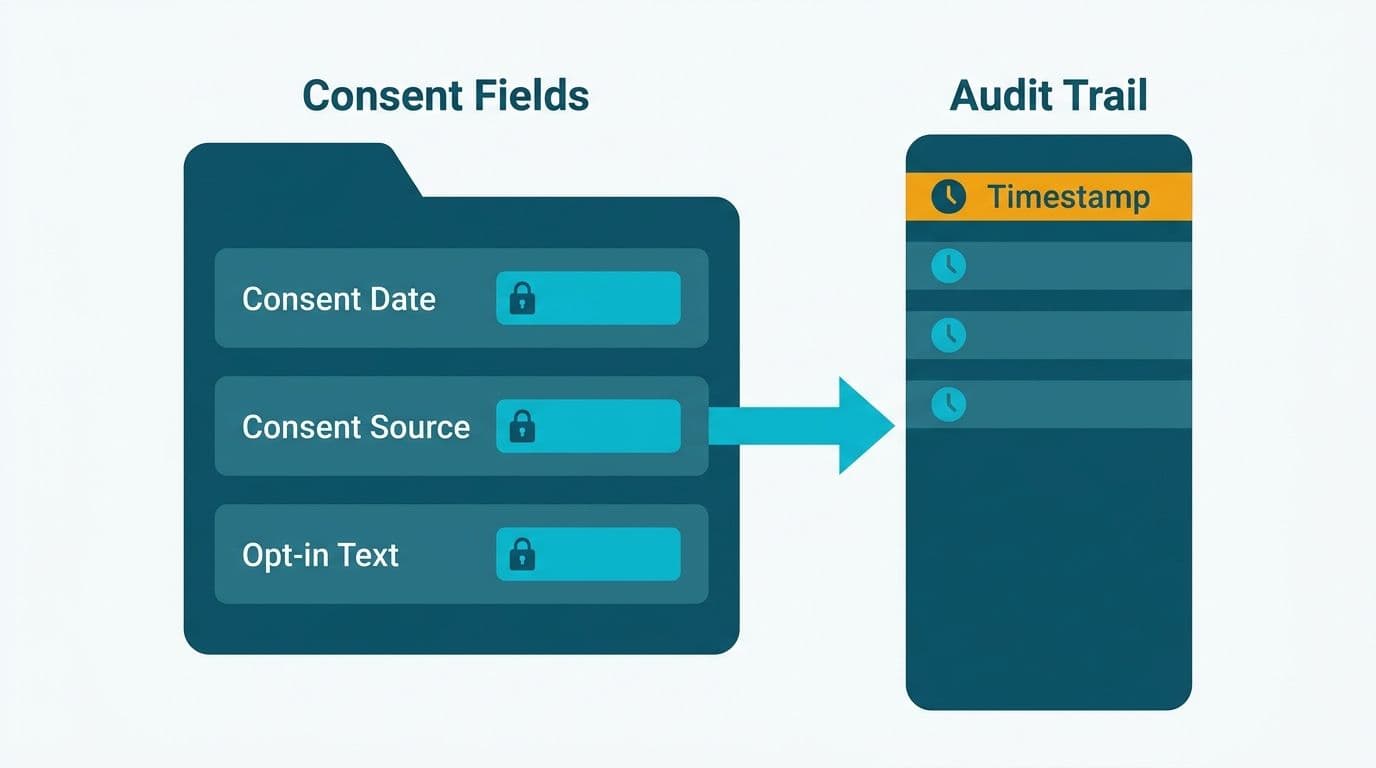
Consent capture is the most commonly misconfigured part of CRM compliance. A checkbox in a web form is not sufficient evidence of consent under GDPR, PIPEDA, or HIPAA's authorization requirements. You need a timestamped, source-attributed consent record that can be produced in response to a Subject Access Request or a regulatory inquiry - on demand, without manual reconstruction.
Minimum required custom fields per contact:
- Consent_Status (picklist: Granted / Withdrawn / Not Captured)
- Consent_Source (picklist: Web Form / Telephone / Paper / Import)
- Consent_Timestamp (date-time, auto-set by workflow when status changes)
- Consent_Version (text: stores the version identifier of your privacy notice at the time of consent)
- Consent_Withdrawn_Date (date-time, auto-set when Consent_Status changes to Withdrawn)
Wire these fields into a Blueprint: a contact's lifecycle stage cannot advance past "Marketing Qualified" unless Consent_Status equals Granted. This single gate prevents any team member from adding a contact to a campaign without a valid consent record - the most common GDPR violation pattern in mid-market CRM deployments.
For GDPR, withdrawal must be as easy as consent was to grant. Any team member should be able to set Consent_Status to Withdrawn, which triggers a workflow that immediately suppresses the contact from all active lists. The Consent_Withdrawn_Date field creates the timestamp evidence that the withdrawal was acted on promptly.
For HIPAA, marketing uses of protected health information require a signed Authorization - not just an opt-in checkbox. A US healthcare organization using Zoho CRM for patient outreach should add a separate HIPAA_Authorization_On_File boolean field and gate all marketing-type communications on its value being true. This field should be read-only for all profiles except Compliance Admin.
Zoho CRM's web-to-lead forms auto-populate Consent_Source and Consent_Timestamp at the point of capture, creating a closed audit loop from the moment data enters the system. For organizations running compliance reporting alongside this configuration, the Zoho Analytics for Healthcare Compliance Reporting setup guide covers how to surface consent metrics and flag data gaps in a compliance dashboard.
How Do You Configure Audit Logs for Regulatory Review?
Zoho CRM's built-in Audit Log (Setup > Security Control > Audit Log) records every create, update, delete, and export action by user, field, and timestamp. This satisfies the access audit trail requirements under GDPR, PIPEDA, and HIPAA. The default in-app retention window is 60 days - insufficient for GDPR's potential supervisory authority investigation horizon or HIPAA's 6-year records requirement.
Configuration steps:
1. Enable Audit Log under Setup > Security Control if it is not already active on your plan tier.
2. Configure a weekly scheduled export via the Zoho CRM API or native CSV export. Route the output to long-term storage: an S3 bucket, Azure Blob Storage, or your organization's SIEM. US healthcare organizations typically route these exports to an existing HIPAA-compliant data lake where retention is managed separately from the CRM.
3. Field-level change tracking activates automatically for custom fields once they are created. No additional Audit Log configuration is required - changes to Consent_Status, Retention_Expiry_Date, and HIPAA_Authorization_On_File are captured in the standard log.
4. Restrict Audit Log access to a named Compliance Admin profile using Zoho CRM Profiles (Setup > Users & Control > Profiles). This prevents regular users from viewing, modifying, or exporting the audit trail - a requirement under GDPR's accountability principle and HIPAA's access control standard.
For HIPAA, access logs must record not just data changes but reads of PHI. Zoho CRM logs record views when a user opens a contact or account record, visible in the Timeline tab of each record - this satisfies the access audit requirement under 45 CFR 164.312(b), as documented in Zoho's HIPAA compliance documentation (2025). For a broader view of how HIPAA and financial services regulations intersect in analytics and automation tooling, the AI Compliance Requirements for Financial Services regulatory map covers the overlapping obligations in depth.
How Do You Build a Right-to-Erasure Workflow in Zoho CRM?
GDPR Article 17, PIPEDA's right to withdraw consent and request deletion, and HIPAA's PHI destruction requirement all demand a documented, auditable process with evidence that each step was completed on time. In Zoho CRM, this is best handled as a Blueprint with mandatory approval steps - not a simple workflow rule - because it requires human sign-off before any data is anonymized or destroyed.
Blueprint stages for right-to-erasure:
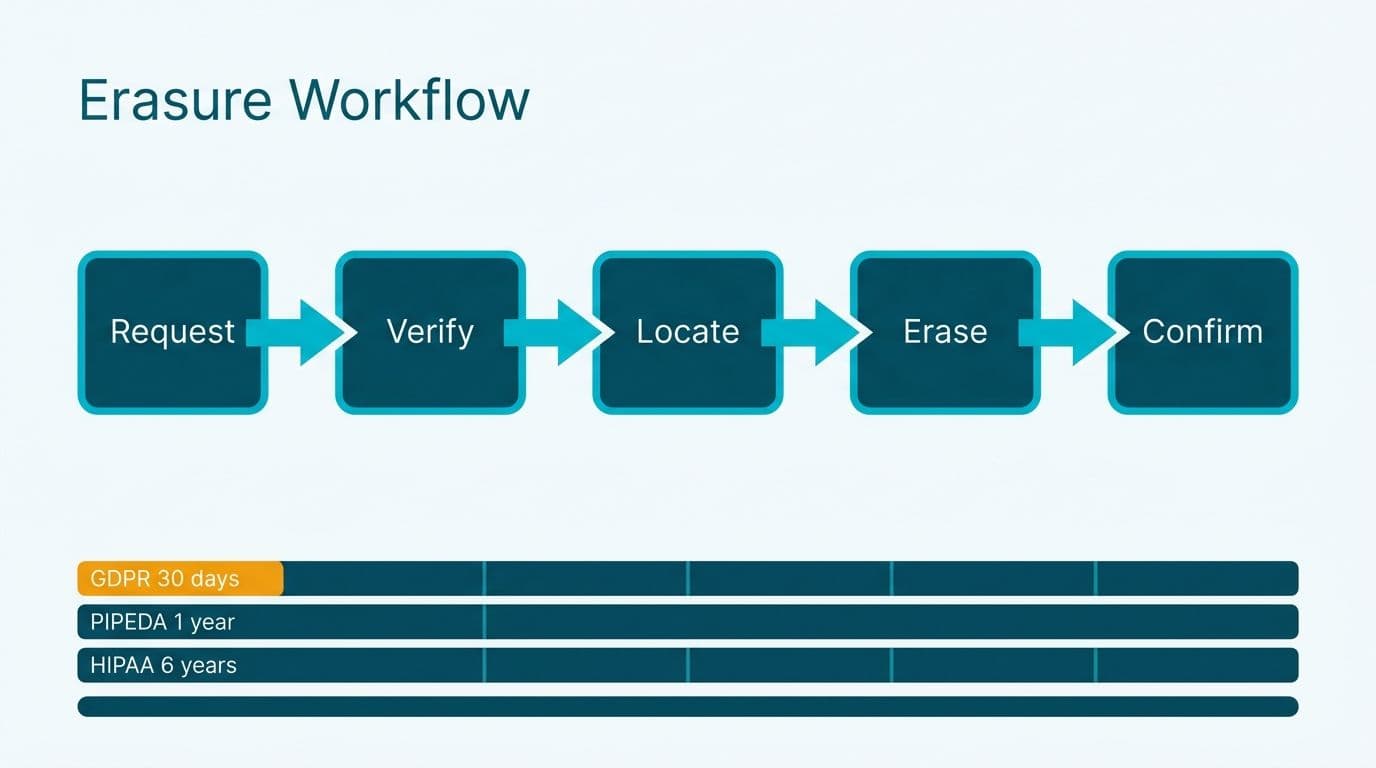
Stage 1 - Erasure Requested. Triggered manually when a contact submits a deletion request by email, web form, or telephone. The compliance admin moves the contact to this stage and logs the request date. The GDPR 30-day response clock starts at this stage transition timestamp.
Stage 2 - Identity Verified. The admin confirms the requestor's identity before acting on the request. GDPR requires this verification step to prevent fraudulent deletion requests. The Blueprint transition requires a mandatory note field documenting the verification method used (for example, "verified via email challenge sent to contact's registered address on [date]").
Stage 3 - Exemption Check. The admin reviews whether a legal hold applies: an ongoing contract, a tax retention obligation under UK HMRC rules or Canadian CRA rules, or a HIPAA-mandated minimum retention period. If a hold applies, the record moves to "Hold - Legal Basis" with a mandatory review date field populated. If no hold applies, the process continues.
Stage 4 - Erasure Executed. The admin anonymizes the record by replacing PII fields with "ERASED_[date]" strings. Hard deletion is not recommended because related Activities, Notes, and Deals retain foreign key references - anonymization preserves CRM relational integrity while removing the personal data. A Deluge script can iterate through all related records across modules and anonymize each in a single execution, with the script output logged as a note on the parent record.
Stage 5 - Confirmation Sent. A confirmation email is dispatched to the requestor. Under GDPR, this must be sent within 30 calendar days of Stage 1. Blueprint timestamps each stage transition automatically, providing the auditable evidence chain that a supervisory authority would request during a compliance review.
For HIPAA, the anonymization step should be replaced with a certified destruction record logged in a custom PHI Destruction Log module. Unlike GDPR, HIPAA requires that PHI destruction be irreversible and documented with a method description (for example, "fields overwritten with null values on [date] by [admin name], confirmed by [second approver]").
How Do Zoho CRM Roles and Profiles Enforce Data Minimization?
Access control is the structural backbone of all three compliance frameworks, yet it is frequently deprioritized during initial CRM deployments when speed takes precedence over governance. HIPAA's Minimum Necessary standard, GDPR's data minimization principle, and PIPEDA's limiting-use principle all translate to the same CRM configuration: users see only the data their role requires, and export access is restricted to named individuals.
Zoho CRM's Roles and Profiles system (Setup > Users & Control) provides two complementary layers:
- Profiles control module-level and field-level permissions. A "Compliance Read-Only" profile can view consent and contact fields but cannot export records, delete entries, or modify consent status fields.
- Roles control record-level access via the organizational hierarchy. A GDPR Data Protection Officer role should have cross-territory visibility for investigation purposes; regional sales reps should see only their own territory's records.
Implementation pattern for a mid-market healthcare finance team:
1. Create five base profiles: Sales Rep, Account Manager, Finance Analyst, Compliance Admin, and DPO. Each profile maps to a distinct data access tier with no upward inheritance by default.
2. Apply field-level security to restrict PHI fields, consent details, HIPAA Authorization flags, and financial account data to Compliance Admin and DPO profiles only. Sales Rep and Account Manager profiles see only the fields required for their role.
3. Configure data sharing rules so that US HIPAA-covered entity records are visible only to users in the US-region role hierarchy. This prevents cross-border exposure that would create additional GDPR obligations for UK or Canadian team members who accessed US patient data.
4. Run a quarterly profile audit using Zoho CRM's built-in Profile Summary report to detect permission creep - the gradual accumulation of access rights that consistently causes compliance audits to flag exceptions.
For the full implementation mechanics of roles and profiles in a clinical context, the Zoho CRM for Healthcare Practices compliance configuration guide walks through field-level security in a working healthcare example.
If your organization needs to bring Zoho CRM into alignment with GDPR, PIPEDA, or HIPAA requirements, our Zoho CRM consulting practice builds retention workflows, consent capture systems, and audit-ready configurations for healthcare and finance teams across the US, UK, and Canada. To explore the platform before committing to a full implementation, Try Zoho CRM free →
---
About Lets Viz: Lets Viz has delivered CRM implementation and data analytics projects since 2020, working with US healthcare systems, UK fintech firms, Canadian manufacturing companies, and global SaaS businesses. The practice holds a 5.0 Clutch rating and specializes in compliance-grade Zoho configurations for regulated industries where data governance is non-negotiable.