How to Build an Approval Workflow in Zoho Creator
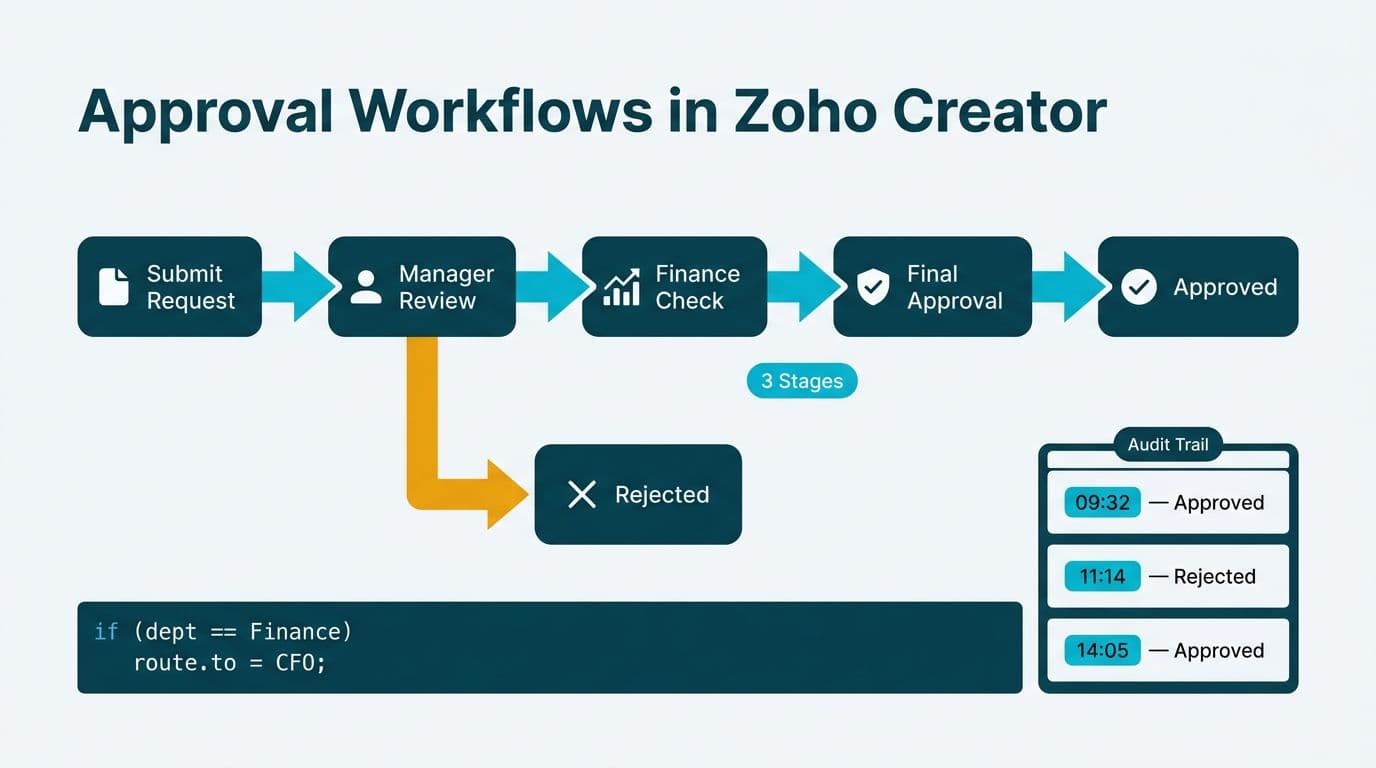
Building an approval workflow in Zoho Creator means configuring a native Approval Process block, writing Deluge scripts for conditional routing, and wiring native notifications to each stage transition. The platform logs every decision - approver identity, timestamp, comment, and outcome - in an immutable audit record. A mid-market finance team can consolidate purchase requests, leave sign-offs, and contract reviews inside a single Creator application.
Key Takeaways
- Zoho Creator's native Approval Process block supports linear and branching multi-stage workflows without third-party tools
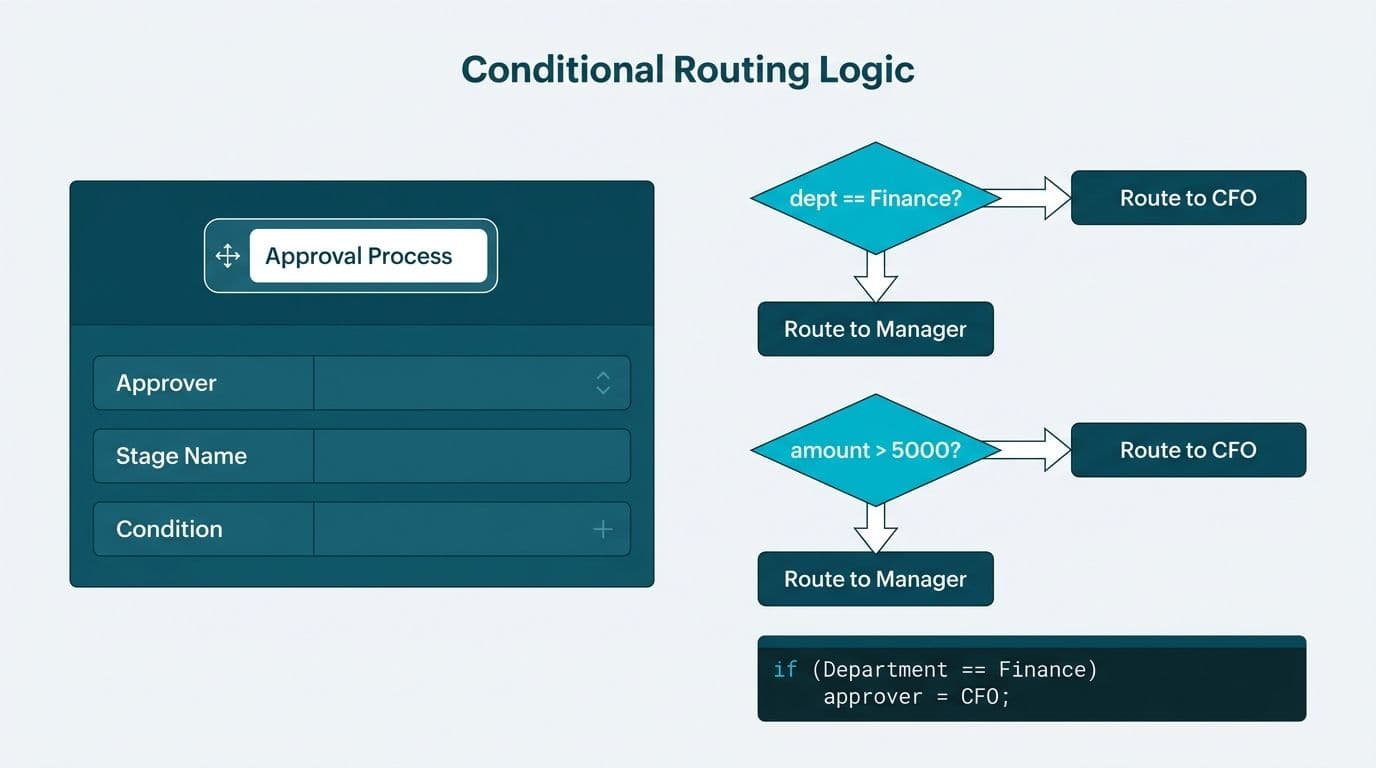
- Deluge scripting adds conditional routing - escalate to the CFO automatically when a purchase request exceeds a defined amount threshold
- Native email, in-app, and SMS notifications fire at every stage transition without additional configuration
- All decisions are logged in Creator's built-in audit trail, critical for SOC 2, HIPAA, GDPR, and PIPEDA compliance requirements
- A single Creator application can consolidate purchase requests, leave approvals, and contract reviews under one governance model
What Is an Approval Workflow in Zoho Creator?
An approval workflow in Zoho Creator is a structured routing mechanism that moves a submitted record through a series of defined review stages before it reaches a final state. Each stage assigns responsibility to a named user or a role, triggers a notification, and captures the approver's decision and comments before advancing the record.
Creator's native Approval Process block - available inside the Workflow builder in Creator 6, documented in Zoho Creator Help (2025) - handles the scaffolding automatically. The block locks the record from further edits while it is under review, so a submitter cannot alter a purchase request after a manager has already seen it. Every action - approved, rejected, or returned for clarification - writes an immutable entry to Creator's system audit log.
This matters for finance and legal teams operating under frameworks such as SOC 2 in the United States, GDPR in the UK and EU, or PIPEDA in Canada. Demonstrating that a contract went through a documented two-stage review is straightforward when the log is native to the platform rather than reconstructed from email threads. Teams that work with Zoho consulting services partners often discover that Creator can replace entire email-chain approval processes while producing compliance-grade evidence at each stage.
Creator's approach addresses a gap visible across Zoho Creator app examples for small business and enterprise alike: form submissions move into a defined process with named owners and deadlines, and no record advances without an explicit approver action.
How Do You Build an Approval Workflow in Zoho Creator?
Building a multi-stage approval workflow in Zoho Creator follows five configuration steps inside the platform's Workflow builder. Each step is non-destructive - you can test in a sandbox environment before deploying to production.
Step 1: Create the trigger form
Design a Creator form for the record type - purchase request, leave application, or contract submission. Include the fields that will drive routing logic: purchase amount, department, contract value, employee grade, or vendor risk tier. These field values are what Deluge will evaluate to route the workflow into the correct approval path.
Step 2: Add an Approval Process block
In the Workflow builder, select On Submit as the trigger event, then add an Approval Process action block. Creator prompts you to name the process and configure the first stage. Each stage requires three inputs:
- Approver - a static user, a field-value reference such as the submitter's direct manager pulled from a lookup, or a Creator role
- Deadline - hours or days before the system flags or escalates the pending stage
- Rejection action - terminate the record outright or return it to the submitter for correction
Step 3: Add subsequent stages
Chain additional stages for multi-level approvals. A purchase-request workflow for a US healthcare organization might sequence: Department Head (Stage 1) - Finance Controller (Stage 2) - CFO (Stage 3, activated only when the request exceeds a defined amount threshold). Creator executes stages in order and skips any stage whose Deluge condition evaluates false.
Step 4: Write Deluge scripts for conditional routing
The Approval Process block handles linear sequences. Conditional branching requires Deluge. A typical high-value escalation pattern:
```
if (input.Purchase_Amount > 50000)
{
sendmail
[
from : zoho.loginuserid
to : CFO_Email_Field
subject : "CFO approval required - high-value purchase"
message : "Request " + input.Request_ID + " requires CFO sign-off."
];
}
```
Pull the CFO email from a Creator lookup table rather than hardcoding it. This keeps the script portable as org charts change.
Step 5: Configure native notifications
Creator's Notification action type covers email, in-app alerts, and SMS. Add a notification at each transition: submission confirmation to the submitter, a stage-completion update, and a final approved or rejected status message. For a UK fintech firm subject to GDPR, preferring in-app notifications over email reduces approval-chain data stored in personal mailboxes - a meaningful consideration when handling data-subject-access requests.
How Does Deluge Scripting Power Multi-Stage Approval Logic?
Deluge is Zoho's proprietary scripting language embedded in Creator. In approval workflows, it manages decisions the declarative Approval Process block cannot: branching on calculated values, calling external APIs at stage boundaries, and writing structured entries to a dedicated audit log.
Consider a contract review workflow at a Canadian manufacturing firm subject to PIPEDA. Three approval paths are required based on contract value:
- Below CAD 10,000: Department Head review only
- CAD 10,000 to 100,000: Department Head plus Legal review
- Above CAD 100,000: Department Head, Legal, and CFO review
A Deluge script evaluates `input.Contract_Value` on submission and writes one of three strings - "standard", "legal", or "executive" - to a hidden `Approval_Track` field. Each Approval Process stage uses a Condition filter on `Approval_Track` to activate or skip. One workflow handles all three paths without maintaining three separate processes.
Deluge also handles time-based escalation. A scheduled function runs every four hours, queries all pending records where submission time exceeds a policy threshold, and sends a reminder notification. If the threshold doubles without action, the function re-assigns the stage to the approver's manager and logs the escalation event to the audit form. This pattern meets the procurement service-level commitments that many mid-market finance teams operate under.
For organizations evaluating Creator against other low-code platforms on compliance grounds - including the Zoho Creator vs Microsoft Power Apps comparison that IT leaders frequently run - Creator's native Deluge scripting and Zoho ecosystem integrations reduce the middleware layer for teams already on Zoho CRM or Zoho Analytics. The Zoho Creator GDPR Compliance and Data Residency Guide covers how audit log storage interacts with data-residency requirements in detail.
What Does a Finance-Team Approval Workflow Look Like End-to-End?
Walking a purchase request from submission to payment-ready status shows Creator's full approval cycle in practice.
Scenario: A US healthcare system's accounts payable cycle
A department coordinator submits a purchase request for medical consumables. The Creator form captures vendor name, purchase amount ($12,500), cost center, and GL code. A Deluge validation script runs on submit, checks the GL code against a lookup table, and rejects the submission with an inline error if the code does not match - preventing malformed records from entering the approval queue before any reviewer sees them.
Stage 1 (Department Head): The head of nursing receives an in-app notification and an email with approve or reject actions. She approves within four hours and adds the comment "Budgeted Q3." Creator writes to the audit log: approver email, timestamp, comment text, outcome.
Stage 2 (Finance Controller): The $12,500 amount activates Stage 2. The controller confirms the three-quote requirement is satisfied and approves. Creator writes a second structured log entry.
Stage 3 (CFO): Skipped. The Deluge condition for amounts above $50,000 evaluates false.
Final state: The record advances to "Approved - Pending PO." A Deluge webhook call posts the approved data to the hospital's ERP to initiate a purchase order. The audit trail - two named approvers, two timestamps, two comment strings, one escalation check that did not trigger - is available for export as CSV or PDF for SOC 2 review or internal audit.
A UK fintech team running equivalent procurement approvals would add a GDPR-compliant data-retention rule on the audit records, configuring Creator's scheduled archival policy to align with data-minimization obligations. A Canadian organization would tag each audit record with the PIPEDA consent classification applicable to any personal data in the vendor fields.
For a broader view of automating the payables cycle beyond the approval layer, see AI Automation for Accounts Payable: A Process Walkthrough.
How Do You Build an Audit Trail in Zoho Creator?
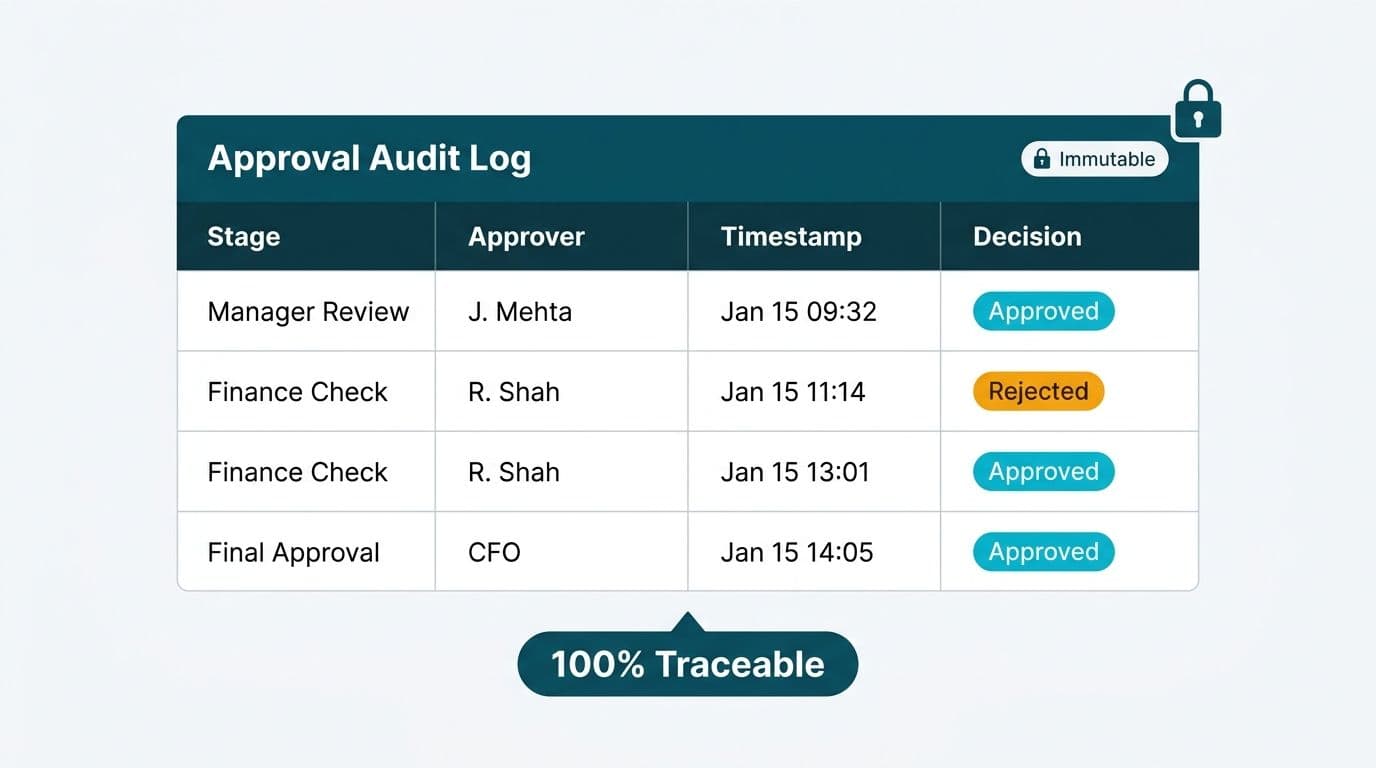
Creator logs approval events to its system audit log automatically. A production finance workflow typically needs an additional explicit, queryable record that an external auditor can review without accessing the Creator environment directly.
The standard approach is a dedicated Audit_Log form inside the same Creator application. A Deluge function called at every stage transition writes a new record to this form:
```
audit_entry = input.Audit_Log [Request_ID = input.Request_ID];
audit_entry.Stage_Name = "Stage 2 - Finance Controller";
audit_entry.Approver = zoho.loginuserid;
audit_entry.Action = "Approved";
audit_entry.Timestamp = zoho.currenttime;
audit_entry.Comment = input.Approval_Comment;
insert audit_entry;
```
Setting the Audit_Log form's field permissions so that standard users have no update or delete access makes the log append-only in practice. Finance teams can export the form data as a flat CSV or PDF at any time without touching the Creator builder.
For HIPAA-covered US healthcare organizations, the Audit_Log form can be extended to capture which users viewed a record - not just who actioned it - supporting the access-log requirement under HIPAA's audit control standard (45 CFR 164.312(b)). For GDPR-regulated UK and EU entities, the same form can flag records containing personal data and link to the relevant data-processing entry in a Creator compliance register.
The governance discipline that finance teams apply to analytics platforms transfers directly here. If your organization already follows structured change management for reporting tools - as covered in Power BI governance best practices - the same principles of role separation, immutable logs, and documented change history apply to Creator workflow governance without modification.
Approval Workflow Comparison: Purchase Requests, Leave Sign-Offs, and Contract Reviews
| Workflow Type | Trigger | Key Branching Variable | Typical Stages | Primary Compliance Driver |
|---|---|---|---|---|
| Purchase Request | Form submit | Amount threshold | Dept Head - Controller - CFO | SOC 2, internal policy |
| Leave Application | Form submit | Employee grade or days | Line Manager - HR Director | PIPEDA, employment law |
| Contract Review | Form submit | Contract value or type | Dept Head - Legal - CFO | GDPR, SOC 2, PIPEDA |
| Vendor Onboarding | Form submit | Vendor risk tier | Procurement - Finance - Compliance | SOC 2, GDPR, HIPAA |
| Expense Reimbursement | Form submit | Amount or category | Line Manager - Finance | Internal policy |
Each workflow uses the same Approval Process block and Deluge scripting pattern. Only the form fields, branching conditions, and stage assignments differ. A team that builds the purchase-request workflow first can adapt the pattern for leave approvals or contract reviews in substantially less time. This reusability is central to why Zoho Creator hr process automation examples show the same platform handling HR, finance, and procurement workflows concurrently - without licensing separate tools for each function.
When Should You Hire a Zoho Creator Developer for Approval Workflows?
Single-stage approval workflows are configurable by a Zoho admin without Deluge experience. Multi-stage conditionally branched workflows with ERP integration, dedicated audit forms, and regulatory compliance requirements are a different undertaking.
Consider engaging a specialist when:
- Your workflow requires more than three stages with conditional branching based on calculated field values
- You need to call an external API - ERP, HRIS, or contract management platform - at a stage transition
- Your audit trail must satisfy a defined regulatory framework: HIPAA or SOC 2 for US healthcare and finance, GDPR for UK and EU operations, PIPEDA for Canadian organizations
- You are migrating legacy spreadsheets or an Access database to Zoho Creator and need to replicate existing approval logic without introducing gaps
- You need Zoho Creator hr process automation examples adapted to your specific org chart and approval hierarchy
When evaluating partners, the Zoho partner tier matters. Advanced and Premium Zoho partners have demonstrated deployment volume and certified staff, and they carry access to Zoho's technical escalation path - relevant when a production finance workflow hits an edge case requiring platform-level investigation. Understanding the Zoho partner tiers - Advanced vs Premium distinction - before shortlisting vendors helps finance and IT leaders ask the right qualification questions during vendor selection.
---
About Lets Viz: Lets Viz has delivered workflow automation and analytics solutions to clients across US healthcare, UK fintech, Canadian manufacturing, and global SaaS since 2020. The team holds a 5.0 Clutch rating and includes certified Zoho and Microsoft specialists who have built production approval workflows, compliance-grade audit trails, and cross-system integrations for mid-market finance and operations teams.
If your finance, HR, or legal team is still routing approvals through email chains and spreadsheet trackers, Zoho consulting services can design and deploy a Creator workflow with an audit trail that stands up to SOC 2, HIPAA, GDPR, and PIPEDA scrutiny. Or try Zoho Creator free and explore the approval workflow builder directly.