Automate Month-End Financial Close with AI Tools
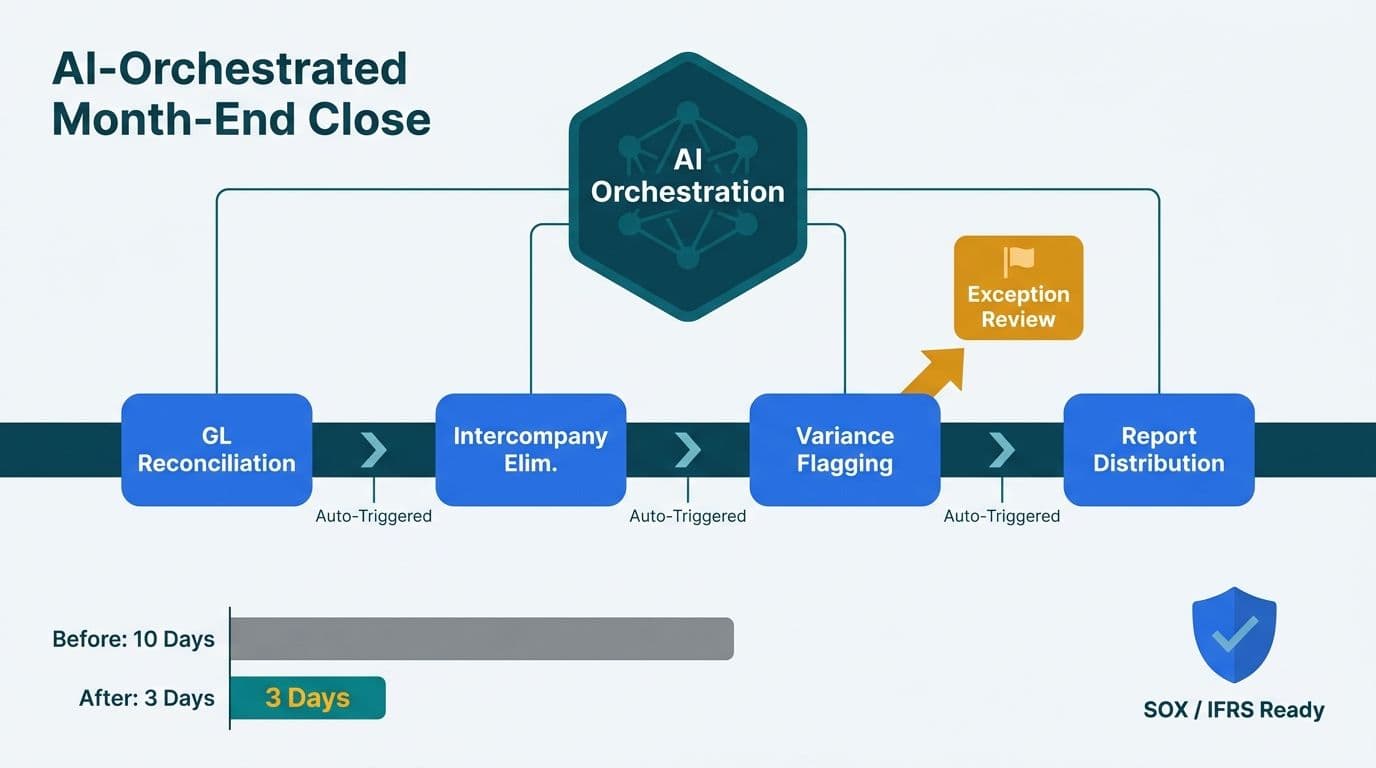
When finance teams automate month-end financial close with AI tools, they replace a sequence of manual handoffs with a single orchestrated workflow where each step triggers the next and only genuine exceptions surface for human review. The result is a faster close that leaves an auditable trail suitable for SOX, IFRS, and local regulatory requirements across US, UK, and Canadian jurisdictions.
Key Takeaways
- AI automation handles GL reconciliation, intercompany elimination, variance flagging, and report distribution as connected steps, not isolated tasks.
- Exceptions - not routine matches - are what reach human reviewers, compressing the close calendar without sacrificing accuracy.
- Workflow tools like n8n suit on-premise or region-locked data environments (important for HIPAA and PIPEDA compliance); cloud agent platforms handle unstructured document ingestion more effectively.
- DAX time intelligence functions, including EARLIER, enable period-over-period variance views that feed directly into automated distribution packages.
- Start with one sub-process rather than a full-stack rollout; GL reconciliation for low-risk accounts is the most reliable entry point.
What Does Automating Month-End Financial Close with AI Tools Actually Mean?
AI-automated month-end close is not a single product - it is an orchestration layer that connects your ERP, reconciliation engine, reporting tool, and communication platform. Each sub-process becomes a node in a workflow that passes structured outputs downstream, triggering the next step automatically on completion.
For teams working with an AI automation consulting partner, the standard architecture looks like this: an orchestration engine polls the ERP at a defined cutoff, reconciles the general ledger against sub-ledger balances, flags open items, runs intercompany nets, calculates budget-versus-actual variances, and packages the approved close report - all without a controller opening a spreadsheet for the routine items.
This is architecturally distinct from accounts payable automation, which focuses on invoice capture and approval routing. If you are mapping both workflows, the AI Automation for Accounts Payable: A Process Walkthrough covers the AP side in detail. The month-end close automation stack described here works downstream of AP: it assumes invoices are already posted and concentrates on the period-end consolidation steps.
The practical benefit is the elimination of wait states. In a manual close, a controller cannot start variance analysis until reconciliation is complete - and reconciliation waits on someone manually exporting the trial balance. Automation removes those waits because each step runs immediately on the completion of the prior one.
How Does AI Handle GL Reconciliation Automatically?
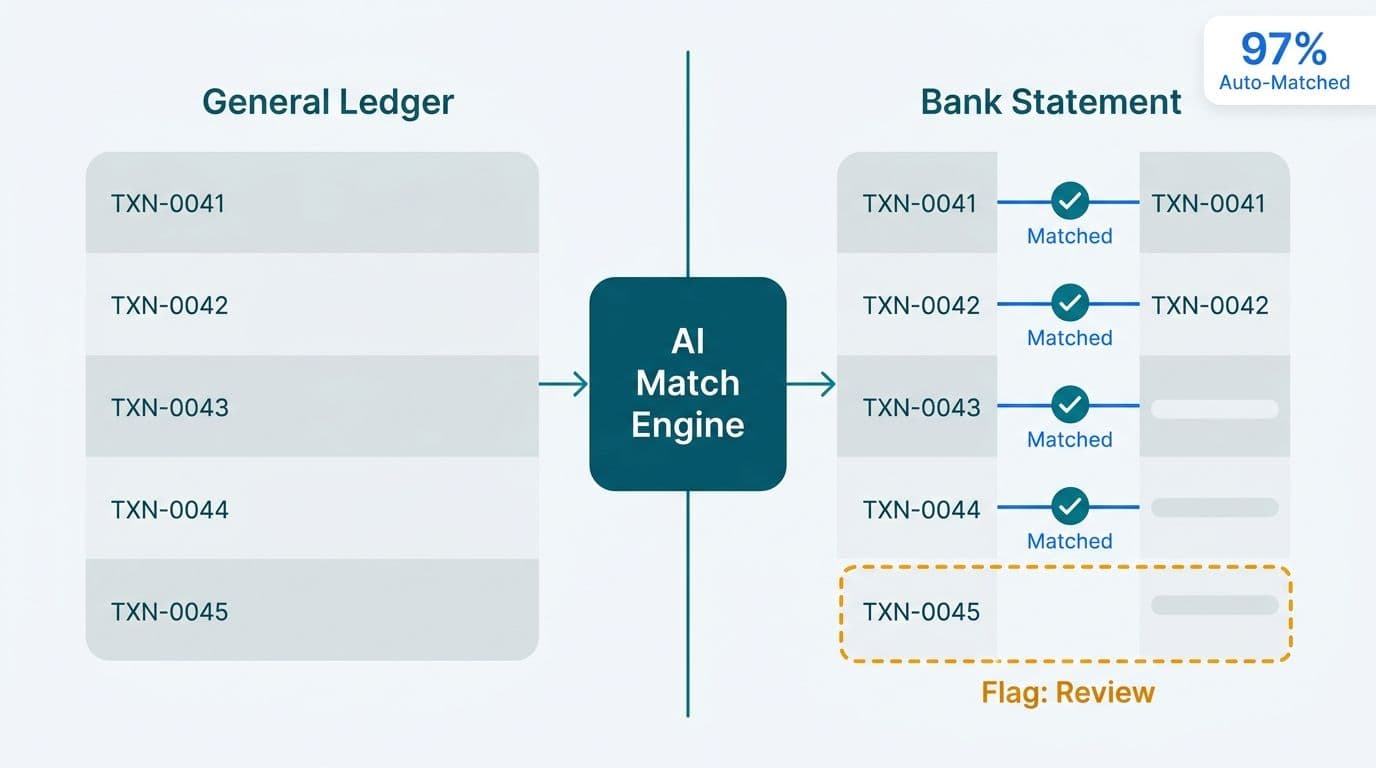
GL reconciliation is the most rule-dense step in the close cycle, which makes it well-suited to automation. The AI layer compares each general ledger account balance against its supporting sub-ledger or external data source - bank statements, accounts receivable aging, fixed asset registers - and classifies each line as matched, within tolerance, or requiring review.
The workflow typically runs as follows:
1. Extract: the orchestrator pulls the trial balance from the ERP via API or scheduled export at the period-end cutoff.
2. Match: a rules engine (or a lightweight LLM where matching logic involves unstructured text descriptions) aligns GL entries against sub-ledger records by account code, amount, and reference number.
3. Tolerance check: items within a configured materiality threshold - for example, under $500 or 0.1% of account balance - are auto-cleared and logged.
4. Exception queue: anything outside tolerance is written to an exception log with a reason code and routed to the responsible controller.
Configuring materiality thresholds correctly is as important as the matching logic itself. A threshold set too low floods reviewers with noise; too high and material items slip through. Most implementations start with thresholds drawn from the existing audit policy and adjust after the first two close cycles, once exception volume is observable.
A US healthcare system running HIPAA-compliant infrastructure routes exception logs through an access-controlled internal channel rather than open email, ensuring patient-adjacent financial data never traverses unsecured networks. A Canadian organisation subject to PIPEDA has similar requirements: financial records containing personal information must remain within provincial or national boundaries, which determines where the reconciliation engine is hosted.
How Do AI Tools Manage Intercompany Elimination?
Intercompany elimination - netting out transactions between entities in the same consolidated group - is repetitive and error-prone when done manually because the same transaction must be identified in two or more entity ledgers and zeroed out in consolidation.
AI handles this by maintaining a persistent intercompany transaction register. During the close run, the orchestrator:
- Queries each entity ERP for intercompany payables and receivables using a consistent entity-pair identifier.
- Matches entries against the register using entity code, invoice number, and functional-currency amount.
- Flags mismatches - common causes are one entity not yet posting the other side of the transaction, or a currency conversion timing difference.
- Proposes elimination journal entries for controller approval before they post to the consolidation layer.
A UK fintech firm running multi-entity consolidations under IFRS 17 finds this particularly valuable: intercompany reinsurance transactions must eliminate cleanly, and the volume makes manual matching impractical under month-end pressure. Under GDPR, consolidated financial data exchanged between entities in different EU member states must be handled with appropriate data-processing agreements - automated pipelines can enforce these controls at the workflow level rather than relying on individual users to remember them.
How Does AI Flag Variances and Route Exceptions?
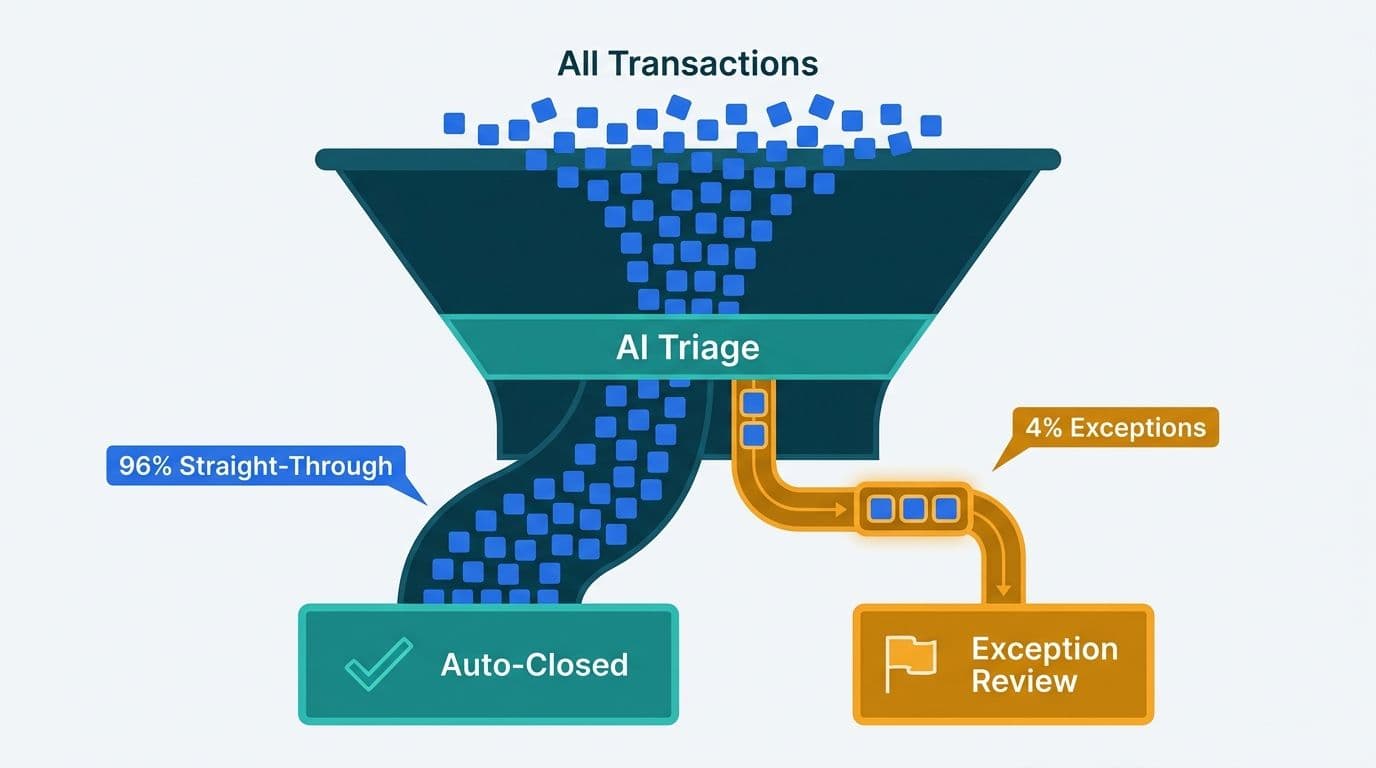
Variance flagging is where AI adds the most analytical lift. Once GL reconciliation is complete, the automation layer compares actuals against the prior period, the same period last year, and the approved budget, then applies statistical thresholds to identify which variances are material and to whom they should be routed.
Power BI is a common destination for variance output in mid-market finance teams. Inside a Power BI model, the DAX EARLIER function enables row-context comparisons within iterating calculations - useful when you need to rank accounts by variance magnitude within a SUMX or FILTER expression before routing the top offenders to reviewers. The EARLIER function captures the column value from the outer row context during a table iteration, so a measure can compare each account's current-period actuals against a ranked prior-period value computed in the same expression. Combined with DATEADD and SAMEPERIODLASTYEAR for broader time intelligence, these calculations produce period-over-period views that the automation layer reads programmatically to determine routing logic.
The routing itself is straightforward: the orchestrator reads the variance output, applies a materiality matrix by account type, entity, and threshold, and writes flagged items to a task queue. A reviewer in Chicago and an approver in Toronto can work from the same queue simultaneously - each item carries the account, the variance amount, the prior-period comparator, and a suggested reason code generated by the LLM layer.
This is where a critical design principle applies: automation must verify outcomes, not just outputs. Our own internal automation work illustrated this risk - we once had over 26 auto-generated fix tasks sit marked as resolved while the underlying issues remained open. The automation registered that someone had acknowledged the recommendation, not that the correction had been applied. Month-end close exception queues must close the same loop: a variance item should remain open until the controller posts a correcting entry and the system re-runs the variance check, confirming the flag no longer triggers.
For Canadian manufacturing companies subject to PIPEDA, exception queues containing employee-expense variances - which may include personally identifiable data - require the same access controls as the source ERP. Automating the routing makes those controls easier to enforce consistently.
n8n vs OpenAI Agent Builder for Finance Automation: Which Fits Better?
Choosing an orchestration layer is one of the first architectural decisions a CIO or data team lead must make. The two most common options for mid-market finance automation are n8n (an open-source, self-hostable workflow engine) and the OpenAI Responses/Agents API (a cloud-native agent platform with built-in language model capabilities). They serve different parts of the problem.
| Dimension | n8n | OpenAI Agent Builder |
|---|---|---|
| Deployment | Self-hosted or n8n Cloud | Cloud only (OpenAI infrastructure) |
| Data residency | On-premise or chosen region (HIPAA, PIPEDA friendly) | Data processed on OpenAI servers |
| Primary strength | Structured data, API chaining, ERP connectors | Unstructured documents, natural language, complex reasoning |
| Finance close fit | GL matching rules, ERP polling, report routing | Vendor description classification, variance narrative generation |
| Compliance posture | Strong - you control the environment | Depends on BAA or DPA negotiated with OpenAI |
| Developer requirement | Low-code node editor | SDK-based (Python/Node.js preferred) |
| Cost model | Free OSS + hosting costs; n8n Cloud subscription available | Pay-per-token via OpenAI API |
For most mid-market finance teams, the practical answer is to combine both: an open-source orchestrator like n8n handles the deterministic steps - GL extraction, matching, elimination journal proposals, and report packaging - while an LLM agent handles the language-intensive steps, such as generating the variance narrative for a CFO summary or classifying ambiguous vendor descriptions during reconciliation.
A US SaaS company with a 12-entity structure might use n8n to orchestrate the close pipeline end-to-end, with OpenAI API calls embedded in specific nodes for commentary generation. A UK fintech firm, mindful of GDPR data-transfer rules, might run n8n self-hosted within its EU cloud region and limit LLM calls to anonymised summary data only.
For teams evaluating the analytics stack that sits downstream of the close, the Fabric Lakehouse Finance Analytics: Power BI Reporting for FP&A guide covers how consolidated close data flows into a Microsoft Fabric lakehouse for FP&A reporting.
How Does Automated Report Distribution Work After Close?
Report distribution is the final step and the one most often left manual even when earlier steps are automated. Once the close is signed off, the orchestrator packages the approved output and distributes it based on role and entity.
A well-designed distribution step includes:
- Role-based packaging: the CFO receives a consolidated executive summary; entity controllers receive entity-level detail; the audit committee receives the variance narrative and supporting schedules.
- Format selection: PDF for signed-off reports, Excel for data consumers, Power BI bookmark links for live dashboard recipients.
- Delivery confirmation: the workflow waits for delivery acknowledgement before marking the step complete. An undelivered report is not a completed close.
- Immutable audit log: every distribution event - who received what, at what time, from which report version - is recorded in a log that satisfies SOX Section 302 and equivalent audit trail requirements under Canadian securities legislation.
For Power BI-based distribution, the Power BI Managed Service for Finance Teams: What to Expect article covers governance considerations including row-level security and scheduled refresh cadences that affect what recipients see at distribution time.
Canadian organisations distributing reports that include personal financial data to cross-border recipients - for example, a Canadian subsidiary reporting to a US parent - must document the cross-border transfer under PIPEDA. Automating the distribution step makes it straightforward to generate that documentation automatically from the audit log.
Where Should Finance Teams Start with AI Automation for the Close?
Start with one sub-process and a clear, testable definition of done. The most common failure mode in finance automation is attempting to automate the entire close in a single project, then discovering that source-ERP data quality is too inconsistent to support reliable matching.
A practical sequence for mid-market teams:
1. GL reconciliation for low-risk accounts first - bank accounts and intercompany receivables have the cleanest data and the most straightforward matching rules. Build confidence before moving to complex accrual or deferred-revenue accounts.
2. Variance flagging with Power BI - connect the reconciled trial balance to a Power BI model with DAX time intelligence measures. DATEADD and SAMEPERIODLASTYEAR cover most period-over-period reporting needs; reserve EARLIER for row-level ranking calculations within the same iterating expression.
3. Exception routing - once variances are flagged reliably, build the queue and notification workflow. This is where n8n or an equivalent orchestrator earns its place in the stack.
4. Report distribution - automate packaging and delivery last, after you trust the data upstream. Distributing a report built on unreliable reconciliations compounds problems rather than solving them.
5. Intercompany elimination - highest complexity because it spans entities and currencies; best saved for phase two after the single-entity orchestration layer is proven.
A useful starting point for teams assessing data infrastructure readiness before committing to a full automation build is the Free BI Readiness Self-Assessment, which covers process maturity, data governance, and ERP connectivity.
---
About Lets Viz: Lets Viz has delivered data analytics and AI automation engagements for US healthcare systems, UK fintech firms, Canadian manufacturers, and global SaaS companies since 2020, earning a 5.0 rating on Clutch. Our finance automation work spans ERP reconciliation pipelines, Power BI FP&A models, and end-to-end close orchestration for mid-market organisations navigating HIPAA, GDPR, and PIPEDA compliance requirements.
If your finance team is ready to compress the close calendar and route exceptions - rather than routine transactions - to human review, our AI automation consulting practice can design and build the orchestration layer that fits your ERP, reporting stack, and compliance environment.