AI Dry Run for Power BI Finance Reporting Validation
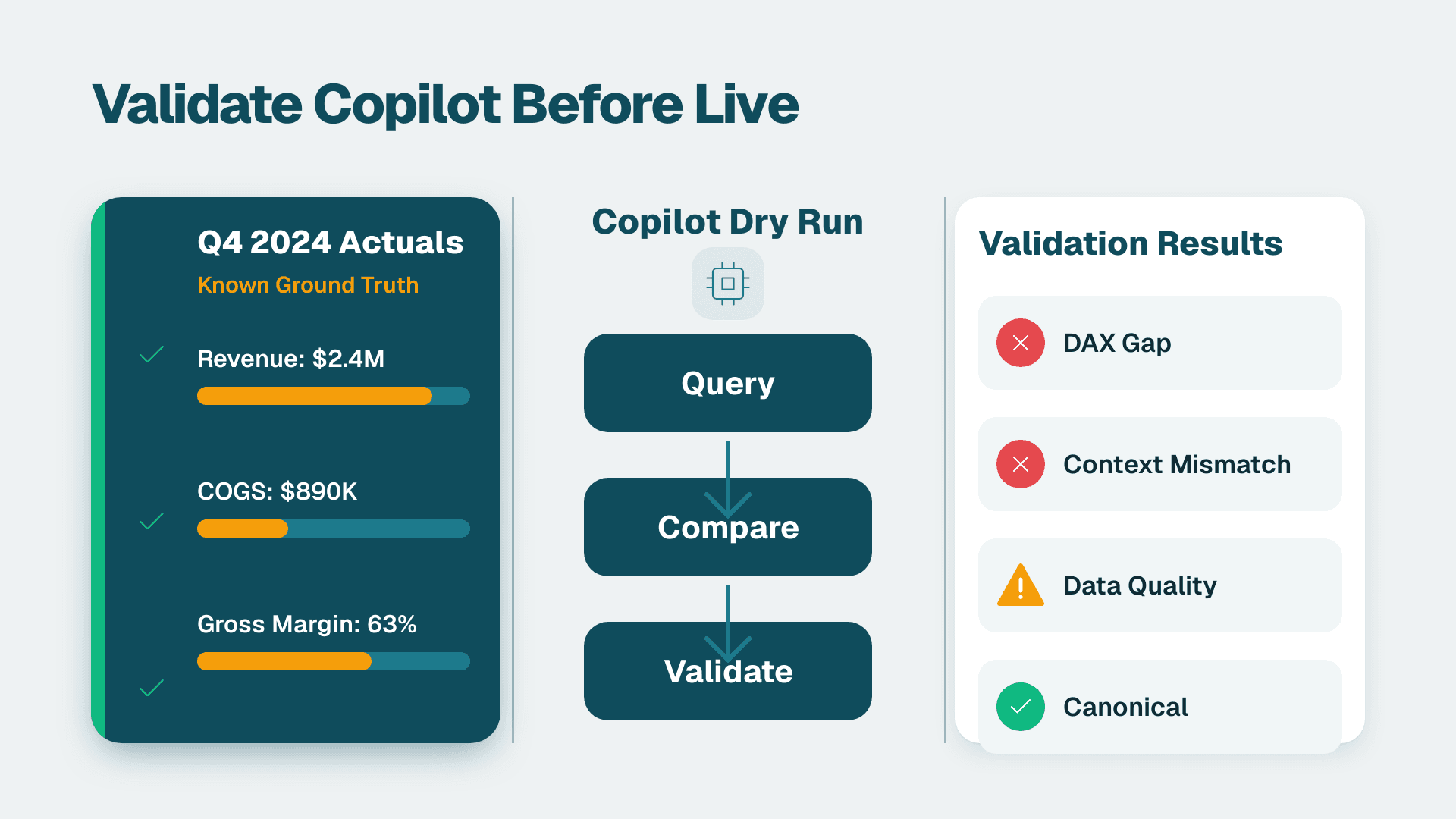
An AI dry run for Power BI finance reporting validation means running Microsoft Copilot against a closed historical period - typically Q4 actuals - where the correct numbers are already known, then comparing Copilot's outputs to those verified figures. It surfaces model misalignments, DAX logic gaps, and data quality issues before AI enters the live reporting path, eliminating the risk of presenting wrong numbers to a CFO or board.
Key Takeaways
A dry run uses known historical actuals as a control set, making failures visible before Copilot touches live reporting.
The most common failure modes are semantic model gaps, row-level security mismatches, and natural-language query ambiguity.
Compliance teams in UK/EU (GDPR), US (SOC 2/HIPAA), and Canada (PIPEDA) should confirm data handling obligations and use anonymized or synthetic data in non-production test environments.
A dry run produces a scored remediation list - not a binary pass/fail - so BI leads can prioritize fixes before rollout.
Time-to-confidence, not time-to-deploy, is the correct ROI metric for Copilot in finance reporting contexts.
What Is an AI Dry Run for Power BI Finance Reporting Validation?
An AI dry run is a controlled pre-production test in which you submit finance questions to Copilot using a historical dataset whose answers are already verified. Because the ground truth is fixed, any discrepancy is unambiguously a system failure, not a data anomaly.
The concept borrows from software QA: engineers run regression tests against known inputs and expected outputs before shipping a release. Applied to Power BI finance reporting validation, the same logic holds. Q4 actuals that have been audited, reconciled, and signed off become the test harness. Copilot must answer questions about those figures correctly - or flag why it cannot - before it is trusted with live Q1 numbers.
This matters most at mid-market companies where finance teams are small, cross-functional reliance on BI output is high, and a single wrong number in a board deck carries real reputational risk. If you are evaluating whether to engage a specialist for this work, Power BI consulting (Copilot-ready) covers the full readiness-through-rollout workflow.
How Do You Run an AI Dry Run in Power BI?
Understanding how to use Copilot in Power BI effectively starts with getting the semantic model right - and a dry run is the fastest way to surface what needs fixing before you commit to live reporting.
Running a dry run is a six-stage process. Each stage produces a concrete artifact that carries forward to the next.
Stage 1 - Select the control period. Choose a fully closed period: Q4 of the prior fiscal year, a completed month-end close, or an audited annual. Every number must be signed off and reconciled. Open periods introduce ambiguity that contaminates test results.
Stage 2 - Provision an isolated environment. Clone your Power BI semantic model to a dev or UAT workspace. Do not run the dry run against production. A misconfigured Copilot query that triggers a large DirectQuery scan should not land on your production gateway. If your organization operates on Microsoft Fabric, use a separate lakehouse or warehouse in the dev workspace rather than the production Gold layer.
Stage 3 - Build the question bank. Finance stakeholders provide the questions they actually ask at month-end and quarter-end. Typical examples: "What was gross margin by product line in Q4?", "Which cost centres exceeded budget by more than 10%?", "Show me revenue by region versus the same quarter last year." Include edge cases: questions crossing multiple fact tables, questions requiring RLS to filter by business unit, and questions whose correct answer is zero or negative.
Stage 4 - Run Copilot and log outputs. Use the Copilot pane in Power BI Service and submit each question. Capture the answer returned, the visual or DAX generated, and the underlying query. Export to a structured log - do not rely on screenshots alone.
Stage 5 - Score against ground truth. Compare Copilot's answer to the verified figure for each question. Score on three dimensions: accuracy (is the number correct?), completeness (was the full question answered?), and traceability (can a reviewer follow lineage from answer to source table?). A RAG rating - Red, Amber, Green per question - works well.
Stage 6 - Generate the remediation backlog. Every Red and Amber item becomes a ticket classified by root cause: semantic model gap, data quality issue, RLS misconfiguration, or natural-language ambiguity (Copilot interprets "revenue" as gross when finance means net). Prioritize by business impact and fix before live rollout.
For teams running automated Power BI report distribution on a tight schedule, the dry run backlog should gate promotion to production - not just inform it.
What Failure Modes Does a Dry Run Reliably Surface?
A dry run surfaces failures that standard UAT misses because it exercises the AI interpretation layer, not just the underlying data model.
Semantic ambiguity in measure names. Copilot resolves natural-language questions to measures by name and description. If your model has both `Revenue` and `Net Revenue` with no clear descriptions distinguishing them, Copilot will pick one inconsistently - and finance may not notice until a quarter-end pack shows a material discrepancy.
RLS boundary violations. A dry run executed as a finance director should return different figures than the same run as a regional manager. Teams frequently skip this test because the test account has admin rights - and discover in production that a regional manager can see global totals. The Power BI RLS admin guide for data protection covers the configuration patterns that prevent this class of failure.
Time intelligence gaps. Questions like "versus same quarter last year" require correctly defined date tables and properly marked fiscal calendars. Copilot can generate technically valid DAX that returns wrong results when the calendar is incomplete - a failure that is invisible until it reaches a board comparison slide.
DirectQuery latency and timeout. A question that works on an imported model may time out or return partial results against a DirectQuery source. The dry run catches this before it becomes a Monday-morning incident.
Cross-table aggregation errors. Finance questions frequently span revenue, cost, headcount, and budget tables. Wrong cardinality or filter direction causes Copilot's aggregations to silently double-count or under-count.
How Does the Dry Run Differ Between Microsoft Fabric and Power BI Service?
The dry run protocol is the same in both environments, but the failure modes differ by platform. Understanding Copilot in Microsoft Fabric vs Power BI Service helps you target test coverage correctly.
In Power BI Service, Copilot operates against a semantic model bounded by its measures, relationships, and column descriptions. Failure modes cluster around model definition: missing measures, poor descriptions, and RLS gaps. This is the environment most mid-market companies are working in today.
In Microsoft Fabric, Copilot can also operate against lakehouses, warehouses, and notebooks via the Fabric data agent. Additional failure modes appear: schema drift in Delta tables, partition pruning that causes Copilot to query only recent data when it intends to query all history, and security model differences between workspace-level and item-level permissions.
| Dimension | Power BI Service | Microsoft Fabric Data Agent |
|---|---|---|
| Copilot scope | Measures, tables, relationships in semantic model | Lakehouses, warehouses, notebooks, semantic models |
| Primary failure modes | Missing measures, ambiguous names, RLS gaps | Schema drift, partition scope, cross-item security |
| Recommended test environment | Dev workspace with cloned semantic model | Dev Fabric workspace with isolated lakehouse |
| Data residency control | Power BI tenant region setting | Fabric capacity region |
| Mid-market complexity | Lower - most orgs have a semantic model already | Higher - requires Fabric capacity and lakehouse maturity |
What Does a Dry Run Validate Across Finance and Operations Functions?
The dry run protocol extends beyond core financial reporting to the adjacent functions BI leads typically need to clear before expanding Copilot access.
FP&A and consolidation. The highest-stakes use case. Questions about budget vs. actual, rolling forecasts, and variance analysis must be letter-perfect. A dry run on Q4 actuals versus the Q4 approved budget is the minimum bar for any FP&A rollout.
Supply chain and inventory analytics. Questions about days-on-hand, reorder points, and supplier fill rates cross inventory, purchase order, and sales tables. Power BI Copilot for supply chain and inventory analytics dry runs should specifically test multi-table joins across at least three fact tables to catch cardinality issues early.
HR analytics and headcount costs. Headcount, salary, and benefits data carry the highest RLS sensitivity. Power BI Copilot for HR analytics dry runs should use a restricted test account that mirrors a line manager's RLS role - not an admin account - to confirm that salary bands cannot be surfaced outside the user's authorized scope.
Healthcare and clinical financial data. For US healthcare organizations subject to HIPAA, dry runs on clinical financial data must use de-identified or synthetic records. Power BI Copilot healthcare clinical data safety requires that the test environment never ingests live PHI, even temporarily.
How Do You Build the Copilot ROI Business Case After a Dry Run?
The dry run is not a cost - it is the evidence base for the rollout approval. Finance leadership will ask for a Power BI Copilot ROI business case, and the dry run generates the inputs needed to build one.
The most defensible metric is time-to-answer reduction: measure how long it currently takes a finance analyst to answer a representative set of month-end questions manually, then run the same set through Copilot post-remediation and record the delta. This is concrete and auditable without relying on market-size projections.
For Power BI Copilot ROI time savings measurement, the dry run provides a natural baseline. Every Red-scored question represents analyst time that Copilot would have wasted or misdirected. The remediation effort converts those hours from risk to realized savings.
Suppose a 10-person finance team at a mid-market US SaaS company currently spends 45 minutes per analyst per month answering ad-hoc Power BI questions. A clean Copilot rollout reducing that to 10 minutes frees roughly 5.8 analyst-hours per month - before counting reduced BI team escalations. Framing the ROI with specific time inputs from the dry run question bank is far more persuasive to a CFO than a generic projection.
The AI Automation for Finance Teams: Where to Start guide covers how to structure the broader automation ROI case across the full finance technology stack.
Compliance Considerations: GDPR, HIPAA, and PIPEDA for the Dry Run Environment
Geography determines which compliance obligations govern your dry run setup. Addressing these before rollout is far less costly than correcting them after a regulatory inquiry.
UK and EU organizations (GDPR). Power BI Copilot GDPR EU data residency is a live concern: Copilot queries pass through Microsoft's AI inference layer, and your data processing arrangement must account for this. Before running a dry run with real financial data, confirm your Power BI capacity is provisioned in an EU or UK region and review Microsoft's current guidance on Copilot data processing for your tenant region. If there is any uncertainty, use anonymized or synthetic data. A UK fintech firm evaluating Copilot for month-end reporting would, for instance, verify capacity region in the Fabric Admin Portal before enabling Copilot for any finance workspace.
US organizations (SOC 2 and HIPAA). For SaaS companies under SOC 2, the dry run environment should fall within your existing audit boundary. For healthcare organizations, HIPAA requires that any system processing PHI have a signed Business Associate Agreement with the vendor. Confirm Microsoft's BAA covers Copilot in Power BI before using live patient financial data in any test. A US health system running a dry run on revenue cycle data should use de-identified billing records from a prior closed fiscal year.
Canadian organizations (PIPEDA and provincial equivalents). PIPEDA requires that personal information be protected during processing and that individuals be informed of new uses. A Canadian manufacturing company dry-running Copilot against payroll-linked finance data should confirm that employee cost data is aggregated to a level that does not constitute personal information under PIPEDA before including it in the test dataset.
Across all three geographies, the safest posture is consistent: use the most recent fully closed period with PII removed or aggregated, run in a non-production workspace, and document the data lineage of the test dataset as part of your compliance record.
---
About Lets Viz: Lets Viz has delivered data analytics and Power BI solutions to clients across US healthcare, UK fintech, Canadian manufacturing, and global SaaS since 2020. With hands-on experience across Microsoft Fabric, Copilot readiness, and finance reporting transformation, the team brings the cross-industry pattern recognition that mid-market BI leads need before committing to an AI rollout.
If your finance team is evaluating Microsoft Copilot and wants a structured dry run before going live, Power BI consulting (Copilot-ready) covers the full readiness assessment, semantic model remediation, and validation protocol.