Zoho Creator GDPR Compliance and Data Residency Guide
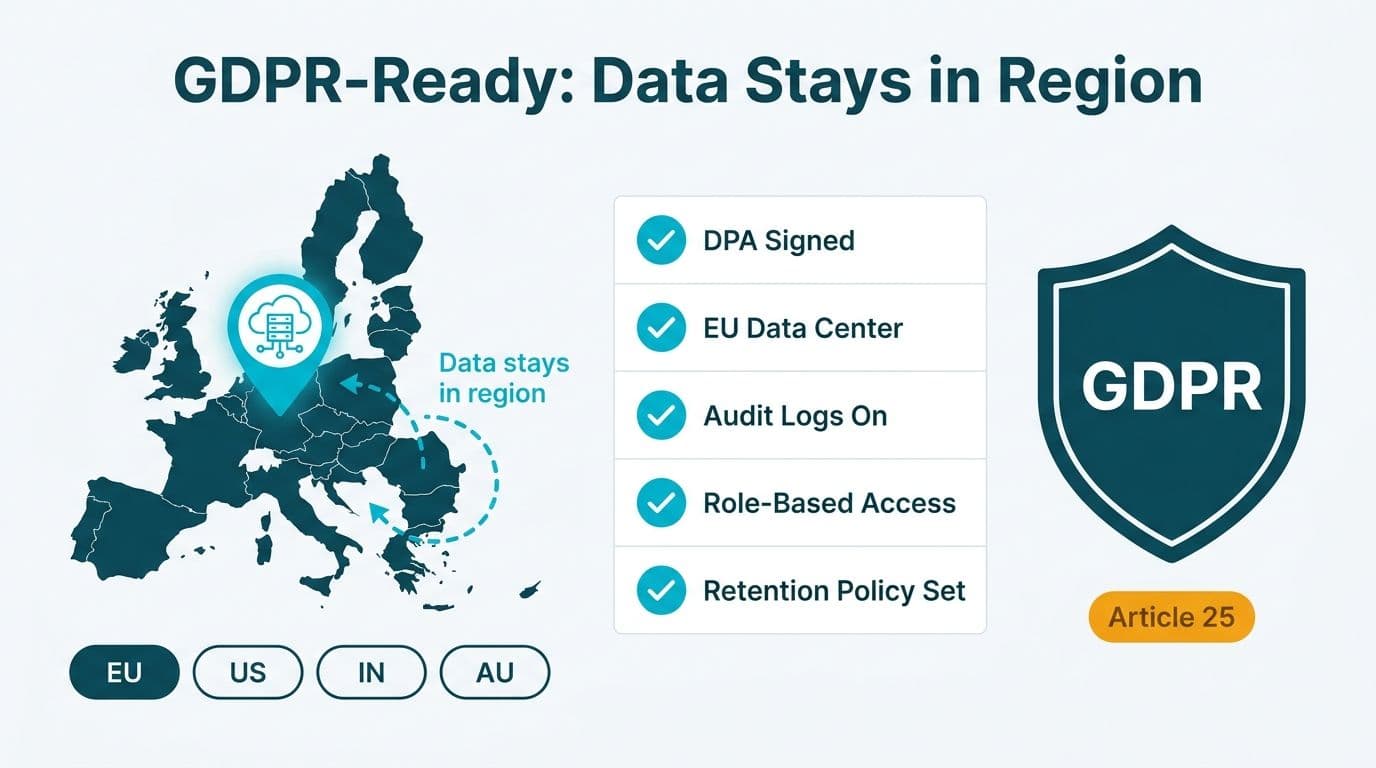
Zoho Creator supports GDPR compliance through a signed Data Processing Agreement, EU data-center options, a published sub-processor list, and built-in access controls that satisfy Article 25 data-protection-by-design requirements. For UK, EU, and Canadian organisations building internal apps, meeting compliance obligations requires selecting the correct data-residency region at account setup and configuring role-based permissions, audit logs, and retention policies before going live.
Key Takeaways
- Zoho Creator offers EU, US, India, Australia, and other regional data centers; your region choice at account creation is permanent and determines where all application data is stored at rest.
- A GDPR-compliant Data Processing Agreement must be executed before processing EU or UK personal data in Creator; UK organisations should also request Zoho's UK GDPR Addendum.
- Zoho publishes a sub-processor list; US healthcare teams must cross-reference it against HIPAA Business Associate obligations, and Canadian organisations against PIPEDA and provincial health data laws.
- HIPAA-covered US entities can sign a Business Associate Agreement with Zoho; contractual safeguards in Zoho's DPA cover most Canadian PIPEDA requirements.
- A pre-launch configuration checklist covering region selection, field-level encryption, access roles, audit logging, and retention rules is the fastest path to audit readiness.
What Data-Residency Regions Does Zoho Creator Support?
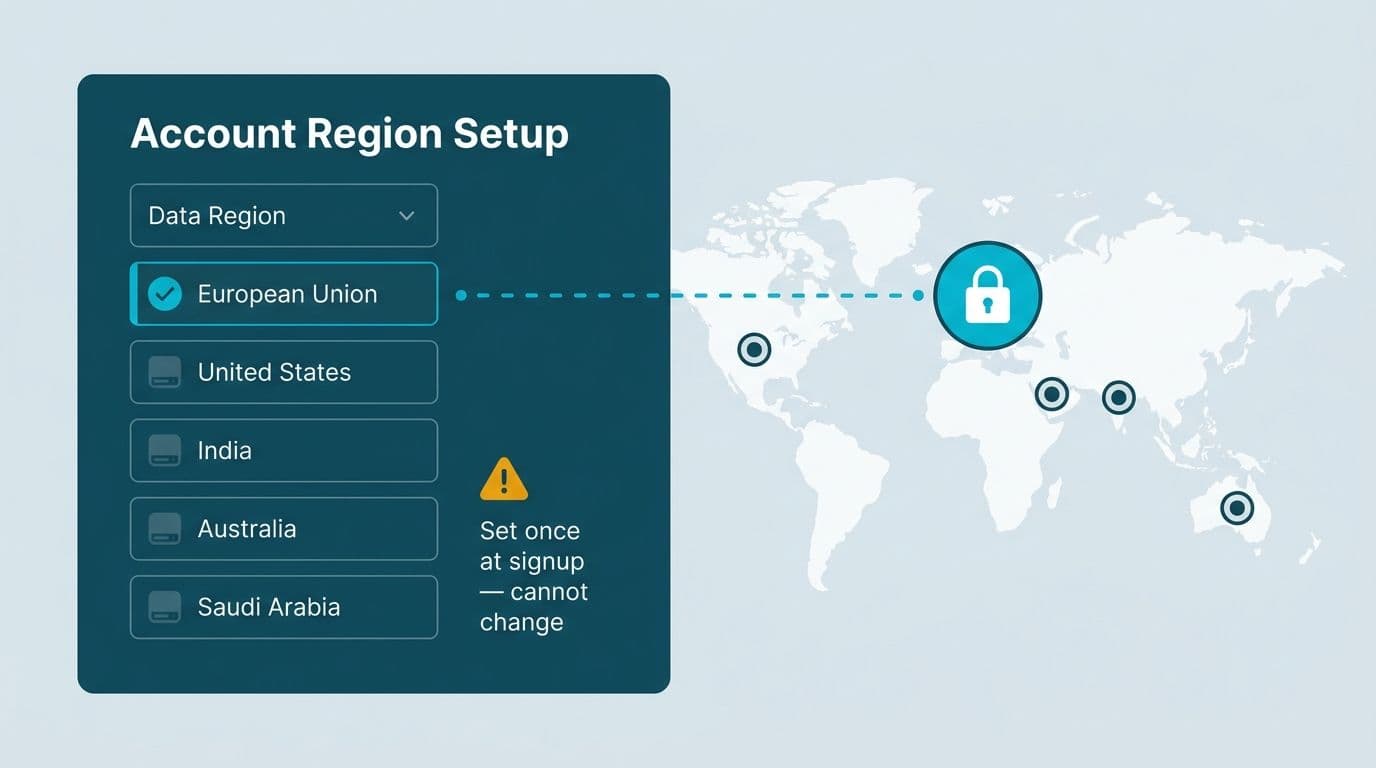
Zoho Creator allows account administrators to select a hosting region at account creation - that single decision determines where your forms, workflows, reports, and uploaded files are stored at rest. As of 2026, Zoho operates data centers in the European Union, United States, India, Australia, Saudi Arabia, and China, with Canadian data handled through North American infrastructure (Zoho's official data-locality documentation lists the current full complement of regions).
| Zoho Region | Primary Use Case | Key Compliance Frameworks |
|---|---|---|
| European Union | EU and UK personal data | GDPR, UK GDPR (with UK Addendum) |
| United States | US healthcare and finance | HIPAA BAA available, SOC 2 |
| India | Indian domestic workloads | Digital Personal Data Protection Act |
| Australia | Australian organisations | Australian Privacy Act |
| Saudi Arabia | KSA data-localisation requirements | NCA CSCC |
Critical note: Region selection cannot be changed after account creation. Migrating an existing Creator account from one region to another requires a full data export, new account creation in the target region, and data reimport - a process your Zoho consulting services partner can automate to reduce downtime and preserve audit continuity.
For a UK fintech firm operating under UK GDPR post-Brexit, the EU data center satisfies data-residency requirements under the current UK-EU adequacy decision, which permits data flows between both regions. A US mid-market healthcare organisation subject to HIPAA should select the US region and pair it with a signed Business Associate Agreement. A Canadian financial-services firm handling employee personal data under PIPEDA can use the North American region, relying on Zoho's contractual safeguards for cross-border transfer documentation.
How Does Zoho Creator GDPR Compliance Work in Practice?
GDPR compliance in Zoho Creator rests on four operational pillars: a valid legal basis for processing, data-protection by design, support for data-subject rights, and breach notification. Creator provides controls for all four - but configuration is your responsibility.
Legal basis and consent capture. Creator forms can include a mandatory checkbox field mapped to a consent timestamp. For EU citizen data, pair this with a hidden field capturing the source URL and session reference via URL parameters, giving you an Article 7-compliant consent audit trail.
Data minimisation and field-level encryption. Review every field against GDPR Article 5(1)(c) before publishing a form. Fields not strictly necessary for the app's stated purpose should be removed at design time. For fields capturing sensitive data - national identification numbers, health identifiers, or financial account references - enable field-level encryption through Creator's data security settings. Encrypted fields are stored as ciphertext in Zoho's database layer; they are not visible in list views, reports, or outbound integrations unless explicitly decrypted by an authorised role.
Right to erasure. Build a Creator workflow that locates all records tied to a user's email address, flags them with a deletion-requested status, and hard-deletes them via the Deluge deleteRecord function on a scheduled trigger. Retain only a pseudonymous deletion log - timestamp plus a non-reversible hash of the identifier - for your compliance audit record.
Breach notification. Zoho's DPA commits to notifying customers within 72 hours of becoming aware of a personal data breach, consistent with GDPR Article 33. Document your internal breach-response procedure to mirror this SLA: Zoho's notification is your trigger; your response plan - escalation contacts, regulatory notification templates, and affected-subject communication drafts - completes the obligation.
For organisations aligning Creator compliance with a broader analytics toolset, the Zoho Analytics for Healthcare Compliance Reporting setup guide covers parallel GDPR controls in the reporting layer.
What Does Zoho's Data Processing Agreement Cover?
A Data Processing Agreement (DPA) is the contract between you as data controller and Zoho as data processor, required under GDPR Article 28. Zoho provides a standard DPA accessible from the Admin Panel under Privacy and Data Protection, or downloadable from Zoho's compliance portal. UK organisations should also request and sign Zoho's UK Addendum, which adapts the EU DPA to the UK GDPR framework and references the UK's International Data Transfer Agreement (IDTA) mechanism for onward transfers to non-adequate countries.
| DPA Clause | GDPR Article | UK GDPR | PIPEDA Principle |
|---|---|---|---|
| Processing on documented instructions only | Art. 28(3)(a) | UK Art. 28(3)(a) | Accountability (Principle 1) |
| Sub-processor list and obligations | Art. 28(2)-(3)(d) | UK Art. 28(2)-(3)(d) | Third-party oversight |
| Technical and organisational measures | Art. 32 | UK Art. 32 | Safeguards (Principle 7) |
| Breach notification (72-hour SLA) | Art. 33 | UK Art. 33 | Breach of Security Safeguards |
| Data-subject rights assistance | Art. 12-23 | UK Art. 12-23 | Access (Principle 9) |
| Data return or deletion on termination | Art. 28(3)(g) | UK Art. 28(3)(g) | Retention (Principle 5) |
| Audit rights | Art. 28(3)(h) | UK Art. 28(3)(h) | Accountability (Principle 1) |
To execute the DPA, navigate to your Zoho Admin Panel and locate the Privacy and Compliance section to initiate the signing workflow. For organisations already processing EU personal data in Creator without a signed DPA, executing the agreement is your most urgent action - processing without it is itself a GDPR infringement under Article 28(1).
Which Sub-Processors Does Zoho Use, and How Do You Review the List?
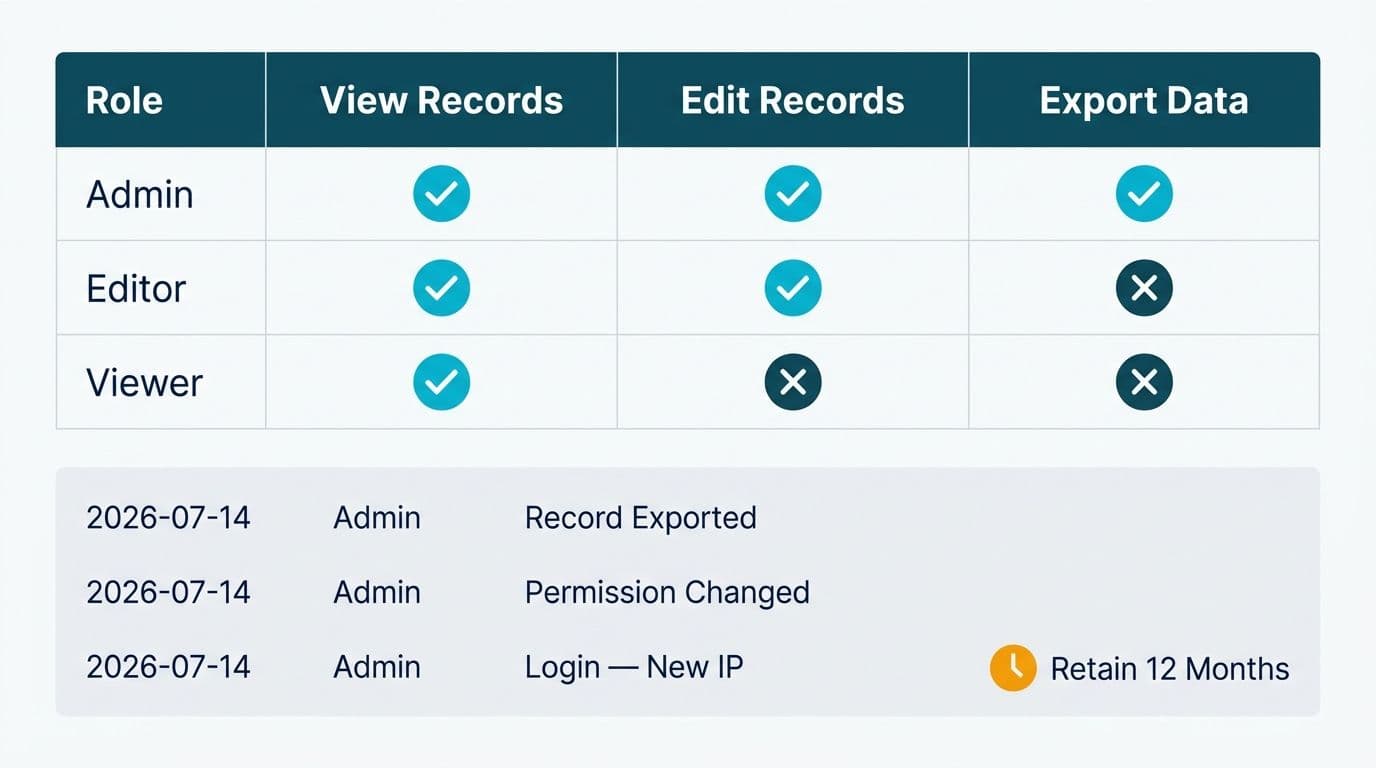
Under GDPR Article 28(2), you must consent to Zoho's use of sub-processors before they are engaged to handle your personal data. Zoho operates under a general consent model: by accepting the DPA, you consent to the sub-processors listed at that time, and Zoho commits to giving you advance notice - typically 30 days per Zoho's privacy documentation - before engaging any new sub-processor. You retain the right to object.
Zoho's published sub-processor list covers cloud infrastructure providers (for compute and storage within each data-residency region), CDN and delivery networks, security monitoring vendors, and billing payment processors. The current list is maintained on Zoho's privacy website - verify the direct URL from your Admin Panel, as it can move with site updates. Review it before your first production deployment and set a quarterly calendar reminder to check for additions.
For US healthcare organisations: Cross-reference the sub-processor list against your HIPAA obligations. Any sub-processor that could receive, store, or process protected health information (PHI) originating in your Creator app must itself be covered by a Business Associate Agreement with Zoho - or your configuration must prevent PHI from flowing to uncovered sub-processors by disabling the relevant Creator integrations.
For Canadian organisations: PIPEDA and provincial health data laws - including Ontario's PHIPA and Alberta's HIA - require documented knowledge of where your processors' sub-processors store data. Zoho's sub-processor list includes location detail; use it to support the third-party risk section of your Privacy Impact Assessment.
If Zoho notifies you of a new sub-processor and you have a legitimate objection - for example, the provider is based in a jurisdiction without adequate protection under your applicable law - you may terminate the relevant services under the DPA's objection clause. Document both the objection and any compensating controls you implement in its place.
How Does Zoho Creator Handle HIPAA and PIPEDA Requirements?
GDPR receives the most international attention, but North American organisations face sector-specific frameworks that require distinct configuration steps.
HIPAA (United States)
Zoho offers a Business Associate Agreement (BAA) for covered entities and business associates under HIPAA. The BAA extends HIPAA-specific obligations to Zoho's handling of any PHI stored or processed within Creator. Before enabling PHI capture in any Creator form, complete the following:
1. Execute the Zoho BAA through your account's legal or compliance contact, or via your Zoho account manager.
2. Confirm the US data center is selected for your account so that PHI remains within US borders.
3. Enable audit logging in Creator's admin settings, ensuring every access to PHI-containing records is timestamped and attributable to a named user.
4. Restrict PHI fields to roles with a documented minimum-necessary justification, per the HIPAA minimum-necessary standard (45 CFR 164.514(d)).
5. Audit and disable any Creator integrations with third-party services not covered by their own BAA.
A US health-plan finance team building a prior-authorisation tracking app, for example, might restrict member ID and procedure code fields to clinical roles, while authorisation status and billing codes are accessible only to finance staff - implementing minimum-necessary segmentation at the field-role level.
For a broader view of HIPAA-aligned tooling across the analytics layer, the HIPAA compliant BI tools for hospital data visualisation guide covers dashboard and reporting decisions in the same compliance context.
PIPEDA (Canada)
Canada's Personal Information Protection and Electronic Documents Act (PIPEDA) and its provincial equivalents require meaningful consent, purpose limitation, and a documented right to access and correct personal information. Zoho Creator supports these through consent-capture checkbox fields with server-side timestamps, purpose-limited app architecture (one Creator app per distinct processing purpose), and registered-user portal pages where individuals can view and correct their own records per PIPEDA Schedule 1, Principle 9.
A Canadian financial-services firm building an internal loan-application tracker should complete a Privacy Impact Assessment before go-live, referencing Zoho's DPA, the executed sub-processor list, and the confirmed data-residency region as documented third-party safeguards for the PIA's risk section.
Zoho Creator Data Residency Configuration Checklist for EU, UK, and Canada
Use this checklist before promoting any Creator app to production where personal data is in scope.
Account and Region Setup
- [ ] Data-residency region confirmed at account creation (EU for GDPR/UK GDPR; US for HIPAA; North America with contractual safeguards for PIPEDA)
- [ ] DPA executed with Zoho; UK Addendum requested and signed where applicable
- [ ] BAA executed with Zoho (US HIPAA-covered entities only)
- [ ] Sub-processor list reviewed, documented, and filed in your vendor-risk register
Data Architecture
- [ ] Every field reviewed against the data-minimisation principle - only collect what the app's stated purpose requires
- [ ] Sensitive fields (health identifiers, national IDs, financial account references) encrypted at the field level
- [ ] Data-retention periods defined per field category; automated deletion workflow built and tested
- [ ] Integrations audited - every third-party service receiving Creator data must meet equivalent compliance requirements
Access Control
- [ ] Role-based profiles configured with least-privilege principle enforced across all user types
- [ ] Special-category or PHI fields restricted to named roles with documented minimum-necessary justification
- [ ] Multi-factor authentication enabled for all admin and developer accounts
- [ ] IP restriction rules applied where your organisation operates from fixed IP ranges
Audit and Incident Response
- [ ] Audit logging enabled in Creator admin settings
- [ ] Log export to your SIEM or compliance data store scheduled (monthly minimum; daily for PHI-heavy apps)
- [ ] Breach-notification procedure documented, referencing Zoho's 72-hour DPA commitment and naming an internal response owner
- [ ] Data-subject rights workflows (DSAR, erasure, portability) built, tested, and documented with target response times
Ongoing Governance
- [ ] Zoho sub-processor change notifications enabled (email subscription or in-app alerts)
- [ ] Quarterly DPA and sub-processor list review scheduled in compliance calendar
- [ ] Annual DPIA or Privacy Impact Assessment review scheduled for any processing classified as high-risk under GDPR Article 35
For organisations embedding this checklist into a broader compliance programme, the AI automation compliance checklist for finance teams covers parallel controls across the data and automation stack.
When Should You Engage a Zoho Creator Consultant for Compliance Work?
Configuring data residency and GDPR controls is manageable for a single, self-contained Creator app. Complexity scales quickly when multiple apps share data models, when Creator integrates with CRM or ERP systems hosted in a different region, or when the data in scope includes regulated categories such as PHI or GDPR Article 9 special-category data.
Engage a specialist through Zoho consulting services when:
- You are operating three or more Creator apps that share user or patient records, making cross-app data governance and erasure workflows non-trivial to maintain.
- Your Creator deployment integrates with Zoho Analytics or Zoho CRM in a different region, or with a non-Zoho system, requiring a documented data-flow map and a valid transfer mechanism for each data leg.
- A client, insurer, or regulator has requested written evidence of your technical and organisational measures - something that requires a documented architecture review, not configuration screenshots alone.
- You need to migrate an existing Creator account from one region to another following a merger, acquisition, or change in legal entity structure.
- Your HIPAA Security Risk Analysis or GDPR risk assessment has classified Creator as a high-risk processor, triggering a mandatory Data Protection Impact Assessment under GDPR Article 35 or a HIPAA risk-analysis update under 45 CFR 164.308(a)(1).
For context on how Creator compliance intersects with broader Zoho platform decisions, the Zoho CRM for healthcare practices compliance configuration guide covers analogous controls in the CRM layer.
Ready to build GDPR- and HIPAA-ready internal apps on Zoho Creator? Explore our Zoho consulting services to see how we configure data residency, execute DPA and BAA agreements on your behalf, and deliver audit-ready Creator deployments for mid-market healthcare and finance teams.
---
About Lets Viz: Lets Viz is a data analytics consultancy serving US healthcare systems, UK fintech firms, Canadian manufacturing companies, and global SaaS businesses since 2020. The team holds a 5.0 Clutch rating and specialises in configuring Zoho, Power BI, and complementary platforms to meet HIPAA, GDPR, PIPEDA, and SOC 2 requirements. Our compliance-first methodology embeds governance controls at the architecture stage, not as a pre-audit retrofit.