What Does Zoho Zia AI Do in CRM? A Plain-English Guide
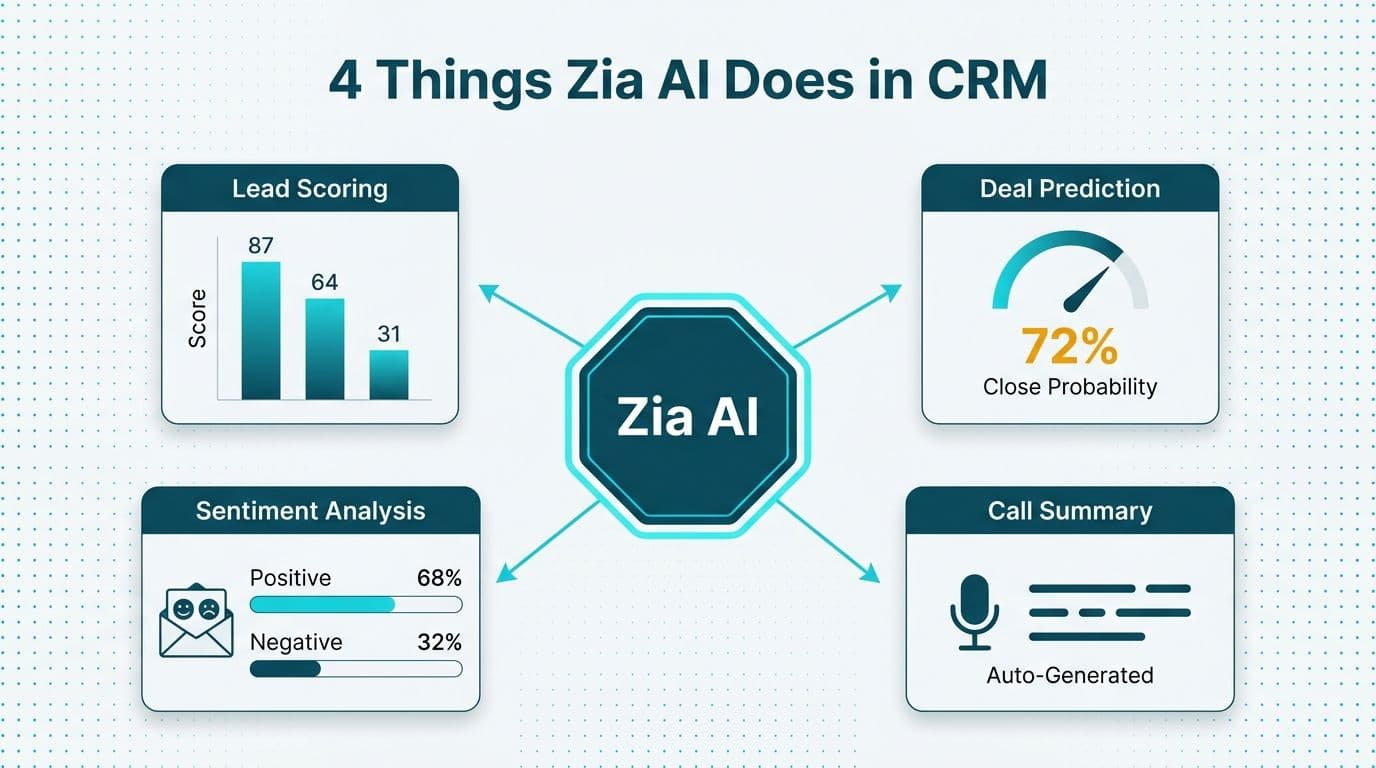
Zoho Zia is the built-in AI layer inside Zoho CRM that automates four core tasks: scoring leads, predicting deal closure probability, detecting email and call sentiment, and generating call summaries. Most capabilities activate out of the box on Enterprise and Ultimate plans - but producing accurate, business-reliable output typically requires deliberate configuration by an experienced consultant.
Key Takeaways
- Zia performs lead scoring, deal predictions, sentiment analysis, and call transcription natively on Zoho CRM Enterprise and Ultimate tiers - no separate AI subscription required.
- Out-of-the-box accuracy depends heavily on data quality: Zia trains on your historical CRM records, not generic industry benchmarks.
- Four configuration areas - field mapping, signal weighting, threshold tuning, and role-based visibility - must be addressed before Zia produces reliable output.
- Healthcare and finance teams in the US, UK, and Canada must verify that Zia-driven automation aligns with HIPAA, GDPR, and PIPEDA data-handling obligations before enabling call transcription or AI-based scoring.
- A clean data migration is a prerequisite for Zia on any platform: the AI cannot learn meaningful patterns from incomplete or inconsistently populated records.
What Does Zoho Zia AI Do in CRM?
Zia is Zoho's proprietary AI engine, embedded across the Zoho CRM platform to surface actionable intelligence from the data your team already captures. It covers lead scoring, deal health predictions, conversational sentiment analysis, call summaries, and anomaly detection - all within the CRM interface and without a separate AI subscription.
Zia is available on Zoho CRM Enterprise and Ultimate plans, per Zoho's official feature comparison (2026). Teams working with a Zoho CRM consulting partner typically unlock Zia's full capability within four to six weeks of go-live, once historical data reaches a usable volume.
The capabilities fall into two categories: those that activate immediately with minimal setup, and those that need deliberate configuration to produce results you can act on. The table below maps the distinction:
| Zia Capability | Works Out of the Box? | What Typically Needs Configuration |
|---|---|---|
| Lead Scoring | Partial - basic scoring activates; weighting needs tuning | Field selection, positive/negative signal mapping |
| Deal Predictions | Partial - requires 3+ months of closed-deal history | Stage mapping, win/loss signal tuning |
| Email Sentiment | Yes - activates on email sync | "At-risk" alert thresholds, routing rules |
| Call Sentiment & Summaries | Yes (with telephony connected) | Telephony connector setup, language/locale settings |
| Anomaly Detection | Partial | KPI field selection, alert threshold tuning |
| Best Time to Contact | Yes - learns automatically | 90+ days of email/call history recommended |
How Does Zia Lead Scoring Work - and What Are Its Limits?
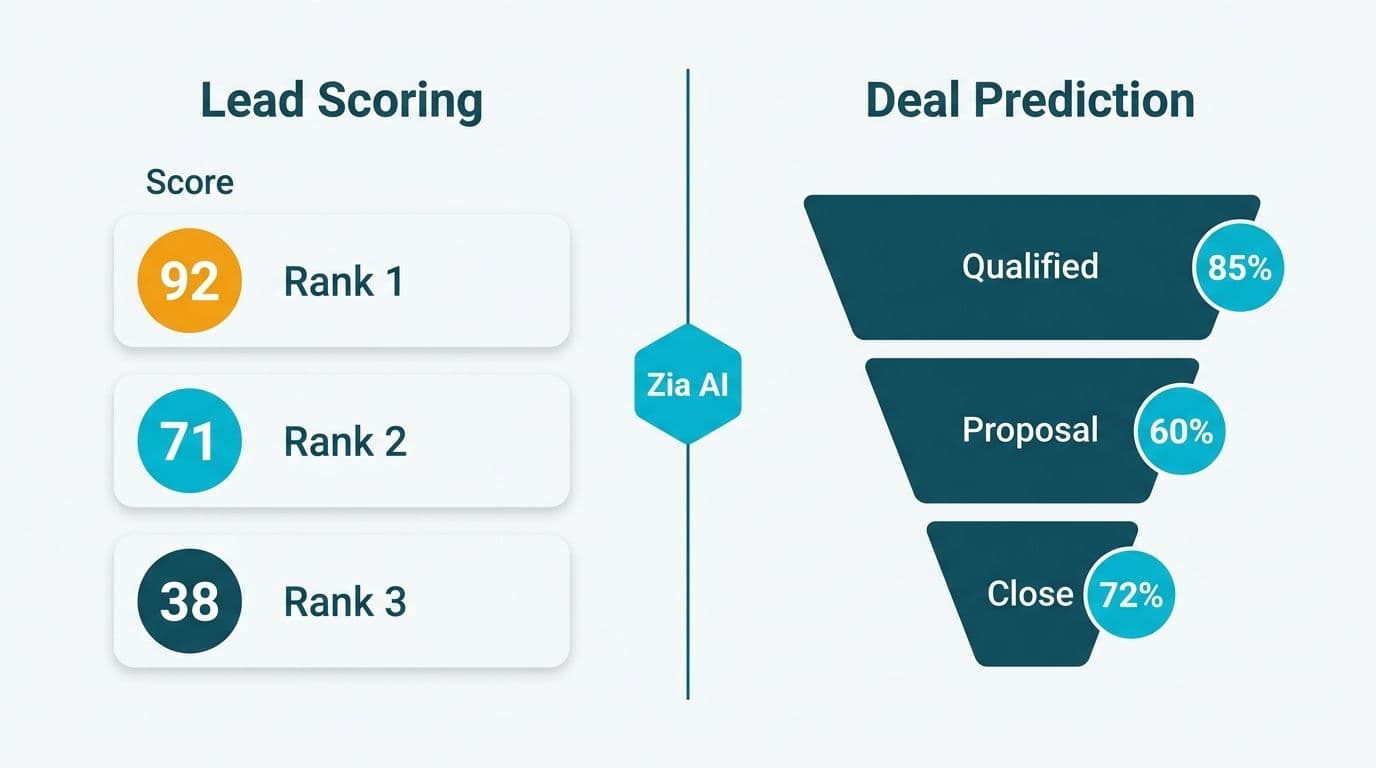
Zia lead scoring assigns a numerical score to each lead based on behavioral and demographic signals your team defines. It uses machine learning to adjust signal weighting over time as deals close or go cold, rather than executing static rules.
The mechanism: Zia monitors fields and activities designated as positive signals - email opens, completed meetings, target-segment tags - and negative signals such as long inactivity, bounced emails, or low-value deal indicators. It recalibrates the weighting without manual intervention as your team records outcomes, per Zoho CRM AI documentation (2026).
What limits accuracy out of the box: Zia trains on your data, not industry-average benchmarks. If lead records are missing key fields - industry, company size, or engagement history - Zia cannot score accurately. A US healthcare technology firm, for example, will find that Zia scores hospital procurement contacts identically to SMB leads unless a consultant maps custom fields for factors like IDN affiliation or procurement cycle length.
Teams should expect three to six months of closed-deal history before scores stabilize into a reliable pattern. For teams migrating from another CRM platform, that migration must include historical disposition data - not only open contacts.
One configuration detail that consistently gets missed: zoho crm roles and profiles setup governs which reps see Zia scores and in what form. If profiles are misconfigured, account executives may see raw numeric scores without interpretive context while sales development reps see nothing at all. Deliberate profile design is as much a part of Zia deployment as the AI configuration itself.
What Is Zia Deal Intelligence and When Should You Trust It?
Zia deal predictions surface inside the Deals module as a probability score alongside a health indicator - green, amber, or red - based on factors including days since last activity, number of touchpoints, and stage velocity compared to historical wins.
Deal health predictions are most reliable when your CRM stage definitions reflect how deals actually close at your company, not how they were configured during initial setup. A common failure pattern: stages are labelled "Proposal" and "Negotiation" but reps move deals backward and forward inconsistently, which corrupts Zia's pattern recognition.
When to trust Zia deal intelligence: Once your pipeline contains at least 50 closed-won and 50 closed-lost deals mapped to well-defined stages, Zia's predictions become directionally reliable, per Zoho CRM model documentation (2026). Below that threshold, treat scores as directional hints rather than forecast inputs.
A UK fintech firm with a 90-day enterprise sales cycle, for example, would need to configure Zia to recognize that a deal sitting at "Legal Review" for 30 days is normal - not a risk signal warranting intervention. Without that context, Zia flags healthy deals as at-risk, eroding rep trust in the AI layer. Undermined trust in AI scores is one of the most consistent failure modes documented in zoho crm user adoption best practices assessments, and recovering from it requires retraining reps alongside reconfiguring the model.
How Does Zia Handle Sentiment Analysis and Call Summaries?
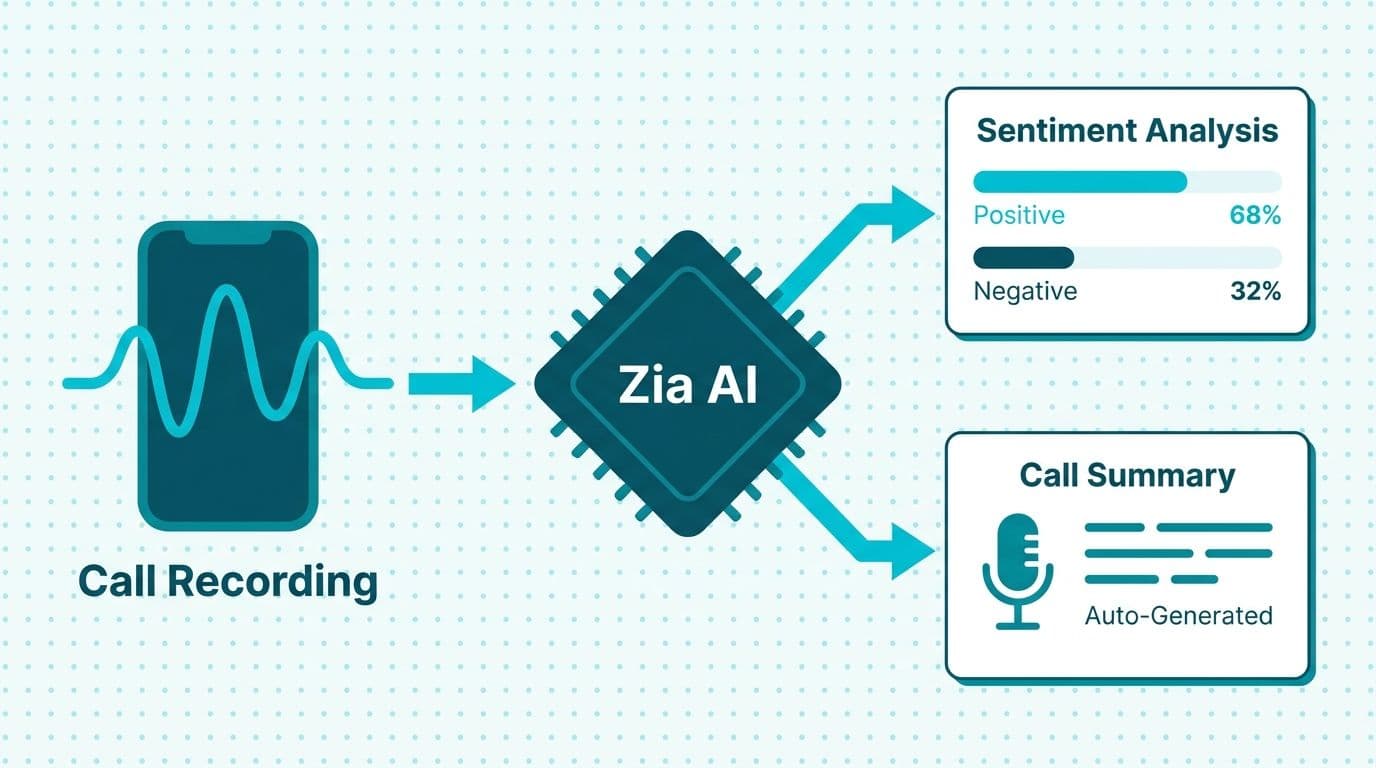
Zia's sentiment analysis operates across two surfaces: email threads and phone calls.
Email sentiment is analyzed at the thread level. Zia classifies each exchange as positive, neutral, or negative, and flags threads that shift from positive to negative - an early-warning signal for deals heading sideways. This feature activates automatically once your email account is synced to Zoho CRM, though the thresholds for "at-risk" flagging benefit from deliberate tuning to reduce false positives.
Call summaries require a telephony integration - either Zoho PhoneBridge or a supported third-party connector. When active, Zia transcribes calls, identifies key discussion points, surfaces action items, and logs a sentiment summary against each call record. Language and locale settings in the telephony connector directly affect transcription accuracy for multilingual teams and regional accents, per Zoho CRM telephony documentation (2026).
For Canadian organizations subject to PIPEDA, and UK and EU teams operating under GDPR, call recording and AI transcription trigger consent and data-residency obligations. Enabling Zia call summaries without a legal review of those requirements - and without appropriate consent language in place - is a compliance gap that routinely surfaces in implementation audits. US healthcare organizations handling patient-adjacent conversations face equivalent scrutiny under HIPAA. The Zoho CRM for Healthcare Practices: Compliance Configuration Guide details HIPAA-aligned field access controls that apply directly to Zia-processed contact data.
Zia AI vs Standard CRM Automation: What Is the Practical Difference?
Zia is not a replacement for Zoho CRM's rule-based automation - it serves a distinct function, and the two work best in combination. Understanding the difference helps teams allocate configuration effort correctly.
Standard automation (workflow rules and Blueprint) executes deterministic logic: if a deal reaches Stage X and field Y equals Z, execute action A. It is predictable, auditable, and does not change behavior over time based on emerging patterns. Compliance teams in regulated industries generally prefer deterministic automation for activities that require clear audit trails - a priority for HIPAA-governed US healthcare teams and GDPR-governed European organizations alike.
Zia (machine-learning intelligence) identifies patterns across records and surfaces probabilistic recommendations: this lead is likely to convert, this deal is showing risk signals, this contact prefers morning outreach. It adapts as the model retrains on new outcomes but is not deterministic - the same inputs can yield different outputs after the model updates.
The practical framework: use Blueprint and workflow rules to enforce process compliance and data integrity, then use Zia to surface prioritization intelligence on top of that structured data. The two layers reinforce each other - Blueprint ensures deal stages are consistent, feeding Zia clean training data, while Zia identifies which of those clean deals to prioritize.
Mixing the two - for instance, using a Zia score as a trigger condition in a Blueprint transition - is possible but requires careful threshold design to avoid automation misfires that advance or reverse deals without human review.
Which Zia Features Still Require Consultant Configuration to Be Reliable?
Most Zia features activate at the platform level but produce reliable output only after deliberate setup. Configuration effort concentrates in four areas:
1. Signal selection for lead and deal scoring. The fields Zia monitors as positive or negative signals must be chosen deliberately. Default signals are generic; a consultant should map them to the activity and demographic fields that actually predict conversion in your business. A Canadian manufacturing firm selling capital equipment needs different positive signals than a US SaaS company on monthly subscriptions - and Zia will not make that distinction on its own.
2. Stage and field mapping. Zia's deal predictions read pipeline stage names and field values literally. If stage transitions are not enforced consistently, Zia's training data is noisy. Enforcing stage discipline through zoho crm workflow rules vs blueprint automation - Blueprint is the better choice, as it locks stage transitions until defined criteria are met - dramatically improves prediction quality over time.
3. Roles, profiles, and Zia visibility. Which team members see Zia recommendations, and which can override or dismiss them, is governed by your roles and profiles configuration. Without deliberate access design, Zia scores become noise rather than guidance. This is particularly relevant for mid-market teams with separate outbound and account management functions, where score context should differ by role.
4. Integration with adjacent systems. Zia's "best time to contact" and sentiment features improve significantly when Zoho CRM is connected to your full communication stack. For teams executing a zoho crm microsoft 365 integration setup, mapping calendar and email data into CRM provides Zia substantially more behavioral signal to learn from. Connecting telephony expands Zia's surface from email sentiment to full call-level intelligence.
The Zoho CRM Pricing Plans Compared: Standard to Ultimate (2026) covers which Zia features are tier-locked and which are included by default - a key input to any zoho crm total cost of ownership mid-market calculation.
How Long Does It Take to Configure Zia Properly?
The zoho crm implementation timeline for teams that want Zia running reliably extends beyond a standard CRM deployment. A practical framework by phase:
- Weeks 1-4: Data audit, field standardization, and stage mapping. Zia cannot learn from inconsistent data. This phase is where the zoho crm partner vs in-house implementation decision has the greatest impact: in-house teams consistently underestimate how many records carry incomplete or conflicting field values, and discovering that gap mid-implementation is costly.
- Weeks 5-8: Zia signal configuration, telephony integration if applicable, and initial scoring rules. Scoring activates during this phase but produces low-confidence output while deal history accumulates.
- Months 3-6: Model stabilization. Zia's predictions become reliable once it has observed a full sales cycle's worth of closed outcomes. Adoption coaching - addressing rep skepticism about AI-generated scores - is most critical during this phase.
Field completeness is the single largest determinant of Zia quality. In one engagement we handled, the Country field was empty on all 19,643 contacts while the Region field was populated on 64% of records. We built a fallback chain - Region first, then email domain inference - so contacts routed correctly without manual intervention. The same field-gap that breaks routing degrades Zia scoring: the AI cannot learn geographic or firmographic patterns from empty fields.
Teams evaluating competing CRM platforms will find comparable data-quality prerequisites regardless of which AI layer is in play. The differentiator is not which AI is smarter out of the box; it is which platform your team can maintain cleanly at scale over time.
For finance teams assessing Zia alongside AI governance requirements, the AI Automation Compliance Checklist for Finance Teams provides a regulatory evaluation framework applicable across US, UK, and Canadian markets. For a broader view of how Zia integrates across the wider Zoho product suite, see What Is Zoho CRM Plus? The Complete Bundle Breakdown 2026.
Should you switch on every Zia feature on day one?
No. Features that depend on your own data work best when enabled in stages, tied to how clean your CRM data is, alongside the configuration timeline above. A suggested order:
- Stage 1, foundation: start with the features that need no training data: activity reminders, next-action suggestions and voice note capture. Set workflow rules that enforce data entry at each deal stage, and sync email into the CRM. These build the logging habits every later AI feature relies on.
- Stage 2, data quality review: before lead scoring, audit call log completeness, email sync rates, deal-stage update frequency and lead-closure tagging. Turn scoring on only if the numbers meet your targets, because a sparse dataset gives a misleading model, which is worse than none.
- Stage 3, anomaly detection: alerts are noisy for the first 8 to 12 weeks because baselines are built from incomplete history, so review them weekly with sales managers before acting on them.
- Stage 4, sentiment: compare Zia's flags with your reps' own deal assessments before using them in pipeline reviews.
Small teams should also weigh the alternative. For a six-seat team closing a handful of deals a month, workflow rules that enforce stage criteria and route leads by territory or score bucket can outperform Zia scoring through the first year, with less upkeep.
What goes wrong with email sentiment and compliance?
Sentiment only sees synced email. Emails that never reach the CRM are invisible to Zia. Partial sync is worse: scoring 40 percent of a deal's thread gives a biased picture. Confirm sync coverage on your key deals first. Accuracy is also higher in English than in other languages, so treat scores for French or other languages as directional.
Compliance checks come first. Confirm a signed BAA before enabling Zia on patient-adjacent data. Under GDPR, keep email sync scope within data minimisation. Under PIPEDA, document the purpose of AI processing before you switch scoring on.
---
About Lets Viz: Lets Viz has delivered CRM and analytics implementations since 2020, serving US healthcare providers, UK fintech firms, Canadian manufacturers, and global SaaS teams. Our consultants hold a 5.0 Clutch rating and specialize in configuring AI-driven CRM features - including Zia - to production-grade reliability across regulated industries.
Ready to move Zia from demo-mode to a reliable forecast signal? Our Zoho CRM consulting team handles data audits, Zia configuration, and adoption coaching end to end. Or try Zoho CRM free and explore Zia's capabilities before committing to a full rollout.