Top 7 Zoho Apps Businesses Underuse (and What They Actually Fix)
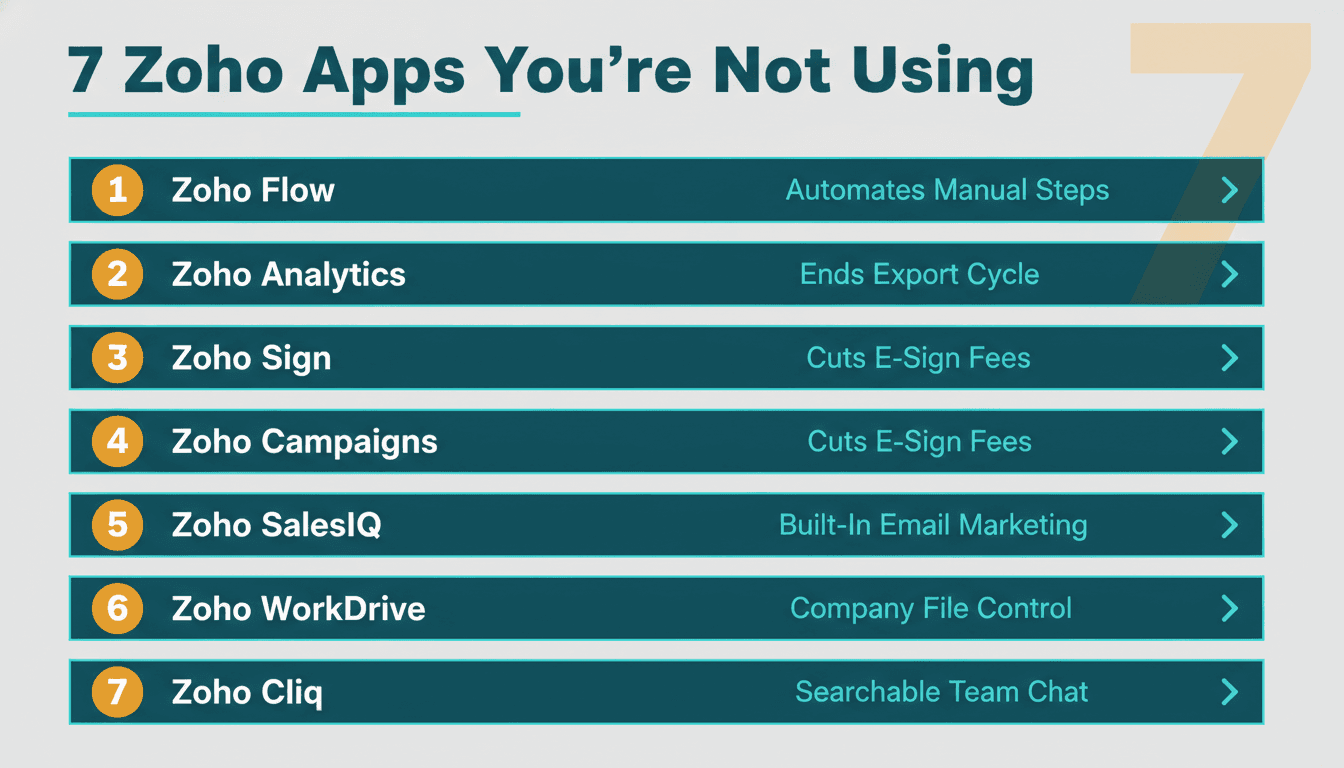
If you run Zoho One and mostly live in CRM, Books, and Desk while everything else collects dust, Zoho Flow is the first app to change that. It connects your entire Zoho stack without code, eliminating the manual data entry that quietly burns hours every week. Below are the seven most underused Zoho apps - ranked by the real operational gap each one closes.
Our Ranking Criteria
- Business impact: Does the app eliminate a recurring pain point that costs time or money every week?
- Setup friction: Can an ops lead get meaningful value within a week, without developer support?
- Cost displacement: Does activating this app replace a paid third-party subscription you are already running?
- Integration depth: How tightly does it connect with CRM, Books, Desk, and the rest of the Zoho suite?
- Time-to-value: How quickly does the payoff show up in day-to-day operations?
1. Zoho Flow: The Automation Layer Your Stack Is Missing
Zoho Flow is Zoho's native workflow automation platform - the connective tissue between every other app in your stack. It triggers actions across apps based on events: a new CRM deal closes, an invoice gets paid in Books, a ticket resolves in Desk. Most Zoho One subscribers never open it.
What it fixes: Data that lives in one app but needs to update three others. If your team copies deal values from CRM into a spreadsheet and then manually enters them into Books, Flow eliminates that loop entirely.
Best for: Any SMB running three or more Zoho apps with manual handoffs between them.
Pros:
- No-code builder with hundreds of app connectors, including services outside the Zoho suite
- Native triggers from CRM, Books, Desk, and Creator mean zero API setup for the most common automations
- Parallel branching logic handles conditional workflows that would otherwise require custom scripts
Cons:
- Complex multi-branch flows require careful testing; an error in a trigger condition can duplicate records silently
- The free tier caps at 100 tasks per month - most real-world automations exceed this within days
If you are weighing Zoho Flow against a standalone automation tool for n8n-style AI agent workflow automation, Flow wins on Zoho-native integration depth but trades flexibility for non-Zoho services. For teams automating end-to-end across their Zoho stack, it is the right starting point. If you are deciding how much intelligence to embed in those workflows versus keeping them rule-based, our breakdown of AI agents vs. rule-based automation covers the decision criteria in detail.
2. Zoho Analytics: Your Built-In BI Tool That Ends the Spreadsheet Export Cycle
Zoho Analytics is a full business intelligence platform - not a reporting tab bolted onto CRM. It connects directly to CRM, Books, Desk, and Creator, letting you build cross-app dashboards without exporting a single CSV. Most businesses replace it with spreadsheets or pay for a standalone BI tool, even though Analytics ships with Zoho One.
What it fixes: The export cycle. When sales data lives in CRM, revenue lives in Books, and support load lives in Desk, the only way to see the full picture is to pull all three manually - unless Analytics does it for you on a schedule.
Best for: Ops leads and finance managers who need cross-department visibility without relying on IT to build reports.
Pros:
- Native connectors to all major Zoho apps sync data automatically without manual intervention
- Drag-and-drop report builder covers most SMB reporting needs without SQL knowledge
- Multi-user sharing with row-level permissions keeps sensitive revenue data appropriately locked down
Cons:
- Dashboards inherit whatever field-naming inconsistencies exist in your underlying CRM setup
- The UI carries more complexity than lighter reporting tools; non-technical users face a real learning curve
One important caveat on data quality: Analytics surfaces what is actually in your data - it does not repair broken source records. We have seen Zoho Desk configurations where unanswered tickets stored zero hours rather than null, making first-response-time averages appear excellent while the operational reality was the opposite. The lesson holds regardless of which BI layer you use: validate source data before trusting any dashboard built on top of it. If you are building a broader AI data strategy framework that uses Analytics as a foundation, those data-quality checks belong at the start, not the end.
For a detailed look at what an Analytics implementation actually covers in scope and cost, our Zoho Analytics consulting guide walks through the full process.
3. Zoho Sign: Stop Paying a Separate Monthly Fee for E-Signatures
Zoho Sign is a legally binding e-signature platform included in Zoho One. It integrates directly with CRM (send a contract from a deal record), Books (sign purchase orders), and Creator (embed signature steps in approval workflows). Most Zoho One subscribers are paying a separate monthly subscription for e-signatures without realizing Sign covers the same ground.
What it fixes: The friction of leaving Zoho to collect a signature, plus the ongoing cost of a standalone e-signature service that duplicates work you could do natively.
Best for: Sales teams sending contracts directly from CRM deals; finance teams approving vendor agreements from within Books.
Pros:
- One-click send from a CRM deal or Books record - no copying links between applications
- Legally compliant with eIDAS, ESIGN Act, and UETA per Zoho's official product documentation
- Built-in audit trail and tamper-evident seal included at no additional cost
Cons:
- Template management is less sophisticated than enterprise-grade dedicated tools for teams managing large contract libraries
- Bulk send to very large recipient lists runs into volume limits on lower Zoho One plans
4. Zoho Campaigns: The Dedicated Email Marketing App Already in Your Stack
Zoho Campaigns is a full email marketing platform - list management, segmentation, drip sequences, A/B testing - that syncs bidirectionally with CRM contacts. It exists specifically because CRM's bulk email features were never designed for marketing volume or deliverability management. Yet most Zoho users either send campaigns through CRM and hit deliverability limits, or pay for a third-party email marketing tool while maintaining a duplicate contact list.
What it fixes: CRM deliverability problems and the operational overhead of keeping contacts in sync between Zoho and a separate marketing tool.
Best for: SMBs running outbound campaigns, lead nurture sequences, or regular newsletters to CRM contact lists.
Pros:
- Two-way CRM sync keeps contact data and campaign engagement history in one place
- Built-in deliverability tooling covers SPF/DKIM alignment, bounce management, and spam scoring
- Segmentation pulls directly from CRM fields and custom properties without manual exports
Cons:
- Template editor is functional but less polished than some dedicated tools
- Mismatched field mapping between CRM and Campaigns causes silent send failures that are difficult to diagnose without knowing where to look
That last point deserves a concrete example. We worked with a supplier whose mass email campaign kept reporting "No emails have been sent." The root cause: Zoho Campaigns sends only to the standard Email field on contact records - but all of this client's contact addresses were stored in a custom Primary_Email field. After backfilling the standard field with the correct data, deliverable coverage went from 77 out of 358 contacts to 283 out of 358, and the resend delivered 206 out of 206. If your Campaigns sends are silently underperforming, field mapping is the first thing to check.
5. Zoho SalesIQ: Prospect Intelligence Your CRM Cannot See
Zoho SalesIQ tracks website visitors, scores leads by behavior, and triggers live chat or automated bot responses. When a CRM contact visits your pricing page, SalesIQ can notify their account owner in real time. Most Zoho One subscribers have no visibility into this behavioral data at all.
What it fixes: The black box between "we sent the proposal" and "they went quiet." SalesIQ provides real-time signals about how prospects engage with your site after the initial conversation, so your team can time follow-ups to actual intent rather than guesswork.
Best for: B2B sales teams with deal cycles longer than two weeks where prospect re-engagement timing has real impact on close rates.
Pros:
- Native CRM integration links visitor sessions to existing contact records automatically
- Lead scoring rules can update CRM lead stage or trigger alerts based on page visit patterns
- Bot builder handles basic qualification and meeting booking without human involvement in the first touchpoint
Cons:
- Requires a JavaScript snippet on your website; meaningful behavioral data takes two to four weeks to accumulate
- GDPR, PECR, and similar privacy regulations require explicit cookie consent before visitor tracking activates, which reduces coverage in certain markets
6. Zoho WorkDrive: Company Files That Actually Belong to the Company
Zoho WorkDrive is a shared document management platform - team folders, version history, file-level permissions - that connects to CRM (attach files to deal and contact records), Creator (store generated documents), and Sign (archive executed contracts). Most Zoho One businesses default to a separate cloud storage service and then attach files to Zoho records manually, if at all.
What it fixes: Contracts, proposals, and reports living outside your Zoho system - accessible only to the person who saved them, invisible to everyone else on the team.
Best for: Teams of five or more where document version confusion or the "which draft did we send?" question comes up more than once a week.
Pros:
- Team folders with role-based permissions replace ad-hoc file sharing that leaves sensitive documents exposed
- Integrated with Zoho Writer, Sheet, and Show for in-browser editing without needing third-party office tools
- Full version history allows recovery of overwritten files
Cons:
- Storage limits on lower Zoho One plans fill up faster than expected for teams handling large media files, CAD drawings, or video
- Mobile app experience is noticeably less polished than consumer-grade alternatives most users are accustomed to
7. Zoho Cliq: Replace the WhatsApp Business Group With Something Searchable
Zoho Cliq is a structured team messaging platform with channels, threaded conversations, and direct integration with CRM notifications and Desk ticket alerts. It is not the flashiest app on this list. But for teams currently running business communication through personal messaging apps, it is the fastest quality-of-life improvement available within Zoho One - and the one that brings business decisions back into a system the company actually owns.
What it fixes: Business decisions buried in personal messaging threads with no searchable record, and support escalations that die in someone's DMs instead of reaching Desk.
Best for: Teams of ten or more where business decisions and client discussions happen across personal devices in unstructured group chats.
Pros:
- CRM and Desk push notifications directly into Cliq channels - no separate alert configuration needed
- Slash-command bots handle common lookups (deal status, ticket updates) without leaving the conversation
- All messages are searchable and auditable, unlike personal messaging apps
Cons:
- Adoption is the hard part - teams deeply habituated to personal messaging apps resist switching even when Cliq is objectively better for business use
- Video call quality is acceptable for routine standups but falls short of dedicated conferencing tools for high-stakes external calls
Quick Comparison: 7 Underused Zoho Apps at a Glance
| App | Primary Fix | Setup Friction | Cost Displacement | Zoho Integration | Time-to-Value |
|---|---|---|---|---|---|
| Zoho Flow | Manual data handoffs | Medium | Medium | Very High | 1-2 weeks |
| Zoho Analytics | Spreadsheet export cycle | Medium | High | Very High | 2-4 weeks |
| Zoho Sign | Third-party e-sig cost | Low | High | High | Immediate |
| Zoho Campaigns | CRM deliverability limits | Medium | High | High | 1 week |
| Zoho SalesIQ | Prospect behavior blind spot | Medium | Medium | High | 2-4 weeks |
| Zoho WorkDrive | Document sprawl | Low | Medium | Medium | 1 week |
| Zoho Cliq | Messaging app chaos | Low | Low | Medium | Immediate |
How to Choose
- Start with Flow if your team spends more than two hours a week copying data between Zoho apps, spreadsheets, or email threads - that is the clearest signal that automation is the constraint.
- Prioritize Analytics if leadership is making decisions from manually assembled spreadsheets that pull separately from CRM, Books, and Desk; the single-source dashboard pays back its setup time quickly.
- Activate Sign today if you are paying a monthly fee for a standalone e-signature service - this is the simplest cost displacement on the list and requires no data migration.
- Move to Campaigns if CRM bulk sends are bouncing, flagging as spam, or if your team needs segmented nurture sequences that the CRM was never designed to manage.
- Add SalesIQ last if your sales cycle is under two weeks or purely inbound - the behavioral data it provides pays off most in longer B2B deal cycles where re-engagement timing changes outcomes.
For teams building more complex internal tools on top of Zoho, our guide on building approval workflows in Zoho Creator shows how Flow and Creator work together to automate multi-step approval processes end-to-end.
---
If you have been sitting on a Zoho One subscription without getting full value from most of it, the gap is almost always configuration and integration - not the software itself. Our team at Lets Viz helps SMBs activate and properly connect the Zoho apps they already own, so the stack works as a coordinated system rather than a collection of siloed tools. Talk to our Zoho consulting team to find out which of these seven apps would deliver the fastest return for your specific setup.
---
About Lets Viz: Lets Viz is a data analytics and business intelligence consultancy helping SMBs and mid-market companies get measurable value from their technology investments since 2020. We work across industries including manufacturing, professional services, healthcare, and e-commerce - implementing solutions across Zoho, Power BI, Looker Studio, and Microsoft Fabric. As an advanced certified Zoho partner, we hold a 5.0 rating on Clutch based on verified client reviews.