SSRS Expressions to DAX Translation Guide: 20 Examples
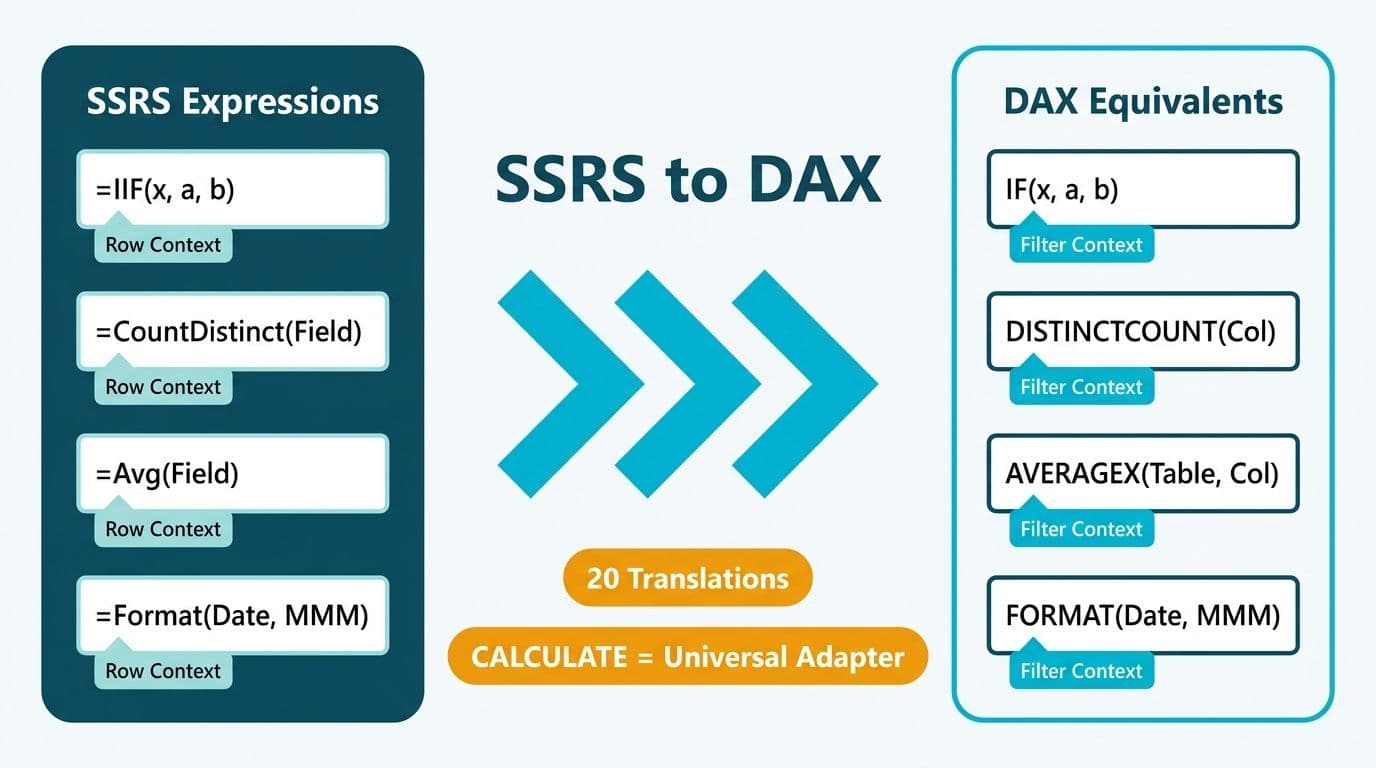
SSRS expressions run in a row-by-row execution model. DAX operates on column-level evaluation inside a filter context - a fundamentally different paradigm. Translating your twenty most-used SSRS functions to DAX equivalents is straightforward once you internalize this shift: most aggregate expressions become CALCULATE wrappers, and most string and date helpers map one-to-one.
Key Takeaways
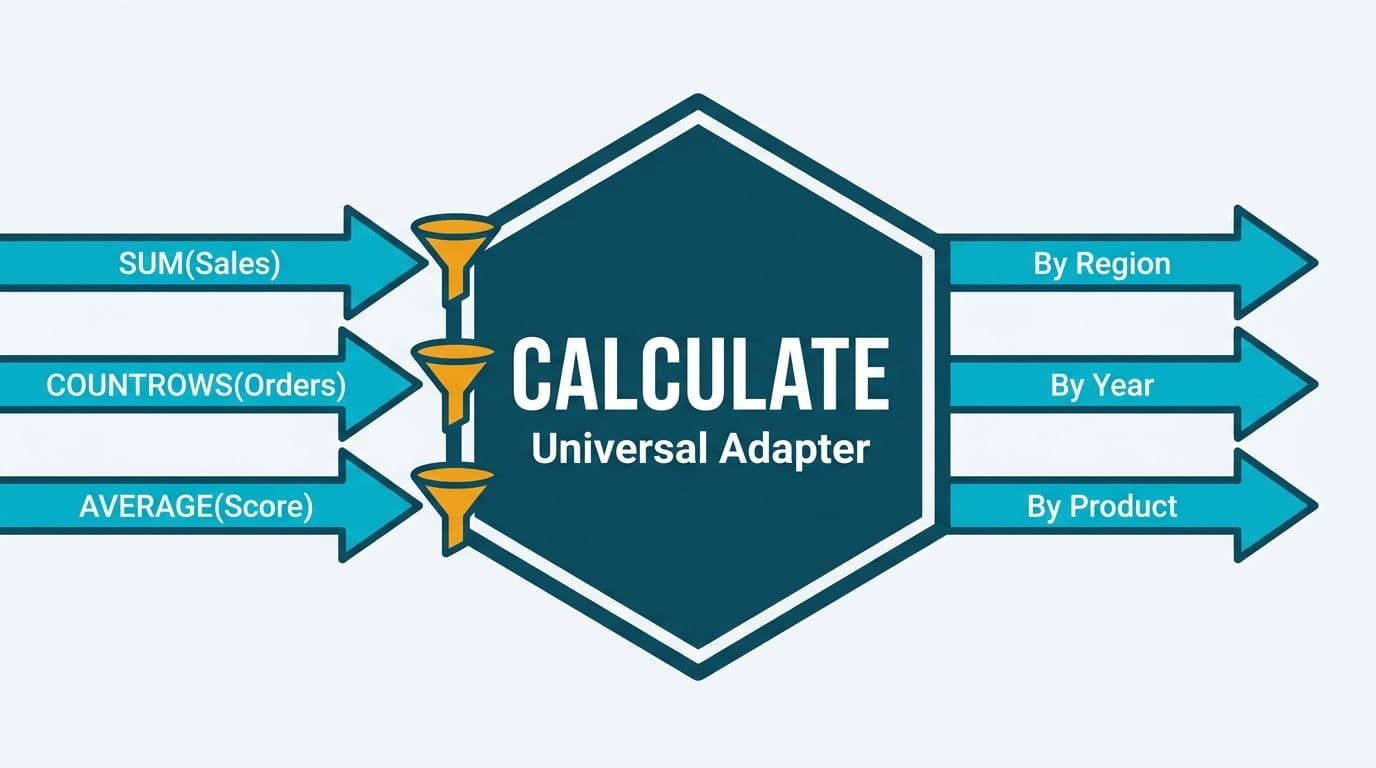
- DAX filter context replaces SSRS row-level scope - CALCULATE is the universal adapter for aggregation logic.
- IIF, Switch, CountDistinct, Avg, and Format all have direct DAX counterparts with near-identical syntax.
- RunningValue is the most mis-translated SSRS function - it requires CALCULATE with FILTER and ALLSELECTED, not a simple aggregate swap.
- Report developers should master row context vs. filter context before attempting complex measures.
- For teams moving beyond expression translation into a full platform shift, Tableau to Power BI migration services covers the data modeling and governance work that expression mapping alone cannot address.
What Makes SSRS Expressions Different from DAX?
SSRS expressions execute inside a report engine that processes one dataset row at a time, scoping aggregations by group membership - a report group, a dataset, or Nothing (the entire dataset). VB.NET powers the syntax: IIF replaces a ternary operator, RunningValue accumulates within a defined scope, and Format applies locale-aware string conversion inline.
DAX has no equivalent of a "report group." Instead, every measure lives in a data model and evaluates against whatever filter context the visual, slicer, or relationship applies at runtime. Teams undertaking a structured Tableau to Power BI migration will find that expressions themselves translate quickly - the harder adjustment is unlearning scope-based thinking and replacing it with filter context.
The practical consequence: any SSRS expression that references a scope parameter - RunningValue's third argument, for example - requires a CALCULATE pattern in DAX rather than a direct function swap.
The 20-Expression SSRS to DAX Translation Guide
The table below covers the twenty expressions report developers reach for most often. DAX equivalents are written as measures unless otherwise noted.
| # | SSRS Expression | DAX Equivalent | Notes |
|---|---|---|---|
| 1 | IIF(cond, trueVal, falseVal) | IF(cond, trueVal, falseVal) | Direct replacement; DAX IF short-circuits evaluation |
| 2 | Switch(expr, v1, r1, v2, r2) | SWITCH(expr, v1, r1, v2, r2) | Use SWITCH(TRUE(), ...) for range conditions |
| 3 | RunningValue(field, Sum, Nothing) | CALCULATE(SUM(col), FILTER(ALLSELECTED(tbl), tbl[SortCol] <= MAX(tbl[SortCol]))) | Filter context replaces scope parameter |
| 4 | RunningValue(field, Count, Nothing) | CALCULATE(COUNTROWS(tbl), FILTER(ALLSELECTED(tbl), tbl[SortCol] <= MAX(tbl[SortCol]))) | Same CALCULATE/FILTER pattern as running sum |
| 5 | CountDistinct(field) | DISTINCTCOUNT(tbl[col]) | One-to-one replacement |
| 6 | Avg(field) | AVERAGEX(tbl, tbl[col]) | AVERAGEX respects row context for expressions |
| 7 | Sum(field) | SUM(tbl[col]) or SUMX(tbl, [expr]) | Use SUMX when summing a per-row calculated expression |
| 8 | Count(field) | COUNT(tbl[col]) or COUNTROWS(tbl) | COUNTROWS preferred for performance |
| 9 | Max(field) | MAX(tbl[col]) or MAXX(tbl, [expr]) | MAXX iterates rows for complex expressions |
| 10 | Min(field) | MIN(tbl[col]) or MINX(tbl, [expr]) | MINX for row-level minimum expressions |
| 11 | IsNothing(field) | ISBLANK(tbl[col]) | DAX uses BLANK(), not NULL |
| 12 | Format(field, "pattern") | FORMAT(tbl[col], "pattern") | Use only in calculated columns - FORMAT in measures returns text |
| 13 | DateDiff("d", d1, d2) | DATEDIFF(d1, d2, DAY) | Interval is the last argument in DAX |
| 14 | DateAdd(date, n, DateInterval.Day) | date + n or DATEADD(dates, n, DAY) | DATEADD requires a proper date table column |
| 15 | Year(date) | YEAR(date) | Direct replacement |
| 16 | Month(date) | MONTH(date) | Direct replacement |
| 17 | Now() | NOW() | Direct replacement; recalculates on each model refresh |
| 18 | InStr(string, substr) | SEARCH(substr, string, 1, 0) | Argument order reversed; returns 0 if not found |
| 19 | Left(string, n) | LEFT(string, n) | Direct replacement |
| 20 | Trim(string) | TRIM(string) | DAX TRIM also collapses interior duplicate spaces |
How Does DAX Filter Context Replace SSRS Row Scope?
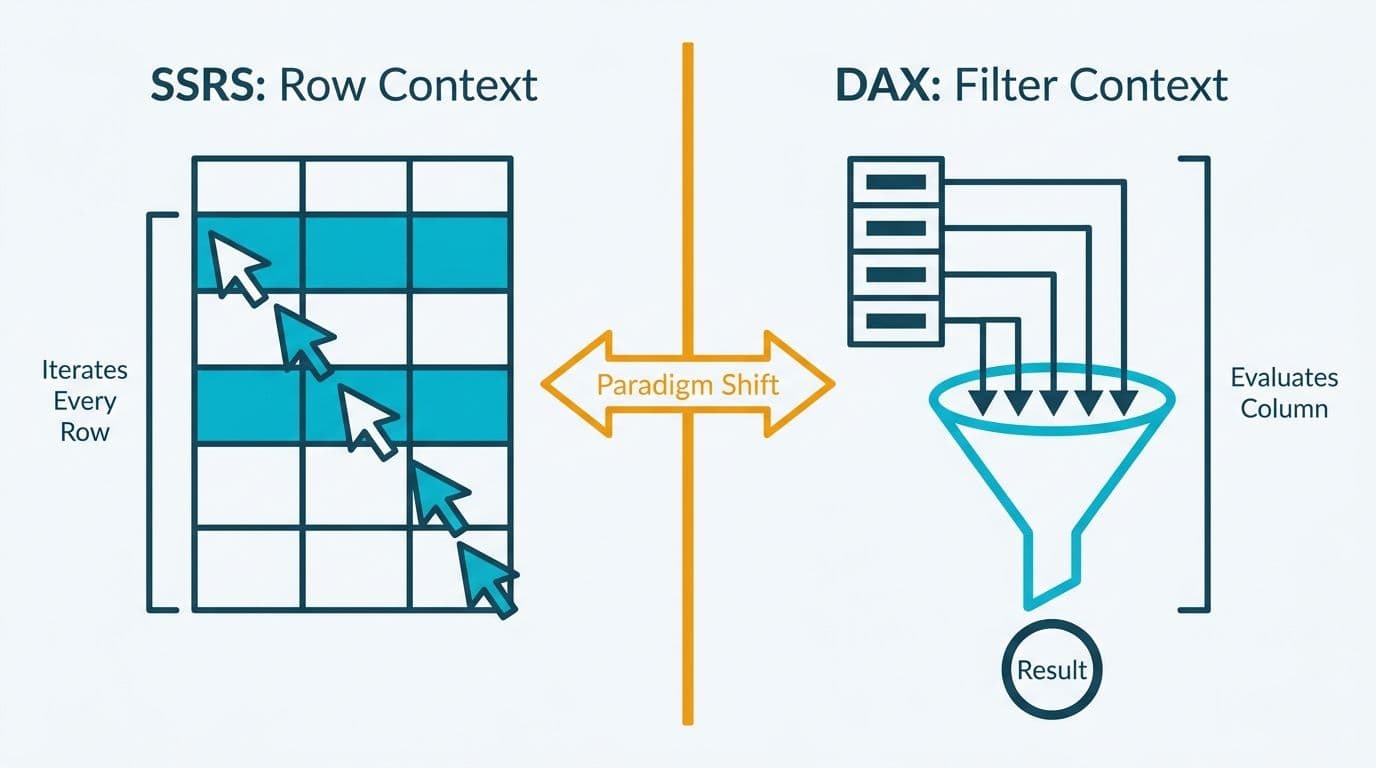
Filter context is the set of filters active when a DAX measure evaluates - slicers, visual row headers, and model relationships all contribute. This is the concept that makes RunningValue the most mis-translated expression in the SSRS-to-DAX transition.
In SSRS, `RunningValue(Fields!Revenue.Value, Sum, Nothing)` accumulates the sum of Revenue across all rows in the dataset. DAX has no "accumulate as you go" concept. Instead, you construct a measure that, for any given row in the visual, asks: what is the total Revenue for all rows where the sort column is less than or equal to the current sort column?
CALCULATE is the function that modifies filter context. Per Microsoft's official DAX documentation, CALCULATE evaluates an expression in a modified context determined by the filter arguments you provide - making it the direct structural replacement for SSRS scope parameters.
A UK fintech firm running GDPR-compliant transaction reports in SSRS will encounter this pattern immediately when building year-to-date revenue measures in Power BI. The SSRS version is a RunningValue scoped to a year group. The DAX version uses CALCULATE with DATESYTD or a FILTER/ALLSELECTED pattern, depending on whether a proper date table exists in the semantic model.
For report developers new to DAX, the actionable rule is: wherever an SSRS expression references a scope parameter, write a CALCULATE wrapper in DAX.
How Do You Translate IIF and Switch to DAX?
IIF is SSRS's inline conditional. The DAX equivalent, IF, uses identical argument order and is a direct replacement.
SSRS:
```
=IIF(Fields!ClaimStatus.Value = "Denied", "Review Required", "Cleared")
```
DAX (calculated column):
```dax
Status Label =
IF(Claims[ClaimStatus] = "Denied", "Review Required", "Cleared")
```
DAX IF short-circuits - the false branch is never evaluated when the condition is true - a useful performance property in large healthcare claims tables carrying tens of millions of HIPAA-regulated rows.
Switch handles multiple conditions with sequential matching. DAX SWITCH is syntax-compatible for equality checks. For range conditions - which SSRS handles with nested IIF - DAX uses `SWITCH(TRUE(), ...)`, where each branch is a Boolean expression evaluated in order.
SSRS nested IIF pattern:
```
=IIF(Fields!Score.Value >= 90, "A", IIF(Fields!Score.Value >= 80, "B", "C"))
```
DAX SWITCH(TRUE()) replacement:
```dax
Grade =
SWITCH(
TRUE(),
Scores[Score] >= 90, "A",
Scores[Score] >= 80, "B",
"C"
)
```
`SWITCH(TRUE(), ...)` is idiomatic DAX and short-circuits on the first matching branch. For a Canadian healthcare analytics team building quality-of-care scorecards under PIPEDA data minimization requirements, this pattern handles multi-tier clinical metric banding without nested IIF chains.
How Do You Replicate RunningValue and CountDistinct in DAX?
RunningValue requires the most structural rethinking. The following measure replicates `RunningValue(..., Sum, Nothing)`:
```dax
Running Revenue =
CALCULATE(
SUM(Sales[Revenue]),
FILTER(
ALLSELECTED(Sales),
Sales[OrderDate] <= MAX(Sales[OrderDate])
)
)
```
ALLSELECTED preserves any active slicer filters while removing the current visual row filter - the closest DAX equivalent to SSRS's Nothing scope. Replace ALLSELECTED with ALL if you want the running total to accumulate across the entire table regardless of active slicer selections.
CountDistinct is the simplest SSRS-to-DAX swap. `CountDistinct(Fields!CustomerID.Value, "DataSet1")` becomes:
```dax
Unique Customers = DISTINCTCOUNT(Sales[CustomerID])
```
The visual's filter context handles scoping automatically. For a US SaaS finance team reporting monthly active accounts under SOC 2 audit requirements, DISTINCTCOUNT in a Power BI measure delivers the equivalent of CountDistinct scoped to the report's current date filter - with no explicit scope argument required.
For a deeper look at how CALCULATE and DAX relationship filters interact, the CROSSFILTER DAX guide on Lets Viz covers relationship direction overrides that can affect DISTINCTCOUNT results when measures span multiple related tables.
How Do You Handle Avg and Format in DAX?
Avg in SSRS aggregates a field across the current scope. The DAX equivalent depends on whether you are averaging a column directly or averaging a row-level calculated expression.
For a direct column average:
```dax
Average Claim Value = AVERAGE(Claims[ClaimValue])
```
For a per-row expression - such as computing a margin ratio before averaging:
```dax
Average Margin =
AVERAGEX(
Sales,
DIVIDE(Sales[Revenue] - Sales[Cost], Sales[Revenue])
)
```
AVERAGEX iterates each row in the table, computes the row-level expression, then averages the results. This is the DAX equivalent of SSRS's `Avg(Fields!Margin.Value)` where Margin is computed inside the dataset query.
Format requires special care. In SSRS, `Format(Fields!ReportDate.Value, "MMM yyyy")` is used freely inside expressions. In DAX, FORMAT returns a text data type, which Microsoft's official Power BI documentation explicitly flags as breaking downstream numeric aggregation. The recommended practice is to apply number and date formatting at the visual level using Power BI's built-in format settings, and to reserve DAX FORMAT only for calculated columns where a text label is the intended output.
SSRS:
```
=Format(Fields!ReportDate.Value, "MMM yyyy")
```
DAX (calculated column, not a measure):
```dax
Month Label = FORMAT(Dates[Date], "MMM YYYY")
```
For US healthcare finance teams or UK fintech environments where regulatory reports mandate specific date display formats, this distinction is critical: create a calculated column for the formatted label and reference it as a slicer or row dimension in the visual, rather than embedding FORMAT inside an aggregation measure.
For broader implementation context, the Power BI healthcare reporting implementation cost guide and the Fabric Lakehouse finance analytics guide cover the data modeling decisions that accompany expression migration in regulated industries.
When Should Healthcare and Finance Teams Plan a Full Migration?
Expression translation is a skills exercise, not a migration strategy. A US hospital network moving forty SSRS claims reports to Power BI will spend roughly 20% of its effort on expression translation and 80% on data modeling and governance. A Canadian insurer migrating SSRS-based PIPEDA compliance dashboards will find that Power BI's row-level security and deployment pipelines require architectural decisions that SSRS never demanded.
Consider a formal migration assessment when any of the following apply:
- The SSRS report inventory exceeds 25 reports sharing common datasets.
- Calculated columns in dataset queries contain business logic that should live in a shared semantic model.
- The organization needs self-service analytics beyond static paginated output.
- Compliance requirements - HIPAA for US healthcare organizations, GDPR for UK and EU operations, PIPEDA for Canadian entities - require row-level security enforced at the model layer rather than the report layer.
The Power BI governance best practices checklist provides a structured framework for the model-layer decisions that must precede DAX authoring at scale.
---
Hands-on support - including data model design, SSRS report cataloging, and DAX authoring for complex expression translation - is available through Tableau to Power BI migration services.
---
About Lets Viz: Lets Viz has delivered data analytics consulting to US healthcare systems, UK fintech firms, Canadian manufacturing companies, and global SaaS teams since 2020. The firm holds a 5.0 Clutch rating across Power BI, Microsoft Fabric, and Zoho Analytics engagements, with deep experience in HIPAA-compliant reporting, GDPR data lineage, and PIPEDA-aware model governance.