CROSSFILTER DAX: Override Relationship Direction in Power BI
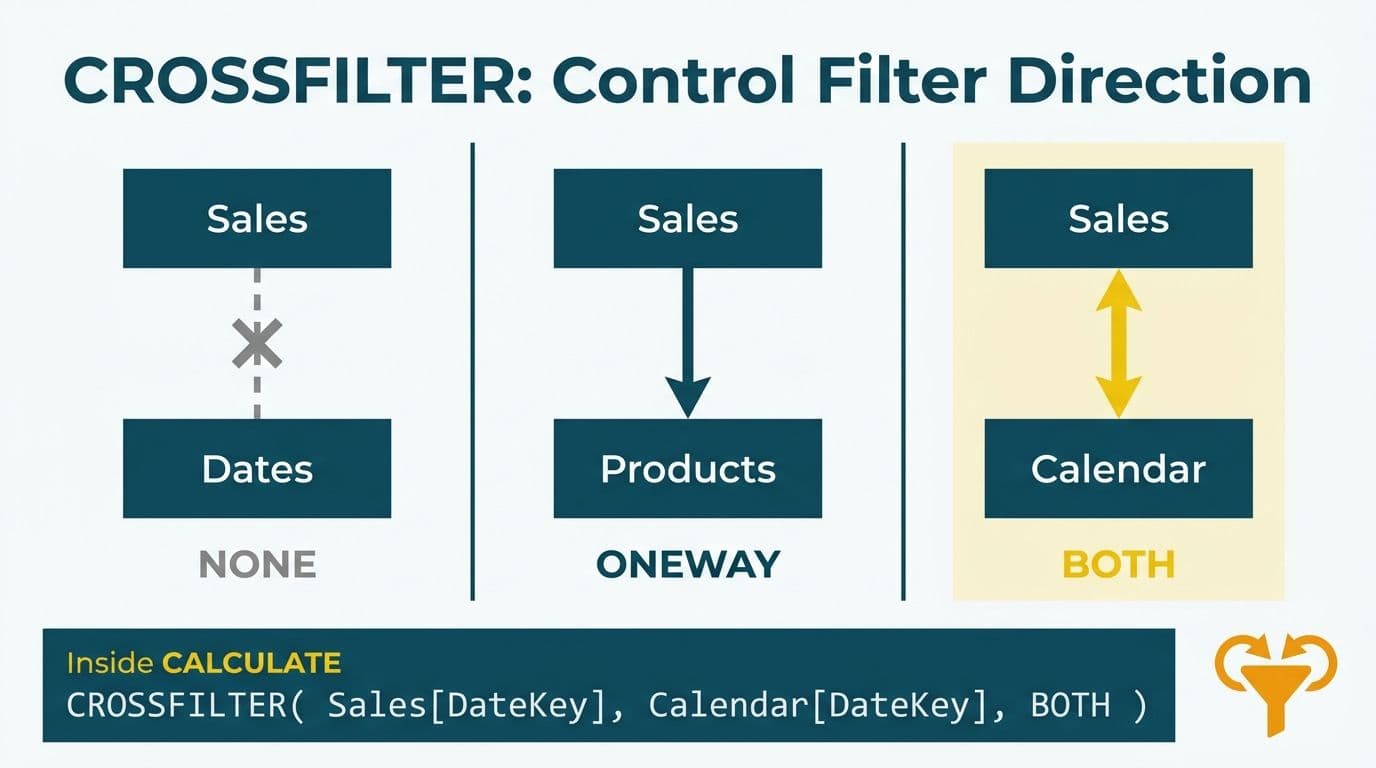
The CROSSFILTER DAX function overrides the default filter direction of a table relationship inside a single measure, without changing the data model globally. Place it inside CALCULATE with a direction of BOTH, ONEWAY, or NONE to control exactly how filters propagate across tables at query time. For finance and healthcare models with multiple fact tables, this is the most precise and performance-safe way to solve cross-filtering problems without introducing ambiguous filter paths.
Key Takeaways
CROSSFILTER(column1, column2, direction) takes the two relationship columns and a direction flag - BOTH, ONEWAY, or NONE - and must sit inside CALCULATE
It applies only within the measure it lives in, leaving the data model graph unchanged
BOTH enables bidirectional filtering for that calculation; NONE disables the relationship entirely for that calculation
Finance P&L models frequently need CROSSFILTER BOTH to let a date or cost-center dimension filter across both a revenue fact and an expense fact simultaneously
Setting BOTH globally on the data model adds query overhead to every visual; CROSSFILTER keeps the cost scoped to one measure
What Is the CROSSFILTER DAX Function in Power BI?
CROSSFILTER is a DAX modifier function used exclusively inside CALCULATE (or CALCULATETABLE) to change how a specific relationship propagates filters - for the duration of one calculation only. It does not return a table or a value on its own; it tells the Power BI formula engine to treat the connection between two specified columns differently for that single evaluation.
The syntax, as defined in Microsoft's DAX reference documentation, is:
```
CROSSFILTER( <columnName1>, <columnName2>, <direction> )
```
columnName1 and columnName2 are the two columns that define an existing relationship in the data model
direction is one of three enumerated constants: BOTH, ONEWAY, or NONE
The function exists to solve a specific architectural problem: applying bidirectional filtering at the model level affects every query that touches those tables, multiplies join complexity, and creates ambiguous filter paths in models with more than two fact tables. CROSSFILTER limits the override to one measure, one query at a time.
Data teams building multi-fact-table models with our Power BI and Fabric consulting team encounter this pattern regularly, especially when a model grows from a single-subject prototype into a production environment covering revenue, expenses, headcount, and budget in the same report.
How Does CROSSFILTER Work Inside CALCULATE?
CALCULATE modifies the filter context before evaluating its main expression. CROSSFILTER is one of several modifier functions you can pass to CALCULATE - alongside USERELATIONSHIP, ALL, and ALLSELECTED - to reshape how the Power BI engine reads the data model for a specific calculation.
When you write:
```dax
Revenue Filtered by Segment =
CALCULATE(
SUM ( FactSales[Revenue] ),
CROSSFILTER ( BridgeSegment[CustomerID], DimCustomer[CustomerID], BOTH )
)
```
Power BI evaluates the SUM with the relationship between BridgeSegment and DimCustomer set to bidirectional - but only for this measure. No other measure or visual is affected.
The three direction constants:
| Direction | Filter propagation | Typical use case |
|---|---|---|
| BOTH | Both directions - either table can filter the other | Many-to-many resolution, cross-filtering multiple fact tables |
| ONEWAY | One direction only - the default defined in the model | Restore default behavior inside a nested CALCULATE call |
| NONE | Disabled - filters do not cross this relationship | Exclude a dimension's influence from one specific calculation |
Understanding how filter context flows more broadly is essential for using CROSSFILTER correctly. The ALLSELECTED DAX function guide covers the related pattern of preserving visual-level filters while ignoring outer filter context - a technique that often appears alongside CROSSFILTER in layered measures.
When Should You Override Relationship Filter Direction with CROSSFILTER DAX in Power BI?
Override the default relationship filter direction with CROSSFILTER DAX when a specific measure needs cross-filtering behavior the current data model does not support, and when applying that change globally would harm performance or create unintended filter paths elsewhere in the model.
The three most common triggers in finance and healthcare analytics are:
1. Multiple fact tables sharing a dimension
A typical financial model contains a date dimension, a revenue fact table, and an expense fact table. The date dimension filters the revenue fact by default. To build a single Net Contribution or Gross Margin measure that pulls from both fact tables after filtering by the same date period, CROSSFILTER lets the date filter propagate into both tables - within that one measure only.
2. Many-to-many relationships via bridge tables
Sales and customer analytics models often connect customers to territories or segments through a bridge table. The default one-directional relationship prevents a slicer on the segment dimension from filtering downstream sales facts. CROSSFILTER with BOTH resolves this within the measure, without opening a permissive bidirectional path across the entire model.
3. Disabling a relationship for a specific calculation
In a rolling-average or prior-period comparison measure, a secondary date relationship may distort the result if it activates unexpectedly. A common case: a model that has both an OrderDate and a ShipDate relationship to DimDate. A 30-day rolling revenue measure should filter on OrderDate only — if the ShipDate relationship activates through an inherited filter context, the rolling window shifts unpredictably for orders with long fulfillment cycles. CROSSFILTER with NONE on the ShipDate–DimDate pair neutralizes that relationship for the rolling measure while keeping it fully available for all shipping-latency metrics elsewhere in the model.
CROSSFILTER DAX for Finance P&L Reporting: Step-by-Step Example
A US healthcare finance team running a multi-entity P&L in Power BI illustrates the most common CROSSFILTER pattern. Consider a model with:
DimCostCenter - cost centers across departments: Cardiology, Oncology, Administration
FactRevenue - patient service revenue, with a one-to-many relationship from DimCostCenter
FactExpenses - departmental expenses, also one-to-many from DimCostCenter
The default model lets DimCostCenter filter FactRevenue. The relationship to FactExpenses exists but filters do not flow correctly across both tables in a combined measure. A finance director selecting Cardiology from a cost-center slicer sees correct department revenue but company-wide expenses - the net contribution figure is wrong.
Broken measure (default model behavior):
```dax
Net Contribution =
[Total Revenue] - [Total Expenses]
```
With Cardiology selected, [Total Revenue] filters to that department. [Total Expenses] returns the total for all departments. The result is meaningless.
Corrected measure with CROSSFILTER:
```dax
Net Contribution =
CALCULATE(
[Total Revenue] - [Total Expenses],
CROSSFILTER ( DimCostCenter[CostCenterID], FactExpenses[CostCenterID], BOTH )
)
```
Now the cost-center slicer flows into both FactRevenue (through the model's default path) and FactExpenses (through the CROSSFILTER-activated path). The net figure is accurate at any granularity - department, division, or entity-wide.
Why not set BOTH on the model relationship globally?
For a US healthcare organization under HIPAA, applying BOTH globally to a relationship that connects patient revenue data can create unintended cross-filtering through other paths in the model, potentially exposing aggregate views that reconstruct individual records. Scoping the override to one measure keeps filter propagation deliberate and auditable.
Canadian organizations under PIPEDA face the same logic. For UK or EU fintech firms under GDPR, model-level bidirectional relationships that exist globally are harder to document and audit than a CROSSFILTER call inside a specific measure - where the intent is explicit in the DAX code itself.
The FP&A dashboard step-by-step build guide shows how this P&L pattern fits into a full management reporting layout, including period-over-period variance analysis that depends on accurate cost-center filtering at every drill level.
CROSSFILTER in Sales Reporting: Many-to-Many Segment Analysis
A UK fintech firm running enterprise sales analytics faces a classic many-to-many structure: one customer belongs to multiple segments, and each segment contains multiple customers. The bridge table approach is standard, but the default one-way relationship blocks segment slicers from reaching the sales fact.
Data model structure:
DimCustomer - customer master
DimSegment - SMB, Mid-Market, Enterprise
BridgeCustomerSegment - maps each CustomerID to one or more SegmentIDs
FactSales - transaction-level sales data, linked to CustomerID
Filters flow from DimSegment into BridgeCustomerSegment (one-to-many, default). The link from BridgeCustomerSegment to DimCustomer defaults to one-way toward DimCustomer, so filters stop there and never reach FactSales.
Revenue by Segment measure:
```dax
Revenue by Segment =
CALCULATE(
SUM ( FactSales[SalesAmount] ),
CROSSFILTER ( BridgeCustomerSegment[CustomerID], DimCustomer[CustomerID], BOTH )
)
```
BOTH enables bidirectional filtering between BridgeCustomerSegment and DimCustomer for this measure. The full filter chain now propagates: DimSegment to BridgeCustomerSegment, BridgeCustomerSegment to DimCustomer (via CROSSFILTER), and DimCustomer to FactSales. The segment slicer works correctly without any model-level changes.
The same bridge-table pattern solves territory analysis in Canadian manufacturing companies, where sales reps cover overlapping geographic territories - the CROSSFILTER structure is identical in both cases.
Understanding the interaction between row context and filter context is fundamental here. The SUMX vs SUM explainer covers when aggregation needs row-level iteration - a pattern that frequently surfaces alongside CROSSFILTER in measures that combine multiple aggregations across related tables.
CROSSFILTER vs. Bidirectional Relationships: Which Should You Use?
Bidirectional relationships set in the Model view are appropriate when cross-filtering is needed everywhere - across all visuals, all measures, and all users. CROSSFILTER in a DAX measure is the right choice when only one or two measures need the behavior, or when the model serves regulated industries where filter paths must be explicit.
Decision guide:
| Scenario | Model-level BOTH | CROSSFILTER in DAX |
|---|---|---|
| Prototype or small model (under 5 tables) | Simpler to maintain | Not necessary |
| Production model with 5+ fact or bridge tables | Risky - ambiguous paths multiply | Recommended |
| HIPAA, GDPR, or PIPEDA compliance context | Hard to audit globally | Explicit and measurable |
| Only 1-2 measures need bidirectional behavior | Unnecessary overhead on all queries | Contained cost |
| Inactive relationship needs activation | Not applicable | Combine with USERELATIONSHIP |
Microsoft's DAX documentation notes that bidirectional cross-filtering at the model level increases query plan complexity and can produce ambiguous results when multiple filter paths exist between two tables. The recommendation for production models is to set relationships to single-direction by default and use CROSSFILTER inside measures where needed.
The Power Query vs DAX for calculations guide covers the adjacent architectural decision of when to transform data before it enters the model versus inside a DAX measure - a judgment call that affects every downstream filter-context question.
Common CROSSFILTER Mistakes and How to Avoid Them
Mistake 1: Using CROSSFILTER outside of CALCULATE
CROSSFILTER has no standalone behavior. Writing it outside CALCULATE results in an error. It must always appear as a filter modifier argument inside CALCULATE or CALCULATETABLE.
Mistake 2: Referencing columns without an active relationship
Both columns passed to CROSSFILTER must define an existing, active relationship in the data model. If the relationship is inactive, use USERELATIONSHIP to activate it first. If no relationship exists at all, define it in Model view before writing the measure.
Mistake 3: Confusing CROSSFILTER with USERELATIONSHIP
USERELATIONSHIP activates an inactive relationship. CROSSFILTER changes the filter direction of an active one. To activate an inactive relationship and make it bidirectional in the same measure, use both functions inside one CALCULATE call:
```dax
Measure with Inactive Bidirectional Path =
CALCULATE(
[Expression],
USERELATIONSHIP ( FactSales[ShipDateKey], DimDate[DateKey] ),
CROSSFILTER ( FactSales[ShipDateKey], DimDate[DateKey], BOTH )
)
```
Power BI evaluates CALCULATE modifier functions together before the main expression runs. USERELATIONSHIP activates the inactive relationship first; CROSSFILTER then overrides its direction. Without USERELATIONSHIP, the inactive relationship remains dormant and CROSSFILTER has nothing to act on — the measure silently falls back to the model default rather than throwing an error, which makes this a particularly difficult bug to diagnose in complex models.
Mistake 4: Applying BOTH globally in the model to fix one visual, then forgetting it
A US SaaS finance team might set a dimension-to-bridge relationship to BOTH globally to resolve one dashboard visual quickly. Months later, the model has new fact tables, and the same global filter path produces incorrect budget-versus-actuals comparisons in an unrelated report. The correct fix is to revert the model-level setting and move the override into the specific measure using CROSSFILTER.
---
About Lets Viz: Lets Viz is a data analytics consulting firm serving US healthcare systems, UK fintech firms, Canadian manufacturers, and global SaaS companies since 2020. With a 5.0 Clutch rating, our team architects Power BI and Microsoft Fabric solutions that handle complex DAX logic, multi-fact-table data models, and governance requirements under HIPAA, GDPR, and PIPEDA.
Ready to solve complex filter-context challenges in your Power BI data model? Our Power BI and Fabric consulting team works with finance and operations teams across the US, UK, and Canada to design DAX measures that are accurate, audit-ready, and built to scale.


