Replace SSRS Report Subscriptions in Power BI: Step-by-Step
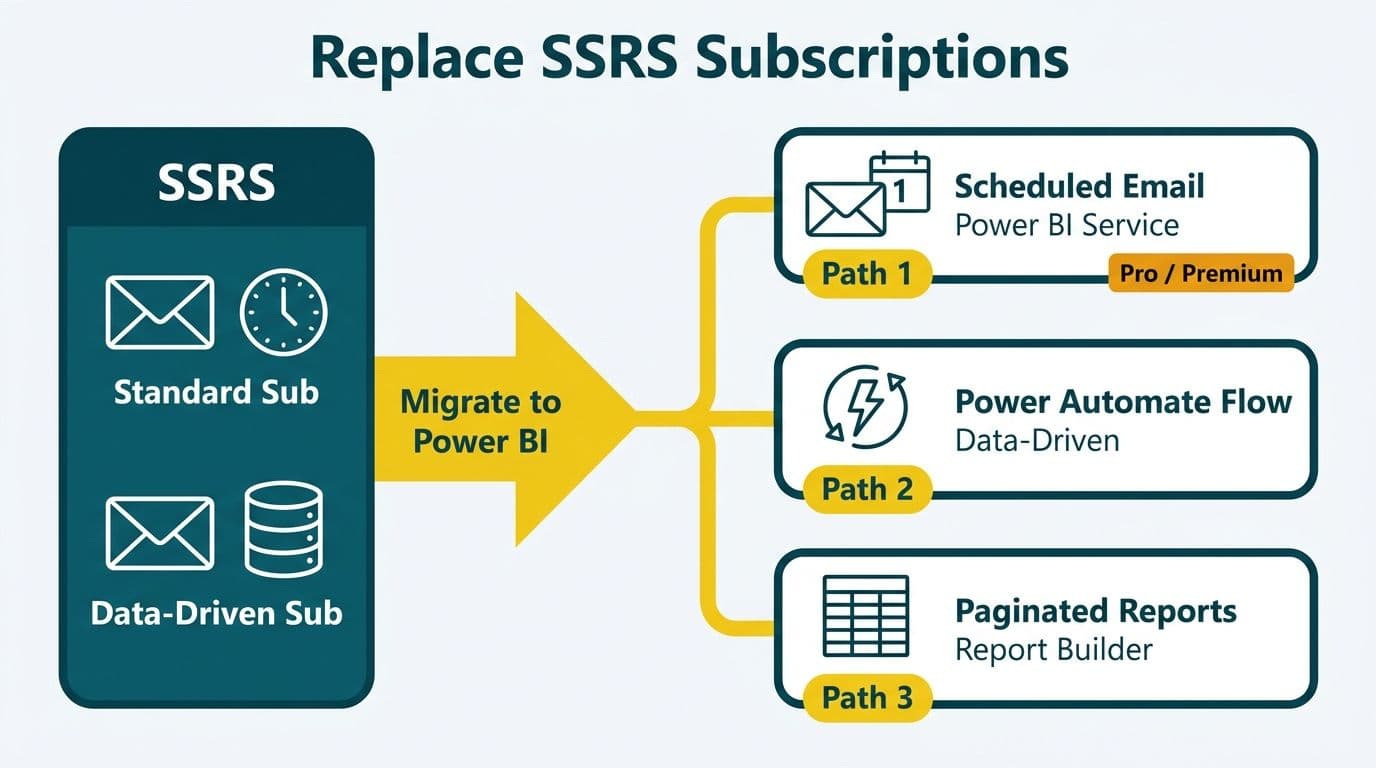
Power BI replaces SSRS report subscriptions through three native mechanisms: scheduled email subscriptions in Power BI Service, Power Automate delivery flows for advanced routing, and paginated report subscriptions via Report Builder. Standard subscriptions map directly to Power BI's built-in email delivery; data-driven subscriptions require a Power Automate flow that reads a recipient list from a data source and loops report delivery at runtime.
Key Takeaways
- SSRS standard subscriptions map to Power BI Service scheduled email subscriptions (Pro or Premium capacity required)
- Data-driven subscriptions require Power Automate to loop delivery against a dynamic recipient list from your data source
- Paginated reports in Power BI (Report Builder) support parameter-level subscriptions closest to SSRS behavior
- Data residency for US healthcare (HIPAA) and UK/EU (GDPR) organizations requires capacity workspaces pinned to approved Azure regions
- Power Automate adds Teams, SharePoint, and webhook channels that SSRS never supported natively
What Are SSRS Report Subscriptions and Why Do Teams Replace Them?
SSRS offers two subscription types: standard subscriptions, which push a static snapshot to a fixed recipient list on a schedule, and data-driven subscriptions, which query a database for recipients, parameters, and delivery settings at run time. Both have served enterprise reporting well, but SSRS is a server-hosted, Windows-dependent stack that most mid-market teams are phasing out as part of a broader BI modernization.
The migration pressure intensified when Microsoft aligned its roadmap around Power BI and Fabric. Teams consolidating tools often tackle SSRS replacement alongside other platform changes - a journey that, for many, also includes Tableau to Power BI migration services as they simplify licensing and centralize their BI environment.
Common reasons teams retire SSRS:
- On-premises infrastructure requires Windows Server licensing and SQL Server CALs
- Report Manager has received minimal feature investment since the late 2010s (per Microsoft's SQL Server roadmap documentation)
- Email delivery is SMTP-only, with no native Teams, SharePoint, or webhook routing
- Data-driven subscriptions are restricted to SQL Server Enterprise Edition (per Microsoft SQL Server 2022 licensing documentation)
For finance and healthcare teams across the US, UK, and Canada, cloud-native delivery through Power BI also simplifies audit trails and access governance.
How Do You Replace SSRS Standard Subscriptions in Power BI?
SSRS standard subscriptions send a fixed report snapshot to a static recipient list. The Power BI Service equivalent is a scheduled subscription on a report page or dashboard - configured in a few clicks with no server infrastructure required.
Step-by-step:
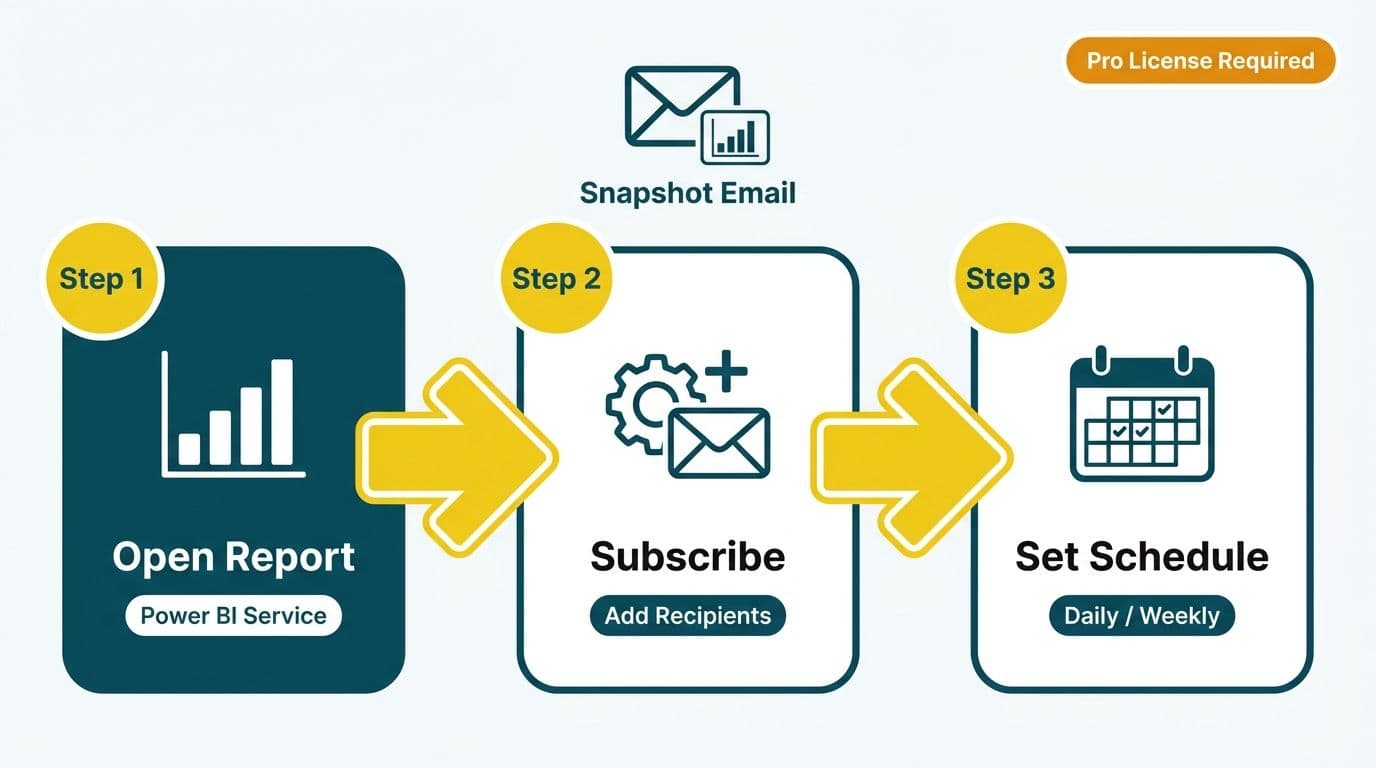
1. Open the report in Power BI Service and select Subscribe to report from the top menu
2. Enter recipient email addresses (up to 1,000 per subscription, per Microsoft's Power BI Service documentation)
3. Set the delivery frequency: daily, weekly on specific days, or triggered after a scheduled data refresh
4. Choose the start date, end date, and timezone for the subscription
5. Select the attachment format - interactive reports deliver as PNG snapshots; paginated reports additionally support PDF, XLSX, and DOCX
License requirement: Both the report owner and each recipient must hold a Power BI Pro license, or the workspace must be backed by Premium capacity (P SKU) or Fabric capacity (F SKU). For finance teams managing sensitive data at scale, a Power BI managed service for finance teams model can bundle capacity licensing with governed delivery configuration.
Key limitation vs SSRS: Power BI standard subscriptions send the same report view to all recipients. SSRS users who relied on per-recipient format selection - CSV for analysts, PDF for executives - must create separate subscriptions per format group or move to Power Automate.
For UK fintech firms operating under GDPR, recipient email addresses used in subscription lists constitute personal data under UK GDPR. Those lists should not be stored in Power BI datasets without a documented lawful basis and a current data-processing agreement with Microsoft.
How Do You Replicate SSRS Data-Driven Subscriptions in Power BI?
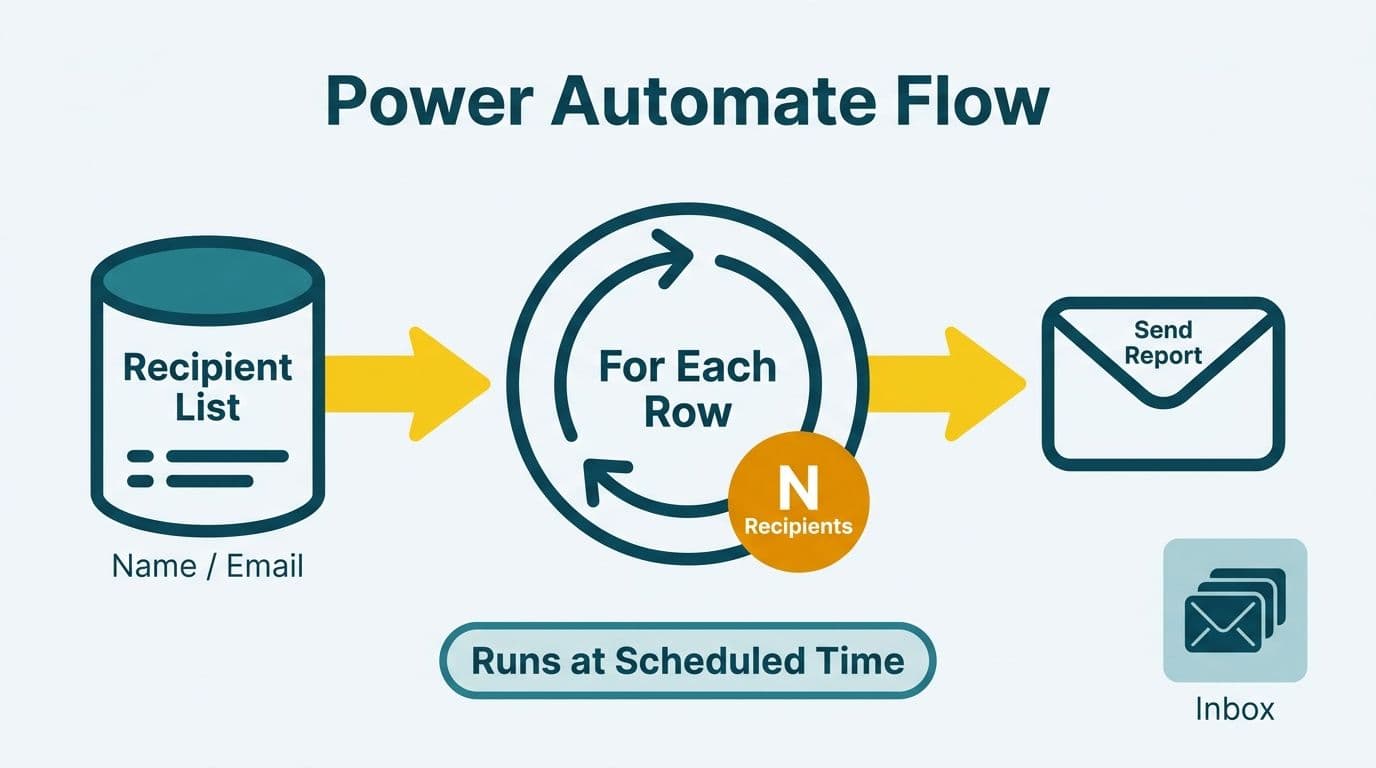
SSRS data-driven subscriptions are the harder migration. At runtime, SSRS queries a subscriber database, fetches one row per recipient, overrides report parameters per row, and fires one delivery per record. Power BI Service has no native equivalent - you replicate this behavior with a Power Automate cloud flow.
Step-by-step: Power Automate data-driven delivery
1. Trigger: Configure a Scheduled cloud flow matching your SSRS subscription cadence (e.g., Monday 07:00 EST)
2. Get recipients: Use the SQL Server, Dataverse, or SharePoint connector to query your subscriber table - columns should include email address, any report parameter values, and preferred format
3. Export report: Call the Power BI REST API action Export To File For Reports, passing the report ID, workspace ID, output format (PDF or XLSX), and any parameter overrides from the current row
4. Poll for completion: Power BI export is asynchronous. Add a Do Until loop that calls Get Export To File For Reports every 10 seconds until the status field returns `Succeeded`
5. Retrieve the file: Call Get Export To File For Reports (File) to download the binary content
6. Deliver: Use the Office 365 Outlook connector to email the binary as an attachment, with the subject line and body you specify
7. Loop: Wrap steps 3-6 in an Apply to each control over your recipient list
Parameter overrides at the row level use the `reportLevelFilters` array in the Export API request body. A US healthcare provider distributing department-level census reports can filter each export to the relevant department code, so the radiology director receives only radiology data - meeting HIPAA minimum-necessary access principles without requiring row-level security in the Power BI model itself.
Canadian organizations subject to PIPEDA must ensure the Power Automate flow does not route data through non-Canadian infrastructure when reports contain personal health information or financial account data. Pin the workspace to a Fabric capacity node in Canada Central or Canada East, and confirm in the Power BI Admin Portal that Multi-Geo routing is not active for that workspace.
How Does Power Automate Extend Power BI Report Delivery?
Power Automate unlocks delivery channels SSRS never supported natively. After retrieving the export binary in your flow, you can branch delivery to multiple destinations simultaneously:
- Microsoft Teams: Post the report as a file attachment to a Teams channel or direct message, with a formatted adaptive card showing the report period and filter context applied
- SharePoint document library: Write the export to a versioned SharePoint library with metadata columns for report date, department, and fiscal period - creating a searchable archive without requiring recipients to log into Power BI
- Azure Blob Storage: Archive each export for long-term retention, which supports US SOC 2 Type II audit evidence requirements and UK FCA record-keeping obligations
- HTTP webhook: POST the binary to an internal API endpoint to trigger downstream automation, such as flagging a workflow system when a report has been distributed
For a UK fintech firm, a common replacement pattern combines SharePoint archival for FCA audit trail with a Teams post to the finance leadership channel - meeting both compliance and usability requirements that SSRS SMTP delivery never addressed.
A Canadian manufacturing company running supply chain reports can write daily supplier scorecards to SharePoint with a versioned filename (e.g., `supplier-scorecard-2026-08-16.pdf`), giving procurement managers a searchable history without requiring Power BI logins.
Before deploying production flows, review your Power BI governance best practices - connector permissions, service account credentials, and flow ownership all need governance controls to prevent unauthorized data distribution.
What Are the Data-Residency and Compliance Rules for Power BI Subscriptions?
Data residency is non-negotiable for healthcare and finance teams in regulated markets, and SSRS migration is an opportunity to formalize controls that on-premises deployments often handled informally.
United States - HIPAA and SOC 2: Power BI Premium capacity in US regions processes and stores data at rest within that region. The Power BI Business Associate Agreement (BAA) - available to Microsoft 365 Enterprise customers - covers HIPAA obligations for protected health information passing through the export API. Confirm your tenant's data location in Admin Portal > About Power BI > Data stored in. Standard Power BI Pro subscriptions without Premium capacity do not provide a contractual region guarantee. For clinical reporting context, the clinical trial data reporting in Power BI guide covers overlapping GCP and GDPR requirements relevant to US-based research teams.
United Kingdom and EU - GDPR: Microsoft's EU Data Boundary commitment covers Power BI Service data processing for tenants provisioned in EU and UK regions (per Microsoft EU Data Boundary documentation, 2026). Verify your tenant region in Microsoft 365 Admin Center > Settings > Org Settings > Organization profile > Data location. Export emails routed through Office 365 remain within the EU Data Boundary when the tenant is correctly provisioned.
Canada - PIPEDA and Quebec Law 25: Premium capacity in Canada Central and Canada East keeps data residency within Canada. Quebec Law 25 (effective 2023, enforcement ongoing) adds privacy impact assessment requirements for cross-border data transfers. Any Power Automate flow calling the Power BI REST API needs a documented assessment if that API endpoint resolves outside Canada. Use a Canada-region Fabric capacity to keep the export job within the country. For SKU and capacity cost guidance, see Microsoft Fabric pricing.
SSRS vs Power BI Subscriptions: Feature Comparison
| Feature | SSRS Standard | SSRS Data-Driven | Power BI Subscription | Power Automate Flow |
|---|---|---|---|---|
| Recipient list | Static, set in UI | Dynamic from query | Static, up to 1,000 | Dynamic from any connector |
| Parameter per recipient | No | Yes | No (paginated: limited) | Yes, via Export API |
| Delivery formats | PDF, Excel, CSV, Word, XML | Same as standard | PNG, PDF (paginated adds XLSX, DOCX) | Any (binary export) |
| Delivery channels | Email (SMTP), file share | Same | Email only | Email, Teams, SharePoint, Blob, webhook |
| SQL Server license required | Enterprise (data-driven) | Enterprise | No | No |
| Cloud-native | No | No | Yes | Yes |
| Audit trail | ReportServer execution log | Same | Power BI activity log (Admin API) | Flow run history (30-day default) |
| GDPR region control | On-premises (customer-controlled) | On-premises | Requires Premium in correct region | Inherits workspace region |
When Should You Use Power BI Report Builder Paginated Report Subscriptions?
Paginated reports in Power BI (.rdl format, authored in Report Builder) are the closest structural match to SSRS reports. They support pixel-perfect multi-page layouts, parameter-driven output, and direct .rdl migration from SSRS with minimal rework.
For paginated reports hosted in Power BI Service - which requires Premium or Fabric F SKU capacity - subscriptions work similarly to SSRS standard subscriptions with one key addition: parameter values can be set per subscription. This lets you create multiple subscriptions on the same paginated report, each scoped to a different cost center or region, without building a Power Automate flow.
Choose paginated report subscriptions when:
- Your existing SSRS .rdl files can be migrated with minor modifications
- The output is a multi-page document such as invoices, regulatory statements, or financial summaries
- Recipients need pixel-consistent formatting across pages
- You need XLSX export with precise cell-level structure for finance workbooks
Choose Power Automate flows when:
- Recipients vary by data (true data-driven delivery)
- You need Teams, SharePoint, or archival delivery alongside email
- Report delivery must trigger downstream business logic
- The report is an interactive Power BI visual report rather than a paginated document
A US finance director managing 40 cost-center heads might start with paginated report subscriptions - one per cost center, parameter scoped to the relevant department code - then graduate to a Power Automate flow once the recipient list grows beyond what manual subscription management can support.
Migrating from SSRS: Practical Sequencing
Most mid-market teams complete the SSRS subscription replacement in three phases:
Phase 1 - Inventory: Export the full SSRS subscription list by querying `ReportServer.dbo.Subscriptions` joined to `ReportServer.dbo.Catalog`. Map each subscription to its Power BI replacement type: standard subscription, paginated report subscription, or Power Automate flow.
Phase 2 - Parallel run: Operate SSRS and Power BI subscriptions in parallel for one full reporting cycle. Compare outputs for format parity, parameter accuracy, delivery timing, and recipient coverage before cutting over.
Phase 3 - Decommission: Disable SSRS subscriptions, redirect SMTP relay accounts, and archive the ReportServer database for audit retention before decommissioning the SQL Server instance.
Teams that have already consolidated their BI stack - including replacing other visualization platforms alongside SSRS - can compress Phases 1 and 2 by reusing governance frameworks established during a broader platform migration.
---
About Lets Viz: Lets Viz has delivered data analytics and BI modernization engagements since 2020, serving US healthcare systems, UK fintech firms, Canadian manufacturing companies, and global SaaS businesses. The team holds a 5.0 rating on Clutch across Power BI, Fabric, and managed analytics engagements - with particular depth in regulated-industry reporting migrations and subscription automation.
Ready to retire your SSRS report server and move to cloud-native delivery? Our Tableau to Power BI migration services team has led SSRS-to-Power-BI migrations across healthcare, finance, and manufacturing - and can scope your subscription replacement in a single discovery session.