Power BI vs Tableau for Healthcare Compliance 2026
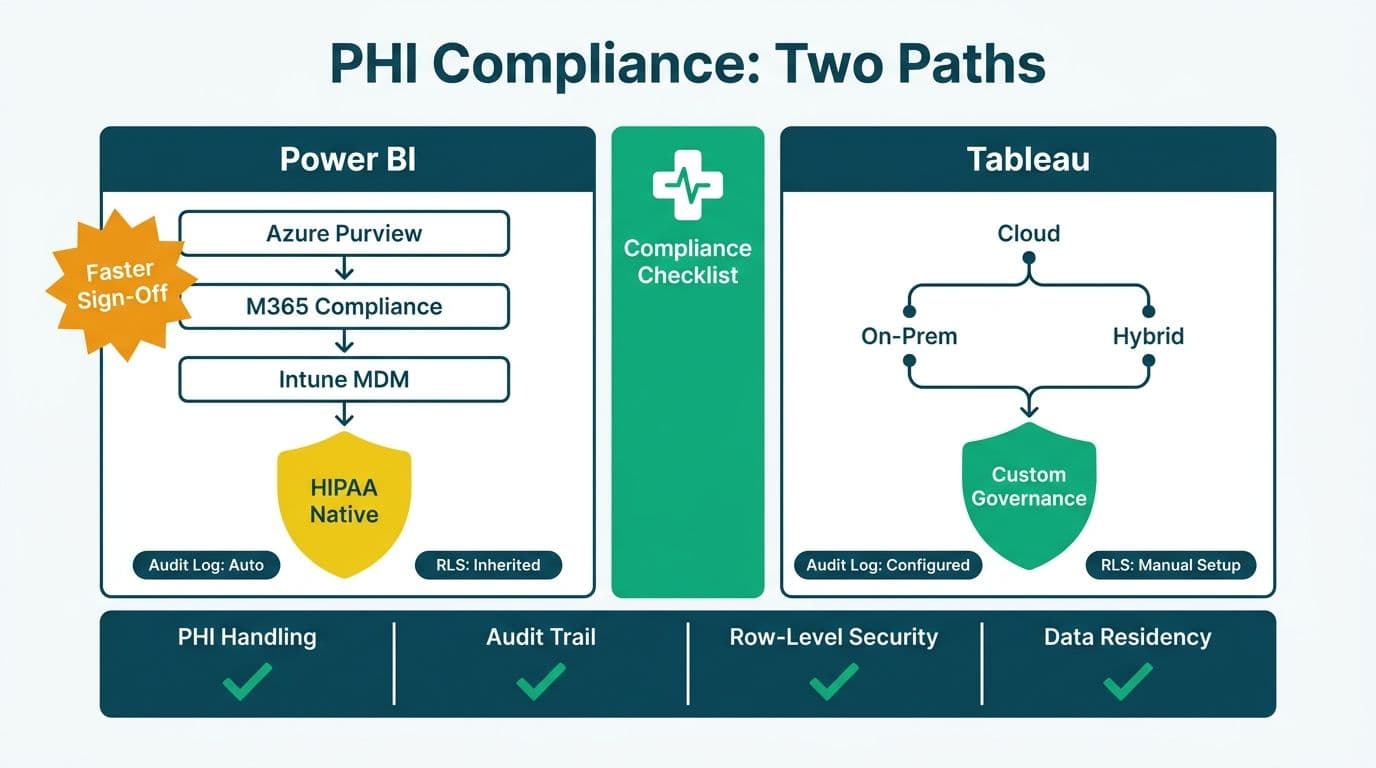
For hospital IT buyers evaluating business intelligence platforms, Power BI and Tableau both meet the baseline requirements for healthcare compliance - but their architectural approaches to PHI handling, audit logging, row-level security, and cloud data residency differ in ways that directly affect how fast your compliance team can sign off on a deployment. Power BI's native integration with Microsoft's compliance stack gives Microsoft-centric health systems a lower-friction path to HIPAA and GDPR readiness. Tableau offers more flexible deployment models and granular governance controls suited to complex, multi-cloud clinical data estates.
Key Takeaways
Microsoft and Salesforce both provide Business Associate Agreements (BAAs) for HIPAA-covered entities using Power BI and Tableau Cloud respectively.
Power BI integrates natively with Microsoft Purview and the Microsoft 365 Unified Audit Log, reducing compliance tooling overhead for organizations already in the Microsoft ecosystem.
Tableau's entitlement-table pattern for row-level security is more maintainable at scale for complex clinical permission hierarchies.
Both platforms offer regionally isolated cloud deployments for US, UK/EU, and Canadian data residency requirements under HIPAA, GDPR, and PIPEDA.
Total cost of ownership over three years - including licensing, compliance hardening, and RLS configuration - can vary substantially between the two platforms depending on deployment model.
What Does Healthcare Compliance Require from a BI Platform?
Healthcare compliance for business intelligence tools centers on four pillars: protected health information (PHI) handling, complete and tamper-resistant audit logs, role-based and row-level access control, and enforceable cloud data-residency guarantees.
In the United States, the Health Insurance Portability and Accountability Act (HIPAA) requires covered entities to protect PHI through technical, physical, and administrative safeguards. Any BI platform that processes PHI must sign a Business Associate Agreement (BAA) with the covered entity. In the UK and EU, the General Data Protection Regulation (GDPR) adds requirements around data subject rights, lawful basis for processing, and cross-border data transfer restrictions. In Canada, PIPEDA - and provincial equivalents including Alberta's PIPA and Quebec's Law 25 - governs how personal health information is collected, used, and disclosed by private-sector organizations.
A platform that satisfies one jurisdiction's requirements does not automatically satisfy another's, particularly around data residency and the right to erasure. Hospital IT teams planning a multi-region deployment should evaluate each platform against all applicable frameworks. Before finalizing any platform decision, use the Instant project cost calculator to model implementation costs - including compliance hardening, RLS configuration, and staff training - across your specific user count and data volumes.
How Do Power BI and Tableau Handle PHI and Signed BAAs?
Both platforms can operate as HIPAA-compliant environments, but the administrative path differs by vendor relationship.
Microsoft Power BI is covered under Microsoft's standard Online Services BAA, which is automatically included in the Microsoft Online Services Terms for eligible commercial and government subscriptions (Microsoft, 2026). Power BI Premium and Power BI embedded within Microsoft 365 E3/E5 inherit Azure's compliance certifications, including HIPAA, HITRUST CSF, and ISO 27001. PHI stored in Power BI datasets resides in Azure, so data classification and sensitivity labels from Microsoft Purview apply directly to datasets, reports, and exported files - giving compliance officers a single pane of glass for PHI classification across the entire Microsoft 365 environment.
Tableau Cloud (operated by Salesforce) offers a BAA for healthcare organizations under Salesforce's HIPAA-eligible services program (Salesforce, 2026). Tableau Server - the self-hosted option - shifts BAA responsibility to the customer's infrastructure contract with the underlying cloud provider. On AWS, Azure, or GCP, healthcare organizations running Tableau Server operate under a shared-responsibility model: Tableau secures the application layer; the customer secures and attests the infrastructure.
A US health system that has already standardized on Microsoft 365 will typically find Power BI's BAA path simpler - it falls within an existing enterprise agreement. A Canadian hospital running Salesforce Health Cloud across multiple facilities may find Tableau Cloud's BAA administratively convenient because it shares the same vendor relationship and contracting cycle.
How Do Power BI and Tableau Handle Audit Logs for Healthcare?
Complete, tamper-resistant audit logging is non-negotiable under HIPAA's technical safeguard requirements and GDPR Article 30's records of processing activities.
Power BI audit events flow into the Microsoft 365 Unified Audit Log and, optionally, into Microsoft Sentinel for SIEM integration. Logs capture report views, dataset refreshes, permission changes, export events, and sharing actions at the individual user level. Retention is configurable up to 180 days in the base service and up to 10 years with Microsoft Purview Audit Premium (Microsoft, 2026). Audit data can be streamed to Azure Monitor or a Log Analytics workspace for long-term retention, custom alerting, and integration with existing security operations workflows.
Tableau writes audit events to the Tableau Server Repository for self-hosted deployments, or to Salesforce's activity log infrastructure for Tableau Cloud. Tableau Cloud's Activity Log exports events as newline-delimited JSON files to customer-controlled cloud storage - AWS S3, Azure Blob Storage, or GCP Cloud Storage - giving the organization direct ownership of the raw audit trail without depending on the vendor's retention schedule (Tableau, 2026). Self-hosted Tableau Server provides complete log control but requires the customer to implement retention policies, backup procedures, and SIEM integration independently.
For UK NHS organizations and EU healthcare providers subject to GDPR Article 30, Power BI's native integration with Microsoft Purview Compliance Manager provides a structured dashboard for mapping data processing activities to GDPR obligations - a meaningful advantage for teams without a dedicated data governance engineer.
For organizations migrating from legacy platforms, the access-control mapping in Cognos Security Model vs Power BI RLS: Side-by-Side Mapping is directly applicable to healthcare audit trail planning.
How Does Row-Level Security Compare Between Power BI and Tableau for Patient Data?
Row-level security (RLS) restricts which rows of data a specific user can see - in a clinical context, a physician sees only records for their own patients, a department head sees their department's data, and a regional administrator sees their geography without cross-facility exposure.
Power BI RLS is defined in the semantic model using DAX filter expressions. Static roles apply fixed filters; dynamic RLS uses the `USERNAME()` or `USERPRINCIPALNAME()` DAX function to filter rows against a user-to-dimension mapping table at query time. For complex, attribute-based requirements - such as filtering by care team, facility code, or payer contract - dynamic RLS requires careful data model design and thorough testing. Power BI does not natively support column-level security within a report without enabling Object-Level Security, which requires Power BI Premium or Microsoft Fabric capacity.
Tableau RLS is implemented through user filters, which can be driven by an entitlement table - a separate database table mapping each user's identity to the dimension values they are permitted to view. This pattern scales well for large organizations with frequently changing permission sets because updates to permissions happen in the entitlement table without touching the Tableau workbook. Tableau also supports column-level visibility through calculated fields and data source-level filters, available without a premium tier add-on.
For healthcare deployments with more than 250 providers across 8 or more facilities - where care team rosters turn over quarterly and cross-facility access must be tightly scoped by department and payer contract - Tableau's entitlement table pattern cuts RLS maintenance overhead significantly compared to rebuilding DAX roles in Power BI each cycle. For Microsoft-centric IT departments that manage identity through Microsoft Entra ID (formerly Azure Active Directory), Power BI's integration with Entra ID security groups for dynamic RLS typically requires less custom tooling and maps naturally to existing directory structures.
| Feature | Power BI | Tableau |
|---|---|---|
| Row-level security mechanism | DAX filter expressions, dynamic via USERNAME() | User filters plus entitlement table pattern |
| Column-level security | Object-Level Security (Premium or Fabric required) | Calculated field masking, data source filters |
| Permission management integration | Microsoft Entra ID group sync | IdP integration or manual entitlement table |
| PHI masking at export | Sensitivity labels via Microsoft Purview | Tableau Data Management add-on required |
| Audit log destination | Microsoft 365 Unified Audit Log or Sentinel | Tableau Repository or Activity Log JSON export |
| HIPAA BAA source | Microsoft Online Services Terms | Salesforce HIPAA-eligible services program |
| GDPR data residency control | Azure region selection plus Purview controls | Tableau Cloud pod selection or self-hosted |
| PIPEDA Canadian hosting | Canada Central (Toronto), Canada East (Quebec City) | Canada pod (Tableau Cloud) or self-hosted |
What Are the Cloud Data-Residency Options for US, UK/EU, and Canada?
Data residency - the contractual guarantee that data is stored and processed within a specific geographic boundary - is a hard requirement in the UK, EU, and Canada, and an increasing risk-management priority for US health systems managing state-level privacy obligations alongside HIPAA.
Power BI stores tenant data in the Azure region of the tenant's home country by default. Organizations can select specific Azure regions for Power BI Premium capacities, and Microsoft Fabric provides explicit data residency controls at the workspace level (Microsoft, 2026). For UK organizations, Azure UK South and UK West retain data within UK borders. For EU organizations, Azure regions in Germany West Central, France Central, Netherlands, and the Nordics provide in-region processing. For Canadian organizations under PIPEDA and Quebec's Law 25, Canada Central (Toronto) and Canada East (Quebec City) are both available.
Tableau Cloud operates multi-tenant pods with geographic isolation: US, EU (Ireland and Germany), UK, Canada, Asia-Pacific, and Japan (Tableau, 2026). An organization selects its pod at provisioning time and data residency is bound to that pod's geography. UK NHS trusts can select the UK pod; Canadian provincial health authorities can select the Canada pod. Tableau Server self-hosted provides complete data residency control - the organization owns the infrastructure and chooses the cloud region - at the cost of additional operational overhead.
Consider a US integrated delivery network with facilities in Ontario, Canada. HIPAA governs the US operations; PIPEDA and Ontario's PHIPA govern the Canadian facilities. In this scenario, both Power BI Premium multi-geo and Tableau Cloud multi-pod can accommodate a two-region architecture. Power BI's multi-geo support under a single Microsoft Entra ID tenant simplifies identity management across jurisdictions; Tableau's multi-pod approach may require separate Tableau Cloud accounts per jurisdiction, adding administrative overhead.
For organizations navigating overlapping UK and EU data governance requirements across financial and clinical reporting, the GDPR Compliant SaaS Financial Reporting: The BI Checklist outlines the cross-functional checklist that applies equally to healthcare data.
Power BI vs Tableau for Healthcare Compliance: Which Platform Should You Choose?
The decision depends on three primary factors: your existing technology stack, the complexity of your access-control model, and the breadth of your multi-jurisdictional requirements.
Choose Power BI when:
Your organization is Microsoft 365 or Azure-first. Native integration with Entra ID, Microsoft Purview, and Azure Monitor reduces your compliance tooling footprint and implementation timeline.
Your IT team is lean and cannot sustain a self-hosted Tableau Server environment with its associated patching, backup, and DevOps overhead.
Budget predictability matters. Power BI Pro is bundled in Microsoft 365 E5; Power BI Premium Per User is priced at a lower per-seat entry point than Tableau Creator licenses.
Your compliance team already uses Microsoft Purview Compliance Manager for HIPAA or GDPR documentation and wants a unified compliance dashboard.
Choose Tableau when:
Your permission model is highly complex - hundreds of distinct data roles across multiple clinical departments, facilities, or regional hierarchies where an entitlement table is the more scalable governance approach.
Your primary data warehouse is non-Microsoft (Snowflake, AWS Redshift, Google BigQuery) and you need a cloud-agnostic BI layer.
You require column-level security without purchasing additional premium add-ons.
Your organization already uses Salesforce Health Cloud and wants to consolidate BAA coverage under a single vendor relationship.
A UK NHS trust standardizing on Microsoft 365 will typically reach GDPR compliance faster with Power BI. A Canadian provincial health authority running Salesforce Health Cloud across multiple hospital sites may find Tableau Cloud's Canada pod and Salesforce BAA the more direct path. A US regional health network migrating from legacy IBM Cognos reporting should review the Cognos to Power BI Migration Checklist: 7-Phase Guide to understand what compliance-specific steps - audit log migration, RLS rebuild, and sensitivity label application - the transition requires.
What Does a Healthcare BI Compliance Implementation Actually Cost in 2026?
Licensing is only one component of the real power bi vs tableau total cost of ownership in 2026. A complete cost model for a healthcare compliance deployment must cover: license tier selection, compliance hardening (BAA signing, Purview or Data Management configuration), RLS design and testing, audit log infrastructure (SIEM integration, long-term retention), end-user training, and ongoing governance maintenance as permission sets and data models evolve.
For Power BI, healthcare-grade deployments typically require Premium Per User or Premium capacity for Object-Level Security and sensitivity label inheritance - a meaningful step up from the base Pro license. Power BI Premium Per User lists at approximately $20 per user per month (as of 2026); Tableau Creator licenses list at approximately $75 per user per month, a gap that compounds quickly at 200 or more clinical users. For Tableau, the Data Management add-on (which includes Tableau Catalog for data lineage) is often required for enterprise PHI tracking, adding to the Creator license base cost. Tableau Server self-hosted avoids SaaS per-seat fees but introduces infrastructure, patching, and DevOps labor that must be budgeted separately.
For healthcare BI teams evaluating their broader data platform costs, the Microsoft Fabric vs Synapse vs Databricks: TCO Cost Breakdown provides a useful benchmark for the infrastructure layer beneath your BI tools.
---
About Lets Viz: Lets Viz has delivered compliance-ready analytics implementations since 2020, serving US healthcare systems, UK fintech firms, Canadian manufacturing companies, and global SaaS organizations. With a 5.0 Clutch rating, the team specializes in Power BI and Tableau deployments that meet HIPAA, GDPR, and PIPEDA requirements from day one - covering RLS architecture, audit log pipeline design, and sensitivity label governance.
Use the Instant project cost calculator to generate an itemized estimate for your organization's healthcare BI compliance implementation - covering headcount, data volumes, platform tier, and compliance hardening scope.


