How to Migrate an Access Database to Zoho Creator: Full Guide
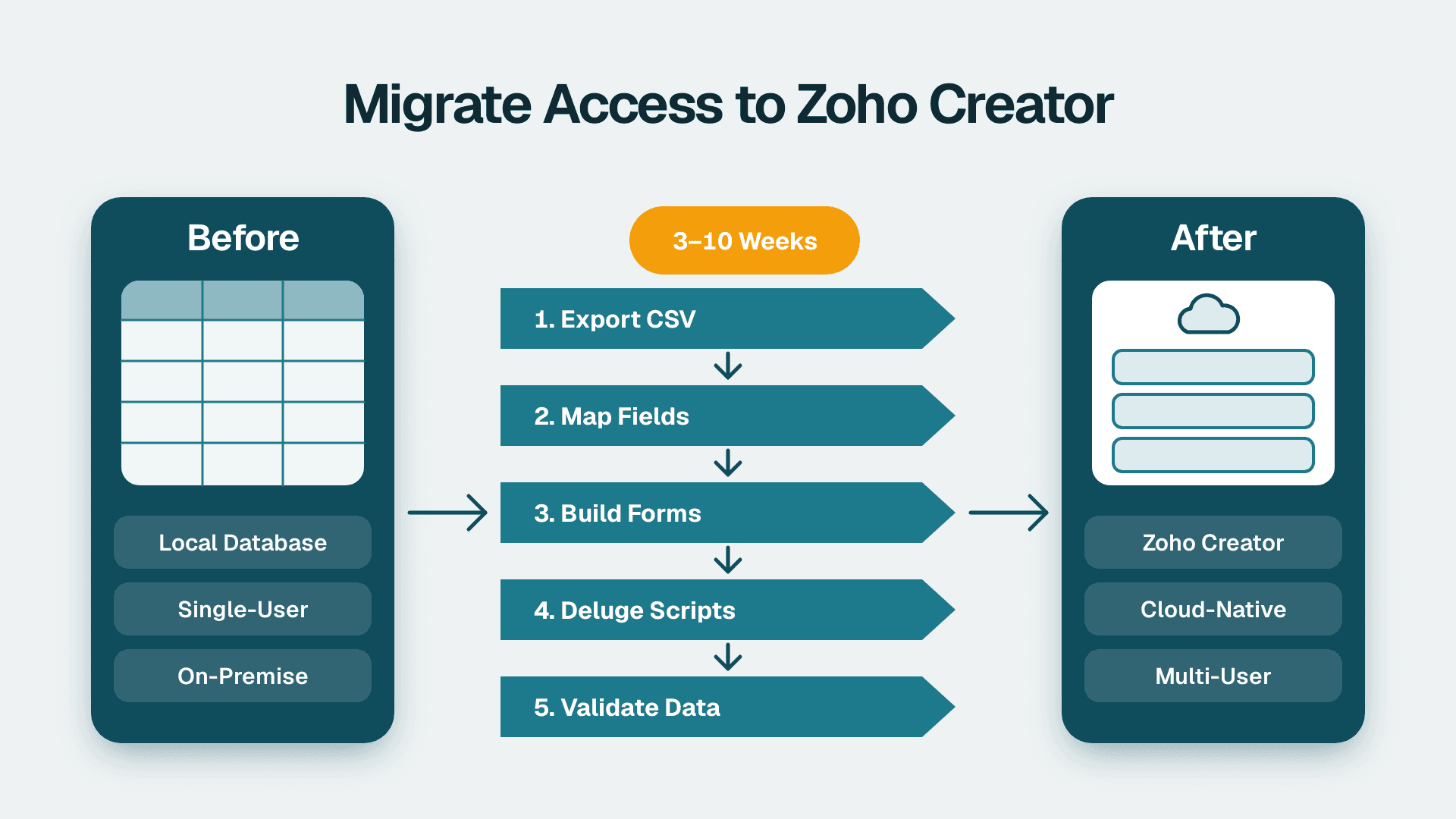
Migrating an Access database to Zoho Creator is achievable in three to ten weeks for most mid-market teams: export your tables as CSV, rebuild the schema as forms in Zoho Creator's form builder, translate query and macro logic into Deluge scripts, and validate data integrity before going live. The result replaces a locally hosted, single-user application with a cloud-native platform that connects natively to the broader Zoho ecosystem.
Key Takeaways
Export Access tables as CSV or Excel; Zoho Creator's import wizard maps column headers to form fields automatically.
Access relationships (foreign keys, lookups) map to Zoho Creator's Lookup fields and Subforms - import parent tables first to avoid orphaned child records.
Access macros and VBA logic re-implement in Deluge using on-submit, on-load, and scheduled workflow blocks.
Field-type mismatches and silent data truncation are the leading causes of failed migrations.
HIPAA, GDPR, and PIPEDA obligations travel with the data - configure data-residency settings and access controls in Zoho Creator before importing any records.
What Does It Mean to Migrate an Access Database to Zoho Creator?
An Access-to-Zoho-Creator migration has three distinct workstreams: data migration (moving records), schema translation (rebuilding table structure as forms), and logic migration (re-implementing queries, macros, and VBA as Deluge scripts). Each workstream has its own failure modes, and underestimating the logic migration is the single most common cause of project overruns.
Specialist support from a Zoho consulting services team can compress the timeline and surface schema gaps before any data lands in production.
Why Teams Move Off Access
Access is a desktop relational database designed for single-user or small workgroup use. As data volumes grow and teams become distributed - across US offices, UK subsidiaries, or Canadian regional divisions - the platform's concurrency limits, absence of mobile access, and manual backup requirements become operational liabilities. Zoho Creator provides multi-user cloud access, built-in audit logging, and direct API connections to Zoho CRM, Zoho Books, and the wider Zoho ecosystem.
How Do You Export Data from Microsoft Access?
Export each Access table as a separate CSV file using File > Export > Text File, or via the External Data ribbon tab in recent versions. Select comma-delimited output, UTF-8 character encoding, and include column headers in the first row. For tables exceeding 100,000 rows, batch the export - Zoho Creator's import wizard enforces per-file row limits documented in Zoho's official import documentation (Zoho, 2025).
Pre-export checklist:
Confirm date formats: Access defaults to locale-specific formatting (MM/DD/YYYY in US regional settings, DD/MM/YYYY in UK installations). Convert to ISO 8601 (YYYY-MM-DD) before exporting, or specify the format explicitly at the Zoho Creator import step.
Export lookup and reference tables first, then import them into Zoho Creator first so parent records exist before child records arrive.
Strip Access-generated autonumber columns from the CSV - Zoho Creator generates its own unique record IDs on import.
Audit for special characters: embedded commas, quotation marks, and pipe characters can corrupt CSV row boundaries and cause partial imports with no error message.
For Access databases that use linked tables (tables physically stored in SQL Server or another backend via ODBC), export directly from the source system. The ODBC layer can truncate long text values or mis-encode character sets, producing data loss that is difficult to detect post-import.
How Do You Re-Map Your Access Schema in Zoho Creator's Form Builder?
Each Access table becomes a Zoho Creator form. Use the Import Data wizard to upload a CSV and have Creator auto-generate a form from the column headers, then refine the auto-assigned field types. Manual field-by-field construction is more reliable for complex schemas with many relational dependencies.
Access Field Type to Zoho Creator Field Mapping
| Access Data Type | Zoho Creator Field Type | Migration Notes |
|---|---|---|
| AutoNumber | ID (system-generated) | Exclude from import; Creator assigns its own |
| Short Text (≤255 chars) | Single Line | Direct equivalent |
| Long Text / Memo | Multi Line | Enable rich text only if HTML content was stored |
| Number (Integer / Long) | Number (Integer) | Match precision; do not use float for currency |
| Currency | Currency | Use the Currency field type for all financial data |
| Date / Date-Time | Date-Time | Creator stores in UTC - verify timezone configuration |
| Yes/No | Checkbox | Maps directly |
| Lookup (foreign key) | Lookup field / Subform | Import parent form first; see relational logic section |
| OLE Object | File Upload | Export files to external storage first, then re-attach |
| Hyperlink | URL | Strip Access's display-text wrapper from the stored value |
Handling Relational Logic
Access enforces relationships through the Relationships panel. Zoho Creator handles the same patterns through Lookup fields and Subforms.
A one-to-many relationship (one customer, many orders) becomes a Lookup field on the child form pointing to the parent form. A many-to-many relationship (products linked to multiple categories) uses two Lookup fields and a junction form, or is flattened into a multi-select field where reporting requirements are simple.
A Canadian manufacturing company migrating a production-scheduling database from Access would need to replicate every parent-child relationship precisely - and note that Access cascade-delete rules do not transfer automatically. In Zoho Creator, cascade logic must be implemented explicitly in Deluge `before-delete` workflow blocks.
How Do You Replicate Access Query and Macro Logic in Deluge?
Deluge (Data Enriched Language for the Universal Grid Environment) is Zoho Creator's built-in scripting language. Every Access query, macro, and VBA module needs a Deluge equivalent. This workstream typically takes as long as the schema and data migration combined - plan for it from the start.
Translating Access Queries to Deluge
Access SELECT queries that feed forms and reports translate to Zoho Creator's Report builder (for display) or Deluge functions (for computation). Key Deluge methods to know:
`zoho.creator.getRecords()` - fetches records with filter criteria, the functional equivalent of a SQL WHERE clause.
`zoho.creator.searchRecords()` - performs full-text search across form fields.
Aggregations (SUM, COUNT, AVG) are configured in the Report builder or handled via `for each` loops in Deluge functions.
Access action queries (INSERT, UPDATE, DELETE triggered by user events) map to Deluge `on-submit` and `on-validate` workflow hooks attached to the relevant form.
Access Macro to Deluge Translation Reference
| Access Macro Action | Deluge Equivalent |
|---|---|
| OpenForm | Button redirect or embedded form link |
| RunQuery (action query) | `zoho.creator.updateRecord()` in a workflow block |
| SendEmail | `sendmail` Deluge task |
| SetValue | Variable assignment in on-submit workflow |
| MsgBox | `info` or `alert` UI action in Deluge |
| RunCode (VBA) | Full rewrite required in Deluge |
VBA modules require a complete rewrite - Zoho Creator has no VBA interpreter. Audit all VBA modules for business-critical logic before the migration starts. A US healthcare team using Access VBA to calculate patient eligibility rules or billing codes needs module-by-module review and sign-off before Deluge re-implementation begins.
If your Access database includes multi-step approval routing, the approval workflow guide for Zoho Creator covers the Deluge workflow engine and role-permission model in detail.
What Are the Five Most Common Pitfalls When Migrating from Access to Zoho Creator?
These failure modes appear consistently across mid-market migrations in healthcare, finance, and operations.
Pitfall 1: Silent Field Truncation
Access Short Text fields hold up to 255 characters. Memo (Long Text) fields can hold far more. If a Memo field is mapped to a Single Line field in Zoho Creator, the import will silently cut content at 255 characters with no error message. Fix: run `SELECT MAX(LEN([FieldName])) FROM [TableName]` in Access for each field before exporting, and set Zoho Creator field types accordingly.
Pitfall 2: Date Format Mismatch
US Access installations default to MM/DD/YYYY; UK installations use DD/MM/YYYY. If the export retains locale-specific formatting and the Zoho Creator import wizard is not configured to match, dates where the day and month values are both 12 or under will import with the values transposed - silently. A UK fintech firm migrating years of transaction records would not catch this without a deliberate post-import validation pass on date fields. Fix: normalize all dates to ISO 8601 (YYYY-MM-DD) at the export step.
Pitfall 3: Lookup Orphaning on Import
If child records are imported before their parent records exist in Zoho Creator, the Lookup fields on those child records are left blank. The import succeeds without error - but the relationships are broken. Fix: import in strict dependency order, parents before children, and verify Lookup field population after each import batch before proceeding.
Pitfall 4: Standard vs. Custom Field Confusion
Zoho's platform reserves certain fields (Email, Phone, Name) for platform-level functions including mass email delivery, duplicate detection, and CRM sync. Data migrated into a user-created custom field with a similar name will not be recognized by those platform features. As an illustrative example: a supplier email campaign might reach only 77 of 358 contacts because addresses live in a custom `Primary_Email` field rather than Zoho's standard Email field. After backfilling the standard field with the correct addresses, coverage would rise from 77 of 358 to 283 of 358. When migrating from Access, always map data to Zoho standard fields where a functional equivalent exists - do not create custom fields for data the platform already has a designated home for.
Pitfall 5: No Referential Integrity Enforcement Post-Migration
Access blocks deletion of a parent record that has active child records. Zoho Creator does not enforce this at the data layer. Without compensating Deluge logic, a user can delete a customer record while open orders still reference it, leaving orphaned rows with broken Lookup fields. Fix: add a `before-delete` Deluge function on each parent form that queries for dependent child records and halts the delete if any exist.
How Long Does a Zoho Creator Migration from Access Take?
Timeline is driven by schema complexity and Deluge rewrite scope - not record volume. Record count rarely determines the critical path.
| Migration Scope | Typical Timeline |
|---|---|
| 1-5 tables, no macros or VBA | 1-2 weeks |
| 6-15 tables, simple macros | 3-5 weeks |
| 15+ tables, complex VBA modules | 6-10 weeks |
| Multi-database consolidation | 10-16 weeks |
A US finance team consolidating three departmental Access databases into a single Zoho Creator application - common in mid-market accounting and compliance environments - should budget for the 10-16 week range and include a parallel-run period during which both systems operate before Access is decommissioned.
For teams evaluating platform options before committing, the Zoho Creator vs Microsoft Power Apps low-code comparison covers the build-versus-buy considerations that inform the migration business case.
What Compliance Obligations Apply During an Access-to-Zoho-Creator Migration?
Regulatory obligations follow the data. Identify compliance requirements before importing any records into Zoho Creator.
HIPAA (US Healthcare): Protected Health Information (PHI) requires a Business Associate Agreement (BAA) with Zoho before migration begins. Zoho Creator's HIPAA-eligible configuration, available on Enterprise plans, includes audit logging, role-based access controls, and encryption at rest (Zoho, 2025). A US health system migrating patient intake records from Access must execute the BAA and configure permission profiles before the first record is imported.
GDPR (UK and EU): Personal data about UK or EU data subjects requires documented lawful basis and, for high-risk processing, a Data Protection Impact Assessment. Zoho Creator's Enterprise plan supports EU data residency, routing data storage to European data centers (Zoho, 2025). Our Zoho Creator GDPR compliance and data residency guide walks through the configuration steps in full.
PIPEDA (Canada): Canadian organizations migrating personal data must ensure the destination meets Canadian privacy standards. Zoho operates a Canadian data center, so Canadian organizations can choose to host their data in Canada; confirm that the Canadian region is available for your plan and configure it before importing records. Organizations subject to PIPEDA should still document the safeguards in place, and complete a transfer-impact assessment if any data will be processed or accessed outside Canada. This is particularly relevant for Canadian financial services firms and provincial health organizations moving from on-premises Access to a cloud platform.
Building a Post-Migration Validation Plan
Migration is not complete when records land in Zoho Creator - it is complete when you can demonstrate the data is correct. A three-layer validation approach covers the most common failure modes:
1. Row count reconciliation: every Access table record count should match its Zoho Creator form equivalent. A discrepancy indicates a failed import batch or a record silently rejected by a validation rule.
2. Field-level spot checks: sample 50-100 records per form and compare values field by field between Access and Zoho Creator. Prioritize date, currency, and long-text fields - the three types most prone to error during import.
3. Business logic validation: run identical calculations in both systems (sum of invoices by customer, count of open cases by status) and confirm matching results. This surfaces rounding, truncation, and aggregation discrepancies that row counts will not catch.
For teams planning to build reporting and analytics on top of the migrated data, Zoho Analytics consulting services covers the dashboard and reporting layer that typically follows a successful platform migration.
---
About Lets Viz: Lets Viz has partnered with organizations across US healthcare, UK fintech, Canadian manufacturing, and global SaaS since 2020, earning a 5.0 rating on Clutch. Our team delivers data engineering, low-code platform migrations, and compliance-ready analytics implementations across HIPAA, GDPR, and PIPEDA environments - from migration scoping through post-launch validation.
Ready to move your Access database to Zoho Creator? Our Zoho consulting services team can scope your migration, map your schema to Zoho Creator forms, and build the Deluge logic your workflows require.


