Cognos Security Model vs Power BI RLS: Side-by-Side Mapping
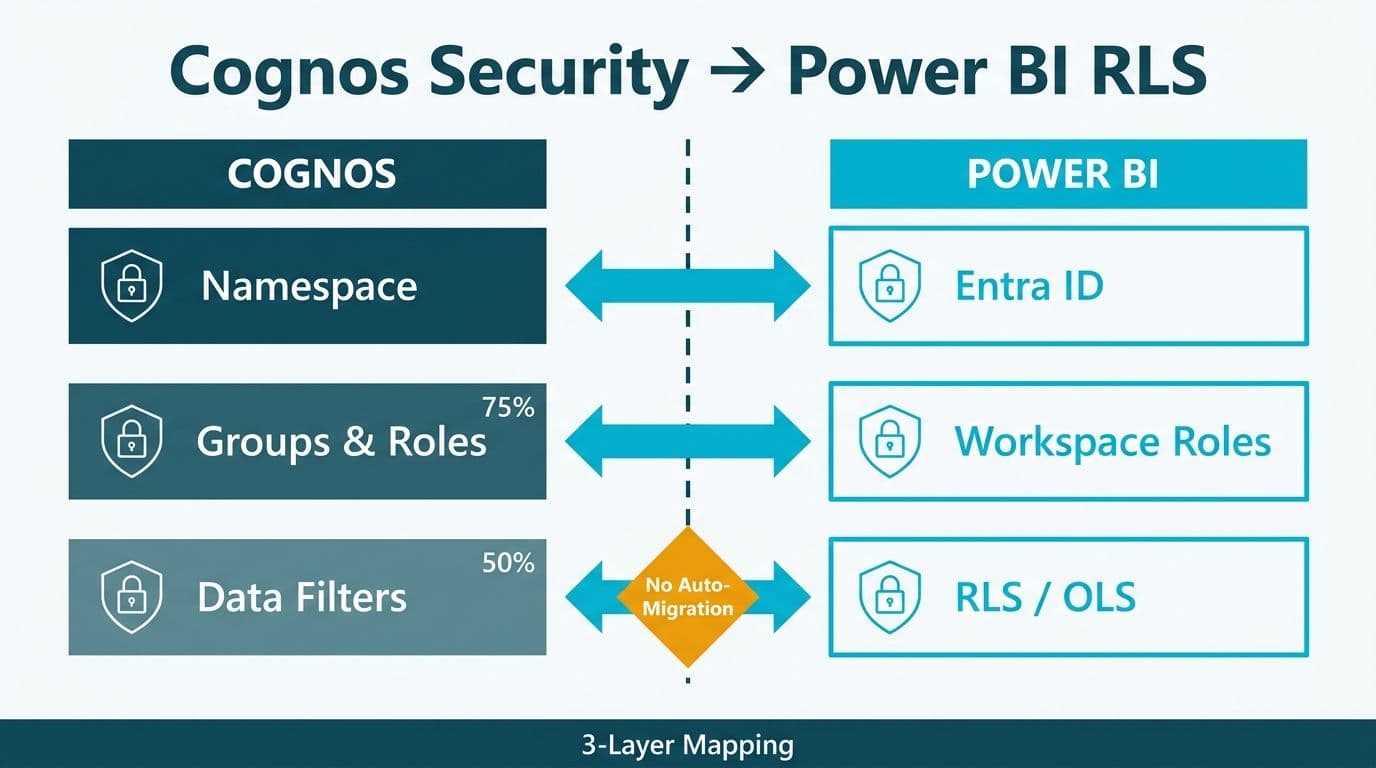
The Cognos security model organizes access across three layers: namespaces for authentication, groups and roles for user collections, and data-level security filters applied in Framework Manager or the Data Query Engine. Power BI replaces these with Microsoft Entra ID, workspace roles, and a combination of Row Level Security (RLS) and Object-Level Security (OLS). The translation is achievable, but requires deliberate design - no tool bridges these models automatically. Teams that replicate Cognos group structures directly in Power BI end up with dozens of brittle static roles instead of a maintainable dynamic model.
Key Takeaways
Cognos namespaces map to Microsoft Entra ID (Azure AD); the authentication model shifts from on-premises directory to cloud identity.
Cognos Groups and Roles translate to Power BI workspace roles for content access plus RLS role definitions inside the semantic model for data-row control.
Data-level security filters - the hardest Cognos construct to migrate - become Power BI dynamic RLS using `USERPRINCIPALNAME()` against a user-dimension mapping table.
Cognos column-level access controls map to Power BI OLS, available only in Premium, Premium Per User, and Microsoft Fabric capacities.
HIPAA, GDPR, and PIPEDA compliance teams must audit and document RLS coverage before go-live; Power BI's model is equally auditable but structured differently from Cognos.
What Is the Cognos Security Model?
IBM Cognos Analytics organizes security across three distinct layers.
Namespaces are authentication provider configurations - Active Directory forests, LDAP directories, or custom providers - that Cognos uses to resolve user identities at login. A typical enterprise deployment has a primary namespace bound to the corporate AD and secondary namespaces for contractors or partners. Each user session inherits the group memberships defined within their namespace.
Groups and Roles sit inside namespaces. Groups are flat user collections; Roles carry functional capabilities such as Report Authoring or Administration. Access to packages, folders, reports, and data sources is granted or denied at the group or role level through the Cognos administration console.
Data-level security filters are the most migration-critical construct. In Framework Manager, a developer writes a WHERE-clause expression and binds it to a group or user class. When a group member submits a query, the gateway appends the filter automatically - the user never sees it, and the result set contains only permitted rows. Some deployments use Data Module macros or parameterised data server connections instead, but the runtime effect is identical.
Organizations migrating from Cognos share the same security remapping challenge as teams covered by our Tableau to Power BI migration services; regardless of the source platform, the task is translating a legacy role hierarchy into a cloud-native, auditable access model.
What Is Power BI Row Level Security - and How Does OLS Extend It?
Row Level Security (RLS) restricts which rows a given user sees within a published dataset. RLS roles are defined inside the Power BI semantic model using DAX filter expressions, then assigned to users or Azure AD groups through the Power BI service. When a report consumer opens a report, the RLS engine silently appends the appropriate DAX filter to every query - functionally equivalent to Cognos data-level security filters, but implemented in the data model rather than a middleware gateway.
Two variants matter for Cognos migrations:
Static RLS hardcodes filter values. A role named "West Region" might apply `[Region] = "West"`. Simple, but each distinct access profile needs its own role.
Dynamic RLS uses `USERPRINCIPALNAME()` to look up the signed-in user in a mapping table and derive permitted filter values at runtime. This is the recommended target for organizations with more than a handful of Cognos security profiles - and the concept that teams learning Power BI from a Cognos or Tableau Server background find most unfamiliar.
Object-Level Security (OLS) hides columns and tables from specific roles entirely. A field hidden by OLS disappears from the field list and cannot be referenced in DAX by end users. OLS requires Premium, Premium Per User, or Fabric capacity - unavailable on Pro-only workspaces.
For DAX patterns that underpin these filters, the Cognos to Power BI DAX Translation Guide covers Framework Manager expression equivalences in detail.
How Does the Cognos Security Model Map to Power BI RLS?
The table below is the side-by-side mapping for the cognos security model vs power bi row level security migration. Use it as your security design checklist before dataset build begins.
| Cognos Construct | Function | Power BI Equivalent | Notes |
|---|---|---|---|
| Namespace (primary) | Authentication source (AD/LDAP) | Microsoft Entra ID | SSO via OIDC or SAML; users inherit AD group memberships |
| Namespace (secondary) | Partner or contractor auth | Entra External Identities (B2B guests) | Guest users can be added to workspace roles and RLS roles |
| Groups | Static user collections | Azure AD Security Groups | Assign AD groups directly to RLS role assignments in the service |
| Roles (Cognos) | Capability-based access sets | Workspace Roles (Admin, Member, Contributor, Viewer) | Workspace roles control content access, not row filtering |
| Data-level security filter | Runtime row restriction per group | Dynamic RLS using USERPRINCIPALNAME() | Requires a user-dimension mapping table in the semantic model |
| Content-store permissions | Report and folder visibility | Workspace folders and App audiences | App audiences control what each group sees post-publish |
| Column-level restriction | Field visibility per user class | Object-Level Security (OLS) | Requires Premium, PPU, or Fabric - not available on Pro |
| Capabilities (Author/Admin) | Functional permissions | Workspace roles plus tenant admin settings | Contributor = Cognos Author; Admin = Cognos Administrator |
How Do You Migrate Cognos Data-Level Security Filters to Power BI Dynamic RLS?
The data-level security filter causes the most redesign effort in any Cognos-to-Power BI migration. These five steps apply across US healthcare systems, UK fintech firms, and Canadian financial institutions.
Step 1 - Inventory existing filters. Export all Framework Manager security filters and Data Module macros. For each, document the WHERE expression, the bound group or user class, and the subject area it governs. This is your RLS migration backlog.
Step 2 - Build a user-dimension mapping table. Dynamic RLS requires an explicit table - commonly called `UserSecurity` or `DimUserAccess` - mapping each user's UPN to permitted dimension values. In Cognos, this logic often lives in a database view or stored procedure. Extract and flatten it into a table that will be loaded into the Power BI semantic model.
Step 3 - Define a single dynamic RLS role. In Power BI Desktop, create one role:
```
[UserEmail] = USERPRINCIPALNAME()
```
Applied via a relationship between `UserSecurity` and the fact table's dimension key, this single role replaces dozens of static Cognos group filters. Use single-direction cross-filtering from `UserSecurity` toward dimension tables to prevent unintended data exposure.
Step 4 - Validate with View As and REST API testing. Use the "View as roles" feature in Desktop for initial checks, then use the Power BI REST API `/effectiveIdentity` endpoint to automate coverage testing across a representative user sample. Capture results as compliance evidence - the first artefact auditors request under HIPAA and GDPR.
Step 5 - Assign Azure AD groups to the RLS role in the service. Bind the Azure AD groups corresponding to each former Cognos group to the dynamic role. The AD group assignment is the coarse access gate; the DAX expression is the fine-grained row filter.
For storage mode decisions affecting RLS query performance, the Power BI Import vs DirectQuery Decision Guide covers tradeoffs relevant to high-volume Cognos data package migrations.
When Should You Use OLS Instead of RLS - or Both?
RLS and OLS solve different problems. The choice depends on data sensitivity classification, not on how Cognos implemented the restriction.
Use RLS alone when all users need the same columns but different row subsets - a regional finance manager who sees only their territory's revenue, or a hospital department head who sees only their unit's patient encounter records.
Use OLS alone when users see the same rows but certain columns must be invisible - salary bands, national insurance numbers, diagnosis codes, or credit scores. Filtering rows is insufficient: the column must disappear from the field list entirely.
Use both when a dataset contains sensitive rows and sensitive columns. This is the standard pattern for US healthcare datasets under HIPAA's minimum-necessary standard, UK and EU datasets governed by GDPR Article 25 (data protection by design), and Canadian datasets under PIPEDA's safeguarding principles. As of 2026, Microsoft Purview's sensitivity label integration with Fabric workspaces makes the combined RLS + OLS pattern the audit-preferred approach in regulated environments, as labels applied to source columns propagate automatically to published reports - generating a traceable classification lineage that satisfies data subject access request workflows under both GDPR and PIPEDA.
What Compliance Requirements Apply When Migrating Cognos Security to Power BI?
Geographic compliance rules do not change the mechanics of RLS and OLS, but they define the audit evidence required before go-live. This applies to tableau to power bi migration for regulated industries and Cognos migrations alike.
US healthcare (HIPAA). A US hospital network migrating Cognos to Power BI must demonstrate that every protected health information (PHI) column is OLS-restricted or excluded from shared datasets. HIPAA Security Rule access control requirements (45 CFR § 164.312(a)) map to Power BI role-based access, but auditors expect written documentation. Export the Power BI REST API dataset user list and RLS role assignments as timestamped evidence. The AI Analytics Data Privacy Risks: Healthcare Audit Guide covers documentation requirements in depth.
UK and EU (GDPR). A UK fintech firm migrating its Cognos regulatory reporting to Power BI must satisfy GDPR Article 25 (data protection by design and by default). Dynamic RLS satisfies the "access limited to necessary data" requirement - provided the `UserSecurity` mapping table is governed by an authorised data steward. Enable audit logging in Microsoft Purview to maintain a queryable access history for data subject requests.
Canada (PIPEDA). A Canadian financial institution migrating from on-premises Cognos to Power BI Service must document data residency under PIPEDA's accountability principle. Power BI Premium and Microsoft Fabric support Canada-specific capacity regions. Confirm both the tenant's default data residency and the workspace's assigned capacity point to Canadian Azure datacentres before the first dataset publish.
MedInsight's 2026 healthcare analytics review identified secure identity federation and AI-driven analytics as the two dominant themes reshaping healthcare BI platforms - reinforcing that auditable, role-based data access controls are a foundational requirement, not an afterthought, in any modernisation programme.
What Are the Most Common Mistakes When Remapping Cognos Security to Power BI?
Five errors appear most frequently in Cognos-to-Power BI security migrations:
1. Replicating static Cognos group filters as static Power BI RLS roles. Enterprise Cognos deployments commonly carry 40–80 distinct group filters; replicating each as a static Power BI role produces an equally large role inventory that requires manual updates every time users change teams or territories. Migrate to dynamic RLS from the outset.
2. Forgetting content-store permissions. Cognos access control exists at both the data layer and the content store layer (report and folder permissions). Teams that migrate data-level filters accurately but neglect workspace roles and app audiences leave report-level access ungoverned in Power BI.
3. Assuming OLS is available on Pro-only workspaces. OLS requires Premium, PPU, or Fabric. If the workspace runs on shared Pro, either upgrade capacity or redesign the dataset to exclude sensitive columns before publishing.
4. Testing only with Desktop's "View as roles" feature. Desktop testing does not exercise the Azure AD group assignment chain. Validate with real user principals signed into the Power BI service, and capture API responses as audit evidence.
5. Missing the service principal RLS exemption. Datasets refreshed or embedded via a service principal are exempt from RLS by default. Embedded analytics scenarios must pass `effectiveIdentity` explicitly in the embed token request - failing to do so exposes all rows to all embedded consumers, a critical gap in healthcare and financial services deployments.
---
About Lets Viz: Lets Viz is a data analytics consultancy serving US healthcare systems, UK fintech firms, Canadian financial institutions, and global SaaS companies since 2020. Our team specialises in Power BI architecture, enterprise BI migration, and regulated-industry compliance - backed by a 5.0 Clutch rating. Every security model migration engagement is led by a certified Power BI architect with hands-on experience translating Cognos and Tableau deployments to modern cloud analytics platforms.
Migrate your Cognos security model to Power BI with confidence - our Tableau to Power BI migration services cover full RLS and OLS design, Azure AD group mapping, and compliance documentation for healthcare and financial services organizations across the US, UK, and Canada.


