HIPAA Compliant BI Tools for Hospital Data Visualization
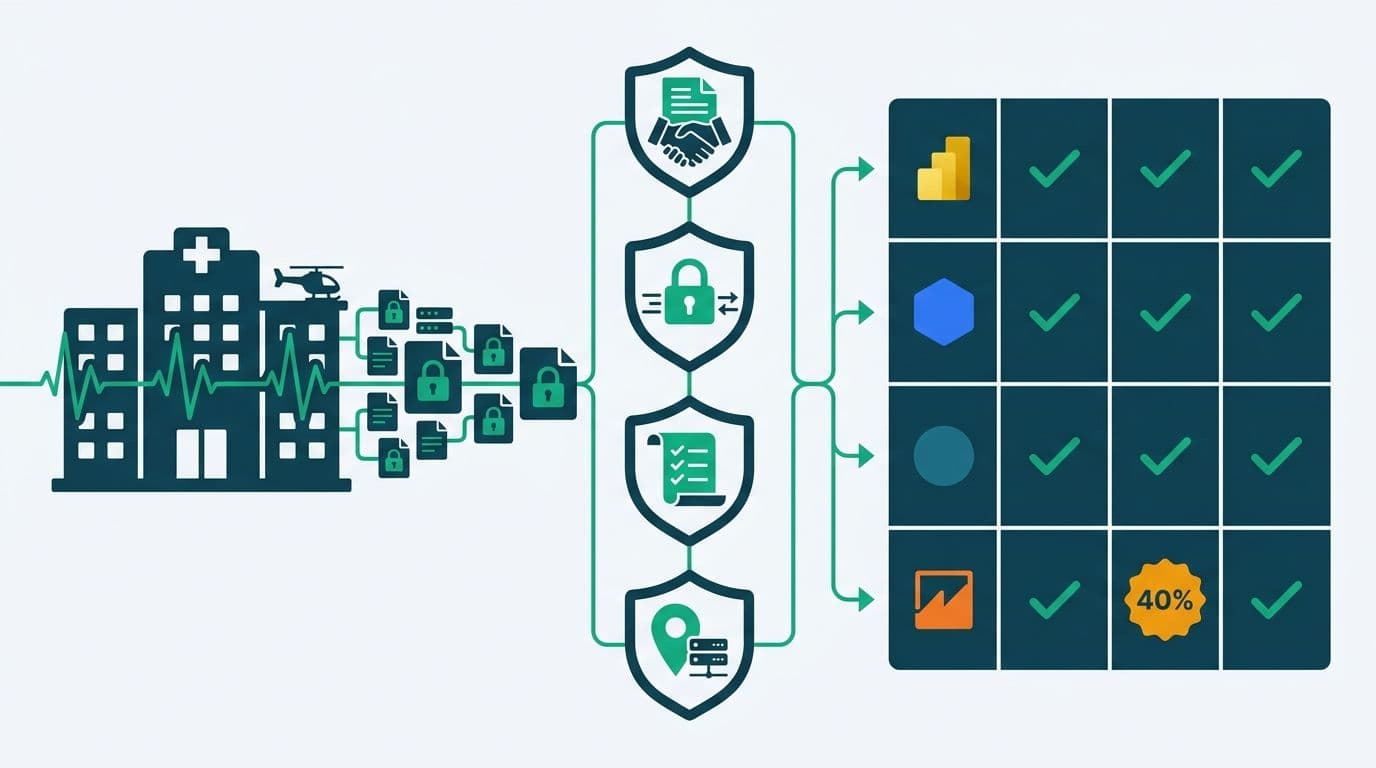
HIPAA compliant BI tools for hospital data visualization require four non-negotiable controls: a signed Business Associate Agreement (BAA), encryption of protected health information (PHI) at rest and in transit, immutable audit logging, and configurable data residency. Microsoft Power BI, Google Looker, Tableau, and Amazon QuickSight all meet this threshold - but their implementation requirements, licensing tiers, and international data residency options differ enough to affect total compliance cost by 40% or more.
Key Takeaways
A BAA is the legal floor: no BAA means no HIPAA compliance regardless of a platform's security features.
PHI handling requires row-level security and field-level controls, not just password-protected dashboards.
Audit logs must be immutable, timestamped, and export-ready for OCR investigations or breach response.
Data residency settings that satisfy HIPAA also serve as the foundation for GDPR (EU) and PIPEDA (Canada) compliance.
Configuration quality matters more than platform choice: a misconfigured deployment is not HIPAA compliant even with a signed BAA.
What Makes a BI Tool HIPAA Compliant for Hospital Data?
HIPAA compliance is not a product feature - it is an outcome of correct configuration, signed legal agreements, and ongoing governance. For a BI platform to handle PHI legally, it must fulfill three HIPAA Security Rule requirements: administrative safeguards (policies and training), physical safeguards (data center controls), and technical safeguards (encryption, access controls, audit logging).
Managed Power BI for healthcare teams frames these requirements as implementation decisions, not procurement checkboxes. A platform that checks every security spec sheet can still create HIPAA liability if row-level security is misconfigured, if test data containing real PHI reaches a development workspace, or if guest sharing features expose dashboards to unauthenticated users.
Regulatory pressure and the shift toward value-based care are pushing hospital IT teams to evaluate BI platforms with the same rigor they apply to EHR vendors - and to treat compliance configuration as a continuous program, not a one-time deployment task.
A HIPAA-compliant BI deployment requires five foundational controls:
BAA signed by the vendor before any PHI enters the platform
Encryption at rest and in transit (AES-256 minimum; TLS 1.2 or higher)
Role-based and row-level access control at the dataset and report level
Immutable audit logs retained for a minimum of six years (HIPAA's record retention floor)
Breach notification readiness within the 60-day OCR reporting window
What Is a BAA and Which BI Platforms Offer One?
A Business Associate Agreement is a legally binding contract under 45 CFR Part 164 that obligates a vendor to safeguard PHI on your behalf. Without a BAA, using a BI platform to process, transmit, or store PHI - even temporarily during a query - constitutes a HIPAA violation, regardless of how technically secure the platform is.
Most enterprise BI platforms offer BAAs, but the scope and tier requirements differ significantly. A US hospital network conducting BI procurement may discover mid-process that the BAA from one cloud analytics vendor excludes a lower-tier storage product - which is precisely where a development team had been staging de-identified patient cohort data. That exclusion creates liability the procurement team did not anticipate.
Key vendor BAA positions as of 2026:
Microsoft signs a BAA covering Azure services, which includes Power BI Premium and Microsoft Fabric capacities. Standard Power BI Pro workspaces are covered only when deployed within a compliant Azure tenant configuration with appropriate security controls enabled.
Google signs a BAA for Google Cloud Platform services, including BigQuery and Looker Enterprise tier. The BAA does not extend to free-tier or sandbox GCP projects.
Salesforce/Tableau offers a BAA under its Healthcare and Life Sciences Shield package - a premium add-on to standard Tableau licensing that also includes field-level encryption and enhanced audit trails.
Amazon Web Services provides a BAA covering QuickSight Enterprise Edition and the underlying S3, Redshift, and Glue services used in a healthcare data lake architecture.
The BAA defines what the vendor is legally responsible for protecting. Responsibility for configuration, access provisioning, and day-to-day monitoring falls entirely on the covered entity - your hospital, clinic, or health system.
HIPAA Compliant BI Tools for Hospital Data Visualization: Platform Comparison
The table below maps four leading platforms against the criteria most commonly evaluated during healthcare BI procurement. Pricing reflects 2026 enterprise licensing.
| Criterion | Microsoft Power BI + Fabric | Google Looker Enterprise | Tableau + Shield | Amazon QuickSight Enterprise |
|---|---|---|---|---|
| **BAA Available** | Yes (Azure tenant) | Yes (GCP tenant) | Yes (Shield tier) | Yes (AWS BAA) |
| **PHI Encryption** | AES-256 at rest, TLS 1.2+ | AES-256, TLS 1.3 | AES-256, TLS 1.2+ | AES-256, TLS 1.2+ |
| **Row-Level Security** | Native RLS (dataset and report) | User attribute-based | Native row-level permissions | Native row-level security |
| **Audit Logging** | Microsoft Purview / Unified Audit Log | GCP Cloud Audit Logs | Admin Insights + Server logs | AWS CloudTrail integration |
| **US Data Residency** | Yes (multiple Azure US regions) | Yes (us-central1, us-east1) | Yes | Yes (us-east-1, us-west-2) |
| **EU Data Residency** | Yes (West Europe, North Europe) | Yes (EU multi-region) | Yes | Yes (eu-west-1) |
| **Canada Data Residency** | Yes (Canada Central - Toronto) | Yes (northamerica-northeast1) | Partial - verify data egress | Yes (ca-central-1) |
| **GDPR Article 25 Ready** | Yes (DPA available) | Yes (DPA available) | Yes (DPA available) | Yes (DPA available) |
| **PIPEDA Ready** | Yes | Yes | Partial | Yes |
| **Approx. Entry Cost** | From $20/user/month (Pro) | Enterprise contract | From $115/user/month | From $18/user/month |
For organizations already running Microsoft 365 and Azure Active Directory, Power BI's native integration with Microsoft Entra ID, Purview, and Defender for Cloud substantially reduces the incremental compliance configuration burden - a significant factor when weighed against platforms that require third-party governance tooling. Our comparison of Looker Studio vs Power BI (2026) covers the decision framework for teams evaluating these two ecosystems in more depth.
How Do PHI Handling and Audit Logging Work in Practice?
PHI handling in a BI context extends well beyond database-level encryption. The risk surface in a typical hospital analytics deployment includes cached query results stored in browser memory, exported PDF reports containing patient identifiers, embedded dashboards shared via public or guest links, and automated email subscriptions that route PHI through corporate mail servers not configured for end-to-end encryption. Healthcare organizations have consistently reported the highest average data breach cost across all industries - exceeding $10.9 million per incident as of 2026 - which means a misconfigured BI export pipeline is a material financial liability, not just a compliance shortcoming.
Row-Level Security in Action
RLS filters dataset rows based on the authenticated user's identity. A hospitalist sees only their assigned patient panel; a department head sees all patients within their unit; a CFO sees aggregate cost data with no individual identifiers. RLS must be configured at the dataset level - not just the report level - so that export functions, API connections, and Analyze in Excel features respect the same access filters and cannot be used to bypass row restrictions.
Sensitivity Labels and PHI Classification
Microsoft Purview Information Protection labels, integrated natively with Power BI, allow PHI datasets to be tagged so that export to Excel, PDF, or external email either triggers a compliance warning or is blocked outright for users without the required classification clearance. This directly mirrors GDPR's data minimization principle under Article 5(1)(c) and PIPEDA's Principle 4.4 on limiting collection to stated purposes.
Audit Logging for OCR Readiness
Under the HIPAA Security Rule, covered entities must maintain hardware, software, and procedural records for six years. In a BI context, that means logging who accessed which report or dataset and when, what data was exported and to what destination, failed authentication attempts or privilege escalations, and changes to row-level security configurations or workspace membership.
Microsoft's Unified Audit Log - routed through Purview - captures all Power BI activity including dataset refreshes, report exports, workspace permission changes, and sharing events. The log is tamper-resistant and can be streamed to a SIEM for real-time anomaly detection.
According to MedInsight (2026), the dominant themes reshaping healthcare analytics are ambient AI for clinical documentation, real-world evidence pipelines, and payer-provider data exchange - each of which depends on auditable, trustworthy data pipelines before any AI layer can be responsibly added on top.
What Are the Equivalent GDPR and PIPEDA Requirements for EU and Canadian Hospitals?
For UK and EU healthcare organizations, GDPR Article 25 - Data Protection by Design and by Default - is the functional equivalent of HIPAA's Technical Safeguards. It requires that systems expose only the minimum necessary data by default, that access controls are active at deployment rather than opt-in, and that data subjects can exercise rights of access and erasure without manual workarounds from the IT team.
A UK NHS Trust deploying a referral tracking dashboard must ensure that clinician-facing views never surface data beyond what is clinically necessary for that user's role. This mirrors HIPAA's minimum necessary standard but is enforced by the UK ICO rather than HHS OCR. GDPR adds one requirement HIPAA does not: the right to erasure under Article 17. A BI platform that caches query results or maintains imported dataset snapshots must have a documented process for purging cached data when a patient exercises that right - a process that is straightforward with DirectQuery mode but requires careful planning when data is imported as snapshots.
Our Power BI Import vs DirectQuery: Mid-Market Decision Guide covers this trade-off in depth for teams weighing query performance against erasure compliance obligations.
PIPEDA (Canada's Personal Information Protection and Electronic Documents Act) applies to federally regulated healthcare organizations and mandates accountability, consent, limited collection, data accuracy, and technical safeguards. The practical BI implication is that patient data should remain within Canada unless explicit patient consent for cross-border transfer has been obtained. AWS ca-central-1 (Montreal), Azure Canada Central (Toronto), and GCP northamerica-northeast1 (Montreal) each satisfy this residency expectation.
A Canadian teaching hospital managing both PIPEDA compliance and a US NIH grant requiring HIPAA equivalency can satisfy both regulatory frameworks within a single Azure Canada Central tenant - one governance layer, two regulatory regimes, and no duplicate infrastructure required.
What Chart Types Work Best for Hospital Dashboards?
The best chart types for hospital dashboards depend on the question being answered and the decision maker receiving the information. The core principle: use the simplest visualization that answers the question without requiring the reader to perform mental arithmetic or decode clinical terminology.
For clinical operations teams, effective chart types include:
Trend lines and area charts for census and occupancy patterns - ICU bed utilization by hour, ED wait times over a 30-day rolling window, readmission rates by month
Small multiples and sparklines for comparing units or departments side by side without cognitive overload on a single chart
Scatter plots for surfacing clinical outliers - readmission rate plotted against average length of stay, broken down by attending physician
Waterfall charts for financial variance analysis - actual versus budgeted cost per DRG category, with positive and negative contributions visible
Heat maps for capacity planning - OR utilization by day of week and time slot, revealing scheduling inefficiencies at a glance
How to Present Hospital Data to Non-Clinical Stakeholders
The central challenge of presenting hospital data to non-clinical stakeholders - board members, CFOs, payer negotiators - is removing the need to decode clinical terminology while preserving the analytical depth that operational leaders need. The practical approach is layered dashboards: an executive summary page with plain-language KPIs (Cost per admission: $12,400 - Target: $11,800 - Variance: +5.1%) that drill through to department-level or patient-cohort detail on demand.
Color coding is a common failure point: green/amber/red status indicators must not be the only visual encoding, since approximately 8% of male viewers and 0.5% of female viewers have some form of color vision deficiency. Colorblind-accessible palettes using shape, pattern, or position as secondary encodings align with ADA requirements in the US, the Equality Act 2010 in the UK, and AODA standards in Canada.
For data visualization examples in public health - population-level infection tracking, vaccination coverage by region, or hospital-acquired infection rates by facility - choropleth maps paired with ranked comparison tables convey the same information both visually and non-visually, satisfying accessibility requirements without sacrificing analytical clarity.
How Does the Hospital Analytics Build vs Buy Decision Work?
Hospital analytics teams regularly face the build-vs-buy question: configure a commercial BI platform with a managed implementation partner, or develop a custom reporting layer on top of the EHR's native analytics module.
The economics reflect a broader pattern: the more specialized the compliance requirement, the more expensive a custom build becomes relative to a governed commercial platform with an established compliance track record.
For a mid-sized US hospital network (300 to 500 beds), the commercial BI plus managed services route typically reaches HIPAA compliance readiness in 60 to 90 days at a total implementation cost of $90,000 to $160,000 - compared to 9 to 18 months and $400,000 or more for a custom EHR-native build that replicates equivalent audit logging and residency controls. The table below summarizes the key trade-offs:
| Factor | Commercial BI + Managed Services | Custom EHR-Native Build |
|---|---|---|
| Audit logging maturity | Mature, tamper-resistant | Varies by EHR vendor |
| BAA coverage | Vendor-provided | Requires independent legal structuring |
| Time to first dashboard | Weeks | Months |
| Data residency control | Multi-region, configurable | Depends on EHR data export model |
| 5-year total cost | Predictable licensing plus managed fees | Internal engineering plus ongoing maintenance |
| GDPR/PIPEDA readiness | Available via vendor DPA | Must be custom-built |
For healthcare organizations exploring AI-driven automation on top of their analytics stack, our guide to AI Workflow Automation for Healthcare Operations (2026) outlines how a governed commercial BI foundation is the prerequisite before automation layers can be safely added - a point the hospital analytics dashboard build vs buy cost analysis often underestimates.
---
Managed Power BI for healthcare teams covers compliance configuration, BAA coordination, row-level security design, and audit log setup as part of a managed engagement - so your analytics team focuses on clinical and operational insights, not infrastructure governance.
---
About Lets Viz: Lets Viz is a data analytics consulting firm with a 5.0 Clutch rating, serving US healthcare networks, UK fintech companies, Canadian manufacturing operations, and global SaaS businesses since 2020. Our team delivers production-grade BI implementations that satisfy HIPAA, GDPR, and PIPEDA requirements - with every engagement backed by documented compliance configuration and structured handover.