Power BI CFO Dashboard: Pre-Launch Implementation Checklist
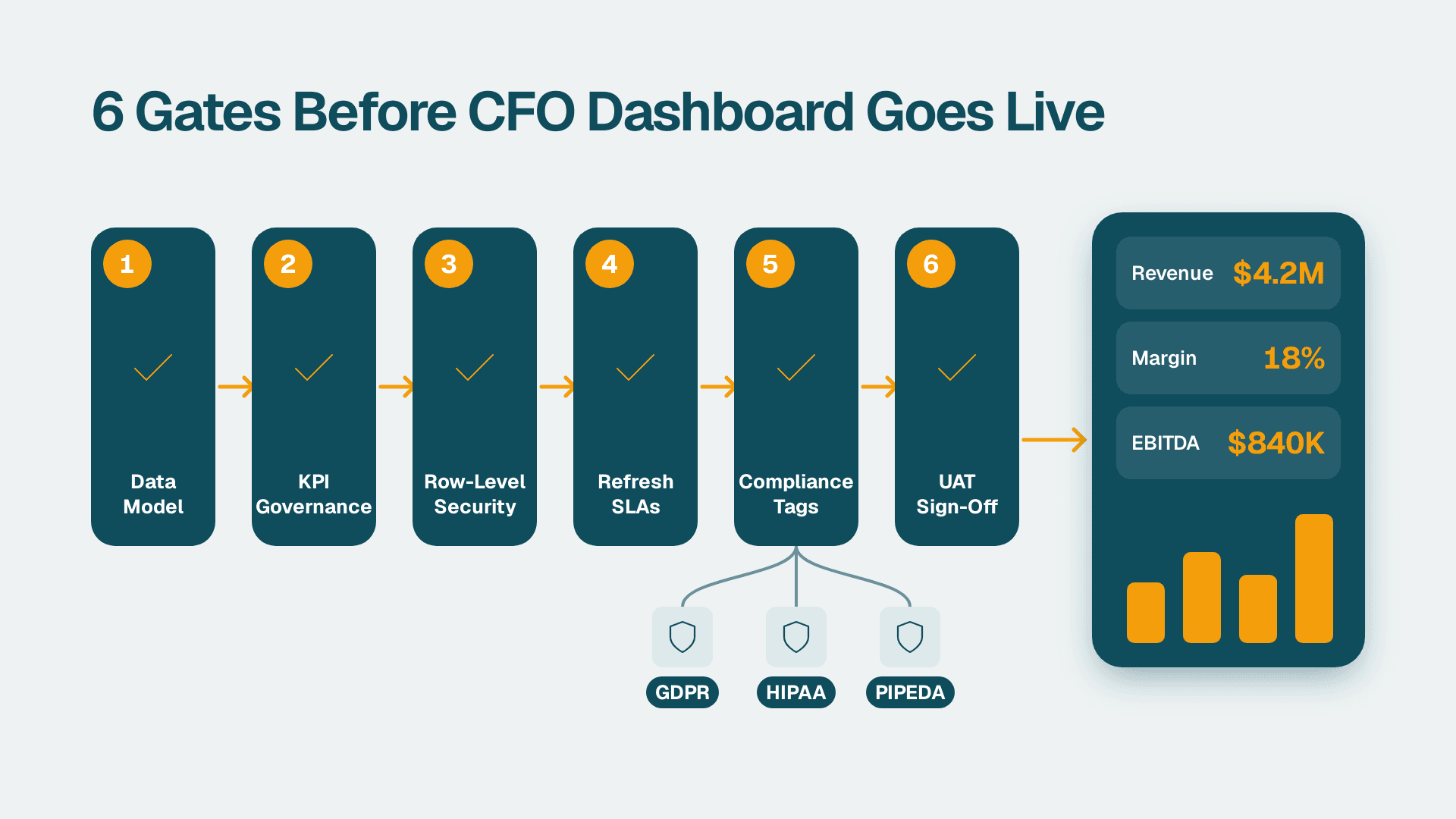
A Power BI CFO dashboard implementation checklist covers six mandatory gates before any finance report goes live: data model sign-off, KPI governance, row-level security configuration, scheduled refresh SLAs, compliance tagging (GDPR, HIPAA, and PIPEDA where applicable), and formal UAT sign-off. Finance teams that sequence these gates systematically catch calculation errors, access-control gaps, and refresh failures before executives encounter them in a board meeting.
Key Takeaways
Six sequential gates - data model, KPI governance, RLS, refresh SLAs, compliance tagging, and UAT - define a finance-grade dashboard launch.
Row-level security must map to the finance org chart and cost-centre hierarchy, not job titles alone.
Compliance tagging requirements differ by region: GDPR applies in the UK and EU, HIPAA covers US health-system finance, and PIPEDA governs Canadian organisations.
Scheduled refresh SLAs must be documented, monitored with failure alerting, and tested before go-live.
UAT sign-off requires data reconciliation against source systems at the row level, not visual spot-checks.
What Does a Power BI CFO Dashboard Implementation Checklist Cover?
A complete power bi cfo dashboard implementation checklist addresses every layer from raw data ingestion to boardroom delivery. Teams building executive finance dashboards as part of a broader Power BI for SaaS finance teams programme treat this checklist not as bureaucracy but as a liability shield: a single miscalculated ARR or EBITDA figure can erode executive trust faster than a missed visual refresh.
Finance teams evaluating Looker Studio as an alternative for finance reporting typically find that Power BI's compliance controls, row-level security model, and enterprise-grade data modelling capabilities better suit CFO-level requirements. This checklist is specific to Power BI deployments.
The six gates in order are:
1. Data model sign-off - schema validated, relationships confirmed, no circular dependencies
2. KPI governance - every metric has an owner, a written definition, and an approval record
3. Row-level security - access roles tested against the finance org chart and cost-centre hierarchy
4. Scheduled refresh SLAs - cadence agreed in writing, failure alerts configured and tested
5. Compliance tagging - GDPR, HIPAA, PIPEDA, or SOC 2 requirements documented per dataset
6. UAT sign-off - figures reconciled against source systems with named approvers
Each gate produces a signed deliverable. Teams that skip to UAT without completing the earlier gates typically find themselves reconciling broken metrics under deadline pressure in the week before a board pack is due.
How Do You Complete the Data Model Sign-Off Gate?
The data model sign-off gate validates that the semantic layer underneath your CFO dashboard is structurally sound before any KPI formula is written on top of it. Without this gate, DAX measures can return plausible but incorrect results - a particularly costly failure in multi-currency or multi-entity consolidations common in SaaS finance and enterprise group reporting.
Key sign-off criteria for the data model:
Star schema confirmed: fact tables (transactions, budget entries, actuals) are separate from dimension tables (accounts, cost centres, periods, products)
Date table certified: a single contiguous date table marked as the date table in Power BI Desktop, covering the full fiscal year range for each geography; for companies spanning US, UK, and Canada, regional calendar conventions must be accounted for (the Power BI fiscal year date table guide covers all three fiscal calendars in detail)
Relationship cardinality audited: no many-to-many relationships without explicit bridge tables, no bi-directional filters left active by default
Data type consistency: currency fields typed as Fixed Decimal Number, date fields typed as Date unless time-of-day precision is required, text keys as Text rather than Whole Number where joins are key-based
Row count reconciled: total rows in the model match the source ERP, billing platform, or CRM within an agreed tolerance - typically zero variance for financial ledger data
One issue that surfaces during sign-off for finance teams running full-ledger reconciliation: Power BI's default visual export is capped at 30,000 rows in CSV format (Power BI documentation, 2025), so the dashboard cannot export a complete billing history for audit reconciliation. Finance teams should document an XMLA endpoint or "Analyze in Excel" extraction path before data model sign-off closes, so reconciliation teams have a reliable route to the full dataset.
Sign-off owner: data engineer or BI architect, counter-signed by the FP&A lead.
What Is KPI Governance and Why Does It Matter for CFO Dashboards?
KPI governance is the process of agreeing, documenting, and controlling how every metric on a CFO dashboard is defined, calculated, and owned. Without it, finance teams routinely produce dashboards where ARR calculated in Power BI does not match the board deck, which does not match the CRM - three numbers, three escalations, and a credibility problem that takes weeks to resolve.
For SaaS and enterprise finance, the KPI governance checklist should include:
Metric registry: a spreadsheet or wiki page listing every KPI, its DAX formula or source field, the business owner by name and role, and the date each definition was approved
Calculation rules document: for contested metrics such as Net Revenue Retention, gross margin, and churn rate, a written definition reviewed and signed by Finance, Revenue Operations, and where relevant the external auditor
Version control: each approved formula locked in a named measure group in Power BI; changes require a documented amendment with a new approval date, not a silent edit to the PBIX file
Change advisory step: for mid-market finance teams, a simple email approval chain between CFO, Controller, and FP&A Director is sufficient; for enterprise deployments, a formal change request aligned with the organisation's change management practice is appropriate
For real-time financial reporting design patterns and KPI dashboard architecture, see real-time financial reporting best practices for FP&A.
How Do You Configure Row-Level Security for a CFO Dashboard?
Row-level security (RLS) in Power BI restricts which rows of data a user sees based on their identity. For CFO dashboards, RLS must reflect the actual finance org chart - cost centres, business units, legal entities - rather than job titles alone. A Controller should see all entities; a regional FP&A manager should see only their region's actuals and budgets; a department head should see only their cost centre's budget lines.
Implementation checklist for RLS on a finance dashboard:
Define roles in Power BI Desktop: create named roles such as "Global Finance", "EMEA FP&A", and "Dept Head - Engineering" with DAX row filters applied to both fact and dimension tables
Map roles to Azure AD security groups: assign roles to Active Directory groups rather than individual email addresses, so that joiners, movers, and leavers are handled by HR processes rather than the Power BI workspace admin
Test each role before publishing: use Power BI Desktop's "View as role" feature; test at least three named accounts per role against known data; document each test case and its result
Document the role-to-data mapping: a simple table listing Role, Permitted Entities, Permitted Cost Centres, and Approver, signed by the CFO or Controller
Enable audit logging: activate Power BI audit logs in the Microsoft 365 compliance portal so that data access events are captured; this satisfies SOC 2 audit trail requirements for US organisations and supports demonstrating GDPR accountability for UK and EU deployments
Schedule RLS reviews: at minimum annually, verify that security group memberships still reflect the current org chart; rapid headcount changes in growing SaaS businesses can leave former employees with active access longer than intended
A Canadian manufacturing company deploying a consolidated P&L dashboard across three provinces should configure RLS to align with PIPEDA's accountability principle - each cost-centre owner accesses only the data their role authorises, and the access mapping is reviewed at least annually and documented.
What Compliance Tags Are Required for GDPR, HIPAA, and PIPEDA?
Compliance tagging means labelling Power BI datasets, reports, and workspaces with the regulatory classification that governs the data they contain. Microsoft 365 sensitivity labels, managed through Microsoft Purview and integrated natively into Power BI, are the standard mechanism (Microsoft Purview documentation, 2025).
The requirements differ by geography and industry:
| Region / Framework | Applies When | Minimum Tagging Requirements | Data Residency |
|---|---|---|---|
| US - SOC 2 / HIPAA | SaaS finance; US health-system finance handling PHI | Sensitivity label on workspace and dataset; audit log enabled; MFA enforced for all workspace members | Azure US East or West regions |
| UK / EU - GDPR | Any dataset containing EU or UK personal data | Sensitivity label; data minimisation review; deletion and erasure workflow documented | EU data boundary enabled in Microsoft 365 admin |
| Canada - PIPEDA | Any dataset with Canadian personal information | Sensitivity label; named accountable officer documented; breach notification procedure in place | Azure Canada Central preferred |
| Global - Internal aggregates | Non-personal financial totals, ratios, and KPIs | "Internal" label minimum; visual export controls enabled | Standard tenant region |
For US health-system finance teams building CFO dashboards that include patient-level revenue data - such as a payer-mix report or unbilled-claims summary - HIPAA requires that access to protected health information is logged, encrypted at rest and in transit, and covered by a Business Associate Agreement with Microsoft. Power BI Premium and Microsoft Fabric's bring-your-own-key (BYOK) encryption satisfies the encryption-at-rest requirement (Microsoft documentation, 2025).
For UK and EU teams, GDPR's data minimisation principle means the dashboard should surface aggregated financial figures rather than expose personal-level transaction rows - a requirement that aligns naturally with good RLS design and reduces both compliance risk and model complexity.
For Canadian organisations under PIPEDA, the accountability principle requires nominating a named individual - typically the Controller or CFO - as accountable for the personal information held in the workspace, with that person's name documented in the compliance record.
What Scheduled Refresh SLAs Should a CFO Dashboard Meet?
A scheduled refresh SLA defines the latest time by which the dashboard must reflect current data, the maximum tolerated failure window, and the escalation path when a refresh fails. Without a written SLA, refresh failures are discovered when a CFO notices stale actuals in a morning review - hours after an alert should have fired.
Recommended SLA framework for finance dashboards:
Daily actuals refresh: complete by 07:00 local time, Monday through Friday; automated alert to the FP&A lead and data engineer within 15 minutes of failure
Month-end close refresh: complete within two hours of the ERP system confirming period close; no failure tolerance - a manual trigger runbook must be written and tested before go-live
Budget versus actuals: refresh aligned to the budget system update cycle, minimum once per business day during active planning periods
Near-real-time requirements: if the CFO requires intraday data, use DirectQuery or Composite Model rather than import mode; document the query load impact on the source ERP before approving this configuration for production
Power BI Premium capacity supports up to 48 scheduled refreshes per day per dataset; the default shared capacity supports eight (Power BI documentation, 2025). Finance teams on shared capacity with complex import-mode models should audit refresh slot usage against these limits before launch day.
For gateway configuration, incremental refresh setup, and failure alert wiring, the Power BI refresh schedule guide covers the technical implementation in detail.
SLA sign-off owner: IT or data engineering for technical delivery; FP&A Director for business acceptance of the refresh window.
How Do You Run UAT for a Power BI CFO Dashboard?
UAT for a CFO dashboard is the final gate before production publication. It is a data reconciliation exercise, not a visual review. Finance professionals are the right testers because they recognise implausible numbers before they open a methodology document.
UAT checklist for a Power BI finance dashboard:
Source reconciliation: every KPI must be traced to the source system (ERP, billing platform, CRM) and reconciled to an agreed tolerance - zero variance for balance sheet items, under 0.1% for volume aggregates; document reconciliation results for at least two closed periods
Cross-filter and slicer consistency: test every slicer combination a CFO is likely to use - fiscal year, legal entity, cost centre, currency - and confirm that grand totals remain consistent when filters are applied and removed
Role-based testing: each defined RLS role must be tested by a real user in that role, not by the developer using "View as role"; document who tested each role and what data they verified
Export validation: confirm that Excel and CSV exports carry the correct sensitivity labels and that row counts match expectations; a US SaaS finance team running a full ARR waterfall export should reconcile opening ARR, new ARR, expansion, contraction, and churn at the customer level for at least two months - totals can be correct for the wrong reasons
Refresh simulation: trigger a manual refresh during UAT and confirm the dataset updates correctly; simulate a failure scenario if the test environment permits
Accessibility check: verify the report meets WCAG 2.1 AA standards if the organisation has an accessibility policy; Power BI Desktop's built-in accessibility checker covers tab order, alt text on visuals, and colour contrast
UAT sign-off document: a table listing each test case, expected result, actual result, tester name, and date. The CFO or a named designee counter-signs before the report is published to production. This document forms part of the compliance record for SOC 2 and GDPR audits.
For teams planning to layer AI-assisted analytics on top of the dashboard after launch, reviewing the Power BI Copilot readiness checklist alongside UAT is worthwhile: Copilot requires a certified semantic model, and the certification criteria overlap significantly with UAT sign-off requirements.
---
About Lets Viz: Lets Viz is a data analytics consultancy building Power BI, Zoho, and ServiceNow solutions for clients across US healthcare, UK fintech, Canadian manufacturing, and global SaaS since 2020. We hold a 5.0 rating on Clutch. Our finance analytics practice has designed compliant CFO dashboards across GDPR, HIPAA, and PIPEDA-governed environments, covering semantic model architecture, row-level security configuration, and refresh SLA governance.
Ready to launch a finance dashboard that clears every gate? Explore how we build audit-ready, governance-first solutions with Power BI for SaaS finance teams.


