Power BI Row Level Security for Healthcare Patient Data
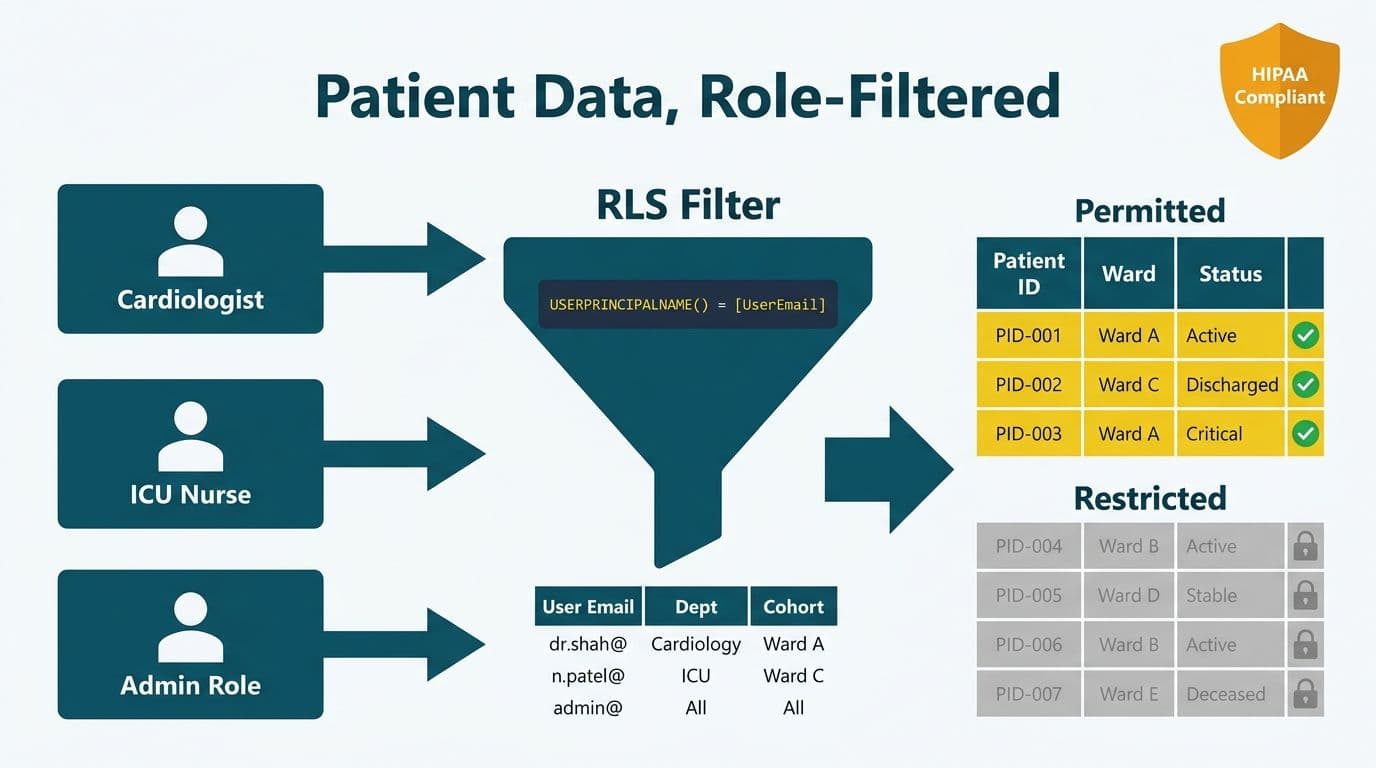
Power BI row level security for healthcare patient data restricts each clinician, department, or administrative role to only the records they are permitted to see. You implement it through RLS roles in Power BI Desktop, DAX filter expressions that evaluate the logged-in user's identity, and an access-control table mapping staff IDs to permitted patient cohorts. This satisfies the HIPAA minimum-necessary standard without rebuilding your data model.
Key Takeaways
Dynamic RLS uses `USERPRINCIPALNAME()` to match the logged-in user against an access-control table at query time - no static role maintenance required.
A single DAX role with a bridge table handles clinician-level, department-level, and site-level access without duplicating logic.
HIPAA minimum-necessary, NHS Spine RBAC, and PIPEDA data-minimisation principles all map to the same RLS architecture.
Row-level filtering applies before aggregation, so no patient counts or drill-throughs reveal forbidden records.
Power BI audit logs track every report view by UPN, satisfying HIPAA audit control requirements under 45 CFR §164.312(b).
What Is Row Level Security in Power BI for Healthcare?
Row level security (RLS) is a Power BI feature that filters data at the row level before any visual or aggregation is rendered. For healthcare organisations, it means a cardiologist sees only their cardiology patients, a ward nurse sees only patients on their ward, and a billing administrator sees encounter records but never clinical notes. The logged-in user's user principal name (UPN) - their Microsoft 365 email address - is the filter key.
Healthcare analytics investment is accelerating sharply. The Healthcare Financial Analytics Market is projected to grow at a 9.1% CAGR through 2036, driven by regulatory tightening and the accelerating shift from EHR reporting to real-time clinical analytics (MarketResearchFuture, 2026). As organisations add more dashboards across more departments, a robust RLS architecture prevents compliance exposure from scaling alongside usage.
There are two RLS modes:
Static RLS: you hard-code which role filters to which value. Simple but brittle - every new clinician or department change requires a model republish.
Dynamic RLS: a DAX expression evaluates the current user at query time against a mapping table. One role handles every user in the organisation.
For healthcare, dynamic RLS is the only practical option. US hospital staff turnover remains elevated at roughly 20% annually (NSI National Health Care Retention Report, 2026), which means a 500-bed hospital is onboarding or offboarding 100+ credentialed staff members per year. Clinicians rotate across units, and locum or agency staff need time-limited access. Static roles that require a model republish for every roster change cannot keep pace - they become a maintenance liability within weeks and create a window where former staff retain PHI access. Our Managed Power BI for healthcare teams practice has found that almost every hospital deployment requires dynamic RLS from day one.
How Does Dynamic RLS Work for Clinician and Department Access?
Dynamic RLS evaluates `USERPRINCIPALNAME()` at query time - returning the signed-in user's email address - and cross-references it against an access-control table in your data model to determine which patient rows are visible.
The architecture has three components:
1. Fact table - encounters, orders, lab results, or admissions. Each row carries a `PatientID`, `DepartmentID`, and `ProviderID`.
2. Access-control table - one row per user-department pair (for example, `jane.doe@hospital.org | Cardiology | PROV001`). Populated from your HR or identity management system.
3. RLS role filter - a DAX expression on the fact table or a related dimension that returns `TRUE` only for rows the current user may see.
A US community hospital in the Midwest deployed this pattern across 14 departments and 320 clinicians. The single dynamic RLS role replaced 22 manually emailed Excel extracts - a common HIPAA risk vector, since email-distributed exports bypass all access controls once they leave the report layer.
Core DAX Role Setup
In Power BI Desktop, navigate to Modeling > Manage Roles > New Role. Name the role `DynamicAccess`. Apply this DAX filter to your access-control bridge table:
```dax
[UserEmail] = USERPRINCIPALNAME()
```
Power BI evaluates this expression for the signed-in user and propagates the filter through model relationships to the fact table. For a measure-level check on a related dimension:
```dax
VAR CurrentUser = USERPRINCIPALNAME()
RETURN
COUNTROWS(
FILTER(
UserDeptBridge,
UserDeptBridge[UserEmail] = CurrentUser &&
UserDeptBridge[DepartmentID] = DepartmentDimension[DepartmentID]
)
) > 0
```
Because Power BI applies RLS before any aggregation, a card visual showing "Total Patients" will correctly display only the count within the user's permitted scope - not the organisation-wide figure.
DAX Patterns for Row Level Security Healthcare Patient Data
The right DAX pattern depends on the granularity of access control required. The table below maps common healthcare access scenarios to their corresponding approach:
| Scenario | Approach | Key Mechanism |
|---|---|---|
| Clinician sees own patients | LOOKUPVALUE on ProviderID | Blank result returns zero rows by default |
| Ward nurse - department scope | Bridge table with CONTAINS | UserDeptBridge populated from HR or AD groups |
| Regional health authority | Hierarchy with PATHCONTAINS | Parent-child org node table |
| Locum or agency (time-limited) | Bridge table with date filter | AccessStartDate and AccessEndDate columns |
| Dual role - clinician and manager | OR logic combining two lookups | ProviderID and DeptID filters combined |
Pattern 1 - Clinician-Level Patient Visibility
```dax
[ProviderID] =
LOOKUPVALUE(
Staff[ProviderID],
Staff[UserEmail], USERPRINCIPALNAME()
)
```
Apply this to the `Encounters` fact table. If `LOOKUPVALUE` returns blank because the user is not in the Staff table, Power BI returns zero rows - safe-by-default behaviour that prevents accidental broad access for unrecognised identities.
Pattern 2 - Department Membership via Bridge Table
Create a `UserDeptBridge` table with columns `UserEmail` and `DepartmentID`, populated from Active Directory group memberships or your HR system. Apply this filter to `DepartmentDimension`:
```dax
CONTAINS(
UserDeptBridge,
UserDeptBridge[UserEmail], USERPRINCIPALNAME(),
UserDeptBridge[DepartmentID], DepartmentDimension[DepartmentID]
)
```
Adding a clinician to a new department requires only an insert into `UserDeptBridge` - no model republish, no downtime.
Pattern 3 - Hierarchical Access for Multi-Site Organisations
UK NHS trusts assign structured role codes via NHS Spine (for example, `B0960` for Clinical Nurse or `R8003` for Medical Consultant). Power BI mirrors this with a parent-child hierarchy table and `PATHCONTAINS`:
```dax
PATHCONTAINS(
OrgHierarchy[Path],
LOOKUPVALUE(Staff[OrgNodeID], Staff[UserEmail], USERPRINCIPALNAME())
)
```
This allows a Regional Medical Director to see all trusts under their org node while a ward sister sees only her ward - the same tightest-applicable-scope principle that NHS Spine RBAC enforces across the national spine.
How to Map HIPAA Minimum-Necessary to Power BI RLS Roles
HIPAA's minimum-necessary standard (45 CFR §164.502(b)) requires covered entities to limit PHI access to the minimum needed for each user's specific task. In Power BI, this means each RLS role exposes the narrowest possible set of rows - and, using object-level security, the narrowest set of columns.
| HIPAA Role | Power BI RLS Role | Visible Rows | Column Access |
|---|---|---|---|
| Treating clinician | ProviderRLS | Own patients only | Full clinical record |
| Billing staff | BillingRLS | All patients, encounter data | No diagnosis narrative |
| Quality analyst | QualityRLS | Aggregated, de-identified | No row-level PHI |
| Department manager | DeptManagerRLS | Own department only | Excludes other departments |
| Executive or CIO | ExecutiveRLS | Org-wide KPIs | Aggregated totals only |
Object-level security (OLS), available in Power BI Premium and Microsoft Fabric, complements RLS by hiding entire tables or columns from a role - useful for excluding a `ClinicalNotes` column from billing staff without creating a separate dataset.
For Canadian healthcare organisations, PIPEDA and provincial statutes such as Ontario's PHIPA impose the same data-minimisation obligation. A Canadian hospital network on Microsoft Fabric would configure this RLS structure alongside Fabric workspace security and Microsoft Purview sensitivity labels to meet PHIPA audit requirements. Our AI Analytics Data Privacy Risks: Healthcare Audit Guide covers the full compliance checklist applicable across HIPAA, GDPR, and PIPEDA environments.
For UK NHS trusts and European hospital groups, GDPR Article 5(1)(c) - the data minimisation principle - is structurally equivalent to HIPAA minimum-necessary. An NHS trust in London piloting Power BI Embedded for ward sisters used Entra ID security groups aligned to their existing Spine RBAC groups as the access-control source, reducing time-to-access changes from days to minutes and eliminating the manually maintained mapping table that had been a recurring data protection audit finding.
Power BI Report Server vs Power BI Service: Which Is Right for Healthcare?
Healthcare organisations frequently debate whether to keep Power BI on-premises or move to the cloud service. The answer depends on your data residency requirements and security posture.
| Factor | Power BI Report Server | Power BI Service |
|---|---|---|
| PHI data residency | On-premises or private cloud | Microsoft data centres, region-selectable |
| Dynamic RLS support | Full | Full, plus OLS |
| Entra ID integration | On-premises AD only | Full Entra ID, MFA, conditional access |
| Audit logging | Windows Event Log, manual extraction | Purview unified audit log, automated |
| HIPAA BAA | Not applicable | Microsoft provides signed HIPAA BAA |
| NHS DSPT coverage | Self-certified by organisation | Covered under Microsoft IG framework |
| Best for | Strict on-prem data residency mandate | Most organisations |
For most US hospitals operating under a signed Microsoft HIPAA Business Associate Agreement, the Power BI Service is the recommended path - and in 2026, Microsoft Fabric is the preferred enterprise architecture for new deployments, consolidating semantic models, lakehouses, and Purview audit logging under a single governance layer without additional tooling. Microsoft's BAA explicitly covers both Power BI and Fabric as HIPAA-eligible services.
For a detailed build-vs-buy cost and architecture comparison, our Managed Power BI Service for Healthcare: Build vs. Buy Guide walks through total cost of ownership at different organisation sizes.
What Are the Most Common RLS Mistakes in Healthcare Power BI Deployments?
Five mistakes appear repeatedly in healthcare RLS implementations:
1. Testing only with an admin account. Workspace administrators bypass RLS by default in Power BI. Always use the built-in View as Role feature with a non-admin test UPN before publishing. Skipping this step is the most common cause of undetected PHI overexposure in production environments.
2. Leaving the source database accessible to end users. RLS lives in the Power BI semantic model, not the source system. If clinical staff hold direct database credentials, they bypass the model entirely. Lock source-system access to a dedicated service account.
3. Using static roles in a dynamic workforce. A 500-bed hospital with weekly staffing changes cannot sustain a model republish for every roster update. Dynamic RLS with an HR-sourced bridge table is the only scalable approach.
4. Exposing the access-control mapping table. If users can browse the `UserDeptBridge` table in Power BI, they can infer which colleagues access which patient populations - a secondary privacy violation. Use OLS or a separate restricted dataset to hide mapping tables from report view.
5. Skipping aggregate visual testing. A card showing "Total Patients: 1,247" must reflect only the user's permitted cohort, not the organisation-wide total. Test every aggregate visual through View as Role to confirm filters apply before aggregation.
For guidance on connecting EHR and FHIR data sources before applying RLS, our Power BI Consulting for Healthcare Organizations guide covers source-system integration patterns. For department-level dashboard templates built on a properly secured RLS layer, see our Healthcare KPI Dashboard Examples by Department (2026).
How to Audit and Monitor RLS in a Live Healthcare Environment
HIPAA requires audit controls (45 CFR §164.312(b)) - the ability to examine who accessed PHI and when. Power BI Premium and Microsoft Fabric provide the tooling to meet this requirement without building a custom audit layer.
Key audit capabilities available today:
Unified audit log (Microsoft Purview): records every report view, dataset refresh, and data export with the requesting user's UPN and a precise timestamp.
Activity log API: queryable programmatically - pipe it into your SIEM or compliance platform for automated alerting on unusual access patterns.
Row-level query tracing: available on Premium capacities via Analysis Services engine traces; shows the exact DAX filter applied per user per query.
A quarterly access review should verify: every active RLS role maps to a current, employed staff member; no user holds a role broader than their clinical function; and departed employees' UPNs are removed from the access-control table - ideally automated via HR system integration to close the manual offboarding gap that healthcare audits most commonly flag as a persistent PHI risk.
---
About Lets Viz: Lets Viz is a data analytics consultancy serving US healthcare systems, UK fintech firms, Canadian manufacturing companies, and global SaaS businesses since 2020. Our certified Power BI practitioners have implemented HIPAA-compliant RLS architectures across outpatient, inpatient, and health-system enterprise environments, and we hold a 5.0 rating on Clutch. We bring the same rigour to every engagement - from a single-hospital deployment to a multi-site health authority rollout.
If your organisation needs clinician-level row level security implemented correctly the first time - with HIPAA documentation, audit log configuration, and ongoing access reviews included - Managed Power BI for healthcare teams is where to start.