Microsoft Fabric Architecture: A CFO's Finance Reporting Guide
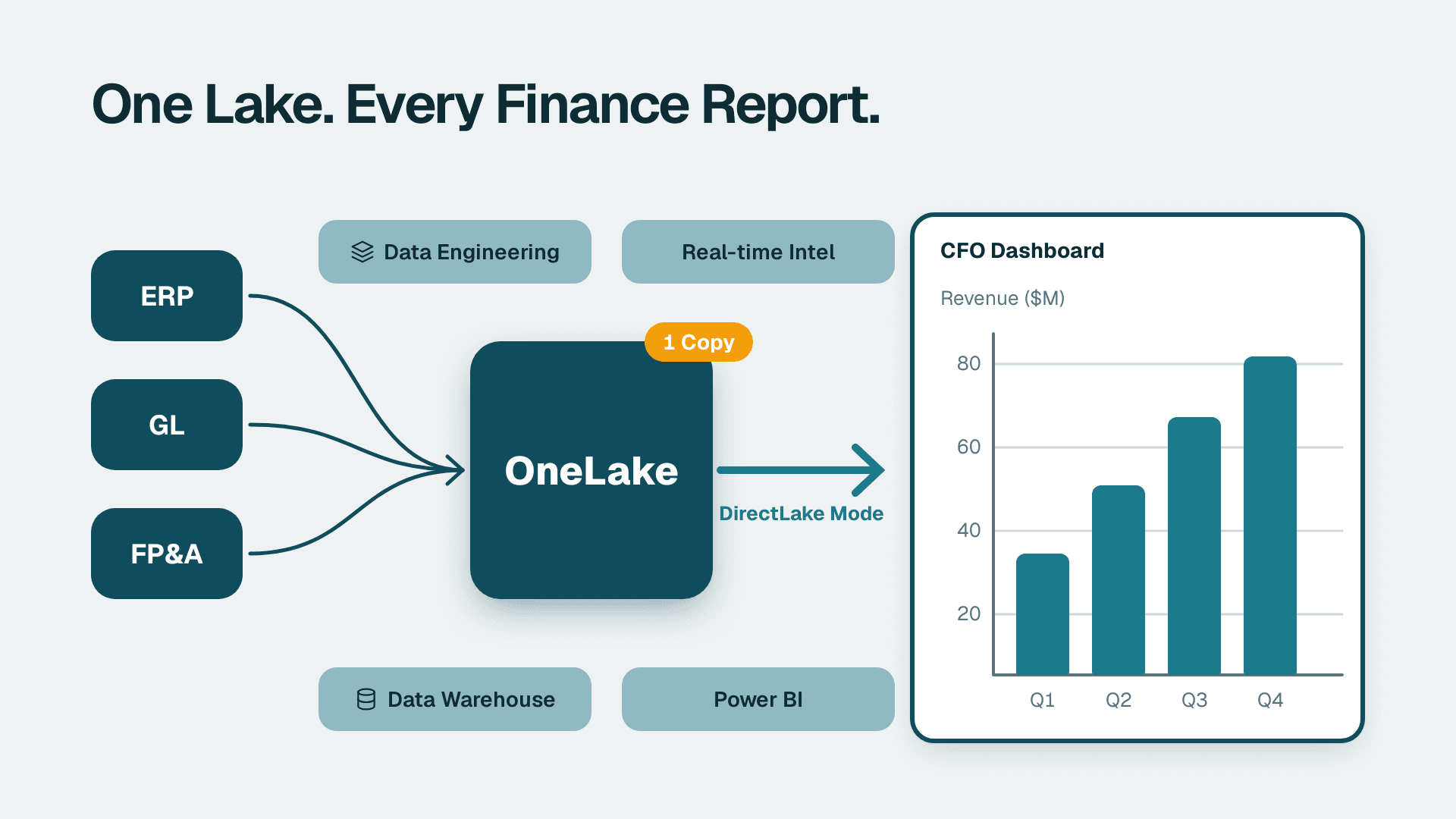
Microsoft Fabric is a unified analytics platform that consolidates data engineering, data warehousing, real-time intelligence, and Power BI into a single licensed environment built on OneLake. For finance teams, this means one authoritative copy of financial data shared across every workload - no ETL duplication, no competing versions of actuals. DirectLake mode delivers near-import-speed query performance directly from that shared lake, without loading data into a separate semantic model.
Key Takeaways
- OneLake stores one copy of financial data; all Fabric workloads read from it, eliminating version drift across actuals sources.
- DirectLake mode gives Power BI finance reports near-import query performance without moving data into a dataset - meaningful for large general ledger or accounts receivable tables.
- Existing Power BI Pro and Premium Per User licenses remain valid inside Fabric; an F-SKU capacity license unlocks the full platform.
- GDPR and PIPEDA compliance requirements are addressed through Fabric's multi-geo data residency controls and Microsoft Purview integration.
- Migration decisions turn on data volume, F-SKU licensing cost, and whether your team is ready to manage a lakehouse layer.
What Is Microsoft Fabric Architecture and Why Does It Matter for Finance Reporting?
Microsoft Fabric reached general availability in November 2023. It wraps several previously separate products - Azure Data Factory, Azure Synapse Analytics, and Power BI - into one Software-as-a-Service environment, licensed by compute capacity rather than per individual service.
For a CFO evaluating the platform, the important architectural unit is OneLake: a single, tenant-wide data lake built on Azure Data Lake Storage Gen2. Think of it as a shared file system where your finance data lands once and every Fabric workload - Dataflows, Notebooks, Warehouses, Power BI semantic models - reads from the same source. No more maintaining separate data copies across three independently billed services; that logic moves into Lakehouses and Warehouses within the same capacity.
Finance teams already running Power BI for SaaS finance teams see the most immediate impact in two areas: eliminating the multiple dataset copies that accumulate in Premium workspaces over time, and the introduction of DirectLake query mode, which changes the performance-versus-freshness tradeoff that finance analysts have managed for years.
Fabric also shifts the commercial model from per-seat licensing to per-compute-unit pricing - F-SKU capacities starting at F2, versus Power BI Premium Per User at $24/user/month per Microsoft's 2026 pricing page. That crossover matters to any CFO whose finance team is growing faster than the per-user model can absorb.
How Does OneLake Work as a Single Source of Financial Truth?
OneLake is the storage foundation of Microsoft Fabric. Every workspace gets a folder in a single tenant-wide lake automatically, with no separate provisioning required (Microsoft Fabric documentation, 2025). Financial data written to a Lakehouse or Warehouse in Fabric is physically stored in OneLake as Delta-Parquet files - versioned, time-travelable, and auditable by default.
For finance reporting, this has three practical consequences.
Version control for financial data. Delta tables log every write operation. If a budget upload on the 15th of the month overwrites prior actuals, finance can query the table as it existed before that write. This is directly useful for budget vs actual variance analysis models where mid-month data corrections are common and the audit trail matters for close review.
No data duplication between reports. In a traditional Power BI Premium architecture, two reports loading from the same ERP source each maintain their own in-memory import dataset. On Fabric, both reports point to the same Delta table in OneLake via DirectLake, and a single write operation propagates to every downstream report simultaneously.
Shared access for data engineering and BI teams. A data engineering team running Python notebooks against OneLake and a finance analyst building a Power BI semantic model are reading the same underlying files. Schema changes applied by engineering are reflected in BI without an intermediate ETL step - though Delta table schema evolution in Fabric requires careful management to avoid breaking downstream finance reports.
For a hypothetical UK fintech firm operating under GDPR, the single-copy model simplifies data subject access requests: there is one authoritative location to search, rather than hunting across multiple dataset copies spread across Premium workspaces.
What Is DirectLake Mode and How Does It Change Finance Report Performance?
DirectLake is a Power BI query mode specific to Microsoft Fabric that reads data directly from Delta-Parquet files in OneLake without first loading them into an in-memory columnar dataset (Microsoft Power BI documentation, 2025). It delivers query performance closer to Import mode while maintaining data freshness comparable to DirectQuery.
The performance mechanism: Fabric pre-warms column segments from OneLake into memory when a report is opened or data is written - a process called framing. Subsequent queries hit in-memory column segments rather than lake files. If a segment is not in memory, Fabric falls back to reading OneLake directly - slower, but functional.
For finance teams, the tradeoff against traditional query modes looks like this:
| Feature | Import Mode | DirectQuery | DirectLake |
|---|---|---|---|
| Data freshness | Scheduled refresh | Live | Near real-time (Delta write) |
| Query speed at scale | Fastest | Degrades with table size | Near-import, with fallback |
| Data stored in | Power BI dataset | Source system | OneLake (Delta tables) |
| Large GL tables (50M+ rows) | Requires incremental refresh | Slow without aggregations | Handled natively via framing |
| Requires Fabric license | No | No | Yes (F or P SKU) |
| Copilot and Q&A support | Full | Limited | Full (as of 2025) |
The Import mode vs DirectQuery tradeoffs for Copilot and Q&A are relevant for teams not yet on Fabric. For organizations that are on Fabric, DirectLake removes the choice between fast-but-stale and live-but-slow for most finance reporting use cases.
A large general ledger table with 50 million rows - common in enterprise SaaS companies billing monthly across hundreds of product lines - would historically require incremental refresh policies and partitioned datasets to stay performant. Under DirectLake, framing handles partition logic automatically, and the finance team does not manage a refresh schedule beyond the Delta table write frequency.
How Does Microsoft Fabric Affect Your Existing Power BI Investment?
Microsoft Fabric incorporates Power BI rather than replacing it. Every semantic model, report, and dashboard continues to work inside Fabric workspaces. The migration question is not "do I abandon Power BI" but "do I move my Power BI capacity to Fabric, and when?"
What stays the same. Power BI Pro licenses ($14/user/month per Microsoft's 2026 pricing) continue to allow report consumption in any workspace. Premium Per User licenses grant access to Fabric items when the workspace is assigned to a Fabric capacity. Existing DAX measures, RLS rules, and paginated reports carry forward unchanged.
What changes with Fabric capacity. When a workspace is assigned to an F-SKU, it gains access to Lakehouses, Warehouses, Notebooks, Dataflows Gen2, and Real-Time Intelligence workloads. Reports in that workspace can be migrated to DirectLake as source data moves to OneLake. Incremental refresh policies on large Import datasets can be replaced with Delta table writes and continuous data landing.
Power BI Desktop vs Power BI Service for finance teams under Fabric. Power BI Desktop remains the primary authoring environment for complex semantic models - particularly for budget vs actuals variance models that require time-intelligence DAX. With Fabric, the recommended pattern shifts toward managing semantic models directly in the Power BI Service, because Fabric's web-based authoring tools support direct edits to DirectLake semantic models without a Desktop round-trip.
The licensing crossover. A finance team of 30 analysts on Power BI Premium Per User pays $720/month for BI capacity. An F8 Fabric capacity (approximately $1,048/month per Microsoft's 2026 pricing) serves unlimited workspace users, though each consumer still needs a Pro license for report access. Above roughly 45 active report consumers, F-SKU total cost often runs lower than per-user Premium - but the calculation must include migration engineering cost and ongoing Fabric administration overhead.
For finance teams also evaluating whether Power BI is the right reporting layer, the comparison between Power BI and other enterprise BI platforms for finance reporting typically comes down to DAX's strength for P&L and variance modeling versus the simpler interface of web-first tools. Power BI's semantic layer handles the hierarchical finance data models and row-level security requirements that most FP&A teams require at scale.
What Power BI Row-Level Security Means Under Fabric for Finance Data
Power BI row-level security (RLS) restricts which rows of financial data a user can see at query time. This is essential for any finance team where regional controllers should not see each other's actuals, or where a CFO dashboard aggregates all regions while individual FP&A analysts see only their own cost centers (Microsoft Power BI documentation, 2025).
Under Fabric, RLS rules defined in a semantic model apply on top of DirectLake exactly as they do in Import mode. A DAX filter like `[Region] = USERPRINCIPALNAME()` applies before any rows reach the report - the underlying Delta table in OneLake can be fully permissive while the semantic model enforces access boundaries. This architecture is detailed in Power BI RLS for data protection.
For a US SaaS company operating across multiple sales regions, RLS on a budget vs actuals dashboard ensures that a regional VP sees only their own P&L rows while the CFO dashboard shows consolidated totals. The DAX and RLS logic does not change when moving from Import mode to DirectLake on Fabric - only the data source layer changes.
Object-level security (OLS) restricts which columns are visible. For finance data containing compensation or pre-announcement M&A information, OLS allows a single semantic model to serve both a general FP&A audience and a restricted finance leadership view, without maintaining two separate datasets.
CFO dashboards for construction companies and project-based industries often require hierarchical RLS: project managers see one project, regional directors see a portfolio, the CFO sees all. Fabric's semantic model layer supports this through dynamic DAX security roles identical to those in classic Power BI Premium - no architectural change is needed when migrating from Premium to Fabric.
What Data Residency and GDPR/PIPEDA Controls Does Microsoft Fabric Provide?
Microsoft Fabric supports multi-geo data residency, allowing a tenant to assign specific workspaces to capacities provisioned in specific Azure regions (Microsoft Fabric documentation, 2025). This is the primary mechanism for satisfying GDPR Article 44 restrictions on cross-border data transfers and PIPEDA obligations around personal data stored within Canadian borders.
For UK and EU organizations. A Fabric capacity provisioned in UK South or West Europe ensures that OneLake data for that capacity - including financial data containing personal information such as customer payment records - does not leave the designated geography. Microsoft's EU Data Boundary commitment, extended to cover Fabric workloads in 2025, provides contractual backing for EU/EEA data processing. UK organizations post-Brexit should verify which specific Fabric workloads are covered under Microsoft's UK data residency terms, as coverage has been phased by workload type.
For Canadian organizations. A capacity in Canada Central or Canada East maps PIPEDA obligations around personal financial data to a defined technical boundary. Canadian enterprises in regulated industries should verify that the Fabric workloads they use - particularly real-time intelligence workloads, which had phased regional rollouts - are covered at their chosen F-SKU tier before migrating compliance-sensitive data.
Microsoft Purview integration. Fabric integrates natively with Microsoft Purview for data classification, sensitivity labeling, and audit logging. Finance data labeled "Confidential - Finance" in Purview propagates automatically to Power BI reports and exports built from that data. For organizations under SOC 2 (US), ISO 27001, or FCA compliance frameworks (UK), this provides a documented evidence chain between data classification policies and BI asset governance without manual tagging.
Full multi-geo availability and Purview integration depth vary by F-SKU tier. Microsoft publishes a feature availability matrix by SKU; finance leaders should review it - or request a capability map from their Microsoft account team - before assuming all governance controls are available at a smaller F2 or F4 capacity.
When Should a CFO Approve a Microsoft Fabric Migration?
The decision is rarely binary. Most organizations run Fabric alongside existing Power BI Premium environments for 12 to 24 months, migrating workloads incrementally as teams build confidence with the lakehouse layer.
Migrate to Fabric when:
- Import datasets are large enough that refresh windows conflict with reporting deadlines (typically 10 million or more rows per finance table).
- Data engineering and BI teams share the same source data but maintain separate copies - the OneLake single-copy model typically repays migration effort within one or two quarters in engineering time and infrastructure cost.
- A net-new analytics capability (real-time treasury cash position or intra-day revenue reporting) would require an additional Azure service subscription under the old model; Fabric's integrated workloads eliminate that additional spend.
- Finance team headcount is growing faster than per-user Premium licensing scales cost-effectively.
Delay or proceed cautiously when:
- Finance data volumes are modest (under 5 million rows per table) and current Import mode refresh schedules meet business needs - DirectLake does not justify migration engineering at this scale.
- Compliance requirements call for data residency controls only available at F64 and above, but compute requirements fit a smaller F8 - the gap between the required compliance tier and the required compute tier needs resolution before migration begins.
- Your team relies on paginated reports for statutory financial output; paginated rendering is available in Fabric but requires a deliberate testing phase against existing output specifications before cutover.
A useful framing for the evaluation conversation: Microsoft Fabric is not an upgrade to Power BI - it is a platform that Power BI is a part of. The question is whether the additional workloads (Lakehouses, Notebooks, Warehouses, Real-Time Intelligence) solve a problem your organization currently has. If the analytics bottleneck is entirely within Power BI, stay on Premium Per User or a smaller F-SKU. If the bottleneck is in data engineering - manual ETL pipelines, fragmented data copies, slow refresh windows on large GL tables - Fabric's integrated lakehouse layer directly addresses that constraint.
---
Ready to assess how your current Power BI environment maps to a Fabric architecture built for your finance team's scale and compliance requirements? The Power BI for SaaS finance teams service page outlines how Lets Viz approaches semantic model design, DirectLake migration, and RLS architecture for SaaS and enterprise finance organizations.
---
About Lets Viz: Lets Viz has delivered data analytics and business intelligence solutions since 2020 for clients across US healthcare, UK fintech, Canadian manufacturing, and global SaaS organizations. With a 5.0 Clutch rating, the firm specializes in Power BI architecture, Microsoft Fabric migration, and finance reporting - helping CFOs and FP&A teams move from fragmented dashboards to governed, scalable analytics.