Power BI Paginated Reports for Healthcare Compliance
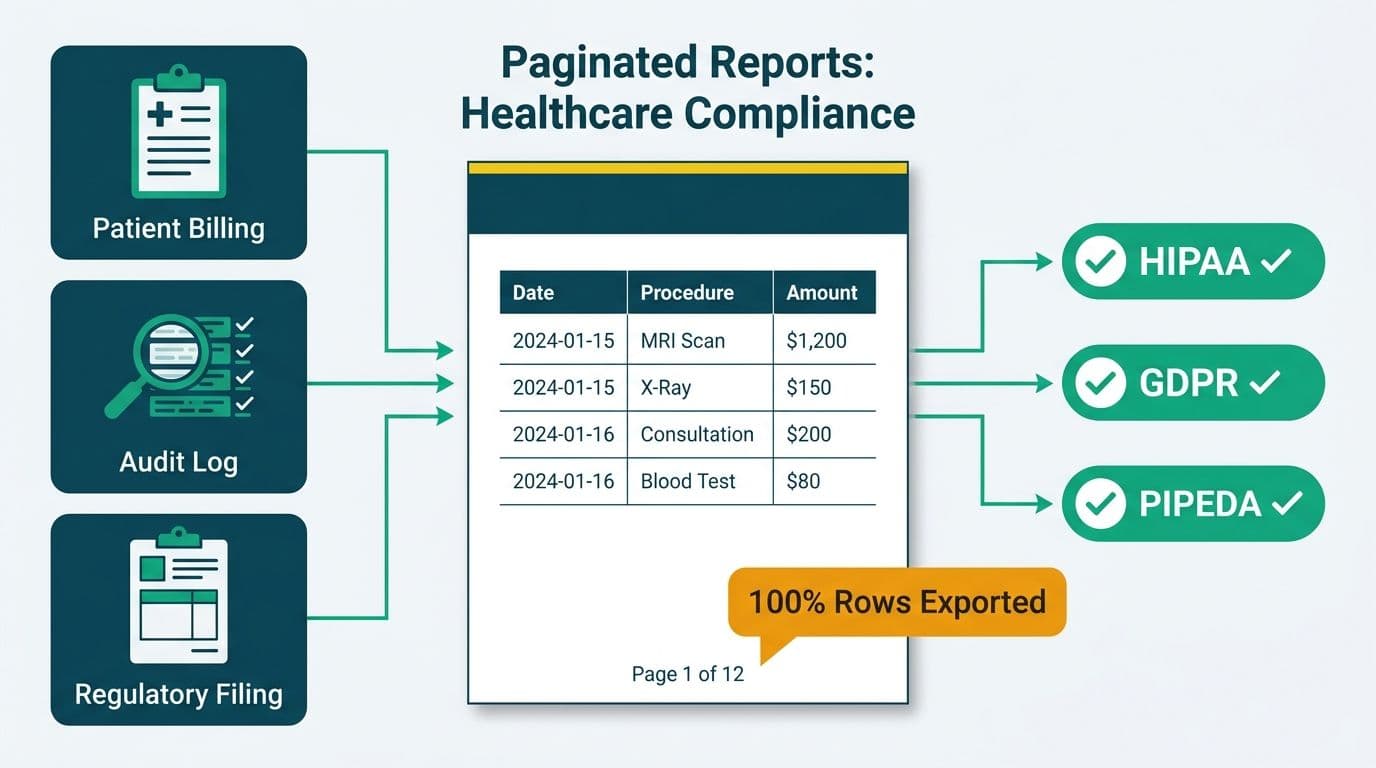
Power BI paginated reports are the right choice for regulated healthcare outputs - patient billing statements, audit logs, and regulatory filings - where pixel-perfect formatting and complete row export are non-negotiable. Unlike interactive reports, paginated reports render identically across print, PDF, and screen, supporting HIPAA, GDPR, and PIPEDA audit requirements. If the output gets signed, stored, submitted, or sent to a patient or regulator, use a paginated report.
Key Takeaways
- Paginated reports deliver pixel-perfect, reproducible output - the core requirement behind every HIPAA audit trail, GDPR data subject record, and PIPEDA disclosure
- Interactive Power BI reports cap underlying data exports at 30,000 rows; paginated reports query the source directly and render full datasets without truncation
- HIPAA (US), GDPR (UK/EU), and PIPEDA (Canada) each impose record-keeping obligations that interactive dashboards were not designed to satisfy
- Microsoft Fabric F64 capacity and above includes paginated reports at no incremental per-user cost, changing the licence economics for enterprise healthcare teams (Microsoft licensing documentation, 2025)
- Most mature healthcare BI environments use both: interactive dashboards for clinical KPI monitoring, paginated reports for every output that carries legal or regulatory weight
What Are Power BI Paginated Reports and How Do They Differ from Interactive Reports?
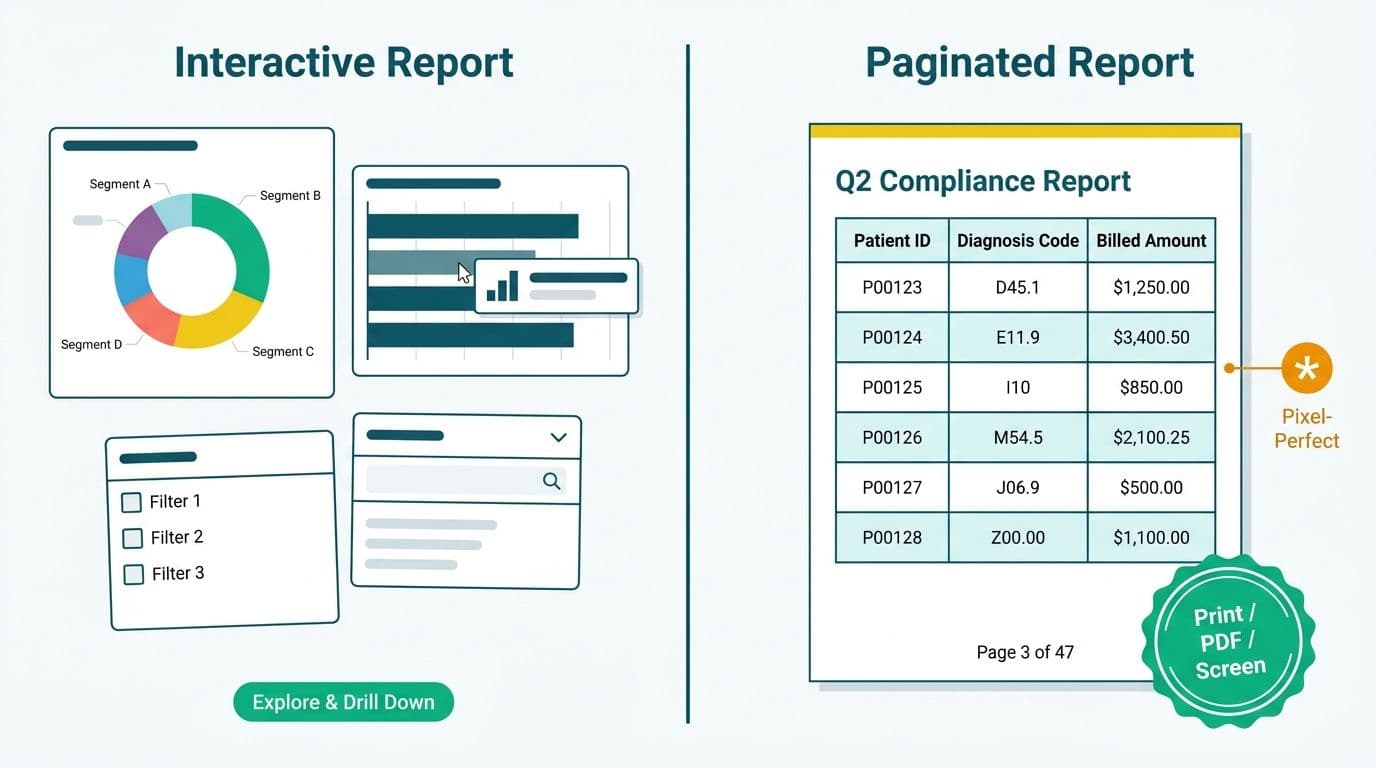
Power BI provides two fundamentally different rendering engines. Paginated reports - built on the SQL Server Reporting Services (SSRS) report engine and available in Power BI Premium and Microsoft Fabric - produce document-style output where every pixel stays in its defined position whether you render one page or one thousand. Interactive reports are built for exploration: slicers, cross-filtering, and drill-through visuals that respond to user selections in real time.
The distinction matters in regulated industries because document fidelity is a compliance requirement, not a preference. When a hospital billing department prints a patient statement, the layout, line items, and totals must be identical to what the system generates if the same statement is requested six months later during a dispute. Interactive reports were designed for discovery; paginated reports were designed for documents.
To scope what a paginated report implementation would cost for your environment - including data source connections, compliance controls, and delivery workflows - the Instant project cost calculator provides a structured starting point based on report complexity and regulatory tier.
Interactive vs Paginated: Feature Comparison
| Dimension | Interactive Reports | Paginated Reports |
|---|---|---|
| Primary use case | KPI dashboards, data exploration | Billing statements, audit logs, regulatory filings |
| Row export limit | 30,000 rows (underlying data) | No practical ceiling |
| Output fidelity | Screen-optimized, responsive | Pixel-perfect across PDF, print, and screen |
| Pagination | Scroll-based, no page breaks | True page breaks, headers, footers, page numbering |
| Parameters | Slicers and cross-filters | Typed parameters (date range, patient ID, payer code) |
| Scheduled delivery | Snapshot subscriptions | Full subscription engine - PDF, Excel, CSV to email or SharePoint |
| PHI row-level security | Semantic model RLS | Data-source-level RLS or direct credential scoping |
| Licensing in Fabric | All F-SKUs | F64+ or Premium Per User (PPU) |
The row export limitation deserves direct attention. A book distributor we worked with discovered they could not extract their own billing data from Power BI - the visual export capped at 30,000 rows against a dataset of over five million records. We connected directly to the underlying model engine and streamed all 5,042,721 billing rows out at roughly a million rows a minute. In healthcare, the same constraint can affect claims files, patient ledgers, and remittance data that routinely run to hundreds of thousands of rows. Paginated reports bypass this limitation by querying the underlying data source directly at render time.
When Should Healthcare Teams Choose Paginated Reports for Compliance Outputs?
Choose paginated reports whenever the output will be signed, stored, submitted, or sent to an external party. The clearest categories in healthcare include:
Patient billing statements. Each statement is a legal document. The format must be consistent, the line items must correspond exactly to the underlying claims data, and the statement must be reproducible if a patient disputes a charge. Interactive dashboards cannot guarantee layout stability across devices and rendering engines - a different browser or screen resolution can shift column widths and truncate values.
Audit logs and PHI access reports. Under HIPAA's Security Rule (45 CFR § 164.312), US covered entities must log who accessed electronic protected health information, when, and from where. A paginated report built on an audit table can be run for any date range and will return the exact same rows every time - no visual sampling, no row-count cap, no rendering variance. A hospital compliance officer can deliver an identical access log to an auditor regardless of how much time has passed.
Regulatory filings. CMS quality reporting, state Medicaid submissions, NHS data returns for UK-based healthcare operations, and CIHI data submissions for Canadian health authorities require structured, schema-compliant outputs. Paginated reports support precise column layouts, conditional subtotals at defined group break points, and structured export to Excel or XML - all without post-processing in a spreadsheet.
Payer reconciliation. Monthly remittance reconciliation between a hospital and an insurance payer involves thousands of claim lines. The report must be deterministic: the same inputs must always produce the same output. Variance introduced by visual rendering or row sampling creates reconciliation exceptions that drain revenue cycle staff time.
Interactive reports remain the right tool for clinical KPI monitoring, operational metrics, and any scenario where the clinician or manager is exploring data rather than certifying a document. The Revenue Cycle Management Dashboard Metrics: A Hospital KPI Guide covers the interactive dashboard side of healthcare reporting in depth.
How Do Power BI Paginated Reports Support HIPAA, GDPR, and PIPEDA Compliance?
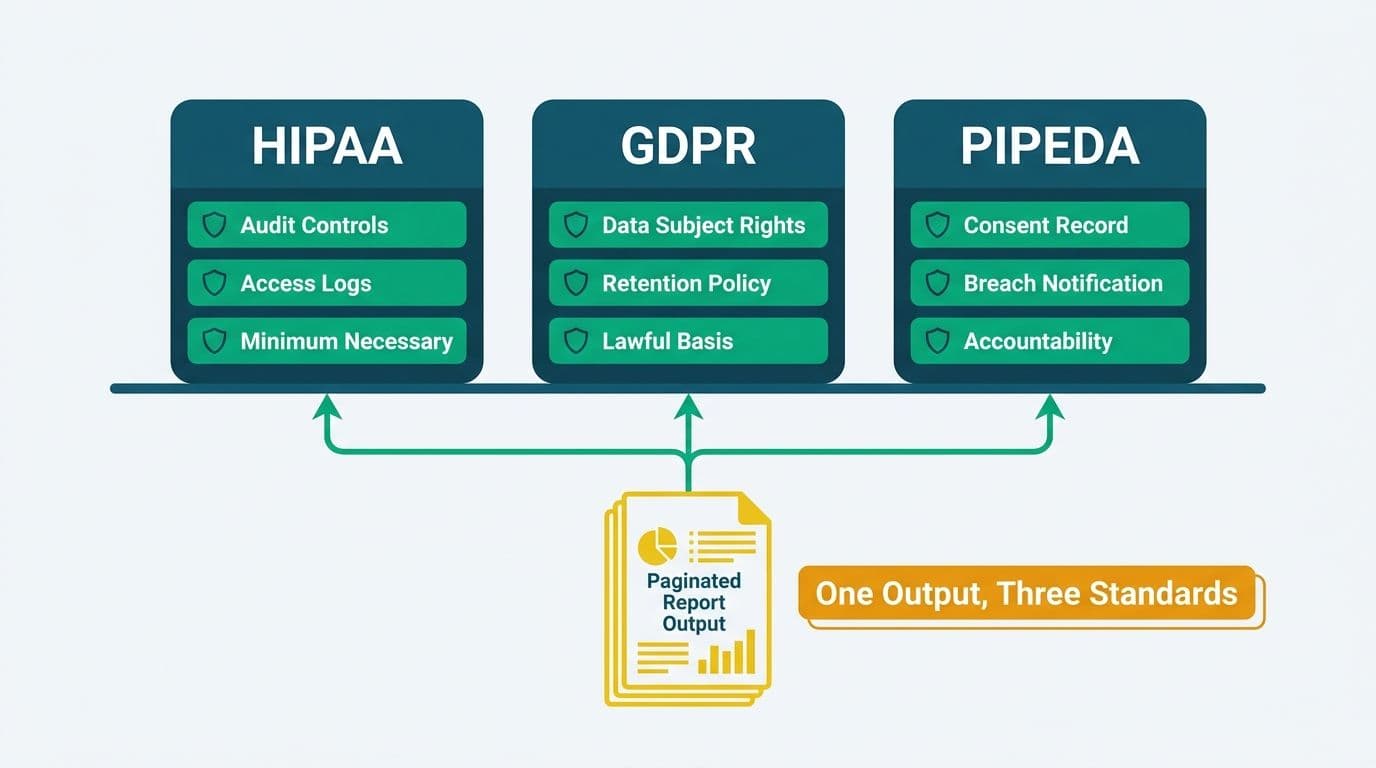
All three regulatory frameworks share a common requirement: the ability to produce a complete, accurate, and reproducible record on demand. Paginated reports are architecturally suited to this because the report definition and the underlying data are separate artifacts - you can rerun the same report definition against the same data and get the same output months or years later, which is precisely what auditors and regulators require.
HIPAA (United States). A US health system using Power BI paginated reports can generate a PHI access log, a minimum necessary disclosure record, or a patient accounting of disclosures that satisfies 45 CFR § 164.528. Microsoft's documentation (2025) confirms that row-level security and sensitivity label inheritance apply to paginated reports in Power BI Premium and Fabric capacity. The Power BI activity log captures every report execution - who ran it, when, and with what parameter values - creating the audit trail that HIPAA's administrative safeguards require.
GDPR (United Kingdom and EU). A UK NHS trust, a Dutch hospital group, or a German health insurer using Power BI must be able to respond to a Subject Access Request under Article 15 of the UK GDPR and EU GDPR. A paginated report parameterized on a patient identifier can render a complete, formatted record of all personal data held for that individual - consistently, on demand, in a format suitable for delivery to the data subject. Microsoft's EU Data Boundary documentation (2025) confirms that Fabric capacity can be region-locked to the EU, supporting the data residency requirements that GDPR Article 46 imposes on cross-border data transfers.
PIPEDA (Canada). A Canadian health authority operating under PIPEDA - and provincial equivalents including Alberta's PIPA and Ontario's PHIPA - must demonstrate that personal health information is accessed only for authorized purposes and that a complete record of access can be produced. Power BI paginated reports support this through parameterized scoping: a report can be constrained to a single patient or a specific date range, and the parameter selections are captured by the Power BI activity API, creating the auditable record that Canadian privacy regulators require.
The Power BI Governance Best Practices: 12-Point Checklist covers the workspace-level controls - sensitivity labels, audit log retention, and export policy configuration - that underpin compliance across all three frameworks.
What Compliance-Critical Features Do Power BI Paginated Reports Provide?
Several capabilities distinguish paginated reports from interactive reports in regulated healthcare environments:
Subscription-based scheduled delivery. Power BI service supports scheduled subscriptions for paginated reports that deliver output in PDF, Excel, or CSV to a SharePoint document library or email address on a defined schedule. A hospital CFO can receive a signed-off billing summary every Monday morning; the file is pixel-identical whether opened on Windows, Mac, or printed as a physical document. For PHI-containing reports, delivery to a SharePoint library with role-based access controls is generally preferable to SMTP email delivery.
Parameter-driven scope control. Unlike interactive reports that rely on end users to apply the correct slicer selection, paginated reports can enforce typed parameter requirements before rendering. A patient statement report configured to require a valid patient ID and a billing period before it executes prevents accidental broad-scope pulls of PHI data.
Subreports and linked document hierarchies. A summary billing report can link to a subreport containing the individual claim lines for a given account, with the same pixel-perfect layout. This produces a document hierarchy - summary cover page, claim detail lines, footnotes - that mirrors the structure of a formal financial statement and supports multi-level regulatory audit responses.
Direct data source connections. Paginated reports support direct database connections that bypass the semantic model layer, enabling healthcare organizations to connect to an EHR export database or a claims adjudication system without the aggregation or truncation that can occur in a semantic model. The Connect EHR Data to Power BI: Epic, Cerner & FHIR Guide details the connectivity patterns for major EHR platforms.
How Does Microsoft Fabric Change the Paginated Reports Equation for Enterprise Teams?
Microsoft Fabric changes the licence economics for paginated reports in ways that matter for enterprise healthcare budget decisions.
Under the legacy Power BI Premium Per User (PPU) model, paginated reports required a PPU licence above the base Pro licence. Under Microsoft Fabric F-SKU capacity at F64 and above, paginated reports are included in the capacity licence with no per-user surcharge (Microsoft licensing documentation, 2025). For a hospital system with 300 reporting users who need paginated report access, the per-head premium disappears - replaced by a shared capacity cost amortized across the full analytics platform, including interactive dashboards, Fabric notebooks, and lakehouses.
For teams evaluating Microsoft Fabric vs Power BI as distinct deployment paths, paginated report availability at different F-SKU tiers is a meaningful differentiator. Smaller F-SKUs (F2 through F32) do not include paginated report rendering; F64 and above does. A healthcare organization that relies heavily on paginated compliance reports will find the F64 capacity threshold a natural upgrade anchor.
The Fabric architecture also enables an audit-trail use case that was harder to implement previously: storing paginated report outputs directly in OneLake as versioned, auditable files with retention policies enforced at the storage layer. For healthcare organizations that must retain billing records for seven years under CMS rules, or maintain PHI access logs for six years under HIPAA's record retention standard, this turns document retention from an operational burden into a platform feature.
What Should Decision-Makers Verify Before Deploying Paginated Reports in Healthcare?
Several practical questions determine whether a deployment will meet its compliance objectives:
Data freshness cadence. Paginated reports render at request time against the connected data source. If the source is refreshed once daily, the report reflects that cadence. For real-time claims adjudication or intraday census reporting, a live direct query connection to the source system is required - which introduces credential management and network security considerations that must be reviewed against the organization's security policy and EHR vendor agreements.
PHI in subscription delivery. PHI-containing reports delivered by email must transit HIPAA-compliant email infrastructure. Most compliance teams prefer delivery to a controlled SharePoint site or Teams channel rather than SMTP email for any report containing patient identifiers, because SharePoint delivery preserves access control and version history that email delivery does not.
Report Builder tooling and skills. Paginated reports are authored in Power BI Report Builder, a separate desktop application with a different expression language and layout engine from Power BI Desktop. The Report Builder expression language resembles Visual Basic, and the layout canvas operates on absolute positioning rather than the responsive grid Power BI Desktop uses. Teams that have built expertise in Power BI Desktop will face a meaningful transition - factor in specialist resource time or dedicated training when scoping the implementation.
Semantic model vs direct query. For compliance reports where completeness is non-negotiable - every claim line, every PHI access event - direct query to the source is generally safer than relying on a semantic model that may have applied filters, aggregations, or row-count limits at the model layer. The tradeoff is render time: large direct-query reports can take significantly longer to generate than model-based reports on the same dataset.
The Power BI Healthcare Reporting: Implementation Cost Guide covers the engagement patterns and cost drivers that appear most frequently when regulated healthcare organizations implement paginated reporting.
---
About Lets Viz: Lets Viz has built Power BI and analytics solutions for US healthcare providers, UK fintech firms, Canadian manufacturing organizations, and global SaaS companies since 2020, earning a 5.0 rating on Clutch. Our engagements span HIPAA-regulated reporting environments, GDPR-compliant data architectures, and enterprise Microsoft Fabric deployments across regulated industries on three continents.
If you are evaluating paginated reports for a compliance reporting use case, use the Instant project cost calculator to scope the engagement before your first architecture conversation.


