Looker vs Looker Studio: Which Google BI Tool Fits Your Team?
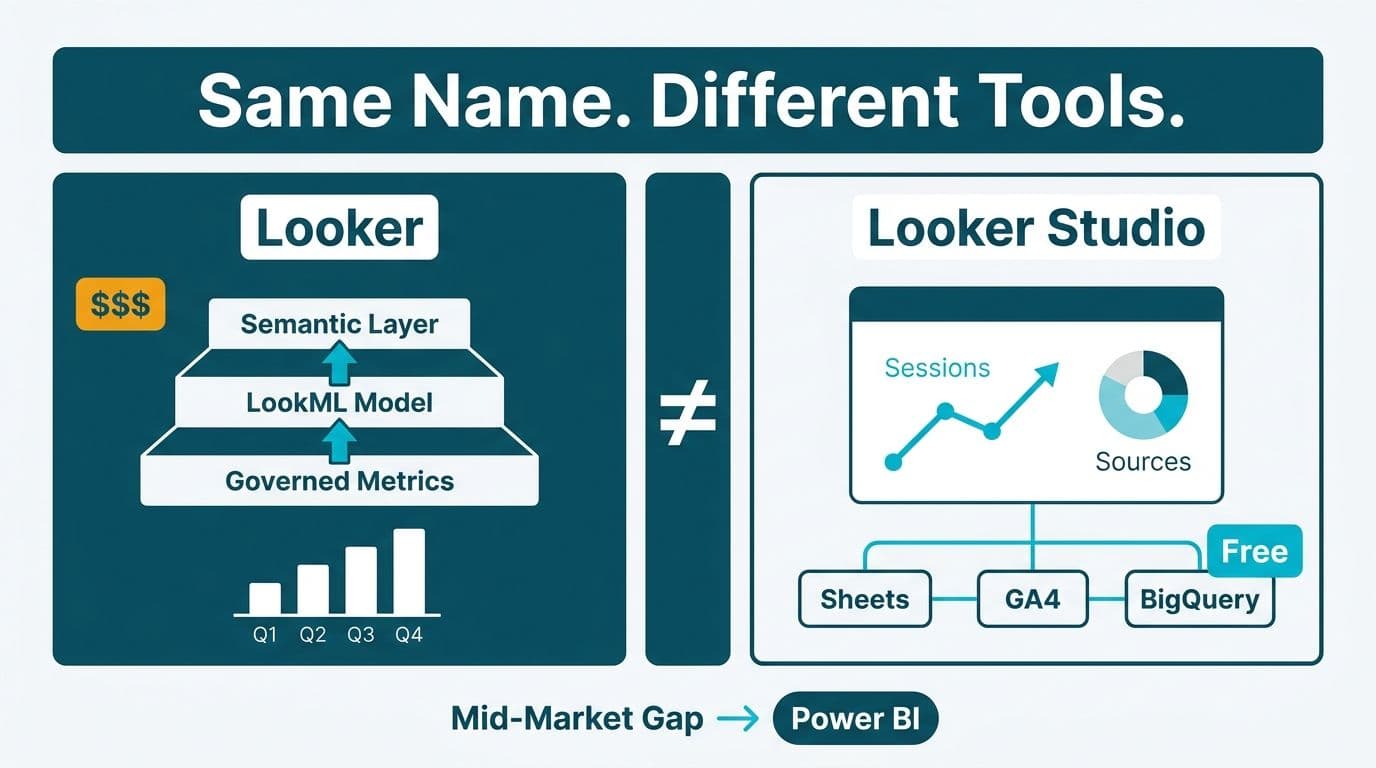
Looker and Looker Studio are two entirely separate products that share only a brand name. Looker is Google's enterprise semantic-layer platform, priced for large organizations with dedicated data teams. Looker Studio is the free, browser-based reporting tool formerly known as Data Studio. For mid-market teams in the US, UK, and Canada, Power BI often fills the gap between both extremes.
Key Takeaways
Looker (enterprise) and Looker Studio are different products with different buyers, pricing, and governance models.
Looker requires an enterprise contract and dedicated LookML engineering; Looker Studio requires only a Google account.
Power BI occupies the mid-market sweet spot: governed, scalable, and significantly cheaper than enterprise Looker for most teams.
Regulated industries should evaluate governance, audit logging, and compliance certifications before choosing any BI platform.
The right tool depends on team size, existing cloud infrastructure, and budget - not brand recognition.
What Is the Difference Between Looker and Looker Studio?
Google's acquisition of Looker in 2020 created a naming problem that persists into 2026. The two products serve entirely different market segments and share little beyond the word "Looker."
Looker (enterprise platform) was built around LookML, a proprietary modeling language that gives data teams a centralized semantic layer where business metrics are defined once and reused across every dashboard and report. Business users can explore data through curated Explores without writing SQL, while data engineers maintain a single source of metric truth. It integrates natively with BigQuery and the Google Cloud Platform. Enterprise contracts are negotiated directly with Google Cloud sales and typically begin in the five-figure annual range.
Looker Studio (formerly Google Data Studio) is a drag-and-drop report builder that connects to Google Sheets, BigQuery, Google Analytics, and hundreds of third-party data sources via community connectors. There is no LookML, no semantic layer, and no row-level security out of the box. The base tier is free; Looker Studio Pro adds scheduled email delivery and workspace collaboration features for $9 per user per month (as of 2026).
The naming confusion is not trivial. A UK fintech firm evaluating "Looker" for GDPR-compliant reporting may trial Looker Studio and conclude the product cannot meet their governance requirements, when in fact they never evaluated the enterprise platform at all. Before committing to any BI platform, use the Instant project cost calculator to model total implementation costs - licenses, data engineering hours, and managed services - across your shortlisted options.
| Feature | Looker (Enterprise) | Looker Studio | Power BI (Pro / Premium) |
|---|---|---|---|
| Price | Custom enterprise contract | Free / $9 per user per month (Pro) | $14-$24 per user per month |
| Semantic layer | LookML (code-based) | None | Tabular model / composite datasets |
| Row-level security | Yes | Limited | Yes (policy-driven) |
| Self-service reporting | Moderate | High | High |
| On-premise / hybrid | No (cloud only) | No (cloud only) | Yes (Power BI Report Server) |
| Native Google integration | Native (BigQuery) | Native (BigQuery, GA4, Sheets) | Via certified connectors |
| Compliance certifications | SOC 2, ISO 27001 | SOC 2 | SOC 2, HIPAA, ISO 27001 |
| Best market fit | Large enterprises on Google Cloud | Google Workspace and GA4 teams | Mid-market and Microsoft / Azure shops |
When Should Your Team Choose Looker (Enterprise)?
Looker makes sense when a data team already runs its warehouse on BigQuery and needs a governed, code-driven semantic layer that non-technical stakeholders can query without writing SQL. The LookML layer enforces consistent metric definitions across departments - preventing the classic situation where Finance and Sales arrive at a board meeting with different revenue figures from the same underlying data. The investment is substantial, so budget for both the platform license and the data engineering hours required to build and maintain LookML models.
A US SaaS company with 300 or more employees, a dedicated data engineering team, and a BigQuery-first stack is the canonical Looker buyer. HIPAA-covered healthcare organizations in the US should verify that a Business Associate Agreement is available through Google Cloud before signing, as BAA availability requires individual negotiation with Google's enterprise sales team and is not included by default.
Without at least one LookML-proficient engineer on staff, however, the platform's governance advantages do not materialize in practice.
When Does Looker Studio Make Sense?
Looker Studio is the right choice for lightweight, operational reporting where data already lives in Google-native sources and the reporting audience is small enough that manual access management is feasible. Marketing teams building GA4 dashboards, finance teams reporting from Google Sheets, and operations managers running ad-hoc BigQuery queries all benefit from its zero-cost entry point. It is particularly well-suited to organizations that are Google Workspace-first and have no immediate plans to build a governed, enterprise-wide metric catalog.
For Canadian organizations subject to PIPEDA, Looker Studio's data processing under Google's cloud infrastructure should be reviewed against applicable provincial privacy requirements - particularly for datasets containing personal health or financial information. Google provides a data processing addendum that covers standard cases, but a formal legal review is advisable before routing sensitive Canadian data through Looker Studio.
The limitations surface quickly when an organization needs row-level security for multi-tenant reporting, a central metric definition shared across departments, or consistent dashboard performance at scale. Looker Studio Pro addresses some collaboration gaps but does not add a semantic layer or enterprise governance. For teams already in the Microsoft ecosystem, the Power BI Import vs DirectQuery guide addresses a data-volume decision point that Looker Studio sidesteps - but one that matters as analytical demands grow.
What does enterprise Looker give you that Looker Studio does not?
Looker Studio is not a free version of enterprise Looker. The two share a brand but not an architecture, and there is no upgrade path between them. Looker Studio has no semantic layer, so each report defines its own measures and two analysts can publish contradictory numbers from the same data.
Enterprise Looker adds:
- Version control: LookML files live in a Git repository, so you get code review, branching, automated testing and rollback.
- Row-level access: a LookML access_filter limits what each user or group can query, without separate datasets.
- Embedded analytics: the Looker Embed API issues signed tokens that control what an embedded viewer can query, which suits governed customer-facing analytics.
- BigQuery fit: it is optimised for BigQuery push-down queries and works with Vertex AI.
What does enterprise Looker really cost to own?
Google prices Looker by developer seats (people who write LookML) and viewer seats (people who explore data). Contracts typically combine a platform fee with per-seat charges negotiated through Google Cloud sales.
The licence is only part of the bill. Total cost of ownership also includes LookML engineering time, which is significant in the first model build, plus change management and, in regulated environments, security review and compliance audit work. Picture a 30-seat healthcare analytics team moving from spreadsheets: licences sit next to LookML development, data model validation, staff training and ongoing governance.
Skills matter too. LookML is a distinct skill from SQL or Python, so a team with strong SQL and Git habits will adopt it with less friction than a team that works only in spreadsheets.
Looker vs Power BI vs Tableau: Where Does Power BI Fit for Mid-Market Teams?
For organizations with 50 to 500 employees, Power BI typically outperforms both Looker products on cost-to-capability ratio. At $14 per user per month (Pro) or capacity-based Premium pricing, Power BI delivers row-level security, paginated reports, a composite semantic model, and native Microsoft Fabric integration at a fraction of enterprise Looker's annual contract value. With Microsoft Fabric reaching full general availability across all workload types in 2026, mid-market teams on Azure can now unify data engineering, warehousing, and BI under a single Fabric capacity SKU - eliminating the separate ETL and warehouse licensing costs that previously narrowed Power BI's price advantage over Looker.
The looker vs power bi vs tableau comparison is frequently framed as a prestige decision, when it is fundamentally an infrastructure question. Organizations on Azure and Microsoft 365 get native single sign-on, Azure Active Directory integration, and data sensitivity labels through Microsoft Purview at no additional BI licensing cost. For UK fintech firms operating under GDPR, where data lineage and access logging are regulatory requirements rather than optional features, Power BI's Purview integration delivers a concrete governance advantage without bolt-on complexity.
Analytics teams across US healthcare, UK fintech, and Canadian manufacturing that must demonstrate audit trails to regulators find that Power BI's HIPAA-eligible service status and Microsoft's compliance portfolio reduce certification overhead compared to assembling equivalent controls on a separate stack. For an applied example of Power BI in regulated finance, the FP&A Dashboard in Power BI guide walks through a complete finance-reporting build.
When Should You Consider Migrating from Tableau to Power BI?
The question of when to migrate from Tableau to Power BI typically surfaces in three scenarios: Tableau licensing renewals where per-Creator pricing has become a board-level budget issue; Microsoft Fabric adoption where maintaining a separate BI vendor creates unnecessary integration overhead; and post-merger consolidation where two organizations run different BI stacks and need to standardize on a single platform.
For a Canadian manufacturing company that standardized on Microsoft 365 following an acquisition, maintaining separate Tableau Creator licenses while already paying for Power BI Premium capacity represents straightforward redundant spend. The migration case becomes compelling when per-user cost differentials are multiplied across a 200-person analyst population and matched against a three-year renewal horizon.
The technical migration is non-trivial but manageable. Calculated fields in Tableau do not map directly to DAX, and LOD expressions require translation into CALCULATE and FILTER patterns. The Cognos to Power BI DAX Translation Guide covers formula translation patterns that apply equally to migrations from other SQL-based BI platforms. For teams already proficient in Excel and the broader Microsoft stack, the learning curve is typically shorter than anticipated. The right trigger for migration is not price alone - it is price combined with a planned Azure adoption, Microsoft Fabric rollout, or Microsoft ERP implementation that makes a unified data stack operationally simpler to govern and audit.
What Do Regulated Industries Need to Know Before Choosing?
For organizations in US healthcare, UK and EU financial services, and Canadian manufacturing, the BI platform decision is inseparable from the compliance framework. Three questions should precede any tool evaluation.
Where is data processed and stored? Both Looker products process data under Google Cloud infrastructure. Power BI processes under Microsoft Azure. For GDPR compliance, UK and EU organizations need data processing agreements reflecting current adequacy status - both Google and Microsoft offer these, but the specific terms differ and warrant independent legal review. Canadian organizations should verify that cross-border data flows meet PIPEDA's accountability principle before routing personal data through any cloud BI platform.
Can the platform demonstrate row-level audit logging? For US healthcare organizations subject to HIPAA, audit logs showing who accessed which records and when are a compliance requirement, not a feature request. Power BI Premium and Looker enterprise both provide this capability; Looker Studio does not.
What are the vendor's breach notification obligations? GDPR mandates 72-hour notification to the relevant supervisory authority. HIPAA requires notification within 60 days for breaches affecting more than 500 individuals. PIPEDA requires prompt notification to both affected individuals and the Office of the Privacy Commissioner for breaches posing a real risk of significant harm. Verify that your vendor's data processing agreement contractually reflects these timelines before signing.
A 2026 World Economic Forum report analyzing AI and analytics governance across more than 80 financial services organizations found that governance, auditability, and explainability ranked as the top priorities for regulated analytics deployments - ahead of raw analytical capability. That priority ordering should anchor the BI evaluation framework for any organization operating in a regulated sector. For a detailed audit framework covering US, UK, and Canadian regulatory environments, the AI Analytics Data Privacy Risks guide outlines the controls that matter most.
Making the Right Choice: A Decision Framework
Three variables determine the optimal BI platform for most organizations.
Team size and data engineering capacity. Looker enterprise requires dedicated LookML engineers and a BigQuery warehouse. Looker Studio requires neither. Power BI requires moderate SQL and DAX proficiency, with a large global talent pool available when hiring or engaging contractors.
Existing cloud infrastructure. Google Cloud and BigQuery shops have a natural path to Looker or Looker Studio. Microsoft Azure and Fabric shops have a natural path to Power BI. Mixed-cloud environments typically favor Power BI's broader certified connector ecosystem and its ability to query across sources without requiring data centralization in a single warehouse.
Governance and compliance requirements. Regulated industries need audit trails, row-level security, and third-party compliance certifications. That points to Looker enterprise or Power BI Premium - not Looker Studio. The free tier has genuine value for the right use case; regulated reporting across multiple business units is simply not that use case.
Mid-market teams needing governed, self-service analytics without enterprise-scale engineering overhead will find Power BI offers the strongest cost-to-capability ratio in most scenarios. Enterprise teams running on Google Cloud at scale will find Looker's semantic layer pays for itself in metric consistency and governance across a large analyst population.
Ready to estimate the real cost of your BI implementation? The Instant project cost calculator generates a structured estimate covering licensing, migration, and managed services - calibrated to your team size and tool shortlist.
---
About Lets Viz: Lets Viz is a data analytics consultancy with a 5.0 Clutch rating, serving organizations in US healthcare, UK fintech, Canadian manufacturing, and global SaaS since 2020. Our team has delivered governed BI implementations across Looker, Power BI, and Microsoft Fabric, giving us direct cross-platform insight into where each tool delivers value and where it falls short. We hold active partnerships with Microsoft and Google Cloud, and regularly advise technical decision-makers on platform selection, migration sequencing, and compliance readiness.
---