How to Train Power BI Q&A with Synonyms and Linguistic Schema
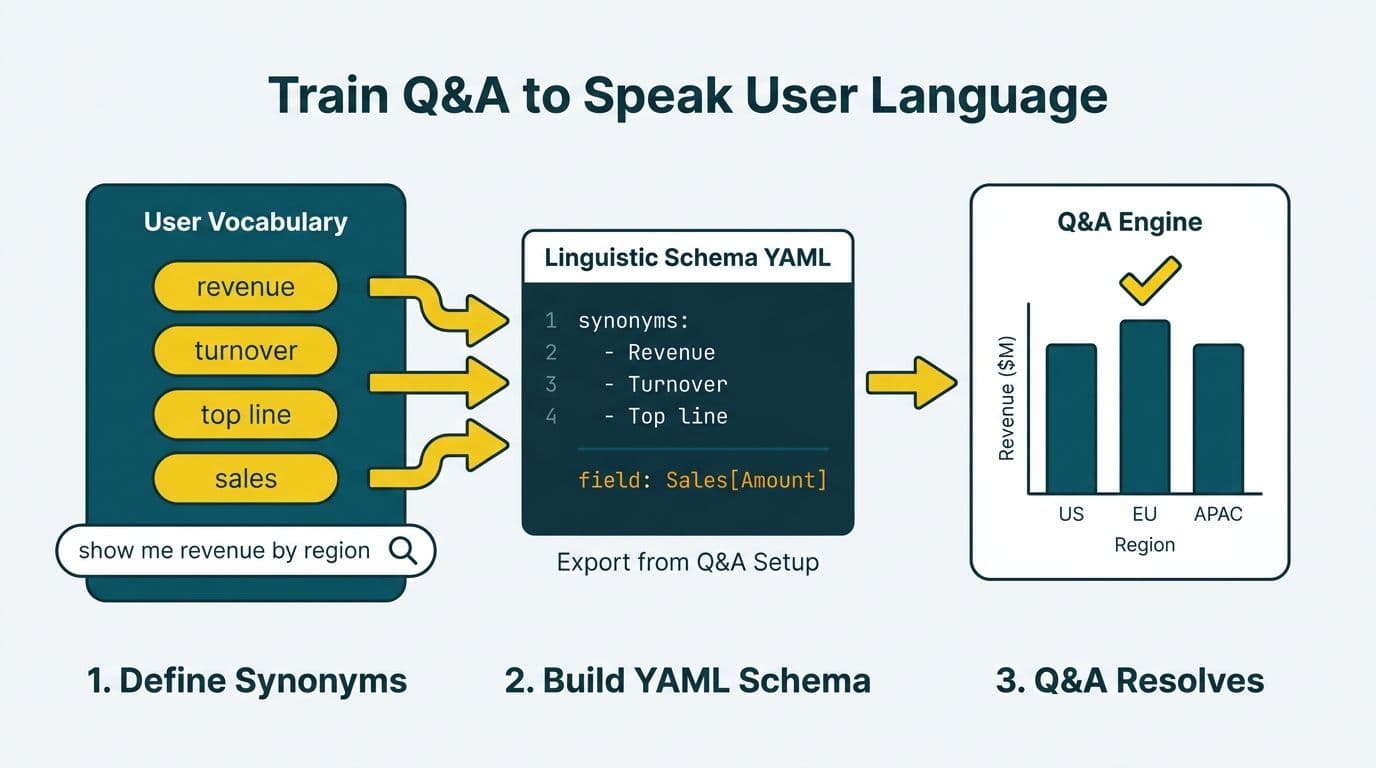
Training Power BI Q&A with synonyms and a linguistic schema YAML means teaching the natural-language engine the vocabulary your users actually type, not the technical column names buried in your data model. Open the Q&A setup pane in Power BI Desktop, define synonym sets for every key measure and table, export the YAML file, and refine it to add phrasings, adjective bindings, and relationship verbs. Most Q&A failures trace directly to skipping this configuration layer after a basic setup.
Key Takeaways
- Synonyms map user vocabulary (revenue, turnover, top line) to model field names - without them, Q&A dead-ends on any term that does not match a column name exactly.
- The linguistic schema YAML extends the synonym UI with adjective bindings, relationship phrasings, and custom entity definitions the setup pane cannot expose.
- Export the YAML from Power BI Desktop, edit it in any text editor, and re-import - the full cycle takes under an hour on a clean data model.
- Finance and healthcare models need explicit schema training because ERP and EMR field names never match what analysts type.
- Q&A shares its semantic layer with Power BI Copilot; teams that configure the schema properly unlock natural-language accuracy in both features simultaneously.
What Is the Power BI Q&A Linguistic Schema and Why Does It Matter?
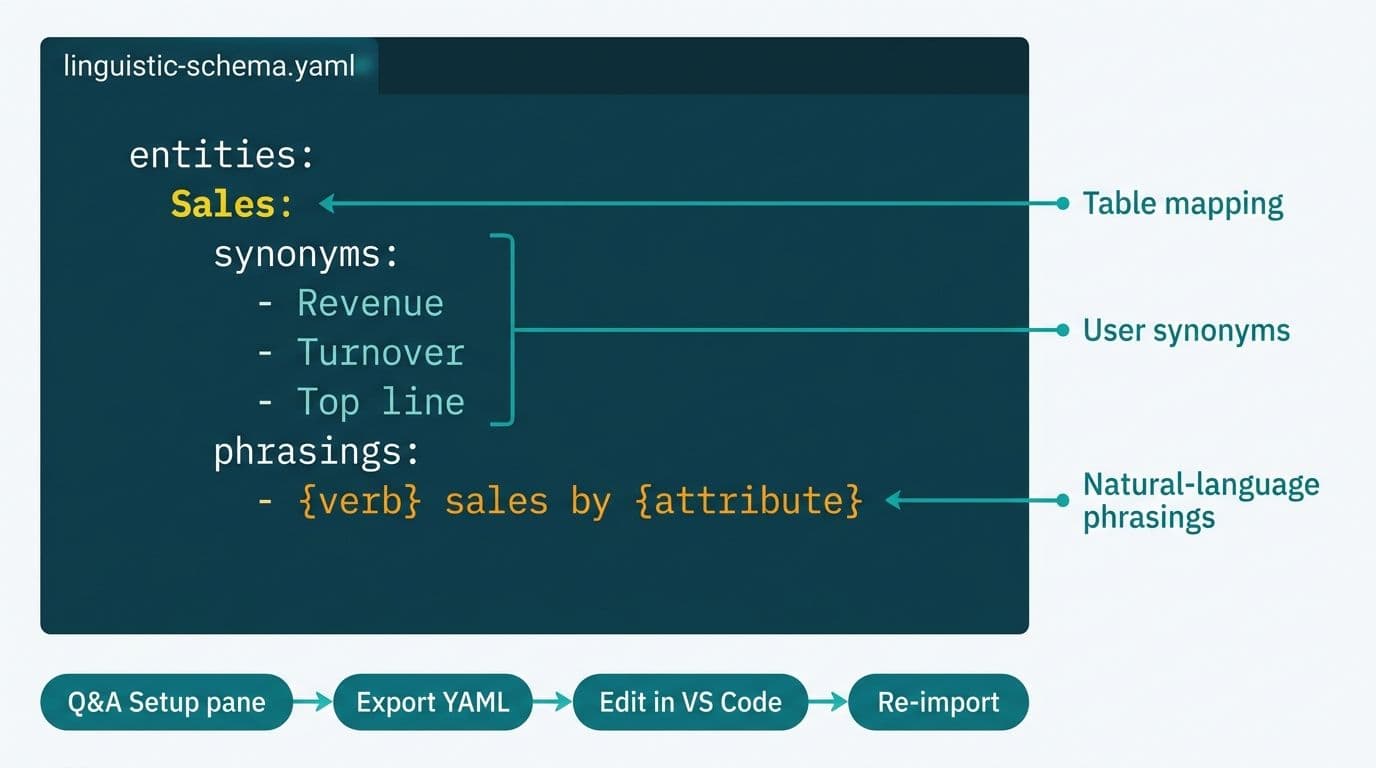
The linguistic schema is a YAML file that maps your data model - tables, columns, measures, and their relationships - to the natural-language terms users type in the Q&A box. Without it, Q&A falls back to column name matching alone, which fails whenever a user types a synonym, a domain abbreviation, a plural, or a calculation expressed in plain English.
Microsoft's Power BI documentation describes the schema as the disambiguation layer: when a user asks "what is our net patient revenue," the engine uses the schema to resolve that phrase to a specific DAX measure filtered to the correct dimension, not a raw column scan (Microsoft Power BI documentation, 2025). Without that mapping, Q&A either returns "I didn't understand that" or, more dangerously, returns a plausible but wrong result by matching the wrong field. The second failure mode is harder to catch and more costly in a finance or clinical reporting context, where a miscalculated KPI can persist across weekly reviews before anyone notices.
This is why Q&A schema configuration appears as a baseline step in any structured Power BI consulting (Copilot-ready) deployment - not an optional polish layer added after go-live.
How Do You Add Synonyms to a Power BI Q&A Data Model?
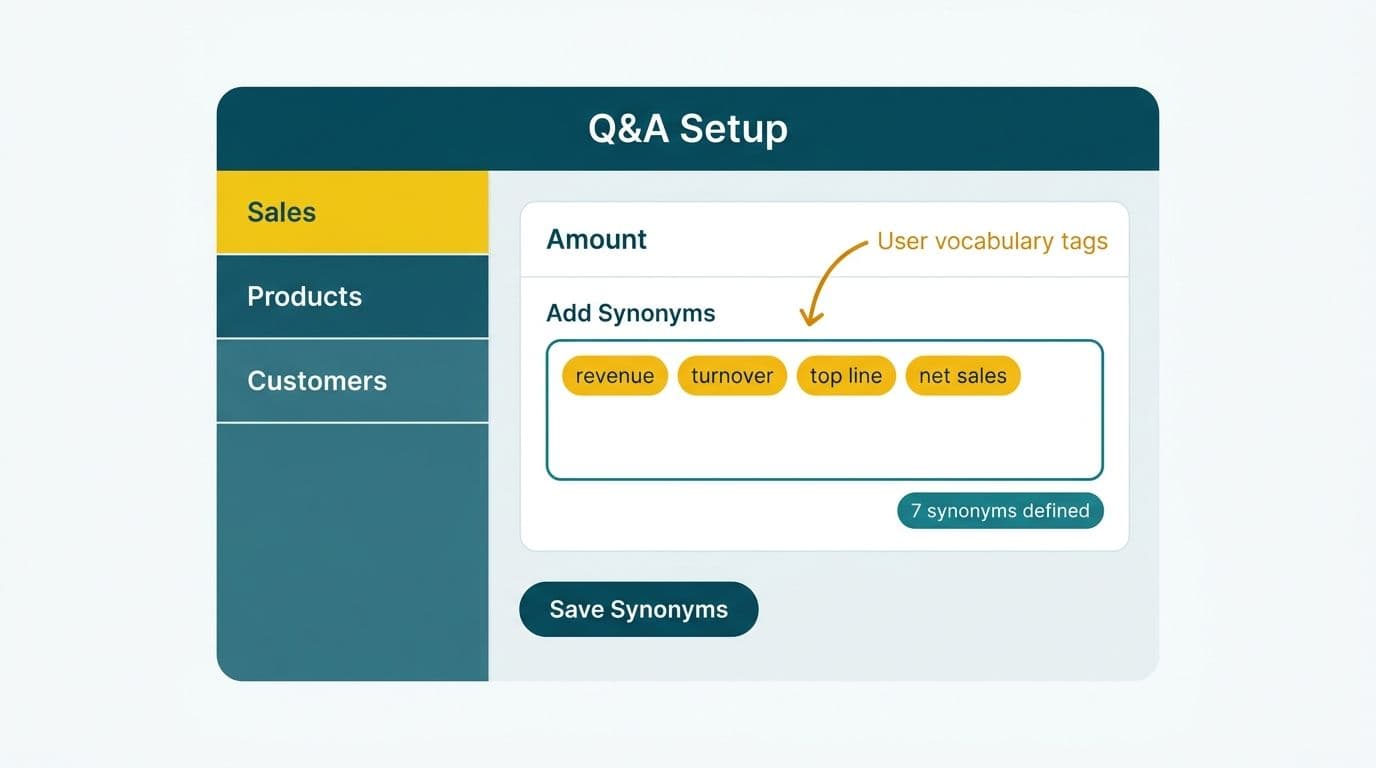
Adding synonyms through the UI is the correct starting point before editing the YAML directly, because the pane writes directly into model metadata and reduces manual YAML work.
Step 1: Open Q&A setup. In Power BI Desktop, navigate to the Modeling ribbon and click "Q&A setup." The pane lists every table, column, and measure in the active data model.
Step 2: Add synonyms for each field. Click any table, column, or measure in the list and type comma-separated synonyms in the input box. For a `[Gross_Margin_Pct]` measure in a financial model, add synonyms such as: `gross margin, gm, margin percentage, markup, gross profit ratio`. Power BI stores these in the model metadata immediately.
Step 3: Use "Review questions" to train field mappings. In the "Review questions" tab, type representative questions your end users would ask - "what was our margin last quarter," "show me overdue invoices," "total revenue by region" - and confirm or correct the field Q&A selects. Each correction improves the model's disambiguation logic incrementally.
Step 4: Export the YAML for advanced configuration. Click "Export linguistic schema" at the bottom of the Q&A setup pane. This generates a `.yaml` file containing everything you have configured, which you can open in VS Code or any YAML-capable editor.
The UI covers synonyms competently but cannot express adjective bindings, relationship phrasings, or logical filters tied to adjectives like "overdue" or "high-risk." Those require direct YAML editing.
How to Train Power BI Q&A with Synonyms and Linguistic Schema: Editing the YAML File
The exported YAML contains four primary sections: `Entities`, `Relationships`, `Phrasings`, and `GlobalSynonyms`. Editing them gives you deterministic control over how natural-language queries map to data model elements - control the UI cannot provide.
Entities: Mapping Tables and Fields to Business Terms
Each table in your model corresponds to an entity block. Under each entity, you define synonyms for the table name and for each property (column or measure).
```yaml
Entities:
- Name: Invoice
Synonyms:
- bill
- receivable
- AR item
Properties:
- Name: InvoiceAmount
Synonyms:
- amount
- value
- invoice total
- billed amount
```
A Canadian manufacturing company tracking supply chain costs might add synonyms such as "landed cost," "duty-inclusive price," and "all-in unit cost" to a `[TotalLandedCost]` measure - terms their procurement team uses daily that no data engineer would encode as a column name in the source ERP.
Phrasings: Binding Adjectives and Verbs to Filter Expressions
Phrasings are the most powerful section and the one most teams omit entirely. They translate natural-language descriptors into concrete DAX filter logic.
```yaml
Phrasings:
- kind: Adjective
adjective:
- overdue
- past due
condition:
filter: "[DaysOverdue] > 30"
table: Invoice
- kind: Verb
verb:
- sold
- generated revenue of
subject: Product
object:
measure: Revenue
```
A US SaaS finance team building a self-service model for their CFO might add phrasings for "churned," "at-risk," and "expansion MRR" - each bound to a CALCULATE function DAX filter context expression that returns the correct customer segment. Without these phrasings, "show me churned accounts this quarter" returns either nothing or a full unfiltered table.
Relationships: Expressing Table Connections in Plain Language
```yaml
Relationships:
- Name: CustomerToInvoice
fromTable: Customer
toTable: Invoice
phrasing:
subject: Customer
verb:
- has
- owns
- is billed for
```
Relationship phrasings are essential in healthcare models. A UK NHS trust or a Canadian hospital deploying Power BI for patient finance reporting might have a `Patient` table related to both `Encounter` and `Claim` tables. Without relationship phrasings, Q&A cannot resolve "show me patients with more than three claims this year" - the engine has no way to traverse that join through natural language alone.
After editing, save the YAML and re-import it via the Q&A setup pane using "Import linguistic schema." Power BI Desktop validates the file on import and flags YAML syntax errors inline.
What Should the Linguistic Schema Cover for Finance and Healthcare Models?
Finance and healthcare models share a structural problem: source system field names are cryptic abbreviations that match no one's natural vocabulary. ERP exports use codes like `GL_ACCT_CD` and `COST_CTR`; EMR systems export fields like `ADM_DT`, `DSCH_DT`, and `DSCH_DRG`. A complete linguistic schema for these verticals should cover the following categories.
| Schema Category | Examples to Map | Why It Matters |
|---|---|---|
| Measure synonyms | Revenue / turnover / top line / net receipts | Finance vocabulary differs by seniority and geography |
| Time adjectives | YTD / year-to-date / current period / this fiscal | Q&A cannot infer fiscal calendars without phrasings |
| Status filters | Overdue / outstanding / cleared / reconciled | Each adjective needs a DAX filter expression |
| Entity aliases | Patient / member / beneficiary / covered life | Payer and provider vocabulary diverge sharply |
| Metric abbreviations | EBITDA / AR / AP / DSO / LOS (length of stay) | Executives use abbreviations Q&A cannot infer |
| Relationship verbs | owns / belongs to / is enrolled in / generated | Enables multi-hop natural-language queries |
US healthcare organizations operating under HIPAA must review which fields appear in Q&A's autocomplete suggestions before enabling the feature for end users. Q&A surfaces column and measure names as suggestions, so PHI-adjacent field names should be excluded via model-level visibility settings before the semantic layer is configured. Canadian organizations under PIPEDA should apply the same discipline - Q&A suggestions are visible to any user with report access, and model-level row-level security must be validated before Q&A goes live. UK and EU organizations subject to GDPR should audit measure expressions to confirm that no natural-language query can return personally identifiable data through an unguarded measure. Our guide to HIPAA-compliant BI tools for hospital data visualization covers the broader model security checklist that precedes schema configuration.
For clinical finance reporting, our hospital readmission rate analytics dashboard guide describes how to structure a Power BI model that supports both natural-language Q&A queries and formal regulatory reporting from the same semantic layer.
How Does Q&A Interact with DAX Measures Like CALCULATE and SUMX?
Q&A resolves natural-language questions to measure calls, not raw column scans. Every measure that users need to reach through Q&A must therefore be visible in the model - hidden measures are inaccessible from Q&A regardless of how well their synonyms are configured.
For measures that use the CALCULATE function DAX filter context pattern - overriding filter context to return period comparisons, segment cuts, or exception calculations - the measure name and its schema synonyms must reflect what the measure actually returns, not its internal DAX logic. A measure named `[Revenue_PYTD_Excl_Returns]` needs synonyms like "prior year adjusted revenue," "last year sales net of returns," and "comparative period net revenue" to match what a finance director would actually type.
The SUMX function appears frequently in measures that aggregate row-by-row across a fact table - for example, calculating total freight cost across a logistics and shipping dashboard where each row represents one shipment line. If your model uses a SUMX-based measure as the authoritative cost figure, the Q&A synonyms must attach to that measure explicitly. Otherwise Q&A may reach the underlying line-item column directly, returning unaggregated or incorrectly scoped results without any error message to alert the user.
Power BI Copilot uses the same semantic layer as Q&A. Teams that invest in synonym and phrasing configuration unlock natural-language accuracy in Copilot without additional schema work - which is why Q&A schema training appears on every serious copilot for business intelligence adoption readiness evaluation. Our Power BI Copilot licensing requirements guide covers the full Copilot enablement path, of which Q&A configuration is a listed prerequisite.
When Should You Rebuild the Schema vs. Letting Q&A Learn Automatically?
Q&A includes an auto-suggestion system that learns incrementally from user corrections made in published reports. Manual YAML configuration is the right choice in four situations where auto-learning is too slow, too opaque, or structurally inadequate.
Regulated industries. US healthcare and financial services organizations cannot wait weeks for Q&A to learn from trial-and-error queries against production data. A UK fintech firm under GDPR cannot rely on iterative user sessions to define what "customer" means when some of those sessions touch PII-adjacent measures. A Canadian financial institution under PIPEDA needs deterministic query behavior from day one, not an evolving probabilistic model.
Models with more than 50 tables. Auto-learning's disambiguation heuristics degrade as the model grows because the number of potential column matches for any given term increases non-linearly. A logistics and shipping dashboard that joins carrier, manifest, shipment, and invoice tables across multiple fact tables will surface persistent Q&A ambiguity without explicit relationship phrasings in the YAML.
Platform migration projects. Teams migrating from a legacy BI platform carry an existing query vocabulary that Q&A must understand immediately. A logistics team migrating to Power BI needs "manifest date," "carrier code," and "freight class" mapped on day one. Our Cognos to Power BI migration guide covers vocabulary mapping as a first-sprint migration deliverable rather than a post-launch task.
Multi-language deployments. The linguistic schema supports multiple language definitions in the same YAML file, which the auto-learning system does not handle cleanly across mixed English-French Canadian deployments or UK organizations with multilingual data entry workflows.
How Do You Test and Validate the Linguistic Schema After Training?
Validation is a required step, not an afterthought. A misconfigured phrasing can return wrong aggregations silently - the most costly failure mode in financial reporting, where an incorrect measure returned by Q&A can persist through weekly reviews before anyone notices.
Test with Q&A Explorer. The "Try your Q&A" panel in Power BI Desktop shows exactly what the engine interprets from each query - the mapped measure, the applied filters, and the visual type selected. Type every synonym and phrasing you defined and confirm the resulting visual matches expected output.
Test boundary and ambiguity cases deliberately. Ask questions you expect to be ambiguous: "show me revenue" (which revenue measure applies?), "total sales last year" (which date table, which fiscal year definition?). If Q&A prompts for clarification, the phrasing is incomplete. If it selects the wrong measure without prompting, a synonym conflict exists in the YAML that needs a more specific phrasing or a narrower synonym scope.
Run user acceptance testing before publishing. Give five to ten finance directors, clinical managers, or data team leads a list of ten representative questions and ask them to type each one into Q&A in a staging report. Every failure maps to a specific gap: a missing synonym, an incomplete adjective phrasing, or a relationship verb the schema does not define.
Version-control the YAML alongside the model. Store the `.yaml` file in the same repository as your Power BI project files. When the data model changes - new measures added, columns renamed, tables restructured - the YAML update belongs in the same change set, not a separate follow-up that gets deprioritized. A schema that drifts from the model is significantly harder to debug than one that was never configured.
---
About Lets Viz: Lets Viz has delivered Power BI, Microsoft Fabric, and data analytics solutions since 2020 for clients in US healthcare, UK fintech, Canadian manufacturing, and global SaaS - holding a 5.0 rating on Clutch. Our team configures semantic layers, row-level security, and Q&A linguistic schemas as part of every model deployment, so natural-language queries return accurate results from the first day in production.
If Q&A still returns dead ends after your initial setup, the gap is almost always in the linguistic schema layer - not the visuals or the DAX. Our Power BI consulting (Copilot-ready) team audits and rebuilds linguistic schemas as a standalone engagement, completing initial configuration within a single sprint.