Power BI Copilot Licensing Requirements: The Complete 2026 Guide
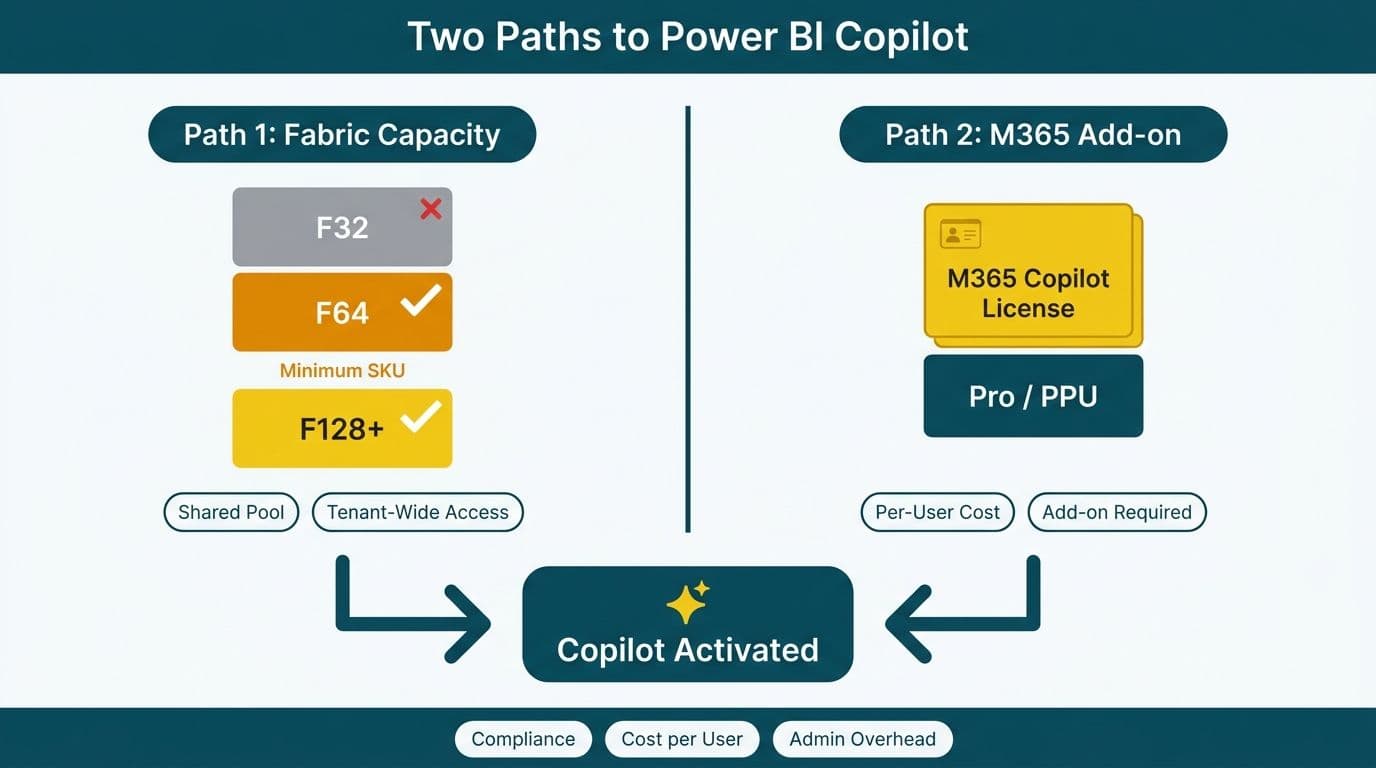
Power BI Copilot requires one of two licensing paths: a Microsoft Fabric capacity at the F64 SKU or higher, or a Microsoft 365 Copilot add-on license paired with existing Power BI Pro or Premium Per User subscriptions. The choice determines your per-user economics, administrative overhead, and - critically for regulated industries - how data flows through Microsoft's AI processing infrastructure. Understanding both paths before procurement prevents costly license mismatches and compliance gaps.
Key Takeaways
Power BI Copilot activates via two licensing paths: Fabric capacity (F64 or above) or the Microsoft 365 Copilot add-on at $30 per user per month.
Fabric capacity is more cost-efficient at scale (50+ users); the M365 add-on suits targeted rollouts for smaller analyst groups.
Data residency for Copilot AI processing follows Microsoft's EU Data Boundary for UK/EU tenants, with direct GDPR and PIPEDA implications for organizations in those regions.
A well-described, certified semantic model is a prerequisite for reliable Copilot output - model readiness and licensing are inseparable decisions.
US healthcare and finance organizations must validate HIPAA and SOC 2 posture before enabling Copilot on sensitive datasets.
What Are the Power BI Copilot Licensing Requirements?
Power BI Copilot's licensing requirements center on two mandatory conditions: an appropriate capacity assignment and a user-level license. Organizations must satisfy both before Copilot features appear in the report canvas and the DAX query view.
The two supported paths are a Microsoft Fabric capacity at the F64 SKU or higher, and a Microsoft 365 Copilot add-on license applied to accounts holding Power BI Pro or Premium Per User (PPU). In both cases, the workspace must be assigned to a Copilot-eligible capacity, and the tenant-level Copilot toggle must be enabled by a Power BI administrator in the Admin Portal under Tenant Settings.
Three baseline prerequisites apply regardless of path:
The Power BI tenant must be hosted in a supported Azure region.
Copilot must be enabled at both tenant and workspace level by a Power BI administrator.
The underlying dataset must use Import or DirectQuery mode; live connections to on-premises Analysis Services do not support all Copilot scenarios.
Organizations evaluating Copilot for the first time typically benefit from a license audit. A Power BI consulting (Copilot-ready) engagement maps existing Microsoft 365 contracts and Fabric investments to the most cost-efficient activation path - a step that frequently surfaces unused capacity licenses or prevents redundant per-user purchases.
Fabric Capacity (F64+) vs. Microsoft 365 Copilot Add-On: A Cost Comparison
The two licensing paths differ fundamentally in cost structure, administrative model, and scalability. Choosing between them requires comparing current headcount, existing Microsoft contracts, and whether the organization is already invested in the Microsoft Fabric ecosystem.
Fabric capacity (F64+) bundles Copilot access into the compute purchase. Every user in a workspace assigned to F64 or higher capacity can access Copilot with no additional per-seat charge. The F64 SKU costs approximately $6,272 per month on an Azure pay-as-you-go basis (2026 pricing); reserved-capacity commitments of one or three years reduce this by up to 37%. At 100 users, this works out to roughly $63 per user per month. Organizations already building on Microsoft Fabric's unified data platform benefit most from this path, since the capacity also covers Fabric pipeline, lakehouse, and warehouse workloads.
Microsoft 365 Copilot add-on charges $30 per user per month (annual commitment, 2026 pricing). Users also need a Power BI Pro license ($14 per user per month) or PPU ($24 per user per month) if not already provisioned, bringing the total to $44 to $54 per user per month. This model suits finance teams or analyst cohorts where Copilot access is granted to a defined group rather than an entire workspace.
| Dimension | Fabric F64+ Capacity | M365 Copilot Add-On |
|---|---|---|
| Monthly base cost | ~$6,272 (F64, pay-as-you-go) | $30/user/month |
| Effective cost at 100 users | ~$63/user/month | $44-$54/user/month |
| Effective cost at 20 users | ~$314/user/month | $44-$54/user/month |
| Power BI Pro/PPU required | Included in capacity | Yes, additional cost |
| Admin model | Workspace capacity assignment | Per-user license provisioning |
| Best-fit scenario | 50+ users, Fabric-native orgs | Targeted small-team rollouts |
| Copilot scenario library | Full access | Full access |
| Data residency control | Set by Azure region | Set by M365 tenant region |
A 200-analyst US healthcare system would find Fabric capacity substantially cheaper at scale. A 15-person FP&A team at a UK fintech firm would favor the M365 add-on to avoid full Fabric commitment. For a comprehensive view of Fabric economics against alternative data platforms, see the Microsoft Fabric vs Synapse vs Databricks TCO breakdown.
How Do You Enable Copilot in Power BI?
Enabling Copilot in Power BI is a five-step process requiring administrator action at tenant level, workspace level, and semantic model level. The sequence is consistent across both licensing paths, though the workspace assignment step differs.
Step 1 - Tenant-level activation. In the Power BI Admin Portal, navigate to Tenant Settings and enable "Copilot and Azure OpenAI Service." Administrators can restrict this to specific security groups, which is advisable during a phased rollout to control scope and gather feedback before a broader release.
Step 2 - Workspace assignment. For the Fabric path, assign the workspace to an F64 or higher capacity via Workspace Settings. For the M365 path, provision each target user with the Microsoft 365 Copilot add-on license through the Microsoft 365 admin center.
Step 3 - Semantic model preparation. Add descriptions to all tables, measures, and key columns in Power BI Desktop or the Fabric portal. Mark the dataset as Certified or Promoted. Copilot uses these descriptions as context when interpreting natural-language prompts - this step has a direct and measurable effect on output accuracy.
Step 4 - User access and testing. Once activated, Copilot surfaces in three locations: the report canvas Copilot pane, the natural-language Q&A interface, and the DAX query view for measure suggestions. Running a structured pilot with a small group before broad rollout surfaces edge cases and model gaps early.
Step 5 - Validate with the Power BI Copilot scenario library. Microsoft publishes a Copilot scenario library containing pre-built prompts covering summarization, trend analysis, anomaly detection, and report narrative generation. Running these scenarios against your own data before go-live surfaces prompt-quality issues and model description gaps before they reach business users.
Data Residency and Compliance: US, UK/EU, and Canadian Implications
Data residency is often the decisive compliance factor when enabling Copilot. Power BI Copilot routes prompts and responses through Azure OpenAI Service; where that processing occurs depends on your Microsoft tenant's home region and applicable data-boundary commitments.
United States - HIPAA and SOC 2. US tenants hosted in US Azure regions (East US, West US 2) have Copilot prompts processed within US boundaries. For healthcare organizations, Microsoft's Business Associate Agreement (BAA) covers Power BI Premium and Fabric under the Microsoft Online Services umbrella. SOC 2 Type II attestation for Fabric was confirmed in Microsoft's 2026 compliance documentation. Finance teams building FP&A dashboards in Power BI should establish a prompt governance policy - structured queries against aggregated data are safer than free-text prompts that reference individual records or patient identifiers.
United Kingdom and EU - GDPR. Microsoft's EU Data Boundary ensures that Copilot for Microsoft 365 and Power BI processes and stores European customer data within EU and EFTA regions. UK tenants post-Brexit are covered under a separate UK data-boundary commitment. For GDPR purposes, Microsoft acts as a data processor and the customer remains the data controller - a relationship that must be documented in the organization's Records of Processing Activities (RoPA) before enabling Copilot on any dashboard that references personal data. A UK fintech firm should complete this documentation step as a prerequisite, not an afterthought.
Canada - PIPEDA. Canadian tenants with data at rest in the Canada Central or Canada East Azure regions benefit from in-country storage. However, as of mid-2026, Microsoft's updated data-residency whitepaper confirms that Copilot AI inference for Canadian tenants still routes through US East or US West 2 when Canadian regions lack sufficient model capacity - a gap that persists as of this writing. Organizations subject to PIPEDA should document this cross-border inference flow explicitly in their Privacy Impact Assessments, obtain a signed data-processing addendum from Microsoft before go-live on regulated workloads, and restrict Copilot interactions to anonymized or aggregated semantic models until Microsoft extends full in-country inference to Canadian regions.
For organizations operating in regulated markets, compliance alignment must be embedded in the licensing decision - not deferred to post-deployment review.
Is Your Power BI Data Model Copilot-Ready?
Power BI Copilot data model readiness is as important as the licensing path selection itself. A model with poor naming conventions and missing descriptions produces unreliable summaries and incorrect DAX suggestions; a well-prepared model enables Copilot to generate accurate narratives and measure code reliably from the first prompt.
Minimum readiness criteria:
Descriptions on all measures and key columns: Copilot reads field descriptions as context for prompt interpretation. A measure labeled "Rev_Adj" with no description is ambiguous; the same measure described as "Revenue net of returns, adjusted for promotional discounts, reported in USD" produces precise output.
Star or clean snowflake schema: Copilot performs poorly against highly denormalized or multi-fact-table models. A clean dimensional structure with clear fact-to-dimension relationships is the baseline expectation.
Certified or Promoted dataset status: These endorsements signal quality to both Copilot and end users navigating the semantic layer in the data hub.
Consistent naming conventions: Uniform naming across all measures and columns reduces ambiguity in generated DAX and natural-language narrative output.
Measures over calculated columns: Calculated columns that aggregate at row level can confuse Copilot's query generation. Replace with measures wherever feasible.
Organizations migrating from legacy BI platforms often carry naming debt and structural anti-patterns that block Copilot readiness. Addressing model structure as part of the migration, rather than after Copilot is already live, prevents a second remediation cycle.
Power BI Copilot in Healthcare and Finance: Practical Applications
The global AI consulting market is forecast to expand at a 33.9% CAGR through 2031 (Grand View Research, 2026), reflecting how AI-augmented analytics tools are shifting from pilot deployments to production infrastructure across regulated industries. Healthcare and finance are the two verticals where Power BI Copilot generates the most immediate value - and faces the strictest scrutiny.
US healthcare. A mid-market US hospital network running Power BI for operational reporting can use Copilot to auto-generate written summaries of readmission-rate trends across facilities, reducing the analyst hours consumed by narrative board-pack commentary. The critical safeguard is model design: Copilot should interact with de-identified or aggregated semantic models, not row-level patient records. For the broader AI analytics landscape reshaping US healthcare operations, see AI Workflow Automation for Healthcare Operations (2026).
US and Canadian finance. Finance directors at mid-market organizations can direct Copilot against certified FP&A models to produce plain-English variance explanations and scenario narratives, cutting the manual commentary that delays monthly board packs. A Canadian bank subject to PIPEDA should route Copilot interactions through anonymized or aggregated reporting layers rather than exposing raw transaction data through unstructured prompts.
UK fintech. A UK fintech firm running Power BI on a Fabric F64 capacity can use Copilot's report narrative feature to auto-draft initial compliance summaries for FCA reporting cycles, materially cutting draft-to-review timelines. GDPR compliance is maintained as long as the tenant remains within the EU/UK data boundary and prompts are designed to avoid referencing personal data in unstructured free text.
---
About Lets Viz: Lets Viz has helped clients across US healthcare, UK fintech, Canadian manufacturing, and global SaaS build analytics solutions on Power BI and Microsoft Fabric since 2020, earning a 5.0 rating on Clutch. Our Microsoft-certified team has guided CIOs and data leaders through licensing path selection, Copilot enablement, semantic model remediation, and data-residency validation across regulated environments in North America and Europe.
Ready to determine the right licensing path and make your semantic models Copilot-ready? Our Power BI consulting (Copilot-ready) team works with mid-market organizations in healthcare, finance, and professional services to activate Copilot on a timeline that fits your compliance obligations and budget.