How to Add Synonyms to Power BI Q&A (Step-by-Step)
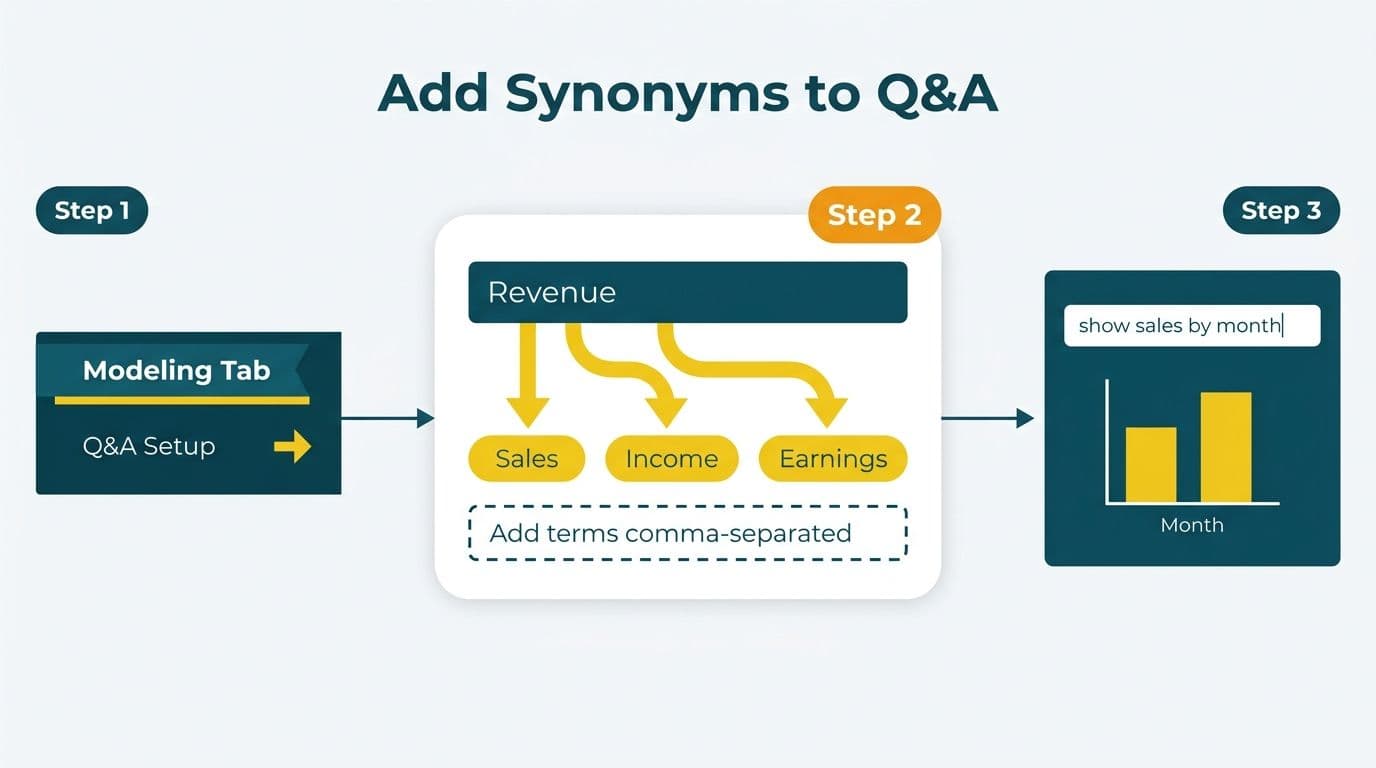
To add synonyms to Power BI Q&A, open your dataset in Power BI Desktop, navigate to the Modeling tab, and select Q&A Setup. From there, expand any table's field list, click the synonym field beside a measure or column name, and type your preferred alternative terms separated by commas. Changes take effect the next time the dataset is published to the Power BI service.
Key Takeaways
- Synonyms are added per field inside Q&A Setup (Modeling tab) in Power BI Desktop and published with the dataset.
- Approving auto-suggested terms promotes them to the linguistic schema, reducing "I didn't understand that" responses.
- Excluding irrelevant tables - staging, bridge, and audit tables - prevents Q&A from surfacing confusing intermediate data.
- The linguistic schema is a YAML file you can export, edit in bulk, and version-control alongside your PBIX.
- A well-tuned Q&A synonym layer is a prerequisite for reliable Copilot natural language responses in Power BI.
What Is the Power BI Q&A Linguistic Schema?
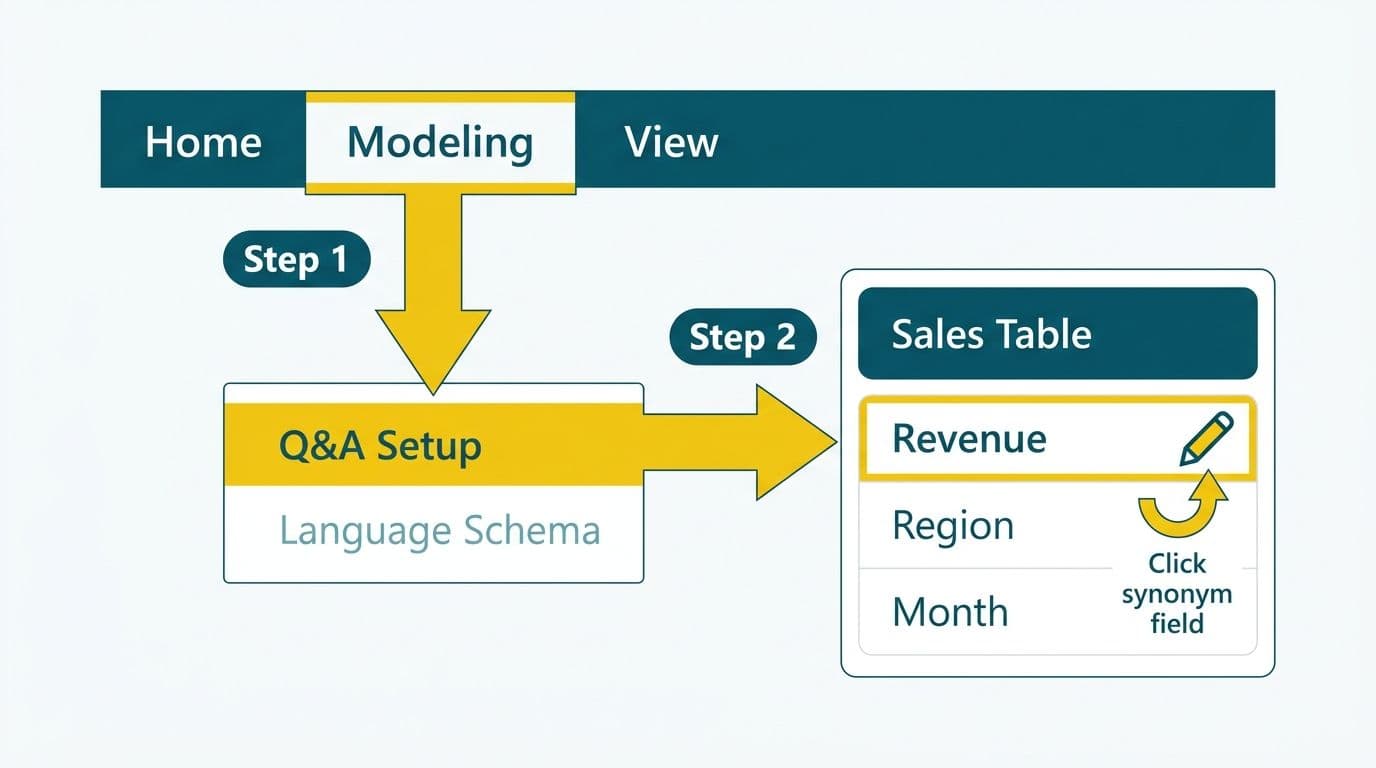
The linguistic schema is the vocabulary map Power BI uses to interpret natural language questions. It defines how column names, measure names, synonyms, and table relationships translate into user intent.
Power BI Q&A ships with a default schema derived from your data model's column and table names. When a user types "total revenue last quarter," Q&A tries to match each word against this schema. Without synonyms, a query like "gross receipts" fails if your measure is named `Net Revenue`. The linguistic schema bridges that gap.
Microsoft documents the schema as a YAML file - known as the linguistic schema YAML - that you can export, edit in any text editor, and re-import. This is particularly useful for large models with dozens of measures, where clicking through the Q&A Setup UI field by field is impractical (Microsoft Learn, 2025).
Finance directors and CIOs should think of the schema as a translation layer between the vocabulary executives and analysts use daily and the naming conventions a developer chose when building the data model. The better the schema mirrors how your business actually talks about data, the more reliably Q&A - and Copilot - will deliver correct results without hand-holding.
How Do You Add Synonyms to Power BI Q&A?
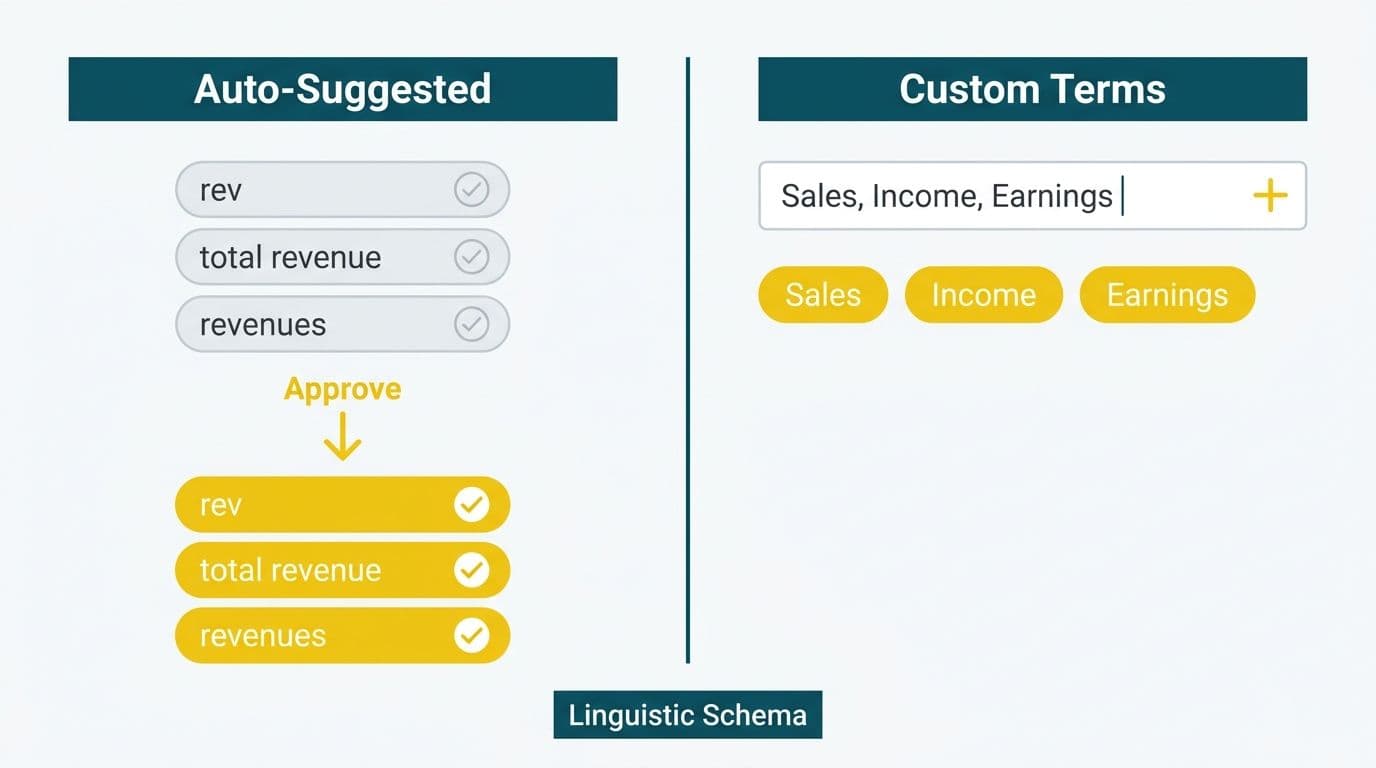
Adding synonyms through the Q&A Setup UI takes about five minutes per table and requires no coding.
Step 1 - Open Q&A Setup
In Power BI Desktop, go to the Modeling tab and click Q&A Setup. This opens the linguistic configuration panel.
Step 2 - Select a field to annotate
In the left pane you will see every table in your model. Expand a table and click on a measure or column name. A synonym input box appears on the right.
Step 3 - Enter synonyms
Type alternative terms separated by commas. For a measure named `Net Revenue`, you might enter: `revenue, gross receipts, total income, earnings`. For a column named `ClaimDate` in a healthcare dataset, enter: `date of claim, service date, admission date`. Click Done after each entry.
Step 4 - Add phrase synonyms for measures
Click the Phrases tab to teach Q&A how to aggregate the measure. For a `Patient Count` measure, add the phrase "how many patients" mapped to a count aggregation. This reduces the "I didn't understand that" error for the most common business questions.
Step 5 - Publish the dataset
Synonym changes live in the dataset, not the report. After adding synonyms, publish the dataset to the Power BI service. Reports using that dataset immediately benefit from the updated schema.
Naming conventions that reduce synonym workload
A simple upstream convention - naming measures in sentence case with spaces, such as `Net Revenue` instead of `NetRevenue_FY` - reduces the synonym load because Q&A can already parse common spacing variants. Where legacy naming exists, synonyms compensate. For new models, agreeing on a naming standard at project kickoff is far more efficient than retrofitting synonyms later.
For enterprise datasets with 50 or more measures, exporting the YAML schema via Q&A Setup - Export Linguistic Schema and editing in bulk is more efficient. Commit the YAML file to version control alongside your PBIX so schema changes are auditable - a useful practice for finance teams subject to SOX controls in the US, FCA reporting requirements in the UK, or OSFI guidance in Canada.
This is the kind of configuration work covered end-to-end in our Power BI consulting (Copilot-ready) engagements, where synonym tuning is typically part of a broader model hardening sprint before a Copilot rollout.
How Do You Approve Preferred Terms in Q&A?
Power BI Q&A learns from usage. As users ask questions, the service surfaces suggested synonyms in the Q&A Setup panel under the Review Questions tab. Each suggestion shows the original question, how the engine interpreted it, and whether the interpretation was correct.
Approving a suggestion promotes that term mapping to the active schema. Rejecting it flags the term as out-of-scope, preventing future false positives.
Best practices for the approval workflow:
- Review suggestions weekly during the first month after launch.
- Approve domain-specific jargon your team uses naturally - for example, "ARR" for annual recurring revenue or "LOS" for length of stay in a hospital context.
- Reject terms tied to internal system names that should not be exposed to end users, such as legacy ERP codes or staging table aliases.
- Assign one dataset owner to manage approvals, similar to how a data steward manages a data catalog entry.
A US health system using Power BI for clinical metrics - for example, one tracking indicators covered in a hospital readmission rate analytics dashboard - would approve terms like "readmit," "bounce backs," and "30-day return" to map to the same underlying measure. Without those approvals, clinical staff asking natural language questions will consistently hit dead ends.
The same dynamic applies in a Canadian hospital network subject to provincial health privacy laws. Clinical leads at different facilities may use regionally specific terms for the same metric - synonym approval harmonizes those dialects into a single data layer without requiring any changes to the underlying DAX measures.
For HIPAA-covered organizations, note that Q&A questions typed by users are processed by Microsoft's cloud service. Confirm with your legal team whether this constitutes a data transmission requiring a Business Associate Agreement. Microsoft's standard BAA covers Power BI as part of its enterprise service commitments (Microsoft, 2025). See our guide to HIPAA compliant BI tools for hospital data visualization for a broader compliance framework to consider alongside linguistic schema configuration.
Which Tables and Fields Should You Exclude from Q&A?
Not every table in your model should be accessible through Q&A. Exposing staging tables, bridge tables, or audit logs creates noise that confuses business users and can surface intermediate data that was never intended for direct consumption.
In Q&A Setup, each table has a visibility toggle. Turning a table off removes it from Q&A's vocabulary entirely. Individual fields within visible tables can also be hidden from the natural language layer while remaining available to DAX calculations.
Tables to exclude:
- Staging or ETL transit tables
- Lookup and bridge tables (for example, `DimDateBridge` or `CurrencyConversion`)
- Internal audit or row-level security support tables
- Disconnected parameter tables not meant for direct queries
Fields to exclude within visible tables:
- Surrogate keys (for example, `CustomerID_SK`)
- Technical flags or bit fields such as `IsDeleted` or `ProcessedFlag`
- Fields that duplicate visible calculated columns
A Canadian asset management firm operating under PIPEDA data governance rules might also exclude fields containing personal identifiers at the Q&A layer as an additional control, even if row-level security already restricts access at the data model level. Defense in depth applies to BI configurations, not only to network and application layers.
For a UK fintech operating under GDPR, excluding fields that could indirectly identify customers from the Q&A vocabulary reduces the surface area for accidental data exposure through natural language queries - particularly relevant when Power BI is embedded in a portal accessible to multiple internal teams with differing data access levels.
Q&A Synonym Scenarios by Industry: A Reference Table
Different industries rely on distinct vocabularies, and the gap between business language and data model naming conventions is widest in regulated sectors. The table below maps common user terms to typical model names and the synonyms needed to bridge the two.
| Industry | User's Natural Language | Typical Model Name | Synonyms to Add |
|---|---|---|---|
| Healthcare (US) | "readmits", "bounce backs" | `30DayReadmission` | readmits, bounce backs, readmission rate |
| Healthcare (US) | "length of stay", "LOS" | `PatientLOS` | LOS, days admitted, inpatient days |
| Finance (US/Canada) | "ARR", "recurring revenue" | `AnnualRecurringRevenue` | ARR, subscription revenue, recurring income |
| Finance (UK) | "net interest margin", "NIM" | `NetInterestMargin` | NIM, interest spread, margin on lending |
| Logistics / Shipping | "on-time delivery", "OTD" | `OnTimeDeliveryRate` | OTD, delivery performance, on-time rate |
| Retail / SaaS | "churn", "attrition" | `CustomerChurnRate` | churn rate, attrition, customer loss rate |
| Manufacturing (Canada) | "yield", "throughput" | `ProductionYield` | yield rate, throughput, output efficiency |
Finance teams familiar with the CALCULATE function in DAX - where filter context determines what a measure returns depending on the slicer or visual currently in scope - will find synonym configuration works as an upstream parallel: it defines the interpretive context the Q&A engine applies to the user's words before it executes any DAX query at all.
How Does Q&A Synonym Setup Affect Power BI Copilot?
Copilot in Power BI uses the same underlying linguistic layer as Q&A. A dataset with a well-tuned synonym schema responds more accurately to Copilot natural language prompts - "summarize revenue by region last quarter" resolves correctly only if "revenue" maps to the right measure and "region" maps to the right dimension column.
Microsoft's Copilot for Power BI documentation (2025) confirms that Copilot leverages Q&A engine improvements, meaning synonym and phrase annotations added today benefit both Q&A visual tiles and Copilot-generated report summaries automatically.
If you are working through a Power BI Copilot licensing and readiness guide, synonym configuration should appear as a pre-launch gate item. Deploying Copilot against a dataset with no synonym tuning is a common source of early user frustration - the natural language interface feels unreliable because the vocabulary map is incomplete.
For finance directors at mid-market firms considering Copilot adoption, the practical sequence is: audit your measures and columns for business-friendly naming, add synonyms for the top 20 most-queried measures, run Q&A test questions with representative users, review and approve suggestions, then enable Copilot for the report workspace.
Teams working through broader AI governance requirements - for example, the compliance frameworks covered in our AI compliance guide for financial services applicable across US, UK, and Canadian institutions - should treat linguistic schema governance as part of their AI model documentation. Q&A synonym mappings are a natural language processing configuration that regulators increasingly expect to see documented and version-controlled alongside model outputs.
What Are Common Mistakes When Configuring the Q&A Linguistic Schema?
Understanding the most common failure modes saves hours of troubleshooting after a Q&A deployment goes live.
Mistake 1 - Adding synonyms at report level instead of dataset level
Q&A synonyms belong to the dataset, not the report. If you configure them inside a report's Q&A visual settings rather than in the underlying dataset's Q&A Setup, the synonyms will not survive when the dataset is republished. Always work from the dataset in Power BI Desktop, not from the report layer.
Mistake 2 - Over-synonymizing a single measure
Adding too many synonyms for one measure creates ambiguity. If "income," "revenue," "earnings," "gross profit," "net profit," and "EBITDA" all resolve to the same measure, Q&A may return the wrong number for a user who intended a different concept. Map each distinct financial concept to its own correctly scoped measure, then add two to four targeted synonyms per measure.
Mistake 3 - Ignoring the YAML for bulk operations
The UI is practical for small schemas, but for a financial model with 80 measures and 15 tables, exporting and editing the YAML in a text editor is far faster and less error-prone. The YAML also enables diffing and peer review in a Git workflow - an important audit trail for organizations subject to financial controls and model governance requirements on both sides of the Atlantic.
Mistake 4 - Not testing with real business users
Synonym selection by the development team almost always misses terminology business users actually use. Run a 30-minute test session where a finance director or clinical lead types their real questions into Q&A before launch. The gap between developer vocabulary and business vocabulary is exactly where most synonym lists are incomplete - and exactly where early user frustration originates.
Mistake 5 - Skipping phrase synonyms for aggregated measures
Column synonyms handle what field is being asked about, but phrase synonyms teach Q&A how to aggregate it. For measures defined using SUMX - which iterates over a table to compute conditional or weighted sums, unlike a simple column aggregation - phrase synonyms ensure Q&A applies the correct iteration logic rather than defaulting to a raw count. Similarly, for measures built with CALCULATE and explicit filter context, phrase annotations map natural language intent to the correct filtered value. Add phrases like "total sales," "sum of sales," and "sales amount" explicitly in the Phrases tab for every key metric.
---
About Lets Viz: Lets Viz has delivered Power BI, Microsoft Fabric, and broader data analytics engagements since 2020, working with US healthcare systems, UK fintech firms, Canadian manufacturing companies, and global SaaS businesses. The firm holds a 5.0 rating on Clutch and specializes in production-ready semantic models, governance-aligned deployments, and Copilot readiness configurations across regulated industries.
If your Q&A layer is returning "I didn't understand that" more often than answers - or if you are preparing a dataset for Copilot adoption and need a reliable natural language foundation - our Power BI consulting (Copilot-ready) team configures, tests, and hands off production-grade linguistic schemas built for finance and healthcare teams.


