How to Evaluate a Power BI Managed Service Provider
To evaluate a Power BI managed service provider, procurement teams should assess SLA tier definitions, data-residency and regulatory commitments, Microsoft Fabric migration readiness, and pricing structure before signing any contract. A provider that excels on capability but lacks explicit HIPAA or GDPR documentation is an unacceptable risk for regulated industries. This guide gives IT leaders, data team leads, and finance directors a structured scorecard to complete that evaluation.
Key Takeaways
- SLA tiers should define response and resolution windows for at least three priority levels, with P1 covering dashboard and data-pipeline outages
- Data-residency commitments must name specific Azure regions - "cloud-hosted" is insufficient for HIPAA, GDPR, or PIPEDA purposes
- Microsoft Fabric readiness is now a baseline expectation for any provider managing Power BI in 2026, not a premium differentiator
- Pricing transparency requires knowing exactly which events trigger overage charges before the contract is signed
- A structured vendor scorecard applied during reference calls - not sales demos - will surface the gaps that informal conversations cannot
Why Evaluating a Power BI Managed Service Provider Demands a Structured Approach
Standard IT vendor selection checklists were designed for infrastructure procurement or SaaS tools, not for analytics managed services where the provider operates inside your data warehouse and semantic model. When you give a managed service provider access to clinical records, transaction logs, or personally identifiable employee data, the evaluation stakes are substantially higher than they are for a typical software subscription.
Managed Power BI services sit at the intersection of BI capability and data stewardship. A provider manages refresh schedules, model performance, row-level security rules, calculation group definitions, and the underlying semantic layer - often without a dedicated internal resource reviewing their work each day. That operational depth is the reason a structured procurement process matters: the risk is not the dashboard, it is everything behind it.
The geographic dimension amplifies those stakes. For a US hospital system, the managed provider touches protected health information through every operational dashboard - from revenue cycle to readmissions tracking. For a UK fintech firm, the same provider processes transaction data subject to GDPR. A Canadian manufacturing company operating under PIPEDA faces direct accountability for any third party that handles employee or customer data on its behalf. Each jurisdiction attaches legal liability to the data handler, which means provider certifications must be explicit and current, not implied.
What SLA Tiers Should You Require When You Evaluate a Power BI Managed Service Provider?
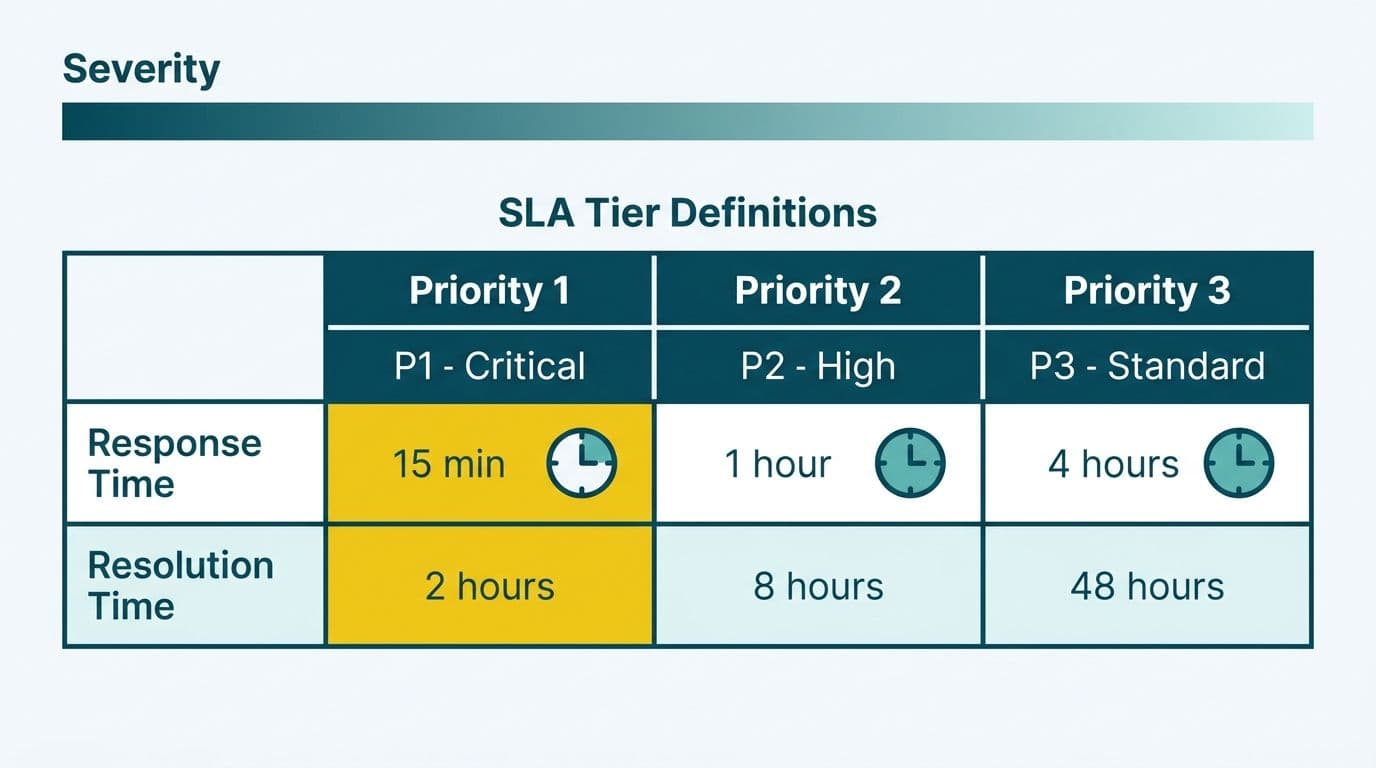
A credible provider defines at least three priority tiers with explicit response and resolution windows committed in writing. A verbal promise of "24-hour turnaround" is not an SLA - it is a sales commitment with no contractual enforcement path.
The following tier structure is a practical baseline for mid-market procurement:
| Priority | Definition | Target Response | Target Resolution |
|---|---|---|---|
| P1 - Critical | Production dashboard offline or confirmed data breach | 1 hour | 4 hours |
| P2 - High | Report displays stale or incorrect data affecting decisions | 4 hours | 1 business day |
| P3 - Medium | Visual formatting issue or minor filter behavior bug | 1 business day | 3 business days |
| P4 - Low | Enhancement request, new report page, or cosmetic change | 5 business days | Per agreed sprint |
Beyond tiers, probe the provider on three scenarios that standard SLA language routinely misses:
Data access under the SLA. Ask whether the SLA covers direct access to the underlying semantic model, not just the Power BI visual layer. One book distributor we worked with discovered their managed setup capped data exports at 30,000 rows through the standard visual export function - but their actual billing dataset contained 5,042,721 rows. Connecting directly to the model engine let us stream the full dataset at roughly a million rows a minute. That capability gap should have surfaced during vendor evaluation, not after the contract was signed. If your managed provider cannot or will not expose the model engine, you do not fully own your own data.
Scheduled refresh SLAs. If a financial close dashboard is set to refresh at 07:00 and the data is three hours stale when the CFO checks it at 09:00, which tier applies? Pin this to a concrete scenario in writing before signing. Providers often exclude scheduled refresh failures from P1 or P2 coverage unless the contract explicitly names them.
Escalation path clarity. For P1 incidents, does escalation route to a named engineer with domain knowledge of your environment, or to a generic support queue? Healthcare organizations subject to HIPAA breach notification timelines require a named incident commander who can confirm the scope of exposure and initiate required reporting within the window the regulation specifies.
How Do You Assess GDPR, HIPAA, and PIPEDA Compliance to Evaluate a Power BI Managed Service Provider?
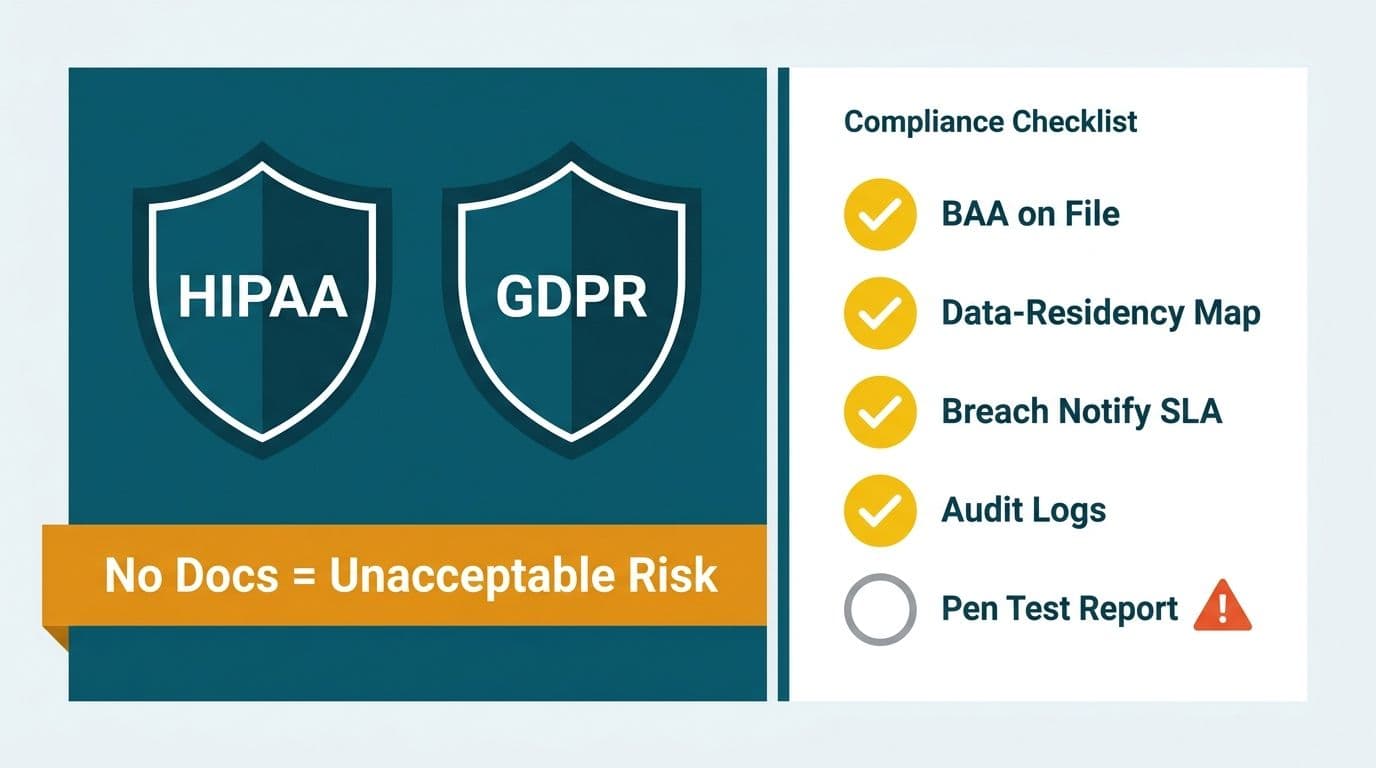
Compliance documentation is where many providers stall during procurement. The correct response to "show us your compliance posture" is a draft data processing agreement and current certification evidence, not a slide deck listing logos.
For US healthcare and finance organizations: require a signed Business Associate Agreement before granting the provider any access to production data. Microsoft publishes its BAA covering Power BI Premium and Fabric under the Microsoft Product Terms (2025). Your managed provider must operate under a sub-BAA or a direct equivalent covering their own operations - not just the Microsoft infrastructure underneath. Request SOC 2 Type II attestation specifically covering the managed service operations, with an audit date within the last twelve months. A SOC 2 report covering only the provider's internal IT systems is not an equivalent substitute.
For UK and EU organizations: the provider must demonstrate that personal data remains within the European Economic Area or that Standard Contractual Clauses are in place for any cross-border transfers. Microsoft's Fabric region selection, documented in the Microsoft Product Terms (2025), allows workloads to be pinned to UK South or West Europe. Your provider must demonstrate they enforce that selection consistently and that support and operational tooling does not route data through jurisdictions outside the agreed scope.
For Canadian organizations: PIPEDA places accountability on the organization, not the vendor. A provider incorporated under US law and operating primarily on US infrastructure does not automatically satisfy Canadian requirements. Ask specifically whether the provider can commit to Canadian data residency using Canada Central or Canada East Azure regions, and require a complete subprocessor list. Under PIPEDA, your organization remains responsible for third parties that handle data on your behalf - making subprocessor visibility non-negotiable during procurement, not an afterthought.
A practical compliance checklist to send providers before the evaluation call:
- Provide your current SOC 2 Type II audit report or ISO 27001 certificate with the effective date
- Confirm the Azure regions where customer data is stored and processed under normal operations
- List all subprocessors with access to customer environments, including support tooling and monitoring platforms
- Confirm whether a BAA (US) or Data Processing Agreement (UK/EU) is available and provide a draft template
- Describe your breach notification process, the internal timeline for identifying scope, and how client notification is handled
The AI Automation Compliance Checklist for Finance Teams provides an overlapping framework for organizations managing automated analytics pipelines under financial services regulations.
Is the Provider Ready for Microsoft Fabric?
Microsoft's 2025 product documentation confirms that Power BI is the reporting and visualization surface for Microsoft Fabric, not a standalone product on a parallel roadmap. Providers that cannot speak credibly to OneLake architecture, Direct Lake mode, Fabric capacity SKUs, and semantic model migration are operating in a legacy context that will increasingly limit what they can deliver as Microsoft consolidates the platform.
Ask these four questions during the technical evaluation:
1. Have you migrated any existing Power BI Premium or PPU workspaces to Fabric F-SKU capacity? Describe the process and any complications encountered.
2. Can you manage Direct Lake semantic models, which read from OneLake delta tables without import? What are your monitoring practices for Direct Lake refresh and query performance?
3. What is your current capability for Fabric Real-Time Intelligence, and do you have production deployments of operational dashboards using this feature?
4. Do you manage Fabric dataflows Gen2 or notebooks alongside Power BI reports as part of an end-to-end pipeline, or only the report layer?
For context on what Fabric migration involves technically, the Microsoft Fabric architecture components explained article covers the OneLake-first design that underpins all Fabric workloads. A provider unfamiliar with that architecture should not be managing a Power BI environment in 2026.
ServiceNow ITSM dashboards in Power BI represent a common enterprise integration that tests this readiness directly. If your operations team runs IT service management reporting through a ServiceNow Power BI integration, the managed provider must handle connector authentication, refresh cadence, and schema change management - all within the Fabric context if you are running on a Fabric SKU. Providers managing only the report layer cannot reliably support integrated pipelines of this kind.
How Should Managed Power BI Pricing Be Structured?
Pricing for managed Power BI services follows three common contract models. Each carries a different risk profile, and the right choice depends on your environment's complexity and the predictability of your demand.
Per-seat retainer. A fixed monthly fee per licensed Power BI Pro or Premium Per User (PPU) user. Predictable at low user counts, but cost scales linearly as the licensed base grows. Verify whether Power BI Free users are counted toward billing and whether rates change at licensing tier thresholds.
Flat monthly retainer by workspace tier. A fixed fee covering a defined number of workspaces, reports, data models, and scheduled refresh cycles per month. This model rewards the provider for managing complexity efficiently and typically suits mid-market organizations with 10 to 50 workspaces and a stable report inventory.
Time-and-materials with a managed floor. A minimum monthly commitment - typically 20 to 40 hours - with additional hours billed at a contracted rate. This model suits organizations with irregular development demand, such as those adding business units or consolidating acquisitions. The risk is scope expansion driven by the provider rather than the client if the contract does not define clearly what the floor covers.
Regardless of model, require the following to be explicit before signing:
- What constitutes a billable incident versus a routine managed service obligation?
- Does the retainer include semantic layer changes such as new DAX measures, calculation group modifications, and row-level security rule updates, or only visual-layer fixes?
- How are downstream Microsoft licensing cost increases passed through to the client?
- What is the process for scope change requests, and who authorizes additional spend?
For a broader analysis of the economics of analytics outsourcing, the When to Outsource Finance Analytics Consulting: CFO Guide addresses the build-versus-buy decision at the organizational level and provides useful context before finalizing a managed service contract structure.
What Does a Vendor Scorecard Look Like for Evaluating a Power BI Managed Service Provider?
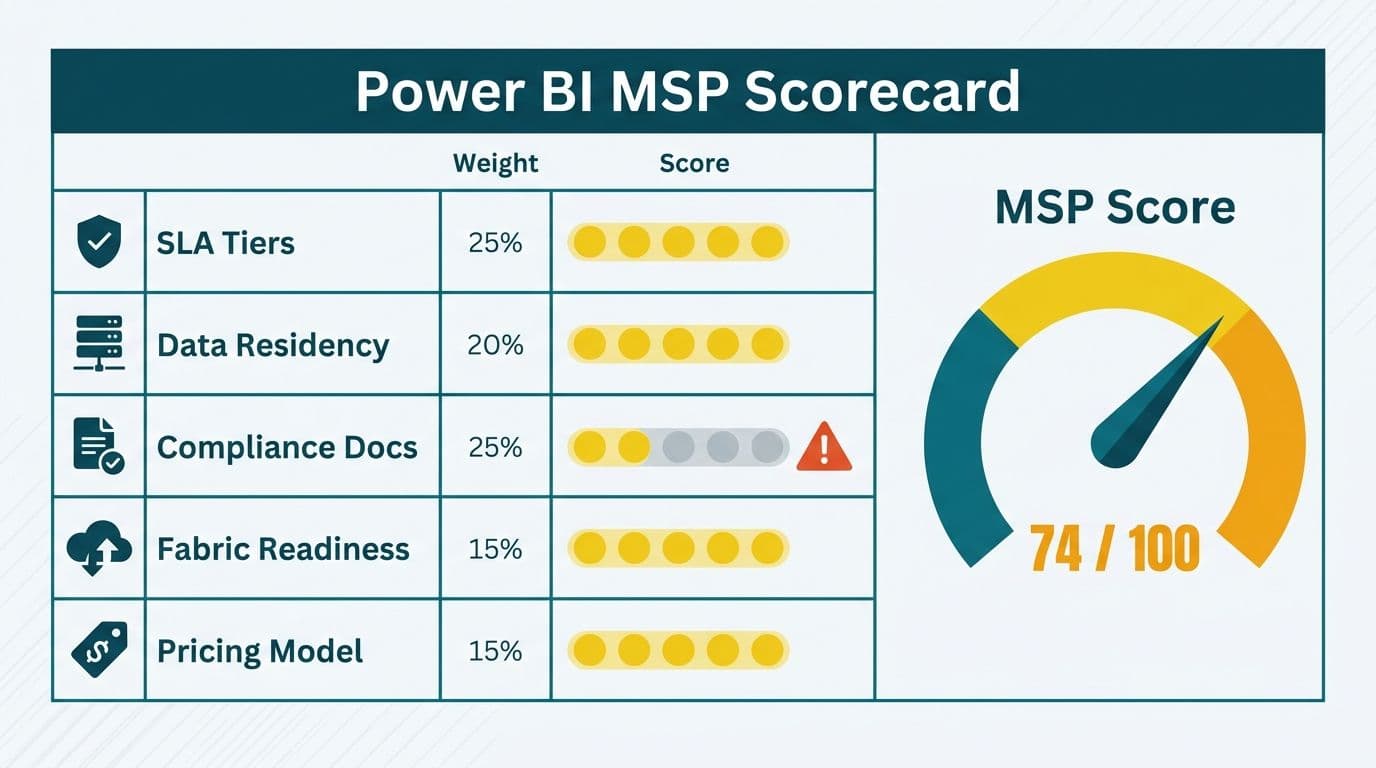
A working procurement scorecard assigns weight across five dimensions and is applied during structured reference calls, not sales demos. Adjust weights to reflect your regulated-industry requirements.
| Evaluation Dimension | Default Weight | What Good Evidence Looks Like |
|---|---|---|
| SLA tier clarity and enforcement | 25% | Written tiers, named escalation contact, documented incident history |
| Compliance posture | 25% | SOC 2 Type II (current), BAA or DPA template available, named Azure regions confirmed |
| Microsoft Fabric readiness | 20% | Direct Lake deployments, Fabric F-SKU migration references from clients |
| Pricing transparency | 15% | All overage triggers itemized, scope change authorization process documented |
| Model governance and quality standards | 15% | RLS audit capability, semantic model documentation standards, versioning practice |
Adjust this baseline for your context. A US hospital system would increase the compliance weight to 40%, redistributing points from model governance. A UK fintech firm would add a GDPR-specific sub-criterion under compliance covering DPA status and subprocessor disclosure. A Canadian manufacturer would add a PIPEDA accountability criterion requiring evidence of the provider's own data handling practices and subprocessor geography.
The reference call itself matters as much as the scorecard. Ask specifically about a P1 incident the provider handled for a client in your industry: what was the cause, how long to resolution, and what process change followed? A provider that cannot describe a P1 incident clearly likely did not learn from it.
Red Flags to Watch for During the Evaluation Process
Even a well-structured scorecard misses signals that only emerge in direct conversation. The following patterns warrant immediate follow-up or disqualification:
Vague data-residency language. Phrases like "we use Microsoft Azure" or "we're cloud-native" are not data-residency commitments. Push for specific Azure region names and ask what happens when a support engineer in a different jurisdiction accesses your environment through a monitoring or ticketing tool.
No BAA or DPA template available at the evaluation stage. Providers with established healthcare or financial services clients have these documents ready. Delays of more than a few business days suggest the legal infrastructure is not in place - or has not been reviewed recently enough to be current.
Thin DAX and semantic model depth. If the provider's technical team cannot discuss row-level security patterns, calculation groups, or how the CALCULATE function behaves in filter context, they are managing only the visual layer. That is insufficient for complex financial models or clinical dashboards where the logic behind the numbers must be independently auditable.
Microsoft Fabric described as "on the roadmap." Fabric is a current shipping product. A provider still treating it as optional is behind the adoption curve that Microsoft is driving through its licensing and product strategy in 2025 and 2026. Committing to a multi-year managed service agreement with such a provider creates technology debt before the engagement begins.
---
About Lets Viz: Lets Viz has delivered analytics consulting and managed BI services since 2020, serving US healthcare organizations, UK fintech firms, Canadian manufacturing companies, and global SaaS businesses. Recognized with a 5.0 Clutch rating, the team brings Power BI model engineering, compliance-aware architecture, and hands-on managed service delivery to regulated industries across three continents.
If you are ready to move from evaluation to engagement, Managed Power BI services describes how Lets Viz structures retainers, SLA tiers, and compliance documentation for mid-market clients in healthcare, finance, and beyond.