How to Connect SQL to Looker Studio: PostgreSQL, MySQL & BigQuery
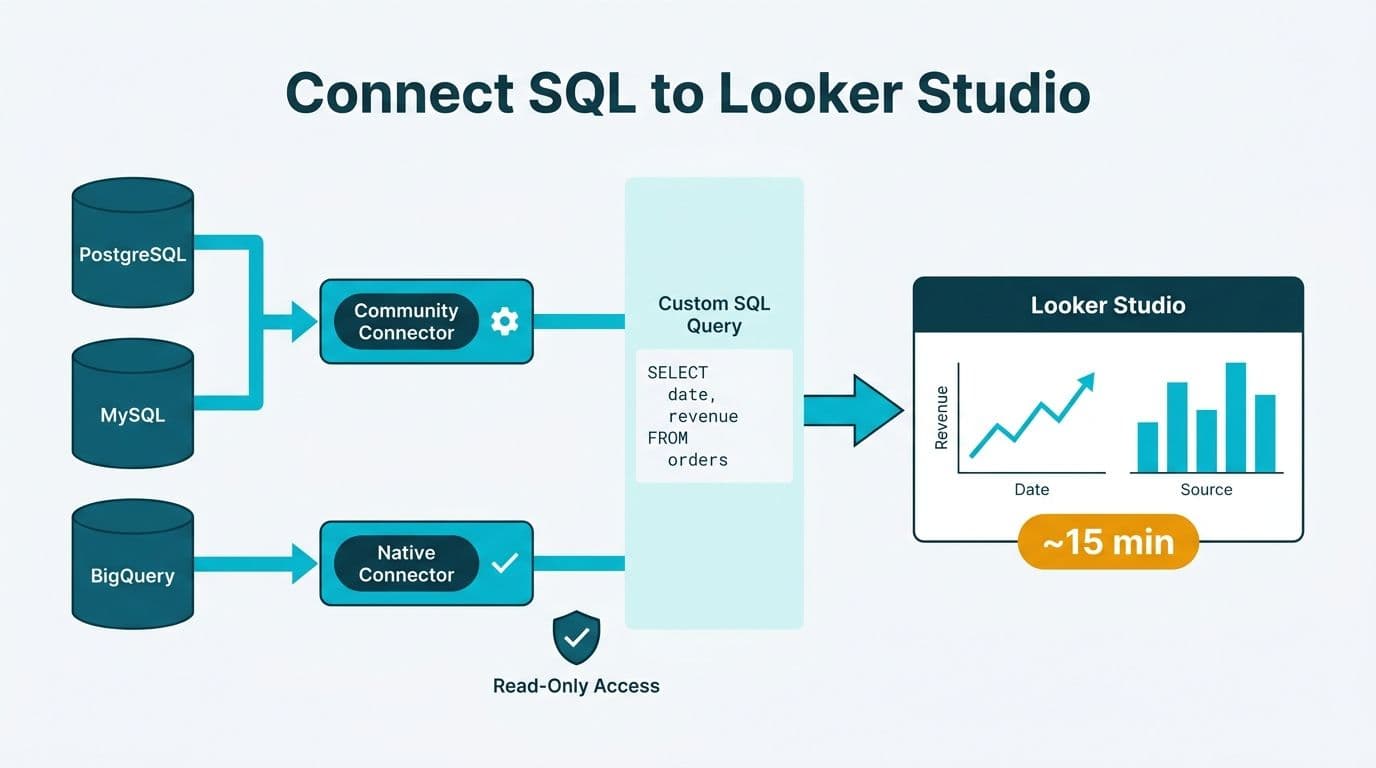
Connecting a SQL database to Looker Studio requires choosing the right connector - the native BigQuery connector for Google Cloud data or a Community connector for PostgreSQL and MySQL - authenticating with database credentials or a service account, and defining a custom SQL query or table as the data source. Most connections are live within 15 minutes. Finance and healthcare teams should layer IP allowlisting and read-only service accounts on top before pointing any connector at a production database.
Key Takeaways
- Looker Studio provides a native, zero-configuration connector for BigQuery and certified Community connectors for PostgreSQL and MySQL via the SQL connector interface.
- Custom SQL queries - rather than full table imports - are the recommended approach for production databases, limiting data exposure and query cost.
- Data blending lets teams combine multiple SQL sources in a single Looker Studio report without an ETL pipeline.
- HIPAA-covered entities in the US, GDPR-governed organizations in the UK and EU, and Canadian businesses subject to PIPEDA must treat Looker Studio credential storage and data transit as in-scope compliance controls.
- Finance and ops teams building multi-source dashboards - from a looker studio marketing dashboard template to a looker studio logistics dashboard template - benefit from defining reusable blended data sources rather than re-querying raw tables in every report.
How Do You Connect a SQL Database to Looker Studio? Architecture Overview
Looker Studio separates data sources from reports. A data source is a reusable connection object that stores authentication details and query definitions. Reports pull from one or more data sources, and multiple reports can share a single source without re-authenticating.
For SQL databases, Looker Studio offers two connection paths:
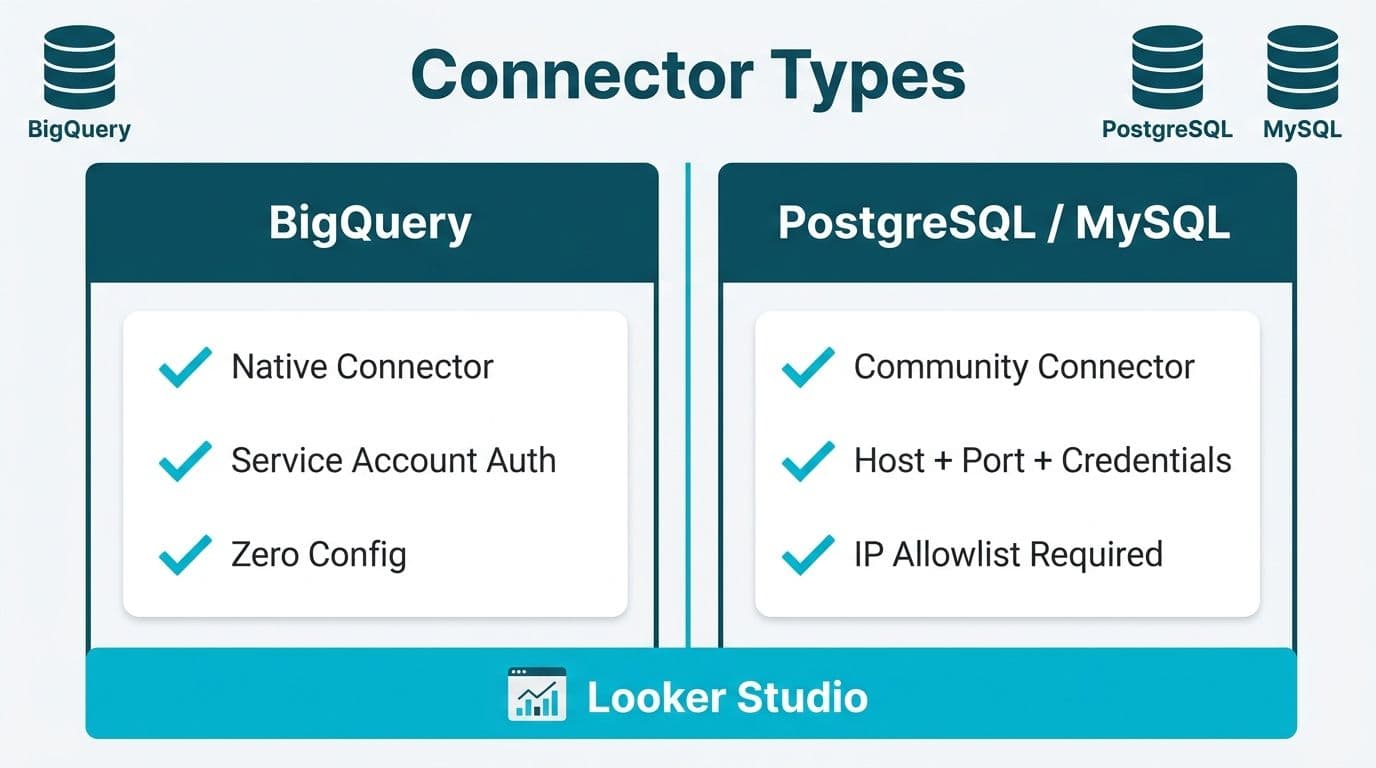
Native connectors are built and maintained by Google directly. BigQuery is the primary native SQL connector, integrating through Google Cloud IAM with no separate credential storage on a third-party system.
Community connectors cover PostgreSQL, MySQL, and other SQL engines. Built on Google's Connector Developer Platform, they are third-party operated - meaning credentials are stored by the connector vendor, not Google.
This distinction matters for compliance. A US healthcare organization under HIPAA, or a Canadian firm subject to PIPEDA, must verify that any Community connector vendor has signed a Business Associate Agreement or equivalent data processing agreement before connecting a database that contains personal or protected health information.
For organizations that need expert guidance on connector selection, security architecture, and report design, Certified Looker Studio consulting covers the full implementation lifecycle - from database authentication through multi-source dashboard delivery.
| Connector Type | Supported Databases | Authentication | Google-Managed | Best For |
|---|---|---|---|---|
| Native | BigQuery | Google Cloud IAM / service account | Yes | Analytics warehouses, large datasets |
| Community SQL | PostgreSQL, MySQL, others | Username/password or connection string | No (third-party) | Transactional databases, legacy systems |
| Google Sheets | Flat files / exports | Google account | Yes | Ad hoc reporting, small datasets |
How to Connect PostgreSQL to Looker Studio Step by Step
PostgreSQL underpins many mid-market finance systems - billing engines, claims adjudication platforms, and ERP backends in the US and Canada frequently run on Postgres. The six-step process:
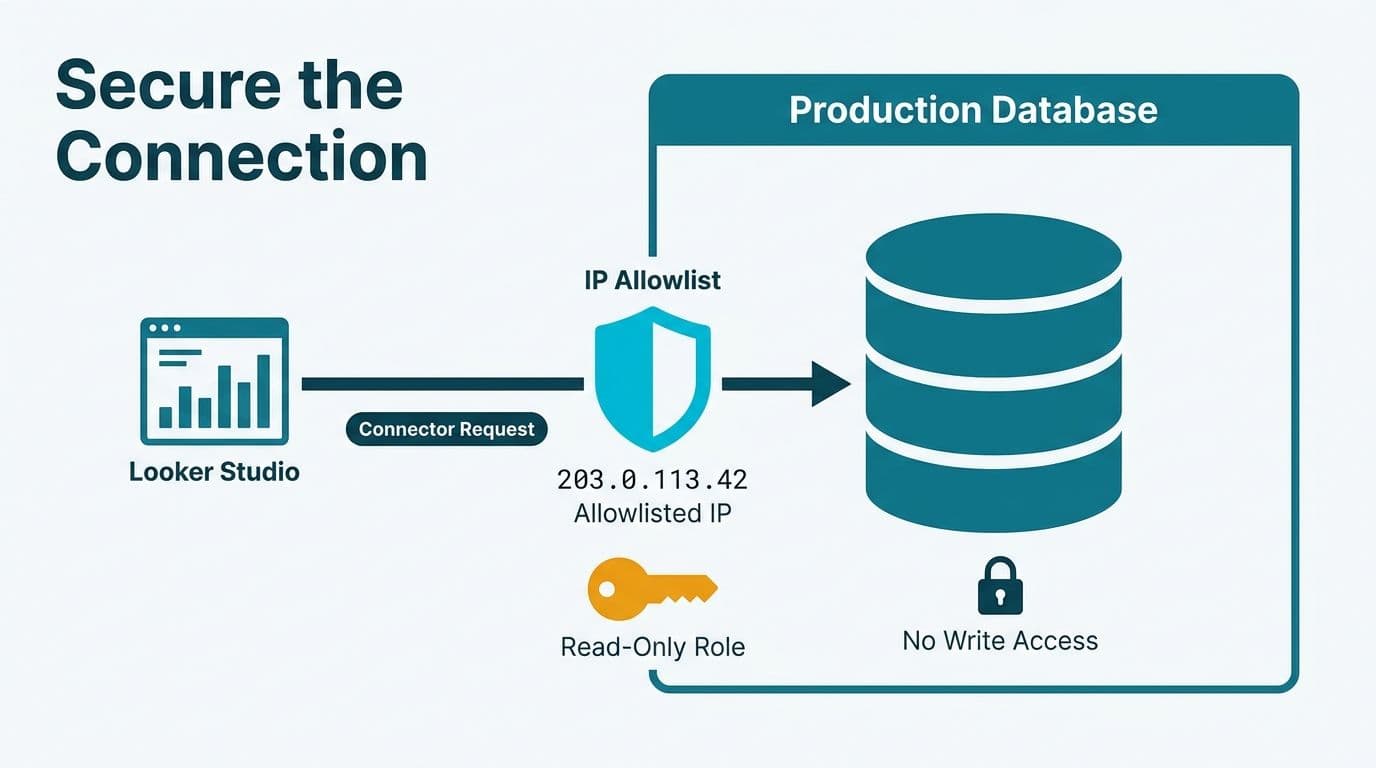
Step 1 - Create a read-only database user. Never use an admin or application credential. A dedicated role with SELECT-only privileges limits the blast radius if credentials are ever compromised.
```sql
CREATE ROLE looker_readonly WITH LOGIN PASSWORD 'strong_password';
GRANT CONNECT ON DATABASE your_db TO looker_readonly;
GRANT USAGE ON SCHEMA public TO looker_readonly;
GRANT SELECT ON ALL TABLES IN SCHEMA public TO looker_readonly;
```
Step 2 - Allowlist Looker Studio IP ranges. Google publishes the outbound IP ranges used by Looker Studio (Google, 2025). Add these to your database firewall - for AWS RDS, update the security group; for a self-hosted server, update `pg_hba.conf`.
Step 3 - Open Looker Studio and add a data source. Navigate to lookerstudio.google.com, click Add data, search for a certified PostgreSQL connector, and enter the host, port (default: 5432), database name, and `looker_readonly` credentials.
Step 4 - Define a custom SQL query. For finance reporting, always write a custom query rather than importing a full table. A query that joins `invoices`, `line_items`, and `cost_centers` and returns only the columns the dashboard actually needs limits both data exposure and query latency.
Step 5 - Apply Looker Studio string functions for field cleanup. PostgreSQL often returns account codes, region identifiers, or date strings in inconsistent formats. Looker Studio's string functions - including `REGEXP_REPLACE`, `SUBSTR`, and `CONCAT` - normalize these fields inside the data source definition without touching the source database. This is especially useful when building a looker studio client reporting template for agencies that must standardize fields across multiple client databases with differing naming conventions.
Step 6 - Validate with a test report. Add a single table visual, select five or six fields, and compare row counts against a direct database query. Row-count mismatches at this stage usually point to a `WHERE` clause issue in the custom query.
How to Connect MySQL to Looker Studio Step by Step
MySQL is common in ecommerce and logistics platforms. Teams building a looker studio ecommerce dashboard shipping and fulfilment view - tracking order status, carrier performance, and warehouse throughput - frequently connect to a MySQL backend.
The steps mirror PostgreSQL with two key differences:
Port. MySQL defaults to port 3306. No JDBC driver installation is needed on the Looker Studio side.
User creation syntax.
```sql
CREATE USER 'looker_readonly'@'%' IDENTIFIED BY 'strong_password';
GRANT SELECT ON your_db.* TO 'looker_readonly'@'%';
FLUSH PRIVILEGES;
```
The `'%'` wildcard allows connections from any IP, which is necessary because Looker Studio's source IPs span Google Cloud ranges. For tighter control, replace `%` with the specific allowlisted ranges from Google's published IP documentation (Google, 2025).
SSL/TLS is mandatory for production. In the connector settings, enable SSL and upload the CA certificate for your MySQL instance. UK fintech firms operating under GDPR must ensure data in transit is encrypted - SSL on the MySQL connector satisfies the appropriate technical measures standard under GDPR Article 32, as enforced by the ICO and EDPB through 2025 guidance.
Once connected, a MySQL data source works identically to a PostgreSQL one inside Looker Studio. You can blend it with other sources, add calculated fields, and publish it as a shared looker studio marketing report template for the wider team.
How to Connect BigQuery to Looker Studio: The Native Connector Explained
BigQuery's integration with Looker Studio is the tightest of the three. Authentication passes through Google Cloud IAM, no Community connector is involved, and the integration is maintained by Google directly.
Step 1 - Confirm IAM permissions. The service account used to create the data source needs the `bigquery.dataViewer` role on the target dataset and `bigquery.jobUser` on the project. Granting these at the dataset level - not project level - follows the principle of least privilege.
Step 2 - Add a BigQuery data source. In Looker Studio, click Add data - BigQuery appears in the Google Connectors section at the top. Select your project, dataset, and table, or switch to Custom Query mode and write a SQL statement.
Step 3 - Set the billing project. Query costs in BigQuery accrue against a billing project. When a US healthcare analytics team queries a shared data warehouse maintained by a separate IT department, specifying the billing project in connector settings avoids unexpected cross-project charges.
Step 4 - Configure data freshness. By default, Looker Studio caches BigQuery results for 12 hours (Google, 2025). For financial dashboards requiring intraday accuracy, reduce the cache to 15 minutes or disable it entirely. Live queries consume BigQuery slots, so validate cost implications before enabling this in a production report.
BigQuery is the natural choice for Canadian organizations already operating on Google Cloud that need to address PIPEDA data residency requirements. Datasets stored in Google's `northamerica-northeast1` (Montreal) region keep data within Canada throughout the Looker Studio query lifecycle.
Which SQL Connector Suits Finance and Healthcare Multi-Source Reporting?
Finance and healthcare teams rarely pull from a single database. A typical US health plan might combine a PostgreSQL claims adjudication database with a BigQuery analytics warehouse and a MySQL scheduling system - then surface all three in one operational dashboard. A UK fintech firm might blend a MySQL transaction ledger with a BigQuery fraud-scoring table.
Three factors determine connector priority:
Data volume. BigQuery handles petabyte-scale datasets efficiently. Community connectors for PostgreSQL and MySQL issue live queries against transactional systems, so unfiltered table scans will be slow - always use a custom SQL query with a `WHERE` clause to limit returned rows.
Compliance posture. For HIPAA-covered entities, the Google Cloud HIPAA BAA covers Looker Studio queries that access data stored in BigQuery (Google Cloud, 2025), making BigQuery the lower-risk path for US healthcare and finance organizations. Community connector vendors must provide their own BAA. For a deeper look at HIPAA-aligned BI architecture, see the guide on HIPAA compliant BI tools for hospital data visualization.
Data freshness requirements. Finance teams tracking daily P&L or intraday treasury positions need sub-hour data. PostgreSQL and MySQL Community connectors can query live with no cache layer, while BigQuery requires deliberate cache configuration to match that. Teams weighing the operational trade-offs will find the In-House BI vs. Managed Reporting CFO cost guide useful for framing the build-vs-manage decision. For organizations evaluating whether Looker Studio or a full Looker semantic layer is the right architectural choice, the Looker vs. Looker Studio comparison clarifies which tool fits which team size and data volume.
How Do Finance and Ops Teams Build Multi-Source Dashboards in Looker Studio?
Once individual connectors are configured, Looker Studio's data blending feature merges them at the report level by joining two or more data sources on a shared key - a date field, an account code, or a customer ID - without requiring changes to either source database.
A practical setup for a US finance team running multi-entity reporting:
1. Create a PostgreSQL data source for ERP actuals (custom SQL scoped by cost center).
2. Create a BigQuery data source for the budgeting warehouse (plan vs. forecast by period).
3. In the report, define a blend on `cost_center_id` and `month`.
4. Build a variance table showing Actual, Budget, and Variance - drawn from two separate SQL databases - in a single chart.
The same pattern applies on the operations side. A looker studio logistics dashboard template might blend a MySQL order management table with a BigQuery carrier-performance dataset to produce on-time delivery KPIs without any ETL pipeline.
For looker studio client reporting for agencies managing multiple clients, the recommended approach is separate data sources per client - isolating credentials and access - combined with a shared report template. Looker Studio's "Make a copy" function lets agencies clone a looker studio marketing dashboard template and swap the data source, keeping report structure, branding, and calculated fields intact.
Finance teams with AI and data compliance obligations across multiple jurisdictions should also review the AI Automation Compliance Checklist for Finance Teams before automating report distribution that involves personal financial data.
What Are the Most Common Mistakes When Connecting SQL to Looker Studio?
Three configuration errors account for most failed or unreliable SQL connections in production:
Using application credentials instead of a dedicated service account. Application users often carry write permissions, rotate passwords on deploy cycles, or get removed when staff turn over. A dedicated `looker_readonly` account with quarterly password rotation is the minimum credential hygiene posture.
Skipping IP allowlisting. A database server with no inbound IP restriction accepts connections from anywhere - a significant risk for healthcare or financial databases containing sensitive data. Google publishes stable Looker Studio IP ranges (Google, 2025); allowlisting them and subscribing to Cloud IP range update notifications closes this gap.
Over-exposing data through table-level access. Full table access allows report editors to pull every row and column, including PII fields that should never appear in a dashboard. Custom SQL queries with explicit `SELECT` field lists and targeted `WHERE` clauses enforce data minimization at the connector layer, before any report-level filter is applied.
Consider a Canadian manufacturing company building a looker studio ecommerce dashboard for its wholesale division. Its `customers` table mixes personal addresses with order history. A custom query that returns only `order_date`, `sku`, `quantity`, and `region_code` - with PII columns excluded - satisfies PIPEDA's data minimization principle and prevents accidental exposure in a looker studio marketing report template shared across the sales team.
---
About Lets Viz: Lets Viz has delivered data analytics and BI consulting to mid-market organizations since 2020, with deep specialization in US healthcare, UK fintech, Canadian manufacturing, and global SaaS. Rated 5.0 on Clutch, our consultants hold Google Cloud certifications and have designed and secured SQL data source connections for regulated production environments across all three markets.
Ready to connect your SQL databases to Looker Studio with the right security posture and reporting architecture for your industry? Our Certified Looker Studio consulting team designs and manages multi-source dashboards for finance and healthcare organizations across the US, UK, and Canada.