AI Automation for Accounts Payable: A Process Walkthrough
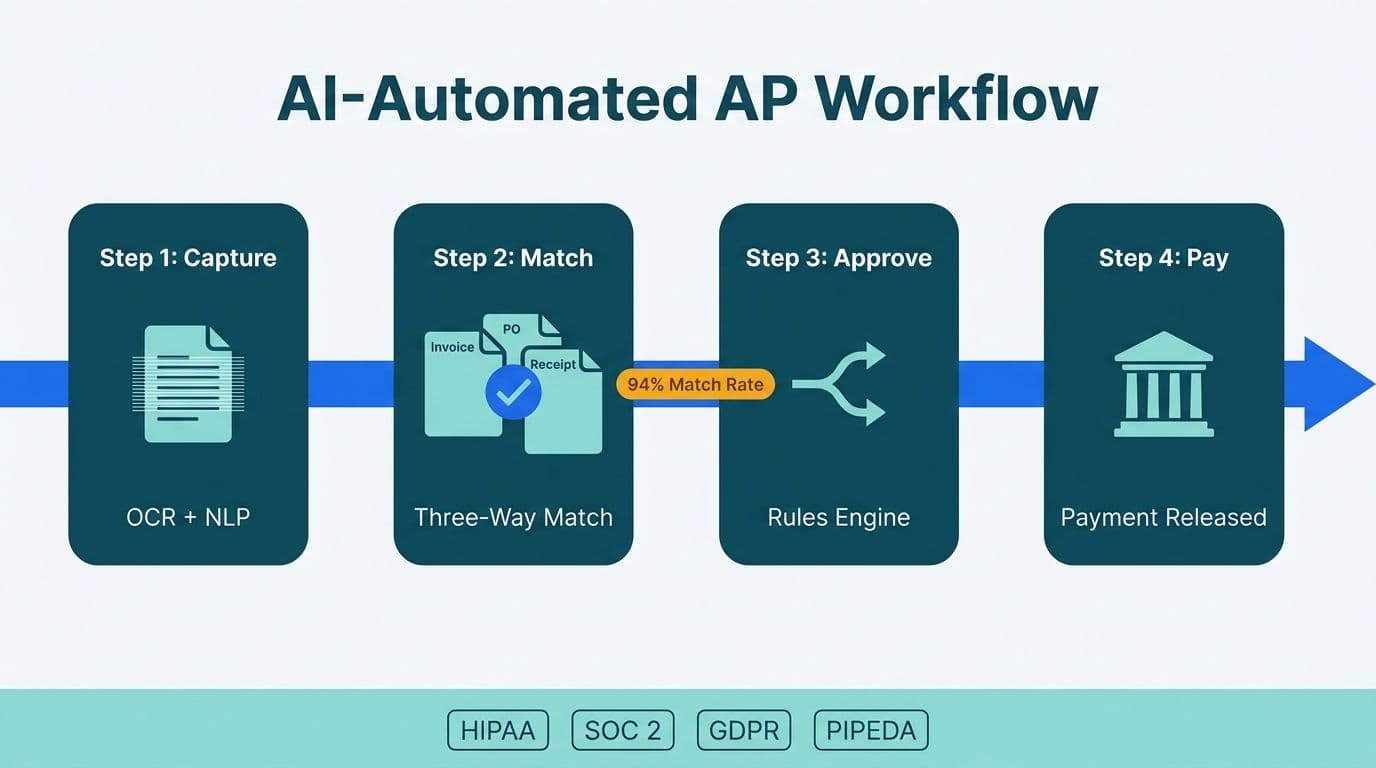
AI automation for accounts payable combines machine learning-based invoice capture, automated three-way matching, and rules-based approval routing to eliminate manual data entry and payment delays. For mid-market finance and healthcare teams operating across US HIPAA and SOC 2 requirements, UK GDPR and HMRC e-invoicing mandates, and Canadian PIPEDA data residency rules, the architecture choices at each stage determine whether the automation holds up under audit.
Key Takeaways
- AI invoice capture uses OCR and NLP to extract vendor, amount, line-item, and tax fields from structured and unstructured documents - including formats it has not seen before.
- Three-way matching compares the purchase order, vendor invoice, and goods receipt automatically, routing only exceptions to human reviewers.
- Approval workflows use vendor risk scoring, dynamic escalation, and anomaly detection to direct invoices to the right approver without static decision trees.
- UK GDPR, HMRC e-invoicing, Canadian PIPEDA, US HIPAA, and SOC 2 each impose specific data residency, audit trail, and PHI-masking requirements that must be designed in from the start - not retrofitted.
- Finance teams consistently achieve the highest early ROI from AP automation, followed by expense management, account reconciliation, and month-end close - in that sequence.
How Does AI Automation for Accounts Payable Work?
AI automation for accounts payable replaces the manual cycle of receiving invoices, keying data into an ERP, matching documents, chasing approvals, and scheduling payments with a connected pipeline that handles each step with minimal human touch. The human role shifts from data entry to exception management - reviewing the cases the system cannot resolve confidently, rather than processing every invoice in the queue.
The three core process stages are: invoice capture (extract and validate data from the document), three-way matching (compare invoice against PO and receipt), and approval routing (move matched invoices to payment and exceptions to the right reviewer). Each stage introduces different AI capabilities and different compliance considerations depending on your geography.
Our AI automation consulting team structures mid-market AP implementations around these three stages because they are sequentially dependent - poor capture data makes matching unreliable, and poor matching decisions create approval bottlenecks that eliminate the time savings the program was built to deliver.
Before configuring any of these stages, finance teams should work through the AI automation compliance checklist for finance teams to identify which regulatory controls apply to their geography and industry vertical.
How Does AI Extract Data from Invoices and Financial Documents?
Invoice capture is where most AP transformations begin. Traditional template-based OCR tools extract text from fixed invoice layouts. AI-powered capture goes further: it uses optical character recognition, natural language processing, and document classification models to identify fields on invoices it has not been explicitly trained on - from a new vendor PDF, a foreign-language document, or an XML e-invoice in PEPPOL format.
The extraction pipeline works in four steps:
1. Document ingestion - Invoices arrive by email attachment, supplier portal upload, EDI feed, or scanned paper. The AI engine normalizes each to a processable format.
2. Classification - The model identifies document type (invoice, credit note, pro-forma, remittance advice) and routes accordingly.
3. Field extraction - The model extracts vendor name, tax registration number (VAT, GST, or EIN depending on jurisdiction), invoice number and date, line-item descriptions and quantities, unit prices, tax amounts, currency, and payment terms.
4. Confidence scoring - Each extracted field receives a confidence score. Fields below a defined threshold - typically 85-95% depending on risk tolerance - are flagged for human review rather than passed downstream automatically.
What document types can AI capture handle?
Well-trained models process PDF, image files (JPEG/PNG), XML including UBL 2.1 (the format referenced in HMRC's 2025 e-invoicing consultation), EDI 810, and email-embedded HTML invoices. Scanned paper is the most error-prone input: image quality, skew correction, and table detection all affect field extraction accuracy. Finance teams with paper-heavy supplier bases should negotiate electronic submission as part of the AP automation rollout, not treat it as a separate project.
For US healthcare organizations, this is where HIPAA intersects with AP automation. If invoices reference patient service categories, procedure codes, or facility identifiers that could constitute protected health information, the extraction layer must tag those fields and restrict routing to AP staff with documented legitimate access. This is a design decision, not a post-deployment patch.
For UK finance teams, HMRC's 2025 e-invoicing consultation proposes mandatory structured electronic invoicing for VAT-registered businesses above a turnover threshold. Designing the capture layer to output UBL 2.1 or PEPPOL-compatible XML now means compliance becomes a configuration change rather than a system rebuild when mandates take effect.
What Is Three-Way Matching and How Does AI Automate It?
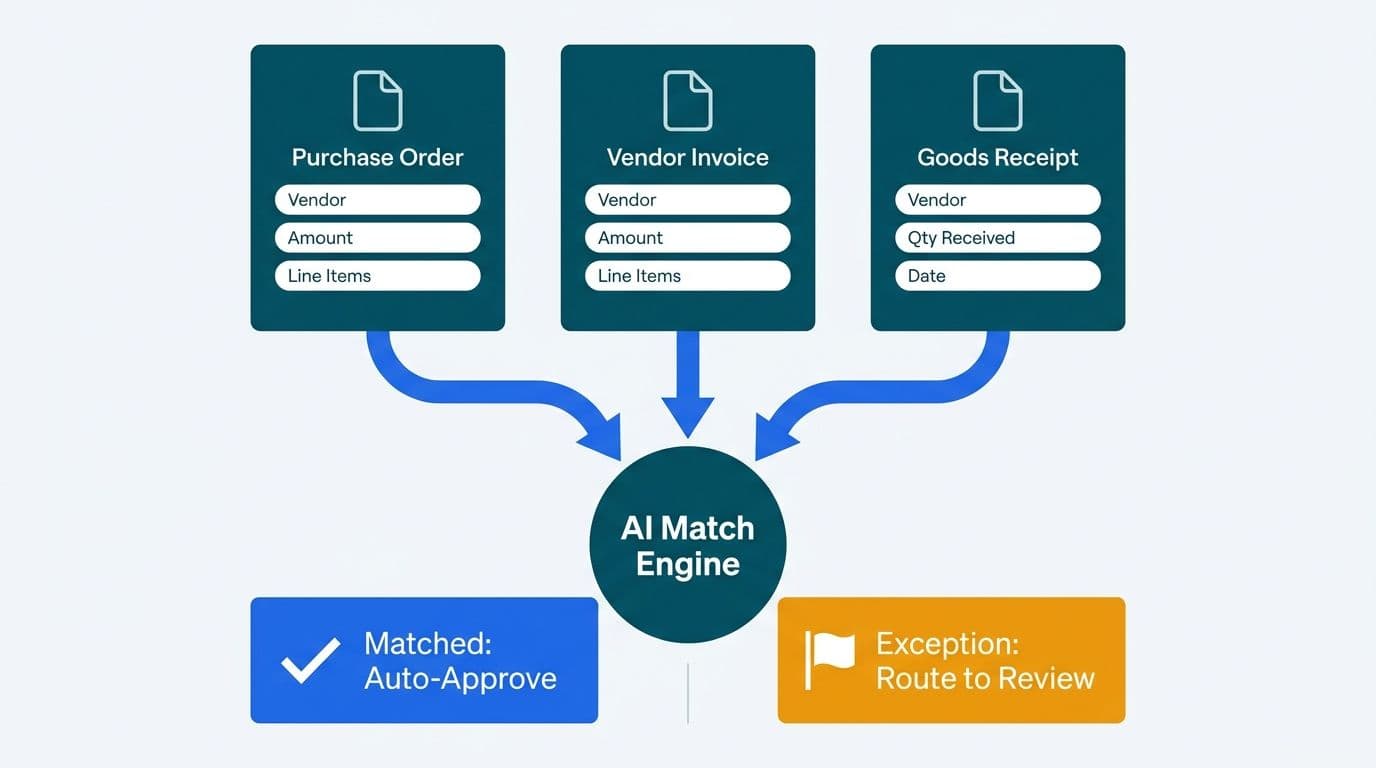
Three-way matching compares three documents: the purchase order (PO), the vendor invoice, and the goods or services receipt. A match means the quantities ordered, received, and billed align within defined tolerances. A discrepancy triggers an exception requiring human judgment.
Manually, an AP clerk retrieves all three documents from the ERP, compares them line by line, and contacts the buyer or receiving department to resolve gaps. At scale - hundreds of invoices per day for a mid-market organization - this is the primary AP bottleneck.
AI automation changes the economics:
- The system retrieves the PO and receipt records from the ERP in real time as each invoice arrives.
- It compares quantities, unit prices, and line-item descriptions using fuzzy matching - handling variations like "Consulting Services - March 2026" vs "Professional Services 03/2026".
- Invoices that match within tolerance move directly to payment queuing without human touch.
- Exceptions - quantity shortfall, price variance above threshold, no matching PO - route to a human review queue with the discrepancy highlighted and all three documents linked.
What tolerance thresholds are standard for three-way matching?
There is no universal standard. Thresholds depend on industry, vendor contracts, and audit requirements. Common configurations:
| Match dimension | Tight tolerance | Moderate tolerance |
|---|---|---|
| Price variance | +/-0.5% | +/-2% |
| Quantity variance | 0 units | +/-1 unit or +/-1% |
| Description match | Exact | Fuzzy (80%+ similarity) |
| Currency rounding | +/-$0.01 | +/-$1.00 |
US healthcare organizations often run tighter tolerances because Medicare cost reports and reimbursement audits require that invoiced costs tie precisely to reported expenses. Canadian organizations under PIPEDA must configure exception queues so that vendor personal data - contact names, banking details - is accessible only to AP staff with a documented legitimate need, with every access logged for audit.
How Does AI Route Invoices for Approval?
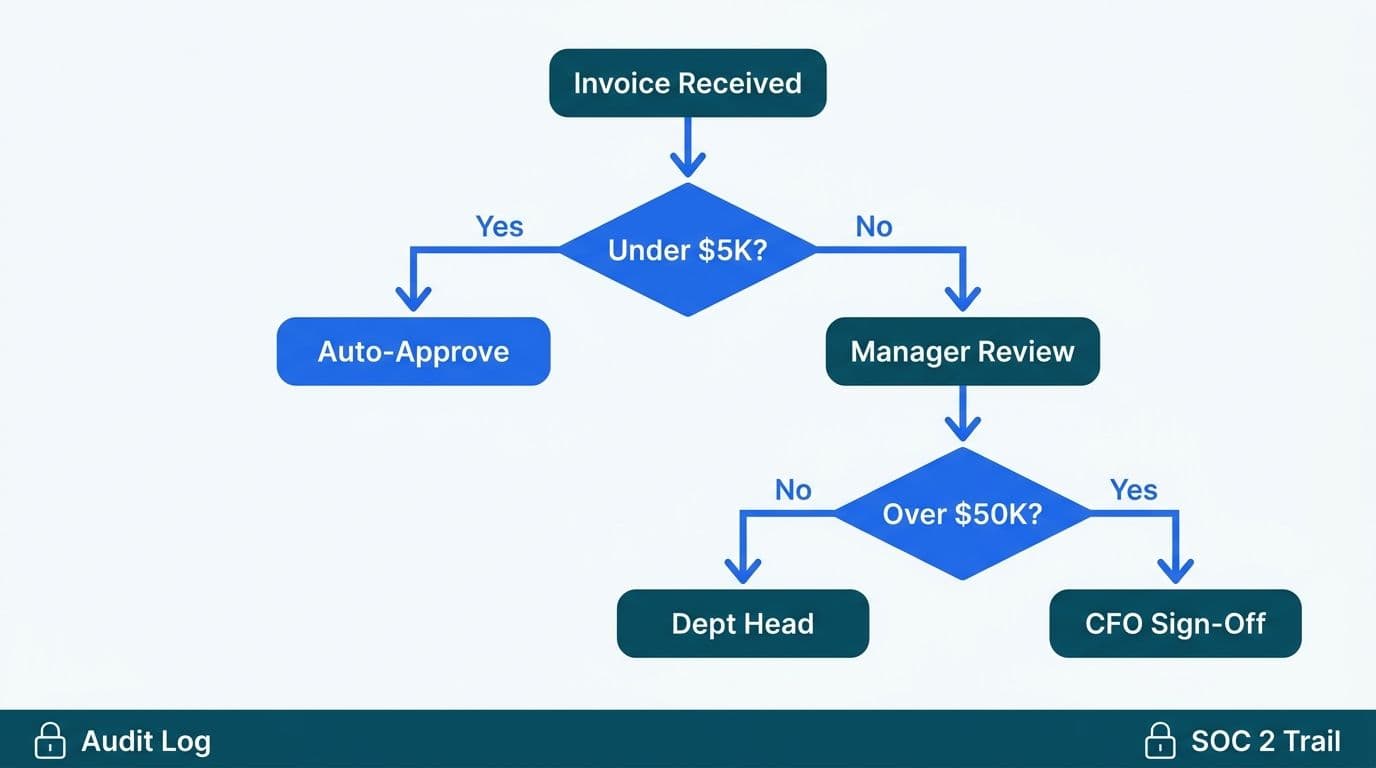
Once an invoice clears three-way matching or is flagged as an exception, it enters the approval routing layer. This is where AI moves beyond rule execution into adaptive logic.
A standard rules-based routing system uses a static decision tree: invoices under a dollar threshold go to one approver, above it to another. AI-augmented routing adds:
- Vendor risk scoring - Invoices from vendors with recent payment disputes, elevated return rates, or matches against sanctions-screening lists route to a compliance reviewer before the financial approver.
- Cost center prediction - When a GL code is missing or ambiguous, the model predicts the correct cost center from line-item descriptions and historical coding patterns, reducing manual re-coding at month end.
- Dynamic escalation - Invoices approaching payment due date without approval escalate automatically. This directly limits late payment penalties, which UK suppliers can claim as statutory interest under the Late Payment of Commercial Debts Act.
- Anomaly detection - Duplicate invoice detection, round-number invoice flagging, and unusual vendor-amount combinations surface as risk signals for the AP manager before payment is authorized.
For finance directors managing AP across multiple entities or geographies, the routing layer is also where currency, tax jurisdiction, and intercompany rules are enforced - reducing the manual coordination that typically spikes at month-end close.
What Compliance Requirements Apply to AI Automation for Accounts Payable?
Compliance is a design constraint for AP automation, not a post-deployment audit item. The three frameworks most relevant to mid-market organizations across US, UK, and Canada are:
UK GDPR and HMRC e-invoicing
Under UK GDPR, any AI system processing vendor personal data must have a lawful basis documented in a record of processing activities. For AP, the lawful basis is typically "legitimate interests" or "performance of a contract." Data minimization applies: extract only the fields the business process requires. HMRC's 2025 e-invoicing consultation proposes mandatory structured e-invoicing for VAT-registered businesses - finance teams should confirm their chosen AP platform can output UBL 2.1 or PEPPOL XML and map to Making Tax Digital API fields before mandates take effect.
Canadian PIPEDA
PIPEDA requires that personal information - including vendor contact details and banking data held in AP systems - be stored in Canada or in jurisdictions with equivalent protection, unless explicit consent is obtained. For Canadian healthcare organizations, this intersects with provincial health information acts (PHIPA in Ontario, HIA in Alberta). When evaluating cloud-hosted AP platforms, obtain a data residency confirmation in writing from the vendor, specifying which cloud regions store and process the data. A general "we comply with Canadian privacy law" statement does not satisfy a PIPEDA accountability audit.
US HIPAA and SOC 2
US healthcare AP teams processing invoices that reference patient service categories or facility identifiers must apply the minimum necessary standard: the AI system should mask or tokenize PHI-adjacent fields before routing invoices to non-clinical AP staff. SOC 2 Type II controls require documented access logs, automated audit trails for every approval action, and data retention policies enforced programmatically by the AP system - not managed by manual record-keeping.
The table below maps the key compliance requirements by geography:
| Requirement | US Healthcare/Finance | UK/EU | Canada |
|---|---|---|---|
| Data residency | AWS GovCloud or approved region | EEA data centers (UK GDPR) | Canadian cloud regions (PIPEDA) |
| PHI/PII handling | HIPAA minimum necessary | UK GDPR data minimization | PIPEDA purpose limitation |
| Audit trail | SOC 2 Type II, 7-year retention | UK GDPR Article 30 records | PIPEDA accountability principle |
| Invoice format | EDI 810, PDF/A | PEPPOL / UBL 2.1 (HMRC 2025) | CPA Canada e-invoicing guidance |
| Lawful basis doc | Not required for B2B vendor data | Record of processing activities | Consent or legitimate business purpose |
For a deeper look at how these frameworks intersect with AI systems across financial services, the AI compliance requirements for financial services regulatory map maps each control to the system layer that must enforce it.
RPA vs AI Automation for Finance Teams: Which Fits Accounts Payable?
This is the question finance directors most frequently ask before committing budget. The answer depends on the stability of the process and the variability of the inputs.
RPA follows deterministic rules on structured screens. It is reliable when invoice format is fixed, data arrives from a small number of sources, and the process rarely changes. RPA breaks when a new vendor sends an invoice in an unexpected format or an ERP upgrade changes a screen layout.
AI automation uses trained models that generalize across input variation. It handles new vendors, unstructured documents, and exceptions without breaking. The tradeoffs: more training data required, more configuration to validate, and ongoing monitoring to catch model drift.
For mid-market AP teams, a hybrid approach is most practical:
- Use AI for invoice capture and three-way matching - high document variability, benefits from generalization.
- Use RPA for downstream payment execution in the ERP - fixed screens, deterministic process.
- Use AI for exception routing and anomaly detection - judgment-intensive, benefits from pattern recognition across transaction history.
One honest caution from our own automation work: automated systems can generate a false sense of completion. We once had 26+ auto-generated site-performance fix tasks sit marked as resolved while Google's Core Web Vitals report stayed flat at 405 flagged URLs - resolved meant a human had read the recommendation, not that any fix had shipped. The same failure mode applies to AP: an invoice marked "processed" in the workflow tool must be verified against the ERP payment record, not just the workflow state. Build outcome verification into your AP agent design, not output verification.
The generative AI use cases in finance article covers how this distinction between output and outcome verification applies across financial workflows.
What Finance Workflows Should Teams Automate with AI First?
Prioritize workflows that combine high transaction volume, structured inputs, and clear exception criteria. AP invoice processing meets all three, which is why it is consistently the starting point for mid-market finance automation programs.
After AP, the typical sequencing for finance and healthcare organizations:
1. Invoice capture and three-way matching - highest immediate ROI, clear exception definitions, measurable cycle time reduction.
2. AI expense management automation - eliminate manual receipt coding and policy-check emails that consume finance team capacity.
3. AI automation for account reconciliation - match bank transactions to GL entries automatically, surfacing only unreconciled items for review.
4. AI automation for month-end financial close - orchestrate the sequence of reconciliations, journal entries, and variance analysis that currently consumes weeks of the finance calendar.
Each step builds on the data discipline established by the previous one. A finance team with clean, consistently coded AP data will find month-end close automation significantly more tractable because the underlying GL is already reliable.
Suppose a US mid-market healthcare billing group processes 400 invoices per week across three entities. Starting with AI invoice capture and three-way matching reduces the manual review queue to the exception cases that genuinely require judgment - without touching the ERP payment module or the month-end close process. That single change frees AP staff to focus on vendor relationship management and exception resolution rather than data entry and document retrieval.
For organizations evaluating how finance analytics and automation fit together, the when to outsource finance analytics consulting guide frames the build-vs-buy decision for mid-market CFOs.
---
About Lets Viz: Lets Viz has delivered data analytics and AI automation engagements since 2020 across US healthcare, UK fintech, Canadian manufacturing, and global SaaS organizations, earning a 5.0 rating on Clutch. Our teams design AP automation architectures that satisfy HIPAA, UK GDPR, and PIPEDA requirements from the first sprint - not as a post-deployment retrofit.
Ready to automate your accounts payable process? Our AI automation consulting team works with mid-market finance and healthcare organizations across the US, UK, and Canada to design, validate, and deploy AP automation that holds up under audit from day one.