How to Connect AI Workflow Automation to Power BI
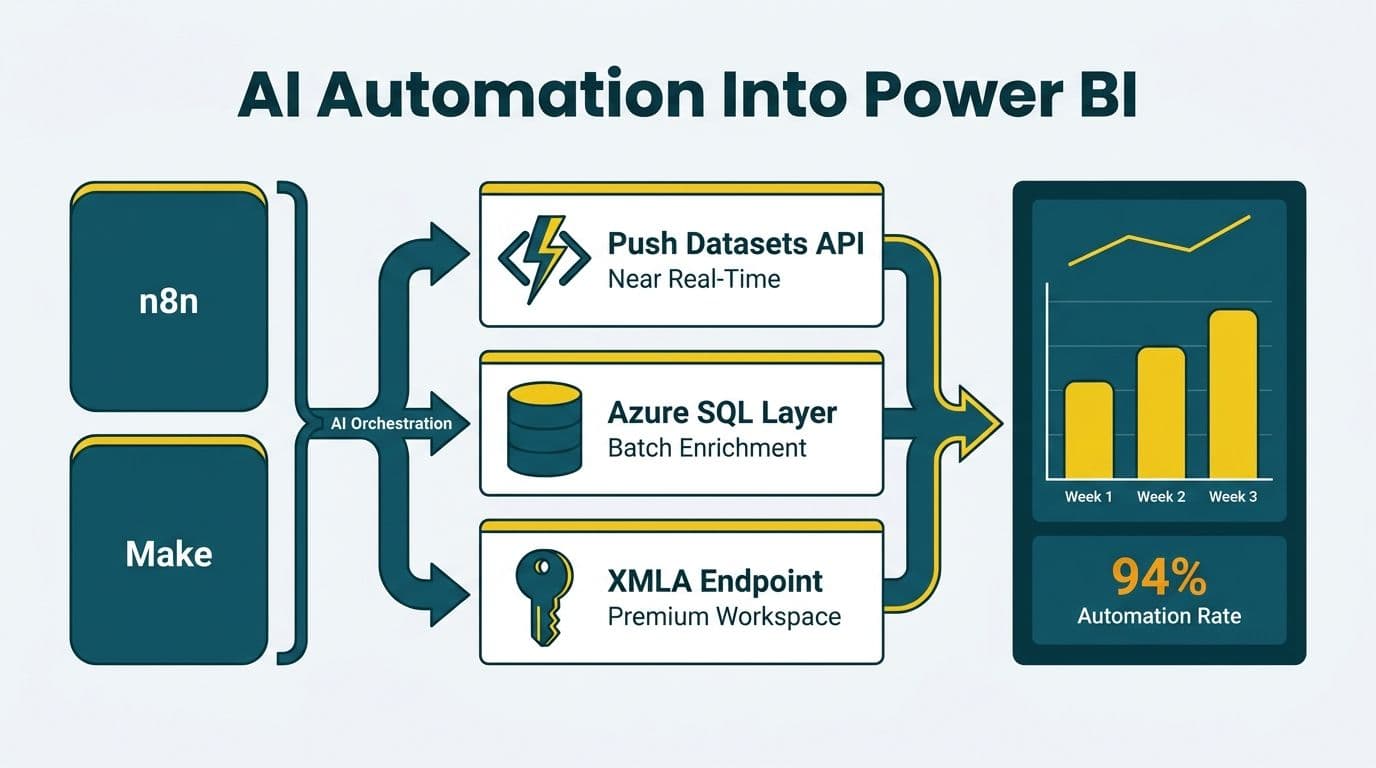
To connect AI workflow automation to Power BI, route orchestration platform outputs through the Power BI Push Datasets API for near-real-time row streaming, an Azure SQL middle layer for batch enrichment, or the XMLA write endpoint on Premium workspaces. The AI layer processes, classifies, and enriches data; Power BI becomes the reporting surface that closes the loop between operational execution and executive visibility. The same patterns apply whether you run fixed-step workflows or AI agent workflow automation, where an agent decides which steps to take at runtime.
Key Takeaways
n8n and Make both support HTTP-based calls to the Power BI Push Datasets API, enabling near-real-time dashboard updates without a dedicated ETL tool.
An Azure SQL or OneLake middle layer reduces API rate-limit risk and allows transformation logic to run outside the BI layer.
Healthcare teams routing PHI through automation pipelines should use self-hosted or Azure-region-confined connectors to satisfy HIPAA and PIPEDA data residency requirements.
Finance teams should automate invoice extraction, accounts payable, and account reconciliation before tackling month-end close - simpler loops de-risk the architecture.
RPA tools write to screens; AI automation tools write to APIs - only the latter integrates cleanly with Power BI's data ingestion surface.
AI agent workflow automation needs a fixed output schema and a logged run record per agent action, so Power BI can report on what the agents did and not only on the data they produced.
What Does Connecting AI Workflow Automation to Power BI Actually Look Like?
Connecting AI automation consulting pipelines to Power BI means establishing a data channel that carries machine-processed outputs - classified invoices, enriched GL entries, triaged patient records - from an orchestration engine into a live BI dataset. The orchestration layer handles execution logic; Power BI handles visualization. The two communicate through Microsoft's documented REST APIs, not file exports.
For CIOs, this integration pattern addresses a persistent disconnect: automation platforms generate execution data that never finds its way into the dashboards executives use to make decisions. For data team leads, it removes the manual ETL step between operational tools and the BI layer.
The three primary connection channels are:
Power BI Push Datasets API - Microsoft's REST endpoint accepts rows posted directly to a streaming dataset. n8n and Make can call this endpoint natively via HTTP nodes, with no middleware required for simple payloads.
Azure SQL or Fabric Lakehouse as a middle layer - For workloads that need transformation, joining, or schema management, the automation platform writes to a structured data store, and Power BI reads from it via DirectQuery or scheduled import. This pattern also handles the Push API's row-limit caps for high-volume scenarios.
XMLA write endpoint - Available on Power BI Premium and Fabric capacities, this endpoint allows tabular model writes using the Analysis Services protocol. Automation platforms can call it through a Python or .NET library, enabling bulk loads into semantic models without touching the visual layer.
The right channel depends on three factors: acceptable latency, data volume, and transformation complexity. For most mid-market finance and healthcare teams, the Push Datasets API covers real-time KPI updates while Azure SQL handles heavier reporting workloads.
For teams evaluating the streaming infrastructure underpinning near-real-time Power BI refresh, see our comparison of Microsoft Fabric Real-Time Analytics vs Stream Analytics.
How Do You Route n8n and Make Outputs Into Power BI Datasets in Near-Real-Time?
The integration follows a three-step sequence: authenticate, transform, push. Both n8n and Make provide HTTP-capable nodes that execute all three steps within a single workflow.
Authenticate. Power BI's Push Datasets API uses OAuth 2.0 with Microsoft Entra ID. Register an app in Entra, grant it Dataset.ReadWrite.All scope, and store the client secret in your orchestration platform's credential vault. n8n stores this in its Credentials module; Make stores it in a Connection.
Transform. AI-processed outputs rarely arrive in the exact schema Power BI expects. Use a Code node (n8n) or a JSON module (Make) to flatten nested AI responses into column-level rows. For invoice extraction workflows, this typically means mapping vendor name, invoice number, line amount, GL code, and extraction confidence score into a flat JSON array.
Push. Post the array to the dataset's rows endpoint: `POST https://api.powerbi.com/v1.0/myorg/datasets/{datasetId}/tables/{tableName}/rows`. Each call supports up to 10,000 rows, per the Power BI REST API documentation (Microsoft, 2025). For higher volumes, write to Azure SQL first and use DirectQuery.
One practical note on capacity: Power BI's visual export caps at 30,000 rows as a CSV file. Working directly with the underlying model engine bypasses that constraint entirely. When we connected at that layer for a book distribution client, we streamed all 5,042,721 billing rows at roughly a million rows per minute. The same principle applies on the write path: for high-volume automation outputs, use the Push API or XMLA endpoint rather than the visual import layer.
| Pattern | Latency | Volume Limit | Complexity | Best For |
|---|---|---|---|---|
| Push Datasets API | Seconds | 10K rows/call | Low | Real-time KPIs, alerts |
| Azure SQL middle layer | Minutes | Unlimited | Medium | Finance reporting, reconciliation |
| OneLake / Fabric Lakehouse | Minutes to hours | Unlimited | Medium-High | Enterprise data mesh |
| XMLA write endpoint | Minutes | Large batches | High | Semantic model updates |
How Does AI Agent Workflow Automation Change What You Send to Power BI?
AI agent workflow automation differs from a fixed n8n or Make scenario in one respect that matters for reporting: the agent chooses its own steps. A scripted workflow always runs the same nodes in the same order, so its output schema is predictable. An agent may call different tools, retry, escalate to a human, or stop early, depending on what it finds. If you only push the final result, Power BI shows what was produced but not how.
Three practices keep agent pipelines reportable:
1. Constrain the output schema. Require the agent to return a fixed JSON structure (status, category, confidence, amount, reason code) and validate it in a Code node before the Push call. Reject or quarantine malformed responses rather than letting them break the dataset.
2. Log every agent action as a row. Write a run-level table with run ID, tool called, outcome, duration, and whether a human override occurred. This gives Power BI a second dataset for agent success rate, exception volume, and escalation trends.
3. Keep approval gates visible. Where an agent proposes an action and a person approves it, push both states so dashboards show pending and approved items separately.
Land agent run logs in the Azure SQL middle layer, since they accumulate quickly and benefit from joins against the business data they relate to. Reserve the Push Datasets API for the small set of live KPIs executives watch.
What Finance Workflows Should Teams Automate with AI First?
Start with workflows that produce structured output and have clear success criteria. Automating ambiguous processes early multiplies integration complexity - and determines which Power BI connection pattern you build first.
AI invoice and document extraction is the highest-priority starting point. When AI extracts data from invoices and financial documents, the structured output - vendor, amount, date, GL code - maps directly into a Power BI dataset with minimal transformation. A US healthcare system routing vendor invoices through an extraction workflow can push validated invoice rows to a Power BI procurement dashboard within minutes of receipt, replacing a manual daily reconciliation step.
AI expense management automation for finance teams is the second priority. Expense line items carry consistent fields, and the classification logic (policy-compliant vs. exception vs. flagged) is straightforward to model. Automation platforms can run classification, push results to Power BI, and surface exceptions to a finance dashboard before end of business.
Accounts payable automation follows: AI matches purchase orders to invoices, flags three-way match failures, routes exceptions to the correct approver, and simultaneously writes match status to a Power BI dataset. Finance directors see live AP aging without querying a back-office system manually.
AI automation for account reconciliation is typically the last finance workflow to automate because it requires confirmed prior-period data. The AI layer handles matching logic across GL entries and bank statements, but reconciliation output should write to a staging table first, with Power BI pulling from staging only after a human confirmation step.
See our AI Automation Compliance Checklist for Finance Teams for a sequencing framework that works within SOC 2 and HIPAA audit requirements.
How to Automate Month-End Financial Close and Feed Results Into Power BI
AI automation for month-end financial close condenses a process that typically runs three to seven business days into a near-continuous pipeline. The integration pattern differs from real-time operational dashboards because month-end close involves sequenced dependencies: sub-ledger close before GL, GL before trial balance, trial balance before variance analysis.
A recommended architecture for a mid-market finance team:
1. Sub-ledger automation - n8n or Make polls ERP sub-ledgers (AP, AR, payroll) on a scheduled trigger. An AI enrichment node classifies unmatched entries and flags them for review. Results write to an Azure SQL staging table.
2. GL aggregation - A downstream workflow reads from staging, aggregates by account, and posts period-end balances to a Power BI Push Dataset. Finance directors see a live trial balance dashboard update as each sub-ledger closes.
3. Variance detection - An AI node compares the current period against prior periods, flags variances beyond a configurable threshold, and pushes a variance summary row to a separate Power BI table. The dashboard shows which accounts require explanation before close is signed off.
4. Human-in-the-loop gate - Nothing in this architecture auto-approves. The automation surfaces findings; the controller approves. Power BI row-level security restricts the trial balance view to authorized finance team members only.
A Canadian manufacturing firm operating under PIPEDA must ensure that financial data processed through cloud-based automation workflows remains within Canadian data residency boundaries, or that explicit consent and contractual controls govern cross-border transfers. Self-hosted n8n deployed to a Canadian Azure region satisfies this requirement cleanly.
RPA vs AI Automation for Finance Teams: Which Connects Better to Power BI?
The choice between RPA and AI automation for finance teams carries a direct consequence for how cleanly data lands in Power BI.
RPA tools automate UI interactions - they click buttons, copy fields, and fill forms in applications that lack APIs. When RPA extracts data from a legacy ERP, it typically writes to a flat file or a local database. Getting that output into Power BI requires a secondary file-ingestion pipeline, which introduces latency and fragility.
AI automation platforms operate at the API layer. They receive webhooks, call REST endpoints, run AI inference, and post results to other APIs - including the Power BI Push Datasets API. There is no screen-scraping layer and no file handoff. Data flows from source API through enrichment to Power BI in a single orchestrated workflow.
For finance teams in the UK operating under GDPR, AI automation platforms offer a cleaner audit trail. Each node execution is logged with timestamps, input hashes, and output payloads, making it straightforward to demonstrate that personal financial data was processed lawfully and minimally. RPA audit logs often capture screenshots, which can themselves contain personal data - a data minimization problem under GDPR.
A UK fintech firm automating client expense categorization would typically choose an AI orchestration layer over RPA because the classification step requires calling an inference endpoint. RPA cannot do this natively, and bolting on a custom integration eliminates the cost advantage that made RPA attractive in the first place.
For healthcare teams building HIPAA-compliant pipelines, our guide on n8n HIPAA compliant workflow automation covers the specific configuration requirements for PHI handling.
What Compliance Guardrails Apply When Automating Data Into Power BI?
Three principles apply universally regardless of jurisdiction: data minimization in transit, access control at the destination, and audit logging across the full pipeline.
US Healthcare (HIPAA) - Any pipeline carrying protected health information must operate within a Business Associate Agreement scope. Microsoft Power BI is covered under the Microsoft BAA for eligible service tiers. Automation workflows should strip PHI to the minimum necessary fields before pushing to Power BI. A hospital readmission risk pipeline should push risk scores and bed-assignment flags - not patient names or MRNs - to the BI layer. Our guide to HIPAA compliant BI tools for hospital data visualization details Power BI's specific compliance posture.
UK and EU (GDPR) - Automated processing of personal financial data requires a documented lawful basis. If an AI pipeline categorizes employee expenses, that processing must appear in the organization's privacy notice. Data minimization and purpose limitation apply at each transformation step. Power BI row-level security should enforce that personal data is visible only to authorized roles.
Canada (PIPEDA) - Canadian organizations remain accountable for personal information even when it is processed by third-party automation tools. Document the full data flow through both the automation platform and Power BI, maintain a processing inventory, and ensure that deletion and correction rights can be exercised end-to-end - not just in the source system.
Across all three jurisdictions, treat the automation platform and Power BI as separate data processors with distinct accountability. A well-documented data flow that maps every transformation step is both a compliance asset and an operational one: it makes pipeline debugging faster and audit responses simpler.
If your team is ready to route AI workflow outputs directly into Power BI with compliance controls built in from the start, our AI automation consulting practice covers scoping, architecture, and implementation for mid-market finance and healthcare organizations in the US, UK, and Canada.
---
About Lets Viz: Lets Viz has designed and deployed AI automation and Power BI integration pipelines for US healthcare systems, UK fintech firms, Canadian manufacturing companies, and global SaaS businesses since 2020. We hold a 5.0 Clutch rating and specialize in helping mid-market data teams close the gap between operational automation and executive reporting, across HIPAA, GDPR, and PIPEDA-regulated environments.