Framework Manager vs Power BI Semantic Model: Side-by-Side
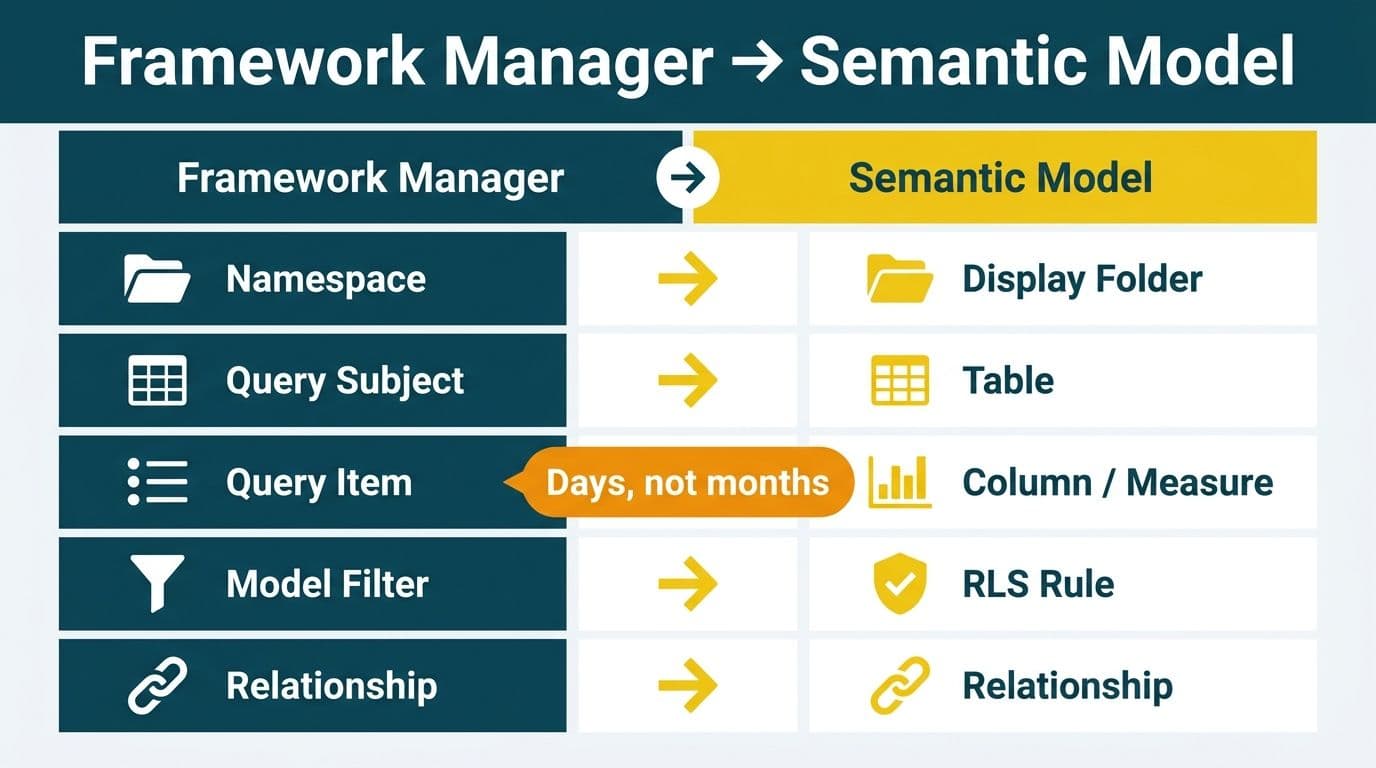
Every Cognos Framework Manager construct has a direct equivalent in the Power BI semantic model: namespaces map to display folders and perspectives; query subjects become tables; query items split into columns and measures; model filters translate to Row-Level Security rules or Power Query steps; and relationships carry across almost unchanged. Most Cognos modelers can rebuild a working semantic model in days rather than months with the right construct mapping in hand.
Key Takeaways
- Framework Manager namespaces map to Power BI display folders for field organization and perspectives for audience-specific model subsets.
- Data source query subjects become Import or DirectQuery tables; model query subjects become DAX calculated tables or Power Query transformations.
- Query items split into columns (attributes) and measures (DAX calculations); Cognos expression-language formulas require a full rewrite in DAX.
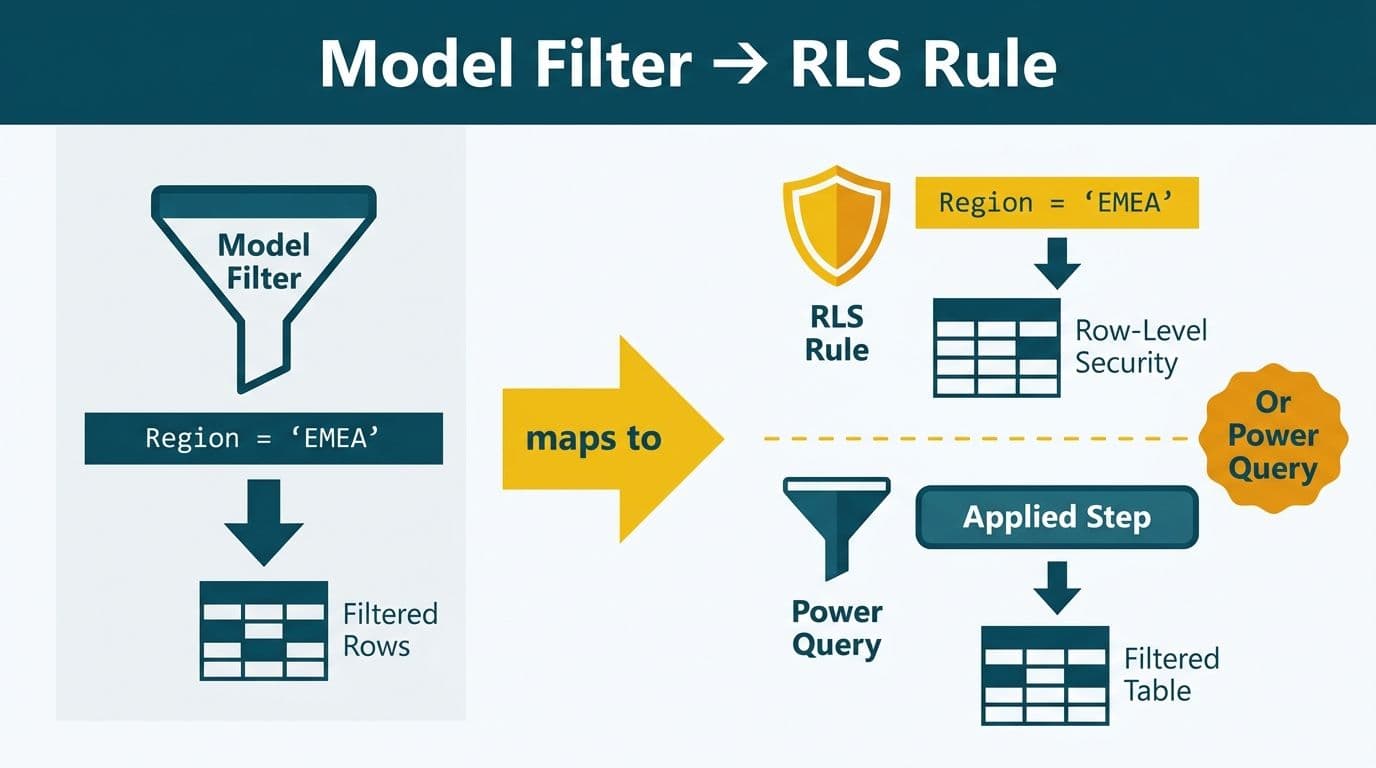
- Model-level filters become Row-Level Security (RLS) rules or Power Query filter steps depending on whether the filter is security-driven or data-reduction-driven.
- Relationships translate to Power BI model-view joins, but cardinality direction, role-playing dimensions, and bidirectional filtering each require deliberate review.
What Is the Power BI Semantic Model vs Framework Manager?
The Power BI semantic model - previously called a dataset - is the centralized metadata layer that defines tables, relationships, measures, and security for every report built on it. Framework Manager serves the same architectural role in Cognos: it abstracts raw source data into business-friendly objects and publishes a package that report authors consume in Report Studio or Cognos Analytics.
The key deployment difference is the artifact format. Framework Manager publishes packages to the Cognos Content Store; Power BI publishes semantic models (`.pbix` or Tabular Model Definition Language `.bim` files) to Power BI Service workspaces. Both enforce the same separation of concerns - data modeling stays out of the report authoring layer - but Power BI's semantic model connects to its cloud platform through XMLA read/write endpoints, enabling enterprise governance, version control via TMDL, and integration with Microsoft Fabric.
For organizations planning this transition, our Tableau to Power BI migration services covers the end-to-end process, including semantic model design patterns that Cognos teams find most familiar.
Side-by-Side Mapping: Cognos Framework Manager vs Power BI Semantic Model
The table below maps the ten most important Framework Manager constructs to their Power BI semantic model equivalents. Use it as a checklist during your pre-migration audit: mark each construct present in your FM model, then map it to the corresponding Power BI design pattern before beginning the build.
| Framework Manager Construct | Power BI Semantic Model Equivalent | Key Notes |
|---|---|---|
| Namespace | Display Folder / Perspective | Display folders group Fields pane entries; perspectives expose subsets to specific audiences |
| Data Source Query Subject | Import or DirectQuery Table | Direct mapping from a DB table or view to a Power BI table connector |
| Model Query Subject | Calculated Table (DAX) or Power Query Table | Derived joins become DAX calculated tables; transforms become M queries |
| Query Item - attribute | Column | Non-aggregated field in a table |
| Query Item - measure/calculation | Measure (DAX) | Aggregated or calculated expression; must be fully rewritten in DAX |
| Standalone Model Filter | RLS Filter Rule (DAX) or Power Query Row Filter | Security filters become RLS; data-reduction filters move to Power Query |
| Embedded Filter (WHERE clause) | Power Query filter step or SQL passthrough | Inline predicates translate to M filter steps or DirectQuery SQL |
| Relationship | Relationship (Model View) | Same concept; review cardinality direction and role-playing dimension patterns |
| Prompt | Slicer or Field Parameter | Interactive user-driven filtering |
| Package | Semantic Model (.pbix / .bim) | The published artifact consumed by report authors and Excel |
How Do Cognos Namespaces Map to Power BI?
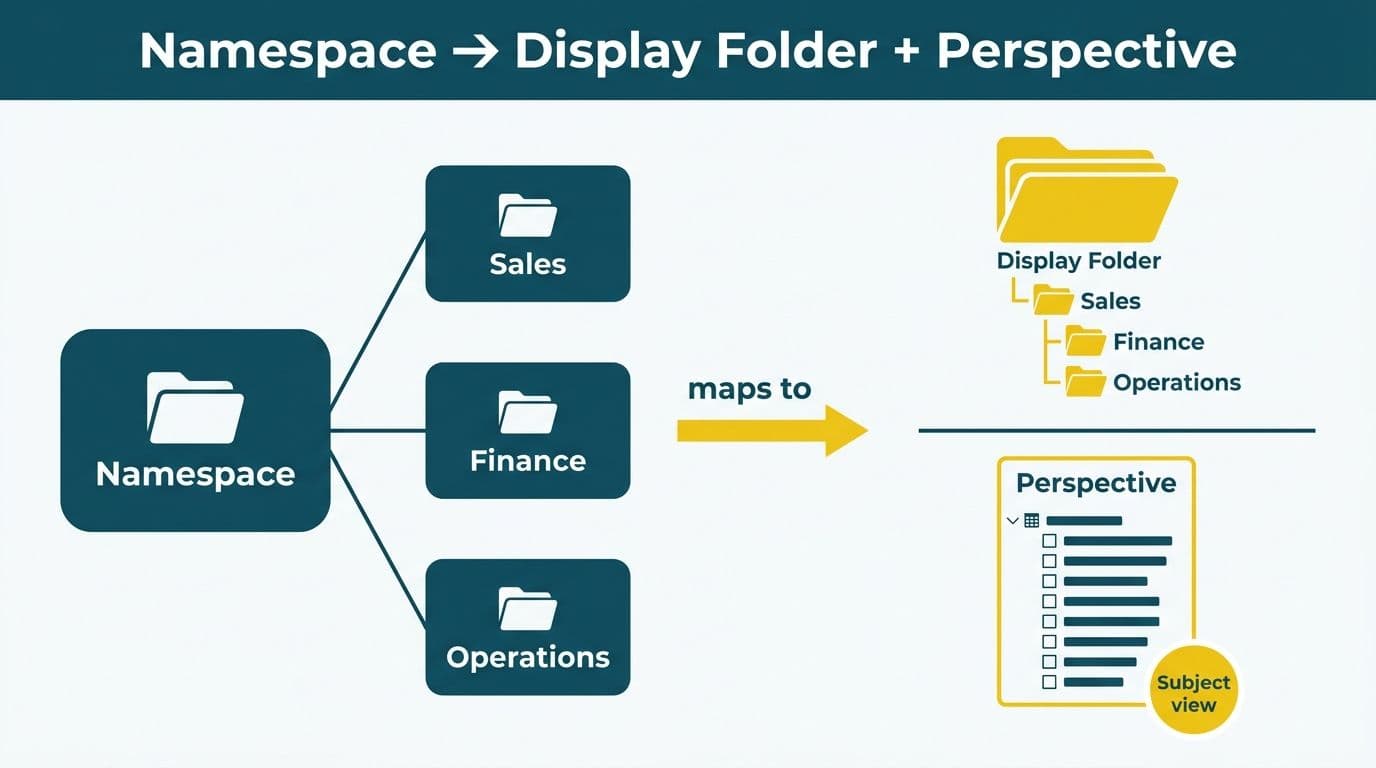
Cognos namespaces are top-level containers that group query subjects, filters, and calculations into logical subject areas - Finance, Claims, HR, or Supply Chain. In Power BI, two mechanisms replicate this behavior: display folders and perspectives.
Display folders are properties set on individual columns and measures that create a subfolder hierarchy inside a table in the Fields pane. A Finance namespace in Framework Manager becomes a Finance display folder group, keeping revenue measures, GL dimensions, and cost center attributes organized just as Cognos analysts expect them.
Perspectives are a Tabular model feature that exposes a named subset of tables and columns to a specific audience. A Finance perspective and a Clinical perspective can both coexist within the same semantic model, hiding irrelevant objects from each group without maintaining two separate published models. Perspectives require Tabular Editor or XMLA endpoint access, available on Power BI Premium or Microsoft Fabric capacity (per Microsoft's Tabular Model documentation, 2025).
A US healthcare finance team migrating from Cognos would typically recreate each namespace as a display folder hierarchy, then define distinct perspectives per department - satisfying the minimum-necessary data access principle aligned with HIPAA's Privacy Rule, which requires limiting data exposure to what is relevant for the intended purpose.
How Do Query Subjects and Query Items Translate to Power BI Tables and Columns?
A data source query subject in Framework Manager maps directly to a database table or view. Its Power BI equivalent is a table loaded through the Get Data connector in either Import mode - where data is copied into the model's in-memory columnar store - or DirectQuery mode, where queries pass live to the source. Per Microsoft's semantic model documentation (2025), Import mode delivers faster interactive query performance; DirectQuery is preferred for large datasets requiring near-real-time refresh or when data governance policies prohibit copying data.
Teams coming from Framework Manager often find the Import versus DirectQuery decision unfamiliar - FM abstracts this choice entirely, passing all queries to the source at runtime. In Power BI, the decision is made at model design time and directly affects query performance, refresh architecture, and capacity consumption.
A model query subject - a derived object that joins or reshapes other query subjects - maps to either a DAX calculated table or a Power Query (M) transformation. DAX calculated tables are computed at model refresh time and stored in memory; Power Query steps run during scheduled refresh and produce a physical table. Most Cognos model query subjects built from joins translate more naturally to Power Query steps, which keep transformation logic visible and independently testable.
Query items split by type:
- Attribute query items - non-aggregated fields such as Account Name, Patient ID, or Policy Number - become columns in the corresponding Power BI table.
- Measure or calculation query items - aggregated expressions such as Claim Amount, Net Revenue, or Days Outstanding - become measures written in DAX.
Cognos expression syntax does not translate directly to DAX. A UK fintech firm migrating revenue rollup calculations from a Framework Manager model will need to rewrite each expression manually. The challenge is structurally identical to the SSRS expressions to DAX translation task: both Cognos and SSRS use proprietary aggregate and conditional functions with no direct DAX equivalents. Teams should audit their FM calculation inventory before migration and prioritize rewrites by report usage frequency. For the most costly errors in this process, see our guide to Cognos to Power BI migration anti-patterns. Organizations processing personal financial or health data in the UK and EU should also verify that transformation logic applied during this step complies with GDPR data minimization principles.
How Do Framework Manager Filters Map to Power BI?
Framework Manager supports two filter types: standalone filters (reusable predicates applied to query subjects) and embedded filters (inline WHERE conditions inside a query subject definition). In Power BI, these translate differently depending on their purpose.
| FM Filter Type | Purpose | Power BI Equivalent |
|---|---|---|
| Security filter | Restrict rows by user identity | Row-Level Security (RLS) - static or dynamic DAX rule |
| Standalone data filter | Reduce row count for performance or relevance | Power Query filter step |
| Embedded query subject filter | WHERE clause in the query subject SQL | Power Query M filter or DirectQuery SQL passthrough |
| Prompt filter | User-driven parameter input | Slicer or Field Parameter |
Static RLS assigns users to fixed roles - for example, a Finance role that sees all finance rows. Dynamic RLS is more powerful and more common in enterprise migrations: it uses `USERPRINCIPALNAME()` to look up the current user in a security mapping table, returning only the rows they are permitted to see. Cognos teams accustomed to namespace-level and governor-controlled security filtering will find dynamic RLS the closest architectural analog.
For Canadian organizations operating under PIPEDA, RLS must enforce data access controls at the semantic model level, not just the report layer. PIPEDA's accountability principle requires that data access restrictions be auditable at the platform level, which Power BI's Fabric admin portal workspace logs satisfy when RLS is correctly configured and documented.
The full security translation - including dynamic RLS design, security table structure, and test procedures - is documented in our Cognos security model vs Power BI RLS side-by-side mapping.
How Do Cognos Relationships Translate to Power BI?
Relationships in Framework Manager define joins between query subjects, including join type, join keys, and cardinality. Power BI's model-view relationship design is structurally similar, but three specific areas require deliberate translation decisions.
Cardinality direction. Power BI enforces a single active relationship path between any two tables by default. Framework Manager allows multiple join paths for different report contexts. In Power BI, secondary join paths must be defined as inactive relationships and activated with the `USERELATIONSHIP()` DAX function inside individual measures where the non-default path is needed.
Cross-filter direction. Power BI introduces a filtering concept that Framework Manager lacks: whether filter context flows one way (dimension to fact) or bidirectionally. Bidirectional filtering can cause ambiguous filter paths in star schemas and significantly increase query complexity. Cognos modelers should default to single-direction filtering and enable bidirectional only where a specific reporting requirement makes it explicitly necessary.
Role-playing dimensions. Framework Manager handles role-playing dimensions - such as a Date table used for both Order Date and Ship Date - by creating multiple query subjects pointing to the same source table. Power BI handles this via one physical Date table with multiple relationships: one active (used by default in all measures), and additional inactive relationships activated by `USERELATIONSHIP()` in specific measures that need the alternate date context.
A Canadian manufacturing firm migrating a Cognos model with a role-playing calendar will need to create one Date table in Power BI, define one active and multiple inactive date relationships to the fact table, and rewrite date-based measures to explicitly invoke `USERELATIONSHIP()` wherever the non-default date context applies.
What Happens to Cognos Calculations When You Migrate to Power BI?
Cognos calculations written in Framework Manager or Report Studio expression syntax must be fully rewritten in DAX (Data Analysis Expressions). No automated tool converts FM expression syntax to DAX; the rewrite is manual and is typically the single longest phase in a Cognos-to-Power BI migration.
Common expression mappings:
- `total([Revenue] for [Region])` maps to `CALCULATE(SUM('Sales'[Revenue]), ALLEXCEPT('Geography', 'Geography'[Region]))`
- `running-count([ClaimID])` maps to a DAX measure using `RANKX` or a cumulative `CALCULATE` with `FILTER`
- `case when [Status] = 'Paid' then [Amount] else 0 end` as a calculated column maps to `IF('Claims'[Status] = "Paid", 'Claims'[Amount], 0)`
Teams managing large calculation libraries should export the FM calculation inventory to a structured spreadsheet, tag each expression by Cognos type (aggregate, conditional, string, date), and use Tabular Editor's C# scripting to batch-create DAX measure stubs - converting a week of manual copy-paste into a scripted half-day. The same DAX translation discipline applies when organizations also migrate SSRS reports alongside their FM model: both Cognos and SSRS use proprietary expression languages with no direct DAX analog, so consolidating the translation effort into a single pre-migration audit phase reduces rework significantly.
When Should You Rebuild vs. Lift-and-Shift a Framework Manager Model?
Not every Framework Manager model deserves a faithful recreation in Power BI. The right approach depends on the existing model's design quality and the business reporting requirements it serves.
Rebuild from scratch when:
- The FM model carries significant technical debt - orphaned query subjects, overlapping namespaces, circular joins built up over years of ad hoc report requests
- The underlying data warehouse has been redesigned or migrated to a cloud platform
- The business wants a clean star-schema semantic model aligned to Power BI's columnar engine best practices
Lift-and-shift query subjects when:
- The source database schema is stable and well-designed
- The FM model is relatively clean, with clear subject area boundaries and minimal redundancy
- Time and budget constraints require preserving existing logic rather than redesigning it
For a US SaaS finance team on a compressed migration timeline, a pragmatic middle path works well: import all data source query subjects as Power BI tables using the same database connector, recreate relationships using the FM entity-relationship diagram as reference, and rewrite only the top 20 calculations by report usage frequency in the first phase - deferring the long tail to a stabilization sprint after go-live.
A Note on Semantic Model Data Volume for Finance and Healthcare Teams
One practical consideration for healthcare and finance teams is export volume. The Power BI Service imposes a 30,000-row cap on visual-layer CSV exports - a constraint that can disrupt reconciliation, audit, and claims-processing workflows that require full-fidelity data extraction.
When a book distributor needed their full billing history out of Power BI, the visual export path was not viable. By connecting directly to the Analysis Services endpoint underneath the semantic model - the XMLA endpoint - it became possible to stream all 5,042,721 billing rows at roughly a million rows per minute. Finance and healthcare teams building compliance-grade reports in Power BI should architect their downstream extract tools to connect to the XMLA endpoint rather than relying on the visual export layer, particularly where audit trail completeness is a regulatory requirement.
For healthcare teams building clinical and billing dashboards on high row-volume patient data, our guide to a Hospital Readmission Rate Analytics Dashboard in Power BI demonstrates patterns that work at production volumes without hitting visual-layer constraints.
---
About Lets Viz: Lets Viz has delivered data analytics and BI modernization engagements for US healthcare systems, UK fintech firms, Canadian manufacturing companies, and global SaaS businesses since 2020. The firm holds a 5.0 Clutch rating and specializes in semantic model design, Cognos-to-Power BI migration, DAX development, and governed self-service analytics programs across North America, the UK, and the EU.
Ready to move your Framework Manager model to Power BI? Our Tableau to Power BI migration services cover semantic model design, DAX calculation translation, RLS migration, and post-go-live support.