Cognos to Power BI Migration for Finance Reporting Teams
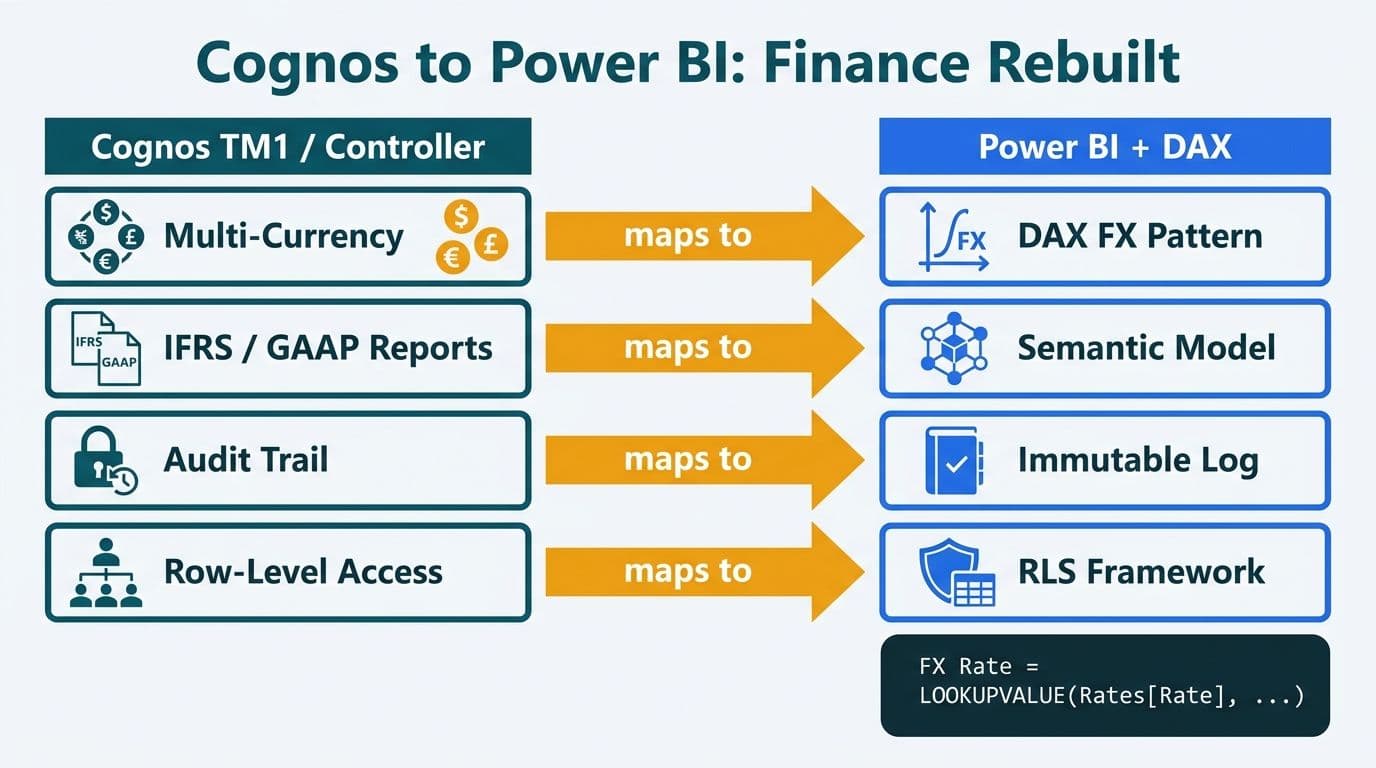
Finance teams migrating from Cognos TM1 and Controller to Power BI must rebuild four core capabilities: multi-currency consolidation, IFRS/GAAP dual-standard reporting, immutable audit trails, and granular row-level data access. Power BI's DAX calculation engine, tabular semantic model, and row-level security framework can replicate each function - but the translation is architectural, not point-and-click. A successful migration rewires the data model before a single report is rebuilt.
Key Takeaways
- Multi-currency consolidation from TM1 maps to a DAX exchange-rate calculation pattern using a dedicated currency dimension table in the Power BI semantic model
- IFRS and GAAP dual-standard reporting requires either separate measure groups or a reporting-standard parameter table that routes calculation logic at query time
- Power BI Premium and Microsoft Fabric enforce audit trails through Azure Log Analytics and workspace activity logs - a structural replacement for Cognos audit tables
- Cognos row-level security objects map to Power BI RLS roles using DAX filter expressions; the mapping is documented but must be validated against every finance data dimension
- Migrating Cognos Framework Manager to a Power BI semantic model is the highest-complexity phase and the most common source of post-cutover report discrepancies
What Makes Cognos to Power BI Migration Different for Finance Teams?
Finance-specific Cognos deployments are architecturally distinct from general BI platforms. TM1 is a multi-dimensional OLAP database with native support for currency translation, intercompany eliminations, and balance-sheet rollups baked into its cube structure. Cognos Controller handles multi-entity consolidation through a purpose-built financial close engine. Power BI's Tabular model is columnar and relational - which means finance teams are not simply moving reports but re-platforming the calculation logic that underpins those reports.
Teams experienced with Tableau to Power BI migration services find that Cognos finance migrations require significantly more semantic modeling work, because TM1 cubes encode consolidation logic directly in the OLAP structure rather than in a separable calculation layer. The key realization: every TM1 consolidation rule and every Controller calculation must become an explicit DAX measure. Nothing transfers automatically.
The four components requiring the most careful engineering are covered in the sections below.
How Do You Replace Multi-Currency Consolidation from Cognos TM1 in Power BI?
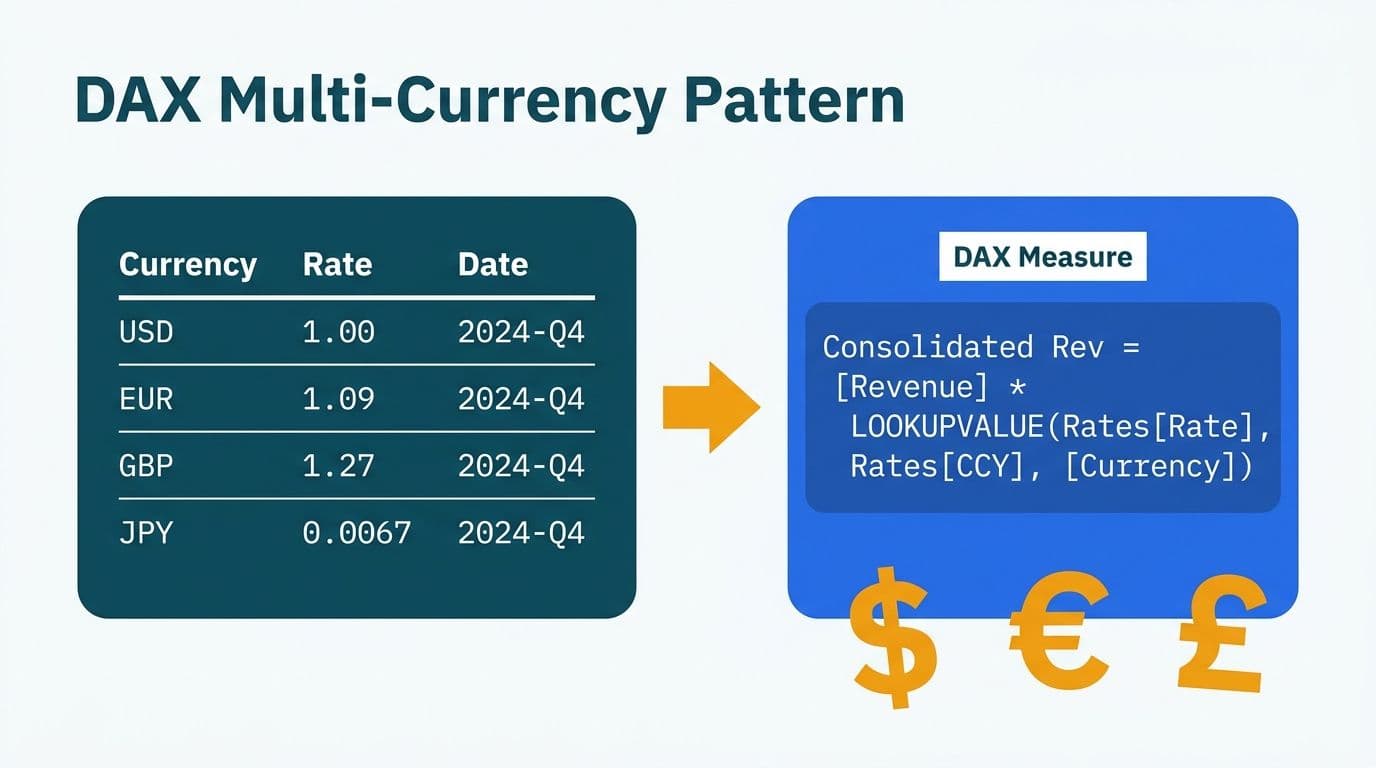
Multi-currency consolidation in Power BI requires a dedicated exchange-rate table, a date-aligned currency dimension, and DAX CALCULATE expressions that apply the correct rate to each reporting entity and period. TM1 handles this natively through its currency translation module; Power BI requires the same logic to be made explicit in the semantic model.
The recommended pattern uses a `FactExchangeRates` table keyed on `[Date]` and `[CurrencyCode]`, joined to fact tables through the shared date dimension. Consolidated reporting-currency amounts are computed with a measure pattern:
```
[Revenue USD] =
SUMX (
SUMMARIZE ( FactSales, FactSales[EntityKey], FactSales[DateKey] ),
[Revenue Local] * RELATED ( FactExchangeRates[ClosingRate] )
)
```
Average rates (for income statement items) and historical rates (for equity accounts) require separate measures. This explicit separation is a point where TM1 migrations frequently introduce silent errors if teams assume a single rate type handles all account types across the chart of accounts.
For intercompany eliminations - which TM1 manages through consolidation rules - Power BI teams use a dedicated `IntercompanyEliminations` table or a calculation group that applies elimination entries at the consolidated entity level. Parent-child hierarchies using the DAX PATHCONTAINS function handle variable-depth consolidation trees.
| Cognos TM1 Feature | Power BI Equivalent | Key Notes |
|---|---|---|
| Currency translation module | DAX measure + FactExchangeRates table | Closing, average, and historical rates each need separate measures |
| Consolidation hierarchy | Parent-child or ragged hierarchy in Tabular model | PATHCONTAINS handles variable-depth trees |
| Intercompany elimination rules | Elimination dimension table + calculation group | Logic must be explicitly modeled per entity pair |
| Spreading logic | DAX time-intelligence measures | TOTALYTD and PARALLELPERIOD cover most standard cases |
| Write-back planning | Power BI Writeback (Fabric) or third-party connector | Native write-back is available in Microsoft Fabric (2025) |
A US healthcare system with subsidiaries across multiple states consolidates financials in USD but reports each subsidiary's performance in its local functional currency for internal management review. In Power BI, each entity's ledger amounts are stored in the fact table in local currency; the DAX measure applies exchange rates based on a slicer parameter or hardcoded reporting-currency logic.
How Do You Support IFRS and GAAP Dual-Standard Reporting in Power BI?
Dual-standard reporting - running IFRS and US GAAP figures side by side for multi-jurisdiction entities - requires either two separate measure groups or a reporting-standard parameter table that routes calculation logic at query time. Cognos Controller manages this through a built-in accounting-standard dimension; Power BI replicates the pattern through the semantic model's calculation layer.
The cleaner architecture uses a `DimReportingStandard` table with values `IFRS` and `GAAP`, surfaced as a report slicer. Each financial measure reads the selected standard and returns the appropriate calculation:
```
[Lease Liability] =
IF (
SELECTEDVALUE ( DimReportingStandard[Standard] ) = "IFRS",
[Lease Liability IFRS 16],
[Lease Liability ASC 842]
)
```
This allows a UK subsidiary reporting under IFRS and a US parent reporting under GAAP to share a single Power BI semantic model while each seeing standard-appropriate figures. The slicer can be locked per workspace using report-level filters and row-level security, preventing a GAAP-only user from inadvertently switching to IFRS outputs.
For Canadian entities subject to ASPE (Accounting Standards for Private Enterprises) alongside IFRS - common in Canadian mid-market manufacturing - the same pattern extends by adding a third value to `DimReportingStandard`.
Three accounting areas that require separate calculation branches:
- Lease accounting: IFRS 16 eliminates the operating lease off-balance-sheet classification; ASC 842 retains a dual model. Two separate sets of measures are required and must be independently validated against source ledgers.
- Revenue recognition: IFRS 15 and ASC 606 are substantially converged, but differences in contract modification and variable consideration handling require separate logic for edge-case contracts.
- Financial instruments: IFRS 9 (expected credit loss model) versus ASC 326 (CECL) require different provisioning formulas and different disclosure dimensions in the semantic model.
The Cognos to Power BI Migration Checklist: 7-Phase Guide provides a structured framework for validating dual-standard outputs against Controller before cutover.
How Do You Preserve Audit-Trail Requirements After a Cognos Migration?
Power BI Premium and Microsoft Fabric provide audit trails through Azure Log Analytics and the Microsoft 365 Unified Audit Log - both queryable, exportable, and sufficient to satisfy the immutability requirements of SOX, GDPR, and PIPEDA. Cognos maintains audit tables within its content store; Power BI externalizes auditing to Azure and Microsoft 365 compliance infrastructure, which for most organizations is already within scope of their existing cloud compliance programs.
The Microsoft 365 Unified Audit Log (Microsoft compliance documentation, 2025) captures every report view, dataset refresh, data export, and permission change at the workspace level. Logs are retained for up to 90 days in the default configuration and can be routed to Azure Monitor Log Analytics for long-term retention of two years or more - satisfying SOX Section 302 and 906 documentation requirements and most internal audit retention policies.
For US healthcare organizations subject to HIPAA, the audit log satisfies Technical Safeguard requirements under 45 CFR §164.312(b), which mandate activity logs for all PHI access. The HIPAA compliant BI tools for hospital data visualization reference provides the full control mapping to Power BI Premium capabilities.
For UK and EU organizations under GDPR Article 32, the Azure Log Analytics integration provides the audit mechanism required under the accountability principle. Canadian organizations subject to PIPEDA Schedule 1 Principle 7 use the same log infrastructure - and those subject to provincial health information laws such as Ontario's PHIPA should verify that logs are stored within Canada Central Azure capacity.
Three implementation steps for audit trail continuity during migration:
1. Enable workspace audit logging before any data migration begins. The audit log must be active from day one, not retrofitted after go-live.
2. Set Log Analytics retention to match your regulatory requirement - typically 7 years for SOX, 6 years for common PIPEDA scenarios, and at least 5 years for standard GDPR retention patterns.
3. Create a dedicated compliance workspace in Power BI that surfaces the Log Analytics data to the compliance and internal audit teams, separate from operational finance dashboards.
Power BI's row-level security also generates audit entries when a user's effective identity is resolved at query time, giving compliance teams a verifiable record of which data each user accessed and under which security role.
How Does Power BI Row-Level Security Replace Cognos Data Access Rules?
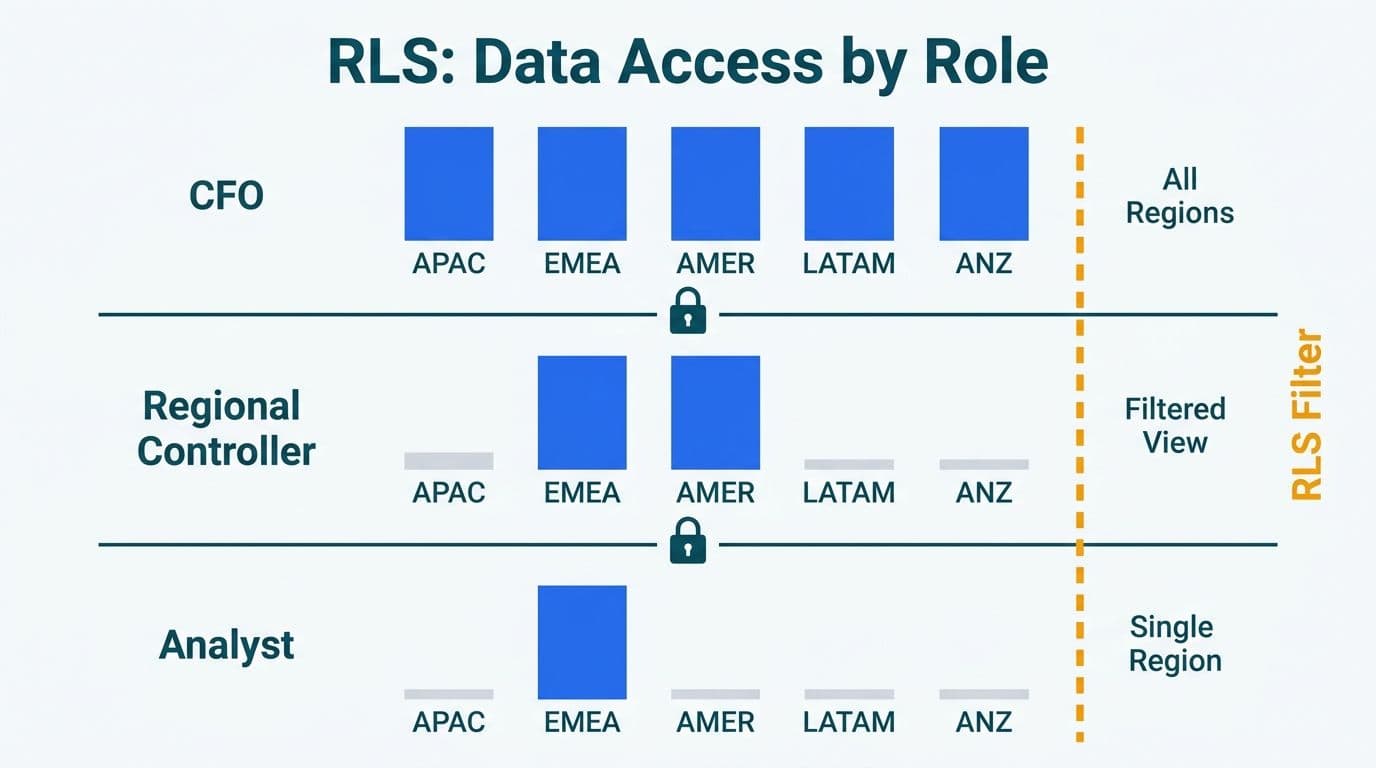
Cognos row-level security - enforced through Framework Manager namespace security filters and per-package access controls - maps to Power BI RLS roles using DAX filter expressions defined in the semantic model. The mapping is methodical and well-documented, but requires validation against every dimension that carries security filters in the source Cognos model.
Microsoft's Power BI RLS documentation (2025) distinguishes two implementation modes:
- Static RLS: fixed DAX filter expressions per role, suited for entity-based security where a regional controller always sees the same cost centers regardless of which user is logged in
- Dynamic RLS: expressions that reference `USERPRINCIPALNAME()` against a security mapping table, suited for large user populations where creating individual roles per person is operationally impractical
Finance teams with 50 or more cost-center owners typically migrate to dynamic RLS. A `DimUserSecurity` table maps each user's Azure AD user principal name to permitted cost centers, entities, or legal entities; the DAX filter joins this table to fact data at query time.
A UK fintech with 80 regional P&L owners, for example, uses dynamic RLS so each owner sees only their region's revenue and cost data in the consolidated Power BI model - without requiring 80 static role definitions to be maintained each time headcount changes. Under GDPR, demonstrating that financial data is accessible only to named, authorized personnel is a core accountability requirement under Article 5(1)(f).
For a full side-by-side mapping of Cognos Framework Manager security objects and their Power BI equivalents, see the Cognos Security Model vs Power BI RLS: Side-by-Side Mapping reference.
How Do You Migrate Cognos Framework Manager to a Power BI Semantic Model?
Migrating Cognos Framework Manager to a Power BI semantic model requires translating three layers: the physical data layer (database connections and query subjects), the business layer (calculated columns, filters, and hierarchies), and the presentation layer (folder structures and subject areas). This phase carries the highest rework risk and the longest validation cycle in the full migration project.
The recommended approach:
1. Inventory Framework Manager subjects. Export the Framework Manager model metadata and classify each query subject as a dimension table, fact table, or derived calculation. Undocumented namespace-level security filters are common and frequently missed in initial inventories.
2. Restructure into a star schema. Framework Manager's normalized query subjects must be reorganized into a Kimball-style star schema before DAX development begins. This restructuring is often the single largest effort in the project and cannot be skipped.
3. Rebuild calculations in DAX. Framework Manager calculations use SQL-like expression syntax; DAX equivalents exist for most common patterns but require deliberate translation and cell-level validation, not copy-paste.
4. Run parallel close cycles. Validate Power BI semantic model outputs against Cognos Controller for a minimum of two full monthly close cycles before decommissioning. Define materiality thresholds for acceptable variance before parallel running begins, not after discrepancies appear.
One pattern that consistently causes problems: Framework Manager uses package-level security that overlaps with namespace-level security. Power BI enforces all security at the semantic model and workspace layer - there is no direct equivalent of package-level filtering. Teams that carry over package logic without restructuring it at the model level discover the gap during UAT rather than during design, adding weeks to the timeline.
The Cognos to Power BI Migration Mistakes: Anti-Pattern Guide documents this and several other structural failure patterns from real migration projects.
How Do Healthcare and Finance Teams Handle HIPAA, GDPR, and PIPEDA During Migration?
Healthcare and finance teams must align their migration architecture with applicable data residency, access control, and audit requirements from the first data load - not as a post-migration retrofit. The three most common regulatory frameworks across North American and UK/EU mid-market organizations are HIPAA (US healthcare), GDPR (UK and EU), and PIPEDA (Canada).
For US healthcare organizations, Power BI Premium on dedicated capacity satisfies HIPAA Security Rule technical safeguard requirements when configured with Azure Private Link (eliminating public endpoint exposure), Microsoft Entra Conditional Access policies for user authentication, customer-managed encryption keys (BYOK) for data at rest, and workspace audit logging routed to a HIPAA-eligible Log Analytics workspace.
For UK and EU organizations under GDPR, Microsoft's Data Processing Addendum covers Power BI as a data processor. Data residency is enforced by selecting EU-region capacity in Power BI Premium - Microsoft's capacity documentation (2025) identifies EU-West (Netherlands) and EU-North (Ireland) as GDPR-compatible residency options.
For Canadian organizations, PIPEDA does not mandate domestic data residency, but provincial health information legislation does. Ontario's Personal Health Information Protection Act (PHIPA) and Alberta's Health Information Act (HIA) require health data to remain in Canada. Microsoft Canada Central capacity (Toronto) satisfies both requirements.
A mid-market Canadian manufacturing firm with operations in Ontario, for example, would configure Power BI Premium with Canada Central capacity, PIPEDA-aligned data subject access request workflows, and Log Analytics retention set to six years. Combined with dynamic RLS, this gives the compliance team a complete picture of who accessed which financial data and when - satisfying PIPEDA's accountability principle and the auditability requirements for cross-border financial reporting under Canadian securities regulation.
The AI Compliance Requirements for Financial Services: 2026 Regulatory Map covers the intersection of these frameworks with Power BI's published compliance certifications in greater depth.
---
About Lets Viz: Lets Viz has delivered Power BI migrations and analytics implementations since 2020 for clients across US healthcare, UK fintech, Canadian manufacturing, and global SaaS organizations. The firm holds a 5.0 Clutch rating, reflecting a track record of technically complex Cognos-to-Power-BI transitions validated against finance close outputs before cutover.
Finance teams ready to retire Cognos TM1 or Controller can explore the full scope, phased timeline, and pricing model for our Tableau to Power BI migration services - which include Cognos and TM1 source environments - and request a scoped assessment for their specific consolidation requirements.