Cognos to Power BI DAX Translation Guide
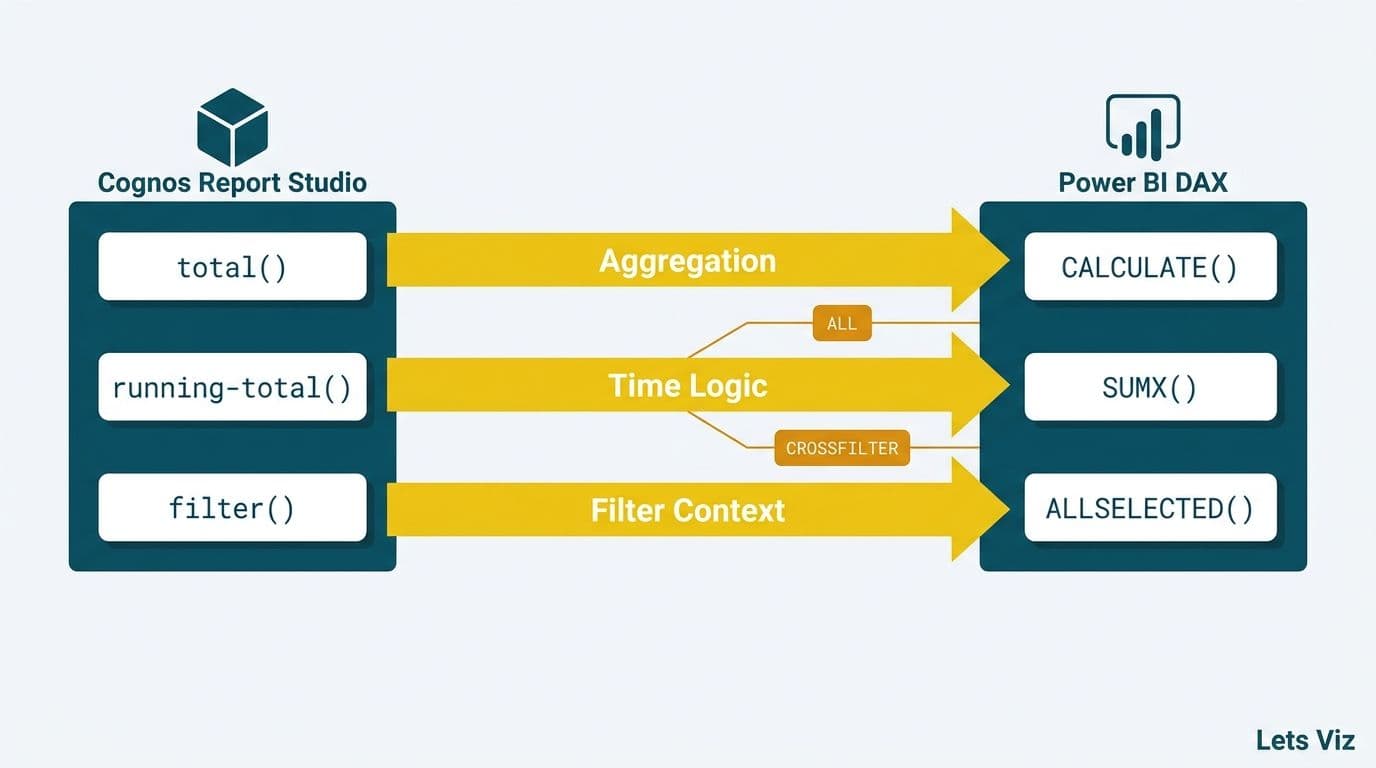
Translating Cognos Report Studio expressions to Power BI DAX requires mapping three core paradigms: calculated expressions become DAX measures using SUMX or CALCULATE, running totals shift from Cognos's cumulative aggregation to DAX time intelligence patterns, and filter contexts - managed through Cognos filter definitions - are controlled in DAX via ALLSELECTED, ALL, and the CROSSFILTER function. Once you understand these structural differences, the translation becomes systematic rather than guesswork.
Key Takeaways
Cognos `total()` and `running-total()` expressions map to CALCULATE with cumulative filter patterns or SUMX in DAX
ALLSELECTED replaces Cognos's implicit ignore-filter scope, preserving slicer context while removing visual-level filters
The DAX CROSSFILTER function controls relationship direction - essential when Cognos used outer joins or multi-join FM packages
When comparing crossfilter vs userelationship DAX Power BI patterns, the rule is simple: CROSSFILTER changes how a relationship propagates filters; USERELATIONSHIP switches which relationship is active
SAMEPERIODLASTYEAR, PREVIOUSYEAR, and DATEADD are the three DAX time intelligence functions that replace Cognos's FM-level fiscal time dimensions for prior-period comparisons - each targets a different comparison scope, and fiscal-year calendar setup determines which to use
SSRS VB expressions - IIF, Switch, RunningValue - map to DAX IF, SWITCH(TRUE()), and cumulative CALCULATE patterns; cascading parameters require SELECTEDVALUE-based DAX measures or dynamic M parameters
Finance and healthcare data teams should build a DAX translation dictionary for their top 20-30 expressions before migrating
A parallel-run approach - keeping Cognos live while Power BI is validated - reduces risk for HIPAA, GDPR, and PIPEDA-regulated organizations
What Makes Cognos to Power BI DAX Translation Different From Other BI Migrations?
Cognos Report Studio operates on a relational, query-based model where expressions are tied directly to the dimensional Framework Manager (FM) package. Power BI DAX is a columnar, context-aware formula language that evaluates measures differently depending on filter context, row context, and relationship topology.
The fundamental shift: in Cognos, you write expressions that act on query result sets. In DAX, you write measures that act on filtered column scans. That distinction drives every decision in a Cognos to Power BI DAX translation guide - and it means a direct syntax lookup is not enough. You must also re-map the filter architecture.
Organizations moving off Cognos are often rethinking their entire data stack alongside a broader Tableau to Power BI migration services evaluation or cloud modernization initiative. Both migration types share the same DAX learning curve once data lands in Power BI.
According to Future Market Insights (2026), the AI consulting services market - which includes BI modernization advisory - is projected to grow from USD 14.0 billion in 2026 to USD 90.99 billion by 2035 at a 26.2% CAGR, reflecting how urgently enterprises are replacing legacy analytics stacks.
A US healthcare network migrating from Cognos must verify all DAX measure logic preserves HIPAA-compliant row-level security. A UK fintech firm under GDPR must confirm that data lineage through DAX measures is auditable. A Canadian insurer under PIPEDA needs the same assurance - and DAX's explicit filter context model makes that audit trail clearer than Cognos's opaque query generation.
How Do You Translate Cognos Report Studio Expressions to DAX Measures?
The starting point for any Cognos to Power BI DAX translation is a direct expression mapping. Most Cognos calculated items fall into three categories: simple aggregates, conditional logic, and ratio calculations. Each has a clear DAX equivalent.
The Tableau Calculated Fields to Power BI DAX: Conversion Guide covers the broader DAX syntax landscape; the Cognos translation adds FM-package-specific nuances around join semantics and query scope that Tableau migrations do not face.
| Cognos Expression | Cognos Syntax | DAX Function | DAX Example |
|---|---|---|---|
| Simple aggregate | `total([Revenue])` | SUM | `SUM(Sales[Revenue])` |
| Conditional sum | `total([Revenue] for [Region]='US')` | CALCULATE + FILTER | `CALCULATE(SUM(Sales[Revenue]), Sales[Region]="US")` |
| Running total | `running-total([Revenue])` | CALCULATE (cumulative) | See Running Total section |
| Share of total | `[Revenue] / total([Revenue])` | DIVIDE + ALL | `DIVIDE(SUM(Sales[Revenue]), CALCULATE(SUM(Sales[Revenue]), ALL(Sales)))` |
| Rank | `rank([Revenue])` | RANKX | `RANKX(ALL(Sales[Product]), SUM(Sales[Revenue]))` |
| Ratio to parent | `[Revenue] / total([Revenue] for [Cat])` | DIVIDE + ALLEXCEPT | `DIVIDE([Rev], CALCULATE([Rev], ALLEXCEPT(Sales, Sales[Category])))` |
| Count distinct | `count(distinct [CustomerID])` | DISTINCTCOUNT | `DISTINCTCOUNT(Sales[CustomerID])` |
| Null handling | `if isnull([Value]) then 0` | IF(ISBLANK) | `IF(ISBLANK(SUM(Sales[Value])), 0, SUM(Sales[Value]))` |
According to Market Research Future (2026), the Healthcare Financial Analytics Market is projected to grow at an 8.58% CAGR from 2025 to 2035. Finance directors at US and Canadian health systems frequently cite Cognos expression translation as the primary technical bottleneck in BI modernization - because the volume of unique expressions compounds the effort significantly.
The key principle: Cognos expressions are declarative and context-implicit - the FM package defines joins and Report Studio handles filter scope automatically. In DAX, you make all of that explicit. Every CALCULATE call is a deliberate filter override. That explicitness is a governance advantage once the data team learns to read it.
How Do Running Totals Work Differently in DAX vs Cognos?
Cognos `running-total()` is a post-aggregation function applied to a sorted query result set. It accumulates values across rows in the order they appear. Power BI has no direct equivalent because DAX evaluates measures independently for each row context - there is no inherent row ordering in a columnar store.
The standard DAX pattern for a running total on a date axis uses CALCULATE with a cumulative filter:
```dax
Revenue Running Total =
CALCULATE(
SUM(Sales[Revenue]),
FILTER(
ALL(Calendar[Date]),
Calendar[Date] <= MAX(Calendar[Date])
)
)
```
For any given date in a visual, this sums all revenue up to and including that date. `ALL(Calendar[Date])` removes the current date filter; `<= MAX(Calendar[Date])` re-applies it cumulatively.
For non-date running totals - common in Cognos finance reports sorted by cost center code - add a numeric sort key column and apply the same pattern:
```dax
Revenue Running Total by Cost Center =
CALCULATE(
SUM(Financials[Revenue]),
FILTER(
ALL(Financials),
Financials[SortKey] <= MAX(Financials[SortKey])
)
)
```
This pattern is especially valuable for finance teams building automated monthly financial reporting in Power BI where Cognos running totals previously powered P&L waterfall rows and cost variance accumulation columns in management reporting packs.
How Do You Use SAMEPERIODLASTYEAR, PREVIOUSYEAR, and DATEADD in Power BI DAX for Prior-Period Comparisons?
Cognos Report Studio handles year-over-year comparisons through time functions baked into the FM package - typically relative time filters or pre-built fiscal time dimensions. In DAX, the analyst makes the same logic explicit through three time intelligence functions: SAMEPERIODLASTYEAR, PREVIOUSYEAR, and DATEADD. Each targets a different comparison scope, and choosing the right one matters more when your organization runs a non-calendar fiscal year.
SAMEPERIODLASTYEAR is the most common starting point for analysts asking "how does this period compare to the same period last year?" The sameperiodlastyear Power BI DAX pattern returns the set of dates from the prior year that corresponds exactly to the currently filtered period - matching month, quarter, or partial year automatically:
```dax
Revenue LY =
CALCULATE(
SUM(Sales[Revenue]),
SAMEPERIODLASTYEAR(Calendar[Date])
)
Revenue YoY % Change =
DIVIDE(
SUM(Sales[Revenue]) - [Revenue LY],
[Revenue LY]
)
```
For this pattern to work correctly, your Calendar table must be contiguous (no date gaps) and marked as a Date table in Power BI Desktop. If the Calendar table is not marked, DAX cannot resolve the time intelligence context and the measure returns blank. Mark it via Table Tools > Mark as Date Table, selecting the Date column.
PREVIOUSYEAR returns every date in the prior complete year, regardless of which period is selected in a slicer. It is the correct function when a finance team wants a full-year prior comparison rather than a matching-period comparison:
```dax
Revenue Prior Full Year =
CALCULATE(
SUM(Sales[Revenue]),
PREVIOUSYEAR(Calendar[Date])
)
```
If the slicer shows Q1 2026, SAMEPERIODLASTYEAR returns Q1 2025 revenue. PREVIOUSYEAR returns all of 2025 revenue. Both are valid - the question is what the business question actually requires.
DATEADD is the most flexible of the three. It shifts a date range by a specified number of intervals (day, month, quarter, or year), making it the right tool for non-standard comparisons such as prior quarter, rolling twelve months shifted back one year, or custom offset periods:
```dax
Revenue 2 Years Ago =
CALCULATE(
SUM(Sales[Revenue]),
DATEADD(Calendar[Date], -2, YEAR)
)
Revenue Prior Quarter =
CALCULATE(
SUM(Sales[Revenue]),
DATEADD(Calendar[Date], -1, QUARTER)
)
```
Fiscal-year calendar considerations for US, UK, and Canadian businesses
The standard SAMEPERIODLASTYEAR function references the calendar year embedded in the Date column. When your organization runs a fiscal year that does not align with January-December, you need a Calendar table with dedicated FiscalYear, FiscalQuarter, and FiscalMonth columns. The pattern shifts: instead of calling SAMEPERIODLASTYEAR directly, you filter by FiscalYear - 1 using CALCULATE with a custom fiscal date range.
- US businesses commonly run fiscal years ending September 30 (federal contractors), June 30 (education sector), or March 31 (retail and manufacturing). A DATEADD-based pattern with a YEAR offset works correctly only if the Calendar table FiscalYear column is populated to match those boundaries. Applying SAMEPERIODLASTYEAR to a standard Calendar[Date] column will misalign comparisons for any month before the fiscal year end.
- UK businesses operating on the April 1 - March 31 corporate financial year need FiscalYear columns that increment on April 1 rather than January 1. SAMEPERIODLASTYEAR applied to a standard Calendar[Date] column will shift by calendar year and misalign Q1 comparisons by three months for any UK entity reporting against a April - March cycle.
- Canadian businesses predominantly use a calendar year fiscal (January 1 - December 31) aligned with CRA filing requirements, so SAMEPERIODLASTYEAR on a standard Calendar[Date] table works without modification in most cases. Exceptions arise for subsidiaries of US or UK parent companies that inherit the parent fiscal calendar.
A reusable fiscal Calendar column pattern for a UK or Canadian March 31 fiscal year end:
```dax
FiscalYear =
IF(MONTH(Calendar[Date]) >= 4, YEAR(Calendar[Date]), YEAR(Calendar[Date]) - 1)
FiscalQuarter =
SWITCH(TRUE(),
MONTH(Calendar[Date]) >= 4 && MONTH(Calendar[Date]) <= 6, "Q1",
MONTH(Calendar[Date]) >= 7 && MONTH(Calendar[Date]) <= 9, "Q2",
MONTH(Calendar[Date]) >= 10 && MONTH(Calendar[Date]) <= 12, "Q3",
"Q4"
)
```
With FiscalYear defined as a calculated column, a prior-fiscal-year comparison measure uses CALCULATE with a fiscal filter rather than SAMEPERIODLASTYEAR:
```dax
Revenue Prior Fiscal Year =
CALCULATE(
SUM(Sales[Revenue]),
FILTER(
ALL(Calendar),
Calendar[FiscalYear] = MAX(Calendar[FiscalYear]) - 1
&& Calendar[FiscalMonth] <= MAX(Calendar[FiscalMonth])
)
)
```
This pattern replaces the Cognos time dimension's fiscal hierarchy - which FM packages typically provided as a pre-built relative time filter - with an explicit DAX filter that finance analysts can inspect, validate, and version-control in Power BI Desktop. It also gives US healthcare and Canadian financial services teams the audit trail that HIPAA, GDPR, and PIPEDA reviews increasingly require for period-comparison logic.
How Do SSRS Expressions Translate to DAX in Power BI?
SSRS (SQL Server Reporting Services) embeds VB.NET expressions directly in report items - IIF(), Switch(), RunningValue(), and cascading parameter filters evaluated row-by-row on a pre-aggregated dataset. Translating SSRS expressions to DAX Power BI follows a different path than Cognos because SSRS logic lives at the presentation layer, not the semantic layer, so the developer must lift that logic into DAX measures before the report can be rebuilt.
The most common SSRS VB expression to DAX mappings are:
| SSRS VB Expression | DAX Equivalent | Notes |
|---|---|---|
| `=IIF(Fields!Revenue.Value > 0, Fields!Revenue.Value, 0)` | `IF(SUM(Sales[Revenue]) > 0, SUM(Sales[Revenue]), 0)` | Direct syntax swap; nesting works identically |
| `=Switch(Fields!Score.Value >= 90, "A", Fields!Score.Value >= 80, "B", True, "C")` | `SWITCH(TRUE(), [Score] >= 90, "A", [Score] >= 80, "B", "C")` | The TRUE() first argument is the key difference |
| `=RunningValue(Fields!Revenue.Value, Sum, Nothing)` | CALCULATE with cumulative date filter (see above) | "Nothing" scope = report-wide; maps to ALL() cumulative pattern |
| `=RunningValue(Fields!Revenue.Value, Sum, "CategoryGroup")` | `CALCULATE(SUM(Sales[Revenue]), FILTER(ALLEXCEPT(Sales, Sales[Category]), Sales[SortKey] <= MAX(Sales[SortKey])))` | Group scope maps to ALLEXCEPT so running total resets per group |
| `=Parameters!Region.Value` | `SELECTEDVALUE(Geography[Region], "All")` | Single-value parameter selection |
| Cascading parameters (param A filters param B dataset) | Dynamic M parameters + SELECTEDVALUE in DAX | Parameter dependency logic moves from dataset queries into M or the `calculate dax` CALCULATE(measure, SELECTEDVALUE filter) pattern |
IIF and Switch - the easy wins. These are direct translations. IIF(condition, true\_value, false\_value) becomes DAX IF(condition, true\_value, false\_value) with identical nesting. SSRS Switch() becomes SWITCH(TRUE(), condition1, result1, condition2, result2, else\_result) - the TRUE() argument tells DAX to evaluate each condition as a boolean test rather than matching against a single value.
RunningValue - the structural gap. SSRS RunningValue() accepts a scope argument that resets accumulation at a group boundary. The "Nothing" scope (report-wide running total) maps to the cumulative date or sort-key FILTER pattern shown in the previous section. A named group scope - such as "CategoryGroup" - maps to ALLEXCEPT: remove all filters except the grouping column so the measure re-evaluates from zero at each group change.
Cascading parameters - the architecture change. SSRS cascading parameters filter one parameter's dataset based on a prior selection. In Power BI this dependency moves into M query parameters (for DirectQuery folding) or into DAX measures that use SELECTEDVALUE to read slicer state and pass it into a CALCULATE filter - the same `calculate dax` pattern that drives most dynamic segmentation measures. This is the most labour-intensive part of any SSRS-to-Power BI migration because parameter logic is rarely documented separately from report markup.
What Is ALLSELECTED in DAX and How Does It Replace Cognos Filter Contexts?
In Cognos Report Studio, filter contexts are applied at the query level through master-detail relationships or explicit filter definitions. A common pattern is calculating a metric within the current filter context while ignoring one specific dimension filter - for example, showing revenue as a share of total revenue for the currently visible product set, even when a country slicer is active.
ALLSELECTED is the DAX function that most closely replicates this behavior. It removes filters applied by the current visual (such as matrix rows or chart axes) while preserving filters applied externally by slicers or page-level filters:
```dax
Revenue % of Slicer Total =
DIVIDE(
SUM(Sales[Revenue]),
CALCULATE(SUM(Sales[Revenue]), ALLSELECTED(Sales[Product]))
)
```
If a page-level slicer shows only Q1 2026 products, ALLSELECTED preserves that selection while removing the per-product filter applied by matrix rows - producing a share-of-selected-total figure that mirrors the Cognos `total([Revenue] for report)` scope pattern.
The distinction between ALL, ALLSELECTED, and ALLEXCEPT maps directly to three Cognos filter scope patterns:
| DAX Function | Filters Removed | Filters Preserved | Cognos Equivalent |
|---|---|---|---|
| ALL | All filters on specified column or table | None | `total([Revenue] for all)` |
| ALLSELECTED | Visual-level row and column filters | Slicer and page filters | `total([Revenue] for report)` |
| ALLEXCEPT | All filters except named columns | Named column filters | `total([Revenue] for [Category])` |
Healthcare analytics teams using Power BI for healthcare organizations frequently need ALLSELECTED when displaying department-level metrics alongside system-wide totals - a pattern directly ported from Cognos care-unit-level reporting against a shared hospital data warehouse.
CROSSFILTER vs USERELATIONSHIP in DAX Power BI: When Each Function Overrides Model Relationships
Cognos Framework Manager packages frequently define multi-join relationships, outer joins, and role-playing dimensions - patterns that do not map directly to Power BI's single-active-relationship model. The DAX CROSSFILTER function and USERELATIONSHIP both override model relationships inside a CALCULATE call, but they solve different problems. Understanding crossfilter vs userelationship DAX Power BI behavior is one of the most critical decisions when translating complex FM packages.
CROSSFILTER changes the direction a relationship propagates filters - it does not switch which relationship is active. Use it when the relationship already exists in the model but its default single-direction filter produces the wrong result:
```dax
Sales with Bidirectional Region Filter =
CALCULATE(
SUM(Sales[Revenue]),
CROSSFILTER(Geography[RegionID], Sales[RegionID], Both)
)
```
By default, a one-to-many relationship filters from the Geography dimension table to the Sales fact table. `CROSSFILTER(..., Both)` enables bidirectional filtering within this measure only, replicating an FM outer join pattern without making the data model permanently bidirectional.
USERELATIONSHIP activates an inactive relationship for the duration of one measure. Use it for role-playing dimensions - for example, when Order Date and Ship Date both reference the same Calendar table but only one relationship can be active at a time:
```dax
Shipped Revenue =
CALCULATE(
SUM(Sales[Revenue]),
USERELATIONSHIP(Sales[ShipDate], Calendar[Date])
)
```
The side-by-side decision rule:
| Scenario | Use | Why |
|---|---|---|
| One relationship exists; filter flows wrong direction | CROSSFILTER | Redirects propagation; does not change which relationship is active |
| Two relationships exist between the same tables; wrong one is active | USERELATIONSHIP | Switches the active relationship for this measure |
| Role-playing dimension (Order Date vs Ship Date) | USERELATIONSHIP | Only one Calendar relationship can be active; swap it per measure |
| FM outer join that should filter both ways | CROSSFILTER(..., Both) | Temporary bidirectionality without model-level risk |
Many-to-many pitfalls. When Cognos FM packages used bridge tables to handle many-to-many joins, translators sometimes reach for `CROSSFILTER(..., Both)` on both sides of the bridge. This creates a bidirectional chain that Power BI evaluates ambiguously - a visual may double-count or silently ignore one filter path. The correct pattern is a single bidirectional relationship from the fact table to the bridge, with the second leg remaining one-directional and controlled through explicit CALCULATE filters. Never enable bidirectional filtering at the model level on both legs of a many-to-many bridge; scope it per measure using CROSSFILTER.
Bidirectional filter risks. Permanent bidirectional relationships set in the model diagram apply to every measure and every visual - including ones that should not cross-filter. A slicer on a small lookup table can silently restrict a completely unrelated fact table through a bidirectional chain. The safe pattern: set all relationships to single-direction in the model, then use CROSSFILTER inside the specific measures that need cross-filtering. This is the approach that most closely mirrors how Cognos FM packages exposed selective join behavior through namespace-level configuration rather than report-level overrides.
Finance and SaaS teams tracking saas metrics for board reporting - including ARR cohort analysis and Rule of 40 benchmark calculations - often encounter role-playing date dimensions when cohort tracking requires both subscription start dates and churn dates. USERELATIONSHIP handles what Cognos achieved through FM dimension aliases.
According to medinsight.com (2026), three themes are defining healthcare analytics modernization this year: value-based care, AI-driven analytics, and payer analytics innovation. Each involves complex multi-period date comparisons where the DAX CROSSFILTER function - alongside USERELATIONSHIP patterns - replaces Cognos's FM-level relationship configurations.
For a deeper look at how data model architecture affects DAX evaluation performance, the Power BI Import vs DirectQuery decision guide covers the underlying architecture choices that govern measure evaluation speed at scale.
When Should Finance and Healthcare Teams Formalize a Cognos DAX Migration?
Three signals indicate it is time to structure a formal Cognos to Power BI migration project rather than continue ad hoc report conversion:
1. Report-level translation is creating inconsistency. When different team members translate the same Cognos expression differently, finance reconciliations fail and board-level numbers diverge. A DAX translation dictionary - mapping your top 20-30 Cognos expressions to validated DAX patterns - is the first deliverable of any structured migration.
2. Regulated environments require auditability. Cognos's query generation is largely opaque; auditors cannot easily trace a displayed number back to the underlying transformation logic. DAX measures are explicit, version-controlled in Power BI Desktop files, and fully documentable in model metadata. For US healthcare organizations under HIPAA, UK fintech firms under GDPR, and Canadian financial institutions under PIPEDA, auditable measure logic is increasingly a compliance requirement.
3. Self-service BI is blocked by FM package dependency. When business users cannot build their own reports because every calculation change requires a Framework Manager update, the BI platform acts as a bottleneck. Power BI's DAX layer gives calculation ownership to the data team without requiring FM changes - and it enables the AI-powered analytics consulting for finance teams that CIOs and data leads are now prioritizing.
A structured Cognos-to-Power BI migration typically runs 8-16 weeks for a mid-market organization with 50-200 active reports. In one recent engagement, a US regional health system completed a 25-expression DAX translation dictionary in the first two weeks; that upfront investment cut report development time by roughly 35% and eliminated the reconciliation failures that had been blocking monthly close sign-off. The translation audit phase - cataloguing all Report Studio expressions and mapping them to approved DAX patterns - should be completed before any report development begins.
---
Ready to translate your Cognos report library to production Power BI DAX? Our team has mapped hundreds of Cognos expressions to validated DAX measures across healthcare, finance, and SaaS clients in the US, UK, and Canada. Explore how we scope and deliver this work through our Tableau to Power BI migration services - which covers Cognos migrations with the same structured translation methodology.
---
About Lets Viz: Lets Viz is a specialist data analytics consulting firm serving US healthcare providers, UK fintech companies, Canadian manufacturing groups, and global SaaS organizations since 2020. We hold a 5.0 Clutch rating and specialize in Power BI model design, DAX engineering, and legacy BI platform migration - including Cognos-to-Power BI engagements structured around a fixed translation dictionary before any report development begins.