5 Looker Studio Templates for GA4: Setup & Pitfalls
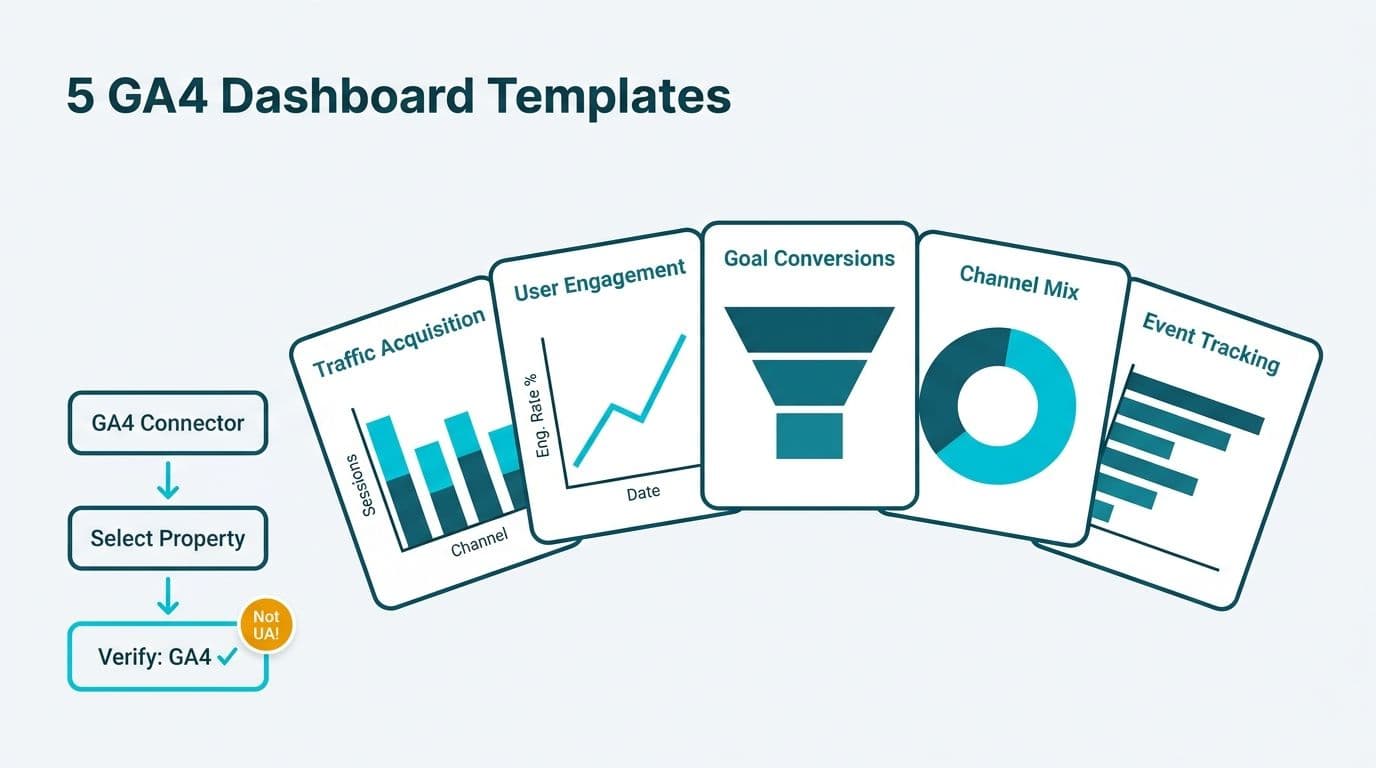
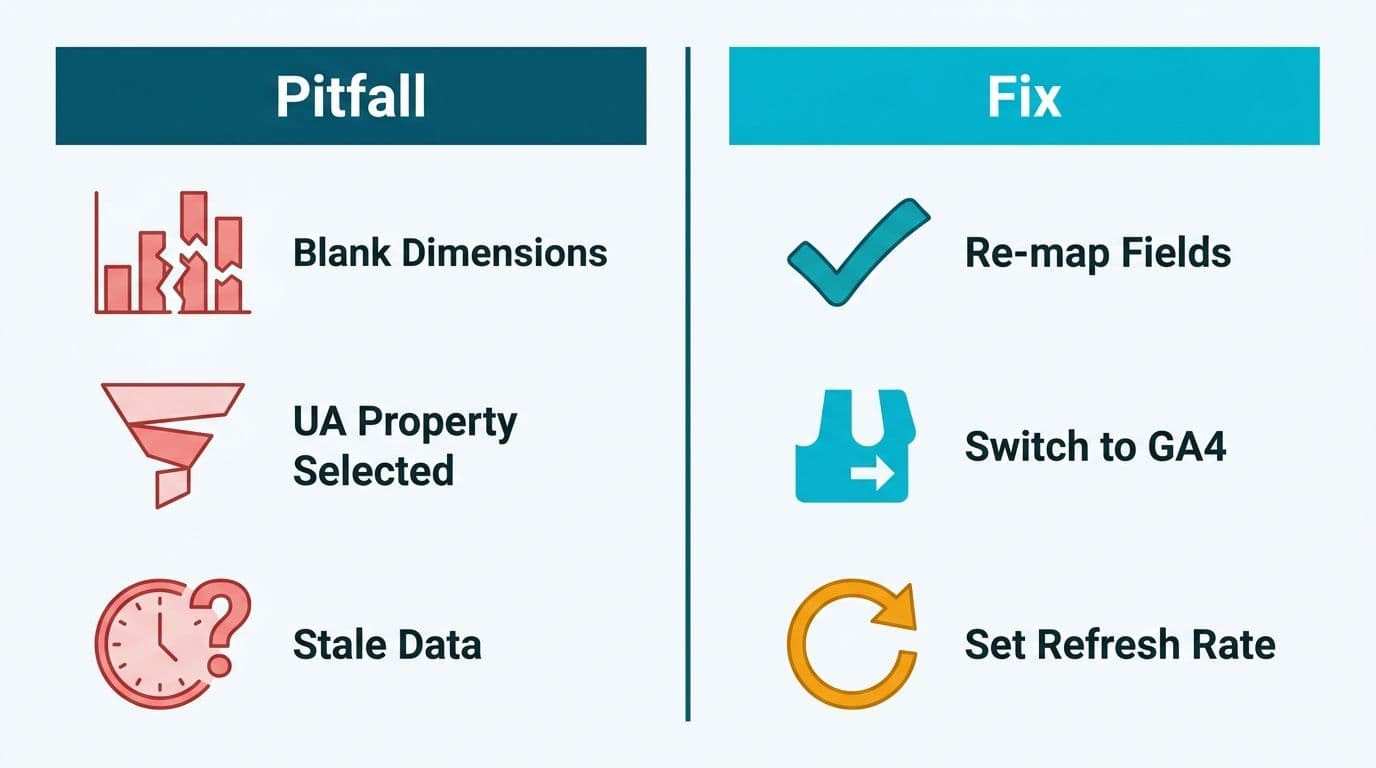
Five production-ready Looker Studio templates for GA4 give data and analytics teams a structured reporting layer for traffic acquisition, user engagement, and goal conversions without building from scratch. Each template connects to the native GA4 data source connector, and the critical setup step is verifying that the selected property is a GA4 property - not a legacy Universal Analytics property - before any dimensions are populated.
Key Takeaways
- Looker Studio templates for GA4 reduce dashboard build time by providing pre-structured views that map directly to GA4's event-based data model, replacing session-based Universal Analytics report logic.
- The GA4 connector has two common first-mile failures: selecting a UA property instead of a GA4 property, and referencing deprecated UA metric names such as "Bounce Rate" against a GA4 data source.
- Healthcare and finance teams must apply row-level filters and compliance controls - HIPAA for US healthcare, GDPR for UK and EU organizations, PIPEDA for Canadian firms - before sharing GA4 Looker Studio reports externally.
- A looker studio marketing dashboard template serves operational marketing teams tracking daily channel performance; a looker studio marketing report template serves executive stakeholders reviewing weekly or monthly KPIs.
- Agency looker studio client reporting templates require viewer-level access controls configured in Looker Studio's Manage Access panel so each client sees only their own property data.
What Are Looker Studio Templates for GA4 and Why Do They Matter?
Looker Studio templates for GA4 are pre-built report files connected to the Google Analytics 4 data source connector, giving teams a validated dashboard structure without starting from a blank canvas. GA4's event-based data model introduced dimension and metric names that are structurally incompatible with Universal Analytics report templates - making purpose-built GA4 templates a practical requirement, not a convenience (Google Analytics Help documentation, 2024).
For mid-market organizations in healthcare and finance, the operational value is direct. A US hospital system's digital team can deploy a goal-conversion template, map it to appointment-booking events, and present clean web analytics to a CIO within the same sprint. A Canadian financial services firm operating under PIPEDA can use an engagement template as the documented, repeatable reporting layer between raw GA4 event data and an executive quarterly review.
Our Certified Looker Studio consulting practice consistently finds that template adoption accelerates most when finance directors need audit-ready reporting on a fixed timeline - the connector setup and chart architecture are already validated, leaving only property-level configuration.
The five template categories that address the broadest reporting needs in mid-market organizations are: traffic acquisition, channel engagement, goal and conversion tracking, e-commerce and fulfilment, and client-facing agency reporting.
How Do You Connect GA4 to Looker Studio? Connector Setup Step by Step
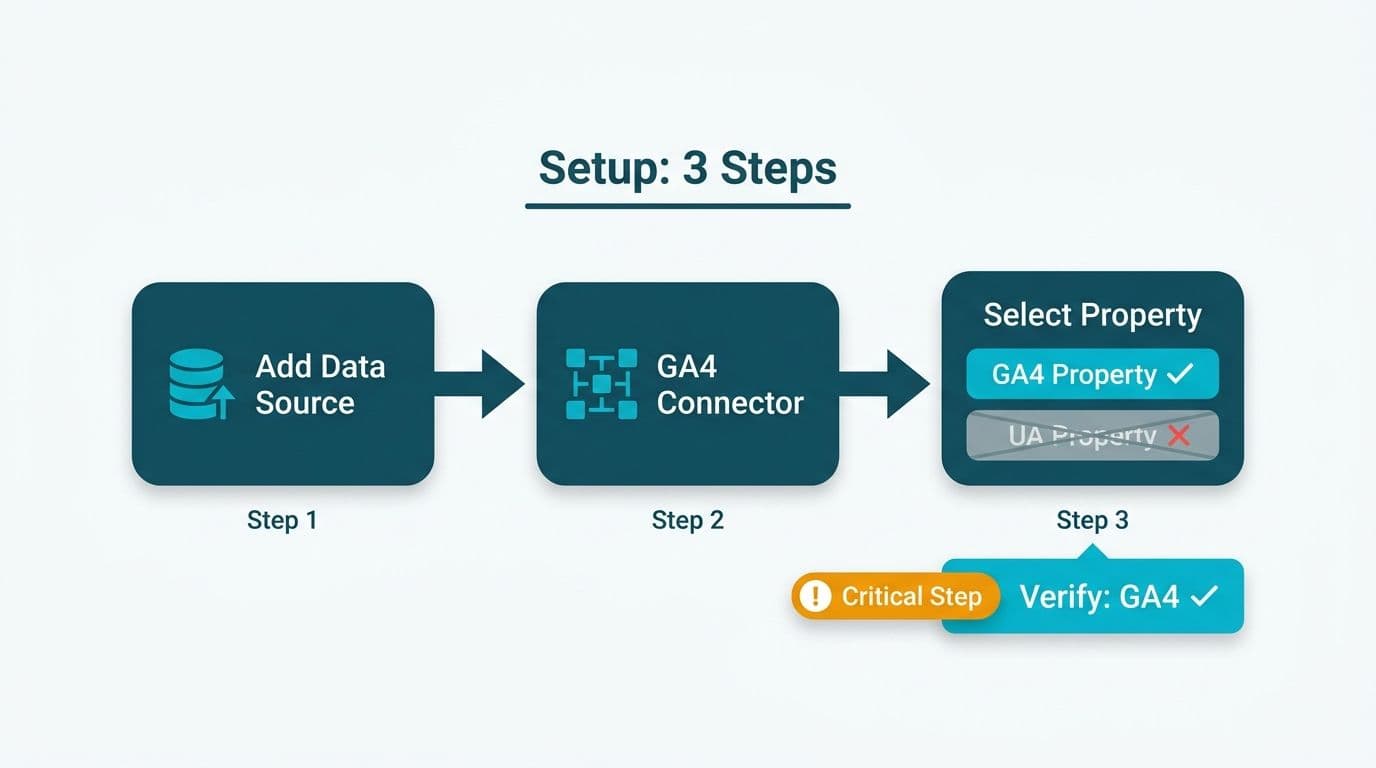
Connecting GA4 to Looker Studio requires the native Google Analytics connector - not the BigQuery connector, unless you are querying a GA4 raw export at scale. The production-tested setup sequence:
Step 1 - Create a new data source. In Looker Studio, navigate to Data Sources and select Google Analytics as the connector type. Authenticate with the Google account that holds at least Viewer access to the target GA4 property.
Step 2 - Select the correct property. GA4 properties and Universal Analytics properties appear in the same dropdown. GA4 properties carry a "(GA4)" label. Selecting a UA property surfaces session-based dimensions that are incompatible with GA4 templates and is the single most common first-mile error across mid-market deployments.
Step 3 - Configure data freshness. The default cache refresh in Looker Studio is 12 hours (Google Looker Studio documentation, 2024). For operational dashboards requiring same-day visibility, set data freshness to 1 hour under Data Source Settings - but note this increases API quota consumption against the GA4 Data API daily limits.
Step 4 - Set timezone-aware date controls. GA4 timestamps events in the property's configured timezone, not UTC. When a report spans properties in different regions - for example, a US e-commerce property and a UK retail property for the same brand - week-over-week comparisons will produce misleading deltas unless each data source respects its own timezone configuration.
Step 5 - Validate with a single metric before populating the template. Add a Sessions scorecard to a blank page and cross-check the figure against GA4's Acquisition overview. A variance above five percent indicates a filter, property, or date mismatch that must be resolved before the full template is deployed to stakeholders.
For UK and EU organizations, GDPR compliance requires IP anonymization enabled at the GA4 property level before data flows into Looker Studio reports shared with third parties. This is a GA4 property setting, not a Looker Studio connector setting - but the template inherits whatever data GA4 chooses to expose.
What Are the Five Production-Ready GA4 Connector Templates?
The following five templates address the reporting surfaces most requested by CIOs, data leads, and finance directors at mid-market organizations. Each includes core dimensions, connector requirements, and the business question it answers.
Template 1: Traffic Acquisition Dashboard
Business question: Where is web traffic coming from, and which channels are growing?
Key dimensions: Session source/medium, session campaign, landing page, new vs. returning users, country.
Connector note: The "Session source / medium" dimension in GA4 reflects the first touch of a session, not last touch. Organizations using last-touch attribution should switch to "First user source / medium" or configure a custom channel grouping at the GA4 property level before connecting the template. This template forms the core of a looker studio marketing dashboard template for teams tracking paid and organic acquisition side by side. For a logistics operation monitoring delivery partner referral traffic or carrier campaign performance, this acquisition layer can be extended into a looker studio logistics dashboard template by adding a campaign dimension filtered to logistics partner UTM parameters.
Template 2: Engagement and Content Performance
Business question: Which pages hold attention, and where do users drop off?
Key dimensions: Page path, engagement rate, average engagement time per session, sessions with engagement, entrances by page.
Connector note: GA4 replaced the UA bounce rate with "engagement rate," defined as sessions lasting more than 10 seconds, having a key event, or having two or more page views (Google Analytics Help documentation, 2024). Templates originally designed for the UA bounce rate metric will return null values against a GA4 data source - the field reference must be remapped. This template is the operational backbone of a looker studio marketing report template for content and editorial teams tracking article or resource performance.
Template 3: Goal and Conversion Tracking
Business question: How many users completed a defined conversion event, and what was their acquisition path?
Key dimensions: Event name, key event count, session conversion rate, event source, session medium, landing page.
Connector note: In GA4, all conversions are events marked as "key events" at the property level. Following Google's 2023 migration documentation, the metric label changed from "Conversions" to "Key events" (Google Analytics documentation, 2023). A finance director comparing current-period lead form submissions to prior-period data must confirm that both date ranges reference the updated metric label - templates imported from the pre-migration period will display zero counts if the field was not updated.
A US healthcare system using this template for appointment-booking events must confirm that no protected health information flows through GA4 event parameters. GA4 does not sign HIPAA Business Associate Agreements, so event parameters must contain only aggregate counts and non-identifiable context - never patient names, appointment times, or record numbers.
Template 4: E-commerce and Fulfilment Tracking
Business question: What is purchase funnel performance, and where does checkout drop off?
Key dimensions: Item name, item category, add-to-cart rate, purchase rate, checkout step abandonment, shipping tier.
Connector note: GA4 e-commerce requires the enhanced measurement e-commerce schema implemented via gtag.js or Google Tag Manager. A looker studio ecommerce dashboard shipping and fulfilment view depends specifically on the "shipping" and "coupon" parameters being passed with the purchase event - if these parameters are absent from the site implementation, those template columns return null and the fulfilment analysis layer is inoperable. A Canadian retailer tracking cross-border orders under PIPEDA can apply a country dimension filter to separate domestic Canadian fulfilment rows from US cross-border transactions without exposing individual-level shipping data.
Template 5: Agency Client Reporting Template
Business question: How does each client's web performance compare across traffic, engagement, and conversion KPIs in a single managed view?
Key dimensions: All core dimensions above, controlled per client via separate data sources or a blended data source with property-level filters.
Connector note: A looker studio client reporting template for agencies requires either one dedicated data source per client GA4 property, or a blended data source with strict property-level filter logic. Viewer-level access must be set in Looker Studio's Manage Access panel so Client A's team cannot access Client B's data - this is a Looker Studio permission setting, not a GA4 setting. A UK digital agency serving GDPR-regulated clients must restrict report sharing to named Google accounts and avoid "Anyone with the link" public access modes, which are incompatible with GDPR data minimization obligations.
GA4 Template Comparison: Which Template Fits Which Use Case?
| Template | Primary User | Core GA4 Metric | Critical Setup Step | Compliance Consideration |
|---|---|---|---|---|
| Traffic Acquisition | Marketing lead, CIO | Sessions by channel | Confirm GA4 property, not UA | GDPR: IP anonymization at GA4 level |
| Engagement and Content | Content team, data lead | Engagement rate | Remap UA bounce rate dimension | GDPR: no PII in page path values |
| Goal and Conversion | Finance director, CMO | Key events count | Update metric label post-migration | HIPAA: no PHI in event parameters |
| E-commerce and Fulfilment | Ops lead, finance | Purchase rate | Confirm enhanced e-commerce schema | PIPEDA: apply country filter for CA/US split |
| Agency Client Reporting | Account manager | All KPIs per client | Set viewer-level property filters | GDPR: restrict public sharing access |
What Configuration Pitfalls Should You Avoid in GA4 Looker Studio Templates?
Pitfall 1 - Mixing UA and GA4 dimensions. Templates built for Universal Analytics reference dimension names that do not exist in GA4's API. Looker Studio flags these as "Invalid Dimension" in red within the field editor. Every broken field must be corrected before the report reaches stakeholders - a CIO reviewing a dashboard with null charts will draw conclusions from the absence of data.
Pitfall 2 - Ignoring data freshness lag. GA4 processes some event types with up to 48 hours of latency (Google Analytics documentation, 2024). A conversion template showing "yesterday's" totals may actually reflect data from 36 hours prior. Date ranges and data freshness intervals should be labeled explicitly in the report header so finance directors are not comparing an incomplete current day against a complete prior period.
Pitfall 3 - Using the wrong date dimension for period comparisons. GA4 offers three date dimensions in Looker Studio: Date, Year, and Year Month. Year-over-year analysis requires explicit date range controls for both the current and comparison periods - GA4 does not auto-populate prior-year columns the way some BI platforms do.
Pitfall 4 - Skipping looker studio string functions for path cleanup. GA4 frequently appends query strings to page path values - for example, /contact?utm_source=email - which produces hundreds of near-duplicate rows in engagement and content templates. Applying a REGEXP_REPLACE or TRIM calculated field using Looker Studio string functions strips query parameters before the dimension reaches the chart layer. This is a required step in any production engagement or content template, particularly for organizations where marketing campaigns drive URL parameter proliferation.
Pitfall 5 - Sharing reports without access controls. For a US financial services team operating under SOC 2 controls, or a Canadian organization subject to PIPEDA, externally shared Looker Studio reports must use domain-restricted Google accounts and report-level access restrictions. Public access settings are incompatible with data governance requirements in regulated sectors and should be treated as a deployment blocker, not an afterthought.
How Do Finance and Healthcare Teams Adapt These GA4 Templates?
Finance directors at mid-market US and Canadian firms typically adapt the goal-conversion template to track revenue-generating digital events: lead form submissions, demo requests, pricing page visits, and gated document downloads. A practical extension is a blended data source that joins GA4 key event counts with CRM pipeline stage data exported to Google Sheets, producing a single Looker Studio view of web-to-pipeline performance without requiring a data warehouse. The finance analytics consulting guide covers when to engage a specialist for these multi-source integrations versus building in-house.
Healthcare organizations face a different constraint. A US hospital system's digital team must ensure that URL paths containing any patient-identifiable context are stripped from the page path dimension using a REGEXP_REPLACE calculated field before any engagement template is shared with department heads or external stakeholders. The HIPAA compliant BI tools guide outlines how GA4 fits alongside HIPAA-compliant data warehouse tooling when web analytics must connect to clinical or financial reporting layers.
UK fintech firms must configure GA4 consent mode v2 - Google's requirement since March 2024 - before any data reaches Looker Studio templates shared outside the analytics team. Consent mode modifies GA4's collection behavior for users who decline analytics cookies, meaning template charts will reflect a blend of observed and modeled data. Reports should label these charts clearly so compliance officers and finance stakeholders have an accurate picture of data completeness rather than treating modeled figures as fully observed counts.
For healthcare teams connecting web analytics to operational performance metrics, the revenue cycle management dashboard metrics guide provides context on how digital conversion data integrates with patient acquisition and financial reporting workflows.
---
About Lets Viz: Lets Viz is a certified analytics consulting practice in operation since 2020, with a 5.0 Clutch rating built across engagements with US healthcare systems, UK fintech firms, Canadian manufacturing organizations, and global SaaS companies. Our certified Looker Studio team deploys GA4 reporting infrastructure for mid-market data and finance teams who need audit-ready analytics without the build overhead.
Ready to deploy production-grade GA4 templates with the right connector configuration and compliance controls from day one? Our Certified Looker Studio consulting practice scopes and delivers implementations from initial connector setup through stakeholder-ready dashboards.