What Is NLP in Power BI? Q&A, Copilot and Data Privacy
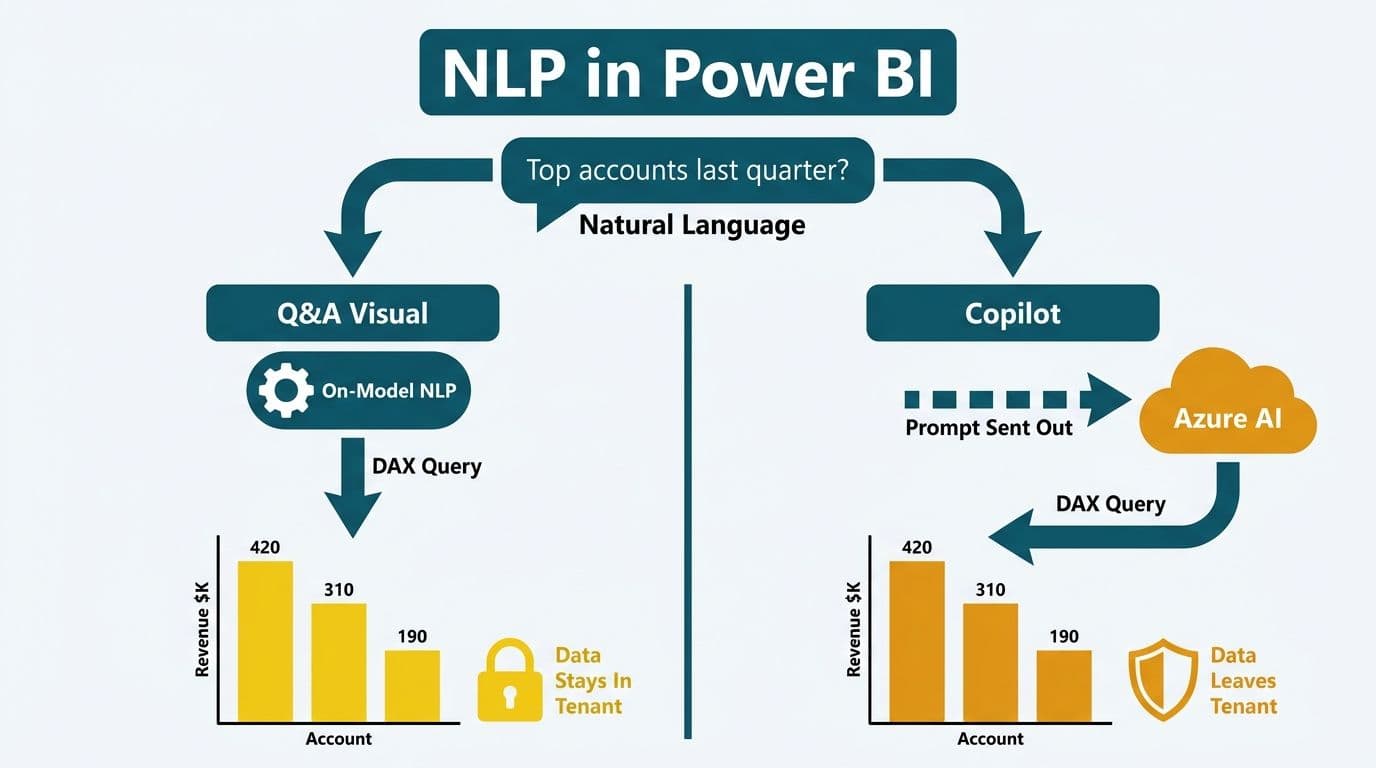
NLP (natural language processing) in Power BI is the technology that lets users type or speak plain-English questions - such as "What were last quarter's top revenue accounts?" - and receive charts, tables, and written summaries in return. Microsoft applies NLP in two features: the Q&A visual and Copilot. Both convert text into DAX queries, but they differ fundamentally in where that processing happens and what data travels outside your semantic model.
Key Takeaways
- Q&A uses on-model NLP to convert natural language into DAX; no data leaves the Power BI tenant.
- Copilot sends prompt text and model metadata (not raw data values) to Azure OpenAI Service, processed within Microsoft's Azure boundary.
- UK and EU organisations must confirm their Power BI tenant is homed in the EU Data Boundary before enabling Copilot to meet GDPR data-residency obligations.
- Canadian organisations should verify PIPEDA cross-border transfer requirements; US healthcare teams must audit semantic model metadata for PHI before activating Copilot.
- Finance teams are using NLP to streamline month-end close queries, expense management reviews, and accounts payable summaries - removing the analyst bottleneck from routine data requests.
What Is NLP in Power BI, and Which Features Use It?
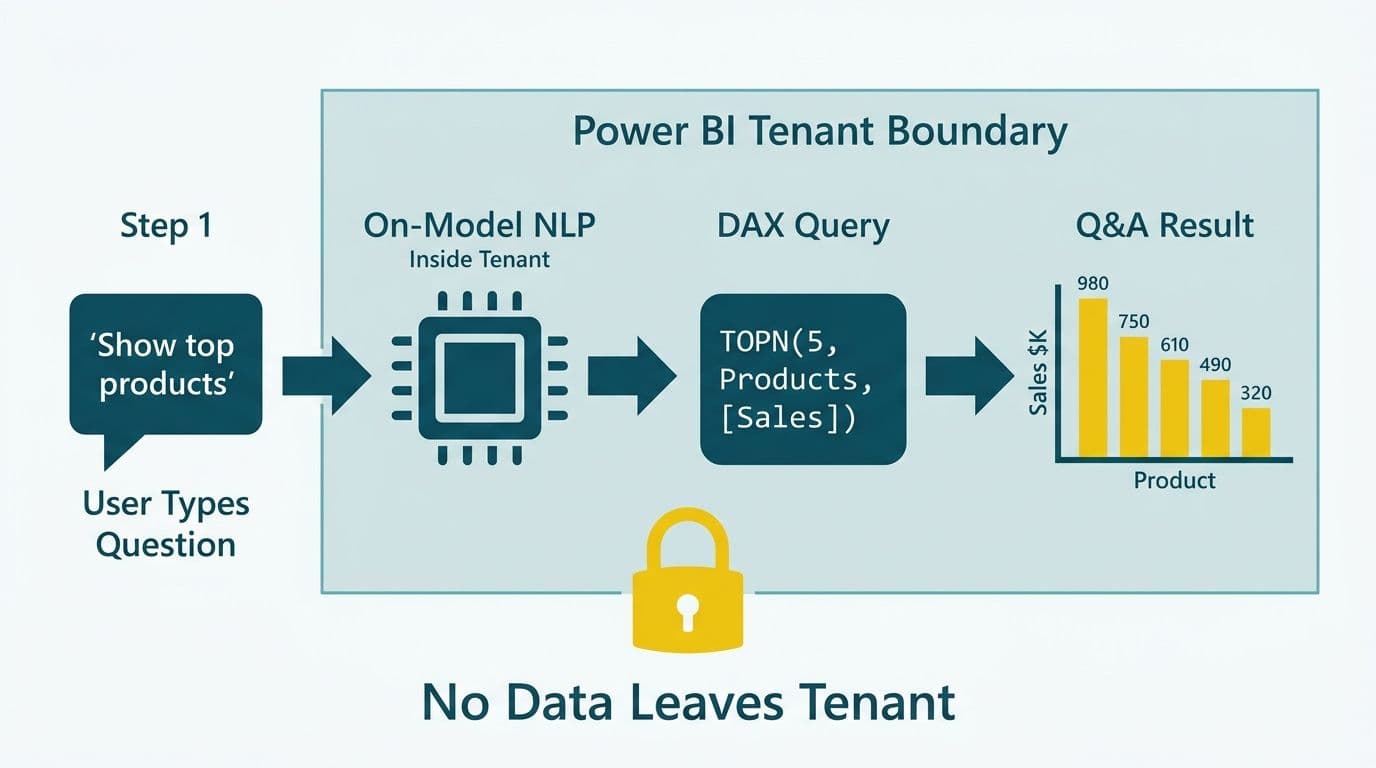
NLP in Power BI refers to the engine that interprets user-written or spoken questions and maps them onto a structured semantic data model. Microsoft ships NLP in two distinct places within the Power BI ecosystem.
The Q&A visual has been part of Power BI since 2019 and received significant accuracy improvements through 2025. It processes questions entirely within the Power BI engine - no text or data crosses the model boundary. When a finance director types "Show me outstanding invoices over 60 days", Power BI's NLP layer tokenises the phrase, matches tokens against table names and column names defined in the model, assembles a DAX expression, and renders a visual.
Copilot in Power BI is a generative AI layer built on Azure OpenAI Service, generally available in Power BI service from 2024 onward (Microsoft Fabric documentation, 2025). Copilot extends what Q&A can do: it drafts narrative summaries, explains trend shifts in plain English, generates new report pages, and answers multi-step analytical questions. The trade-off is architectural - Copilot sends prompt text and schema metadata to Azure for processing rather than resolving everything locally within your tenant.
Understanding where each feature processes data is the first step toward a defensible governance posture. For organisations that want model architecture and compliance readiness addressed together, a Power BI consulting (Copilot-ready) engagement ensures both layers are optimised before end users start typing questions.
How Does Power BI Q&A Process Natural Language?
Power BI Q&A translates a natural-language question into executable DAX without sending any data outside your tenant. The NLP pipeline runs through four sequential stages:
1. Tokenisation - the user's question is split into individual words and phrases.
2. Entity recognition - tokens are matched against table names, column names, and synonyms registered in the linguistic schema.
3. Intent classification - the engine determines whether the user wants an aggregation, a filter, a ranking, a time comparison, or a combination.
4. DAX generation - a query is assembled and executed against the VertiPaq in-memory engine.
The accuracy of this pipeline depends almost entirely on semantic model hygiene. A column named "Amt" resolves poorly; "Invoice Amount" resolves correctly. Finance teams that invest in descriptive naming conventions and register business-term synonyms - "GP" mapped to "Gross Profit", "ARR" mapped to "Annual Recurring Revenue" - get substantially better Q&A results without changing the underlying data.
For data teams building AI expense management automation, Q&A can be wired into Power Automate flows so finance directors receive plain-English summaries the moment budget thresholds are breached. Those summaries are generated entirely from the published semantic model, with no analyst involvement and no data leaving the Power BI environment.
How Does Copilot in Power BI Use NLP - and What Data Travels to Azure?
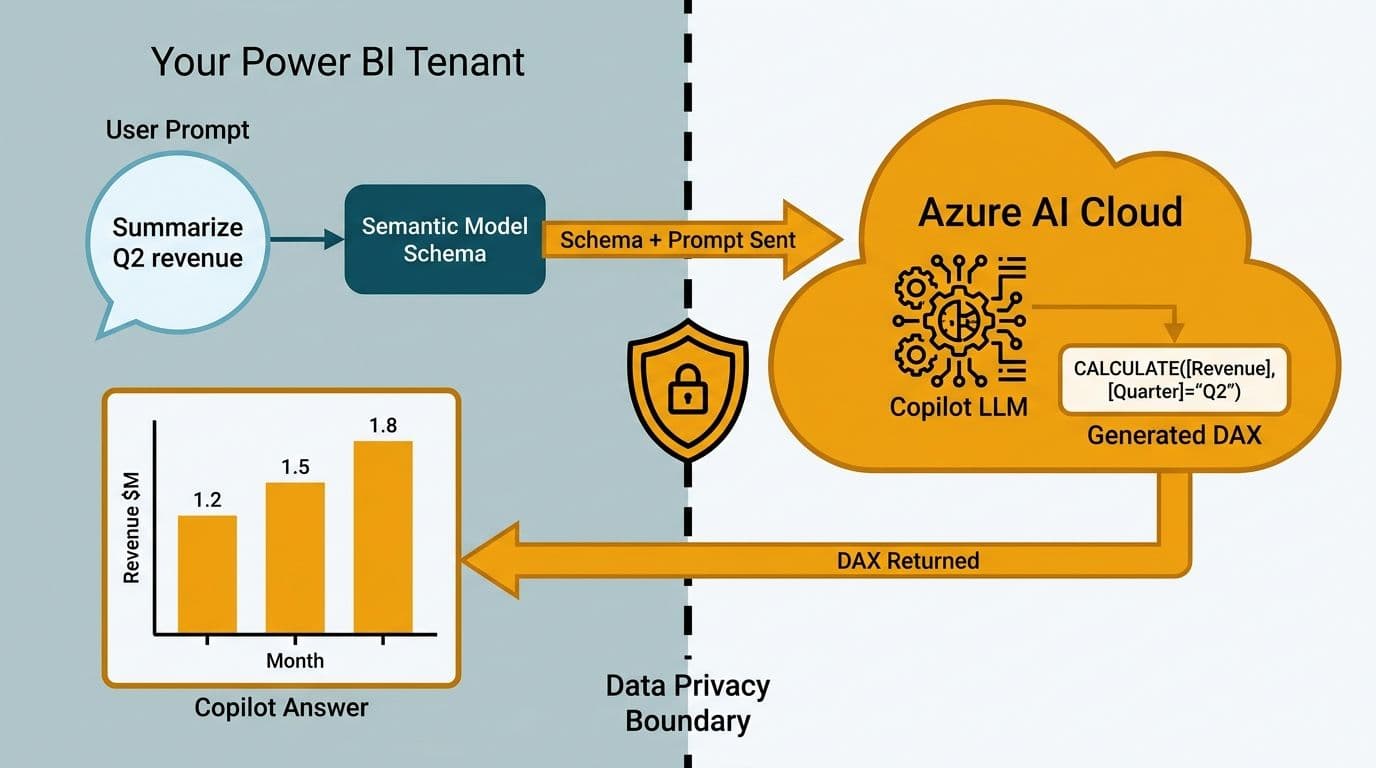
Copilot is Power BI's most capable NLP layer, and it requires a clear-eyed understanding of data flows before regulated organisations enable it.
What Copilot sends to Azure OpenAI Service (per Microsoft Fabric documentation, 2025):
- The user's natural-language prompt
- Semantic model metadata: table names, column names, measure names, and model descriptions
- Report page context when Copilot is asked to summarise or explain a report
What Copilot does not send to Azure:
- Raw row-level data values from your dataset
- Customer or patient PII stored in data tables
Processing occurs within the same Azure geography as your Power BI tenant. For enterprise customers, Microsoft contractually commits that prompt data is not used to train its foundational models. Administrators can verify this in the Power BI Admin Portal under the "Copilot and Azure OpenAI Service" settings.
The practical implication for compliance teams is that the risk lies in metadata, not row data. If a DAX measure is named "Revenue from Key Account - Confidential" or a table is titled "Patient Readmission Records Q3", those strings travel to Azure during a Copilot session. Semantic model design - specifically what goes into field names and descriptions - becomes a governance decision once Copilot is enabled.
For the full breakdown of what licences activate these features, see the Power BI Copilot Licensing Requirements guide.
What Are the GDPR Data-Residency Rules for UK and EU Power BI Users?
For UK and EU decision-makers, the core compliance question is not whether NLP produces accurate answers - it is whether prompt processing satisfies GDPR requirements on international data transfers and data residency.
Microsoft's EU Data Boundary commitment, which came into force in 2023 and was extended in 2025, restricts the processing of EU customer data - including Copilot prompts - to European Azure regions for tenants homed within the EU. Both Power BI and Azure OpenAI Service are listed as in-scope services under this commitment (Microsoft EU Data Boundary documentation, 2025).
Three steps UK and EU CIOs should complete before enabling Copilot:
Step 1: Confirm tenant home region. In the Power BI Admin Portal, navigate to "About Power BI" and verify the tenant data region. If the region is US East or US West, prompts process in the US - a potential transfer requiring safeguards under GDPR Article 46.
Step 2: Update your Record of Processing Activities. Copilot represents a new processing activity. Document the controller-processor relationship with Microsoft under a Data Processing Agreement (DPA). Microsoft provides a standard enterprise DPA that covers both EU GDPR and UK GDPR obligations.
Step 3: Audit semantic model metadata. Ensure no personal data appears in column names, table names, or measure descriptions before enabling Copilot, as this metadata travels to Azure during every session.
UK organisations operating under UK GDPR post-Brexit face the same requirements as EU organisations. A UK fintech firm that has not confirmed its tenant is homed in a UK or EU Azure region may need to complete a Transfer Impact Assessment before enabling Copilot on any workspace containing customer financial data.
How Do US Healthcare and Finance Teams Navigate NLP Compliance?
US organisations face two primary compliance frameworks when evaluating NLP in Power BI: HIPAA for healthcare entities handling Protected Health Information, and SOC 2 for finance and SaaS businesses.
HIPAA and Power BI Copilot
Microsoft includes Power BI in its Business Associate Agreement for Microsoft Online Services (updated 2025), meaning Power BI can form part of a HIPAA-compliant architecture. For Copilot specifically, the critical requirement is that PHI must not appear in semantic model metadata. If column names, table descriptions, or measure names contain Protected Health Information, those strings travel to Azure OpenAI Service during Copilot sessions.
A US hospital system using Power BI to monitor readmission rates, staffing ratios, or care pathway performance can safely enable Copilot on workspaces where the semantic model uses aggregate clinical terminology rather than individual patient identifiers. The hospital readmission rate analytics dashboard guide covers the Power BI model design patterns that support this approach in practice.
Finance teams and SOC 2
Finance directors evaluating what finance workflows to automate with AI first consistently find that Copilot delivers high value in three areas: month-end close status queries, accounts payable ageing summaries, and budget-versus-actual variance explanations. Copilot can generate plain-English responses for all three directly from published semantic models, without analysts building one-off reports. For teams looking at how AI extracts data from invoices and financial documents upstream, Power BI's NLP layer provides the query interface that makes that extracted data accessible without SQL skills.
Microsoft holds SOC 2 Type II attestation covering both Power BI and Azure OpenAI Service, providing the audit trail that finance compliance teams and external auditors typically require.
Canadian organisations handling customer or employee financial data should verify that their Power BI tenant's data residency aligns with PIPEDA cross-border transfer obligations before routing Copilot prompts through US-based Azure infrastructure.
NLP in Power BI vs. Traditional BI: Which Approach Fits Each Scenario?
The table below maps common finance and healthcare use cases against three delivery approaches. The final two rows capture the data-travel and compliance considerations that governance teams care about most.
| Use Case | Traditional BI | Power BI Q&A | Power BI Copilot |
|---|---|---|---|
| Ad-hoc revenue query | Analyst builds visual (30-60 min) | Instant visual from typed question | Visual plus written narrative |
| Month-end close summary | Scheduled PDF report | Query published model on demand | Copilot drafts narrative summary |
| Invoice ageing review | Pre-built dashboard | Ask for overdue invoices by age bucket | Summarise AR trends with commentary |
| Readmission rate trend | Static weekly report | Real-time model query | Plain-English trend explanation |
| Expense variance to budget | Finance analyst builds view | Filter and aggregate by question | Copilot flags top variances |
| Data travel | Stays in tenant | Stays in model engine | Metadata and prompt travel to Azure (in-region) |
| Compliance overhead | Low | Low | Requires metadata audit and DPA |
The central trade-off is clear: Q&A delivers near-zero compliance overhead because all processing stays within the model engine. Copilot delivers richer, narrative-grade output but requires upfront governance work - metadata audit, DPA confirmation, and region verification - before deployment in regulated environments.
When Should Your Organisation Enable Q&A or Copilot?
A practical readiness framework prevents both compliance gaps and the user frustration that follows poor model quality.
Enable Q&A when:
- Semantic model tables and columns use human-readable, descriptive names
- Synonyms are registered for the business terms your users will type
- Users hold Power BI Pro or Premium Per User licences
Enable Copilot when:
- The Power BI tenant is confirmed in a supported Azure region (US, EU, UK, Canada, and Australia as of 2025 - see Microsoft's Copilot availability documentation for the current list)
- The organisation holds Microsoft Fabric capacity or Power BI Premium Per User (PPU) licensing
- A metadata audit confirms no PII or PHI appears in semantic model field names or descriptions
- For UK and EU deployments: EU Data Boundary configuration is verified and a DPA is in place with Microsoft
- For US healthcare: the Microsoft BAA is signed and row-level security is enforced on sensitive workspaces
- For Canadian organisations: a PIPEDA cross-border transfer review has been completed
Delay Copilot if:
- Sensitive identifiers appear in column or measure names
- The tenant is homed in a region that does not match your data-residency requirements
- A data classification exercise across semantic models has not yet been completed
Suppose a 50-seat US SaaS finance team wants to reduce analyst time during month-end close. They could enable Copilot immediately on their revenue analytics workspace - clean metadata, US tenant, low-sensitivity data - while keeping it disabled on the HR compensation workspace until a metadata review is complete. A UK fintech firm would enable Copilot only after verifying EU Data Boundary configuration and updating its DPA schedule. A Canadian manufacturing company would require a legal review of PIPEDA cross-border provisions before activating Copilot on any workspace containing customer or employee financial data.
How NLP in Power BI Connects to Broader AI Finance Automation
NLP in Power BI sits at the conversational query layer of a broader AI-powered finance stack. Upstream, document AI tools handle how AI extracts data from invoices and financial documents - converting unstructured PDFs into structured rows that land in a data warehouse or lakehouse. Power BI's NLP layer then makes that structured data conversationally accessible: a finance director can ask Copilot to summarise accounts payable throughput, flag exceptions in expense management, or explain variance against budget - all in plain English, without writing a DAX expression.
This pipeline - automated document extraction feeding NLP-powered queries - is how mid-market finance teams are reducing the analyst bottleneck across month-end close and accounts payable automation simultaneously. For a broader map of where generative AI fits across finance operations, the generative AI use cases in finance guide covers ten practical applications with implementation context.
For teams that want the productivity benefits of NLP-powered analytics with governance handled end to end, Managed Power BI services from Lets Viz includes semantic model health reviews, Copilot readiness assessments, and ongoing compliance monitoring across US, UK, EU, and Canadian regulatory environments.
---
About Lets Viz: Lets Viz has delivered Power BI, Fabric, and AI analytics solutions to US healthcare systems, UK fintech firms, Canadian manufacturing companies, and global SaaS businesses since 2020, earning a 5.0 Clutch rating and active Microsoft partnership status. Our consultants have designed HIPAA-compliant semantic models, EU Data Boundary-verified Copilot deployments, and Copilot-ready architectures for regulated mid-market organisations across North America and Europe.
If your team is ready to evaluate or implement NLP features in Power BI, our Power BI consulting (Copilot-ready) service covers model design, compliance readiness, and Copilot configuration from day one.


