What Is Microsoft Copilot for Finance? A Hands-On Guide
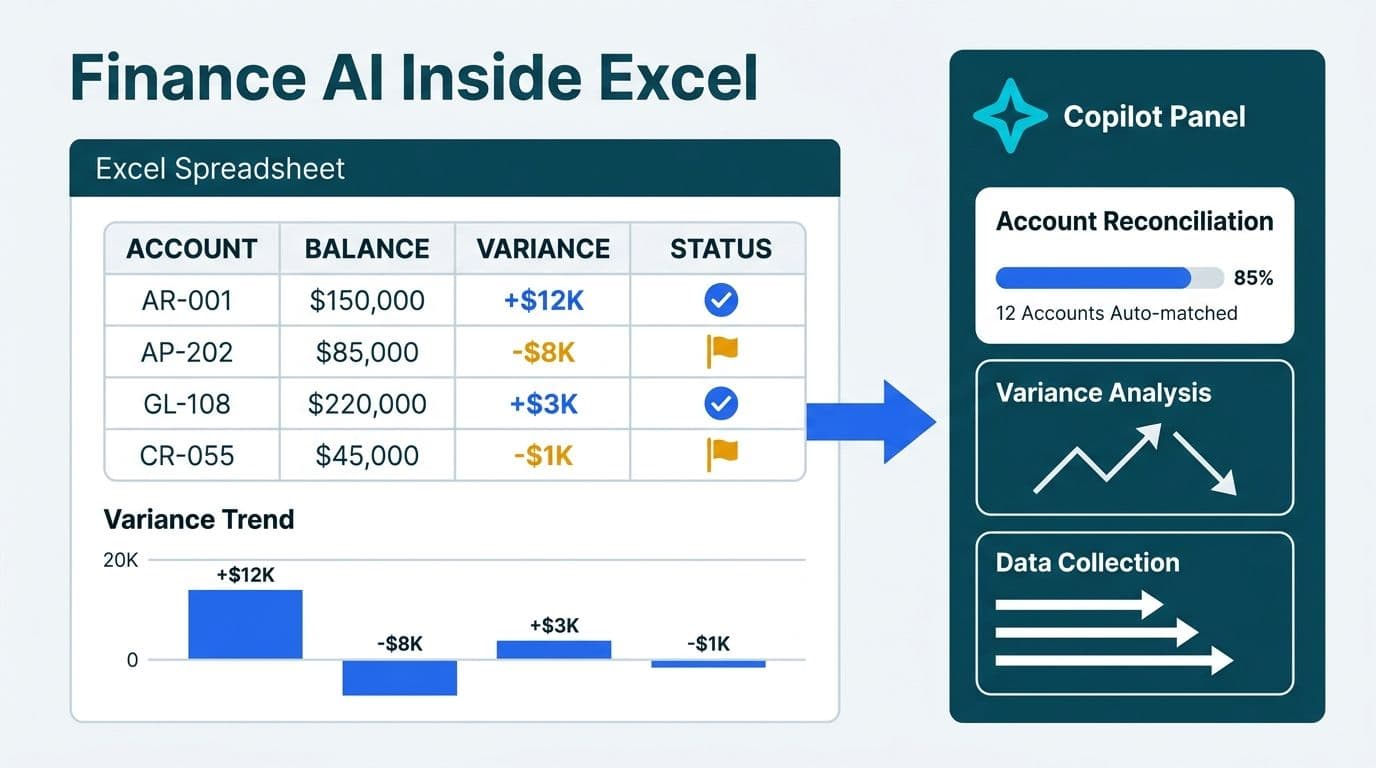
Microsoft Copilot for Finance is an AI-powered add-in for Microsoft 365 that embeds directly into Excel and Teams to help finance teams automate routine close tasks. It assists with account reconciliation, variance analysis, and data collection workflows without requiring analysts to leave their familiar tools. Available as a paid add-on license on top of Microsoft 365 Business or Enterprise plans, it augments your existing finance stack rather than replacing your ERP or financial planning system.
Key Takeaways
Copilot for Finance lives inside Excel and Teams - not as a standalone finance platform
Core capabilities: reconciliation assist, variance analysis, and structured data collection workflows
Requires Microsoft 365 Business Premium or Enterprise plus a separate Copilot for Finance add-on license
Genuine gaps include limited ERP connectivity outside Dynamics 365, thin audit logging, and model opacity
A formal AI governance framework for finance is a prerequisite before deployment, especially under GDPR, PIPEDA, or SOC 2 obligations
What Is Microsoft Copilot for Finance and How Does It Work?
Microsoft Copilot for Finance is a purpose-built finance AI assistant that Microsoft brought to general availability in 2025 (Microsoft, 2025). It is not a standalone application - it runs as an add-in pane inside Excel and as a bot within Microsoft Teams, using Azure OpenAI models to interpret financial data, surface anomalies, and coordinate month-end workflows in plain language.
The product connects to your data through Microsoft's connector ecosystem. Dynamics 365 Finance integrates natively. Other ERP systems - SAP, Oracle, NetSuite, and similar platforms - connect through Power Platform connectors or custom API configurations, which typically require a developer or low-code specialist to configure correctly.
The core user experience is straightforward: an analyst opens a trial balance or sub-ledger in Excel, highlights a data range, and asks Copilot to flag reconciling items above a threshold or explain the period-over-period variance in a specific cost center. Copilot returns structured outputs - flagged rows, plain-language explanations, or draft journal entry suggestions - directly inside the workbook.
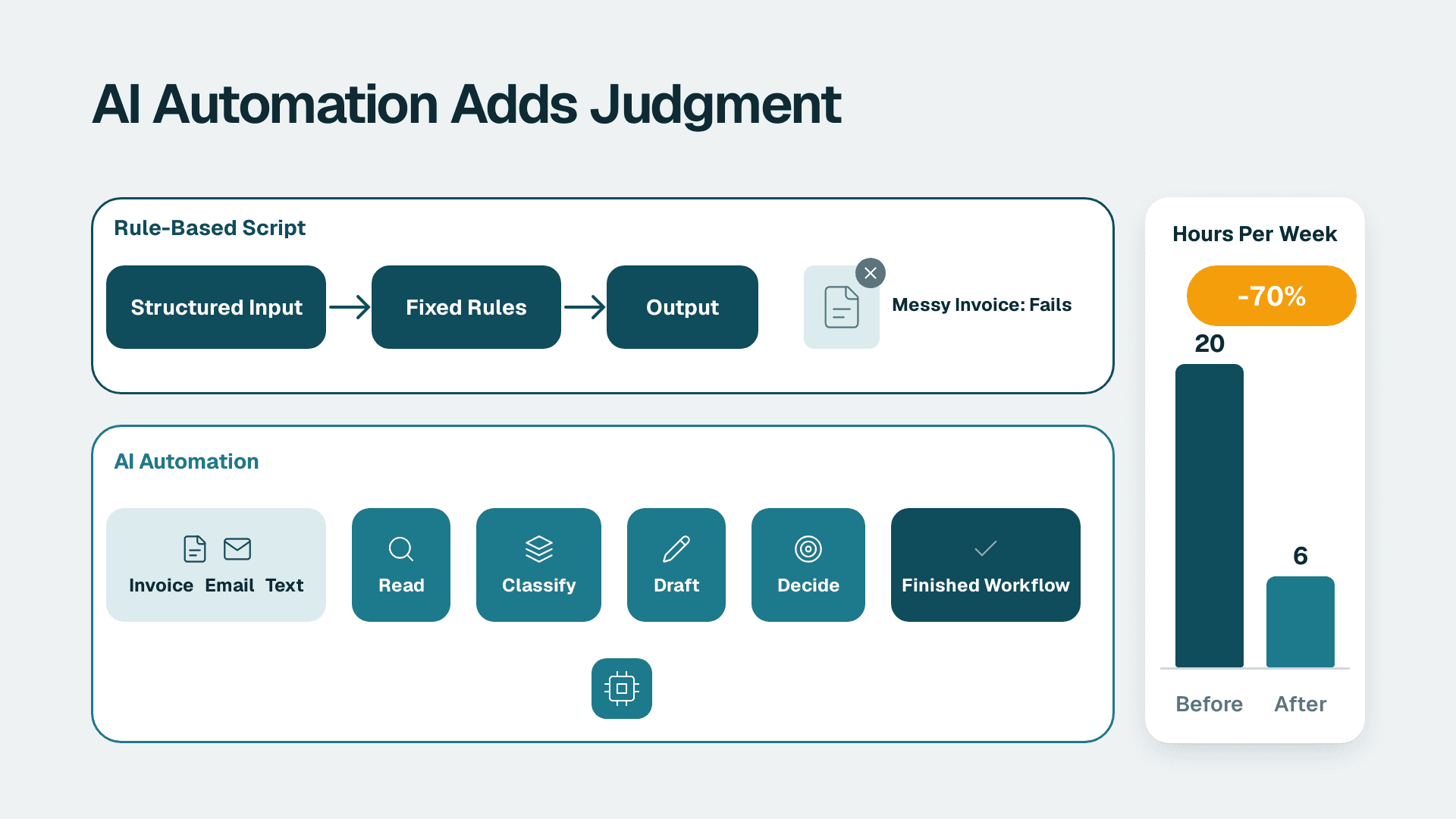
Finance teams evaluating broader automation opportunities should understand that Copilot for Finance addresses one layer of the automation stack. For a fuller picture of what end-to-end AI automation consulting looks like - from data pipelines through approval workflows - that is the right starting point before committing to any single tool.
What Does Copilot for Finance Actually Do? Excel and Teams Walkthroughs
Reconciliation Assist in Excel
Reconciliation assist is Copilot for Finance's most consistently demonstrated capability. The workflow: load your trial balance or bank statement into Excel alongside the comparative sub-ledger data, invoke Copilot from the add-in pane, and it scans the sheet for rows that diverge from expected values. The output is a prioritized list of reconciling items with short explanations - for example, a payment posted to a clearing account with no matching AP entry found.
For a US SaaS finance team running a mid-month bank reconciliation, this scan replaces the manual line-by-line review that typically consumes several hours of senior analyst time. Finance teams that have fully configured the tool - clean structured data, Dynamics or a mapped connector - report cutting reconciliation review time by 50–65% per close cycle, compressing a 4-hour senior analyst task to under 90 minutes of exception review. Critically, the analyst must verify each flag - Copilot makes no automatic postings - which is the right design for a tool operating near the financial record of a business.
Variance Analysis in Excel
The variance analysis workflow allows analysts to describe a comparison in plain language and receive a structured breakdown in return. A prompt asking why Q2 gross margin differs from Q1 by product line returns a formatted table of drivers, sorted by impact, with explanatory commentary. The output can be exported directly to Word or PowerPoint, accelerating the CFO narrative preparation that typically follows the close.
Finance teams already building Power BI dashboards should note that Copilot's variance summaries are a narrative complement to visual reporting, not a replacement. The FP&A Dashboard in Power BI: A Step-by-Step Build Guide outlines how to structure the underlying data model that feeds both tools effectively.
Data Collection Workflows in Teams
For finance teams that spend close week chasing department heads for accrual estimates or budget inputs, the data collection workflow feature reduces the email overhead significantly. Controllers build structured request templates in Excel and distribute them through Microsoft Teams channels. Copilot for Finance tracks submission status, sends automated reminders to non-responders, and consolidates completed inputs back into a master workbook.
For a UK fintech firm under GDPR obligations, this workflow creates a documented data collection chain: submissions are timestamped, attributed to named users, and stored within the Microsoft 365 tenant rather than scattered across personal inboxes. That chain of custody is directly relevant when demonstrating data handling compliance to auditors.
The Teams-side coordination extends to close checklist management: the Copilot bot surfaces outstanding tasks in the Finance Close channel, updates item status as team members mark work complete, and escalates overdue items to the controller without manual follow-up.
What Are the Real Capability Gaps in Copilot for Finance?
Honest evaluation of any AI finance tool requires equal weight on limitations. Copilot for Finance has five gaps that finance leaders should assess before deployment.
1. ERP connectivity is not universal. Dynamics 365 Finance connects natively. Every other major ERP - SAP S/4HANA, Oracle Fusion, NetSuite, Sage Intacct - requires Power Platform connector configuration or custom API work. For mid-market organizations not standardized on Microsoft's ERP, the integration layer adds time and cost that erodes first-year productivity gains.
2. Model opacity creates audit friction. Copilot for Finance's reasoning is generated by Azure OpenAI models. The precise logic path that produces a reconciling item flag or variance explanation is not exposed to the user. For US financial services firms under SOC 2 requirements, or UK and EU firms facing regulatory scrutiny, the inability to explain AI outputs to internal audit can slow sign-off on AI-assisted processes.
3. Native audit logging is thin. As of 2026, Copilot's interaction history does not provide the timestamped, attributable, exportable record that financial controllers typically need for internal audit evidence. Organizations should plan to supplement logging with Power Automate flows that archive Copilot outputs to a SharePoint document library.
4. No built-in approval enforcement. Copilot surfaces recommendations but enforces nothing. A controller can act on a suggested journal entry without any second-approver step unless a separate Power Automate approval flow is configured. Governance policy must be designed and layered on top of the tool.
5. License costs compound quickly. Copilot for Finance is priced per user per month as an add-on to existing Microsoft 365 licensing. For a finance team of 30 analysts, the Copilot for Finance add-on alone runs approximately $18,000–$21,000 per year at current per-seat pricing - before factoring in connector development (typically 20–40 hours of low-code or developer time for non-Dynamics ERPs) and change management. Modeling total cost of ownership across licenses, integration, and adoption overhead before committing is essential.
These gaps are not disqualifiers, but they confirm that Copilot for Finance is a power tool requiring deliberate setup. Before deployment, reviewing the most common AI workflow automation mistakes saves considerable rework later.
How Does Copilot for Finance Compare to Other AI Forecasting Tools for Finance Teams?
AI forecasting tools for finance teams now span a wide range: embedded AI in spreadsheet add-ins, dedicated FP&A platforms with AI-native forecasting engines, and ERP-native AI built into transactional systems. The table below positions Copilot for Finance in context against the categories finance leaders are most commonly evaluating.
| Dimension | Copilot for Finance (Excel/Teams) | Dedicated FP&A AI Platform | ERP-Native AI (Dynamics 365) |
|---|---|---|---|
| Primary strength | Reconciliation assist, close coordination | Driver-based forecasting, scenario modeling | Transactional AI, process automation |
| ERP agnostic? | Partial - native Dynamics, others via connector | Usually yes | No - Dynamics only |
| Setup complexity | Low-medium (M365 + connectors) | Medium-high (new platform, migration) | Medium (Dynamics instance required) |
| Audit trail quality | Basic (supplemental tooling needed) | Strong (most platforms) | Strong |
| Model transparency | Low | Varies by vendor | Varies |
| Licensing model | Per-user add-on on M365 | Subscription, seat-based | Included in Dynamics tiers |
| Best fit | Excel-first teams already on M365 | FP&A teams needing rolling forecasts | Organizations standardized on Dynamics |
For organizations evaluating broader Microsoft data infrastructure alongside AI tooling, the Microsoft Fabric vs Synapse vs Databricks: TCO Cost Breakdown covers the data layer decisions that typically accompany an AI finance deployment.
How to Automate Month-End Financial Close With Copilot for Finance
Automating month-end financial close with AI is a layered problem. Copilot for Finance addresses the analyst-facing layer effectively but does not cover the full automation stack. A realistic close automation map for a mid-market finance team has four layers.
Layer 1 - Data ingestion (outside Copilot): Power Automate or Azure Data Factory pulls trial balance extracts, AP aging reports, and sub-ledger exports from the ERP on a scheduled basis. Data quality controls and transformation logic run here, before any AI layer touches the numbers.
Layer 2 - Reconciliation and variance review (Copilot's domain): Analysts load structured extracts into Excel. Copilot flags reconciling items, generates variance summaries, and drafts commentary. The team works through an exception queue rather than reviewing every line manually.
Layer 3 - Narrative and reporting: Copilot variance summaries feed into Word documents or PowerPoint decks for the CFO package. Power BI dashboards, built on the same data warehouse, carry the visual reporting layer independently.
Layer 4 - Approval and sign-off (outside Copilot): Power Automate routes close sign-off through a documented approval chain - controller, finance director, CFO - with timestamped records that satisfy audit requirements.
For US healthcare finance teams, Layer 1 pipelines must address HIPAA data handling before any AI layer touches patient-adjacent financial data. Microsoft's HIPAA Business Associate Agreement covers Azure and Microsoft 365 services when configured for compliance - but the data architecture must be purpose-built for that configuration, not assumed by default.
For a Canadian manufacturing company operating under PIPEDA, keeping all data processing within Microsoft's Canadian data center regions - configurable through Microsoft 365 data residency settings - satisfies the accountability requirements that PIPEDA places on organizations handling personal information in the course of commercial activity.
What AI Governance Framework Does Finance Need Before Deploying Copilot?
An AI governance framework for finance teams defines how AI-generated outputs are reviewed, approved, documented, and audited before they influence financial records or reporting. With Copilot for Finance, governance is the difference between a compliant productivity tool and a control deficiency that surfaces during an audit.
A functional framework has four components.
Output review policy: Every Copilot-generated reconciling item, variance explanation, or journal entry suggestion requires review and approval by a named human before any action is taken. This policy should be documented in the close process narrative and cross-referenced in your internal control documentation.
Data classification and scope controls: Identify which Excel workbooks and Teams channels contain material non-public information, PHI for US healthcare finance teams, or personal data subject to GDPR for UK and EU organizations. Configure Copilot's access scopes accordingly - not all finance data should be accessible to the AI add-in by default.
Interaction logging: Supplement Copilot's basic logging by routing outputs through Power Automate to a SharePoint document library. Each logged session should capture the timestamp, user identity, prompt summary, and the AI output that was reviewed. This creates the evidence trail that internal audit and external auditors expect when reviewing AI-assisted processes.
Model update monitoring: Microsoft updates Azure OpenAI models on a rolling basis. Finance teams should establish a process to re-validate Copilot outputs after significant model updates, particularly for reconciliation logic that depends on consistent threshold interpretation across close cycles.
Teams that build this framework before deployment avoid the retroactive scramble that hits organizations discovering control gaps during audit. If you need external support structuring the governance architecture alongside the automation stack, AI automation consulting is the service designed for exactly that engagement.
Is Copilot for Finance the Right AI Tool for Your Finance Team?
The honest answer depends on your Microsoft 365 footprint and close process maturity.
Copilot for Finance delivers clear value when three conditions align: your team is already on Microsoft 365, your close process is primarily Excel-based, and you have a controller or finance director willing to champion adoption and maintain governance discipline over AI outputs.
It is harder to justify when your ERP is not Dynamics 365 and your team lacks low-code development capacity to build connectors, or when data quality is inconsistent enough that AI exception flags would generate more noise than signal. In those conditions, the integration and governance buildout can erode year-one productivity gains and delay the payback period significantly.
The most useful framing: treat Copilot for Finance as an intelligent upgrade to your existing Excel-and-Teams workflow, not as a standalone AI forecasting or FP&A platform. Organizations that need driver-based planning, rolling forecast automation, or deep scenario modeling are better served by a dedicated FP&A AI platform or a custom Power BI-anchored solution. The Best AI Automation Tools for Business 2026: Ranked by Use Case covers the broader landscape for teams still mapping their AI tooling strategy.
---
About Lets Viz: Lets Viz is a data analytics and AI automation consultancy operating since 2020, with a 5.0 Clutch rating from clients across US healthcare, UK fintech, Canadian manufacturing, and global SaaS. Our team helps finance and operations leaders design, implement, and govern AI-assisted workflows that hold up under regulatory scrutiny and deliver measurable close-cycle efficiency.
Ready to scope what Copilot for Finance - or a broader AI automation architecture - looks like for your finance team? Explore AI automation consulting to start with a structured assessment.