What Is a CRM System and How Does It Work?
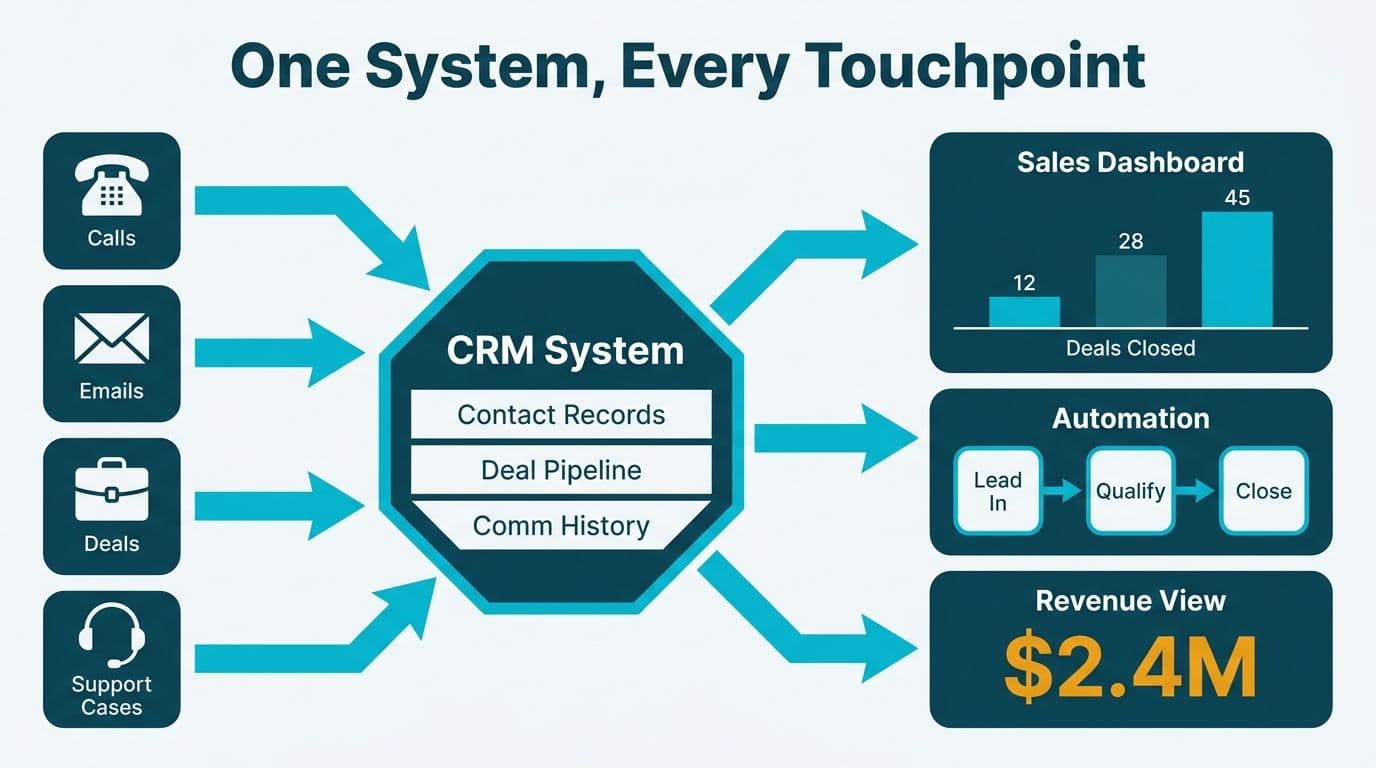
A CRM system - short for customer relationship management - is a shared database that records every interaction a company has with leads, prospects, and customers: calls, emails, deals, and support cases. It layers workflow automation on top of that data to move deals forward without manual effort, and surfaces dashboards that give sales, finance, and operations a single version of the revenue picture.
Key Takeaways
- A CRM consolidates contact records, deal pipelines, and communication history into one system of record.
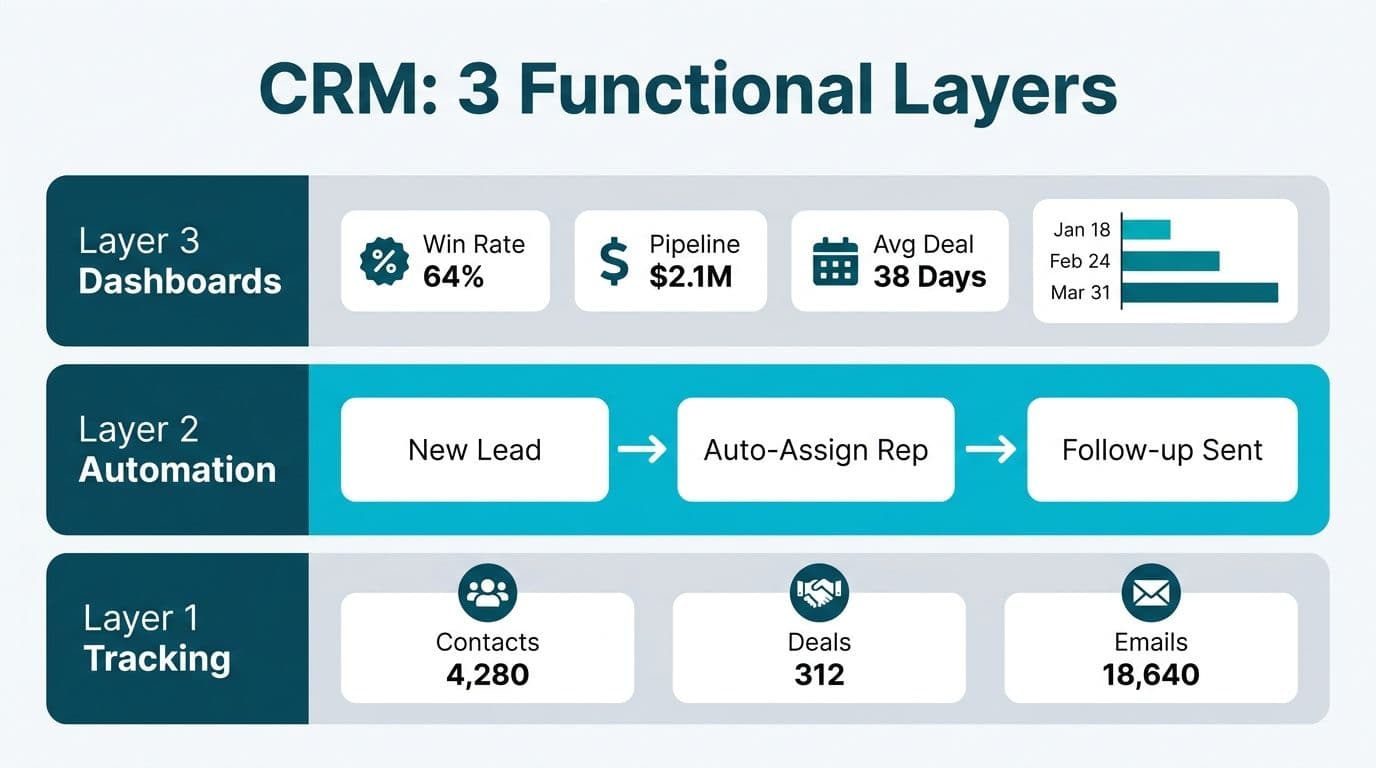
- Core CRM functions split across three layers: tracking what happened, automating what happens next, and reporting what it means.
- Healthcare and finance teams configure CRM data handling to satisfy HIPAA, GDPR, or PIPEDA depending on their geography.
- Zoho CRM's territory management, Blueprint process builder, and advanced partner programme make it a strong fit for mid-market professional services firms.
- User adoption after go-live determines whether a CRM becomes a revenue asset or an expensive contact list.
What Does a CRM System Actually Track?
The foundation of any CRM is the contact record - a unified profile that aggregates everything the business knows about one person or account. Beyond name and email, a well-configured system captures interaction history (every call, email, meeting note, and support ticket, timestamped and attributed to a rep), deal records (stage, value, expected close date, and the full decision-maker map), activity timelines, and custom fields tailored to the business model.
For a healthcare organisation operating under HIPAA - say, a US hospital network managing physician liaison outreach - the CRM adds consent flags, access-audit logs, and data-residency configurations to that core record. Similar requirements apply under Canada's PIPEDA for patient-adjacent commercial data, and under GDPR for UK and EU clinical sales teams. Our Zoho CRM GDPR Compliance Configuration guide covers the field-level setup in detail.
Beyond individual contacts, CRMs also track account-level data: company size, industry, contract value, renewal dates, and the full web of relationships between contacts at each account. For a Canadian professional services firm managing a portfolio of long-term client engagements, this account-level view is often more strategically valuable than any single contact record.
The guiding principle: if a contact, account, or deal has commercial value to your business, the CRM should be its authoritative record. Every gap in that coverage is a potential gap in your revenue data.
How Does a CRM System Work? The Three-Layer Model
A modern CRM operates across three functional layers that build on each other.
Layer 1 - Data capture. Every email from a connected mailbox, every web form submission, and every calendar booking syncs into the CRM automatically. Reps also log calls manually or via a dialler integration. The result is a complete interaction timeline, provided the team consistently uses the system.
Layer 2 - Workflow automation. Rules fire based on the data in Layer 1. A lead that fills out a pricing form at midnight receives an automated acknowledgement immediately; the owning rep receives a task notification at 9 am. Deal stages advance when a proposal is viewed. Renewal reminders trigger 90 days before a contract end date. This is where Zoho CRM consulting typically begins: mapping a firm's sales process into automation rules the platform can execute reliably, including Zoho CRM territory management setup for teams operating across multiple regions.
Layer 3 - Reporting and forecasting. Revenue dashboards aggregate pipeline by stage, rep, territory, and product line. Finance directors use these views to build rolling 90-day forecasts. CIOs monitor adoption metrics - login frequency, task completion rates, data-entry completeness - to identify underperforming regions before the pipeline number becomes unreliable.
The three layers are interdependent. Poor data capture produces unreliable automation. Bad automation makes reports meaningless. Getting the foundation right in Layer 1 is the work most implementation projects underestimate, which is why user adoption planning belongs in the project scope from day one.
What Do CRM Systems Automate? Examples from Sales, Healthcare, and Finance
Automation is what separates a CRM from a sophisticated spreadsheet. The most common use cases vary meaningfully by vertical.
Sales Teams (US and UK SaaS Firms)
Lead routing assigns new inbound leads to the correct rep based on geography, company size, or product interest - cutting the delay caused by manual inbox triage. Cadence automation runs a multi-touch email-and-call sequence without manual scheduling. Contract renewal alerts fire at 120, 60, and 30 days before a subscription end date, prompting the rep to re-engage before the customer starts evaluating alternatives.
Healthcare Organisations (US and Canada)
Physician liaison teams at US health systems use CRM automation to track every referral source, log follow-up outcomes, and generate weekly conversion reports - giving marketing a clear view of which hospital partners drive the most admissions. Automated workflows route consent forms and flag expired patient authorisations, directly supporting HIPAA compliance obligations. Under PIPEDA, Canadian health-adjacent commercial teams use CRM automation to route data subject access requests that would otherwise miss statutory response timelines.
Finance and Fintech Teams (UK, US, and Canada)
A UK fintech firm tracking mortgage applications from initial enquiry through underwriting uses automated status updates to keep applicants informed at each decision gate, reducing inbound support call volume without adding headcount. Wealth management teams at US and Canadian advisory firms log every client interaction and set automated review reminders aligned to regulatory obligations. New accounts that trigger an AML or KYC flag generate a compliance task automatically, rather than depending on a rep to flag it manually.
For finance teams that need reporting beyond the CRM's native dashboards, connecting CRM data to a dedicated BI platform is the natural next step. Our Zoho Analytics Integrations connector map covers how that pipeline works end to end.
What Do CRM Reports Show - and Why Finance Directors and CIOs Care?
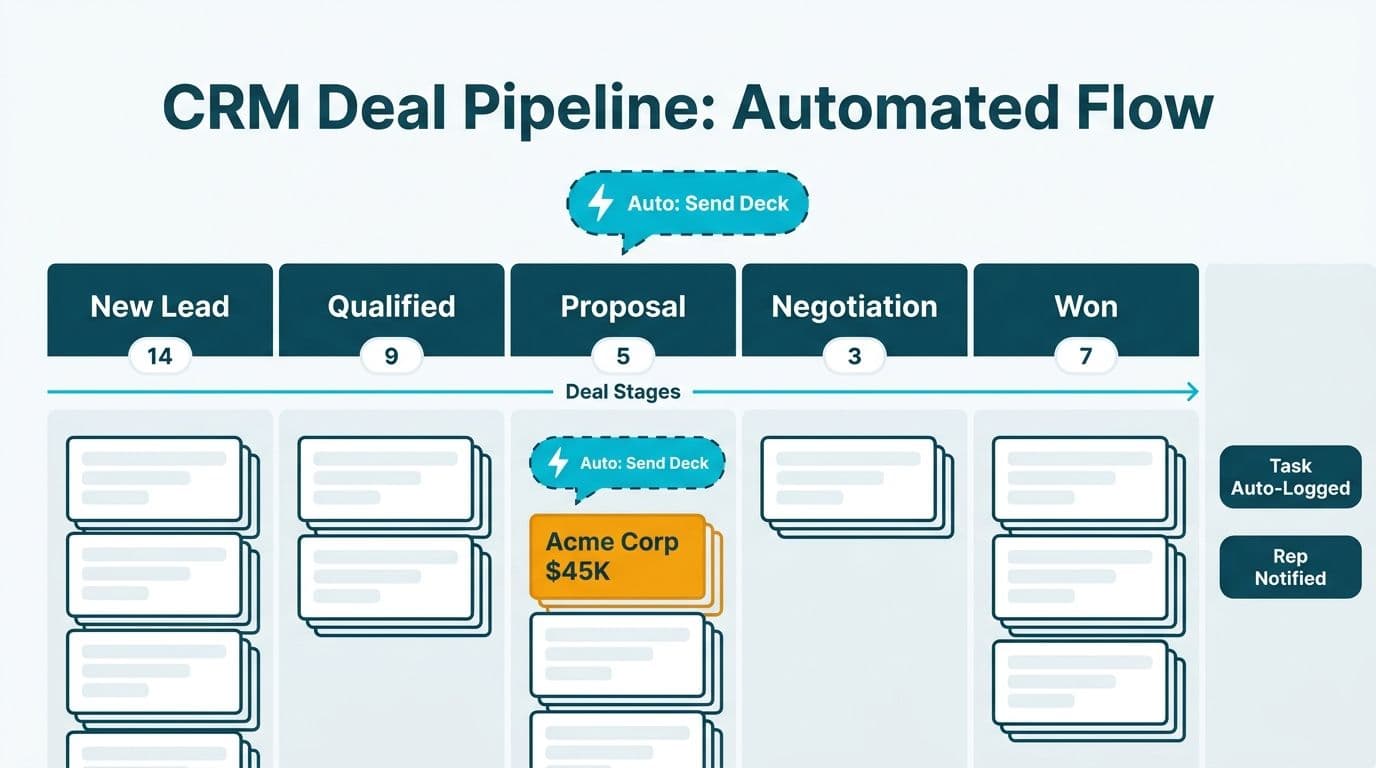
CRM reporting answers three strategic questions that matter to the C-suite.
Pipeline and forecast reports show the dollar value of deals at each stage and the probability-weighted revenue expected to close in the current period. Finance directors use these to reconcile sales projections against finance models, replacing the manual process of emailing reps for updates every Friday. A Canadian professional services firm might run weekly pipeline reviews where the CRM report is the single source of truth - ending the version problem where each rep's total differs from the number in the finance model.
Activity and performance reports track rep behaviour: calls logged, emails sent, meetings booked, deals created. CIOs use these to identify adoption gaps by territory. If one region shows low activity relative to its account coverage, it is either a capacity problem or an adoption problem. Both are fixable once visible. Zoho CRM user adoption strategies after go-live typically start here - pulling the activity report and walking through it with front-line managers region by region.
Customer health and retention reports flag accounts that have gone quiet: no calls in 60 days, no renewal initiated, no support case resolved. Customer success teams use these signals to prioritise outreach before churn becomes irreversible.
A practical lesson from our own operations: our internal lead list was built by parsing booking confirmation emails. When we wired the Calendly API directly into our data pipeline, we found 24 bookings the parser had silently missed. The list jumped from 42 to 66 leads, each with proper source attribution. The same principle applies to CRM data: if your capture method has gaps, your reports are wrong in ways you cannot see - and you will not know what you are missing until a better system reveals it.
Zoho CRM vs. Pipedrive: Which Fits Mid-Market Sales Teams?
Two platforms come up consistently in mid-market evaluations. The table below covers the dimensions data team leads and CIOs weigh when making a platform decision for sales, healthcare, or financial services teams.
| Dimension | Zoho CRM | Pipedrive |
|---|---|---|
| Best-fit company size | Mid-market to enterprise | SMB to lower mid-market |
| Workflow automation | Advanced multi-step rules; Blueprint process builder | Linear pipeline automation; simpler rule builder |
| Territory management | Native territory hierarchy and assignment rules | Limited; typically handled via custom fields |
| Reporting depth | Custom report builder, AI-assisted forecasting, analytics dashboards | Visual pipeline views; lighter on custom reporting |
| Compliance tooling | GDPR consent fields, HIPAA-ready configuration, PIPEDA data handling | Basic GDPR fields; less prescriptive on configuration |
| Integration ecosystem | 900+ native integrations; full Zoho One suite connectivity | 400+ integrations; strong email client focus |
| Partner programme | Multi-tier certification; Zoho Advanced Partner status and Advanced Partner certification tiers unlock dedicated support and co-marketing | No formal partner certification tiers |
| Fit for consulting and professional services | Strong - cross-module deal tracking suits complex, multi-stakeholder engagements | Moderate - works for simpler project pipelines |
For a professional services firm running long deal cycles - common in US healthcare consulting, UK financial advisory, or Canadian management consulting - the Zoho CRM feature set typically justifies the added configuration effort. For a 10-person team with a transactional pipeline and a short sales cycle, the lighter tool wins on speed to value.
Our guide to Zoho CRM integrations for B2B service companies covers integration decisions in more detail for firms evaluating the Zoho ecosystem.
How Does CRM Compliance Work Across the US, UK, and Canada?
Compliance requirements shape CRM configuration decisions before the first contact record is imported - which is why selecting the right tier and data-centre region belongs in the evaluation, not in post-launch remediation.
United States - HIPAA and SOC 2. Healthcare organisations handling protected health information need a CRM vendor that signs a Business Associate Agreement, supports field-level encryption, and maintains access-audit logs. Zoho CRM's enterprise tier supports these configurations per Zoho's 2026 compliance documentation. SaaS companies selling into healthcare buyers may also need the CRM to fall within their SOC 2 audit scope - affecting both vendor selection and configuration choices.
United Kingdom and EU - GDPR. Every contact record requires a documented lawful basis for processing, a consent mechanism, and a data-retention policy. UK fintech firms typically require CRM data stored in EU or UK data centres. Zoho offers regional data hosting for this purpose. Our step-by-step Zoho CRM GDPR configuration guide covers consent module setup, field-level controls, and data subject request workflows in detail.
Canada - PIPEDA. Canada's Personal Information Protection and Electronic Documents Act requires explicit consent before collecting personal data for commercial purposes, a documented purpose-limitation policy, and the ability to action access and deletion requests within defined timescales. CRM administrators at Canadian financial services firms typically build a PIPEDA compliance checklist into their implementation playbook before go-live, so the system is legally operational from day one rather than retrofitted after launch.
When Should a Mid-Market Company Move to a Full CRM Platform?
Three signals consistently appear before a mid-market team decides to move from spreadsheets or a basic pipeline tool to an enterprise-grade CRM.
Forecast accuracy breaks down. When the CFO cannot trust the sales pipeline number because every rep maintains a separate version, the cost of the status quo becomes visible in missed targets and stalled board conversations. A single system of record with enforced data entry resolves this directly.
Handoffs create revenue leakage. Deals lost in the transition from marketing to sales, or from sales to customer success, are a coordination problem. A CRM solves it structurally by making handoff state visible and automating the handoff task itself. No deal falls through the gap because a rep forgot to send a handoff email.
Compliance requirements force a system of record. A US healthcare organisation preparing for a HIPAA audit needs an auditable log of every customer interaction. A Canadian financial advisory firm ahead of a PIPEDA review needs the same. Spreadsheets cannot provide that, and the risk of regulatory non-compliance accelerates the CRM decision faster than any internal ROI argument.
For professional services firms evaluating Zoho CRM, our lead scoring setup guide is a practical companion to implementation planning - it shows how to prioritise inbound leads from day one of go-live, which directly supports post-launch user adoption.
---
About Lets Viz: Lets Viz has delivered data analytics and CRM implementations for clients across US healthcare, UK fintech, Canadian manufacturing, and global SaaS since 2020, earning a 5.0 rating on Clutch. Our team combines technical CRM configuration with process design, so implementations work the way your team actually sells - not the way the demo suggested.
Ready to configure, migrate, or optimise your CRM? Our Zoho CRM consulting team can scope the right configuration, compliance setup, and adoption plan for your market.