Best Zoho CRM Integrations for B2B Service Companies
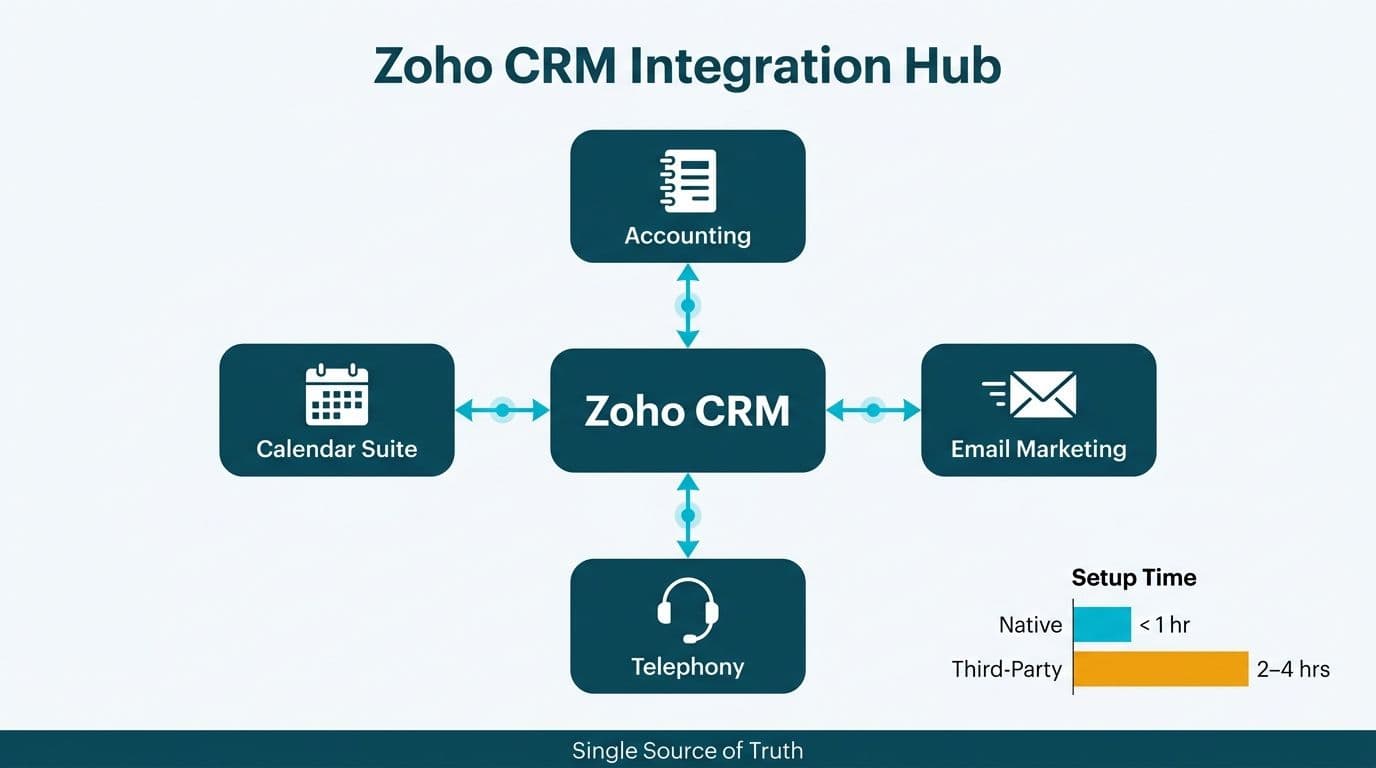
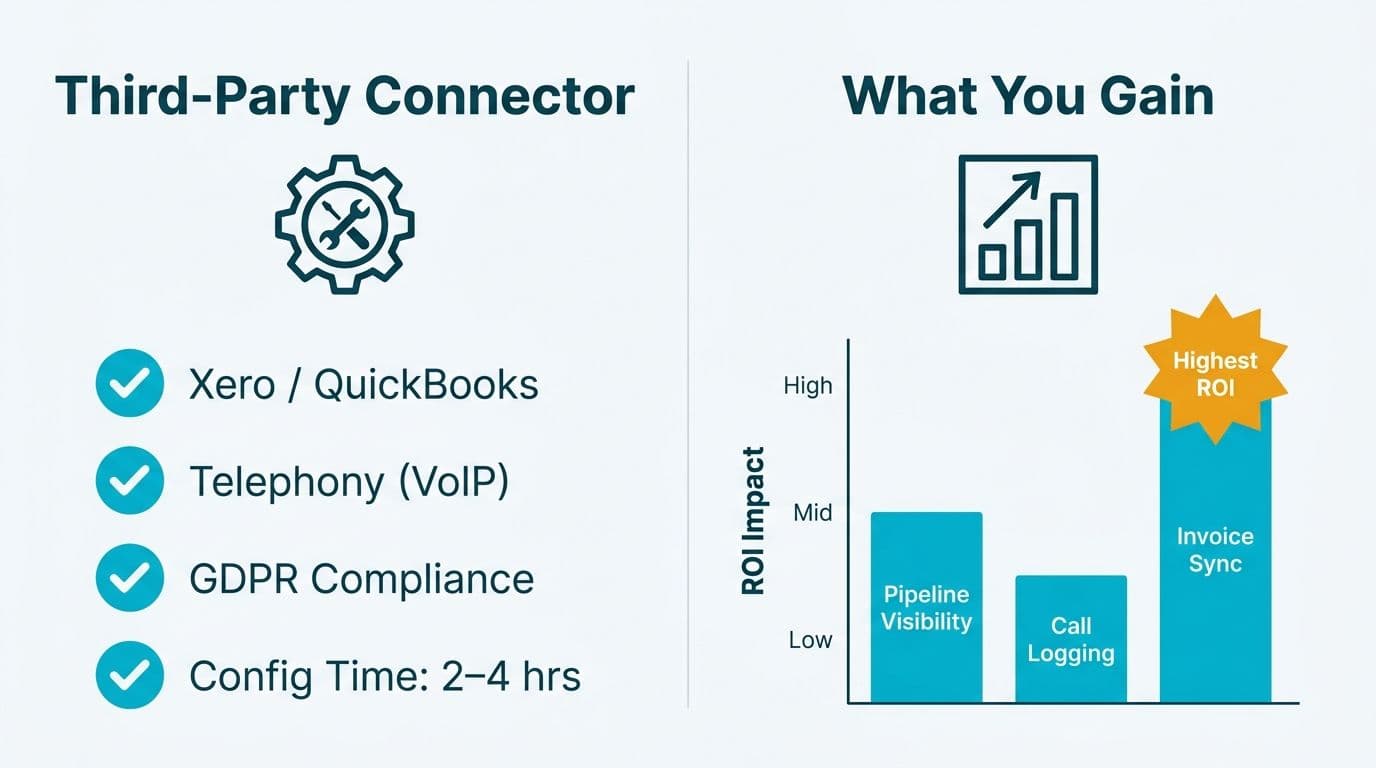
The highest-ROI Zoho CRM integrations for B2B service companies connect your CRM to accounting platforms (Xero, QuickBooks), email marketing tools, telephony systems, and calendar suites - eliminating manual data entry and giving revenue teams a single source of truth. Native Zoho integrations typically install in under an hour; third-party connectors require two to four hours of configuration. The right stack depends on your company size, region, and compliance obligations.
Key Takeaways
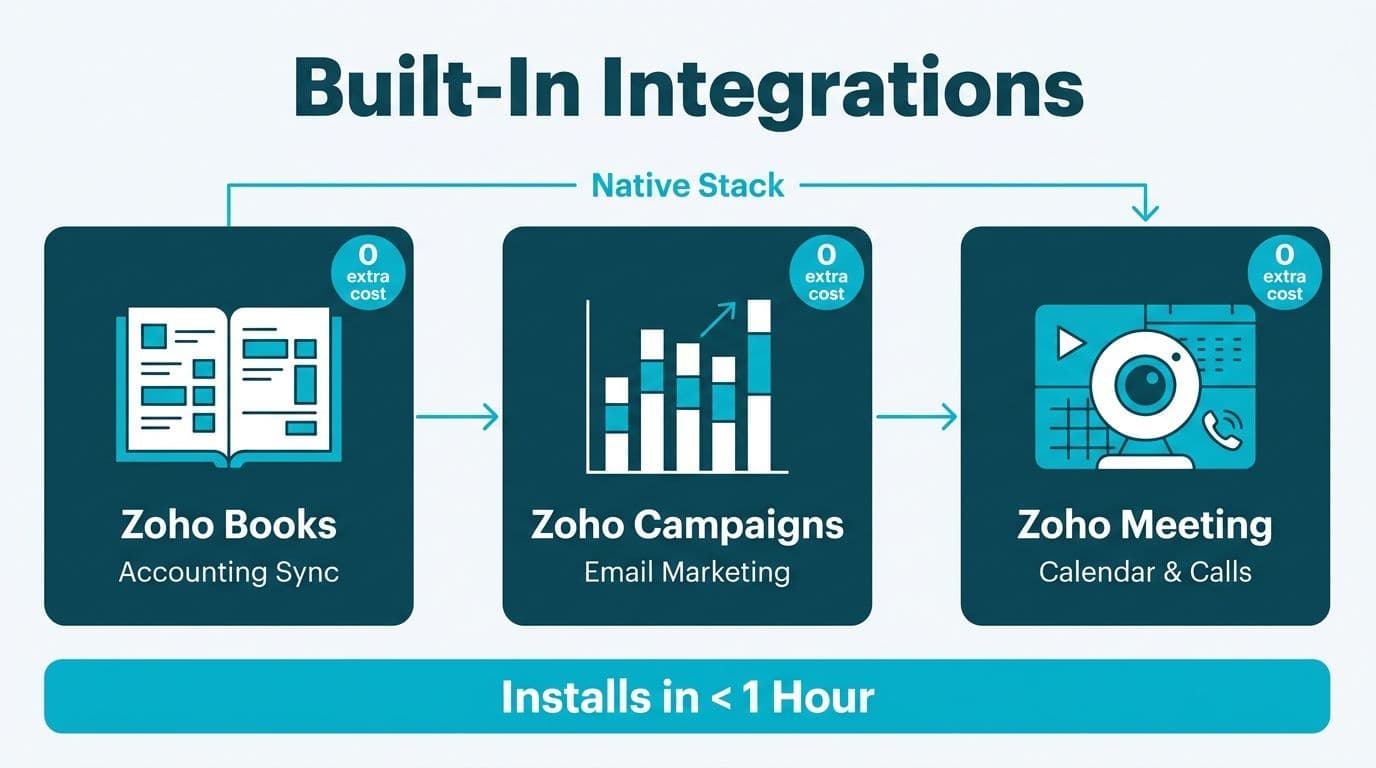
- Native Zoho integrations - Zoho Books, Zoho Campaigns, Zoho Meeting - carry no additional licensing cost and connect in under an hour
- Xero and QuickBooks integrations surface invoice status directly inside CRM deal records, shortening the cash-to-close cycle for finance teams
- Telephony integrations (RingCentral, Twilio, Aircall) log calls automatically - a critical requirement for US healthcare and fintech compliance audit trails
- The Zoho CRM Microsoft 365 integration syncs contacts, calendar events, and emails bidirectionally; setup requires admin consent in Azure Active Directory
- Regional email routing and field mapping mismatches are the most common failure point when configuring email marketing integrations
Which Zoho CRM Integrations Deliver the Highest ROI for B2B Service Companies?
For B2B service companies, the integrations that consistently pay back fastest are accounting syncs, email marketing automation, and telephony logging. These three categories eliminate the three largest sources of manual work in a revenue team's week: chasing invoice status, building contact lists, and transcribing call notes.
For organizations evaluating the broader integration landscape, a Zoho CRM consulting engagement is the fastest way to map your existing tool stack against what Zoho supports natively - avoiding paid middleware for connections that are already free out of the box.
The table below rates each integration category by setup complexity, licensing cost, and business impact:
| Integration Category | Example Tools | Setup Complexity | Licensing Cost | Business Impact |
|---|---|---|---|---|
| Accounting | Xero, QuickBooks Online | Medium (3-5 hrs) | Free (native) | High - invoice visibility in CRM |
| Email Marketing | Zoho Campaigns (native); third-party email platforms | Low-Medium (1-3 hrs) | Free or paid | High - automated nurture sequences |
| Telephony | RingCentral, Aircall, Twilio | Medium-High (4-8 hrs) | Paid per seat | High - call logging and compliance |
| Calendar / Meetings | Microsoft 365, Google Workspace, Zoho Meeting | Low (1-2 hrs) | Free (native) | Medium - reduces no-shows |
| eSignature | Zoho Sign, DocuSign | Low (1-2 hrs) | Free or paid | Medium - contract velocity |
| Data Analytics | Zoho Analytics | Low (under 1 hr) | Free (native) | Medium-High - pipeline reporting |
Complexity guide: Low = under two hours, no developer required. Medium = two to five hours, admin-level configuration. High = over five hours, may require developer or partner support.
How Does Zoho CRM Microsoft 365 Integration Work?
The Zoho CRM Microsoft 365 integration syncs contacts, calendar events, tasks, and email threads bidirectionally between the CRM and Outlook. Once configured, sales reps work inside Outlook without switching tabs; every email and meeting automatically appears on the corresponding CRM contact and deal record.
Setup steps for Zoho CRM Microsoft 365 integration:
1. Navigate to Zoho CRM Settings and select Microsoft 365 under Integrations
2. Grant admin consent in Azure Active Directory for the Zoho CRM application
3. Choose sync direction (one-way or bidirectional) for each object type - contacts, calendar, email
4. Map CRM fields to Outlook contact fields; set conflict resolution rules (Zoho documentation, 2025, recommends the "CRM wins" rule where CRM is the system of record)
5. Test with a pilot group of five to ten users before org-wide rollout
A US SaaS finance team migrating from a legacy contact manager can typically complete this setup in one business day including field mapping and testing. The integration is available at no additional cost on all paid Zoho CRM plans.
For UK and EU organizations, verify that the integration's data residency defaults align with GDPR Article 46 requirements before enabling bidirectional sync. Zoho's Data Processing Addendum (2025) covers EU Standard Contractual Clauses and is available directly from the Zoho Trust Center.
Zoho CRM Accounting Integrations: Xero vs. QuickBooks
Connecting your CRM to accounting eliminates the revenue recognition gap - finance sees deals close in CRM while invoices remain stranded in a separate accounting system. Both the Xero and QuickBooks integrations create invoices directly from CRM deal records and push payment status back into the CRM account view.
Xero integration: Available natively through the Zoho Marketplace at no additional cost. Users generate Xero invoices from the CRM Deals module; payment status syncs back hourly. Xero holds a strong position in the UK, Canadian, and Australian mid-market. For Canadian organizations, PIPEDA-compliant data handling is maintained within Xero's Canadian data center when configured correctly (Xero Privacy Policy, 2025).
QuickBooks Online integration: Also native via the Zoho Marketplace, covering invoices, expenses, and contact sync. QuickBooks Online is dominant in the US mid-market; its SOC 2 Type II certification (Intuit, 2025) satisfies most US healthcare and financial services audit requirements when combined with Zoho CRM's own SOC 2 posture.
Key difference for multi-currency teams: Xero's integration supports multi-currency natively within the connector. QuickBooks Online multi-currency requires the Advanced subscription tier. For B2B service companies billing across USD, GBP, and CAD, this distinction is worth resolving at contract time rather than after go-live.
Both integrations carry zero additional cost beyond your existing Zoho CRM and accounting subscriptions. For a breakdown of which Zoho CRM tier unlocks which integration features, see our Zoho CRM pricing plans comparison.
Telephony and Calendar Integrations: Setup Complexity and Compliance
Telephony is the highest-complexity integration category and also the one with the strongest compliance argument in regulated industries.
Why telephony integration matters for compliance: In US healthcare, call logs are frequently required under HIPAA administrative safeguard standards. In US and Canadian financial services, regulators expect firms to retain records of client communications. Telephony integrations that log calls directly to CRM contact records create an auditable trail without manual effort.
Popular telephony integrations with Zoho CRM:
- RingCentral: Native Zoho integration; calls are logged with duration, recording link, and call outcome. Typical setup time is four to six hours including call outcome field mapping.
- Aircall: Marketplace integration with strong adoption across European teams; includes GDPR-compliant call recording controls. Aircall's EU data processing documentation (2025) supports GDPR Article 30 record-keeping requirements.
- Twilio: Developer-level integration via Zoho's PhoneBridge API. Highest flexibility, highest setup cost - typically six to eight hours of developer time. Best suited for companies with custom IVR requirements or compliance-grade recording needs.
Calendar integrations are considerably simpler. Zoho Meeting is native and free; it generates meeting links from CRM records and logs attendance automatically. Google Workspace and Microsoft 365 calendar sync are both one-click installs from the Zoho Marketplace.
For US healthcare practices managing appointment scheduling alongside CRM activity, our Zoho CRM for healthcare compliance configuration guide covers the additional safeguards required under HIPAA for CRM-connected scheduling and communication systems.
How Do Zoho CRM Workflow Rules and Blueprint Automation Affect Integration Reliability?
Integration reliability is not only a connector question - it is also an automation design question. When a deal moves from Proposal Sent to Closed Won, do your integrations trigger at the right moment and under the right conditions? The answer depends on whether you use Workflow Rules or Blueprint.
Workflow Rules fire on record creation or field changes. They are stateless - they do not enforce a step sequence, and they do not prevent a record from skipping stages. For integrations, this means a workflow can trigger invoice creation in Xero the moment a deal field is marked Closed Won, regardless of whether a proposal was ever signed or approved.
Blueprint enforces a linear process. Each stage transition requires defined conditions and user actions before the next stage becomes accessible. Blueprint is better suited to integrations where sequence matters - for example, requiring a countersigned contract via Zoho Sign before a QuickBooks invoice is auto-generated.
Practical guidance on Zoho CRM Workflow Rules vs. Blueprint automation:
- Use Blueprint for accounting integrations that generate financial documents - it prevents premature invoice creation and protects revenue data integrity
- Use Workflow Rules for email marketing triggers, such as adding a contact to a nurture sequence when a deal is created - simpler to configure and sufficient for the task
The choice also affects your Zoho CRM implementation timeline. Blueprint configuration adds one to two weeks to a standard rollout, but returns that investment through cleaner data and fewer billing errors in the first quarter post-launch.
What Is the Total Cost of Ownership for Zoho CRM Integrations in the Mid-Market?
For mid-market B2B service companies with 50 to 500 seats, Zoho CRM total cost of ownership for integrations breaks into three buckets: licensing, implementation, and ongoing maintenance.
Licensing: Native Zoho integrations - Zoho Books, Zoho Campaigns, Zoho Meeting, Zoho Analytics, Zoho Sign - are included in CRM Plus and above, or available as standalone components in Zoho One. Third-party integrations (Xero, QuickBooks, RingCentral, Aircall) carry their own per-seat or per-account costs independent of Zoho.
Implementation: A typical mid-market rollout covering accounting, email marketing, telephony, and Microsoft 365 runs eight to fifteen days of consultant time when scoped properly. The Zoho CRM partner vs. in-house implementation question deserves serious examination here - Zoho-certified partners carry pre-built field mapping templates that reduce configuration time significantly for standard integrations, and they encounter field mapping edge cases that in-house teams typically discover only after go-live.
Access control before go-live: Setting up Zoho CRM roles and profiles correctly before integrations activate prevents data access issues post-launch. Finance team members, for example, should hold profile-level access to the QuickBooks connector but not to telephony call recordings. Pairing proper access control with Zoho CRM user adoption best practices - phased rollout, in-app training modules, a designated power-user in each department - reduces help desk tickets sharply in the first ninety days.
Ongoing maintenance: Plan for two to four hours per quarter per integration to handle API version updates, field mapping drift, and new user provisioning. Telephony integrations require the most maintenance as provider APIs evolve frequently.
A field mapping lesson from practice: One B2B client's team had been building marketing lists entirely by hand from their CRM. After implementing a scheduled sync job running every two hours inside Zoho, the system pulled 30 fields of sales context into four regional mailing lists and routed each contact by country automatically. Manual list-building dropped to zero. The root cause was not a missing connector - it was improper field mapping and absent automation, two things that are consistently underscoped in initial integration projects.
For compliance-heavy industries, US healthcare and financial services organizations should also budget time for a formal security review. Our AI automation compliance checklist for finance teams covers the overlapping governance considerations when CRM integrations touch regulated financial data.
Regional Considerations for US, Canadian, and UK/EU Deployments
Integration configuration is not geography-neutral. The following differences affect B2B service companies most frequently.
United States: HIPAA covered entities connecting Zoho CRM to telephony or email marketing tools must execute a Business Associate Agreement (BAA) with each provider. Zoho offers a BAA (Zoho HIPAA documentation, 2025); verify that your telephony and email marketing providers do as well. A US healthcare group practice connecting Zoho CRM to a telephony system without signed BAAs in place carries direct HIPAA exposure - complete this review before any integration goes live. SOC 2 Type II reports from each integration vendor are the baseline audit requirement for US financial services firms.
Canada: PIPEDA governs personal data collected through CRM integrations. For a Canadian professional services firm syncing contact data between Zoho CRM and a US-based accounting or email platform, the cross-border transfer provisions of PIPEDA apply. Zoho's Canadian data residency option (available on Enterprise plans) addresses data stored within Zoho; downstream third-party integrations require separate legal assessment. Organizations should also monitor Bill C-27, Canada's forthcoming privacy modernization, which is expected to tighten cross-border transfer requirements.
UK and EU: GDPR applies to any CRM integration that processes EU or UK personal data. In practice, this means: a data processing agreement with every integration vendor; consent tracking for email marketing where contacts have not explicitly opted in; and confirming that telephony call recording storage meets Article 5(1)(e) storage limitation requirements. A UK fintech firm deploying Aircall alongside Zoho CRM should verify that call recording retention policies are configured to delete recordings after the legally required period rather than indefinitely. Aircall and RingCentral both publish GDPR-compliant processing documentation (2025) covering EU deployments.
---
About Lets Viz: Lets Viz has delivered CRM implementations and data analytics engagements since 2020, serving US healthcare systems, UK fintech firms, Canadian manufacturing companies, and global SaaS organizations. The firm holds a 5.0 rating on Clutch and operates as a certified Zoho partner with hands-on delivery across Zoho CRM, Zoho Analytics, and the broader Zoho One ecosystem.
If your team is evaluating which integrations to prioritize - or needs hands-on help with field mapping, data quality, access control, or compliance configuration - Zoho CRM consulting from a certified partner is the most direct path to a working, auditable integration stack.