Tableau to Power BI Migration for Regulated Industries
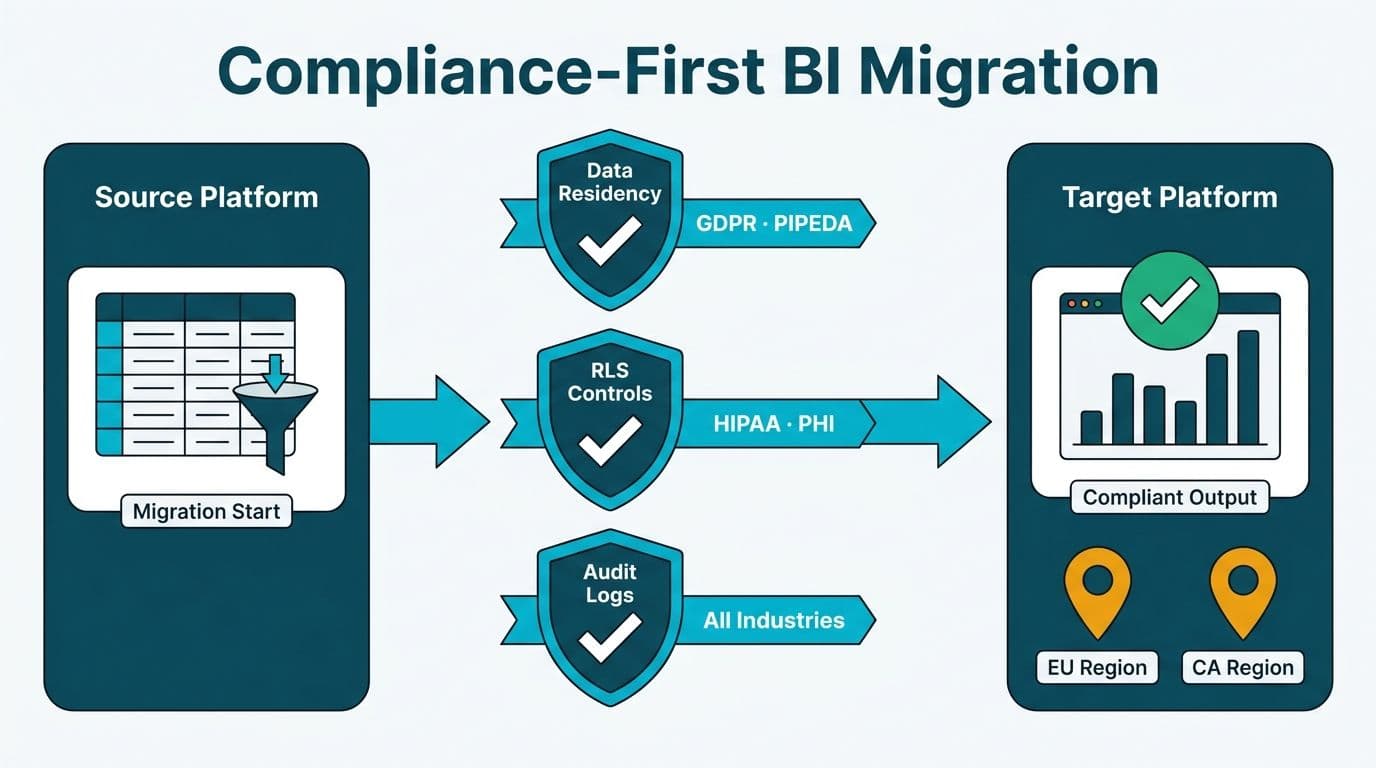
Tableau to Power BI migration in regulated industries demands a compliance architecture designed for HIPAA, GDPR, or PIPEDA from the start. Healthcare organizations must map PHI row-level security controls, financial firms need immutable audit logs, and every organization must verify data residency before enabling cloud connectivity. Done correctly, the migration delivers a more defensible compliance posture than the platform it replaces.
Key Takeaways
Power BI Premium supports capacity-level data residency pinning to specific Azure regions, satisfying GDPR (EU/UK), PIPEDA (Canada), and US federal data governance requirements.
PHI row-level security in Power BI uses DAX-based roles that map directly to Tableau's user filters - but require explicit compliance testing before production go-live.
Power BI Activity Log and Microsoft Purview together supply the audit trail that HIPAA §164.312(b) and FCA/OSFI financial compliance standards require.
HIPAA-compliant BI tools for hospital data visualization must enforce access controls at the dataset layer, not only at the report layer.
A three-phase approach - compliance architecture first, security migration second, report conversion third - reduces regulatory risk across every jurisdiction.
What Does a Migration from Tableau to Power BI Actually Involve?
A migration from Tableau to Power BI follows a consistent pattern regardless of industry: audit the existing Tableau environment, map workbooks and data sources to their Power BI equivalents, recreate security roles in the Power BI semantic model, rebuild dashboards and reports, validate outputs against source data, and decommission legacy licenses. Microsoft offers a native migration utility, and third-party tools can accelerate workbook translation - though complex calculated fields, nested LOD expressions, and table calculations almost always require manual remediation.
The core technical pivot is the shift from Tableau's live connection and extract model to Power BI's Import, DirectQuery, and Composite modes. Import mode loads data into the semantic model on a refresh schedule - fast query performance, but a storage footprint that affects licensing. DirectQuery keeps data in the source system and queries it on demand - lower storage overhead, but performance depends on source database optimization. Regulated organizations frequently choose DirectQuery or Composite mode specifically to avoid hosting PHI or regulated financial records inside Power BI's managed semantic model, keeping sensitive data within existing database perimeters where existing controls already apply.
The standard migration checklist - environment audit, workbook conversion, security rebuild, user training, cutover - remains the same in regulated industries. What changes is that every step carries a compliance checkpoint that does not exist in unregulated migrations. That distinction is what the rest of this article addresses.
What Makes Tableau to Power BI Migration for Regulated Industries Uniquely Complex?
Regulated migrations carry risks that standard BI transitions do not. In healthcare, any BI tool that stores or transmits protected health information (PHI) is a covered component under the HIPAA Security Rule, making the platform itself a business associate. In financial services, regulators across the US (SEC, FINRA, OCC), the UK (FCA), and Canada (OSFI) require demonstrable audit trails, data lineage documentation, and access governance before a system carries regulatory data.
Our Tableau to Power BI migration services team consistently finds three gaps when regulated organizations migrate without a compliance-first plan: inherited workbook permissions that do not translate cleanly to Power BI's security model, cloud connectivity settings that inadvertently route PHI through unsanctioned regions, and missing audit log coverage during the cutover window itself.
This migration is a governance transition, not a technical lift-and-shift. Legal, compliance, and IT security teams must sign off before any production report goes live.
How Do You Meet Data Residency Requirements When Migrating to Power BI?
Data residency is the obligation to store and process data within a defined geographic boundary. It applies to PHI under HIPAA and US state laws, to personal data under GDPR (EU and UK), and to financial records under PIPEDA and provincial legislation in Canada.
Power BI Premium capacities and Microsoft Fabric workspaces support multi-geo configuration, which pins datasets to a specific Azure region regardless of the tenant's home region. The practical steps:
1. Map data to its regulatory jurisdiction before migrating. PHI from a US hospital must stay in a US Azure region. A UK fintech firm under GDPR must use the EU or UK South Azure region. A Canadian financial services organization under PIPEDA should target Canada Central or Canada East.
2. Configure a dedicated Premium capacity in the target region. Workspaces assigned to that capacity inherit its geographic boundary.
3. Disable cross-region data transfer in the Fabric tenant admin settings via the Data Residency control.
4. Document the configuration for your compliance or privacy officer as evidence that data is not leaving the designated jurisdiction.
| Jurisdiction | Primary Regulation | Azure Region Requirement | Power BI Control |
|---|---|---|---|
| US (Healthcare) | HIPAA Security Rule | Any US Azure region | Multi-geo Premium capacity |
| European Union | GDPR Art. 46 | EU or approved third country | Multi-geo + EU capacity |
| United Kingdom | UK GDPR / FCA | UK South (or EU post-adequacy) | Multi-geo Premium capacity |
| Canada | PIPEDA + provincial laws | Canada Central or Canada East | Multi-geo Premium capacity |
For financial teams working through broader cloud compliance questions, our GDPR Compliant SaaS Financial Reporting: The BI Checklist provides a control inventory adaptable to the Power BI tenant settings above.
How Do You Map PHI Row-Level Security from Tableau to Power BI?
Row-level security (RLS) in Tableau uses user filters at the workbook or published data source level, driven by `USERNAME()` matched against a user attribute table. Power BI uses DAX-based security roles defined inside the semantic model. The concepts align, but implementation details matter for regulated environments.
Tableau User Filters vs. Power BI DAX Roles
In Tableau, a PHI access filter might restrict records where `[AssignedNurse] = USERNAME()`. The Power BI equivalent is a named security role with a DAX table filter: `[AssignedNurse] = USERPRINCIPALNAME()`.
Power BI resolves `USERPRINCIPALNAME()` against the viewer's Microsoft Entra ID identity; Tableau resolves `USERNAME()` against its own directory. During migration, every Tableau user identity must map to a Microsoft Entra ID UPN - a step that routinely exposes shared logins and service accounts that violate HIPAA's individual accountability requirement before they reach the new platform.
PHI RLS Migration Checklist
Export all Tableau user filters and data source permission rules to a master inventory
Confirm every Tableau user has a unique, corresponding Microsoft Entra ID UPN
Recreate each filter as a named Power BI security role at the dataset level
Use `USERPRINCIPALNAME()` for all cloud-deployed reports, not `USERNAME()`
Test every role with actual Microsoft Entra ID test accounts before cutover
Validate RLS at the dataset layer - users with Build permission can create new reports that bypass report-layer-only filters
One DAX nuance worth flagging: when counting patient encounters scoped to the current user's assigned unit, COUNTX is correct when row-context iteration is required. The difference between COUNTX vs COUNT in Power BI DAX matters here because the filter must evaluate each row individually rather than aggregate a column directly. Using the wrong function in an RLS-scoped measure can return inflated counts that expose records outside the permitted scope.
What Audit Logging Does Power BI Provide for HIPAA and Financial Compliance?
The HIPAA Security Rule (§164.312(b)) requires covered entities to implement mechanisms that record and examine activity in systems containing PHI. The FCA expects UK firms to retain audit records for a minimum of five years, and OSFI guidance for Canadian federally regulated financial institutions imposes equivalent long-term log requirements.
Power BI provides two overlapping audit mechanisms:
Power BI Activity Log captures report views, dataset refreshes, data exports, permission changes, and admin operations. Logs are accessible via the Power BI REST API and can be streamed to Azure Monitor Log Analytics or Microsoft Sentinel. The default retention in the Power BI service is 30 days - insufficient for HIPAA (six-year minimum) or FCA requirements. In practice, regulated organizations route logs to an Azure Monitor Log Analytics workspace configured with a seven-year interactive retention policy, which satisfies both HIPAA and FCA requirements from a single log store without maintaining separate archives. This routing must be configured before the first production workload lands in Power BI, not after.
Microsoft Purview adds data lineage tracking, sensitivity labels, and unified audit search across Microsoft 365. For regulated workloads, Purview's Information Protection labels classify datasets containing PHI or personally identifiable financial data so that any downstream export or external share is automatically logged and optionally blocked at the tenant level.
A workstream many teams skip: establish log routing before the first Tableau report is retired. The cutover window - when both platforms run simultaneously - creates a compliance gap if neither platform's logs are being centralized in real time.
For financial services teams rebuilding P&L reporting in Power BI, Power BI P&L dashboard examples in regulated finance typically layer audit-tagged datasets with departmental row-level access. Our FP&A Dashboard in Power BI: A Step-by-Step Build Guide covers the dataset-first architecture that supports both compliance logging and executive reporting within the same semantic model.
What Are the Best Chart Types for Hospital Dashboards in Power BI?
The best chart types for hospital dashboards balance clinical precision with readability for mixed audiences. Hospital data covers time-series metrics (admissions, length of stay, bed occupancy), categorical comparisons (department-level readmission rates, HEDIS scores), and geographic distributions (patient origin by zip or postal code).
Power BI visuals that perform well in healthcare settings:
Line charts with a secondary axis for census forecasting and occupancy trends - allowing absolute bed count and utilization percentage to share one visual without distorting scale
Bullet charts (available via AppSource) for KPI target versus actual - ideal for HEDIS scorecards and HCAHPS performance dashboards
Small multiples for comparing the same metric across departments or facilities - effective for average length of stay by care unit
Treemaps for cost distribution across DRG (diagnosis-related group) categories
Shape maps or filled maps for data visualization examples in public health - ED visit rates by county, vaccination coverage by postal district, or referral patterns by catchment area
A layout pattern that migrates well from clinical Tableau environments: KPI summary cards at the top, time-series trend in the middle, drill-through detail table at the bottom. Executives see the summary layer; clinical staff reach individual encounter records when needed.
How Do You Present Hospital Data to Non-Clinical Stakeholders in Power BI?
How to present hospital data to non-clinical stakeholders is one of the most consistent failure points in healthcare BI migrations. Tableau workbooks built by clinical informatics teams often embed clinical terminology that CFOs, board members, and operations directors cannot interpret without a clinical background.
Power BI's design model supports progressive disclosure as a structural principle:
Q&A natural language queries let non-clinical users ask plain-language questions about department performance or resource utilization without navigating complex report structures. Synonym configuration in the semantic model ensures abbreviations like ALOS resolve to the same measure as their plain-language equivalents.
Glossary tooltips surface plain-language definitions in-context, removing the need for a clinical translator in every executive review.
Executive bookmarks - saved filter states exposing only the three or four metrics a board member monitors - turn a complex clinical dataset into a one-page summary. Migration is the right moment to rebuild reports around the audience rather than replicating old workbook structure.
For organizations using Power BI embedded analytics for SaaS healthcare platforms - such as patient portals or payer analytics tools - the same progressive disclosure approach applies at the embedding layer. Role-based embedding ensures each user class sees only the measures and records their role permits.
How Does Microsoft Fabric Lakehouse Architecture Strengthen Regulated Migrations?
Microsoft Fabric lakehouse architecture is the most significant backend shift available to organizations migrating from Tableau while modernizing their data infrastructure. A Fabric lakehouse centralizes all data in OneLake - a single logical data lake with tenant-level governance and built-in compliance controls, rather than isolated source database connections. Microsoft Fabric holds HIPAA, HITRUST CSF, SOC 2 Type II, ISO 27001, and FedRAMP High authorizations, making it the most comprehensively certified backend option available for regulated industry migrations.
For regulated industries, the compliance advantages are concrete:
Unified sensitivity labeling - a label applied at the source data layer propagates automatically to every downstream Power BI semantic model, eliminating manual re-labeling per report or workspace.
Delta Lake format supports time-travel queries, letting compliance teams reconstruct any dataset's state at any historical point - directly useful for regulatory examinations and HIPAA audit responses.
Fabric workspace roles integrate with Microsoft Entra ID groups, so the identity governance governing Azure infrastructure governs the BI layer from the same control plane.
Organizations evaluating total cost of ownership alongside their Tableau migration should review our Microsoft Fabric vs Synapse vs Databricks: TCO Cost Breakdown. For the storage layer, Microsoft Fabric OneLake Explained: The Unified Data Lake covers the governance architecture most relevant to regulated data management.
A UK fintech firm migrating from a legacy Tableau environment, for example, would stage transaction data in a Fabric lakehouse pinned to the UK South Azure region, apply GDPR sensitivity labels at the Gold layer of the medallion architecture, and expose Power BI semantic models only to compliance-approved workspace groups - achieving end-to-end residency and access governance from a single control plane.
Building a Compliance-First Migration Roadmap
The practical sequence for regulated organizations:
Phase 1 - Compliance Architecture (Weeks 1-4)
Inventory all datasets containing PHI, PII, or regulated financial data in the current Tableau environment
Map data residency requirements by dataset and jurisdiction
Configure Power BI Premium or Fabric capacity in the required Azure region
Map all Tableau users to Microsoft Entra ID UPNs and resolve shared or service accounts
Route Power BI Activity Log to Azure Monitor Log Analytics from day one
Execute a Business Associate Agreement with Microsoft before any PHI enters the Power BI service
Phase 2 - Security and Access Migration (Weeks 5-10)
Recreate all Tableau user filters as named Power BI DAX security roles at the dataset level
Apply Microsoft Purview sensitivity labels to all regulated datasets
Validate every security role with dedicated Microsoft Entra ID test accounts
Complete a Privacy Impact Assessment for Canadian organizations governed by Quebec's Law 25 or PIPEDA provincial requirements
Phase 3 - Report Conversion and Training (Weeks 11-20)
Convert Tableau workbooks starting with lowest-sensitivity reports to build migration competency before handling PHI or financial records
Rebuild clinical and financial dashboards around audience personas, not source workbook structure
Require compliance sign-off before retiring each Tableau workbook
Decommission Tableau licenses only after confirming audit log continuity across the full reporting scope
Suppose a 200-bed US community hospital migrates its Tableau census dashboard into Power BI without completing Phase 1. PHI reaches a workspace not yet covered by a Business Associate Agreement, data residency is unvalidated, and Activity Log routing is absent. The cutover becomes a reportable HIPAA incident. The three-phase sequence exists to prevent exactly this outcome.
---
About Lets Viz: Lets Viz is a data analytics consulting firm serving regulated industries since 2020, with a 5.0 Clutch rating. Our team has delivered Power BI and Fabric solutions for US healthcare networks, UK fintech firms, Canadian manufacturing and financial services organizations, and global SaaS companies requiring enterprise compliance architecture built in from the start.
Ready to migrate with compliance built in from day one? Our Tableau to Power BI migration services team handles data residency configuration, PHI row-level security mapping, and audit log setup as part of every regulated industry engagement.