Power BI Cross-Filter vs Cognos Drill-Through: Reference Card
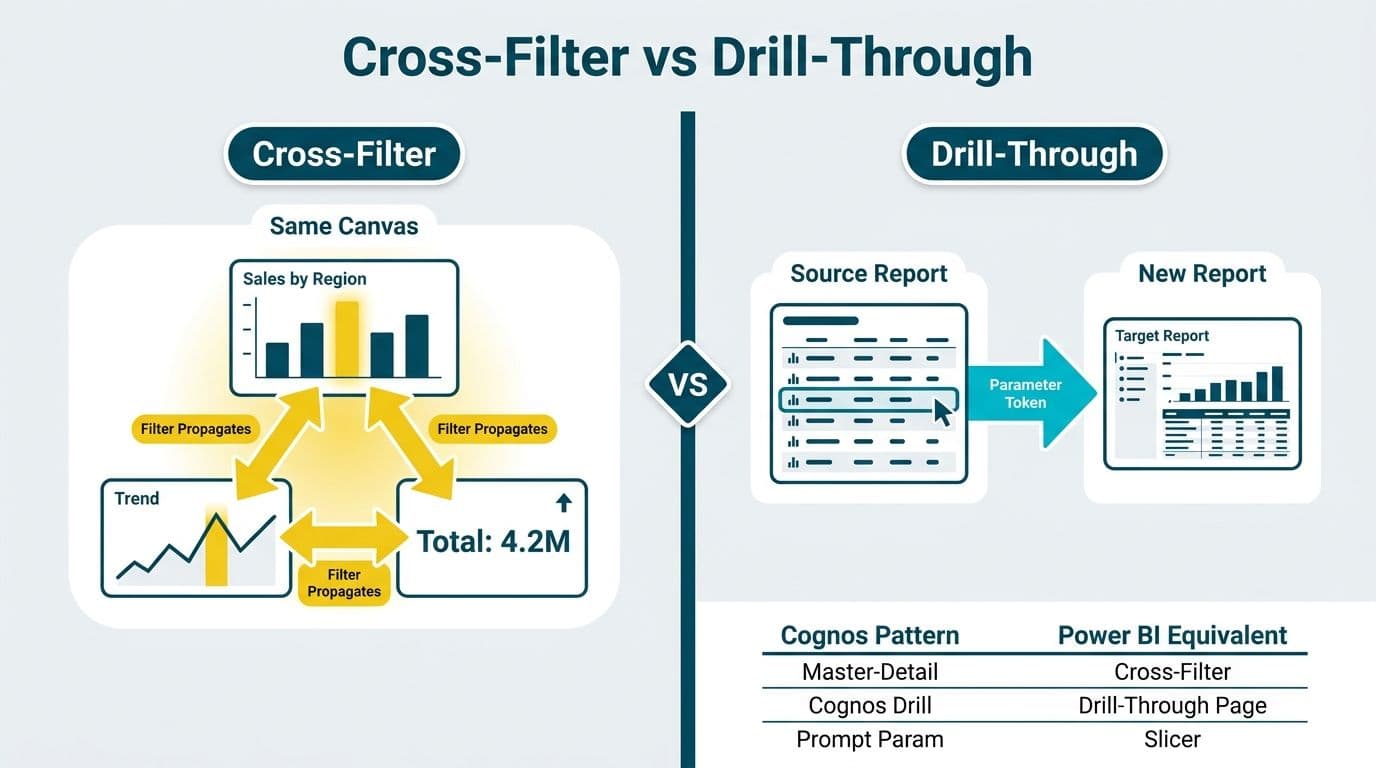
Power BI cross-filter propagates selection context across related visuals using the data model's relationships. Cognos drill-through navigates to a separate target report, passing parameter values as prompt tokens. These are not interchangeable: each Cognos interaction pattern maps to a distinct Power BI mechanism - cross-filter, drill-through page, or slicer. Understanding the mapping prevents weeks of rework during a migration.
Key Takeaways
- Cross-filter in Power BI is the relationship-driven equivalent of Cognos master-detail frame interactions - no additional authoring is required beyond defining the model relationship.
- Drill-through pages replace Cognos prompt-driven drill-through: the target page filters itself based on the field a user right-clicks in the source visual.
- Slicers replace Cognos standalone prompt controls - persistent filter widgets that drive multiple visuals simultaneously.
- DAX filter context replaces Cognos expression-based row filtering; an ssrs expressions to dax translation guide approach applies directly to migrating Cognos calculated filters.
- Mapping Cognos interactions to Power BI mechanisms before rebuilding visuals prevents significant re-authoring effort mid-project.
What Is the Difference Between Power BI Cross-Filter and Cognos Drill-Through?
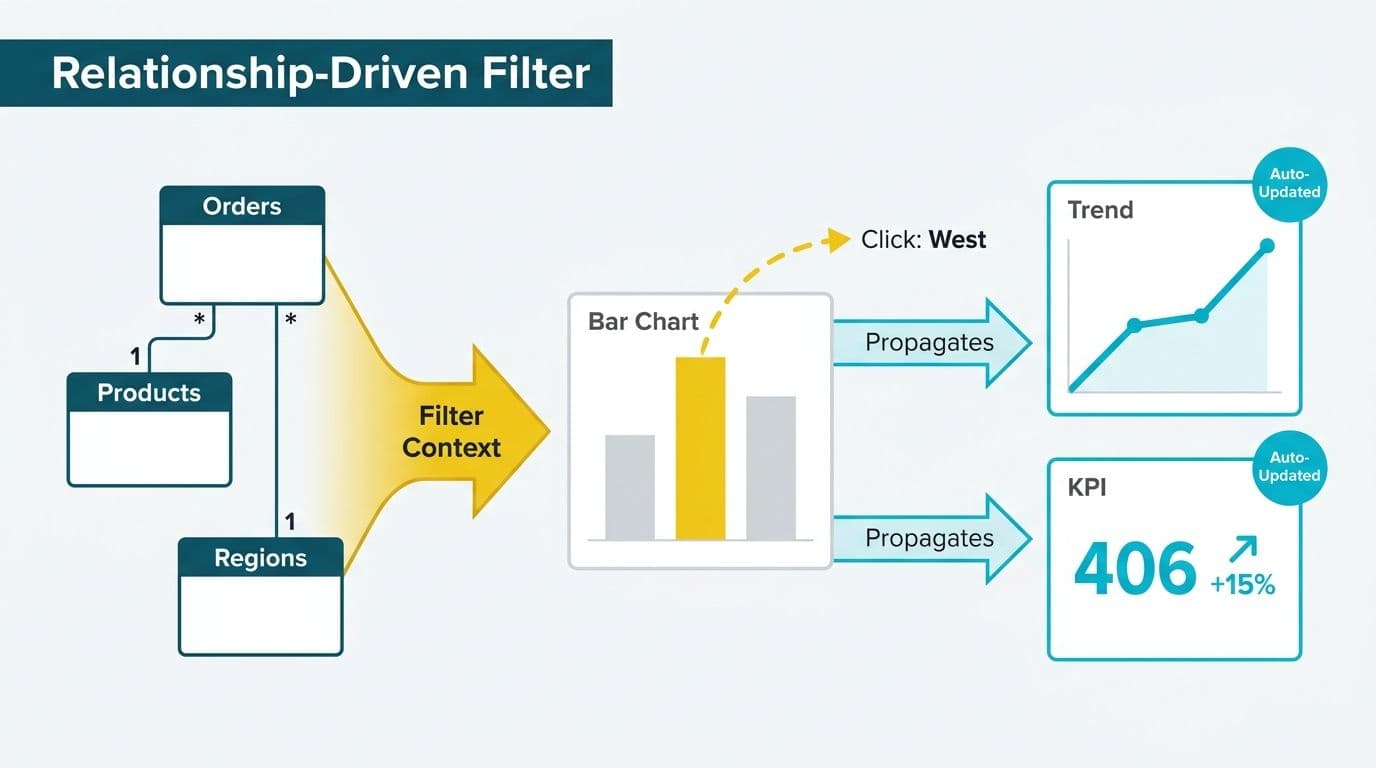
Power BI cross-filter is an in-page interaction: clicking a bar in one chart instantly filters every connected visual on the same canvas, driven by the data model's relationships. Cognos drill-through is a navigation event: clicking a value opens a second report, with that value passed as a prompt parameter to the target.
In Cognos, a finance director at a US healthcare organization drills from a summary claim volume chart into a separate report showing line-level claim detail - a separate document, separate data module, and a separate URL. In Power BI, that same interaction is achieved with a drill-through page: the summary chart lives on Page 1, and right-clicking a data point sends the user to Page 2 pre-filtered to that payer or period, all within the same .pbix file.
For teams undertaking a Tableau to Power BI migration project that also encompasses Cognos reports, establishing this distinction is the essential first step before rebuilding any visual.
How Do You Map Cognos Frame Interactions to Power BI Cross-Filter?
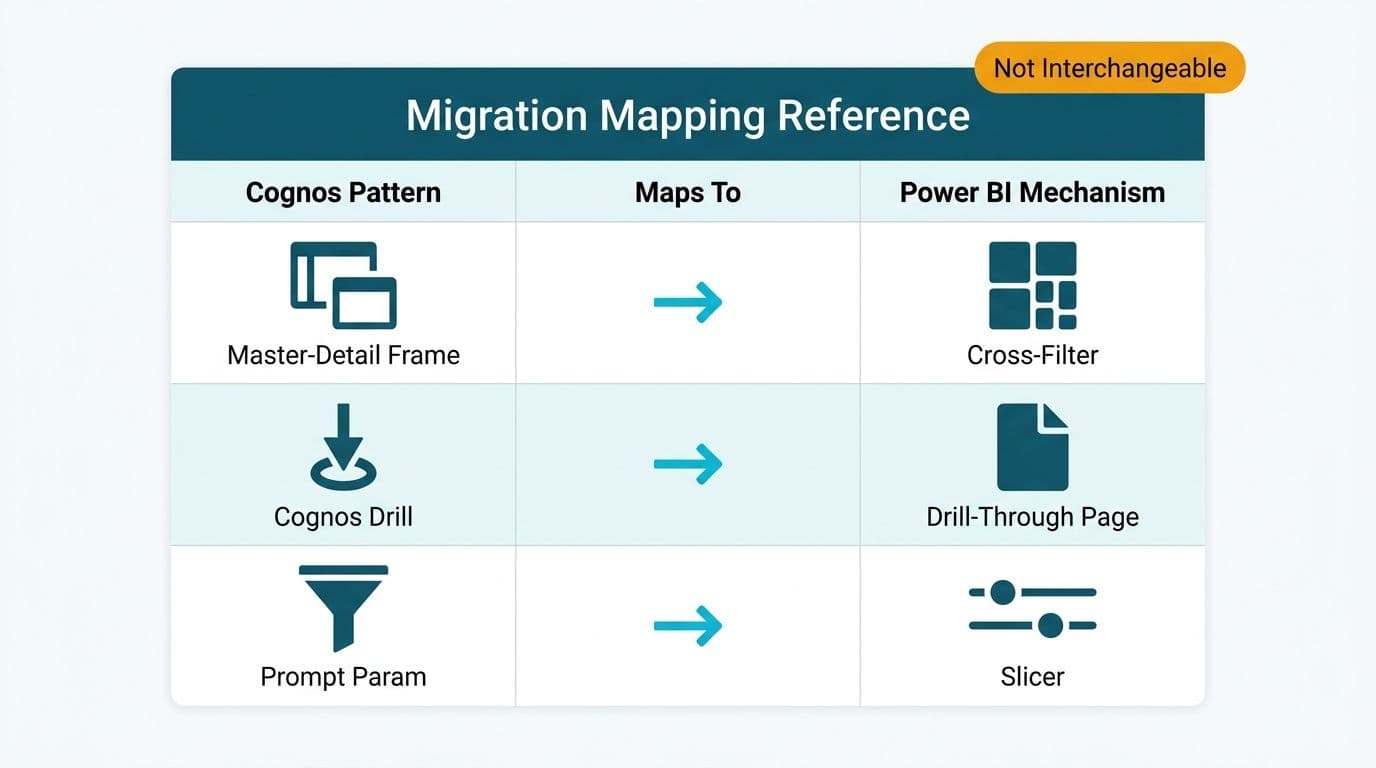
Cognos Report Studio uses frame interactions - a master frame sends a value to a detail frame using a drill-through definition or master-detail relationship. Power BI replaces this with automatic cross-filtering driven by the data model.
| Cognos Concept | Power BI Equivalent | Notes |
|---|---|---|
| Master frame | Source visual (any chart or table) | No configuration needed - relationships drive context |
| Detail frame | Target visual on the same page | Filtered automatically when source is clicked |
| Master-detail relationship | Model relationship (star schema join) | Defined in Power BI Desktop Model view |
| Frame interaction: Use as filter | Edit interactions (cross-filter) | Format > Edit interactions |
| Prompt page | Slicer panel | Slicers replace standalone prompt pages |
| Drill-through definition | Drill-through page + drill-through well field | Configured per target page |
The key transition for Cognos authors: in Power BI, the data model relationship does the heavy lifting. If a report author selects 'Ontario' in a province slicer, every visual with a relationship to the region table filters automatically. No per-visual-pair interaction mapping is required, unless you want to suppress a specific visual (using Edit interactions to set it to 'No impact').
For a UK fintech firm running GDPR-regulated reporting, this model-driven approach has a governance advantage: RLS in Power BI applies uniformly across all cross-filtered visuals. In Cognos, each target report typically maintained its own data module security configuration, making audit coverage more fragmented.
How Does Cognos Prompt-Driven Drill-Through Translate to Power BI?
Cognos prompt-driven drill-through passes parameter values from a source report to a target report at the moment of navigation. Power BI's equivalent is the drill-through page: a report page that receives filter context when a user right-clicks a data point and selects 'Drill through.'
To configure a drill-through page in Power BI Desktop (per Microsoft's Power BI documentation, 2025):
1. Create a new report page and name it (e.g., 'Claim Detail').
2. Drag the filter field (e.g., PayerName) into the 'Drill through' well in that page's Filters pane.
3. Power BI automatically adds a back-navigation button to the target page.
4. Any visual on any other page can now right-click a PayerName value and navigate here, pre-filtered to that payer.
The field placed in the 'Drill through' well is the direct equivalent of the prompt parameter in a Cognos drill-through definition. The source visual is equivalent to the Cognos drill-through-enabled cell or hyperlink column.
A Canadian healthcare organization operating under PIPEDA - managing patient financial data across provincial billing systems - would use drill-through pages to let finance directors navigate from a provincial cost summary to a line-level procedure code breakdown, with RLS enforcing provincial data boundaries within a single secured Power BI report.
Power BI Cross-Filter vs Cognos Drill-Through: Side-by-Side Reference Card
This table is the field reference for report authors rebuilding Cognos interactivity in Power BI.
| Interaction Pattern | Cognos Mechanism | Power BI Mechanism | Configuration Location |
|---|---|---|---|
| In-page context filter | Frame interaction (master-detail) | Cross-filter | Model view - relationships |
| Suppress a visual from filtering | 'No filter' frame interaction | Edit interactions - 'No impact' | Format > Edit interactions |
| Navigate to detail report | Drill-through definition | Drill-through page | Target page > Drill-through well |
| Pass a single parameter | Prompt parameter | Drill-through field | Target page > Drill-through well |
| Pass multiple parameters | Multiple prompt parameters | Multiple fields in Drill-through well | Stack fields on target page |
| Standalone prompt control | Prompt page control | Slicer | Insert > Slicer |
| Cascading prompts | Cascading prompt controls | Dependent slicers | Model relationship drives cascade |
| Highlight without filtering | Not available in Cognos | Cross-highlight | Format > Edit interactions |
| Conditional visibility | Conditional blocks | Bookmarks + button actions | View > Bookmarks |
| Hierarchy drill-down | Drill-down in list or crosstab | Hierarchy drill mode | Visual header drill controls |
Cross-highlight is unique to Power BI and has no Cognos equivalent. When active, non-selected values remain visible in other visuals but are dimmed rather than removed - most useful in executive finance dashboards where directors want to see what they are filtering out, not just what they have selected.
When Should You Use Slicers vs Cross-Filter vs Drill-Through Pages?
Each mechanism fits a different reporting pattern. The decision hinges on whether the interaction is in-page or navigational, and whether the user sets a filter explicitly or by clicking a data point.
Use cross-filter when the user wants immediate, same-page visual reactions from a click - replacing a Cognos master-detail frame interaction on a single report page.
Use a slicer when the user needs a persistent, visible filter control equivalent to a Cognos standalone prompt - one dropdown or date range that drives multiple visuals before the data is viewed.
Use a drill-through page when navigating from summary to detail warrants its own page, replacing a Cognos drill-through definition that opened a separate target report.
A US hospital system rebuilding its revenue cycle dashboard under HIPAA requirements - where access to claim-level patient financial data must be deliberately gated - would use drill-through pages rather than cross-filter. Surfacing PHI-adjacent detail through cross-filter, which activates on any visual click, is harder to audit than an explicit drill-through action. This tiered architecture mirrors the approach in hospital readmission rate analytics dashboards in Power BI, where summary and detail tiers serve distinct clinical and financial audiences.
For teams also rebuilding Tableau workbooks alongside Cognos reports, the skills map for learning Power BI from a Tableau background covers the visual and model layer transitions that apply equally to Cognos migrations.
How Do DAX Filter Expressions Replace Cognos Report Expressions?
Cognos Report Studio uses expression-based filters - conditions such as `[Claim Status] = 'Approved'` applied at the data module or report level. Power BI replaces these with DAX measures, calculated columns, or Power Query steps, depending on where in the stack the filter logically belongs.
The same translation principle an ssrs expressions to dax translation guide applies to SSRS projects holds for Cognos: data module filters translate to Power Query steps or model-level RLS rules; report-level filters translate to visual-level filters or DAX `CALCULATE` expressions with explicit filter arguments.
| Cognos Expression | Power BI Equivalent | Where Applied |
|---|---|---|
| Data module row filter `[Status] = 'Active'` | Power Query filter step | Model (ETL layer) |
| Report filter `[Fiscal Year] = ?p_Year?` | Drill-through field or slicer | Report layer |
| Calculated field `([Revenue] - [Cost]) / [Revenue]` | DAX measure | Model layer |
| Prompt macro `#prompt('pRegion')#` | Slicer selection or drill-through parameter | Report layer |
| Crosstab detail filter | Visual-level filter in Filters pane | Report layer |
For a UK fintech firm subject to GDPR audit requirements, migrating Cognos data module row filters into Power BI RLS rules is the preferred architecture: RLS enforces access at the model level, giving compliance reviewers a single definition to audit rather than per-report filter conditions scattered across dozens of Cognos specification files. The AI compliance requirements for financial services regulatory map covers the broader governance framework in which these BI architecture decisions sit.
If your team is rebuilding Cognos report interactivity in Power BI, mapping each interaction pattern before the first visual is rebuilt saves significant re-authoring effort. Our Tableau to Power BI migration services include Cognos interaction audits, mechanism mapping, and phased delivery for healthcare and finance teams across the US, Canada, and UK.
---
About Lets Viz: Lets Viz is an analytics consultancy serving US healthcare systems, UK fintech firms, Canadian manufacturers, and global SaaS companies since 2020. With a 5.0 Clutch rating across BI migration, managed reporting, and data platform projects, our team specializes in translating legacy BI environments - including Cognos, SSRS, and Tableau - into modern Power BI and Microsoft Fabric deployments.